If you are anything like me, there are more than you would care to admit in public.
One running llama.cpp.
One running watch -n1 nvidia-smi because that is what passes for observability around here.
One tailing a log file that scrolls too fast to read.
One with a vLLM server you started forty minutes ago and are now slightly afraid to Ctrl-C, because you no longer remember whether anything depends on it.
And one, inevitably, sitting at a shell prompt in a directory you cannot identify.
Every serious local inference setup eventually grows a dashboard. It is made of tmux, three shell aliases, and hope, and it exists because the alternative is holding the entire state of your machine in your head. Nobody plans this. It accretes.
So I was pleased to find that somebody finally built the real one. It is called Spark Studio, it is MIT licensed, and it was written by a developer going by TheAwakenOne, who announced it on the NVIDIA developer forums in July 2026. It targets the DGX Spark specifically.
It also has a feature I have not stopped thinking about since, which we will get to.
The repo describes itself with admirable directness:
Your DGX Spark, one friendly dashboard. Launch local models with one click, watch memory and logs live, chat, benchmark — and when a recipe breaks or runs slow, let Claude Code or Codex diagnose, patch, and relaunch it for you.
Concretely, it is a browser dashboard on port 7860, backed by a Python 3.11 FastAPI service with SQLite for the recipe library and run history. It fronts the inference engines you already use rather than replacing them: vLLM, SGLang, llama.cpp, WebLLM in the browser, and sparkrun for multi-node recipes. It gives you live unified memory and log streaming, a chat interface, benchmarks that report tokens per second and time-to-first-token, and an OpenAI-compatible gateway so Continue or Cursor can point at it.
Installation is the customary single line:
bash <(curl -fsSL https://raw.githubusercontent.com/TheAwaken1/Spark-Studio/main/install.sh)There are --basic, --recommended, and --full profiles depending on how much of the ecosystem you want dragged in. Running instances cost about 60–90MB of RAM, which on a machine with 128GB is not a number worth arguing about.
Here is the thing I want to praise before anything else: Spark Studio does not try to be an inference engine. It is a launcher and an observability layer. That restraint is the entire reason it is useful. The graveyard of developer tooling is full of dashboards that decided halfway through that they should also own the runtime, and every one of them ended up worse at both jobs.
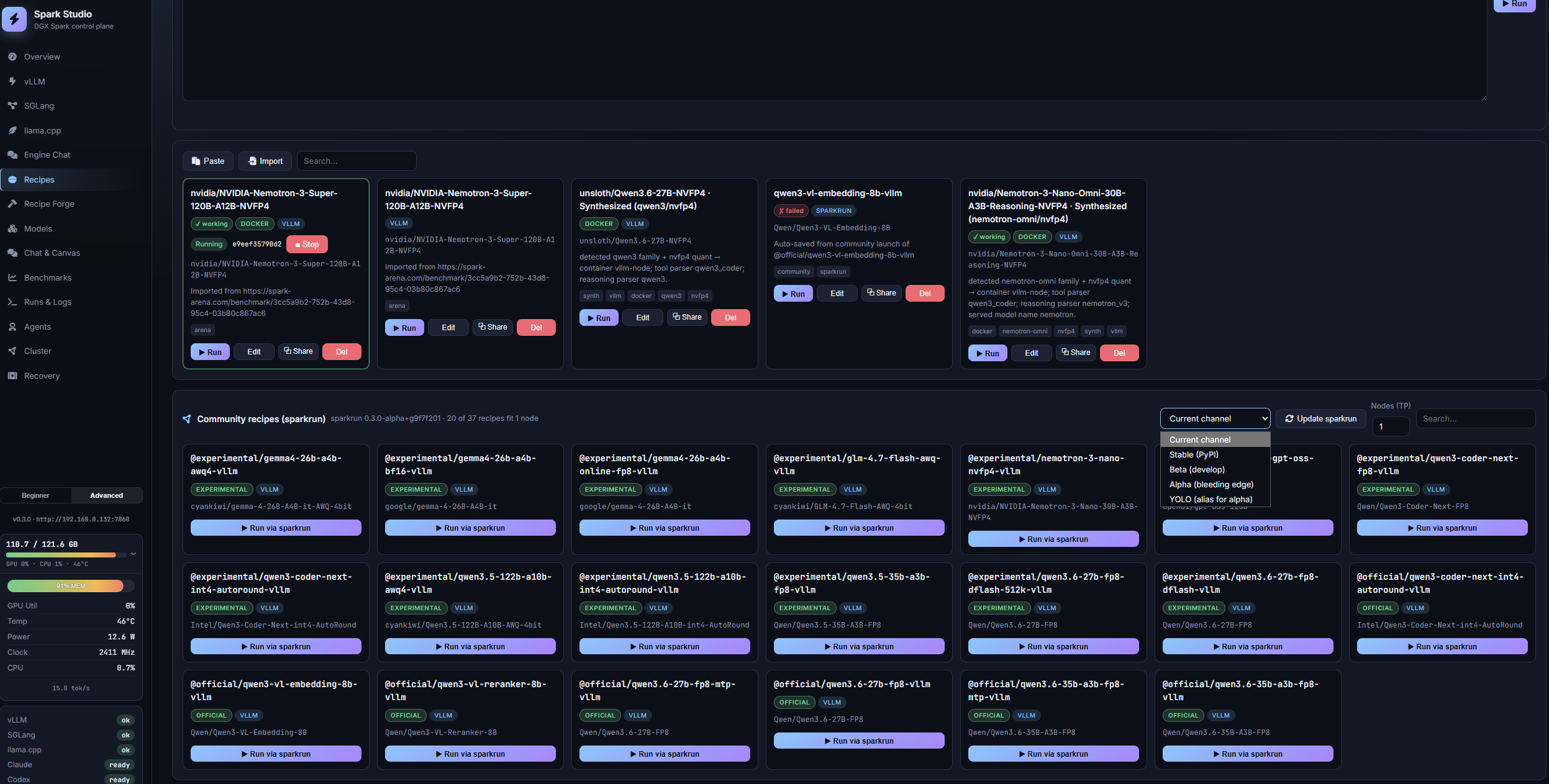
When a recipe fails, Spark Studio goes further than most similar solutions. Aside from showing the stack trace it offers to fix it.
There are two loops. Auto-Fix & Retry takes a broken run, hands the failure to Claude Code or Codex — using your own subscription and keys, not the project’s — and lets the agent diagnose, patch, and relaunch. It gets up to three attempts. Optimise Speed points the same machinery at a run that works but is slow.
That second loop has a detail in it that I think is genuinely important, and I want to make sure it does not slide past you:
The optimisation is only kept if it measures at least a 10% improvement.
Read that again. The agent is not trusted to be right. It is required to prove it. Propose a change, relaunch, re-benchmark, compare against the previous number, and if the win is not big enough to clear the bar, throw the change away. It acts like a regression test wearing a trench coat, many steps further than an omnipresent chatbot.
I find this hilarious, in the way that only our industry manages. We have spent something like forty years trying to convince working programmers to measure their optimisations instead of guessing at them. Knuth published the “premature optimisation” line in 1974. It is possibly the most-quoted and least-obeyed sentence in software. And now here we are in 2026, and the LLM has a stricter merge criterion than most of the humans I have worked with.
If you want the takeaway in one line:
An agent you don’t measure is just a confident intern with commit access.
The measurement is the product. The agent is the cheap part.
Now the counterweight, because I am not going to sell you a miracle. Three attempts and a stopwatch is not correctness. A benchmark gate proves a config got faster; it says nothing about whether it got right. An agent can absolutely find you a 15% speedup by quietly shortening a context window, loosening a sampler, or swapping a quantisation that degrades output quality in ways tokens-per-second cannot see. Speed is trivially measurable and quality is not, which means the loop optimises hard for the thing it can count.
So: use it, and then read the diff. The patch is right there. Spark Studio ships full Monaco editors for the YAML, JSON, and shell it touches, which suggests the author expects you to look — as you should.
The feature that got the warmest reception in the forum thread was the memory guard. As one reply put it:
pre-launch memory guard is such a good call for unified memory
Before launching a model, Spark Studio stops whatever is currently resident, waits for the memory to actually come back, and only then starts your run. It also wires up earlyoom, tunes OOM priorities, detects crash loops, and cleans up orphaned containers.
This sounds like hand-holding. It is not. It is load-bearing, and the reason is architectural.
On a box with a discrete GPU, running out of VRAM kills your job. Annoying, survivable, you try again with a smaller batch. On a unified memory system like the DGX Spark, the model weights and everything else are drawing from the same 128GB pool, so exhausting it does not politely kill one process — it can take the whole machine down with it. Guardrails in that environment are not paternalism. They are the difference between a failed run and a power cycle.
This is also the practical face of a constraint I have written about from several angles. What Fits in 128GB works through which model sizes are comfortable, which are tight, and which are fantasy. Does Size Matter? makes the harder argument that fitting in memory and running acceptably are entirely different questions, and that the industry keeps optimising for the first one. And Prefill vs. Decode explains the 273 GB/s bandwidth wall that puts dense 70B decode down around 3 tokens per second — the number that surprises people who bought the machine expecting an H100 in a lunch-box.
Spark Studio does not repeal any of that physics. What it does is make the physics visible while you are working, instead of six hours later when you are trying to reconstruct why the box fell over. In practice, the 128GB pool means one large model at a time, and the app now manages that reality on your behalf rather than letting you discover it.
One caveat worth knowing before you install: flushing the page cache requires passwordless sudo for /proc/sys/vm/drop_caches. That is a real permission to hand a dashboard. It is defensible for a single-user workstation tool. Know that you are doing it.
To the author’s considerable credit, the README says this out loud rather than burying it:
the dashboard has no authentication and binds to all interfaces so your LAN can use it. Anyone on your network can control it, and — over the HTTPS/Caddy setup — open Hermes Chat, which is a real interactive shell running as your user. Only run it on a network where you trust every device.
Most projects would have written “designed for local network use” and moved on. This one tells you the truth, so I am not going to scold the author. For a v0.x single-user tool, no auth is a reasonable trade. Similar to how Jupyter Lab started, before an ecosystem spun up around it
I am going to scold you, though, because you were about to skip this section.
No authentication, plus binding to every interface, plus an interactive shell running as your user, adds up to a simple statement: anyone who can reach port 7860 can run commands as you. Not “can view your metrics.” Can run commands.
“Trusted LAN” is a category that stopped meaning much around the time we all put internet-connected lightbulbs on it. Your guest network, your room-mate, that IoT device with firmware from 2019 — they are all on the trusted LAN.
So: bind it to loopback and reach it over an SSH tunnel, or put it behind a reverse proxy that actually authenticates. Do not port-forward it. Do not put it on a coffee shop wifi. Not “not yet” — not ever.
The fastest way to learn whether a DGX Spark suits your workload is to watch your own model run on one, and Spark Studio is the shortest path to that, because it turns throughput from a spec-sheet abstraction into a number on a chart while you work.
You do not have to own the hardware to find that out. Rent one by the hour — Enverge Spark Cloud starts at $0.75/hour for a single 128GB instance, $1.65/hour for a 2× NVLinked pair — run the install one-liner, load your model, and read the tokens-per-second number with your own eyes. An hour of that costs less than lunch and tells you more than any benchmark table, including ours. The loopback-and-SSH-tunnel advice from the last section goes double on a rented box.
Three things, and only one of them is about this tool.
Dashboards are a maturity signal. They show up when a platform finally has enough users to have UX problems rather than existence problems. Local inference has left the compile-it-yourself-and-be-grateful era. That transition happened faster than I expected.`
The interesting new primitive is not the UI. It is the benchmark-gated agent loop: propose, measure, and let the measurement decide. That pattern generalises far past inference configs, and it is a much better answer to “how do I trust an LLM with my system” than either blind acceptance or blanket refusal. The agent is not the authority. The stopwatch is.
And a 56-star project is out-shipping the vendor tooling on operational polish, which is the oldest story in open source and keeps stubbornly being true. Someone with one machine and a specific irritation still routinely beats a roadmap.
I still have too many terminal tabs open. But there’s hope!
Thanks for reading Enverge.ai - Into the Machine which Learned! This post is public so feel free to share it.
Spark Studio is an open-source, browser-based dashboard for running local LLM inference on NVIDIA DGX Spark hardware. It launches and monitors vLLM, SGLang, llama.cpp, WebLLM, and sparkrun recipes from one interface, with live memory and log views, chat, and benchmarking. It was created by TheAwakenOne and announced on the NVIDIA developer forums in July 2026.
Yes. It is MIT licensed and available at github.com/TheAwaken1/Spark-Studio. The Auto-Fix and Optimize Speed features call Claude Code or Codex using your own subscription and keys, so those costs are yours and are separate from the project.
No, and that is the point. It is a launcher and observability layer that runs on top of the engines you already use. It does not implement inference itself, so your existing back-end choices, quantisation formats, and performance characteristics are unchanged.
No. It is built and tuned for DGX Spark and aarch64, but x86_64 Linux is supported. You can also run it on a rented DGX Spark instance — the install one-liner behaves the same on hosted hardware, which is a cheap way to evaluate the machine before committing to a $4,699 purchase.
No. The dashboard has no authentication, binds to all interfaces by default, and can open an interactive shell running as your user. Anyone who can reach port 7860 can run commands on your machine. Bind it to loopback and use an SSH tunnel, or put it behind an authenticating reverse proxy. Never expose it to the internet.
When a recipe fails, Spark Studio hands the failure to Claude Code or Codex, which diagnoses the problem, patches the configuration, and relaunches — up to three attempts. The separate Optimise Speed loop does the same for slow runs but only keeps a change if re-benchmarking shows at least a 10% improvement. Review the resulting diffs: a speed gate proves a run got faster, not that it stayed correct.