From Wikipedia, the free encyclopedia
Wikipedia information page

Vector 2022 (desktop) dark mode

Minerva (mobile) dark mode

A light-on-dark color scheme, colloquially known as dark mode or night mode, has been available on Wikipedia's desktop and mobile websites since July 2024. These are available to both logged-out and logged-in users using the Vector 2022 skin, which is applied by default. Logged-in users who have changed their skin must switch to Vector 2022 in order to use dark mode. The Wikipedia mobile apps also have similar features.
In addition, logged-in users on English Wikipedia may activate the WikimediaUI dark mode gadget, and various volunteer-written CSS files allow for further or alternative customization.
A compatibility guide for editors provides guidance on making pages and templates work well in dark mode.
A dark mode feature is available since July 2024 as part of the mw:Reading/Web/Accessibility_for_reading project for the default Vector 2022 (desktop) and Minerva (mobile) skins:
- On desktop click the Dark radio button on the right side of the screen or under the spectacles icon in the top right.
- On mobile, tap the "hamburger menu" in the top left, choose settings, and in the Color section select Dark.
For both, you can also select "Automatic" to have the mode change based on your operating system's settings.
-

Desktop dark mode setting
-

Desktop dark mode setting (on smaller screens, or when menu has been hidden)
-

Finding mobile dark mode setting (1)
-

Finding mobile dark mode setting (2)
-

Finding mobile dark mode setting (3)

.png)


The official Wikipedia mobile apps for Android and iOS have multiple themes available, including light-on-dark.
-

Wikipedia Android app white theme
-

Wikipedia Android app sepia theme
-

Wikipedia Android app dark theme
-

Wikipedia Android app black theme


There are browser extensions for popular browsers that offer a Wikipedia-specific dark mode, and browser extensions that allow you to set custom CSS for a given domain, which could be used with the CSS available above. However, all browser extensions need to be carefully screened for security issues. Some inject advertising, and customization may be more difficult than editing a single CSS file.
There are several add-on/extension offerings on Firefox which work well. The most popular is Dark Mode for Wikipedia which uses only a single css style sheet to enable dark mode on Wikipedia. Do not install any extension or add-on that you don't trust.
If you use Chrome, there is also a built-in experimental/beta setting to force dark mode, set through chrome://flags/ with the description "Force Dark Mode for Web Contents - Automatically render all web contents using a dark theme". This is provided by Chrome's development team, so security should not be a concern, but this will render all web pages in dark mode. This feature is also available in Microsoft Edge, through the edge://flags/ menu.

There are two Gadgets that can be enabled in  Preferences:
- Preferences → Gadgets →
 Dark mode toggle: Enable a toggle for using a light text on dark background color scheme

- Once checked, dark mode is available to toggle in the preferences portlet, located in the Upper Right-Hand corner of the page. The link to click is named "Dark mode", and is to the left of the "Watchlist" link.
- Preferences → Gadgets → Gadget-Blackskin.css: Use a black background with green text
Apart from gadgets, an alternative way to get a dark mode is adding custom CSS to your user style page(s). This is more complex than activating a gadget, but more flexible, allowing, for example: custom colors, custom fonts, or hiding unused UI elements. Help:User style describes the process of adding custom CSS in general. For dark mode-specific CSS, a number of options are available including:
- WikimediaUI Dark mode – the CSS powering the dark mode gadget usable as a standalone style without the gadget, stable version from April 25, 2020, by User:AHollender (WMF), User:Volker E. (WMF) and User:MusikAnimal
- Darklands dark theme – a low contrast dark mode by User:Dialectric
- DavidL's DarkTheme – a dark theme by User:DavidL
- Tollens' dark theme – an easily-customizable dark theme by User:Tollens
- wikipedia-userstyle-dark-minimum by User:Vitaly Zdanevich
-
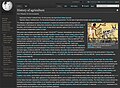
Dialectric's darklands theme
-
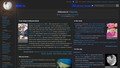
DavidL's DarkTheme
-

Tollens's dark theme
-

Dark minimal theme by Vitaly Zdanevich


| Timeless | Vector (2022) | Vector legacy (2010) | MinervaNeue | MonoBook | |
|---|---|---|---|---|---|
| WikimediaUI Dark mode |  Y Y
|
Y
|
Y
|
Y
|
Y
|
| Darklands dark theme |  N N
|
Y
|
Y
|
N
|
N
|
| DavidL's DarkTheme | Y
|
Y
|
Y
|
Y
|
Y
|
| Tollens' dark theme | N
|
Y
|
Y
|
Y
|
Y
|
| Vitaly Zdanevich's dark theme | N
|
N
|
Y
|
N
|
N
|
If you manage your own wiki and have access to its files, you can install extensions and skins that support dark mode.