EasySwitch links the computers on your desk into one workspace. Control them with one keyboard and mouse, move your clipboard and files between them, and turn another computer into a real second display.
Free forever for 2 computers · Pro $49 once · No subscription
End-to-end encrypted
No cloud
No account in the app
macOS · Windows · Linux
One cursor, one clipboard, three machines — and the third one is a
display now. No cloud, no internet needed — and never a mirror of your desktop.
Real footage
This is what it actually looks like.
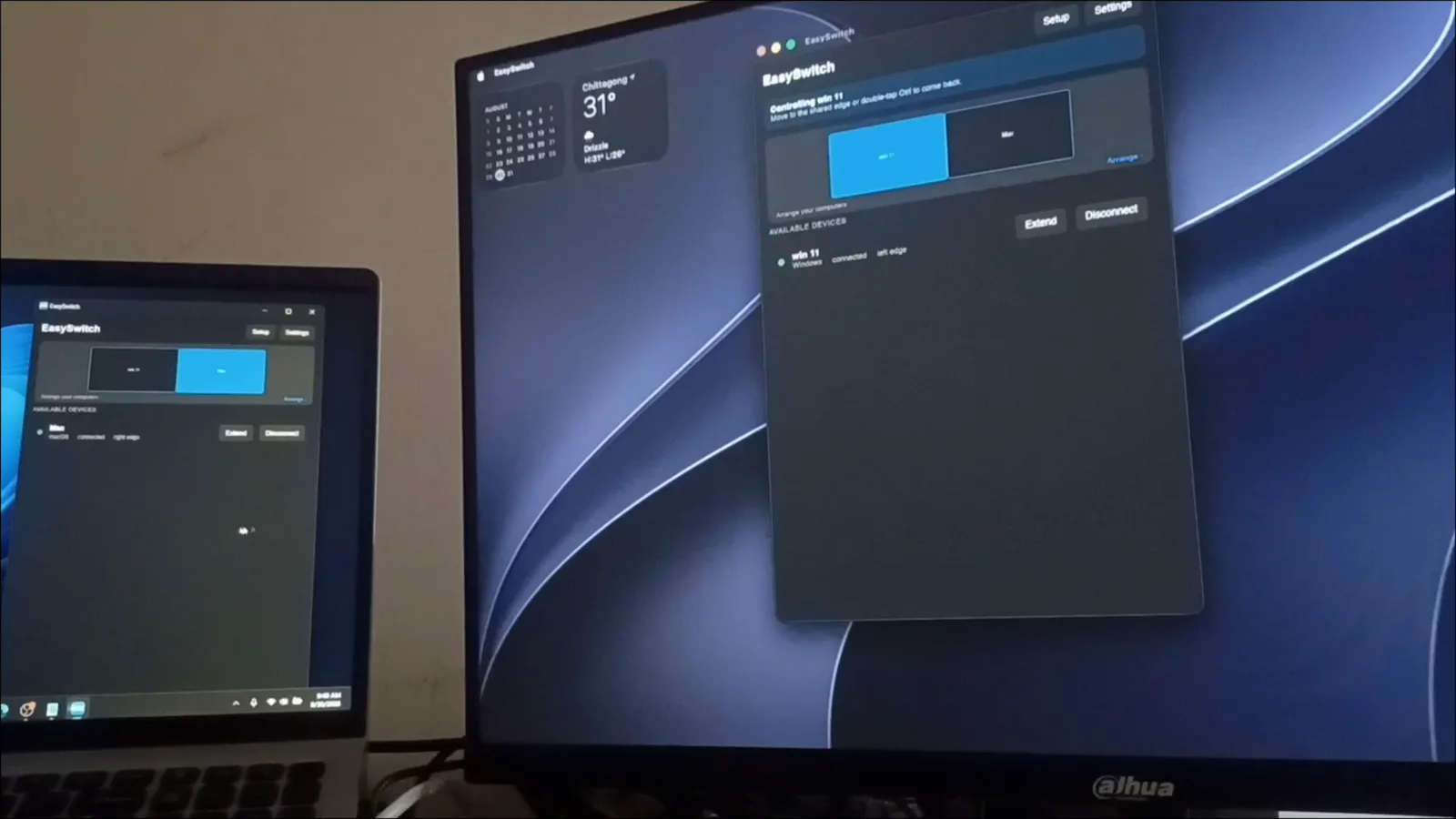
A MacBook and a Windows PC on one desk: pair once, move files both
ways, type across, then give each machine the other's screen.
Filmed, not rendered.
Filmed on a real desk — the MacBook on the left, the Windows PC on the
right. Sound on.
And the app itself.
Four screens you'll actually use, captured on Linux. The same app runs
on macOS and Windows.
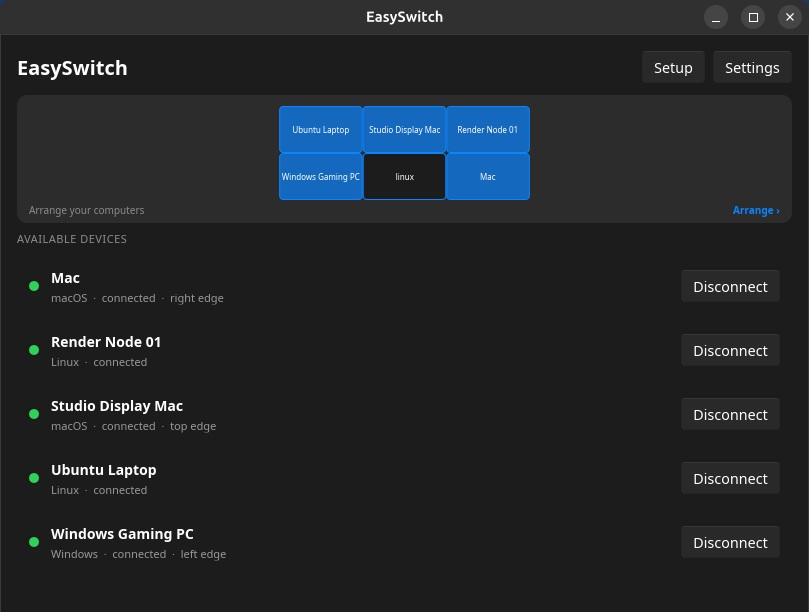
Two Macs, a Windows PC and three Linux machines — each with its OS, its status and the screen edge it sits on.
New in 0.1.0 (b118) · Extend Pro
The computer next to you is a monitor now.
Pick a linked computer, choose Extend, and your machine
gains a real second display — one your operating system treats like any
other monitor.
Drag a window onto it. Work there. Take it back whenever you want.
60 fps
at the other screen's native resolution
No screen capture
the display is created empty — your desktop is never read
Hardware encoded
on the platforms whose OS provides an encoder
LAN only
encrypted straight between your machines, no server in between
Comes back on its own
after sleep, a reboot or a network blip
Can create a display
macOS13 and later
Windows11 — one consented driver install, first use only
LinuxGNOME 44+ / KDE Plasma 6 on Wayland
Linux (X11)can receive a display, not create one
Can show one
macOSincluding Retina at native scale
Windowshardware decode, software fallback
LinuxWayland and X11
Extend is part of Pro — a one-time purchase that also covers the
keyboard, clipboard and files.
Not screen sharing
Your screen is never captured.
Every other way of putting one computer's picture on another starts by
reading the screen you already have. Extend starts by making a screen
you didn't.
The usual way
Screen sharing
Your desktop
captured
compressed
streamed
Whatever is on your screen leaves the machine.
EasySwitch
EasySwitch Extend
Your real desktop stays private
A new empty display
rendered remotely
encrypted over LAN
Your screen is never captured.
One desk
Your desk is already powerful.
It just doesn't act like one computer.
Two keyboards are one too many.
Keep the one you like. Your cursor slides off the edge of its screen onto the next machine and the keyboard goes with it — the same way it already moves between two monitors.
Any keyboard and mouse
No dongle
No switch box
Stop emailing files to yourself.
Copy here, paste there. Or drag the file across the screen edge and drop it straight into Finder or Explorer. It works between a Mac and a PC, where AirDrop won't.
Mac ↔ Windows ↔ Linux
Folders too
Text, images, files
That old laptop is a monitor now.
Point EasySwitch at it, press Extend, and the machine you're working on gains a screen. Put the things you keep glancing at over there and take the space back on your main display.
Logs
Docs
Chat
Terminal
Dashboards
Reference
Four things stop being a problem.
One mouse and keyboard
Slide the cursor off the edge of one screen and onto the next computer. The keyboard follows it.
Arrange your machines like monitors — the cursor crosses at the edge you choose
Cmd ⇄ Ctrl is translated automatically, so copy and paste feel native on both
Ctrl+Alt+1–5 jumps straight to a machine; Ctrl+Alt+L locks input where it is
Laptop, desktop, test box: crossings hand off machine to machine like one long desk, and the clipboard works between any pair of them.
Switch from the keyboard
Ctrl+Alt+2
Jump straight to a machine instead of dragging the cursor across three screens — the number is its position in your layout. Double-tap Ctrl to snap control back to the computer you're sitting at, even if the network stalls.
Lock input where it is
Ctrl+Alt+L
Pin the keyboard and mouse to the machine you're on so a stray cursor can't wander mid-sentence. Same chord to release it.
Flip a screen into a display
Ctrl+Alt+M
Turn the machine you're pointing at into an extra monitor, and turn it back into a computer when you're done. Part of Pro.
It comes back by itself
Sleep, a dropped Wi-Fi connection, a reboot — the machines find each other again and carry on, including a display you were extending onto.
Phone and browser bridge
Scan a QR code and send text or files from any phone or browser on your network. Nothing to install on the phone. Part of Pro.
How it works
Three steps. Then it disappears.
A small native app on each machine — quick to start, light on memory,
input latency in the low milliseconds on a LAN.
01
Install on each computer
They find each other on your local network automatically — no IP addresses, no config files, no relay account.
02
Pair once
Confirm the same fingerprint on both machines, then arrange them in Settings the way they sit on your desk — like a multi-monitor layout.
03
Move the cursor off the edge
That's it. When you want a display instead of a cursor, pick the machine and hit Extend.
Runs on Windows, macOS and Linux, in any combination — Mac to Windows,
two PCs, three of anything. One limitation is worth knowing up front
and it's on the download page: what runs where.
Private by design
Still never your screen
EasySwitch is not remote desktop and never mirrors a desktop. Extend doesn't capture the screen you're using — it creates a brand-new, empty display and streams only that, only while you have it switched on, encrypted, over your own network. Leave Extend off and nothing but input, clipboard and your files ever moves.
Everything is end-to-end encrypted between your machines, on every
tier — encryption is never a paid feature. Licenses verify on your machine: the app talks to our server exactly
once, when you add a key, and works forever after that with the
internet unplugged. No account in the app, no telemetry, no cloud in
the path.
The extra displayonly while you're extending — never your real screen
How it compares
Most tools solve half the desk.
Some tools move your keyboard. Others move your screen. EasySwitch
brings both together.
Competitor features as published 2026-08-04 — verify current terms on
their official sites. Deskflow is excellent open source and spacedesk is
genuinely free on Windows; if either covers your desk, use it happily.
Full matrices, every dimension, and the head-to-head pages for
moving off a tool you already use: KVM software · second-screen software.
Pricing
Pay once, or don't pay at all.
Two computers are free forever. Everything else is a single purchase
that never renews.
Free
$0
forever, for 2 computers
Two computers, forever free. No key, no account needed.
14-day money-back guarantee · secure checkout by Paddle · key delivered
instantly and activated offline after that
Need more than five computers? Business covers 25.
Students and open-source maintainers get Pro free — ask us.
Questions
The things people ask before installing.
Is EasySwitch free?
Yes — mouse, keyboard and clipboard (text, images and files up to 10 MB) across two computers are free forever, including drag-and-drop. Pro lifts the transfer limit to any size, links 5 computers and adds the web bridge and virtual displays — a one-time purchase, never a subscription.
Is this remote desktop? Can anyone see my screen?
EasySwitch is not remote desktop and never mirrors a desktop. Extend doesn't capture the screen you're using — it creates a brand-new, empty display and streams only that, only while you have it switched on, encrypted, over your own network. Leave Extend off and nothing but input, clipboard and your files ever moves.
Does it work between a Mac and a Windows PC — or two of the same?
Both. Any combination works — Mac to Windows, two Windows PCs, two Macs, Linux to anything — with automatic Cmd ⇄ Ctrl shortcut translation, so copy/paste muscle memory works on every machine. There's no cross-platform requirement.
Second monitors, big-file transfers, hardware KVMs, working offline —
the rest is in the full FAQ and the documentation.
Try it on two computers in the next five minutes.
Free forever for 2 machines — mouse, keyboard, clipboard, files and full
encryption. No account, no card, no subscription.