This blog post explains how to track Linux system calls (read, write, and open) using Rust and eBPF (extended Berkeley Packet Filter). We will walk through the entire process—from basic definitions, setting up the project, writing eBPF programs, to loading and running them in user space with Rust. The goal is to provide a clear, beginner-friendly guide with well-structured explanations and code examples.
Basic Definitions
Before diving into the code, let’s clarify some key concepts:
- Syscall (System Call): A mechanism used by programs to request services from the kernel, such as reading or writing files.
- read calls: System calls that read data from a file descriptor.
- write calls: System calls that write data to a file descriptor.
- open calls: System calls that open files or devices.
- Kprobe: A kernel feature that allows attaching custom handlers to almost any kernel function entry point.
- kretprobe: Similar to kprobe but attaches to function return points.
- User space: The memory space where user applications run.
- Kernel space: The protected memory space where the operating system kernel runs.
Installation Steps
Install Essential Build Tools, LLVM, and Clang
eBPF programs are typically compiled with LLVM and Clang. You can install these along with other essential build tools using your distribution’s package manager. For Debian/Ubuntu systems, run:1
2sudo apt update
sudo apt install -y build-essential llvm clangInstall Rust using
rustup
The recommended way to install Rust is withrustup, the official toolchain manager. It manages your Rust versions and associated tools.1
curl --proto '=https' --tlsv1.2 -sSf https://sh.rustup.rs | sh
Follow the on-screen prompts, choosing the default installation is usually sufficient. After installation, make sure to configure your current shell by running
source "$HOME/.cargo/env".Install the Rust Nightly Toolchain
The Aya library, which we’ll be using, requires features that are only available in the nightly version of Rust. Install it alongside your stable toolchain:1
rustup install nightly
Install
cargo-generate
We will usecargo-generateto create a new project from the official Aya template. This makes bootstrapping a new eBPF project much easier.1
cargo install cargo-generate
With the environment now set up, you are ready to create your first eBPF project.
Setting Up the Codebase
To start, follow the Rust eBPF development setup instructions provided by the Aya project:
Generate a new eBPF project template:
1
cargo generate -a aya-rs/aya-template -n syscall_ebpf
During the prompts:
- Select kprobe as the type of eBPF program.
- Attach the kprobe to
__x64_sys_opensyscall (you will add others later).
Project Structure Overview
The generated project will have three main parts:
syscall_ebpf: Contains the main Rust code for user-space logging and interaction.syscall_ebpf_common: Defines shared data structures between user and kernel space.syscall_ebpf-ebpf: Contains the eBPF program logic running inside the kernel.
Writing the eBPF Program Logic
1. Creating a Map to Store Syscall Counts
We use a HashMap in eBPF to keep track of how many times each syscall is called.
1 |
|
The #[map] macro declares this map for eBPF to manage in kernel space.
2. Defining Counter Functions for Each Syscall
We attach kprobes to syscall entry points and increment counters accordingly. We assign arbitrary IDs for our syscalls:
0forread1forwrite2foropen
1 |
|
3. Incrementing Syscall Counts
This helper function updates the count for the given syscall ID.
1 |
|
- We fetch a mutable pointer to the current count.
- If it exists, we increment it; otherwise, we insert an initial count of
1. - We log the syscall ID and the calling process’s PID for real-time visibility.
4. Panic Handler in eBPF
eBPF programs cannot unwind on panic, so we must provide a minimal handler that loops forever.
1 | #[cfg(not(test))] |
5. Complete eBPF Program Code
Here is the full source code for syscall_ebpf-ebpf/src/main.rs:
1 | #![no_std] |
Building the eBPF Program
Create a .cargo/config.toml file inside the syscall_ebpf-ebpf directory with the following content to target the eBPF architecture:
1 | [build] |
Then build the program using the nightly toolchain:
1 | cargo +nightly build --release -Z build-std=core |
Writing the User-Space Rust Program
This program loads the eBPF bytecode, attaches the kprobes to the kernel functions, and periodically reads the syscall counts from the eBPF map to display them.
Here is the complete code for syscall_ebpf/src/main.rs:
1 |
|
2. Running the Program
Run the user-space program with elevated privileges and specify your network interface (replace enp2s0 with your interface):
1 | RUST_LOG=info sudo -E cargo run -- -i enp2s0 |
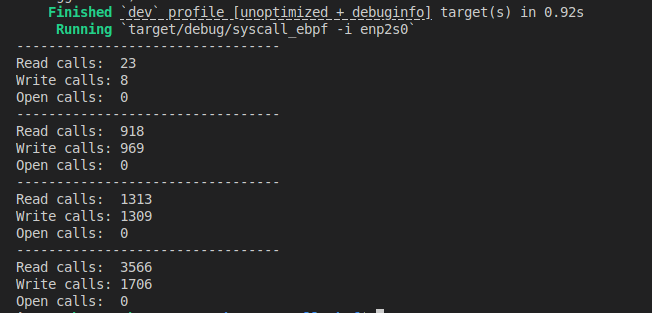
You should see output similar to:
Next Steps
This example demonstrates a simple but powerful way to track syscalls with Rust and eBPF. You can extend this foundation to:
- Parse and analyze network packets.
- Use tracepoints for more detailed kernel events.
- Build custom logging and monitoring tools for security or performance analysis.
Stay tuned for more advanced eBPF tutorials!