Knowledge Library MCP—Azure AI Agent Service and MCP Powers Precision Querying
Azure AI Services Multi-Agent Multimodal - Speech, Vision, Text RAG Implementation leveraging Anthropic’s Model Context Protocol
Knowledge Library MCP (KL MCP) is a multi-modal application leveraging Azure AI Agent Service to locate documents—text and images—and deliver conversational insights via bots. It enhances search with live data integration and Responsible AI principles, designed for scalable, professional-grade querying.
About the Project
KL MCP—Azure AI Foundry and GPT-4o Turn Data into Financial Clarity
Imagine thousands of documents—Machine Learning notes, TSLA 10-Ks, workflows, and charts—transformed from chaos into actionable insights. KL MCP, built with Azure AI Agent Service, Microsoft Document AI, and an upgraded FinancialAnalysisApp, delivers a fast, focused system for retrieving files and answering queries. This is how I turned a developer’s challenge into a hackathon standout.
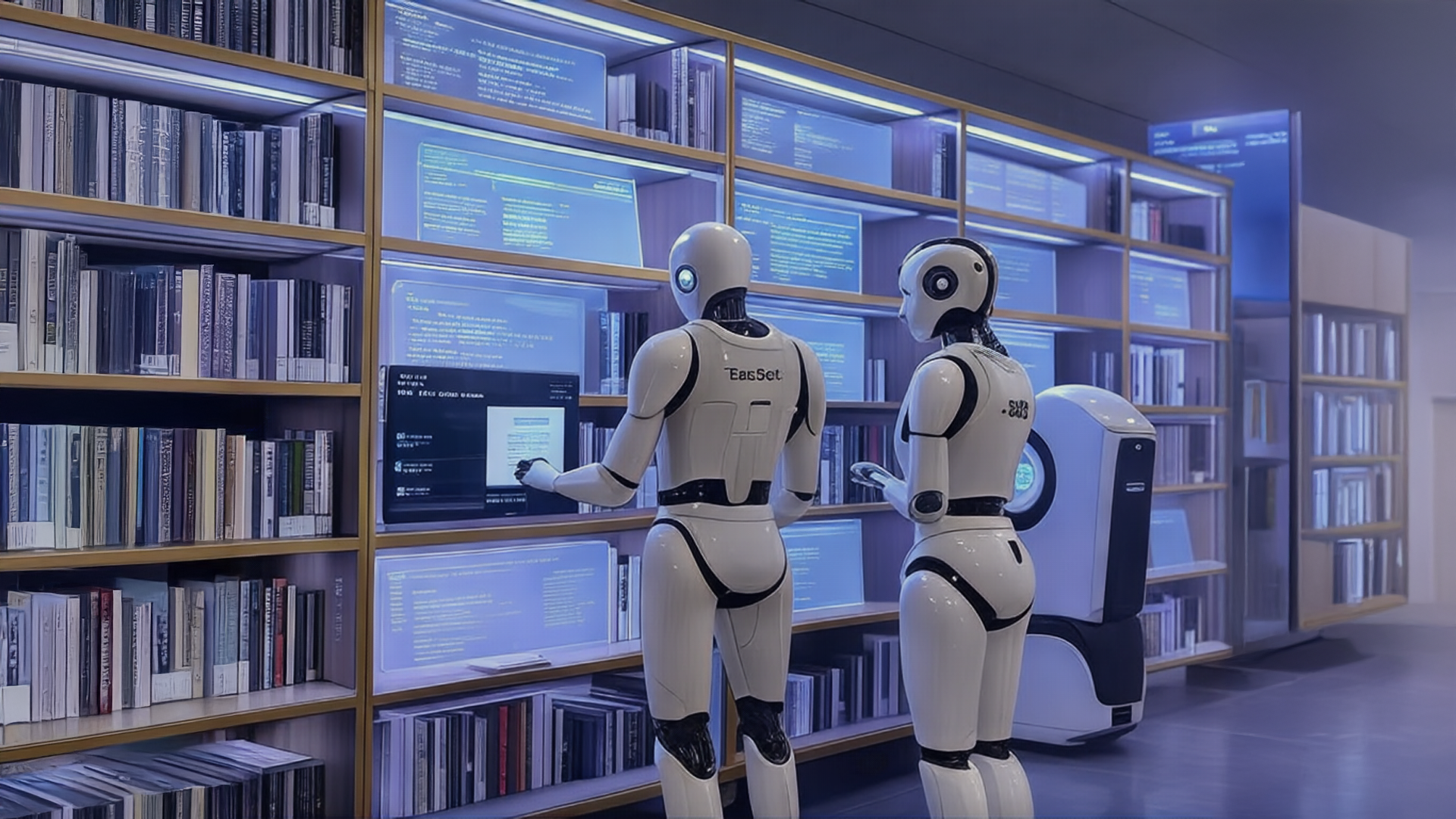
The library-like backbone of KL MCP, fueled by Azure AI Agent Service, Microsoft Document AI, Microsoft Graph, and my custom MCP bots.
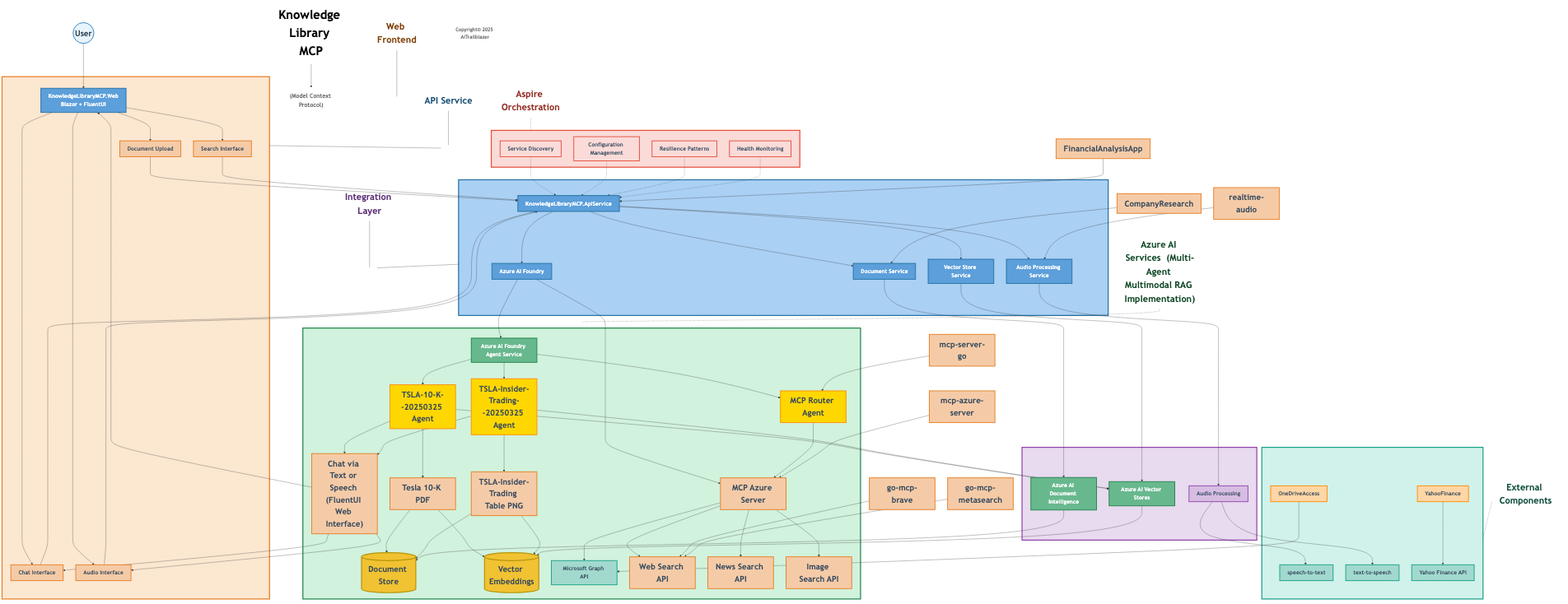
Detailed architecture of KL MCP, showcasing its multi-agent, multimodal design.
Inspiration
As a developer, I faced endless hours sifting through PDFs, Excel sheets, and charts for a single useful detail. Anthropic’s Model Context Protocol inspired me—context could unlock disorganized data’s potential. I began by segmenting documents into Cosmos DB NoSQL, but as the volume grew, search accuracy faltered. That struggle drove me to create KL MCP—a structured, library-like solution powered by Azure AI Agent Service and Microsoft Document AI, converting a daily frustration into a competitive edge.
What It Does
KL MCP retrieves documents—text or images—like Machine Learning pipelines, SEC filings, or workflow diagrams, and supports conversational queries. Ask a TSLA 10-K chart, “What’s the revenue outlook?”—it delivers. It processes PDFs, Word documents, Excel sheets, PowerPoint slides, raw text, HTML, and images, using Microsoft Document AI’s OCR and layout analysis for precision. With Azure AI Agent Service and custom bots, it surpasses Azure AI Search by integrating live data and code-generated insights, offering a dynamic, responsive chat experience. Data captured, answers delivered.
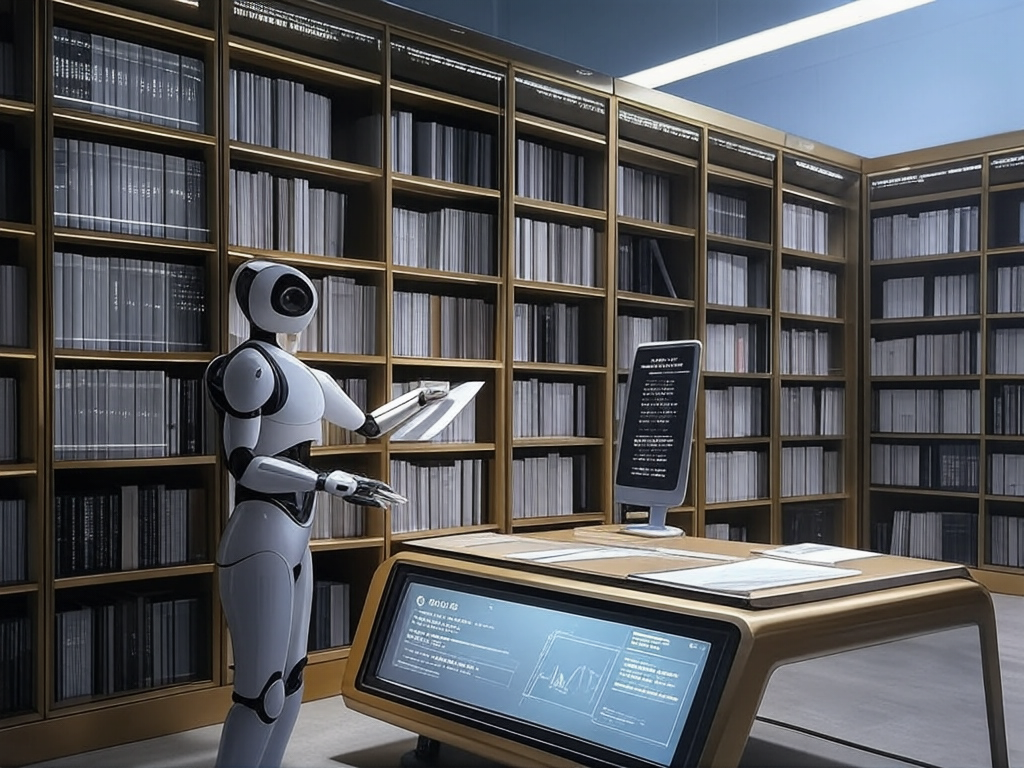
KL MCP snags OneDrive docs and powers chat queries across text and images like a pro.
How I Built It
I developed KL MCP single-handedly, utilizing Azure AI Agent Service, Microsoft Document AI, and GitHub Copilot’s assistance to refine my code and logic. Here’s the breakdown:
- Foundation: Azure AI Agent Service anchors KL MCP—a managed platform deploying intelligent agents with models like GPT-4o. It excels at processing text data—raw files, structured spreadsheets—from storage or indices with speed, as noted in its documentation. Its limitation? No image support—charts like the MSCI market cap breakdown were invisible to it.
- Vision Integration: GPT-4o, hosted on Azure OpenAI Service, fills that gap. This multimodal model analyzes images, extracts text, and interprets graphical data accurately. Its ability to decode financial visuals, as highlighted in recent analyses, made it essential for KL MCP’s chart-handling needs.
- Bot System: I created specialized bots—DocBot for Machine Learning and workflows, SECBot for filings—each linked to domain-specific agents, such as TSLA or ML documents. Files upload to vector stores, with Cosmos DB NoSQL managing metadata—file type, date—for semantic searches. Microsoft Document AI processes text and images, enabling seamless chat integration.
- Live Data: API calls pull current stock prices, keeping responses fresh beyond static retrieval limits. Python scripts generate visuals—like profit trend graphs—enhancing chat outputs with calculated insights.
- Agent Tuning: I configured a GPT-4o agent to locate files, execute code, and chat, incorporating Responsible AI principles—fairness, transparency—for scalability. A lightweight app, built with the Azure AI Agents SDK, manages uploads, threading, and querying.
Laying the Foundation with Azure AI Agent Service
Azure AI Agent Service became KL MCP’s heavy hitter—a managed platform spinning up agents with GPT-4o muscle. It’s a beast at chewing through text—raw files, spreadsheets, you name it—pulling insights from storage or search indices in a flash. The docs tout its text-handling prowess, and it’s a champ for data-driven smarts.
But it’s blind to visuals out of the box. A chart like the MSCI market cap breakdown was invisible to it—unacceptable for KL MCP. I needed a system that could see and think across all data types.
Bringing in Vision with GPT-4o
Enter GPT-4o, OpenAI’s multimodal marvel on Azure OpenAI Service. It doesn’t just read—it sees. It scans images, extracts text, and decodes charts like a pro. A write-up showed it nailing financial trends from visuals, and I knew it’d supercharge Azure AI Agent Service. GPT-4o could crack my MSCI chart, turning pixels into text that the agents could jam with, bridging visuals and text into a killer workflow.
Tapping OneDrive with Microsoft Graph API
To level up, I wired in Microsoft Graph API with a confidential client flow using client_secret. It grabs docs straight from OneDrive, persisting tokens across restarts with a tokens.json file. If the access token expires, it refreshes it automatically using the refresh_token, keeping the system humming without constant logins. Copilot helped me nail the OAuth dance—authentication at /auth/start, token exchange at /auth/callback, and a list_onedrive_root tool to fetch and chat about OneDrive goodies.
Building the Bot Crew
I crafted a bot squad—DocBot for ML and workflows, SECBot for filings—each tied to domain-specific agents (TSLA, ML docs). Copilot guided me to vectorize uploads into stores, while Cosmos DB NoSQL tracked metadata like file type and date. Microsoft Document AI processed text and images, and Graph API pulled OneDrive data, making chats feel alive, not like a dusty catalog.
Adding Live Data and Visual Flair
Copilot helped me whip up API calls—like live stock prices—keeping data fresh, not stale. Python scripts crunched numbers and spun up visuals—like profit trend graphs—adding flair to chat responses.
Tuning the GPT-4o Agent
With Copilot’s nudge, I tuned a GPT-4o agent to “find files, run code, and chat,” blending multi-modal insights with Responsible AI principles like fairness and transparency. It integrates OneDrive queries seamlessly, keeping the system sharp.
Solving the MSCI Chart
A highlight was analyzing the MSCI market cap chart from a TSLA filing—“SELECTED COUNTRIES MSCI MARKET CAP AS A PERCENT OF WORLD MSCI (percent, daily, based on US$),” tracking US, Europe, and Japan from 2016 to 2025. GPT-4o extracted the US red line, stable above 60% by 2025; Europe’s blue line, falling from 50% to over 35%; and Japan’s green line, declining from 70% to around 45%. It noted specifics—like the US at 61.9 on March 14, 2024—and converted the chart into text, stored for Azure AI Agent Service to answer queries like “What’s Japan’s MSCI share in 2020?” with precision.
Challenges I Faced
Scaling proved difficult—Cosmos DB NoSQL struggled with precision as document counts reached thousands. Structuring a library-like system within Azure required extensive iteration, and aligning metadata with vector stores demanded meticulous effort. Integrating live data, code outputs, and Responsible AI standards—ensuring fairness and transparency—tested my resolve, but persistent debugging kept the project on track.
Accomplishments I’m Proud Of
I’m proud to have crafted a multi-modal app that retrieves a TSLA 10-K chart and delivers trend insights instantly. It outperforms Azure AI Search with a bot-driven system, live data, and Responsible AI integration. Solving a developer’s persistent challenge with a polished, effective tool stands as a significant accomplishment. Complexity met, clarity gained.
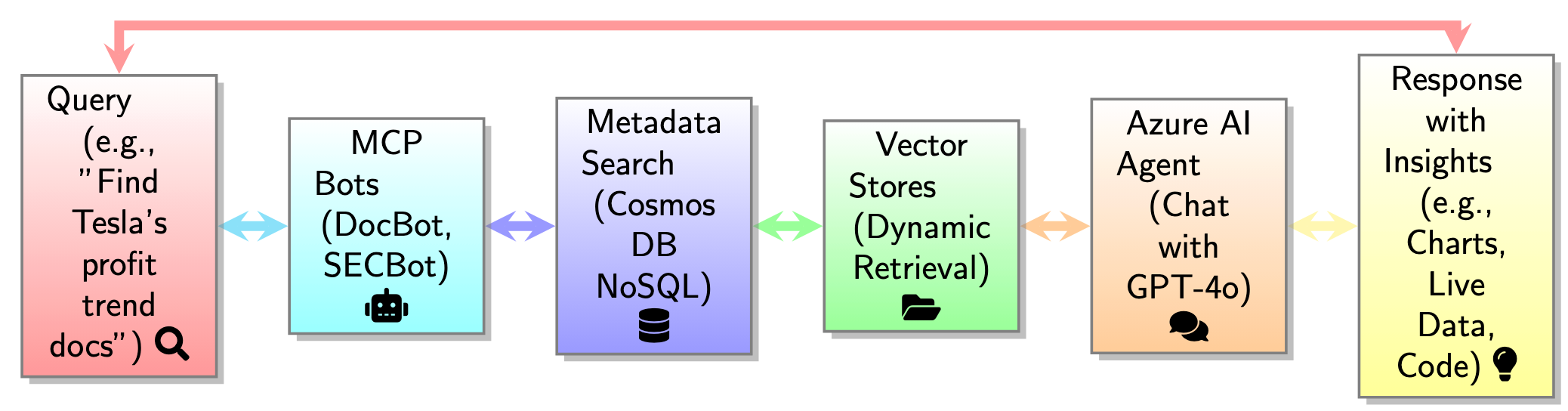
KL MCP chatting about a TSLA 10-K chart, mixing OneDrive data, text, and images like a rockstar.
Lessons Learned
Azure AI Agent Service and Microsoft Document AI excel in multi-modal applications—combining text and image processing with advanced language capabilities is transformative. Hierarchical bot systems outmatch flat indexes at scale, and Responsible AI is integral to robust design. GitHub Copilot accelerated my development, while building a library structure honed my metadata and integration skills.
What’s Next for Knowledge Library MCP
KL MCP’s next steps include adding voice and audio for query input, video support for workflow visuals, enhanced bot logic, AI-driven metadata tagging, and Azure Machine Learning for predictive insights—all grounded in Responsible AI.
New Features and Updates in FinancialAnalysisApp
FinancialAnalysisApp, KL MCP’s backbone, received critical upgrades to handle the MSCI chart and more. It now accepts command-line inputs to manage vector stores or target specific files, uses environment settings—like connection strings—for security, and identifies supported formats by file name. It fully controls vector stores in Azure—listing, managing, or clearing them—and offers a conversational loop, answering MSCI trend queries—like the US holding above 60% while Japan drops from 70% to 45%—with live, precise responses. These enhancements elevate KL MCP’s financial analysis capabilities significantly.
Projects in Knowledge Library MCP
The Knowledge Library MCP repository includes the following projects:
1. KnowledgeLibraryMCP
A cloud-ready, distributed application built on .NET 9 Aspire and FluentUI, serving as a comprehensive document management and AI-powered search system. It processes, extracts, and analyzes information from various document types, including financial reports, PDFs, and images, with a modern UI and cloud-native architecture.
Architecture of KnowledgeLibraryMCP, showcasing its distributed design and integration with Azure AI services.
2. CompanyResearch
Tools and scripts for conducting company research, including document classification and structured data extraction.
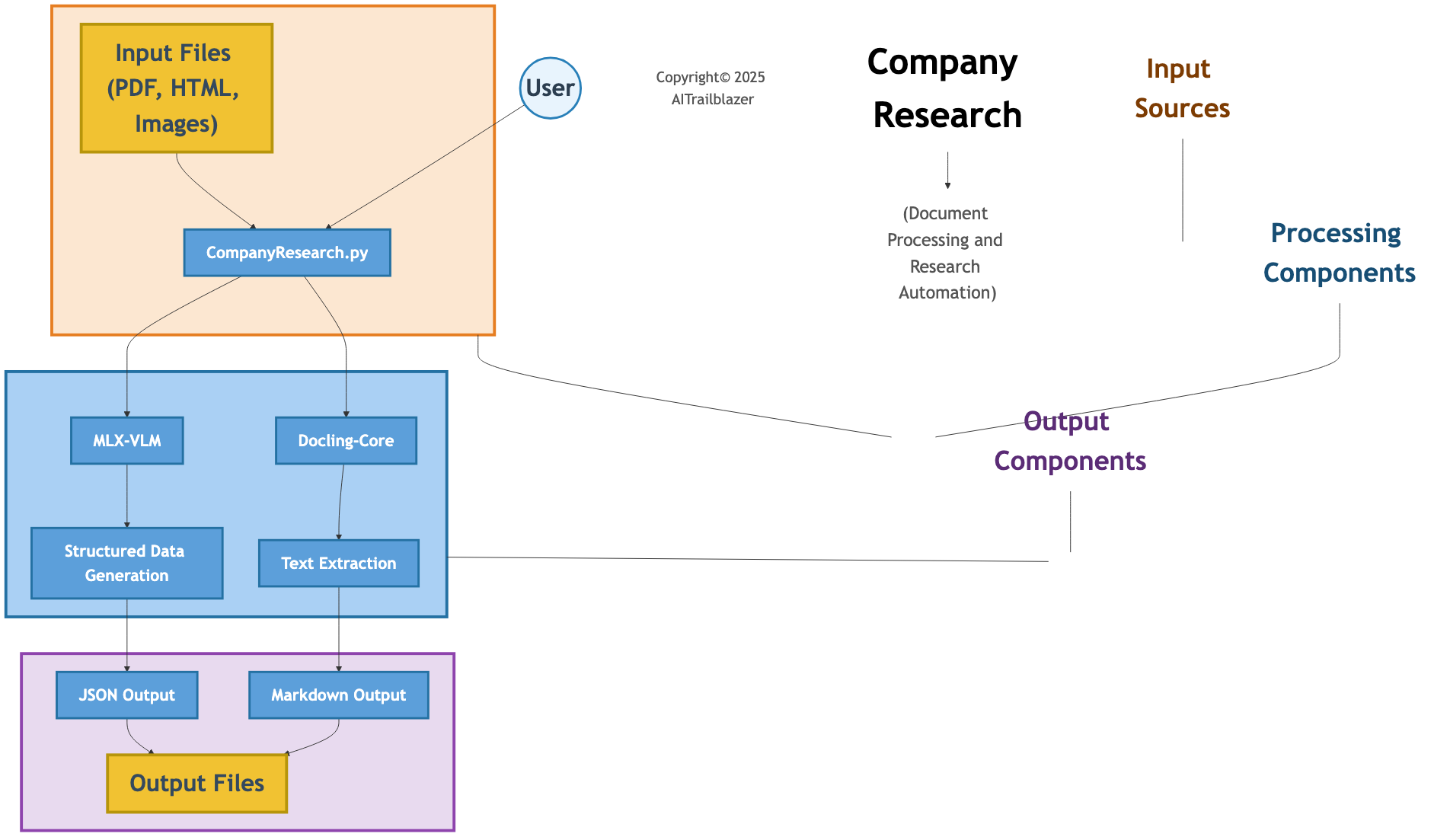
Architecture of CompanyResearch, highlighting its document processing and data extraction workflow.
3. FinancialAnalysisApp
A .NET-based application for financial analysis, supporting document processing and conversational insights.
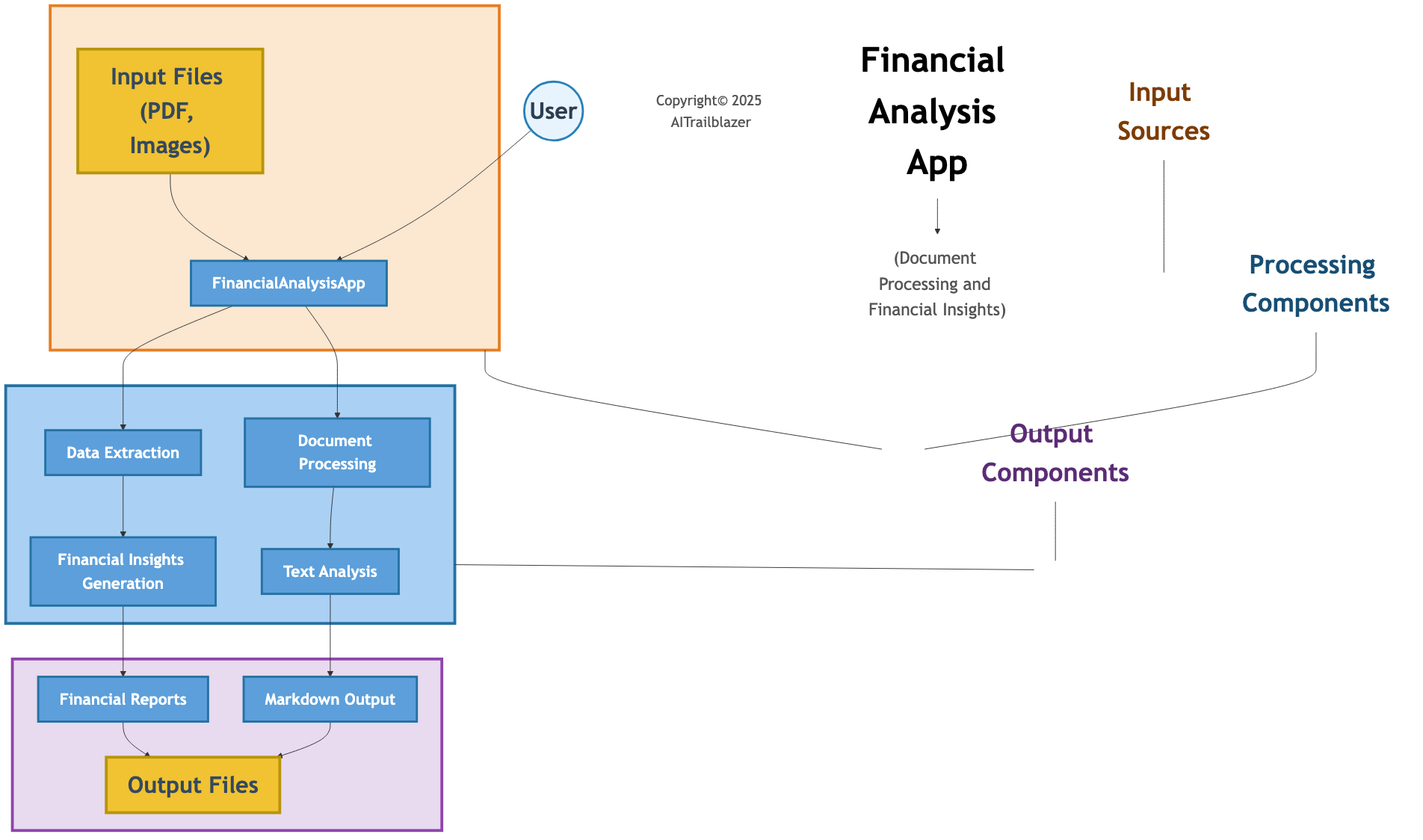
Architecture of FinancialAnalysisApp, showcasing its financial data handling and chat capabilities.
4. go-mcp-brave
A Go-based MCP server integrating with the Brave Search API for real-time web, news, image, and video search results.
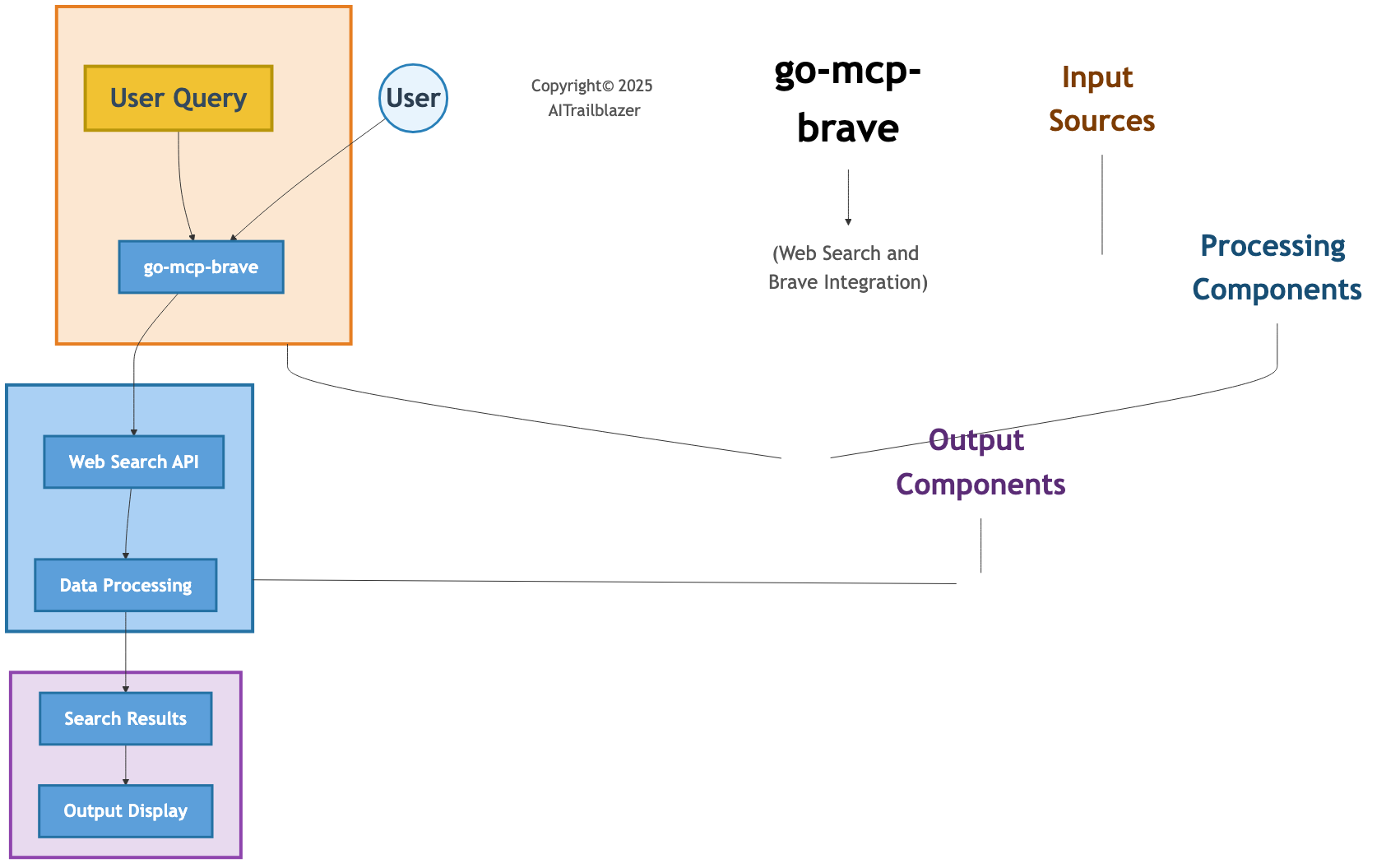
Architecture of go-mcp-brave, detailing its integration with Brave Search API.
5. go-mcp-metasearch
A Go-based application providing metasearch functionality by aggregating results from multiple search engines and APIs.
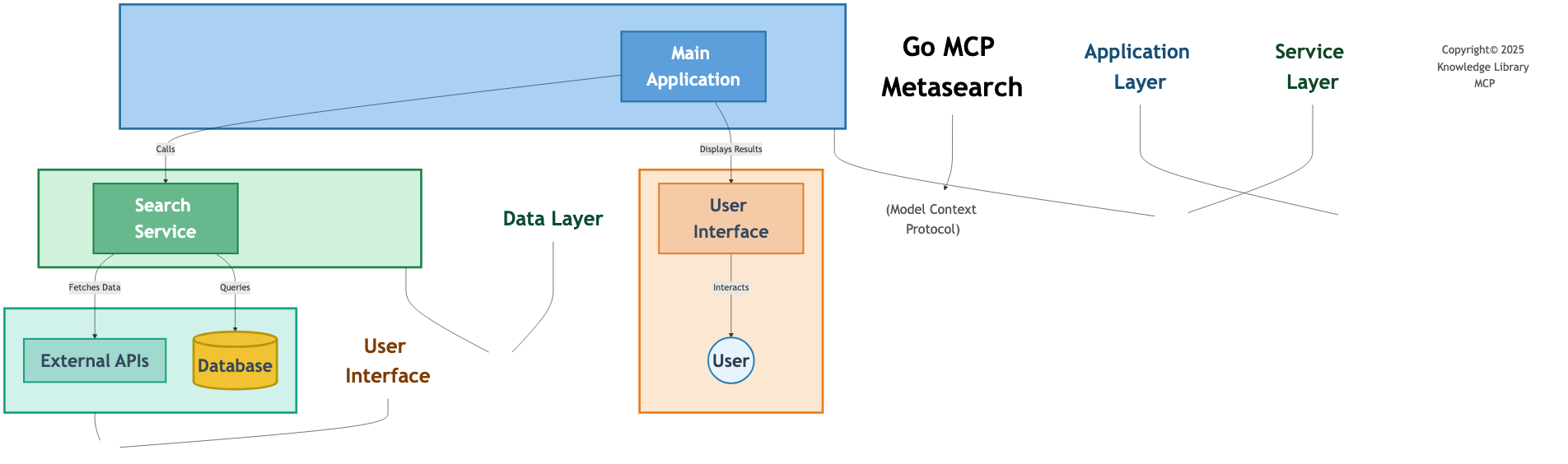
Architecture of go-mcp-metasearch, illustrating its multi-engine aggregation process.
6. mcp-azure-server
A Python-based server integrating with Azure AI services for document processing, vector store management, and AI-powered interactions.
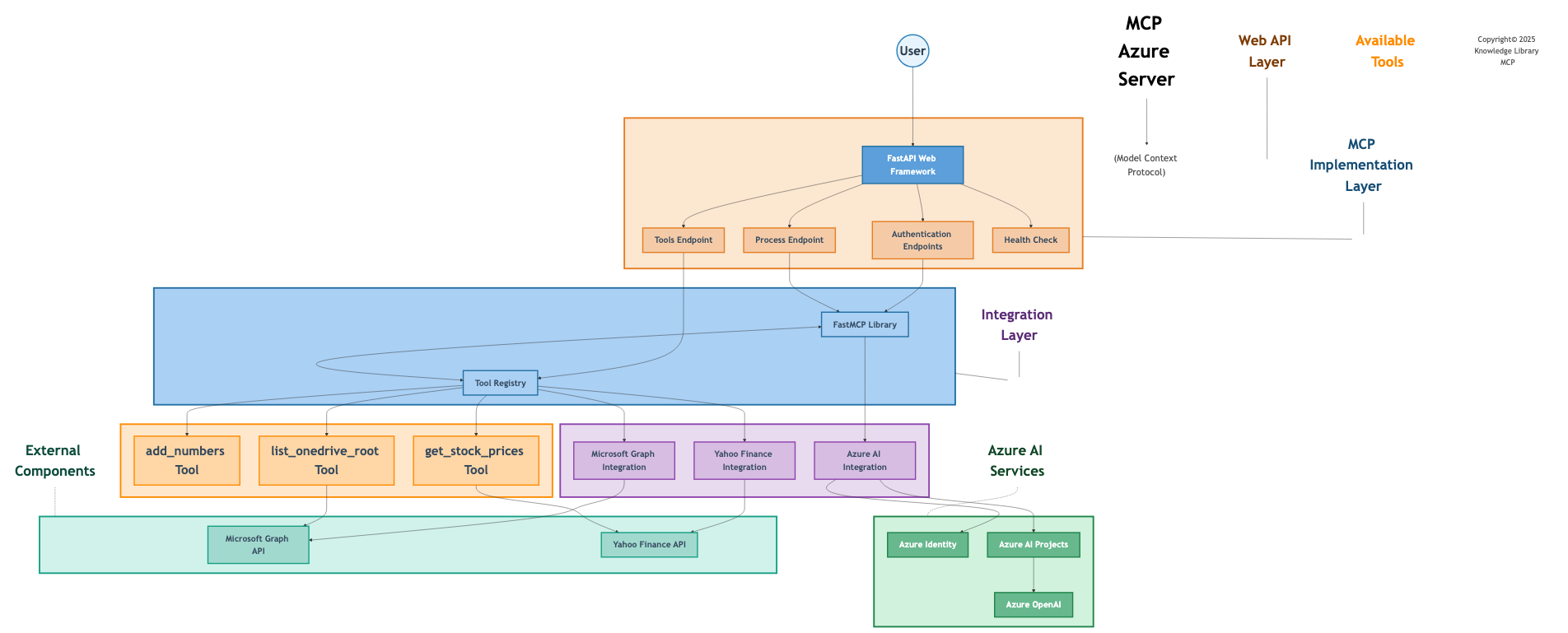
Architecture of mcp-azure-server, showing its Azure AI integration and processing pipeline.
7. mcp-server-go
A Go-based MCP server implementing the Model Context Protocol for tool execution and data retrieval.
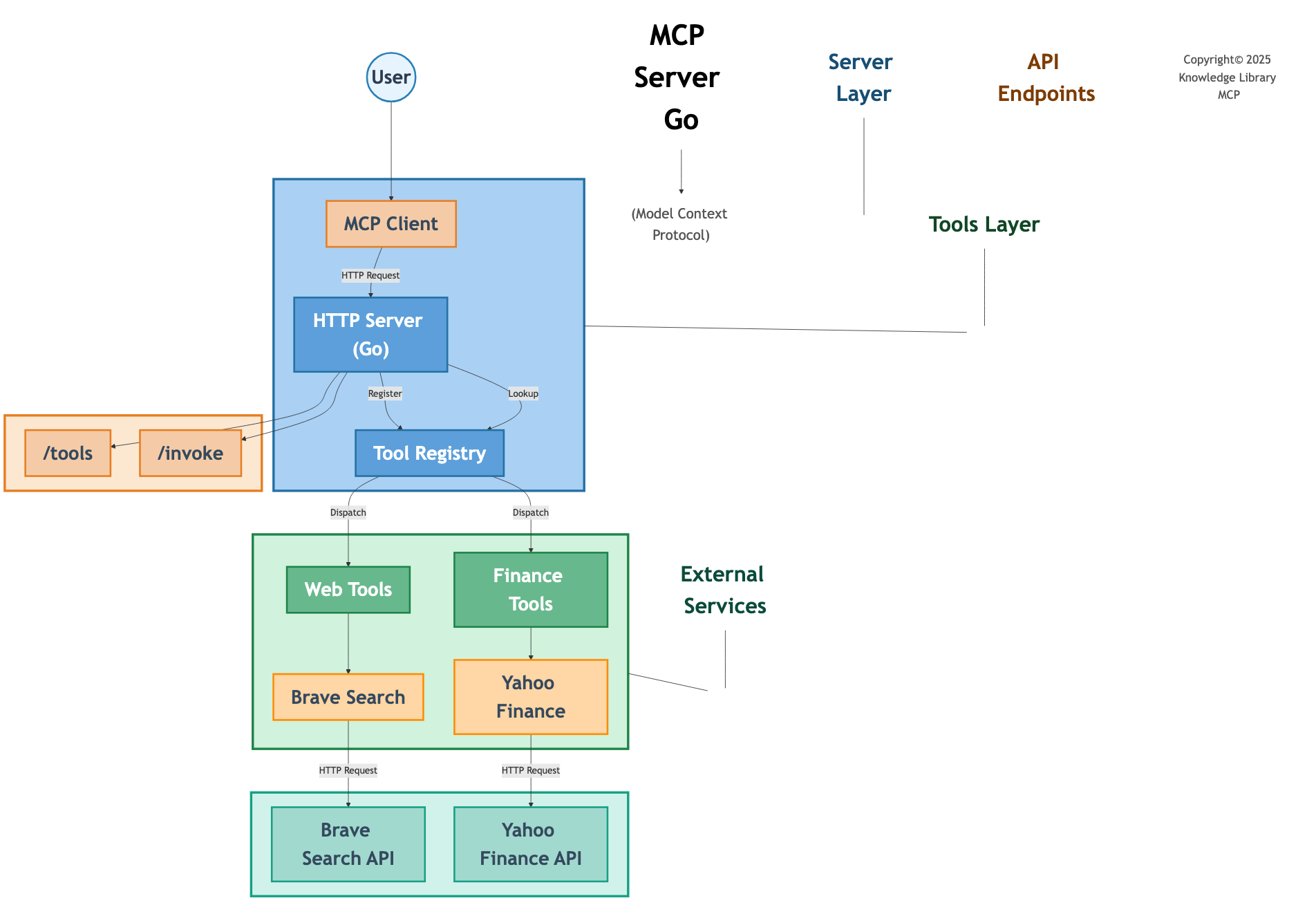
Architecture of mcp-server-go, outlining its MCP implementation and tool execution.
8. realtime-audio
A Python project for real-time audio processing, supporting audio-to-text and text-to-audio interactions.
Technologies Used
The Knowledge Library MCP project leverages a diverse set of technologies to deliver robust, scalable, and user-friendly solutions. Below is a list of the key technologies used across various components of the project, including the core KnowledgeLibraryMCP application:
Programming Languages
- C#: Powers the core of
KnowledgeLibraryMCP,FinancialAnalysisApp, and other .NET-based components for building web services, APIs, and backend logic, ensuring high performance and type safety. - Python: Utilized in
CompanyResearch,mcp-azure-server, andrealtime-audiofor data processing, server-side logic, and real-time audio interactions, leveraging its extensive AI and scripting capabilities. - Go: Drives
go-mcp-brave,go-mcp-metasearch, andmcp-server-gofor high-performance microservices, offering concurrency and efficiency for search and protocol implementations.
Frameworks and Libraries
- .NET 9.0: The foundation for
KnowledgeLibraryMCPandFinancialAnalysisApp, enabling cloud-native web and API services with Aspire orchestration for service discovery, configuration, and monitoring. - Aspire: Used in
KnowledgeLibraryMCPfor cloud-ready architecture, providing distributed application orchestration, health checks, and seamless Azure integration. - Blazor: Powers the interactive web UI in
KnowledgeLibraryMCP.Web, delivering a server-side rendered frontend with real-time updates and a modern user experience. - Fluent UI: Provides modern, responsive UI components for
KnowledgeLibraryMCP.Web, ensuring a consistent and accessible interface across devices. - Playwright: Enables webpage automation and screenshot capture in
CompanyResearch, supporting document processing workflows. - Docling-Core: Facilitates document processing and structuring in
CompanyResearchfor extracting structured data from diverse formats. - MLX-VLM: Generates DocTags and extracts structured data in
CompanyResearch, enhancing document analysis capabilities. - Markdig: Processes Markdown content across components, including rendering documentation and UI elements in
KnowledgeLibraryMCP. - PyDub: Handles audio playback and manipulation in
realtime-audio, enabling audio response generation. - SpeechRecognition Library: Captures and converts audio input to text in
realtime-audio, supporting voice-based queries.
Cloud and AI Services
- Azure AI Services: Powers document intelligence, vector store management, and AI-driven search across the project, including
KnowledgeLibraryMCP’s multimodal capabilities. - Azure AI Document Intelligence: Extracts text, tables, and structured data from PDFs, images, and Office documents in
KnowledgeLibraryMCP, enabling precise content analysis. - Azure OpenAI Service: Integrates GPT-4o Realtime Preview in
KnowledgeLibraryMCPfor multimodal AI, processing text and images with advanced natural language understanding. - Azure AI Foundry: Provides managed AI services in
KnowledgeLibraryMCP, combining GPT-4o with scalable infrastructure for dynamic agent-based interactions. - Azure AI Vector Stores: Manages document embeddings in
KnowledgeLibraryMCPand other components for efficient semantic search across large datasets. - Brave Search API: Fetches real-time web, news, image, and video search results in
go-mcp-braveandtext-search-audio.py, enhancing external data integration.
Tools and Utilities
- Mermaid.js: Generates architecture diagrams for documentation, used across projects including
KnowledgeLibraryMCPto visualize system design. - Node.js and npm: Required to run the Mermaid CLI for diagram generation, supporting project documentation workflows.
- BeautifulSoup: Parses HTML and extracts text in
CompanyResearch, aiding in web-based document processing. - Pillow: Processes images in
CompanyResearch, supporting image-based data extraction alongsideAzure Document Intelligence. - Bash: Automates tasks via scripts like
update_architecture_diagram.sh, streamlining development and deployment processes. - Microsoft.JSInterop: Facilitates JavaScript interop in Blazor components like
Home.razorwithinKnowledgeLibraryMCP.Web, enabling dynamic client-side functionality.
Additional Technologies Used
- Microsoft Graph API: Integrates with
KnowledgeLibraryMCPandmcp-azure-serverto access and manage OneDrive documents, enhancing document retrieval capabilities. - Azure Machine Learning: Provides predictive insights and advanced analytics, planned for future enhancements in
KnowledgeLibraryMCP. - GitHub Copilot: Accelerates development and improves code quality across the project, including logic refinement in
KnowledgeLibraryMCP. - OAuth 2.0: Secures authentication and token management in API integrations, such as Microsoft Graph access in
KnowledgeLibraryMCP.
These technologies collectively enable KnowledgeLibraryMCP and its related projects to deliver a comprehensive, multimodal, and cloud-native solution for document management, search, and AI-driven interactions.