
The RamaLama project makes it easy to run AI locally by combining AI models and container technology. The RamaLama project has prepared all software necessary to run an AI model in container images specific to the local GPU accelerators. Check out How RamaLama makes working with AI models boring for an overview of the project.
The RamaLama tool figures out what accelerator is available on the user’s system and pulls the matching image. It then pulls the specified AI model to the local system and finally creates a container from the image with the AI model mounted inside of it. You can use the run command to activate a chatbot against the model, or serve the model via an OpenAI-compatible REST API.
Integrating user-specific data into AI models with RAG
Because everything is running in containers, RamaLama can generate code to put the REST API into production, either to run on edge devices using Quadlets or into a Kubernetes cluster.
This works great, but often the AI model was not trained on the user’s data and needs more data. In the AI world, adding user data to an AI model requires retrieval-augmented generation (RAG). This technique enhances large language models (LLMs) by enabling them to access and incorporate external knowledge sources before generating responses, leading to more accurate and relevant outputs. User data is often stored as PDF or DOCX files or as Markdown.
How do users translate these documents into something that the AI models can understand?
IBM developed a helpful open source tool called Docling, which can parse most document formats into simpler JSON structured language. This JSON can then be compiled into RAG vector database format for AI models to consume. See Figure 1.
This sounds great, but it can be very complex to set up.
Introducing RamaLama RAG
RamaLama has added variants of the GPU-accelerated container images with a -rag postfix. These images layer on top of the existing images and add Docling and all of its requirements as well as code to create a RAG vector database. See Figure 2.
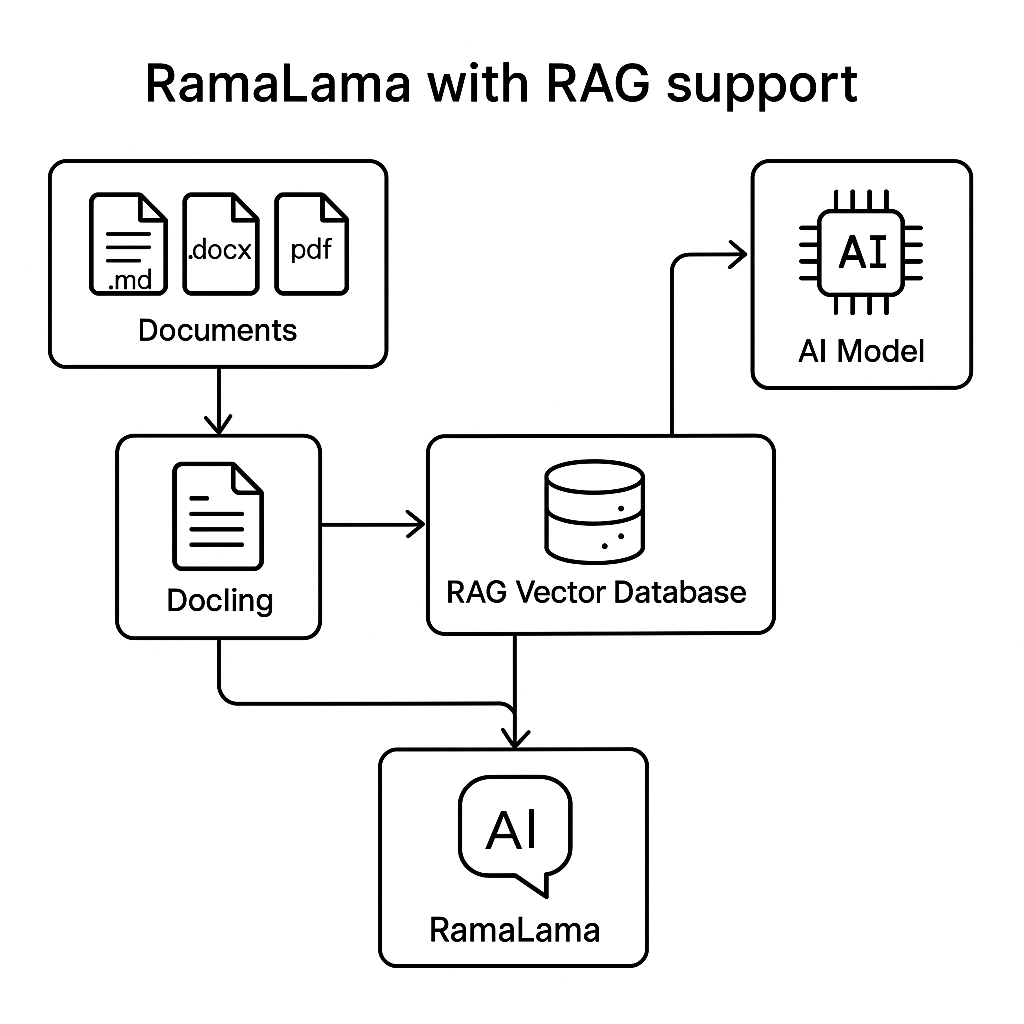
RamaLama is currently compatible with the Qdrant vector database. (The RamaLama project welcomes PRs to add compatibility for other databases.)
Simply execute:
$ ramalama rag file.md document.docx https://example.com/mydoc.pdf quay.io/myrepository/ragdataThis command generates a container, mounting the specified files into it and executing the doc2rag Python script. This script uses Docling and Qdrant to produce a vector.db based on the input files.
Once the container completes, RamaLama creates the specified OCI image (Artifact in the future) containing vectordb. This image can now be pushed to any OCI-compliant registry (quay.io, docker.io, Artifactory …) for others to consume.
To serve up the model, execute the following command:
$ ramalama run --rag quay.io/myrepository/ragdata MODELRamaLama creates a container with the RAG vector database and the model mounted into it. Then it starts a chatbot that can interact with the AI model using the RAG data.
Similarly, RamaLama can serve up the REST API with a similar command:
$ ramalama serve --rag quay.io/myrepository/ragdata MODELPutting the RAG-served model into production
In order to put the RAG model into production, you need to use an OCI-based model. If the model is from Ollama or Hugging Face, it is easy to convert it to an OCI format, as follows:
$ ramalama convert MODEL quay.io/myrepository/mymodelNow push the models to the registries:
$ ramalama push quay.io/myrepository/mymodel$ ramalama push quay.io/myrepository/myragUse the ramalama serve command to generate Kubernetes format for running in a cluster or a quadlet to run on edge devices.
For Quadlets:
$ ramalama serve  –name myrag –generate quadlet --rag quay.io/myrepository/ragdata quay.io/myrepository/mymodel
Generating quadlet file: myrag.volume
Generating quadlet file: myrag.image
Generating quadlet file: myrag-rag.volume
Generating quadlet file: myrag-rag.image
Generating quadlet file: myrag.container
For Kubernetes:
$ ramalama serve  –name myrag –generate kube --rag quay.io/myrepository/ragdata quay.io/myrepository/mymodel
Generating Kubernetes YAML file: myrag.yaml
Now install these quadlets on multiple edge services and just update the RAG data image or the model image and the edge devices will automatically get updated with the latest content.
Similarly, use the Kubernetes YAML files and update the container image used to run the model and the RAG data independently, and Kubernetes will take care of updating the application and its content on restart.
Summary
RAG is a powerful capability, but one that can be complicated to set up. RamaLama has made it trivial.
Follow these installation instructions to try RamaLama on your machine.