Introducing the TypeScript SDK for the Spotify Web API
Posted July 3, 2023

Jo Franchetti
We are excited to announce the launch of the Spotify TypeScript SDK for the Spotify Web API. This SDK makes it easy to build web applications that integrate with Spotify, and it is now available on GitHub and npm and can be used wherever you can run JavaScript.
The TypeScript SDK is a comprehensive library that provides access to all of the features of the Spotify Web API. It is easy to use, and it can be used to build a wide variety of web applications with data from Spotify; such as tracks, playlists, artists and more.
The TypeScript SDK is open source, and it is licensed under the Apache License. This means that you can use it in your own projects, and you can contribute to its development.
How to use the TypeScript SDK
To use the TypeScript SDK, you will need to install it using npm or yarn. Once it is installed, you can import it into your project and start using it.
_10 npm i @spotify/web-api-ts-sdk -save
Authentication
The SDK provides multiple methods of authenticating with the API:
- Authorization Code Flow with PKCE
- Client Credentials Flow
- Mixed Server and Client Side Authentication
For advice on which method to use you can read about each in the Spotify for Developers documentation.
Creating a client instance
Creating an instance of the SDK can be done in a number of ways depending on which form of authentication you will use:
_10 import { SpotifyWebApi } from '@spotify/web-api-ts-sdk'; _10 _10 // Choose one of the following: _10 const sdk = SpotifyApi.withUserAuthorization("client-id", "https://localhost:3000", ["scope1", "scope2"]); _10 const sdk = SpotifyApi.withClientCredentials("client-id", "secret", ["scope1", "scope2"]);
Each of these factory methods will return a SpotifyApi instance, which can then be used to make requests to the Spotify Web API.
Creating a web app
An example web application is provided in the GitHub repository. This example comes with the SDK so if you have installed the SDK with npm, you can directly change directory to the example directory. To use this example if you have not already installed the SDK, clone the repository, change to the example directory, and install the dependencies:
_10 git clone https://github.com/spotify/spotify-web-api-ts-sdk.git _10 cd example _10 npm install
Create a .env file in the root of the example directory with your client_id and redirect url:
Visit http://localhost:3000 to see your app in a browser
Creating a NodeJS app
A simple Node.js application is provided in the GitHub repository, or you can create your own by doing the following:
Create and navigate to a new directory for your app and initialize a new Node.js project (accepting the default install options), then install the SDK as a dependency:
_10 cd my-node-app _10 npm init _10 npm install @spotify/web-api-ts-sdk --save
Add a default script to your package.json file
If using ES Modules
Create an index.mjs Node module:
_16 import { SpotifyApi } from "@spotify/web-api-ts-sdk"; _16 _16 console.log("Searching Spotify for The Beatles..."); _16 _16 const api = SpotifyApi.withClientCredentials( _16 "your-client-id", _16 "your-client-secret" _16 ); _16 _16 const items = await api.search("The Beatles", ["artist"]); _16 _16 console.table(items.artists.items.map((item) => ({ _16 name: item.name, _16 followers: item.followers.total, _16 popularity: item.popularity, _16 })));
Update your package.json:
_10 "scripts": { _10 "start": "node index.mjs", _10 "test": "echo \"Error: no test specified\" && exit 1" _10 },
If using CommonJS
Create an index.js file:
_20 const { SpotifyApi } = require("@spotify/web-api-ts-sdk"); _20 _20 (async () => { _20 _20 console.log("Searching Spotify for The Beatles..."); _20 _20 const api = SpotifyApi.withClientCredentials( _20 "your-client-id", _20 "your-client-secret" _20 ); _20 _20 const items = await api.search("The Beatles", ["artist"]); _20 _20 console.table(items.artists.items.map((item) => ({ _20 name: item.name, _20 followers: item.followers.total, _20 popularity: item.popularity, _20 }))); _20 _20 })();
Update your package.json file:
_10 "scripts": { _10 "start": "node index.js", _10 "test": "echo \"Error: no test specified\" && exit 1" _10 },
Once you’ve created your Node.js program, you can run it using npm start:
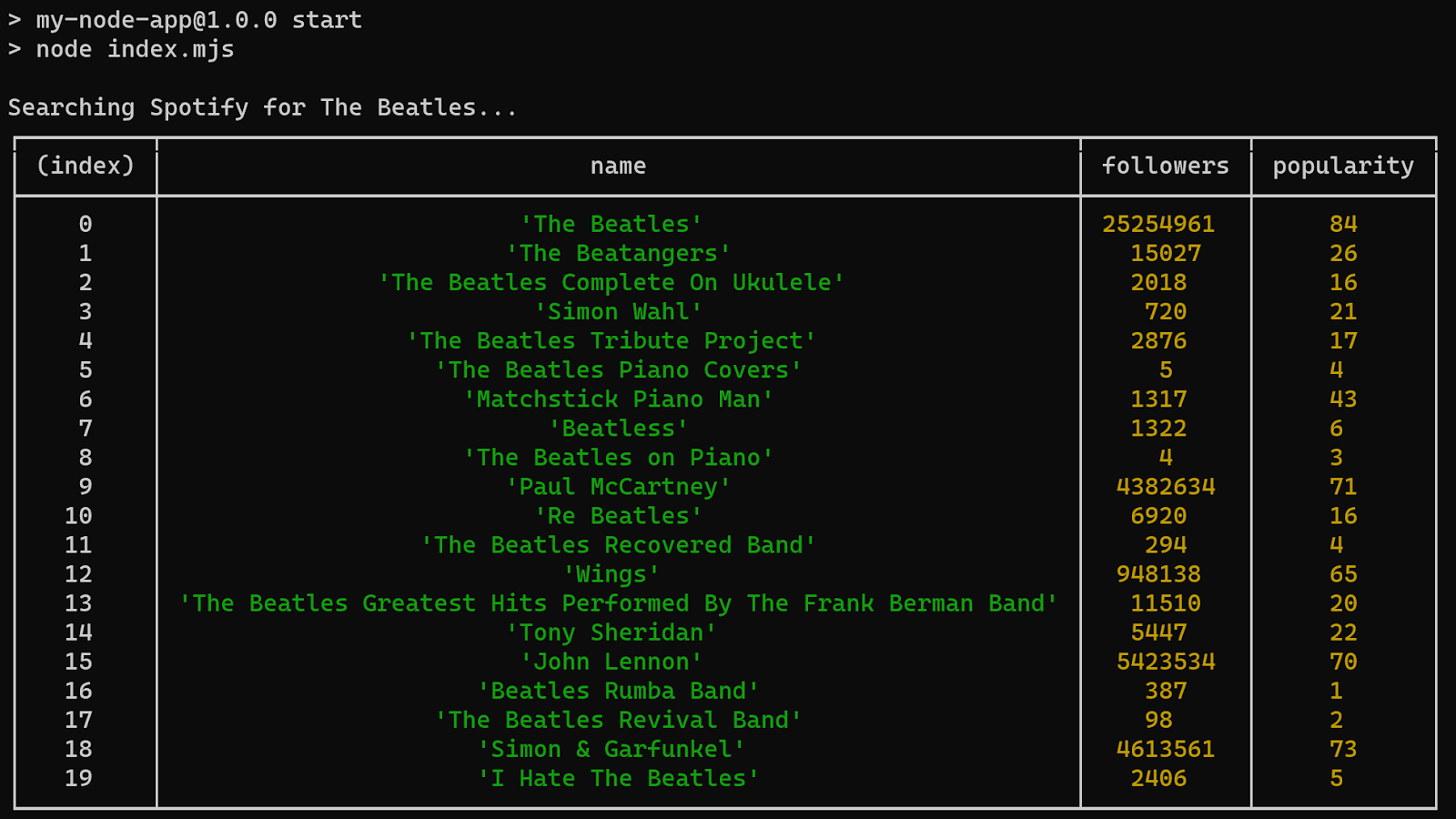
Regardless of your module loading style, the usage of the SDK is the same.
We hope that you find the TypeScript SDK useful. If you have any questions or feedback, please contact us on the Spotify for Developers Forum or Twitter or make an issue in the GitHub repository. The repository is Open Source and we welcome contributions from the community.