Two weeks ago, Anthropic released Cowork to Claude Max subscribers ($100 to $200 per month), then extended it to Pro users a few days later. The product emerged from an observation about Claude Code: engineers were using it for tasks that had nothing to do with software. People pointed it at folders of receipts to generate expense reports, used it to organise media libraries, had it draft documents from scattered research notes. The command line interface and “Code” branding were putting off non-technical users who could benefit from the same capabilities. Rather than building a dumbed-down version, Anthropic did something more interesting: they shipped a Linux virtual machine inside an Electron app.
Let’s explore how it works!
When you launch a Cowork session, the Claude Desktop application boots a lightweight Linux VM using Apple’s Virtualisation framework. This VM contains a complete Linux environment with the Claude Code binary pre-installed, the same agent runtime that engineers use from their terminals. It can execute bash commands, read and write files, and spawn subprocesses, all isolated from your actual Mac filesystem.
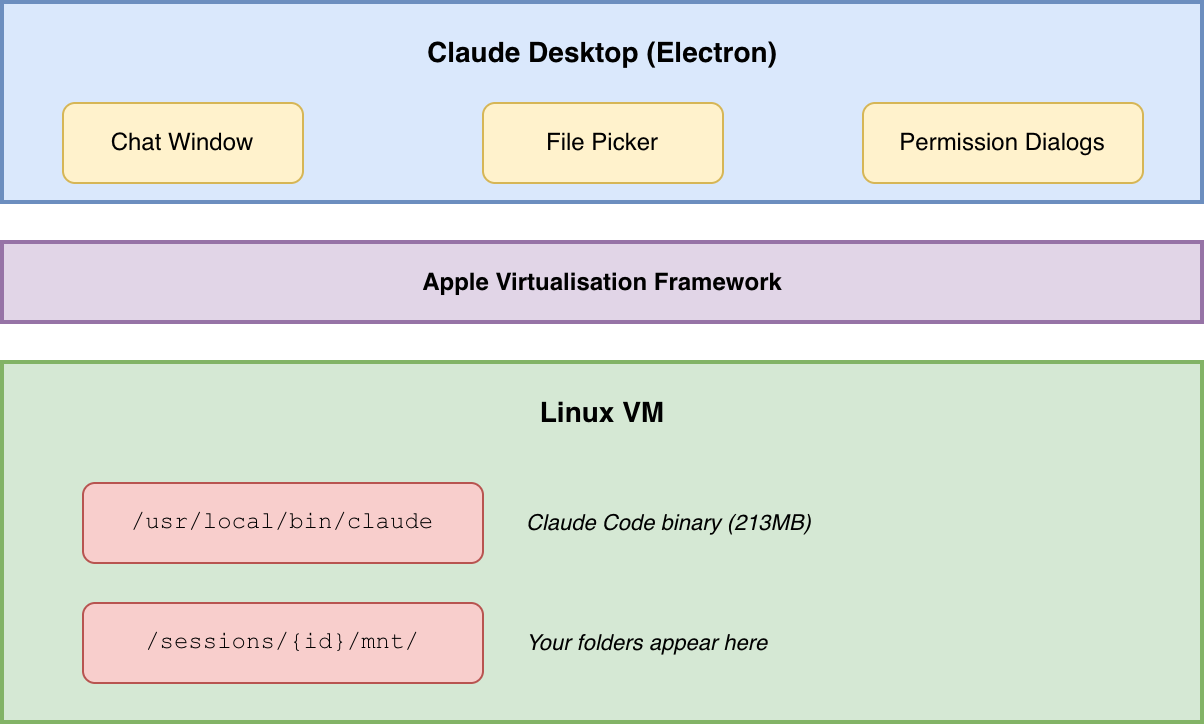
The decision to run a VM rather than executing Claude Code directly on macOS is worth examining. The obvious alternative would have been to run the agent natively with standard macOS sandboxing, which is how most desktop apps handle file access. Anthropic instead chose architectural isolation: the VM genuinely cannot access files outside mounted directories because those files do not exist in its filesystem namespace. This is a good idea; having a strong security boundary allows the agent to run free with reduced risk.
When you select a folder in Cowork’s interface, the desktop app mounts that specific directory into the VM’s filesystem using VirtioFS. From Claude’s perspective inside the VM, your folder appears at /sessions/{id}/mnt/{folder_name}, and that is the only part of your filesystem it can see.
The Electron app and the VM communicate over a virtio socket (vsock) using newline-delimited JSON. When you type a message in the chat window, it gets serialised as JSON, written to the socket with a newline terminator, and read by Claude Code inside the VM. When Claude wants to show you progress, request permission, or return results, those messages travel back up the same channel.
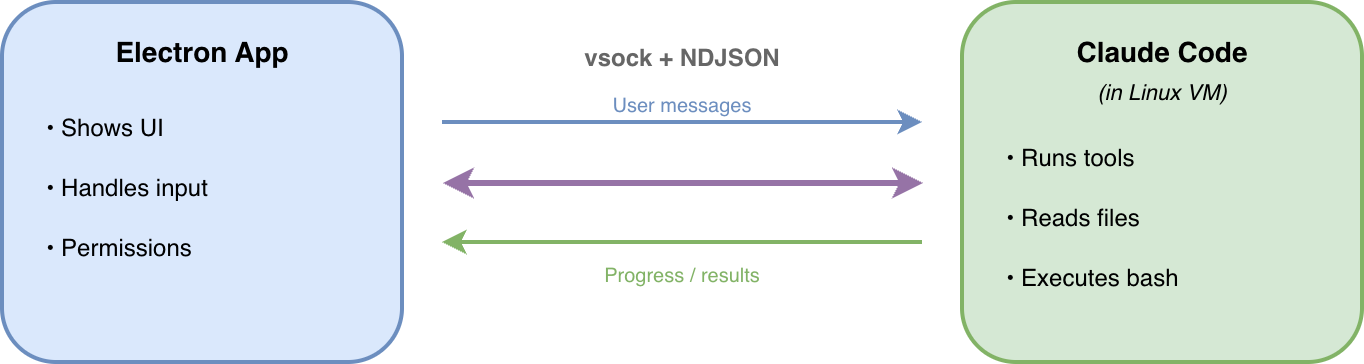
The message protocol is straightforward: user messages go in, assistant responses come out, with system messages for things like permission requests interspersed.
The Cowork tool suite is identical to what engineers get from Claude Code on the command line. Cowork has access to Bash for executing shell commands, meaning anything you could do in a terminal it can do programmatically. It can read files across a wide range of formats including text, images, PDFs, and Jupyter notebooks. It can write and edit files, search through directories with regex patterns, and fetch content from the web.
This means it also supports Claude Code’s orchestration capabilities. The Task tool lets Cowork spawn subagents for complex multi-step work, parallelising operations or delegating subtasks to specialised workers. There is a planning mode for breaking down complex implementations before executing them. The Skill tool provides access to document generation capabilities for PDFs, Word documents, spreadsheets, and presentations.
Cowork also makes it easy to enable the Claude in Chrome browser extension, which exposes an additional set of tools to Claude Code via an MCP server. With this enabled, Cowork can navigate web pages, fill out forms, click buttons, read page content, and even record GIFs of browser sessions. This is not AI-assisted browsing in the sense of suggesting what to click; it is actual browser automation where Claude Code controls the browser programmatically while you watch or do something else. The combination means Cowork can execute workflows that span your local filesystem and the web in a single task.
This architecture is not without its tradeoffs. The VM image downloads as a compressed file and decompresses to a 10GB root filesystem on disk. The VM allocates 4GB of memory by default, which is memory your other applications cannot use. Your Mac needs to stay awake and the desktop app needs to stay open for Claude Code to keep working; close the app or let your machine sleep and the session ends. There is no synchronisation across devices, so work started on your laptop cannot continue on your desktop.
The hardware requirements are also constraining. Cowork requires macOS 13.0 (Ventura) or later because that’s when Apple added Linux VM support to the Virtualisation framework.
These constraints follow directly from the architectural choices. Running a VM provides strong isolation guarantees but requires resources. Keeping state local to your machine means no upload of your files to cloud servers but also no access from other devices. Anthropic has indicated that Windows support and cross-device sync are on the roadmap, but for now the product reflects the tradeoffs inherent in local-first, VM-based execution.
Agentic AI products in the market often tend to decompose into two very different categories depending on whether you’re an engineer or a regular user. Engineers get agents like Claude Code and OpenCode that can execute code, manipulate files, and chain together complex operations. Everyone else typically gets a chatbot that produces text you then have to copy-paste somewhere useful. Cowork collapses this distinction by giving non-technical users access to the full agent runtime, without them having to understand what a terminal is.
Cowork was reportedly built by a four-engineer team in about ten days, largely using Claude Code itself. This kind of development velocity is impressive, but is also understandable when you realise that Cowork is actually just a relatively thin wrapper around Claude Code itself.