Connect your databases, apps and sheets once. datatomcp links them, writes down what each number means, and lets every agent on your team ask for exact answers. Every question is recorded, every number can be checked, and the answer can come back as a chart.
Pasting a sheet puts every row into the model's context: it fills the window, and you pay for every token. With datatomcp the agent asks a database and gets back only the result, about 475 times fewer tokens on our test file, and the total is computed, not estimated.
User
How many orders came from France in September, and what was the revenue?
Measured on our 50,000-row test orders file. Pasting sends the whole 4,118,185-byte file; a full datatomcp session (tool list, schema, query and result) sends 8,663 bytes. Tokens estimated at about 4 bytes per token. Price: Claude Opus 5.5 input, $4 per million tokens (October 2026).
Connect it once. Every agent gets the same answer.
Five steps take your team from scattered sheets, exports and databases to answers you can put in a report without checking them by hand.
01
Connect every source
Connect PostgreSQL, MySQL, Stripe, HubSpot and Airtable, pick Google Sheets in Google's own picker, or upload Excel and CSV files. Each source becomes a dataset that stays in sync, with a version for every refresh.
Every import comes with a report: lines that couldn't be read, numbers stored as text, mixed dates. Nothing is converted until someone confirms it.
revenue looks like numbers but is stored as text, like "$712.80". Nothing changes until you confirm.
Convert to number
02
Link it together
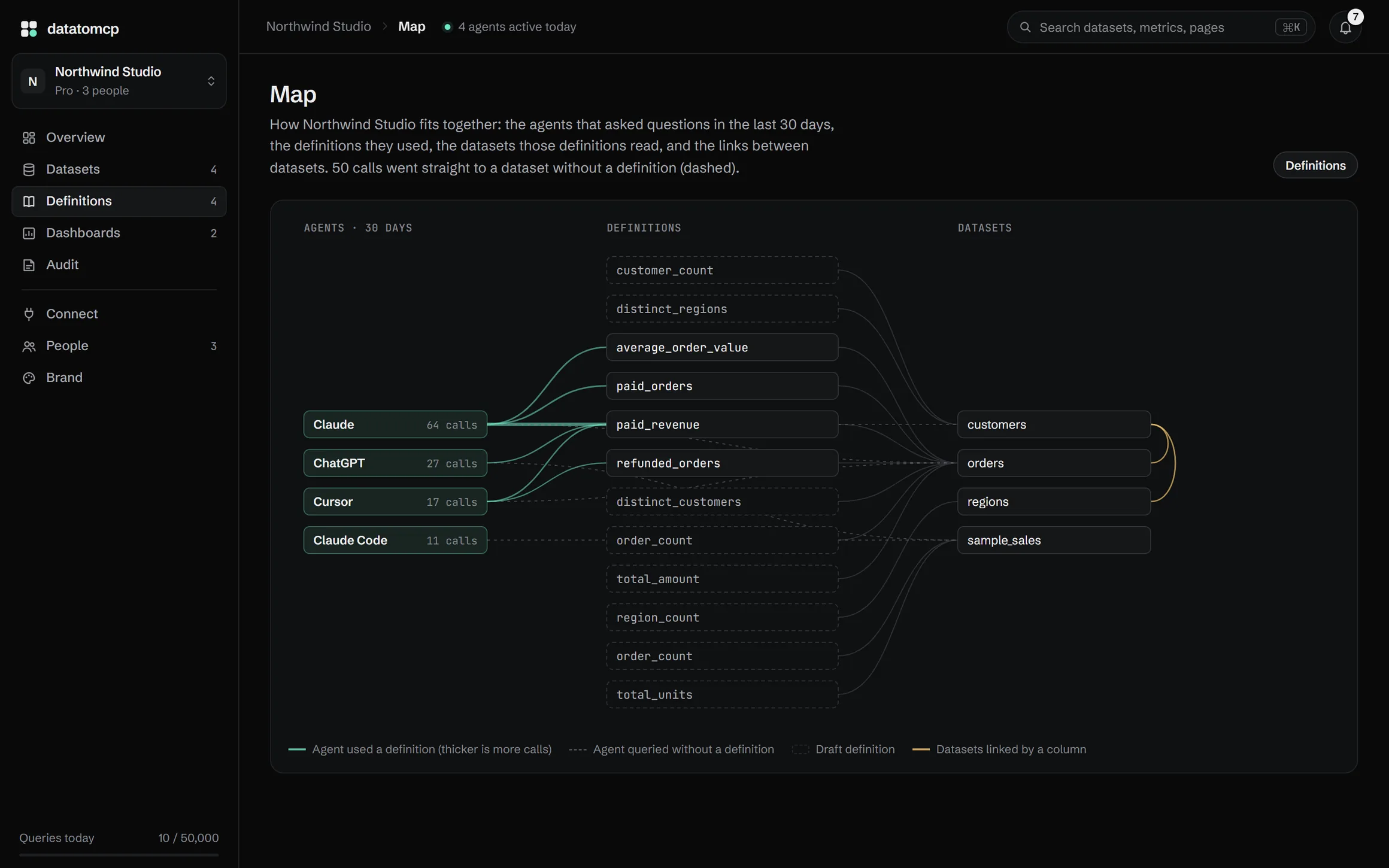
datatomcp finds the ids and codes your datasets share, like the customer_id in orders and in customers, and draws the map. Links chain, so an agent can total orders by a customer's region in one query.
A link confirms itself only when every value matches. Otherwise you see what didn't match, and decide.
orders → customers47 of 48 matchedConfirmConfirmed
customers → regions10 of 10 matchedConfirmed on its own
group_by: ["regions.region"]works from orders now
03
Agree on what each number means
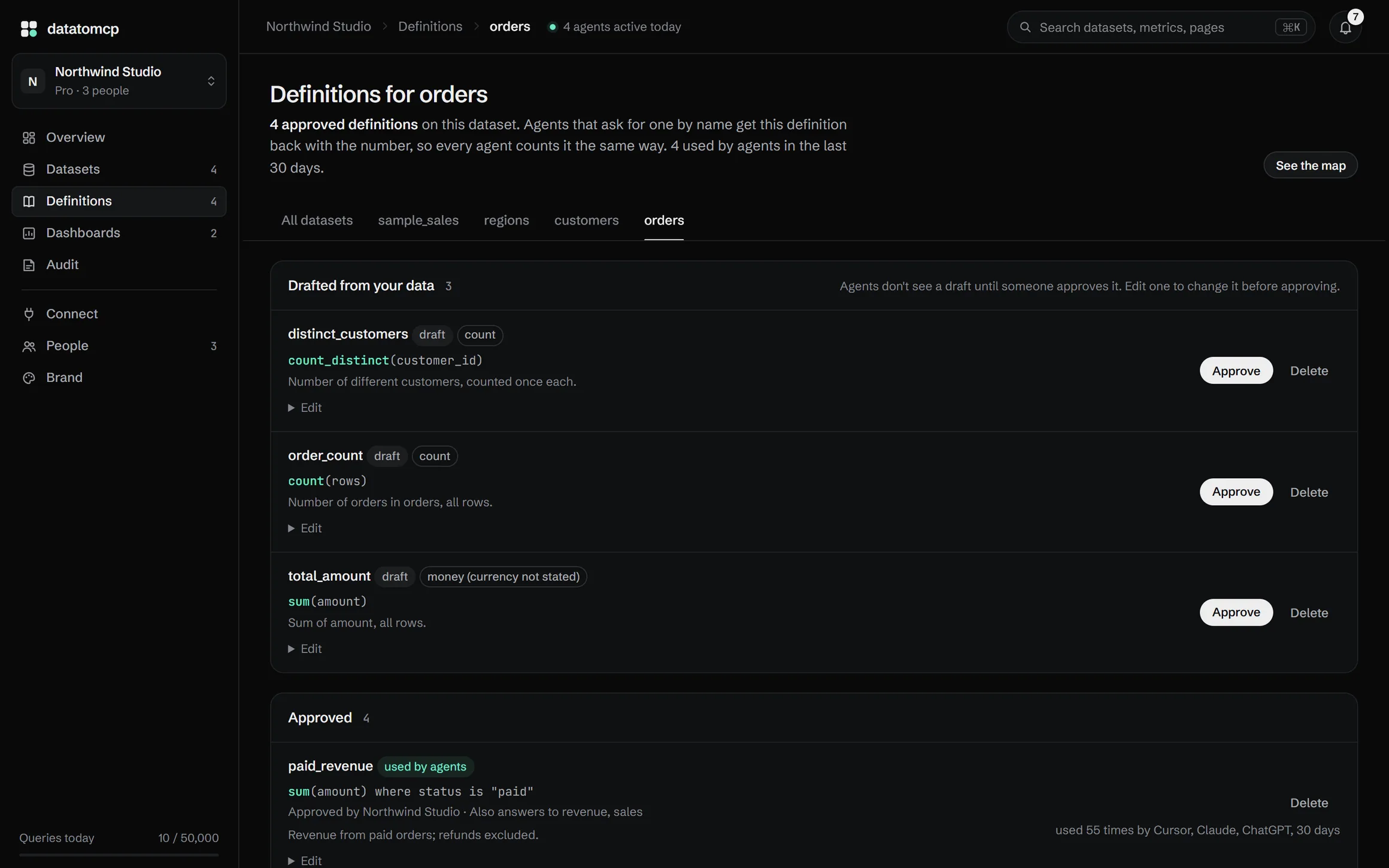
datatomcp drafts definitions from your columns, like paid revenue as the sum of amount where the status is paid. A person approves or edits each one, and agents only use approved ones.
Every answer that uses a definition says so. A glossary explains your team's words, like "active customer", the same way.
EditApproveApproved by you · agents use it from now on
Glossary
active customer
Placed at least one paid order in the last 90 days.
04
Ask from any agent
Add one URL to Claude, ChatGPT, Cursor or any MCP client, or call the REST API. A database counts every row, so totals are exact, and each answer names the dataset version it came from.
When a picture is clearer, the agent draws a chart or makes a dashboard right in the chat, and anyone can refresh it later.
Sam · ChatGPT160 ms4 groupsSame answer as Claudeaggregate · orders · paid_revenue by regions.region
You · Cursor120 ms8 rowsquery_rows · orders · status = refunded
Sam · ChatGPT140 msError: revenue is textaggregate · sample_sales · sum(revenue)
You · Claude Code210 ms8 columnsdescribe_dataset · sample_sales
I help about 300 finance people use AI agents at a Fortune 100 company. Almost all of them hit the same wall: they paste a whole CSV or Google Sheet into the chat, the context fills up, the tokens add up, and the totals are close but not exact.
datatomcp is the tool I wanted for them: read-only for agents, hosted in the EU, and honest about its limits.
One workspace for the whole team. Data, meaning and every agent, side by side.
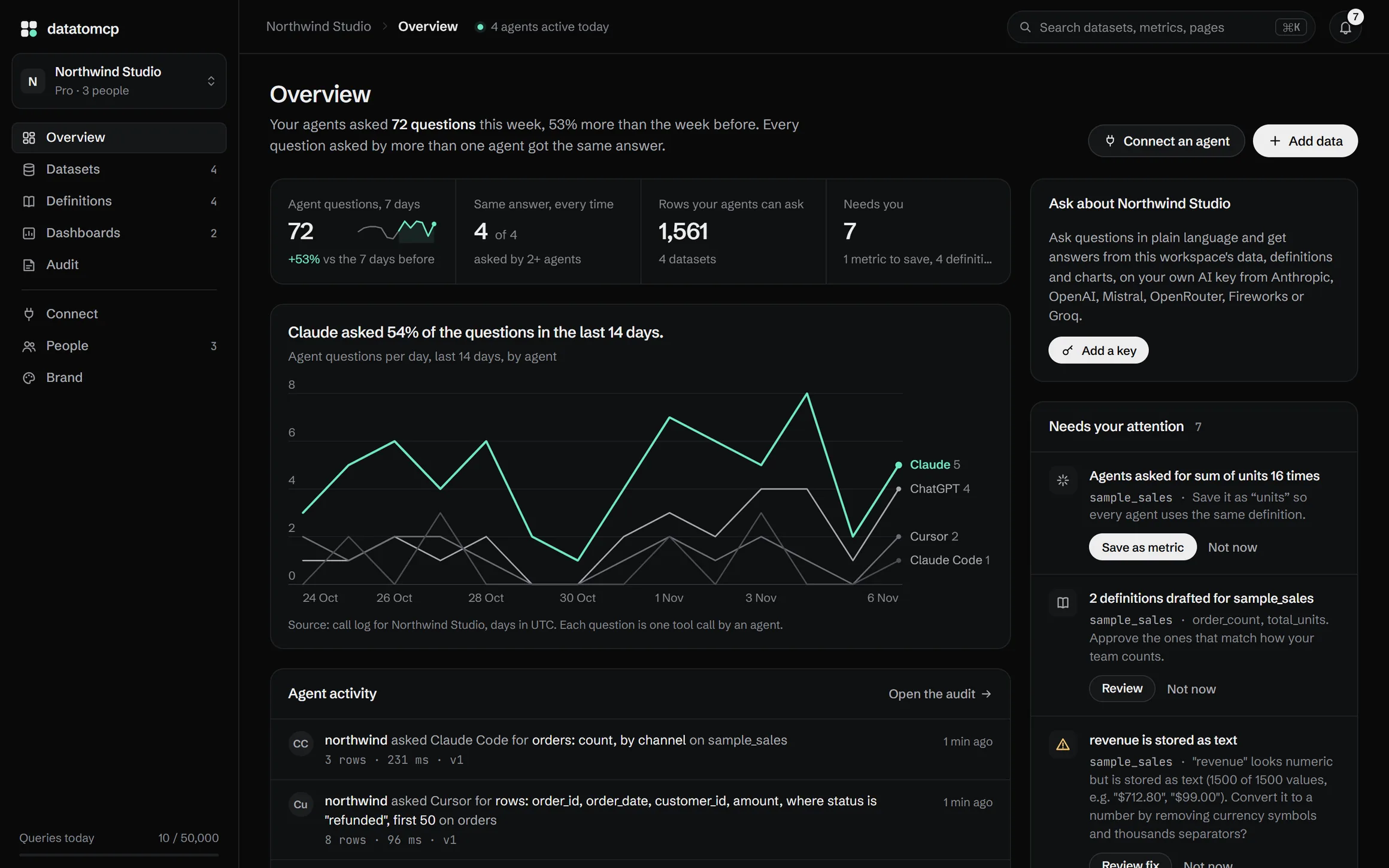
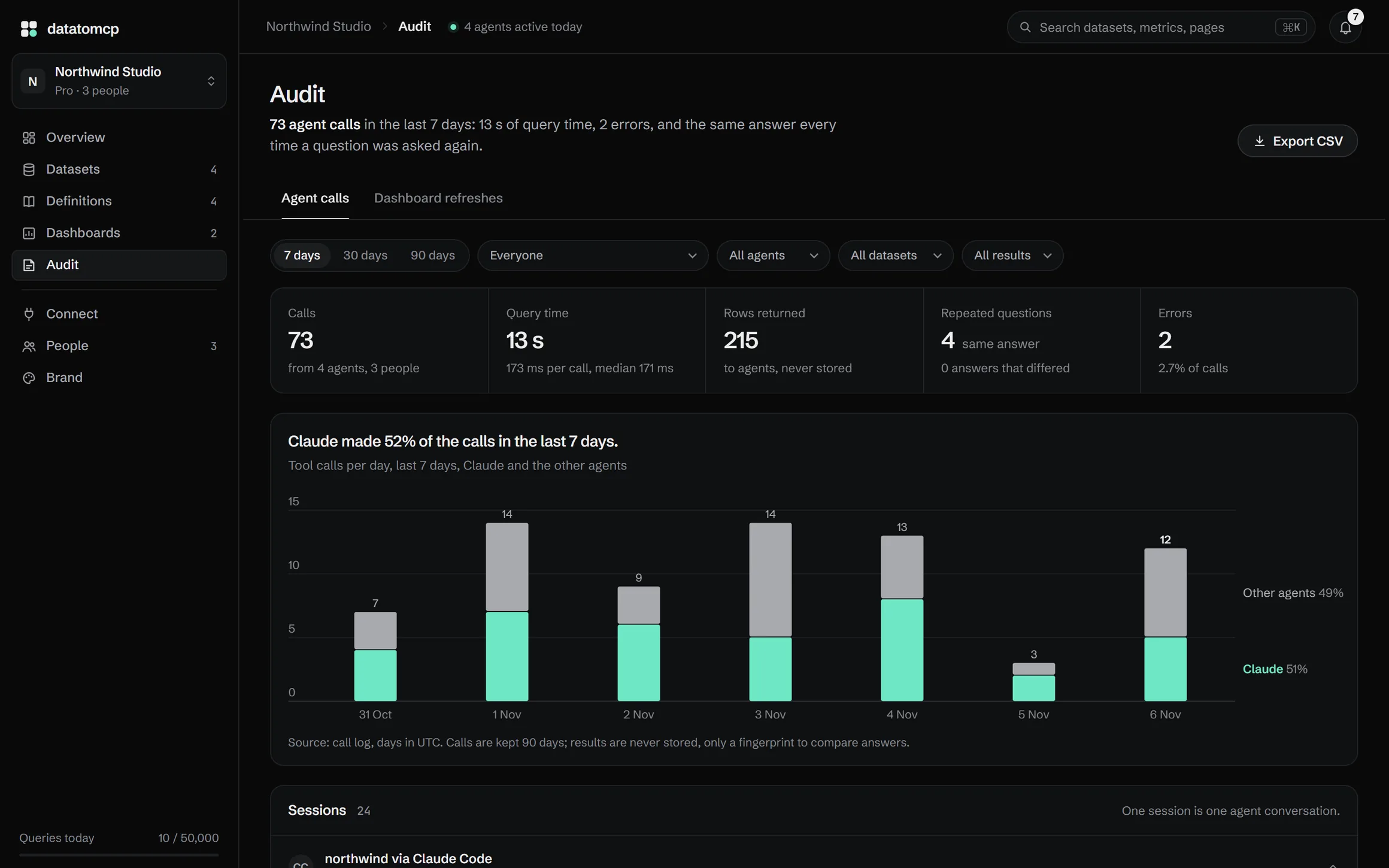
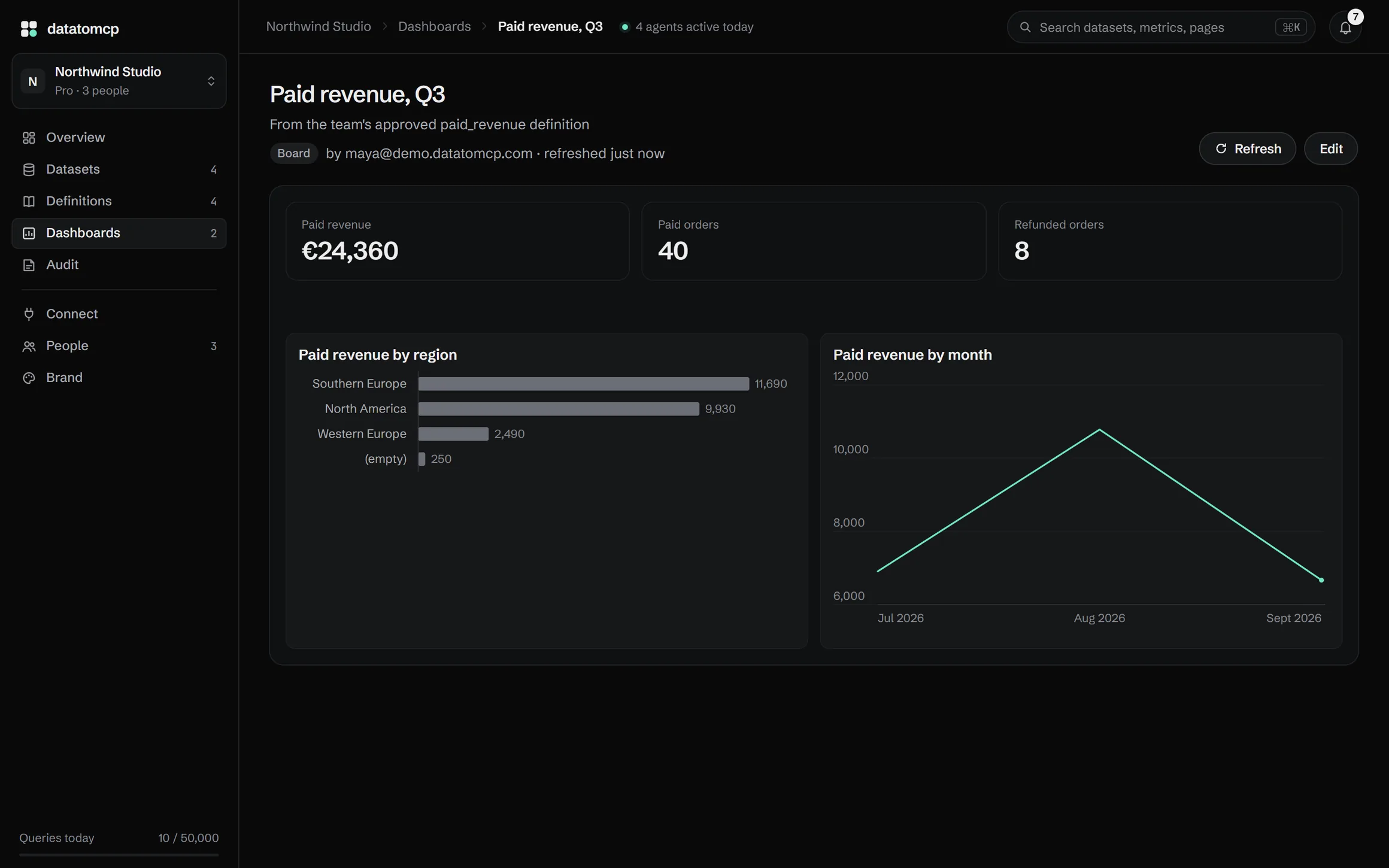
Open this page live Every dataset, its freshness, the team's definitions and what the agents asked, on one page.Open this page live Which agents asked, which definitions they used, which datasets those read, and how the datasets link.Open this page live Approved definitions with who approved them, drafts waiting for a person, and the team's glossary.Open this page live Every agent question, repeated questions and whether they got the same answer, and every error.Open this page live A board an agent made from a few questions, refreshed on the latest data whenever you open it.
This is the public demo workspace, Northwind Studio, with its real numbers. Click through every page, no sign-up needed.
Made for teams without a data team. And for the people who set them up.
For teams
Invite people as editors, who add and update data, or viewers, who ask. Each person connects their own agent once and gets the same datasets at the same version, so everyone quotes the same number.
Give each client a workspace of their own, with their data, their definitions and their words. Limit the agent you use for a client to that client's data, show them what their agents asked, then hand it over.
A copy of each source (one file per version), backups and accounts are kept in the European Union.
No AI processing unless you opt in
Never used for training. AI cleaning suggestions (Mistral, EU) and the in-app assistant (your own key) stay off until you turn them on.
Private by default
Every request needs a sign-in or an API key. Database and app credentials are encrypted and never shown to agents.
Deleted when you say so
Delete a dataset or your whole account from the app. It's gone at once, and from backups within 14 days.
What is an AI-native data layer?
A single place where your team's spreadsheets, files, databases and apps live, kept up to date, linked together and described with the team's own definitions, that every AI agent can ask for exact answers. Agents don't just reach the data: they know what each number means, a database does the counting, and every question is recorded. It does the job of a data warehouse and a semantic layer for teams without a data team.
Which data sources can I connect?
Databases and apps: PostgreSQL and MySQL (a table or a read-only query), Stripe (customers, subscriptions with MRR, invoices, payments), HubSpot (contacts, companies, deals) and Airtable. Sheets and files: Google Sheets, Excel and CSV. Each one becomes a dataset with versions, sync, links to your other data and the audit. Need another source? Ask for it in the app: we add sources on request, the most requested first.
What are definitions?
The team's agreed meaning of a number, like "paid revenue = sum of amount where status is paid". datatomcp drafts them from your columns when you add data, and a person approves or edits each one. Agents only see approved definitions, every answer that uses one says who approved it, and an unknown name gets the closest definitions instead of a guess. A glossary explains words like "active customer" the same way.
Which agents can use it?
Any client that supports remote MCP servers, including Claude, ChatGPT, Cursor and Claude Code. Agents without MCP support, n8n workflows and your own apps use the REST API with an API key. Both return the same results.
Which tools do agents get?
Over MCP: workspace_overview, list_datasets, describe_dataset, distinct_values, query_rows and aggregate to read and count, chart to draw the answer, create_dashboard, list_dashboards and refresh_dashboard for dashboards, report_issue to flag a data problem to the team, and propose_definition, propose_link, propose_term and propose_brief to suggest a definition, a link, a glossary term or the business brief, which a person approves in the app before any agent uses it. connect_source starts a new connection and activity shows what agents did. Data stays read-only over MCP, and an owner can set any agent to Analyze so it only reads. Apps get the same queries over REST.
Can it draw charts and dashboards?
Yes. datatomcp has its own library of 52 chart types (trends, comparisons, waterfalls, funnels, cohorts, scorecards and more), in light and dark. Agents draw them right in the conversation in Claude and ChatGPT, the in-app assistant draws them too, and the REST API returns them from a query. Ask an agent for a dashboard and it makes a board or a short story of slides in your workspace, which anyone on the team can refresh on the latest data.
Can I see what the agents asked?
Yes. The audit page lists every agent question for 90 days on Pro (30 on Free): who asked, from which agent, on which dataset, the query, how long it took, and errors. When two agents ask the same question, it shows whether they got the same answer. Export it as a spreadsheet at any time.
Can my team use it?
Yes. Invite people to a workspace by email, as editors (they add and update data) or viewers (they ask). Each person connects their own agent once and asks about the same datasets, at the same version, so everyone gets the same numbers. An activity log shows who changed what and which agent asked what, for whom. The free plan has 2 people per workspace, Pro has 5, and Business plans go further.
How do linked datasets work?
When two datasets share an id or a code, like orders.customer_id and customers.customer_id, or a pair of columns, like country + month in orders and targets, datatomcp finds the link on import and shows it on a map. Links chain (orders → customers → regions), so agents can answer across them in one query, like revenue by region. Totals from a linked dataset count each of its rows once, so a target is never added twice. Links are only confirmed automatically when every value matches; otherwise you confirm them.
Why not paste the CSV into the chat?
That works once, for a small file. It breaks when the file is large, changes every week, or several agents need it. Here the agent asks for the rows and totals it needs, and every agent reads the same, current version.
Can it read private Google Sheets?
Yes. You choose specific sheets in Google's own file picker, and datatomcp gets access to those files only, not the rest of your Drive.
What happens with messy files?
Rows that can't be parsed are listed with their line numbers and the rest of the file is imported. Columns that look numeric or date-like but aren't consistent are flagged, and nothing is converted until you confirm it. If you turn it on, AI suggests clean-up rules ("treat n/a as empty"); a person approves each one, and it runs again on every refresh.
Is my data sent to an AI provider?
Not unless you choose it. Your data is stored in the EU and never used for training. The agent you connect receives only the query results it asks for. Two things are opt-in: AI cleaning suggestions, which send a column summary and at most 50 sample rows to Mistral (EU) when an editor asks, and the in-app assistant, which runs on your own AI key.
What exactly do you store?
A copy of each source you connect, one file per version, on servers in the EU, so every question is counted on all the rows. Delete the dataset and the copy is gone at once, and from backups within 14 days. Query results are never stored. Credentials for databases and apps are encrypted and never shown to agents.
How do I connect Claude or ChatGPT?
Copy your MCP URL (https://app.datatomcp.com/mcp) into the app's connector settings, sign in once, and approve access. Claude Code takes one command. The Connect page in the app shows the exact steps for each client.
What happens if I hit a limit?
Nothing breaks silently. You get an email at 80% of your daily queries, agents get a clear error at 100%, and the count resets at midnight UTC. Datasets over the row limit are refused at import with the reason.
Can I cancel Pro?
Yes, anytime from the billing portal. You keep Pro until the end of the period. Back on Free, your datasets stay readable; you just can't add more than the Free limits allow.
Can agents run SQL?
No, on purpose. They get a small set of validated query tools with limits, so a confused agent can't run something slow or unexpected.
Connect your first dataset.
Connect a database or an app, pick a Google Sheet or upload a file, then add one URL to your agent. The free plan needs no card.