001 · 2026-01-15 · Using eBPF to find blocking code in Tokio without instrumenting your code
Your Tokio service is slow. Latency spikes under load, then recovers. No errors in the logs. CPU isn't maxed out. The usual culprit: blocking code on the async runtime.
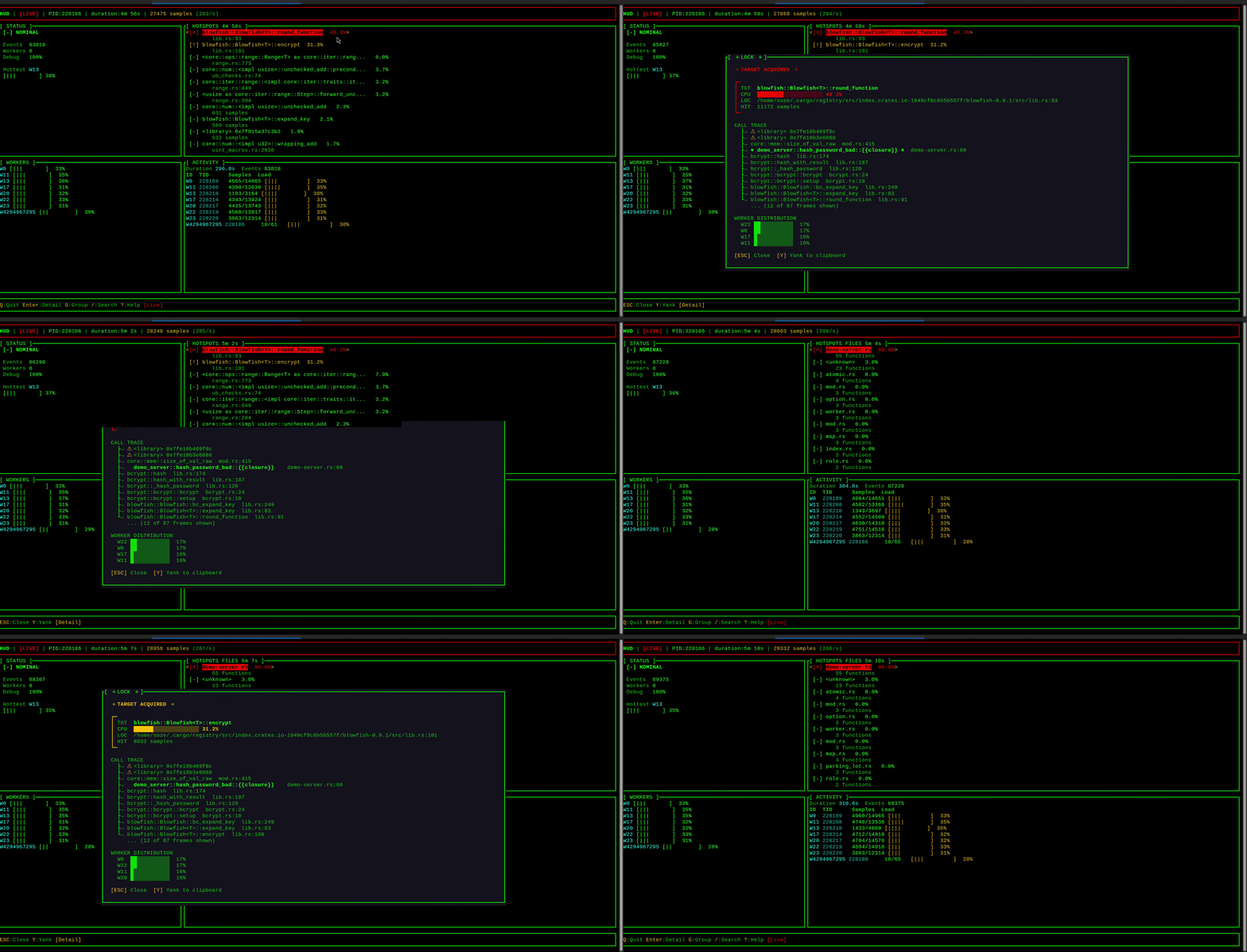
TL;DR: Blocking code on Tokio workers causes latency spikes without errors. Use hud to find it without code changes—this article covers how to diagnose and fix the common culprits.
THE PROBLEM
Tokio relies on cooperative scheduling: tasks yield at .await points, trusting that code between awaits completes quickly. When it doesn't—CPU-heavy work, synchronous I/O, blocking locks—a single task monopolizes a worker thread, stalling everything else queued behind it. No panics, no errors. Just degraded throughput that's hard to trace.
HOW BLOCKING SNEAKS IN
Consider this async endpoint that hashes passwords:
async fn hash_password(body: Bytes) -> Json<HashResponse> {
    let password = String::from_utf8_lossy(&body).to_string();
    let hash = bcrypt::hash(&password, 10).expect("hash failed");
    Json(HashResponse { hash })
}
It looks innocuous—after all, it's an async fn. But bcrypt::hash is intentionally slow (50–100ms at cost factor 10, longer at higher factors) and never yields. While it runs, that worker is blocked. Other requests queue behind it.
The usual suspects:
| Pattern | Example | Why it blocks |
|---|---|---|
std::fs in async | File::open(), read_to_string() | Sync syscalls |
| CPU-heavy crypto | bcrypt, argon2, scrypt | Intentionally slow |
| Compression | flate2, zstd | CPU-bound |
std::net DNS | ToSocketAddrs | Sync resolution |
| Large parsing | Big JSON/XML payloads | CPU-bound |
| Sync mutex during slow work | std::sync::Mutex | Thread blocks waiting |
In practice:
// Blocking file I/O
let config = std::fs::read_to_string("config.toml")?;

// Blocking DNS resolution
let addrs = "example.com:443".to_socket_addrs()?;

// Sync mutex held during slow operation - blocks the worker thread
let guard = sync_mutex.lock().unwrap();
expensive_computation();  // other tasks on this worker stall
drop(guard);
Note: holding a std::sync::MutexGuard across an .await usually won't compile—the guard isn't Send. But holding it during long synchronous work still blocks the worker thread. Use tokio::sync::Mutex when you need to hold a lock across .await points. For short critical sections without awaits, std::sync::Mutex is often faster—just keep the work minimal.
All of these work correctly in tests. The problem only manifests under concurrent load.
WHAT IT LOOKS LIKE IN PRODUCTION
The symptoms are maddeningly vague:
- p99 latency climbs under load, recovers when load drops
- Throughput plateaus below expected capacity
- No errors, no panics, nothing in the logs
- CPU utilization looks normal (the threads are blocked, not spinning)
- Adding more Tokio worker threads helps—until it doesn't
So you blame the database. Or the network. Or add caching in the wrong place. Without visibility into the runtime, you're guessing.
FINDING IT
Quick sanity check: During development, wrap suspicious operations in tokio::time::timeout. If a supposedly-fast async call times out, you likely have blocking code in that path:
use tokio::time::{timeout, Duration};

let result = timeout(Duration::from_millis(100), async {
    some_async_operation().await
}).await;

if result.is_err() {
    tracing::warn!("operation exceeded 100ms — possible blocking");
}
This won't tell you where the blocking is, but it confirms the problem exists before reaching for heavier tools.
Existing options: tokio-console provides runtime visibility and accurate task poll times, but requires instrumenting your code. Tokio's unstable blocking detection warns when polls exceed a threshold, but it's opt-in and needs a redeploy. Standard perf + flamegraphs work but require manual interpretation. All of these require either code changes or significant expertise.
hud takes a different approach: attach to a running process with no code changes required. It's an eBPF profiler that hooks into the Linux scheduler. When a Tokio worker thread experiences OS-level scheduling latency (time spent waiting in the kernel run queue, not Tokio's task queue), hud captures a stack trace.
High scheduling latency often indicates blocking: when one task monopolizes a worker, other tasks queue up waiting. Because hud runs in-kernel and only samples on scheduler events, overhead is low—though you should benchmark in your environment, as eBPF overhead varies with event frequency and stack depth.
Requirements: Linux 5.8 or later, root privileges, and debug symbols in your binary:
# Cargo.toml
[profile.release]
debug = true
force-frame-pointers = true
Note: debug = true increases binary size (~10-20%) and force-frame-pointers adds minor runtime overhead (~1-2%). For production investigation, you can build a debug-enabled binary and swap it in temporarily, or accept the overhead if you need always-on observability.
Install:
# Pre-built binary
curl -LO https://github.com/cong-or/hud/releases/latest/download/hud-linux-x86_64.tar.gz
tar xzf hud-linux-x86_64.tar.gz

# Or from source
git clone https://github.com/cong-or/hud && cd hud
cargo xtask build-ebpf --release && cargo build --release
Point it at a running process:
sudo hud my-serviceDemo
Here's hud in action with a server that has intentionally blocking endpoints (from the hud repo):
# Terminal 1: Run the demo server (debug build for clear stack traces)
cargo build --example demo-server
./target/debug/examples/demo-server

# Terminal 2: Attach hud
sudo ./target/release/hud demo-server

# Terminal 3: Generate load
curl -X POST http://localhost:3000/hash -d 'password123'
hud displays latency hotspots in a live TUI, grouped by stack trace. Select one to see the full call stack—the ◄ marker highlights frames in your code. Consistent traces pointing to the same function are your likely culprits.
Important: hud captures the stack of the thread experiencing latency—the victim, not necessarily the blocker. If Task A blocks and causes Task B to wait, you'll see Task B's stack. Look for patterns: many different stacks showing latency suggests something else is monopolizing workers; if one stack dominates, that code path is likely the blocker itself.
I built hud because I found existing tools hard to use intuitively. Flamegraphs and perf output require expertise to interpret. hud's TUI surfaces what matters—hotspots ranked by frequency, with drill-down into call stacks—so you can get answers without becoming a profiling expert first.
THE FIX
Once you've identified the culprit, the fix is straightforward: offload the work to Tokio's blocking threadpool.
Before:
async fn hash_password(body: Bytes) -> Json<HashResponse> {
    let password = String::from_utf8_lossy(&body).to_string();
    let hash = bcrypt::hash(&password, 10).expect("hash failed");
    Json(HashResponse { hash })
}
After:
async fn hash_password(body: Bytes) -> Json<HashResponse> {
    let password = String::from_utf8_lossy(&body).to_string();

    let hash = tokio::task::spawn_blocking(move || {
        bcrypt::hash(&password, 10).expect("hash failed")
    })
    .await
    .unwrap();

    Json(HashResponse { hash })
}
Quick reference:
| Blocking pattern | Solution |
|---|---|
File I/O (std::fs) | tokio::fs (uses spawn_blocking internally) |
DNS (ToSocketAddrs) | tokio::net::lookup_host |
| Blocking I/O | Wrap in spawn_blocking |
| CPU-heavy compute | spawn_blocking, or spawn_blocking + rayon |
| Already on runtime thread | block_in_place (avoids thread handoff; panics on current_thread) |
| CPU loops that can't be offloaded | tokio::task::yield_now().await or consume_budget().await |
Note: spawn_blocking isn't free—it moves work to a separate thread pool, adding context-switch overhead. For very short operations (<1ms), the overhead may exceed the benefit. For parallelizable CPU work like image processing or batch compression, use rayon's thread pool—but call it from within spawn_blocking, not directly from async code, or you'll still block a worker.
VERIFYING THE FIX
Export traces before and after to confirm the improvement:
# Before fix (run under load for 60 seconds)
sudo hud my-service --headless --duration 60 --export before.json

# Deploy fix, then run again
sudo hud my-service --headless --duration 60 --export after.json
Compare the traces. The problematic stack should show reduced frequency or disappear entirely. Some baseline scheduling noise is normal—focus on whether your specific hotspot improved. You can integrate this into CI against a load test to catch regressions before they reach production.
TUNING SENSITIVITY
The default threshold is 5ms, a reasonable starting point for most web services. Adjust based on your latency requirements:
| Threshold | Use case |
|---|---|
--threshold 1 | Latency-critical APIs, games |
--threshold 5 | General web services (default) |
--threshold 10 | Background workers |
--threshold 20 | Batch jobs, ETL pipelines |
At 50k requests/second, a 1ms block affects 50 requests. Choose a threshold that matches your SLO.
For interactive debugging, use --window to set a rolling time window. Without it, metrics accumulate forever and never decay:
sudo hud my-service --window 30 # 30-second rolling windowTip: Real blocking produces consistent traces pointing to user code and known blocking operations. Noise from OS scheduling appears as random preemption in stdlib or runtime code—you can usually ignore it.
LIMITATIONS
hud measures scheduling latency—how long worker threads wait in the kernel run queue. This correlates with blocking but doesn't measure it directly. Keep these caveats in mind:
- System noise: High CPU pressure, NUMA effects, or hypervisor scheduling can cause latency spikes unrelated to your code. Look for consistent, repeatable traces.
- Frequent short blocks: Many 1ms blocks won't trigger a 5ms threshold but can still degrade throughput. Lower the threshold if you suspect many small blocks accumulating.
- Lock contention: Threads waiting on mutexes may be in
TASK_INTERRUPTIBLEstate and won't appear as scheduling latency. - Stripped binaries: Most production binaries lack debug symbols. You'll need a debug-enabled build for meaningful stack traces.
- Tokio only: hud identifies workers by thread name (
tokio-runtime-w). Other runtimes (async-std, smol, glommio) won't be detected. Tested with Tokio 1.x—thread naming is an implementation detail that could change in future versions.
ALTERNATIVES
tokio-console is the official Tokio diagnostic tool. It measures actual task poll durations—more accurate than scheduling latency. Use it if you can. But it requires adding the console-subscriber crate and rebuilding your application.
Tokio's unstable blocking detection is another option: compile with RUSTFLAGS="--cfg tokio_unstable" and Tokio will warn when task polls exceed a threshold. This catches the blocker directly, not victims. It's more accurate than hud for identifying the offending code—but requires a rebuild with the unstable flag, and only catches blocks that exceed the threshold during that specific run. Short-but-frequent blocks that add up may slip through.
perf + flamegraphs work for general CPU profiling but require manual interpretation to identify async-specific issues.
hud fills a different niche: profiling without code changes or rebuilds. Useful for staging environments, load testing, quick triage of a running process, or confirming that blocking is even the problem before investing in instrumentation.
| Tool | Best for | Trade-off |
|---|---|---|
| hud | Quick triage of running processes | Measures symptoms, not direct cause |
tokio-console | Precise task poll times | Requires code instrumentation |
perf + flamegraphs | CPU profiling, broad analysis | Manual interpretation needed |
| Custom metrics | Production monitoring | Must know where to instrument |
TAKEAWAY
Blocking in async Rust doesn't raise errors or panic. It just makes everything slower—and the cause harder to find.
Watch for:
std::fsin async context- CPU-heavy crypto (
bcrypt,argon2) - Sync compression (
flate2,zstd) std::netDNS resolutionstd::sync::Mutexheld during expensive work
When you're unsure where the problem lies, start with a profiler that can attach to running processes without code changes. Narrow down the suspects, then dig deeper with instrumentation if needed.
Try hud on your project
curl -LO https://github.com/cong-or/hud/releases/latest/download/hud-linux-x86_64.tar.gz
tar xzf hud-linux-x86_64.tar.gz
sudo ./hud your-tokio-service
github.com/cong-or/hud — MIT or Apache-2.0 licensed. Issues and PRs welcome.
Further reading:
- Async: What is blocking? — Alice Ryhl's deep dive on blocking in async Rust
- tokio::task::spawn_blocking — Official docs on offloading blocking work
- Reducing tail latencies with automatic cooperative task yielding — Tokio's approach to preemption