Posted Jan 06, 2026 12:35 AM
Hi, I am also having the same issue.
See below VMX output:
vTpm and encryption has been removed.
####Start of VMX####
.encoding = "UTF-8"
config.version = "8"
virtualHW.version = "22"
mks.enable3d = "TRUE"
pciBridge4.present = "TRUE"
pciBridge4.virtualDev = "pcieRootPort"
pciBridge4.functions = "8"
pciBridge5.present = "TRUE"
pciBridge5.virtualDev = "pcieRootPort"
pciBridge5.functions = "8"
pciBridge6.present = "TRUE"
pciBridge6.virtualDev = "pcieRootPort"
pciBridge6.functions = "8"
pciBridge7.present = "TRUE"
pciBridge7.virtualDev = "pcieRootPort"
pciBridge7.functions = "8"
vmci0.present = "TRUE"
hpet0.present = "TRUE"
nvram = "Windows 11 64-bit Arm.nvram"
virtualHW.productCompatibility = "hosted"
powerType.powerOff = "soft"
powerType.powerOn = "soft"
powerType.suspend = "soft"
powerType.reset = "soft"
displayName = "Windows 11 64-bit Arm"
firmware = "efi"
sensor.location = "pass-through"
guestOS = "arm-windows11-64"
tools.syncTime = "TRUE"
tools.upgrade.policy = "upgradeAtPowerCycle"
sound.autoDetect = "TRUE"
sound.virtualDev = "hdaudio"
sound.fileName = "-1"
sound.present = "TRUE"
numvcpus = "4"
memsize = "8192"
sched.mem.maxmemctl = "0"
sata0.present = "TRUE"
nvme0.present = "TRUE"
nvme0:0.fileName = "Virtual Disk.vmdk"
sata0:1.deviceType = "cdrom-raw"
sata0:1.fileName = "auto detect"
sata0:1.present = "TRUE"
usb.present = "TRUE"
ehci.present = "TRUE"
usb_xhci.present = "TRUE"
svga.graphicsMemoryKB = "524288"
ethernet0.connectionType = "nat"
ethernet0.addressType = "generated"
ethernet0.virtualDev = "vmxnet3"
ethernet0.linkStatePropagation.enable = "TRUE"
ethernet0.present = "TRUE"
extendedConfigFile = "Windows 11 64-bit Arm.vmxf"
floppy0.present = "FALSE"
vmx.encryptionType = "partial"
vtpm.present = "TRUE"
vmxstats.filename = "Windows 11 64-bit Arm.scoreboard"
svga.vramSize = "268435456"
numa.autosize.cookie = "40012"
numa.autosize.vcpu.maxPerVirtualNode = "4"
uuid.bios = "56 4d 25 29 4e 82 cf 7e-0f 20 60 e7 34 c6 66 c4"
uuid.location = "56 4d 25 29 4e 82 cf 7e-0f 20 60 e7 34 c6 66 c4"
vm.genid = "-5396197438048241113"
vm.genidX = "8426568439511845617"
pciBridge4.pciSlotNumber = "21"
pciBridge5.pciSlotNumber = "22"
pciBridge6.pciSlotNumber = "23"
pciBridge7.pciSlotNumber = "24"
usb.pciSlotNumber = "16"
ethernet0.pciSlotNumber = "160"
sound.pciSlotNumber = "17"
ehci.pciSlotNumber = "18"
usb_xhci.pciSlotNumber = "192"
sata0.pciSlotNumber = "19"
nvme0.pciSlotNumber = "224"
nvme0:0.redo = ""
vmotion.checkpointFBSize = "4194304"
vmotion.checkpointSVGAPrimarySize = "268435456"
vmotion.svga.mobMaxSize = "1073741824"
vmotion.svga.graphicsMemoryKB = "524288"
vmotion.svga.supports3D = "1"
vmotion.svga.baseCapsLevel = "9"
vmotion.svga.maxPointSize = "189"
vmotion.svga.maxTextureSize = "16384"
vmotion.svga.maxVolumeExtent = "2048"
vmotion.svga.maxTextureAnisotropy = "16"
vmotion.svga.lineStipple = "0"
vmotion.svga.dxMaxConstantBuffers = "15"
vmotion.svga.dxProvokingVertex = "0"
vmotion.svga.sm41 = "1"
vmotion.svga.multisample2x = "1"
vmotion.svga.multisample4x = "1"
vmotion.svga.msFullQuality = "1"
vmotion.svga.logicOps = "1"
vmotion.svga.bc67 = "9"
vmotion.svga.sm5 = "1"
vmotion.svga.multisample8x = "1"
vmotion.svga.logicBlendOps = "1"
vmotion.svga.maxForcedSampleCount = "8"
vmotion.svga.gl43 = "1"
ethernet0.generatedAddress = "00:0C:29:C6:66:C4"
ethernet0.generatedAddressOffset = "0"
vmci0.id = "885417668"
nvme0.subnqnUUID = "52 fd ba b7 2f c8 69 7f-a2 a7 96 c1 b5 ae 28 77"
monitor.phys_bits_used = "36"
cleanShutdown = "TRUE"
softPowerOff = "TRUE"
usb_xhci:6.speed = "2"
usb_xhci:6.present = "TRUE"
usb_xhci:6.deviceType = "hub"
usb_xhci:6.port = "6"
usb_xhci:6.parent = "-1"
usb_xhci:7.speed = "4"
usb_xhci:7.present = "TRUE"
usb_xhci:7.deviceType = "hub"
usb_xhci:7.port = "7"
usb_xhci:7.parent = "-1"
sata0:1.startConnected = "FALSE"
toolsInstallManager.lastInstallError = "21004"
svga.guestBackedPrimaryAware = "TRUE"
gui.fitGuestUsingNativeDisplayResolution = "FALSE"
tools.capability.verifiedSamlToken = "TRUE"
tools.remindInstall = "FALSE"
toolsInstallManager.updateCounter = "4"
guestInfo.detailed.data = "architecture='Arm' bitness='32' buildNumber='26200' distroName='Windows' distroVersion='10.0' familyName='Windows' kernelVersion='26200.7462' prettyName='Windows 11 Pro, 32-bit (Build 26200.7462)'"
keyboardAndMouseProfile = "5243576e-5da8-d127-4c06-2f6b7025fd03"
gui.applyHostDisplayScalingToGuest = "FALSE"
checkpoint.vmState = ""
vmx.buildType = "release"
hard-disk.hostBuffer = "disabled"
isolation.tools.dnd.disable = "TRUE"
sata0:1.autodetect = "TRUE"
cpuid.coresPerSocket.cookie = "4"
nvme0:0.present = "TRUE"
gui.lastPoweredViewMode = "fullscreen"
gui.viewModeAtPowerOn = "fullscreen"
usb_xhci:5.present = "TRUE"
usb_xhci:5.deviceType = "hid"
usb_xhci:5.port = "5"
usb_xhci:5.parent = "-1"
usb_xhci:4.present = "TRUE"
usb_xhci:4.deviceType = "video"
usb_xhci:4.port = "4"
usb_xhci:4.parent = "-1"
####End of VMX####
-------------------------------------------
Original Message: Thank you very much for your interest and quick response. Could you share the contents of the vmx file in txt format for reference? Perhaps there are issues with some of our definitions. You bet. Launch vs 1 hour. Original Message: Can you investigate your vmware-vmx process? Vmware Fusion process fine about RAM but vmware-vmx spending a lot of memory(exceed seperated memory) Original Message: 1 Hour Windows 11 Pro 25H2 26200.7462 VMWare Fusion Professional 25H2 (24995814) MacBook Pro Apple M3 Max 26.2 (25C56) 128 GB RAM I just don't seem to be seeing it. Am I missing something, what's the difference? Original Message: Hi. Faced with same issue. Macbook Air M4, 24Gb, VMWare Fusion 25H2, Windows 11 25H2, after 1 hour. Original Message: Hello there, The VM that I had no issues with in version 13.xx is now being forced to shut down due to unusual RAM consumption during use. It shuts down directly on macOS with the usage shown in the relevant screenshot, without any errors on VMware. Could this be a memory leak? How can I determine this? -------------------------------------------
Sent: Jan 05, 2026 07:18 AM
From: Furkan Yucel
Subject: VMWare Fusion 25H2 With M3 Memory Leak
Original Message:
Sent: Dec 31, 2025 12:25 PM
From: Yoda Mann
Subject: VMWare Fusion 25H2 With M3 Memory Leak
Sent: Dec 31, 2025 10:38 AM
From: Furkan Yucel
Subject: VMWare Fusion 25H2 With M3 Memory Leak
Sent: Dec 30, 2025 07:42 PM
From: Yoda Mann
Subject: VMWare Fusion 25H2 With M3 Memory Leak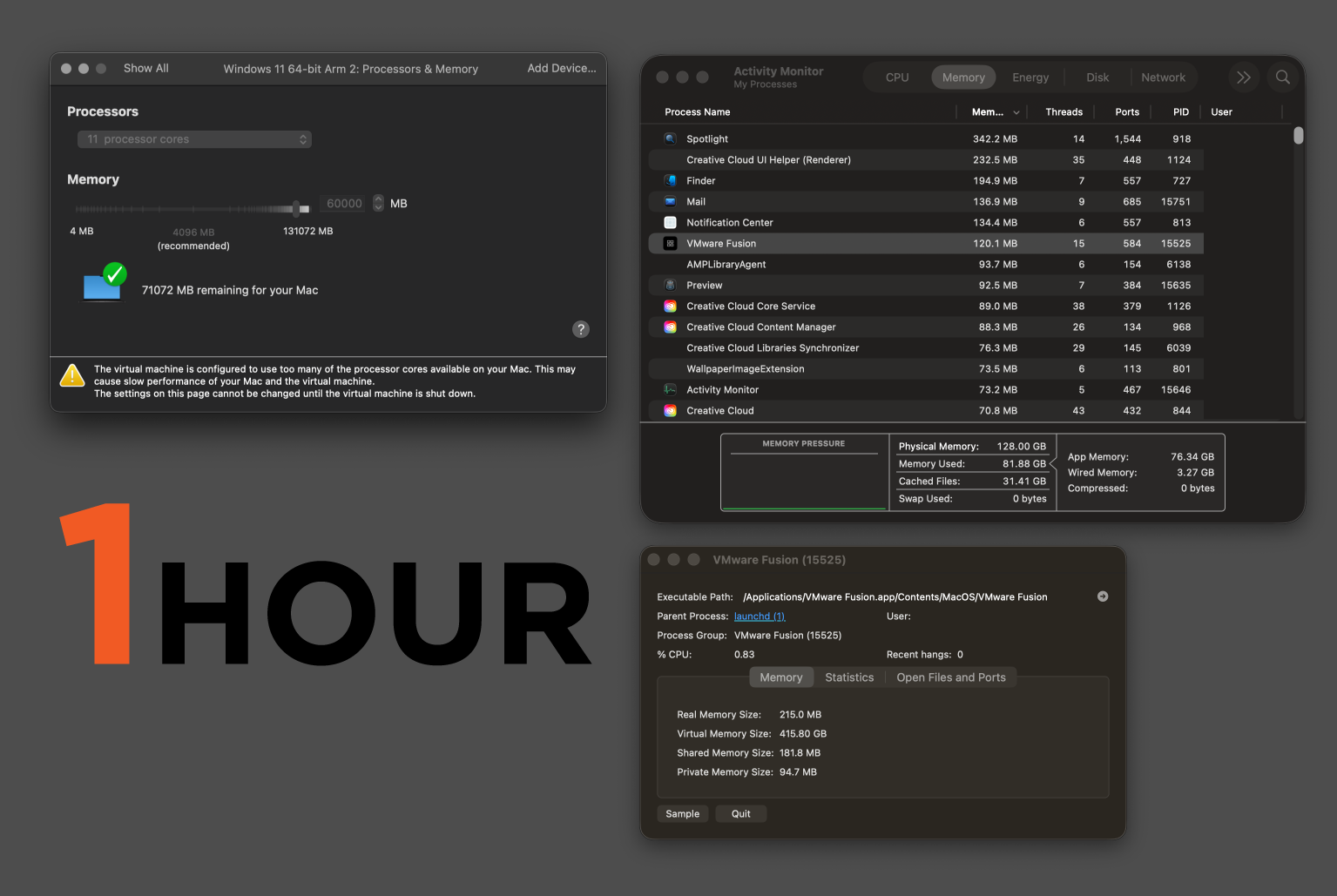
Sent: Dec 29, 2025 12:29 PM
From: Serje Kon
Subject: VMWare Fusion 25H2 With M3 Memory Leak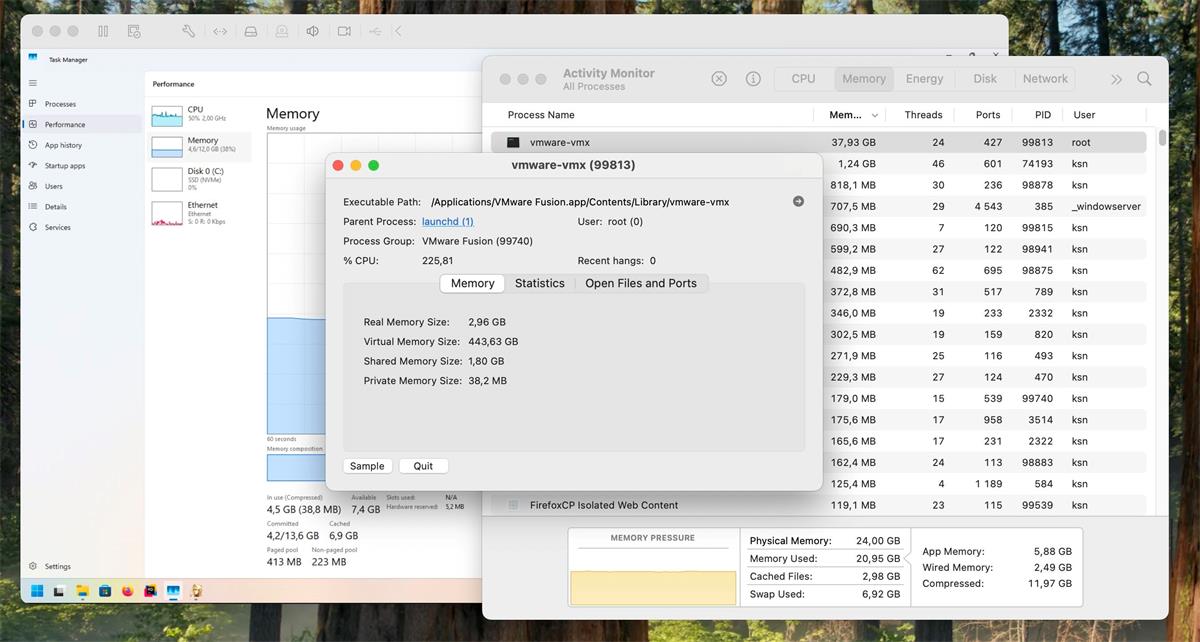
Sent: Dec 16, 2025 07:53 PM
From: Furkan Yucel
Subject: VMWare Fusion 25H2 With M3 Memory Leak
Device and environment information:
Macbook pro m3 max 48gb MacOS Version 15.7.3 (24G419) Running Win11 ARM64 on VMware Professional 25H2 (24995814), allocating 20GB of the 48GB RAM for the VM.