Native macOS UI
Beautiful, responsive interface that feels right at home on your Mac. Built with native SwiftUI controls, smooth animations, and meticulous attention to macOS design guidelines for an authentic Apple experience.
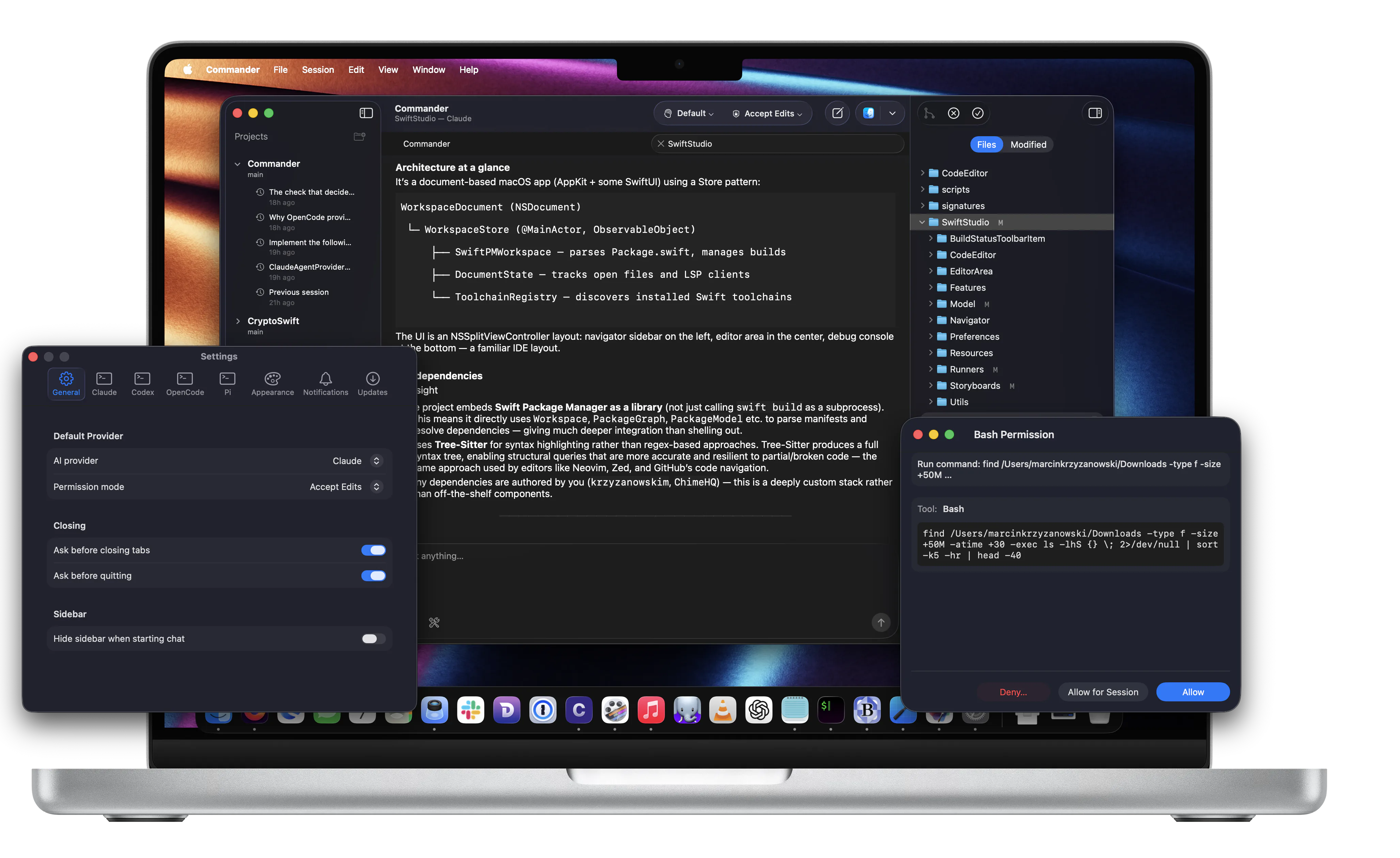
A native macOS interface for AI coding agents with built-in diffs, git workflow, and worktrees-prompt, review, and commit without context switching.
Requires a supported agent CLI installation
Add a project and choose the branch or worktree you want to work in.
Use your preferred supported agent through Commander’s native UI-no new accounts.
See diffs, iterate, then commit with an integrated git workflow.
Watch how Commander streamlines your entire development workflow in seconds
Commander brings the power of AI coding agents to a beautiful native macOS development environment
Beautiful, responsive interface that feels right at home on your Mac. Built with native SwiftUI controls, smooth animations, and meticulous attention to macOS design guidelines for an authentic Apple experience.
Powered by your selected agent CLI. Get intelligent code generation, smart refactoring suggestions, automated documentation, and natural language programming assistance directly in your development workflow.
Seamlessly manage multiple projects with built-in git integration. Work on multiple branches simultaneously using worktrees, handle commits, pull requests, and version control without context switching-all within Commander's elegant interface.
Built with performance-first architecture. Native Swift codebase optimized for Apple Silicon ensures instant responses, smooth scrolling, and efficient resource usage for a productivity-focused developer experience.
Keep your editor. Commander adds a native Mac workflow for prompting, reviewing diffs, and committing changes.
Commander streamlines your software development workflow with intelligent automation
Describe features, bugs, or refactoring tasks in natural language. Commander works through your selected agent CLI and your project context to provide relevant suggestions tailored to your codebase.
See code changes in real-time with inline diffs and syntax highlighting. Review AI‑generated code, suggest modifications, and collaborate with the AI assistant to refine solutions until they're production-ready.
Execute git operations directly from the interface. Create branches and commit changes—all integrated seamlessly into your development workflow.
Commander is a local Mac app. Your credentials stay in your CLI, and your repo stays on your machine.
Commander doesn’t handle authentication. It uses your existing supported agent CLI installation, which manages sign-in and API keys.
Commander does not collect, store, or transmit your repositories to Commander servers. When you run the agent, your chosen CLI may send code context to its provider to generate responses.
This website uses TelemetryDeck to collect anonymized usage data (no cookies; no personally identifiable information) to help improve the product.
Commander is a beautiful native macOS application that provides a powerful interface for supported AI coding agents. It combines AI‑powered coding assistance with integrated git workflow and seamless project management, all wrapped in a native Mac experience.
Yes, Commander is completely free. There are no subscription fees, premium tiers, or hidden costs. It's free for all Mac developers.
Commander requires macOS 15.0 or later and is optimized for the latest macOS features.
Commander connects to your local supported agent CLI and provides a native macOS interface for code generation, refactoring, documentation, and more. It includes an integrated git workflow for seamless version control.
Commander requires macOS 15.0 or later and one supported agent CLI installed. Setup instructions are in the documentation.
Join thousands of Mac developers building better software faster with AI‑powered coding assistance