Wander Console - Discover the Small Web
Wander is a small, decentralised, self-hosted web console that lets visitors to your website explore interesting websites and pages recommended by a community of independent personal website owners.
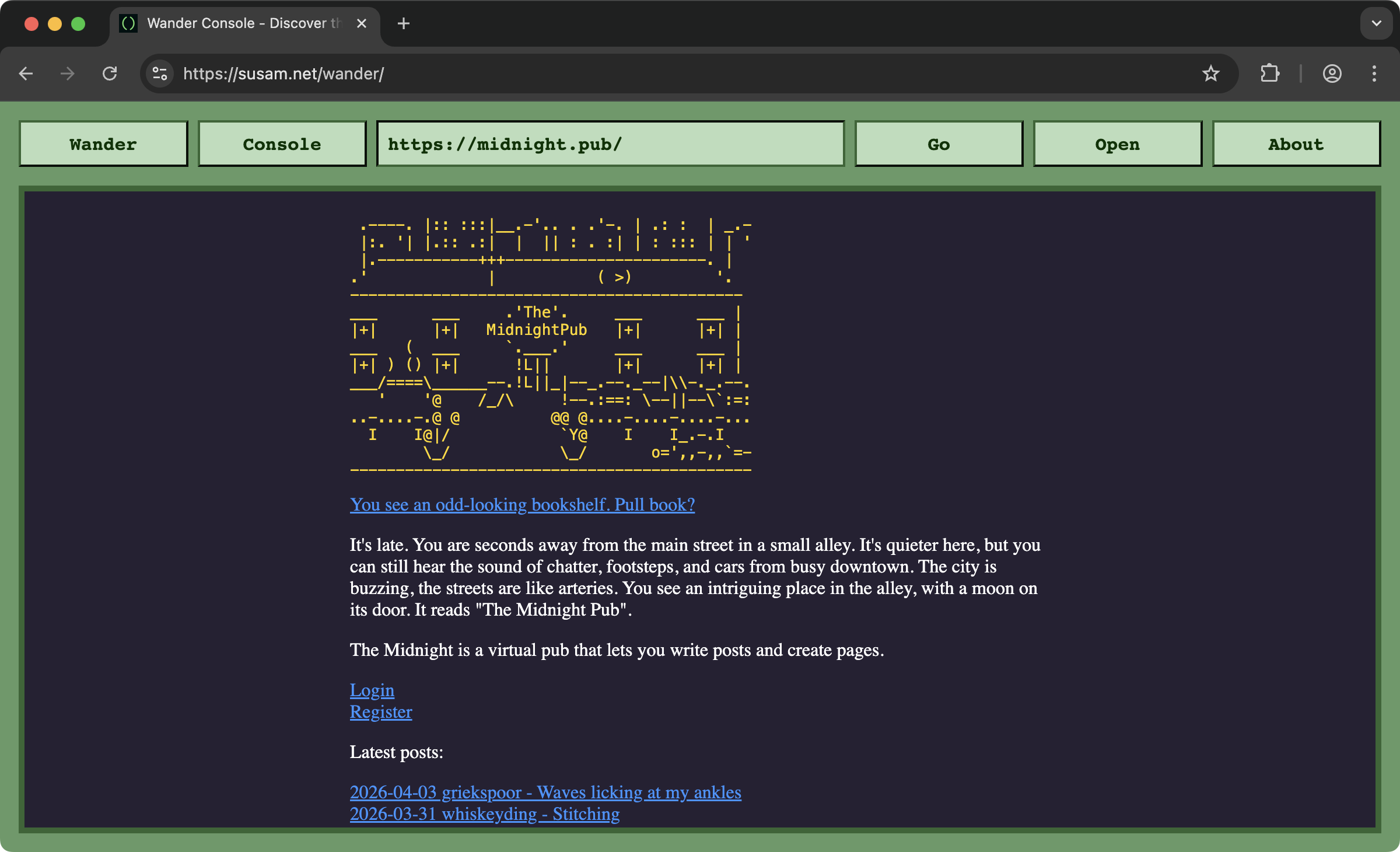
Each Wander console loads personal websites and pages recommended by the Wander community. Further, each Wander console can link to other Wander consoles, forming a lightweight, decentralised network for browsing the small web of personal websites.
Visit https://susam.net/wander/ to see an example of a Wander console.
Visit https://susam.codeberg.page/wcn/ to find a list of known Wander consoles.
Contents
- How It Works
- Wandering the Web
- Changing Base Console
- Install
- Customise Your Console
- Caution
- Wander Console Network
- Design
- Features
- Comparisons
- Join the Community
- Contributing
- Credits
- Support
- Licence
How It Works
A Wander console does two things:
-
Wander pages: It loads a random page from a list of websites and pages recommended by the community.
-
Wander consoles: It can send the visitor to another Wander console on a different website, where they can continue wandering the Web using the new Wander console.
A Wander console is just a directory on your web server with two files:
-
index.html - This is the HTML tool that implements the Wander console user interface.
-
wander.js - This is where you define the list of websites and pages you recommend and the other Wander consoles you want your console to link to. The other Wander consoles you link to are known as the neighbours of your console. So this file defines your console neighbourhood.
Together, these two files form a Wander console. The most interesting
aspect of the Wander console is that everything happens on the
client-side, on the user's web browser. As a website owner, you do
not need to set up any server-side components. The only thing you
need to do is place the above two files somewhere on your web server,
preferably, at the directory /wander/.
Wandering the Web
As a visitor, you begin wandering the Wander network at a Wander console. This might be your own console or someone else's. For example, you can start wandering at https://susam.net/wander/ right now. The console you visit is called the base console. All other consoles are known as remote consoles.
Once you are on a Wander console, you can click the Wander button at the top left to visit websites and pages recommended by your base console as well as remote consoles. Your base console fetches website recommendations from itself as well as from remote consoles and displays them to you.
The first time you load a base console, one of the web pages
recommended by the base console owner is picked randomly and presented
to you. The base console then discovers all the other consoles listed
in its wander.js file (see example). These other
consoles are known as the neighbours of the base console. Each
console lists its neighbouring consoles in its wander.js file.
When you click the Wander button for the first time, your base console selects one of its neighbouring consoles at random and then chooses a page from its recommendations. That chosen page is then shown to you on your base console. At the same time, the neighbours of that console are discovered. Throughout this process, you remain on the base console. You never leave it.
With each click of the Wander button, the base console selects a console at random from the growing list of discovered consoles. Specifically, it selects a console from the most recently discovered 100 consoles. A website or web page recommended by that console is shown to you and its neighbours are added to the list of discovered consoles. In this way, each hop takes you deeper and deeper into the Wander network, while expanding the set of known remote consoles.
Changing Base Console
As mentioned in the previous section, you typically do not leave the base console while wandering the web. However, if you wish, you can click the Console button at the top to visit a neighbouring console. In practice, this is rarely necessary since most consoles look similar, but you can do so if you want to explore a different one.
Some console owners customise the appearance or behaviour of their consoles. You might want to change the base console to encounter such customised consoles. Further, different console owners maintain different ignore lists that define which websites must never appear on their console. An ignore list (see example) typically contains commercial websites that do not fit the spirit of the small web, as well as defunct or incompatible websites that do not load in the console. A console with a well maintained ignore list ensures that a visitor to that console has a lower likelihood of encountering commercial or broken websites. So another reason for changing your base console is to use one with a better ignore list.
Install
Here are the steps to set up Wander Console on your website:
-
Download the Wander bundle from one of the following locations:
- https://codeberg.org/susam/wander/archive/wander.zip
- https://github.com/susam/wander/archive/wander.zip
Both links provide identical copies of the bundle. If one link does not work, say due to service issues, try the other link.
-
Extract the following files:
index.htmlwander.js
-
Place the the two files somewhere on your website, preferrably at the
/wander/path, for example:wander/ ├── index.html └── wander.js -
Open
wander.jsand edit the following JavaScript object:const wander = { consoles: [], pages: [], }Please see https://susam.net/wander/wander.js for an example.
The value for the
consolesproperty is a list of console URLs that you want to link to from your console. This defines your console's neighbourhood. When a user visits your console, it fetches thewander.jsfiles of these neighbouring consoles to discover website recommendations. These console links are also shown when the user clicks the Console button on your console. Further, when another console reaches your console while exploring the network, it follows these links to discover recommendations from your neighbourhood.The value for the
pagesproperty is a list of websites and pages that you want to recommend to the Wander community. When a user visits your console, a recommendation is chosen at random from this list and displayed. Likewise, when another console reaches your console, it uses this list to pick a recommendation at random and present it to its user. -
Once your console is live, share it with others in the following community thread: https://codeberg.org/susam/wander/issues/1.
Hopefully, someone will link to your console and then visitors to their console may receive recommendations from your
wander.js.
Tip: Do not edit the index.html file directly. Keeping your
index.html unmodified makes it easier to update your Wander Console
UI by downloading new versions of index.html and replacing the
existing file. If you want to customise the Wander Console UI, follow
the instructions in Customise Your Console.
Customise Your Console
You can customise the look and feel of your console by adding custom CSS files. You can also customise the functionality of your console by adding custom JavaScript files. Further, you can customise which URLs your console should never load.
Custom CSS
To add a custom stylesheet, say, style.css to your console, edit
your wander.js file and add a styles property:
const wander = {
  consoles: [
    // ...
  ],
  pages: [
    // ...
  ],
  styles: [
    'style.css',
  ]
}
The value of the styles property is a list of CSS filenames. These
filenames may be paths relative to your index.html or absolute URLs.
Custom JS
Similarly, to add a custom script, say, script.js, add a scripts
property:
const wander = {
  consoles: [
    // ...
  ],
  pages: [
    // ...
  ],
  scripts: [
    'script.js',
  ]
}
The value of the scripts property is a list of JavaScript filenames.
These filenames may be paths relative to your index.html or absolute
URLs.
Customise Ignore List
To block certain URLs from loading on your console, add or edit the
ignores property:
const wander = {
  consoles: [
    // ...
  ],
  pages: [
    // ...
  ],
  ignore: [
    'https://example.com/',
    'https://example.net/foo/',
  ]
}
Each entry in the ignore list represents a wildcard pseudo-prefix pattern that console and page URLs are matched against. If a console URL or a web page URL matches one of the given wildcard prefix patterns, your console will never load it.
Let us elaborate how the wildcard pseudo-prefix pattern works. To check whether a URL matches a pattern, the following normalisation is done on both the URL and the pattern:
- The protocol is removed from the beginning.
- Query parameters and fragment identifiers are removed from the end.
- The remainder is converted to lowercase.
- A trailing forward slash is added if it does not already exist.
After normalisation, the pattern is interpreted as a wildcard pattern
where any asterisk (*) matches zero or more arbitrary characters in
the normalised URL.
A URL is considered to match a pattern if the normalised pattern matches the beginning of the normalised URL. This peculiar matching algorithm has some desirable effects and some counterintuitive ones:
-
An ignore pattern
https://example.com/ignores all of the following URLs:http://example.com/ https://example.com/ https://example.com/foo/ ftp://example.com/ -
An ignore pattern
https://example.com/fooignores all of the following URLs:https://example.com/foo https://example.com/foo/ https://example.com/foo/barBut counterintuitively, it does not ignore the URL
https://example.com/foobarbecause the normalised patternexample.com/foo/is not a prefix of the normalised URLexample.com/foobar/. -
An ignore pattern
https://example.com/foo/is equivalent to the previous one. This one makes it more obvious why it doesn't matchhttps://example.com/foobar. -
An ignore pattern
https://example.com/foo?p=hellomatches all of the following URLs:https://example.com/foo https://example.com/foo/ https://example.com/foo?p=world https://example.com/foo#chapter1 https://example.com/foo/bar/In practice, there is usually no need to use a pattern like this. The simpler pattern
https://example.com/foo/behaves the same and is clearer. -
An ignore pattern
https://example.com/foo/#worldis equivalent to the previous one. As before, the simpler patternhttps://example.com/foo/behaves the same and is clearer. -
An ignore pattern
https://*.example.com/matches all of the following URLs:https://foo.example.com/ https://bar.example.com/baz https://web.archive.org/web/*/https://foo.example.com/ -
An ignore pattern
httpS://Example.COM/Foomatches all of the following URLs:https://example.com/foo HTTPS://EXAMPLE.COM/FOO Https://EXAMPLE.com/foO
The last example demonstrates that prefix matching is
case-insensitive. This can be counterintuitive because a URL like
https://example.com/foo would match https://example.com/FOO as
well, even though it is quite possible that they are two distinct
pages serving different content.
An alternative approach would be to perform case-insensitive matching only for the domain part and case-sensitive matching for the remainder. However, we have decided to go with the above algorithm for the sake of simplicity and brevity in both code and documentation. This algorithm takes only 8 lines to implement. A more sophisticated solution that feels more intuitive for all edge cases would take significantly more code and would also take longer to explain.
Customisation Order
Customisation files are loaded in the following order:
- The console's own built-in stylesheet and script load first.
- Then the console loads all the custom stylesheets in the order specified.
- Then it loads all the custom scripts in the order specified.
- Finally, it sets up the console with a randomly chosen website.
Prefer using this customisation mechanism to customise your console.
This allows you to keep your index.html unmodified, which makes it
easier to upgrade your Wander Console UI simply by downloading a new
copy of the file and replacing your existing one.
Caution
When adding links to your console, you might want to check if each
console loads successfully within the console. Some websites set the
X-Frame-Options HTTP header or the frame-ancestors directive in
their Content-Security-Policy header to prevent their pages from
being embedded in other websites. Such pages will not load inside the
Wander console.
Adding such links to your wander.js can disrupt the wandering
experience for users of the Wander network.
To test a link, open https://susam.net/wander/ (or your own Wander
console), paste the link into the URL textbox (the text input field)
and click Go. If the link loads within the console, it is safe to
include. If it does not, please avoid adding it to your wander.js.
Wander Console Network
Due to the distributed nature of the network, it is difficult to maintain a complete list of all Wander consoles. However, we make a best effort to keep track of known consoles. The current list of known consoles is available at:
This list is generated from time to time by a tiny crawler project maintained at https://codeberg.org/susam/wcn.
Further, you can crawl the network from your console or any given console by clicking the Console button in the top navigation bar and then selecting Crawl. Doing so will show only the portion of the network that is reachable from that console.
Design
One of the design goals with Wander has been to keep it fully decentralised, similar to the Web itself. I have tried to avoid having any centralised list of URLs or seed nodes. Each Wander console is just a small, self-hosted node made up of two static files. Anyone can run it on their own website, define the pages they recommend and link to other consoles as neighbours. All Wander consoles are equal participants from a technical perspective. None of them act as a canonical source of seed URLs. The network is defined entirely by these independently hosted consoles. A visitor can start from any one of them and browse the network. With each click, the console tool simply follows the console neighbourhood from one console to another and loads the recommended pages it discovers.
Comparisons
Wander is often compared to other projects and trends like webrings, Kagi Small Web and StumbleUpon. There is indeed a lot of similarity between Wander and such projects. After all, each such service has been an inspiration behind Wander. While there is a lot of similarity with such services, there are some differences as well. These differences are noted in the following subsections.
Wander vs Kagi Small Web
Kagi Small Web currently accepts only blogs, comics and YouTube channels. It does not accept arbitrary small websites. In fact, it was this particular limitation that motivated me to build Wander.
Unlike Kagi Small Web, there is no central list of URLs in Wander. Each participant hosts their own Wander console along with their own list of favourite URLs. You can begin browsing the network from any console. The pages you see are pulled from that console, the consoles it links to and so on recursively.
Wander vs StumbleUpon
Wander has similarities to StumbleUpon as well but unlike StumbleUpon there is no central service. The Wander network lives entirely on independent personal websites maintained by individuals. The pages shown in a console come directly from such Wander consoles that belong to individual personal website owners.
Wander vs Webrings
Wander is similar to webrings in spirit, but differs in structure. A typical webring forms a cycle, where each site links to a fixed next and previous site. In Wander, the network graph is arbitrary. Each instance can link to any number of pages and other instances.
There is no central list and no ring maintainer deciding how sites are connected. With Wander, you decide which pages to recommend and which other consoles to link to. This means you are in full control of your recommendations and your Wander neighbourhood.
Join the Community
If you have set up a Wander Console on your website, please share a link to it in the following community thread: https://codeberg.org/susam/wander/issues/1.
Doing so helps other members of the community learn about the existence of your console and link to it from their own consoles.
Join Our IRC Channel
We have an Internet Relay Chat (IRC) channel where you can meet and greet other members of the Wander Console community. If you are new to IRC, you can join the channel using the following web gateway: web.libera.chat/#wander.
If you use an IRC client, connect to irc.libera.chat (port 6667 for
plaintext or 6697 for TLS) and then run /join #wander.
This channel is for people who enjoy building personal websites and want to talk to each other. You are welcome to share your Wander Console URL, link to your website or your recent articles as well as links to other non-commercial personal websites.
Contributing
Here are a few things to keep in mind when submitting fixes and improvements:
-
Please create a new pull request for your contribution.
-
Run
make depsandmake checksto catch code style issues before sending your pull request. If you do not havemake, refer to the Makefile and run the commands fordepsandchecksmanually. -
Please read Writing Good Commit Messages and follow the recommendations there. Here are some important things to check before sending a pull request:
-
Limit the first line of the commit message to 50 characters.
-
If a second line is present, it must be blank.
-
You may include a more detailed explanation starting from the third line. This is optional.
-
If you include a detailed explanation, ensure that each line is no longer than 72 characters. Hard-wrap the text by inserting line breaks. In Vim, you can use
:set tw=72and reflow text withgq. In Emacs, useM-qto reformat a paragraph. For other editors, refer to their documentation. If your editor does not support automatic hard-wrapping, you may need to wrap lines manually. -
Use proper capitalisation, punctuation and complete sentences.
These guidelines may feel old-fashioned, but they are the conventions I follow. I am more particular about commit messages than I am about code: code can be fixed in a later commit but commit messages cannot be changed once merged. Fixing them requires rewriting commit history, which I want to avoid. Therefore, please ensure the commit message is in good shape when submitting a pull request.
-
-
I know my code is not the most modern way to write JavaScript. Still, I would appreciate it if any new code follows the existing style as much as possible.
-
After opening a pull request, please be patient. I have a very busy schedule and cannot review changes quickly. I am currently busy with a few academical pursuits, so I will have limited time to collaborate on pull requests until June 2026. I will still try to review submissions whenever I can during breaks. (This tool itself was written during one such break.)
-
The smaller the change, the easier it will be for me to review and merge the changes.
-
I may not merge every change, so please keep that in mind when deciding how much time to invest in a contribution. I do not want you to feel too disappointed if a change is not merged. I generally recommend making changes that are first and foremost useful to you. That way, even if your contribution is not merged, it will still be valuable to you and something you can continue using for yourself.
Credits
Thanks to:
- exurd for adding sandbox settings to the wander iframe.
- 4thguy for adding a fix to prevent recently recommended pages from reappearing too soon.
Support
I put this together in the early hours of a certain morning (18 Mar 2026), so it may not be very polished and the list of websites is quite small as well. But the list is growing. I am adding some finishing touches too whenever I can spare some time from my otherwise busy schedule. If you encounter a bug, please let me know.
Licence
This is free and open source software. You can use, copy, modify, merge, publish, distribute, sublicence and/or sell copies of it, under the terms of the MIT Licence. See LICENCE.md for details.
This software is provided "AS IS", WITHOUT WARRANTY OF ANY KIND, express or implied. See LICENCE.md for details.