This repository has been archived on
. You can view files and clone it, but you cannot make any changes to its state, such as pushing and creating new issues, pull requests or comments.



⚠️ THIS REPOSITORY WAS ARCHIVED HERE AND MOVED TO GITHUB, GO TO: https://github.com/jjba23/welkomscherm.el ⚠️

welkomscherm is Dutch for welcome screen.
welkomscherm.el is a small, calm, extensible welcome screen / dashboard for Emacs: a centred handful of lines, the links you actually use, and nothing that gets in your way. It greets you in a graphical frame and in a plain terminal alike, on any Emacs from 25.1 upwards, and it asks nothing of you that Emacs does not already provide.
Extensible and configurable to your liking and following and respecting your themes out of the box and with customizable faces.

One screen, two themes, every section: the demo alternates between the default view and one with separators, recent files and system details enabled, in a dark and a light theme. The frames are drawn from the package's own buffer output — see Showcase and screenshots for how, and for more pictures.
Why welkomscherm ?
Every editor has a welcome screen; most of them try to be a cockpit. That is wonderful when you want a cockpit, and tiring when you only want to feel at home.
welkomscherm makes one promise: *a small, legible, beautifully centred screen that you can read in a second and trust to keep working for the next fifty years.* Concretely, that promise is kept by four choices.
- No external libraries.
- The whole package runs on Emacs built-ins alone. There is nothing to install alongside it and nothing to break when another package changes. The section separators are drawn by welkomscherm itself and re-flow with the window, so there is not even a rendering library to miss.
- Tiny and auditable.
- The entire package is a single file of a few hundred lines. You can read all of it on a coffee break, and you will understand all of it.
- Composable sections.
- Every block of the screen is a self-contained unit
with its own heading, its own visibility rule and its own body. Adding,
removing or reordering a section means editing one list — the list
welkomscherm/sections— and nothing else. - One screen, two worlds.
- The same buffer renders identically in GUI Emacs and in terminal Emacs, local or over SSH, because it is plain text and ordinary Emacs buttons rather than images and widgets.
Features
- A welcome screen, not a cockpit.
- Title, bookmarks, work links, action buttons, optional recent files, optional system details. Nothing else asks for your attention.
- Composable sections.
- Add, remove or reorder blocks of the screen by
editing
welkomscherm/sections. A section can be one of the built-ins, a record you build withwelkomscherm/make-section, or a plain function of no arguments. - Self-drawn separators.
- Opt-in horizontal rules that follow the centring
axis of your text, re-flow on resize, and need no
page-break-linesor any other package. Seewelkomscherm/use-separator. - Clickable everything.
- Bookmarks and actions are ordinary Emacs buttons,
so
mouse-1,TABandRETall work, in a GUI frame and in a terminal. - GUI and TUI parity.
- No images, no widgets, no conditional code paths: the same screen on a laptop, a workstation, or a server console over SSH.
- Opt-in extras.
- Recent files (from the built-in
recentf) and system details are one flag away, and stay out of the way until you ask for them. - Startup honesty.
- A small line tells you how long Emacs took to start, handy while tuning your configuration and easy to switch off afterwards.
- Your private and work lives apart.
- Separate bookmark lists for personal and work links, each arranged in rows, the way you would arrange a shelf.
- Quiet by default.
- The buffer is read-only, a little extra line spacing
keeps it airy (user customizable via
welkomscherm/line-spacing), and point is left on the first line so you always see it from the top. - Free software, all the way.
- GPL-3.0-or-later for the code, FDL-1.3+ for the docs. No telemetry, no network, no surprises.
Ways to install
Four routes to the same 1.2.4, from the most automated to the most manual. They all build the tag this README documents.
From the Guix channel
GNU Guix is the functional package manager this project is developed with: a build is a pure function of its inputs, so the same recipe gives the same result everywhere, and an upgrade that goes wrong can be rolled back.
The jointhefreeworld channel carries emacs-welkomscherm at 1.2.4, so a checkout of the channel is enough — no package definition to write:
git clone https://codeberg.org/jjba23/guix-jointhefreeworld.git
guix install -L ./guix-jointhefreeworld emacs-welkomscherm
Add the channel to $HOME/.config/guix/channels.scm (the channel's README has the four lines) and a plain guix install emacs-welkomscherm keeps working on every later guix pull.
From the Nix flake
Nix offers the same declarative, reproducible model with its own language, its own store and a binary cache, and it is a natural fit if the rest of your machine is already described in Nix.
The jointhefreeworld flake builds this project with this repository's own expression, so the package cannot drift from the source:
nix build github:jjba23/nix-jointhefreeworld#emacs-welkomscherm
The same attribute is available as an overlay, so pkgs.jointhefreeworld.emacs-welkomscherm works inside a NixOS or home-manager configuration too.
As a container image
Podman or Docker is the route that puts nothing on the host: the Dockerfile in this repository builds the project in a builder stage and copies only what it installed into a runtime stage, so the image is small and the host keeps its own toolchain untouched.
podman build -t welkomscherm-el .   # docker build -t welkomscherm-el . also works
podman run --rm -it welkomscherm-el
The image's entry point is Emacs, with welkomscherm.el installed and byte-compiled, which makes it useful for a quick try and for reproducing a bug on a clean system.
As a distribution package
Debian, openSUSE and Arch each get the project through their own package manager. Packaging lives in this repository under packaging/ and is pinned to the same release tag, so the recipes and the sources they build are versioned together.
None of the three archives ships welkomscherm.el yet, so these are recipes to build rather than packages to install from a mirror:
| Distribution | Package | How to build it |
|---|---|---|
| Debian, Ubuntu | elpa-welkomscherm |
copy packaging/debian to the repository root, then dpkg-buildpackage -us -uc -b |
| openSUSE | emacs-welkomscherm |
osc build with packaging/opensuse |
| Arch | emacs-welkomscherm |
makepkg -si in packaging/arch |
Each recipe carries its own dependency list, so a missing library fails the build with its name rather than producing a package that cannot load.
Which one?
- Guix if you want the toolchain the project is tested with, and the ability to roll back a bad upgrade.
- Nix if the rest of your machine is already declarative; the flake pins nixpkgs and gives you a binary cache.
- Container if you only want to try the release, or reproduce a report on a machine that has nothing installed.
- Distribution package if you want the project managed by the same tool as the rest of your system, with its licence, manual page and launcher in the usual places.
Installation
Requirements
- GNU Emacs 25.1 or newer. That is the whole list. welkomscherm has no
external dependencies and does not require any part of Emacs that is not
already there (no
cl-libbeyond the bundled one, no icon package, no rendering library). - Optional:
recentf-modeif you want the recent files section to have something to show.
Install with Elpaca and use-package (recommended)
The package is not (yet) available in popular Emacs repositories such as MELPA or ELPA, so fetch it straight from the source of truth:
  (use-package welkomscherm
    :ensure (:host codeberg :repo "jjba23/welkomscherm.el" :branch "trunk")
    :bind (("C-c SPC SPC" . welkomscherm))
    :init
    (setopt welkomscherm/centered t
            welkomscherm/use-section-title t
            welkomscherm/use-separator nil)

    ;; A quiet two-line greeting.
    (setopt welkomscherm/top-title-list
          '("Make yourself comfortable."
            "Your files are right here."))

    (setopt welkomscherm/bookmarks-list
          '((("dotfiles" . "~/Dev/Personal/dotfiles/")
             ("notes" . "~/Dev/Personal/private-notes/")
             ("emacs config" . "~/Dev/Personal/dotfiles/users/joe/emacs/init.el"))
            (("second-row-api" . "~/Dev/Personal/second-row-api/README.md")
             ("second-row-ssr" . "~/Dev/Personal/second-row-ssr/"))))

    (setopt welkomscherm/work-list
          '((("my-work" . "~/Dev/Work/my-work/")
             ("hem-wiki" . "~/Dev/Work/hem-wiki/"))))

    (setopt welkomscherm/actions-list
          '((("*scratch*" . (lambda (btn) (switch-to-buffer "*scratch*")))
             ("*Messages*" . (lambda (btn) (switch-to-buffer "*Messages*")))
             ("re-render me" . (lambda (btn) (welkomscherm))))))

    ;; Offer a hand, only if you want it.
    (setopt welkomscherm/show-recent-files t
            welkomscherm/show-system-details nil))
Then simply call M-x welkomscherm whenever you want to come home. To make it
the first thing you see, see Welkomscherm at startup.
A note on
setopt: it arrived in Emacs 29. If you run an older Emacs — and welkomscherm is happy all the way back to 25.1 — usesetqin place ofsetoptand everything else above stays the same.
Install by hand
Two lines are enough if you keep the file somewhere on your load-path:
git clone https://codeberg.org/jjba23/welkomscherm.el ~/.emacs.d/site-lisp/welkomscherm.el (add-to-list 'load-path "~/.emacs.d/site-lisp/welkomscherm.el")
(require 'welkomscherm)Install with package-vc (Emacs 29 and newer)
If you run Emacs 29 or newer, the built-in package-vc can fetch, build and
load it without any third-party package manager at all:
(package-vc-install "https://codeberg.org/jjba23/welkomscherm.el")
Or interactively: M-x package-vc-install RET and paste the URL.
Install with Nix
This repository carries the expression itself, default.nix next to
welkomscherm.el, so nix-build in this checkout builds the package. It is
also part of
nix-jointhefreeworld,
the set of Nix packages for everything Jointhefreeworld. The set's
emacsOverlay adds it to emacsPackages, byte-compiled and with its
autoloads, so an Emacs that Nix builds gets it the way it gets any other
package:
  let
    emacsPackages = pkgs.emacsPackages.overrideScope nix-jointhefreeworld.emacsOverlay;
  in
    emacsPackages.withPackages (epkgs: [ epkgs.welkomscherm ])
Quick start
Under a minute, start to finish:
- Put welkomscherm on your
load-pathand require it (see Installation). -
Point it at a directory or file you open all day:
(require 'welkomscherm) (setq welkomscherm/bookmarks-list '((("org" . "~/org/") ("notes" . "~/notes.org")))) - Run
M-x welkomscherm.
That is the whole tour. Everything below is refinement: what the screen shows, how it is built, and how to make it yours.
Welkomscherm at startup
If you want the welcome screen to be your initial buffer whenever you start a new Emacs (a GUI frame or a terminal one), add this to your Emacs configuration:
  (setq initial-buffer-choice
        (lambda () (welkomscherm) (get-buffer welkomscherm/buffer-name)))
Note that if using use-package it's recommendable to apply this setting in
your (use-package emacs) declaration.
Configuration
Feel free to dive a little into the source code and explore all the configuration options: every option is documented in its own docstring. Out of the box, welkomscherm shows its top title, then your work and personal bookmarks, your action buttons, and how long startup took.
Every option below belongs to the welkomscherm customization group and can be
set with setopt, with setq on older Emacsen, or through
M-x customize-group RET welkomscherm.
Look, buffer and titles
-
welkomscherm/buffer-name(string, default"*welkomscherm*") - The name of the buffer welkomscherm renders into. Change it only if another package wants that name.
-
welkomscherm/centered(boolean, defaultt) - Whether text lines are centred. When nil, everything is drawn flush left, which some people prefer in narrow terminals.
-
welkomscherm/line-spacing(integer, float, or nil, default10) -
How many pixels to use for
line-spacing. An integer is a number of pixels and a float is a fraction of the current line height. When nil, the buffer keeps the existing editor defaultline-spacing. -
welkomscherm/use-section-title(boolean, defaultt) - Whether section headings are drawn. Turning it off keeps the blank-line and rule separation but hides the titles, for a quieter screen.
-
welkomscherm/use-separator(boolean, defaultnil) -
Whether a horizontal rule separates sections. The buffer keeps a plain form
feed (the
^Lpage break of a text file) and welkomscherm draws it as a rule using nothing but Emacs, so no rendering library is involved, and the rule re-flows by itself whenever the frame is resized. The old namewelkomscherm/use-form-feedstill works as an obsolete alias. -
welkomscherm/separator(character, default?─) -
The character the rule is made of; try
?=,?*or?·for another texture. -
welkomscherm/separator-width(integer or nil, defaultnil) -
How wide the rule is, in columns.
nilfollows the content and shares the text's centring axis: the rule spansfill-columncolumns, or the window when that is narrower. -
welkomscherm/top-title-list(list of strings) - The lines of the top banner. Default: "While any editor can save your files" and "only Emacs can save your soul !". Make it say whatever feels like home.
- ?
- The heading options —
welkomscherm/bookmarks-name,welkomscherm/work-name,welkomscherm/actions-name,welkomscherm/recent-files-name,welkomscherm/system-details-nameandwelkomscherm/init-time-name(all strings) :: Rename any section heading. The little suit and heart glyphs in the defaults are just text; replace them with nothing, or with your own favourite marks.
Optional sections
Two sections are off by default, so that they never surprise you, and each turns on with a single flag.
-
welkomscherm/show-system-details(boolean, defaultnil) -
When non-nil, a small section reports the running Emacs version, the
operating system, the host and the user. Its rows come from
welkomscherm/system-details-list. -
welkomscherm/system-details-list(alist) -
Each entry is
(LABEL . VALUE), where VALUE is either a string or a function of no arguments returning a string. The default rows are built from Emacs's own variables. Add your own, for instance to greet you by name:(setopt welkomscherm/show-system-details t) (setopt welkomscherm/system-details-list '(("Emacs" . welkomscherm/system-emacs-version) ("System" . welkomscherm/system-description) ("Host" . system-name) ("User" . welkomscherm/system-user-name) ("Mood" . "ready to write"))) -
welkomscherm/show-recent-files(boolean, defaultnil) -
When non-nil, lists the files you visited recently. The list is read from
the built-in
recentf-list, so enablerecentf-modefor it to fill up. Files that no longer exist on disk are skipped, so the section never offers you something that is gone. -
welkomscherm/recent-files-limit(integer, default5) - How many recent files to show. The section stays quiet when there is nothing to show, so it never leaves an empty heading behind.
  (setopt welkomscherm/show-recent-files t
          welkomscherm/recent-files-limit 5)
Startup time
-
welkomscherm/show-init-time(boolean, defaultt) - Whether to show how long Emacs took to start. Handy while you are tuning your configuration; turn it off once you are happy.
-
welkomscherm/init-time-name(string, default"Emacs startup took τ") - The heading for that value.
The screen itself
-
welkomscherm/sections(list) - The ordered list of sections to render — a mix of the built-in section records and any sections of your own. See Sections: the building block.
- ?
welkomscherm/top-title,welkomscherm/work,welkomscherm/bookmarks,welkomscherm/recent-files-section,welkomscherm/actions,welkomscherm/system-details,welkomscherm/init-time:: These are the built-in section records themselves. You rarely set them directly; you reference them when you composewelkomscherm/sections, or when you want to reuse one of them next to a section of your own.
Hooks
-
welkomscherm/pre-render-hook(hook) -
Run before the buffer is populated, with the welkomscherm buffer current.
A natural place to adjust
fill-columnso that centring matches the width of your frame. -
welkomscherm/post-render-hook(hook) - Run after the buffer is populated, with the welkomscherm buffer current.
Both are described with examples in Available hooks.
Sections: the building block
Everything on the screen is a section. A section is a small record, built
with welkomscherm/make-section, that knows three things:
- its name — the heading drawn above it. It can be a plain string, a
function returning a string (so the heading follows customization made
later), or
nilfor a section with no heading at all; - its render function — a function of no arguments that grows the buffer;
- its condition — a function of no arguments; when it returns non-nil the
section is shown, otherwise it is skipped entirely.
nilmeans "always show".
The shared framing — the blank line, the optional separator and the heading —
is drawn for you by welkomscherm/render-section, so a section body only ever
draws its own content. That is what makes sections independent: to add,
remove or reorder one, you never touch the rendering code.
The screen itself is simply the list welkomscherm/sections, rendered in
order:
  welkomscherm/sections
  ;; => (welkomscherm/top-title welkomscherm/work welkomscherm/bookmarks
  ;;     welkomscherm/recent-files-section welkomscherm/actions
  ;;     welkomscherm/system-details welkomscherm/init-time)
Reorder that list to reorder your home screen; drop an element to retire a section; add your own to make the screen truly yours. A section can even be a plain function of no arguments, if that is all you need:
  (setopt welkomscherm/sections
          (list welkomscherm/top-title
                ;; A section of your own, built as a record.
                (welkomscherm/make-section
                 :name "Today"
                 :condition (lambda () (bound-and-true-p org-agenda-files))
                 :render (lambda () (welkomscherm/insert-muted "Make it a good one.")))
                ;; Or just a bare function.
                (lambda () (welkomscherm/insert-muted "and a warm cup of coffee"))
                welkomscherm/bookmarks
                welkomscherm/actions))
The primitives you can draw with
A section body is ordinary Emacs Lisp: you may insert whatever you like. To
keep it looking like the rest of the screen, use welkomscherm's own helpers.
| Helper | What it does |
|---|---|
welkomscherm/insert-muted |
insert text in the muted face and centre the line |
welkomscherm/insert-new-line |
end the current line |
welkomscherm/insert-spacer |
insert the two-space gap between two buttons |
welkomscherm/insert-separator |
insert a horizontal rule marker, followed by a newline |
welkomscherm/maybe-separator |
the same, only when separators are enabled |
welkomscherm/maybe-centered |
centre the current line when welkomscherm/centered |
welkomscherm/render-rows |
draw rows of (ALIAS . PATH) buttons |
welkomscherm/render-action-rows |
draw rows of (LABEL . FUNCTION) buttons |
welkomscherm/render-section |
draw one section, framing and all |
A slightly more ambitious section, with its own buttons:
  (welkomscherm/make-section
   :name "Capture"
   :render (lambda ()
             (welkomscherm/render-action-rows
              (list (list (cons "note" (lambda (btn) (find-file "~/org/inbox.org")))
                          (cons "task" (lambda (btn) (find-file "~/org/tasks.org"))))))))
Available hooks
welkomscherm.el allows you to run code arbitrarily both before it renders, as well as after. You should feel free to customize this to your liking.
On the technical side, this means two hooks are made available,
welkomscherm/pre-render-hook and welkomscherm/post-render-hook.
Find here an example where we adjust the fill-column in the welkomscherm
buffer so that the dashboard gets centered properly according to the size of
the frame.
By default, without this, centering is based on your default fill-column
(likely 70 char) due to (center-line).
  (add-hook 'welkomscherm/pre-render-hook
            (lambda () (setq-local fill-column (frame-parameter nil 'width))))
Find here an example of running arbitrary code after rendering:
  (add-hook 'welkomscherm/post-render-hook
            (lambda () (message "welkomscherm rendered successfully")))
How welkomscherm compares
The Emacs dashboard space is friendly and varied; each of these packages is a good answer to a slightly different question. Read this table as a map rather than a scoreboard: any of them may be the right home for you.
| Package | Hard requirements | What it gives you | How you shape it |
|---|---|---|---|
| welkomscherm.el | Emacs ≥ 25.1 (nothing else) | centred links, bookmarks, work, actions, recent files, system details, startup time | composable sections in one list |
| emacs-dashboard | Emacs ≥ 27.1 | banner, recent files, bookmarks, projects, agenda, registers | dashboard-items and dashboard-startupify-list |
| enlight | Emacs ≥ 27.1 and compat |
one fully custom string, plus optional text menus | enlight-content and hooks |
| welcome.el | Emacs ≥ 27.1 and nerd-icons |
a banner header and a key-driven command menu | welcome-menu-items |
| minimal-dashboard.el | Emacs ≥ 27.1 | a centred image and a line of text | a handful of variables |
A few notes to keep the comparison honest (all read from the projects' repositories):
- emacs-dashboard is the richest of the group and the closest thing to a
batteries-included cockpit; it is also the largest, with roughly 2,400 lines
across
dashboard.elanddashboard-widgets.el. Itspage-break-lines,projectileand icon dependencies are optional, not required. - enlight is deliberately the opposite: a small framework (
330 lines) where
you supply the content as a string. Its only external dependency is ~compat
. - welcome.el is a compact welcome buffer (
277 lines) built around a command
menu, and needs ~nerd-icons
for its icons. - minimal-dashboard.el narrows the idea down to an image and a line of text (~337 lines).
Against all of these, welkomscherm's distinguishing choices are its zero external dependencies, its section abstraction — every block is a reusable unit you can reorder or share — and its strict equivalence between GUI and TUI. When the package is measured against Emacs's image-display limits, this is what lets the very same screen greet you on a laptop, a workstation and a server console without a single conditional.
Tips, recipes and troubleshooting
The screen is not centred the way I like it
Centring follows fill-column (through center-line), not the window. Set it
per-buffer in a hook, as shown in Available hooks:
  (add-hook 'welkomscherm/pre-render-hook
            (lambda () (setq-local fill-column (frame-parameter nil 'width))))
The recent files section is empty
It reads the built-in recentf-list. Enable recentf-mode, visit a few
files, and the section will fill up. Files that have since been deleted are
skipped, and a section with nothing to show draws nothing at all.
A section disappeared
Sections hide themselves when their condition says so. The work and bookmark
sections vanish when their lists are empty, recent files when there is nothing
recent, and system details when welkomscherm/show-system-details is off. That
is the feature, not a bug: no empty headings, ever.
How do I make my own section look native?
Yes — build it with welkomscherm/make-section and draw inside it with the
helpers in The primitives you can draw with.
You get the heading, the spacing and the separator for free.
How do I get back out?
The welcome screen is an ordinary buffer, so C-x b switches away and C-x k
closes it. If you would like a single key to dismiss it, give yourself one in
the post-render hook:
  (add-hook 'welkomscherm/post-render-hook
            (lambda () (local-set-key (kbd "q") #'kill-buffer-and-window)))
Does it work in a terminal?
Yes, identically: it is plain text and ordinary Emacs buttons, so it works over
SSH in emacs -nw with no images and no special fonts.
Testing and development
The project ships with an ERT suite in test/welkomscherm-test.el and a
Maak file. With maak installed, a single command runs the whole quality gate
from a clean tree.
maak on its own runs check, which:
- byte-compiles the package and its test suite with warnings turned into errors;
- enforces
checkdocthroughtest/welkomscherm-checkdoc.el, which turns style findings into a non-zero exit; - runs the ERT suite.
Other tasks: maak compile, maak test, maak lint, maak clean,
maak repl (an Emacs with the package loaded, ready for hacking) and
maak tasks (to list them all).
If you prefer plain Emacs, the suite runs on its own too:
  emacs -Q --batch -L . -L test -l test/welkomscherm-test.el \
        -f ert-run-tests-batch-and-exit
The package itself needs no external library at all. Even the horizontal rules
that separate sections are drawn by welkomscherm itself, with no library: see
welkomscherm/use-separator and welkomscherm/separator.
Showcase and screenshots
Default view, both themes:


Everything on, both themes:


These pictures are generated from the real thing, not mocked up:
screenshots/capture.el renders the package in a batch Emacs and dumps the
buffer — text, styling runs and all — and screenshots/render.py paints that
output with the Modus themes' own palette. (The mode line is drawn by the
renderer, and the startup-time section is left out, because a batch render has
no meaningful startup time to report.) Regenerate them with Emacs, and with
Python 3 and Pillow:
  emacs -Q --batch -L . -l screenshots/capture.el screenshots/out
  python3 screenshots/render.py
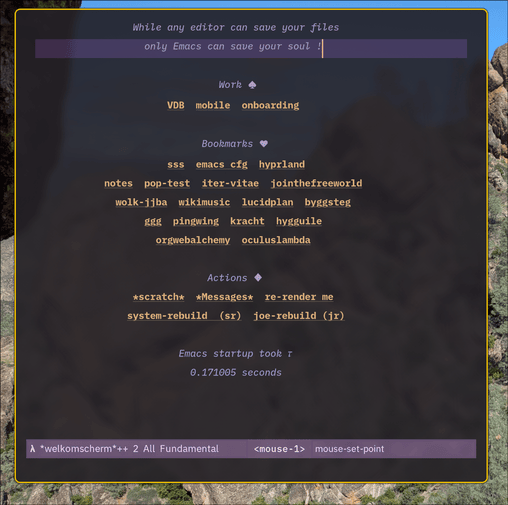
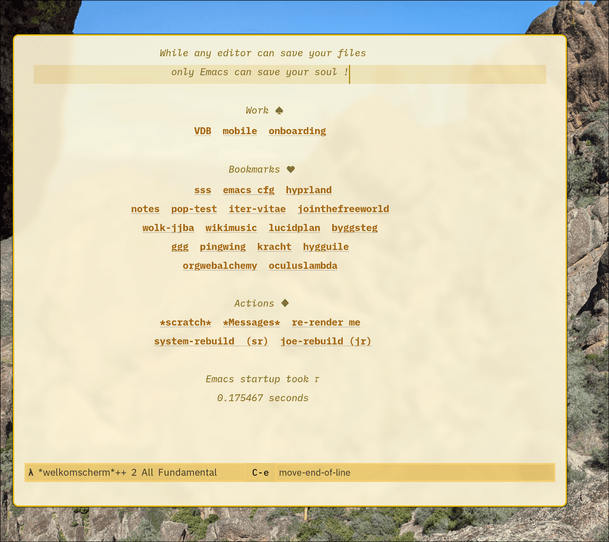
And here are two screenshots of the real thing in its natural habitat, taken from a live Emacs session:
Contributing
Contributing to free software is a uniquely beautiful act because it embodies principles of generosity, collaboration, and empowerment.
We welcome everyone to feel invited to the welkomscherm.el project, and encourage active contribution in all forms, to improve it and/or suggest improvements, brainstorm with me, make it more modular/flexible, etc, feel free to contact me <jjbigorra@gmail.com> to chat, discuss or report feedback.
You do not need to write code to help. Any of these counts:
- Report a bug
- a sentence, an Emacs version and, if you can, the contents
of the
*welkomscherm*buffer is plenty. - Suggest a section
- send the
welkomscherm/make-sectionform you wish existed; it may land in the defaults. - Improve the words
- this README, the docstrings and the comments in the source all count as code here, and are just as worth polishing.
- Send a patch
- run
maakfirst — it byte-compiles with warnings as errors, enforcescheckdocand runs the tests — then open a pull request, or mail the patch if you prefer. - Spread the word
- tell someone who has been meaning to try Emacs.
Find here the Backlog and Kanban boards for my Emacs packages: https://lucidplan.jointhefreeworld.org/tickets/emacs-pkg
If you like my work, please support me by buying me a cup of coffee ☕ so I can continue with a lot of motivation.
Code of conduct
This project adheres to the jointhefreeworld code of conduct. Find it here:
https://jointhefreeworld.org/blog/articles/personal/jointhefreeworld-code-of-conduct/index.html
In summary, we foster an inclusive, respectful, and cooperative environment for all contributors and users of this free software project. Inspired by the ideals of the GNU Project, we strive to uphold freedom, equality, and community as guiding principles. We believe that collaboration in a community of mutual respect is essential to creating excellent free software.
License
welkomscherm.el and all of its source code are free software, licensed under the GNU General Public License v3 (or newer at your convenience).
https://www.gnu.org/licenses/gpl-3.0.html
The documentation and examples, including this document, which are provided with welkomscherm.el, are all licensed under the GNU Free Documentation License v1.3 (or newer at your convenience).
Acknowledgements
Thanks to the GNU Emacs maintainers, whose built-ins make a package this small possible; to the authors of emacs-dashboard, enlight, welcome.el and minimal-dashboard.el, who each showed a different way to greet someone at their editor; and to Protesilaos Stavrou, whose Modus themes supply the colours used in the screenshots above.