Follow us on LinkedIn, X, Bluesky
Release date: August 19, 2026
Downloads: Windows: x64 Arm64 | Mac: Universal Intel silicon | Linux: deb rpm tarball Arm snap
Welcome to the 1.134 release of Visual Studio Code. This release helps you work across windows, organize related chats side by side, and navigate long conversations faster.
-
Side-by-side chats: Arrange related chats and subagent chats in groups for easier comparison.
-
Prompt timeline: Quickly navigate across prompts and review their file changes.
-
Find in chat: Search for text in the complete conversation with ease.
-
Preview HTML files: Preview local HTML files directly in VS Code by making the integrated browser their default editor.
Happy Coding!
VS Code is rolling out gradually to all users. Use Check for Updates in VS Code to get the latest version immediately.
To try new features as soon as possible, download the nightly Insiders build, which includes the latest updates as soon as they are available.
Agents
Agent host
The agent host lets you connect to the same agent session from multiple VS Code windows. It runs agent harnesses in a dedicated process based on the Agent Host Protocol (AHP). The agent host's Copilot agent is powered by the Copilot SDK, which aligns the agent's behavior and functionality with the Copilot CLI, the standalone GitHub Copilot app, and other Copilot products.
We're actively developing the agent host. The following screenshot shows the Copilot harness selected for an agent host in an editor window:
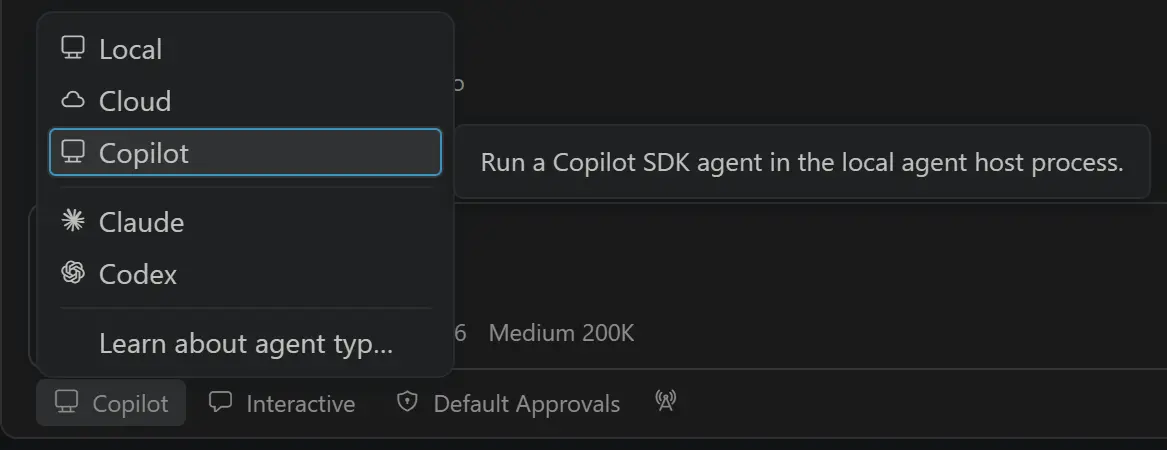
You can learn more in our VS Code Agent Host documentation. If you have any feedback or requests, please let us know by filing an issue.
Grid layout for chats in a session
Keep related conversations visible by arranging chats in horizontal or vertical groups. Drag chats or subagent chats into a group to compare results or monitor work side by side. VS Code restores the chat-group layout and focus when you return to the session or reload the window.
Create a side chat to open a new conversation beside the current chat.
Drag and drop a subagent chat into a group to view it side by side with the current chat.
You can also Alt+select a chat in the Chats picker to open it to the side.
Improvements to the side pane layout
Settings: sessions.layout.singlePaneDetailPanel and workbench.editor.showTabs
The single-pane layout keeps session details and editors in a shared tab bar next to chat. This release makes the layout easier to control:
-
The layout follows the workbench.editor.showTabs setting. Multiple tabs remain visible, while the
singleandnonevalues use a compact single-title header.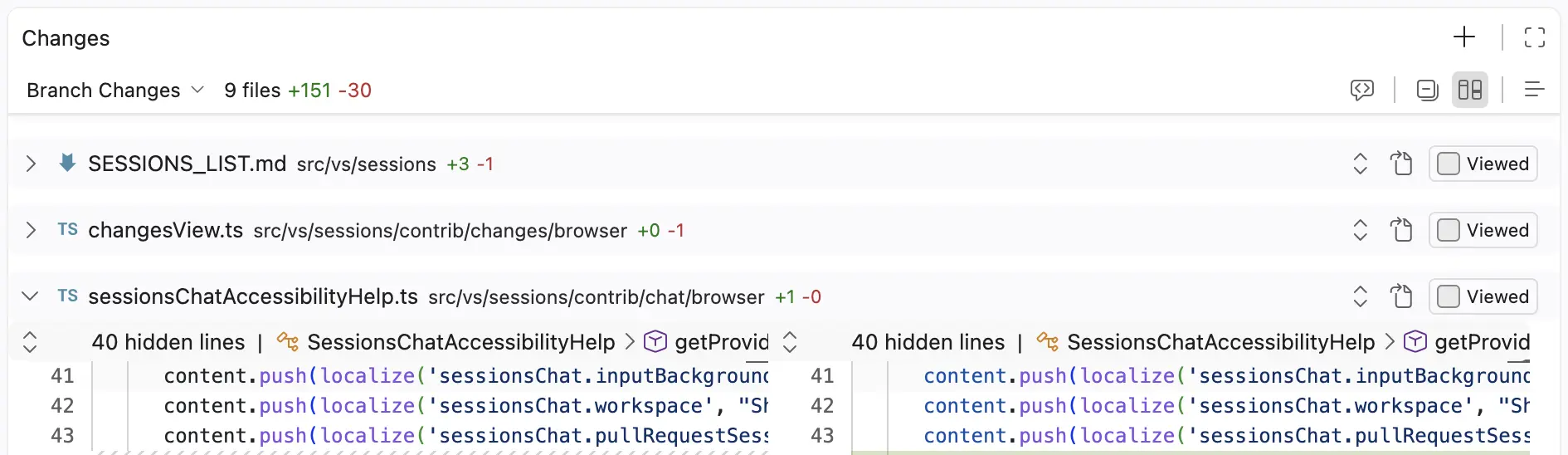
-
Text file editors use the same header structure as the Changes editor, with file breadcrumbs in the header.
-
The side pane keeps its size and visibility when you switch sessions, avoiding unexpected layout shifts.
Enable sessions.layout.singlePaneDetailPanel and reload the window to use this layout.
Prompt timeline
Setting: sessions.chatTimeline.display
Long agent sessions can make it difficult to find earlier prompts and identify which ones changed files.
The Agents window includes a timeline in the transcript gutter. Each dot represents one of your prompts, and the highlighted dot marks your current position. Hover over the timeline to view your prompts, then select one to jump to it. For prompts that changed files, the list shows the number of lines added and removed and lets you open the changes directly for review.
Use the
sessions.chatTimeline.display
setting to show the timeline beside the scrollbar (ruler) or hide it (off).
Chat
Find in chat
Finding information from earlier in a long conversation previously required scrolling through the transcript. Use ⌘F (Windows, Linux Ctrl+F) to search conversations in the Chat view, chat editors, and the Agents window.
Search includes the entire conversation, even content that is not currently rendered on screen. As you move between matches, VS Code scrolls each match into view and expands a collapsed work summary if it contains the match. You can also match case, match whole words, or use regular expressions.
Editor Experience
Close other editors from a tab
Keep one editor open without using the tab context menu. Hold Alt to change the close action on each editor tab to Close Other Editors, then select the action on the tab you want to keep.
Open HTML files in the integrated browser by default
Setting: workbench.editorAssociations
If you often preview local HTML files instead of editing them, set the integrated browser as their default editor. Configure this behavior with the workbench.editorAssociations setting or from the editor header.
The integrated browser provides the same features as a standalone browser tab while remaining associated with the HTML file. To preserve this association, links and other navigation open in new tabs.
Thank you
Contributions to vscode:
- @a1exmozz: agentHost: Emit user message telemetry to CTS PR #329961
- @abmahdy (Ahmed Mahdy): Preserve instructions for terminal completion notifications PR #330570
- @benelog (Sanghyuk Jung): Fix duplicated word in Copilot prompt text PR #328961
- @cipheraxat (Akshat Anand): Modern UI tabs: reserve close-button column so it doesn't overlay filename (fix #329605) PR #330754
- @jadefr (Jade Ferreira Vieira): Feature/alt click close other tabs PR #328975
- @martincheck (Martin Check): chat: avoid splitting surrogate pairs in read_file PR #331005
- @marvinroger (Marvin ROGER): Fix crash due to undefined
document.queryCommandSupportedPR #330298 - @mirimadahmed (Mir): voice: honor the new_session flag on send_to_chat PR #330859
- @Shaurav-Vora (Shaurav Vora): Co-authored: Implement Ctrl+F find widget support for chat panes and editors PR #330340
- @SimonSiefke (Simon Siefke)
- fix: memory leak in extensions view PR #330210
- fix: memory leak in source control view PR #330241
- fix: memory leak in code actions PR #330142
- fix: memory leak in search view PR #330240
- fix: memory leaks in chat widgets PR #326876
- fix: memory leak in references view PR #330191
- fix: memory leak in search result folder matches PR #331012
- @yzxcj797: docs: fix dead nes-video.gif link in copilot extension README PR #330992
Issue tracking
Contributions to our issue tracking:
- @gjsjohnmurray (John Murray)
- @RedCMD (RedCMD)
- @IllusionMH (Andrii Dieiev)
- @albertosantini (Alberto Santini)
We appreciate people trying our new features as soon as they are ready. Check back often to learn what's new.
If you'd like to read release notes for previous VS Code versions, go to Updates on code.visualstudio.com.