What if you could hide a readable message inside an audio file? Not steganography - something you can literally see when you pull up a spectrogram. I recently added this feature to miniDSP, and it’s honestly one of my favorite things in the whole library.
Back in grad school, I spent a lot of time with the Entropic Signal Processing System (ESPS), a suite of tools made by a company called Entropics. ESPS had this fun little utility called ebanner that could render text into a spectrogram. You’d give it a string, it would produce audio, and when you visualized that audio as a spectrogram - there was your text, spelled out in frequency bands.
I always thought it was such a clever idea. When I started building out miniDSP, it was one of those features I knew I wanted to include eventually.
How It Works
The basic idea behind my implementation is pretty simple - turn text into a picture made of sine waves. (I believe the ebanner implementation was more sophisticated.)
-
Rasterize the text. Each printable ASCII character is represented as a 5-column by 7-row bitmap. Characters are spaced three columns apart, giving a total grid width of
8 * len - 3columns. -
Map pixel rows to frequencies. Row 0 maps to
freq_hi, row 6 maps tofreq_lo, with linear interpolation in between. So each lit pixel in the bitmap becomes a specific frequency in the output. -
Synthesize sine waves. For each column of the bitmap, sine waves are generated at the frequencies corresponding to “on” pixels. Phase continuity is maintained across columns so the tones sound smooth rather than clicky.
-
Crossfade and normalize. A 3 ms raised-cosine envelope is applied at tone transitions to suppress artifacts, and the final signal is normalized to 0.9 peak amplitude.
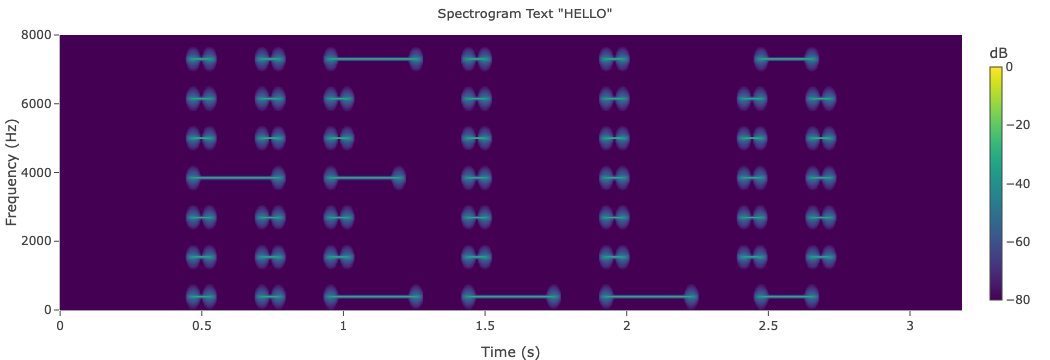
The result: an audio signal that looks like text when you compute its spectrogram. Pretty cool!
Here’s what “HELLO” sounds like:
And here’s what the spectrogram looks like:
The API
The function signature is straightforward:
unsigned MD_spectrogram_text(double *output, unsigned max_len,
                              const char *text,
                              double freq_lo, double freq_hi,
                              double duration_sec, double sample_rate);
It writes synthesized samples into output and returns the number of samples written. You control the frequency range, duration, and sample rate.
A minimal example:
#include "minidsp.h"
double buf[64000];
unsigned n = MD_spectrogram_text(buf, 64000, "HELLO",
                                  200.0, 7500.0, 2.0, 16000.0);
Try It
The examples/ directory in miniDSP includes a ready-to-run program that takes a string argument, synthesizes the audio, computes the spectrogram, and generates an interactive HTML visualization:
make -C examples spectrogram_text
cd examples && ./spectrogram_text "HELLO"
open spectrogram_text.html
Learn More
The full tutorial - with interactive plots and detailed parameter explanations - is at wooters.github.io/miniDSP/spectrogram-text.html. The miniDSP source and docs live at github.com/wooters/miniDSP.