Update (September 19, 2026) We re-ran these tests but with a network-optimized EC2 instance (300Gbps NIC) where R2 hit 137Gbps. Therefore, our current view is that the 55 Gbps ceiling originates from some hop sitting between Latitude.sh’s Ashburn location and Cloudflare R2’s IAD location. Cloudflare and AWS peer heavily together (which makes sense, since they both have such an enormous chunk of internet traffic). So all claims regarding the 55 Gbps number are actually specific to the Latitude Ashburn ←> Cloudflare IAD network path, and not specific to Cloudflare itself. We are not sure what their exact server-side throttle is (they told me is that it’s under 1 Tbps, which I think we can all agree is reasonable).
Update (September 10, 2026) Cloudflare has reached out to us suggesting they do not limit speed at 55 Gbps on their end. We are going to work on finding a root cause with them. So please do not take any of the following numbers as gospel. Our strong endorsement still stands 👊.
For those of you unaware, Cloudflare R2 is the new kid on the block in the object storage universe. Many people are frustrated with the $23/TB/mo price tag of AWS S3 (and even worse, the $0.09/GiB to move data out), so Cloudflare answered that by offering object storage of their own at a flat $15/TB and no egress charges.
But, importantly, how hard does it go?
We rented a bare-metal server with a 100 Gbps NIC in Ashburn and went and got the numbers ourselves.
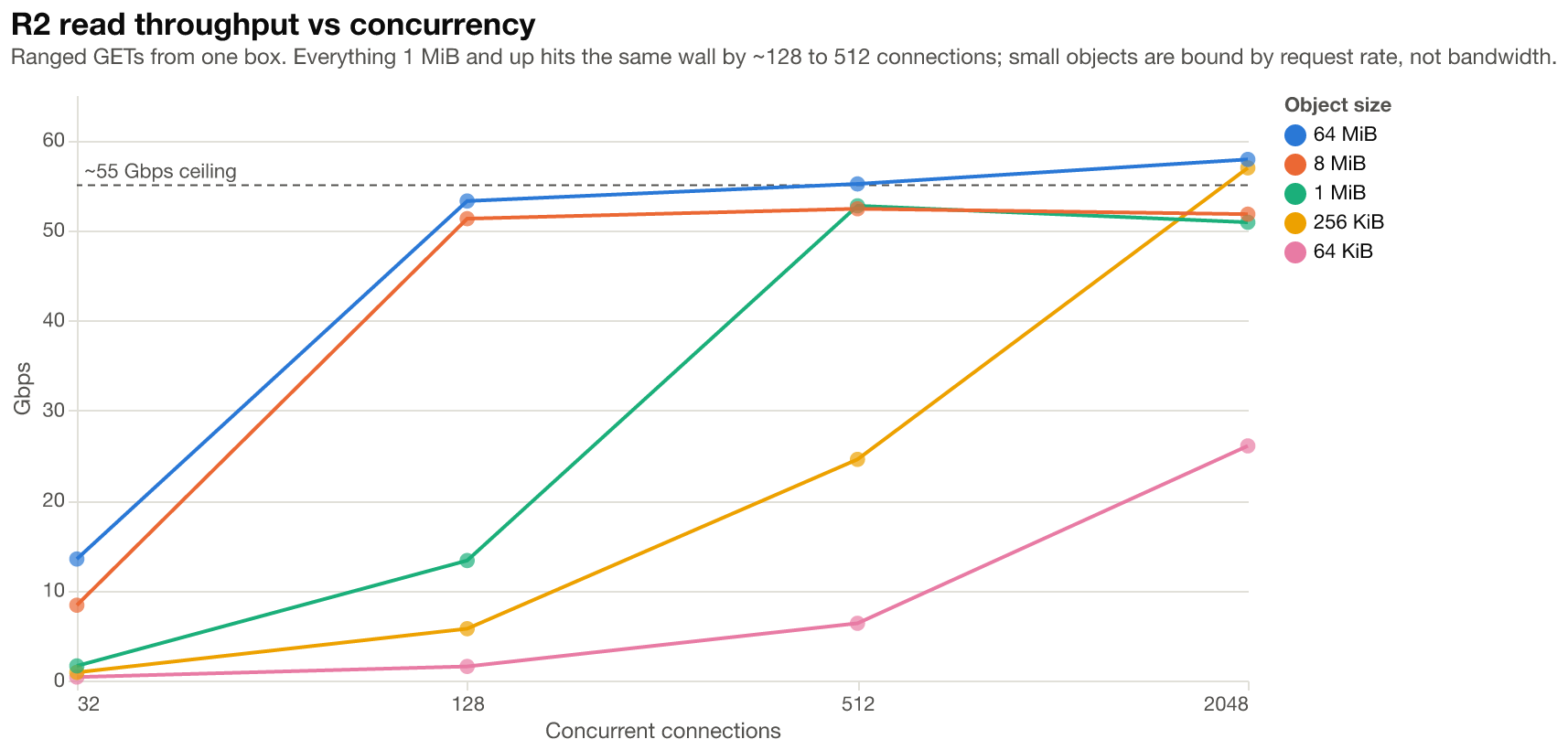
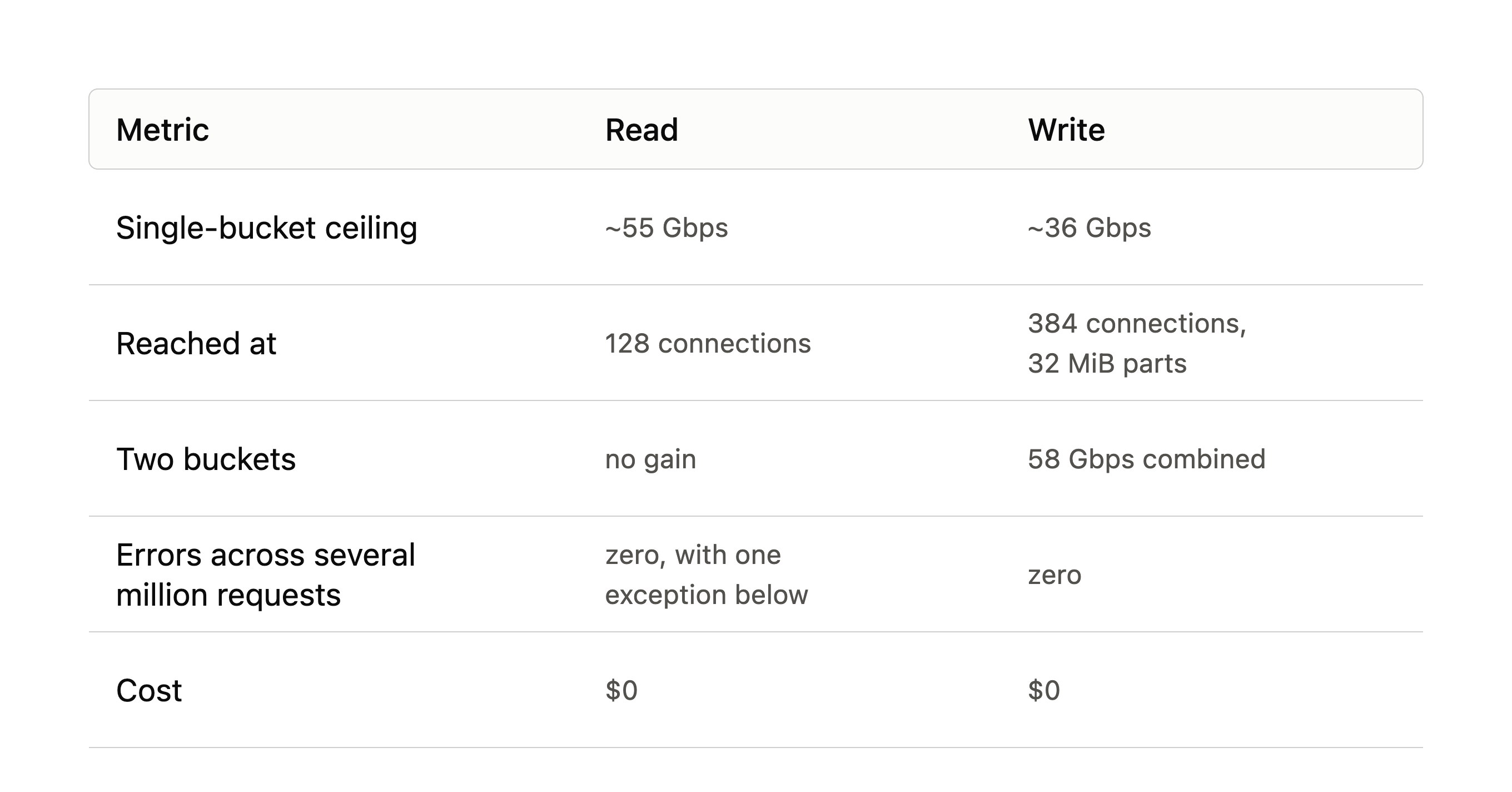
R2 read at ~55 Gbps and wrote at ~36 Gbps. Both are hard ceilings. Neither read nor write moved no matter how many simultaneous connections, keys, or buckets we interacted with.
Every byte we read takes this path (and every write takes the reverse).
1. R2’s storage (drives or a cache; we saw a 13 percent bump on repeat reads)
2. R2’s servers and NIC
3. The internet
4. Our NIC, which DMAs packets into kernel memory through its receive ring
5. Our kernel: the TCP stack on the CPU, socket buffers, and the copy into the app
6. The app’s buffer in RAM (normally a disk after that, which we deliberately skipped)
We’re trying to measure steps 1 and 2, which are the responsibility of R2. Steps 4 through 6 are our responsibility, so we must make sure that we’re not bottlenecked by something that’s our falt.
For example a modern SSD writes at around 5000 MiB/s, or roughly 40 Gbps, so had we written everything to disk instead of RAM (we wrote to RAM only for exactly this reason) we’d be bottlenecked by our own disk and not by R2, which would be a glaring flaw in this benchmark.
To ensure the 55 Gbps was indeed server-side, we pulled from R2 at full tilt while also pulling unrelated non-R2 traffic, and watch our kernel’s NIC receive counter while doing so.
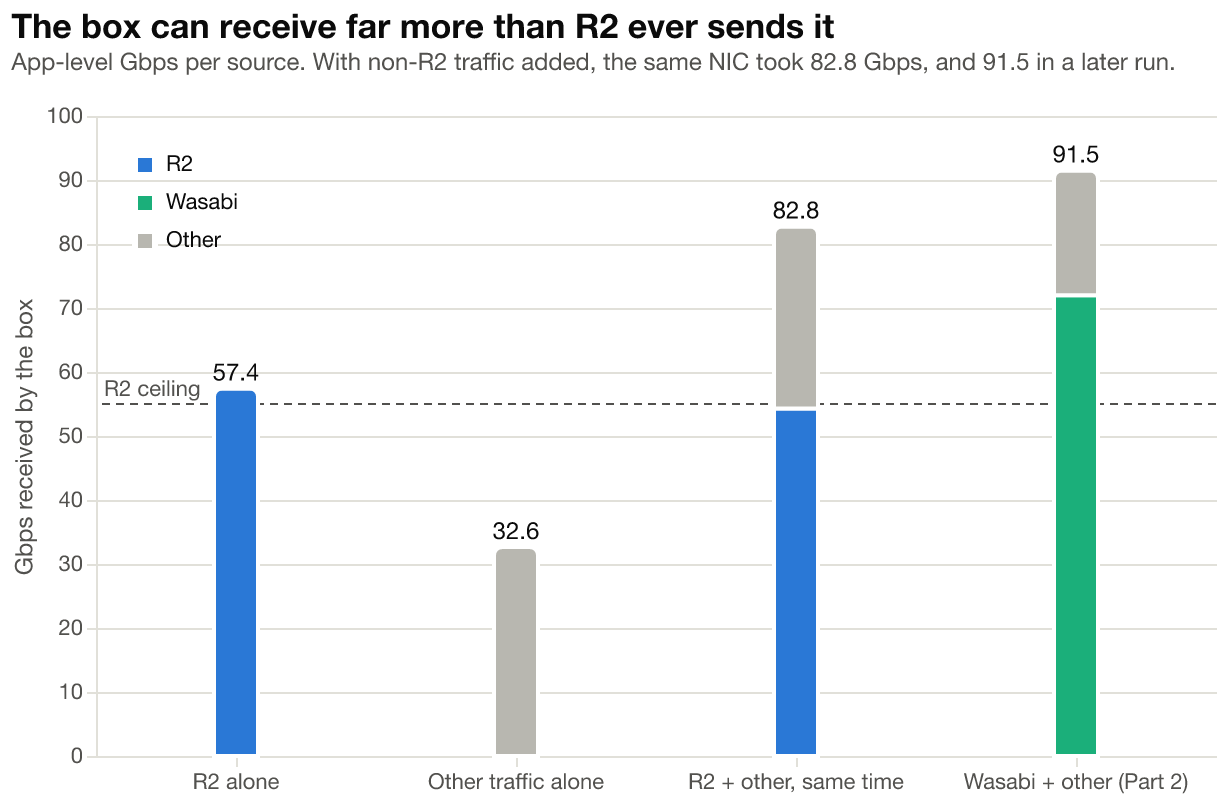
The box received 82.75 Gbps combined, 44% more than an R2 read alone. Later, during the Part 2 tests, the same box took 91.5 Gbps. If our NIC, kernel, or uplink were the limit, neither result is possible.
Three separate clients agree. Our own Go load generator, s5cmd, and MinIO’s warp landed at 52.7, 51.2, and 54.2 Gbps. Three codebases, three authors, one number. App-level and NIC-level byte counters agreed to within 0.2% throughout.
Side note about AI
Fable wrote the Go load generator for us without being asked. HTTP and object storage have been around for decades, so this is the kind of deterministic, well-documented code we’re comfortable handing to a model.
Just because we achieved 55 Gbps once doesn’t mean that’s the only limit. What if Cloudflare imposes some other kind of limit? Such as total bandwidth per hour, max operations per hour, or a shared bandwidth budget that applies to both read + write? Such things would be trivial to implement with tc, and would be fully within Cloudflare’s right to use considering they don’t charge for egress.
We didn’t find one. We tested along the time, key, bucket, IPv4 and simultaneous read/write dimensions and found the following results.
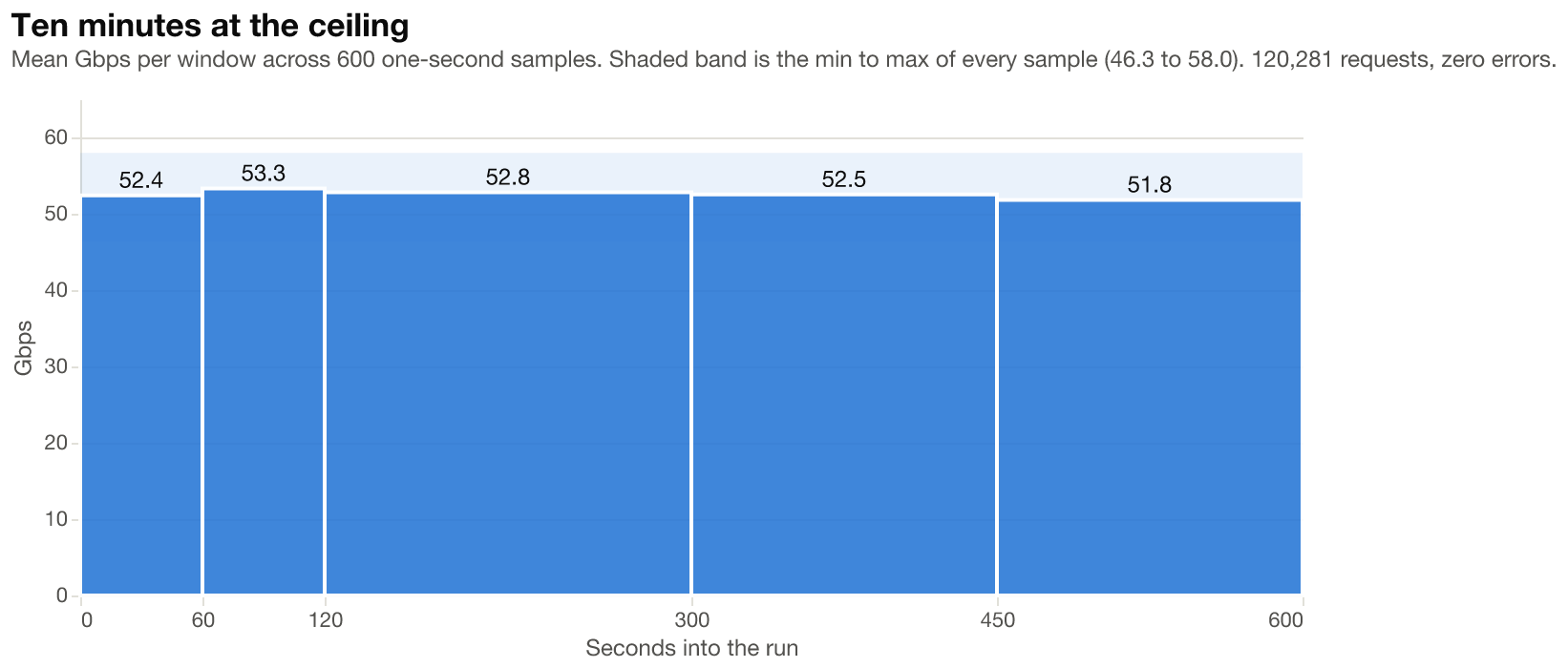
Ten minutes at 55 Gbps: 0.3 Gbps of drift, zero errors.
One key vs 32 keys: same 55.8 Gbps.
One bucket vs two: no gain on reads.
IPv4 vs IPv6 across R2’s anycast addresses: IPv4 wins by 1 to 3 Gbps. Consistent, marginal.
Reads and writes at the same time: 52 Gbps of reads alongside 34 Gbps of writes, 86 Gbps total. Each direction lost a couple of Gbps to the other. There is no shared bandwidth budget between GET and PUT.
Time to first byte floors at ~40 ms regardless of object size or concurrency. On a 0.525 ms round trip that is ~70x the network RTT, so it’s server-side request handling, and in practice it means anything under ~256 KiB is bound by request rate, not bandwidth.
R2 will return 503 SlowDown when reading the same part of the same object more than 128 times concurrently. Real-world examples this could include an index, a header, a manifest, a reference genome, a yield curve, stock tick data and and the like.
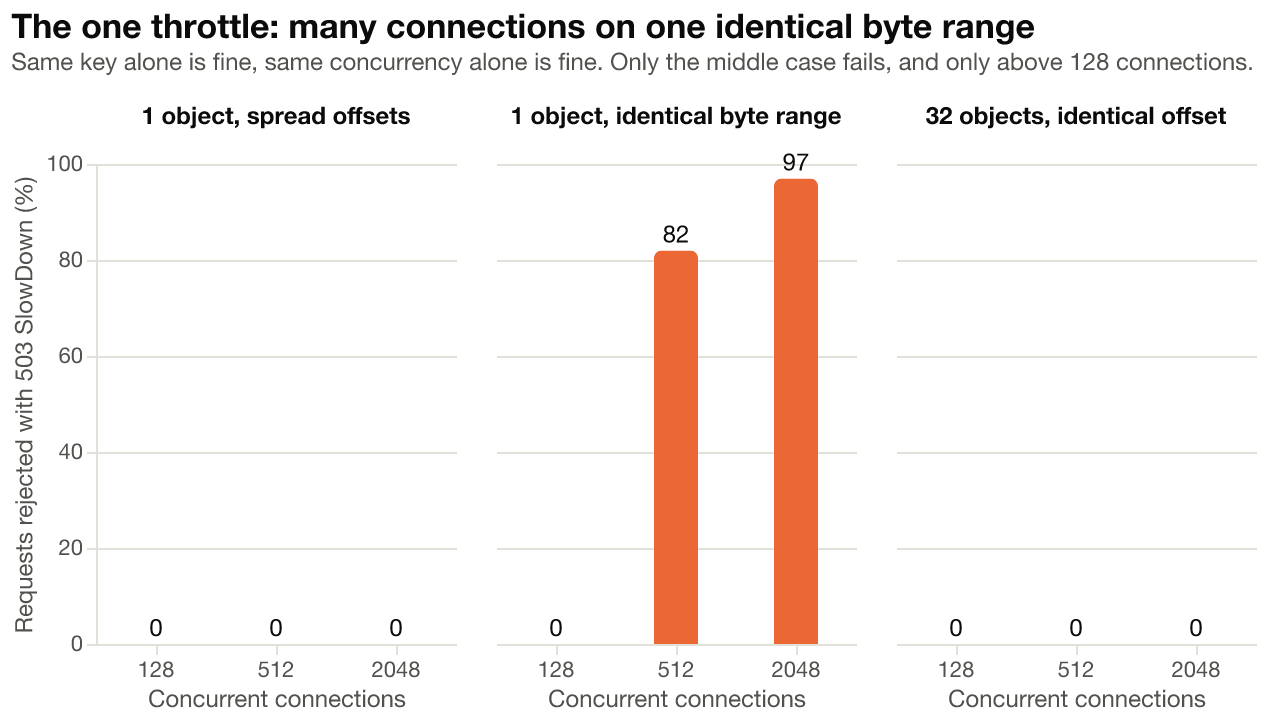
This is a deliberate rejection, not a saturated disk. Wasabi’s version of the same test degraded gracefully with zero errors (more on this in Part 2).
It’s not obvious which approach is better. At Carolina Cloud, for example, we prefer to fail loudly and let our users know what the issue is rather than slowly degrade and leave them to figure it out themselves.
If you find yourself in this situation: replicate the hot object under a handful of duplicate keys and round-robin across them. The 503s vanish, even at 2048 concurrent requests. Across our entire benchmarking journey with R2, this was the only non-200/206 response we ever saw.
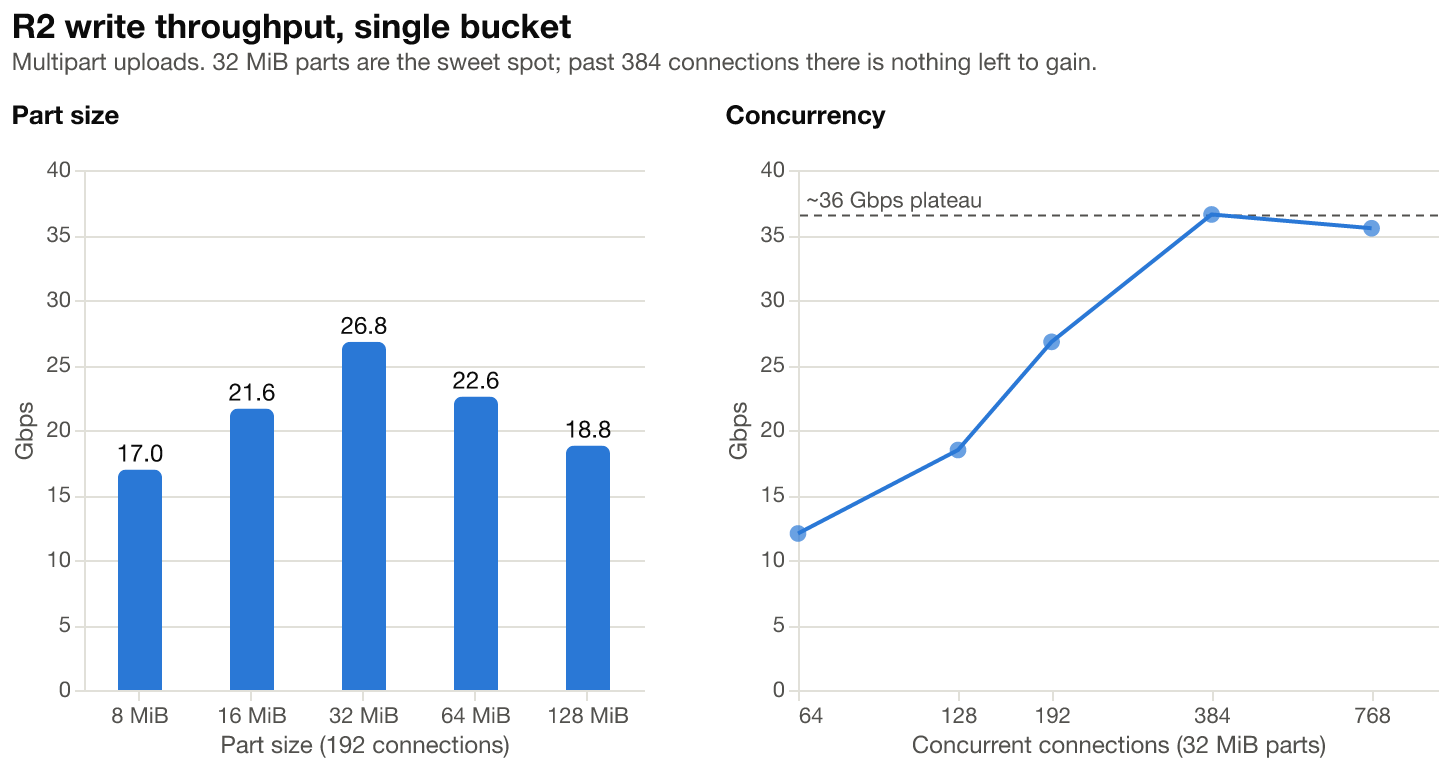
Write bandwidth reaches 37 Gbps on one bucket. Part size matters: 32 MiB parts peak at 26.8 Gbps at 192 connections, while 8 MiB and 128 MiB parts both land under 19. A single key sustains about 68% of what the same load spread across 32 keys does.
What if we write to two buckets at once?
Writing to two buckets at once reached 58 Gbps combined, so if you’re write-heavy, and going from 32 Gbps to 58 Gbps is worth it for you, then spread your output across buckets. Reads showed no such gain. If any Cloudflare engineers on the R2 team read this and would like to opine on why, we’d love to know!
s5cmd, warp, and our custom loader all pulled the same objects past 50 Gbps. The AWS CLI pulled from R2 at ~3 Gbps, and raising its concurrency and part size barely moved it. The same CLI reaches ~5 Gbps against Wasabi and S3 in our other benchmarks. We didn’t try its CRT transfer engine, which presumably exists for this problem.
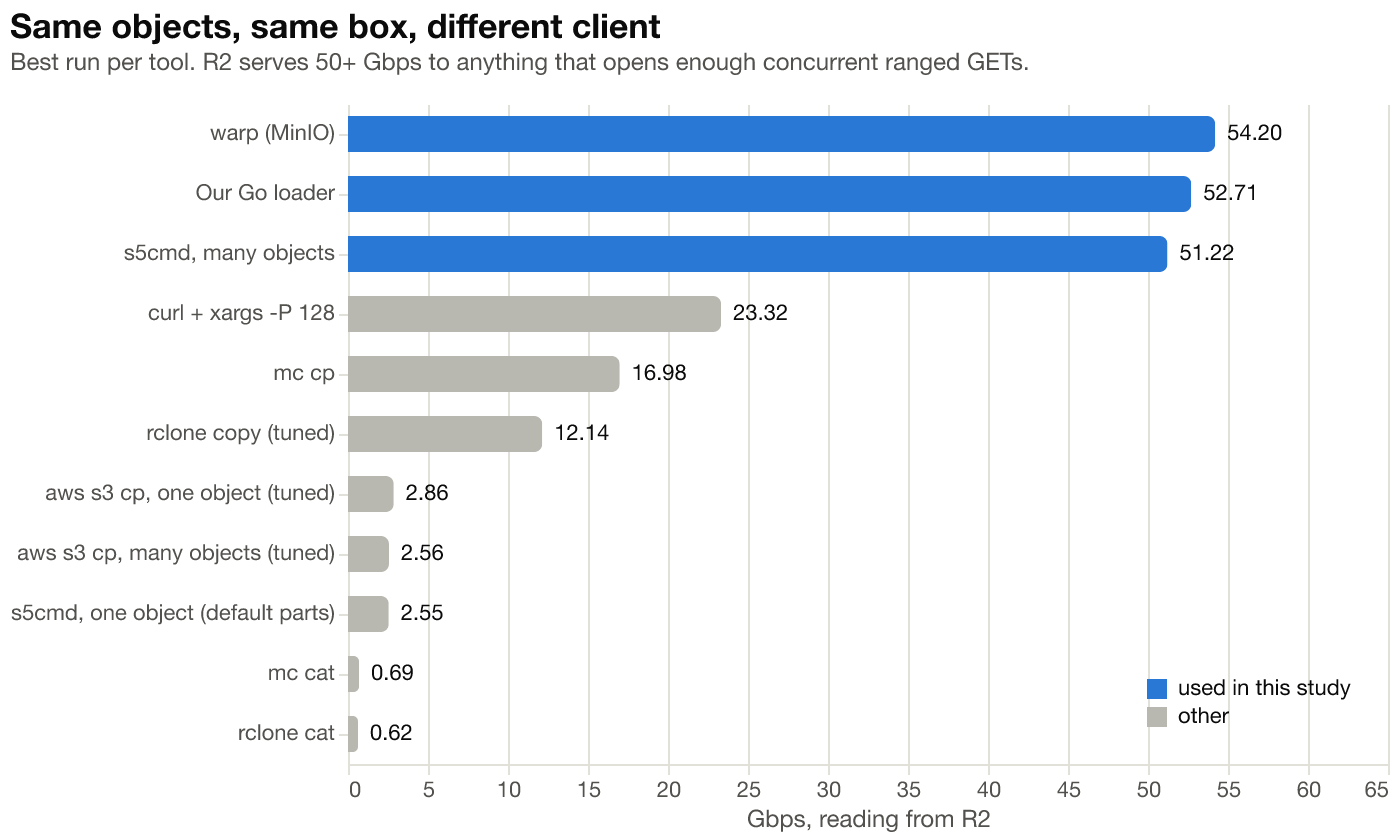
R2 will serve a single key at 55 Gbps to anything that opens enough concurrent ranged GETs against it. Check whether your tool does that by default before blaming the provider.
Everything ran from one box and one account, so we can’t say whether the ceiling is per account or per source IP. Both are R2’s limit, not yours. They differ on whether a second box would raise it. If it’s per source IP, a second NIC on the same machine might do it.
A second account might also do it, but that usually violates a TOS, and at Carolina Cloud we’ve seen enough multi-account abuse to not want to inflict that headache on someone else, even if it’s for a blog post carrying great praise.
(If anyone at Cloudflare can tell us which it is, we’ll re-run it to verify)
This benchmark cost us almost nothing to run. Latitude.sh allows 20TB of free transfer each month, and R2 famously does not charge egress. R2 does charge for operations which came out to well under $10 for this.
We did pay Latitude.sh around $10/hr for this formidable and well-connected bare metal instance but that’s fair play. As far as I know no companies in this industry are charities.
So overall we moved around 10TiB of data in a couple of hours for under $30, most of which was for the server rental and not the networking. Not bad. The same egress on AWS would cost around $700.
Carolina Cloud runs Nextflow pipelines for genomics and finance, and the hot-range throttle came straight out of that workload. samtools and htslib tools do index-seek reads into CRAM and BAM files. When a batch of tasks starts at once, every one of them reads the same header region of the same reference file before doing anything else.
If you’re running that kind of workload and paying AWS $90 per TB to get your data out, R2 at $15/TB/month with zero egress is a serious contender, and 55 Gbps from a single box is enough for supercomputing-scale work. This is a big part of why we, Derek and Alice, are long NET 0.00%↑ on our personal balance sheet.
Despite historically being more on the CDN, web and content serving side of computer science, and less on the heavy-compute HPC side, Cloudflare has accidentally stumbled their way into a strong object storage offering that can absolutely hang with the big boys.
R2 goes hard!
Part 1 has a happy ending. For part 2 we ran the same tests on the same box, but with a different ending due to a billing model that changes the answer for short-lived pipeline data.
If you want the load generator or want to talk about where your pipeline data should live, reply here or email us at hello@carolinacloud.io.