So we had the chance to review the OrangePi 6 Plus a few months back, equipped by the very impressive CIX P1 SOC, developed on a 6nm process. It also features a very decent integrated GPU, the Mali-G720-Immortalis. And turns out that OrangePi is not the only company that has access to this hardware - Radxa has also developed 2 boards using this SOC, and their newer, and smaller board, the Orion O6N, is a good option to consider.
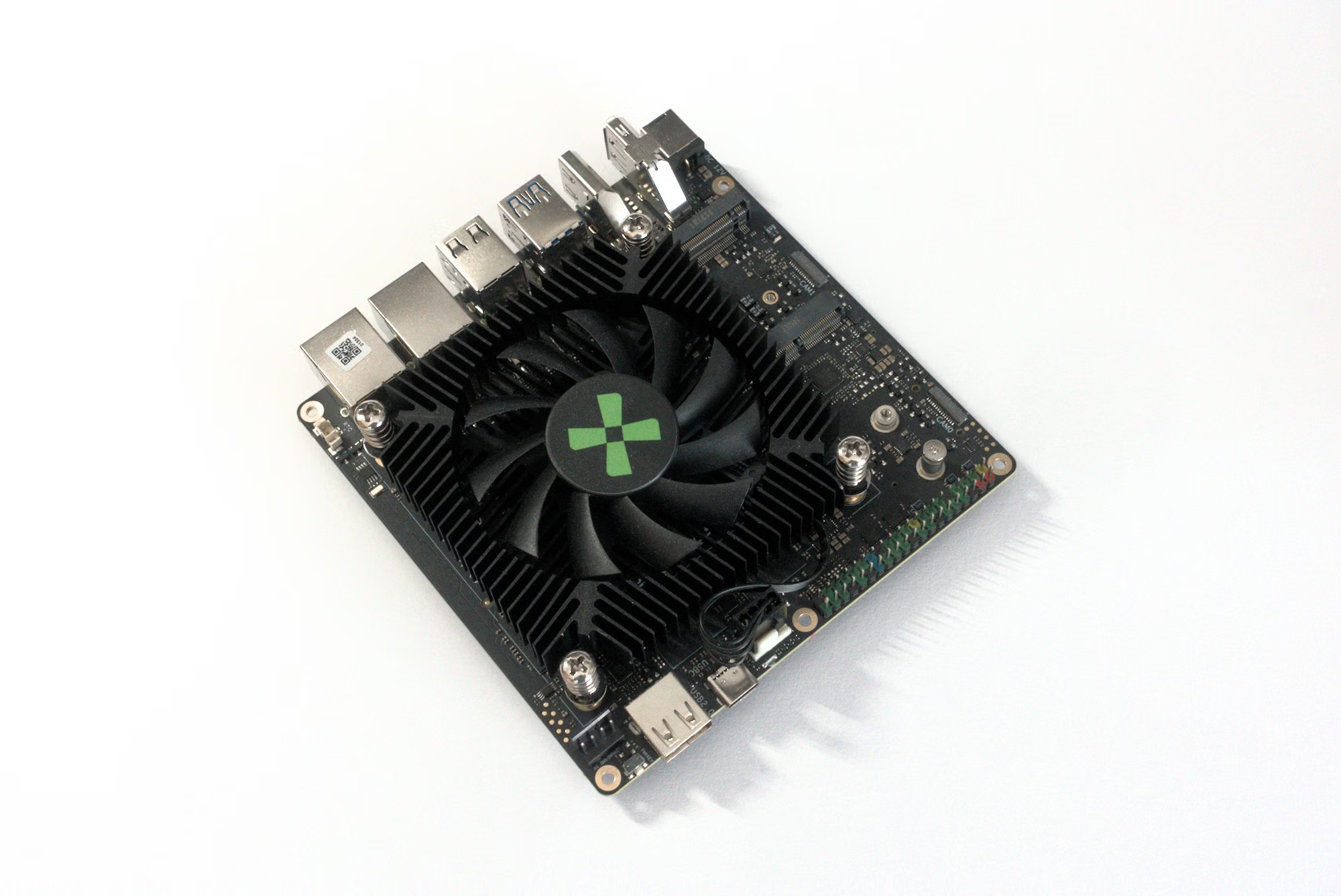
As you can see, the board comes with a active cooling system that covers most of the board, in a similar fashion to the Orange Pi 6 Plus. Let’s see what the specs look like first.
Specs
There’s a lot of ports on this device and no lack of connectivity both up and down.
| Component | Specification |
|---|---|
| SoC | CIX P1 (6nm TSMC process) |
| CPU Architecture | 4× Cortex-A720 (Up to 2.6 GHz) + 4× Cortex-A720 (Up to 2.4 GHz) + 4× Cortex-A520 (Up to 1.8 GHz); 12MB L3 Cache |
| GPU | Arm Immortalis-G720 MC10 (Hardware Ray Tracing, Vulkan 1.3, OpenGL ES 3.2 support) |
| NPU (AI) | Up to 45 TOPS (System-wide); Standalone NPU with INT4/INT8/INT16/FP16/TF32 support |
| RAM | 8GB / 16GB / 24GB / 32GB / 48GB / 64GB LPDDR5 (128-bit, 5500 MT/s) |
| Storage | 2× M.2 2280 slots (PCIe 4.0 x4 NVMe), 1× Pluggable UFS module connector |
| Networking | Dual 2.5GbE (2500Mbps) Ethernet ports |
| Wireless & Cellular | 1× M.2 Key-E (2230) slot for Wi-Fi 6/7 & BT 5.4, 1× M.2 Key-B (3042) slot for 4G LTE with 1× Nano SIM slot |
| Video Output | 1× HDMI 2.0 (4K@60Hz), 1× DP 1.4 with MST (4K@120Hz), 1× USB-C (DP Alt Mode up to 4K@60Hz) |
| Video Codec | Decode: Up to 8K@60fps (AV1/H.265/H.264/VP9), Encode: Up to 8K@30fps (H.265/H.264/VP9) |
| USB Ports | 2× USB 3.2 Gen 2 Type-A (10 Gbps), 3× USB 2.0 Type-A, 1× USB 3.2 Gen 2 Type-C (with DP Alt Mode) |
| Camera (MIPI) | 2× MIPI CSI interfaces (Configurable as 2-lane or 4-lane per port) |
| Expansion | 40-pin GPIO header |
| Other Interfaces | 1× Power button, 1× 4-pin CPU fan header (PWM & TACH), 1× RTC battery header |
| Power Supply | 12V DC input via 5.5 x 2.5 mm (5525) barrel jack OR 4-pin internal connector (≥65W recommended) |
| Dimensions | 120mm × 120mm (Nano-ITX Form Factor) |
One of the interesting choices is the last of USB-C for power supply.
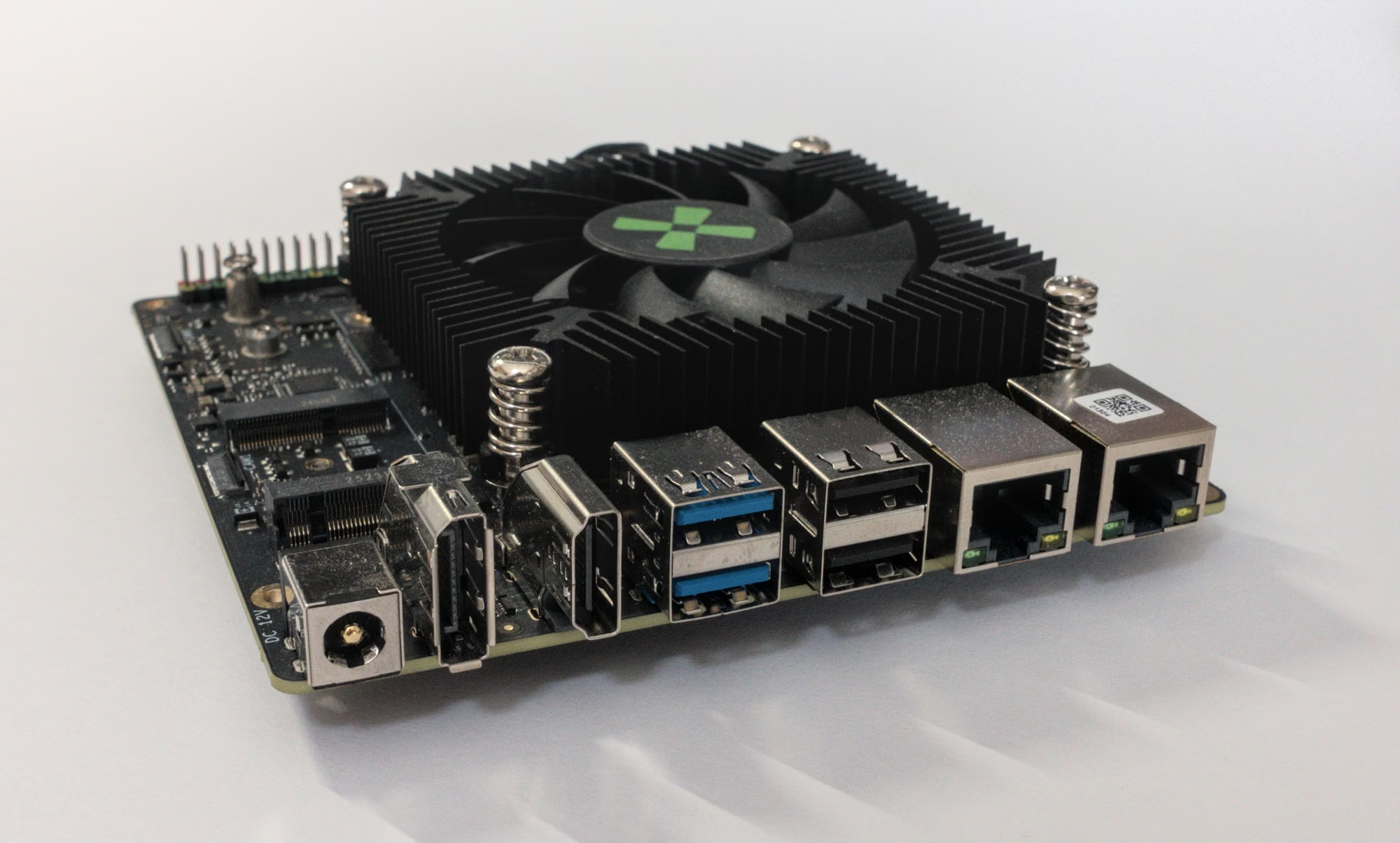
Here Radxa went for a barrel jack connector, which is a weird choice in a world where most laptops and mobile devices now use USB-C standard by default.
| Feature | Specification |
|---|---|
| SoC Model | CIX CD8180 / CD8160 (Codename: CIX P1) |
| Architecture | Armv9.2-A (64-bit) |
| Total CPU Cores | 12 Cores (Tri-cluster configuration) |
| Big Cores | 4× Cortex-A720 @ Up to 2.8 GHz (Performance) |
| Medium Cores | 4× Cortex-A720 @ Up to 2.4 GHz (Mainstream) |
| Little Cores | 4× Cortex-A520 @ 1.8 GHz (Efficiency) |
| L3 Cache | 12MB Shared L3 Cache |
| GPU | Arm Immortalis-G720 MC10 |
| Graphics Features | Hardware Ray Tracing, Vulkan 1.3, OpenGL ES 3.2, OpenCL 3.0 |
| NPU (AI Engine) | Arm-China Zhouyi: 30 TOPS (Dedicated); ~45 TOPS (Total System AI) |
| AI Precision | INT4, INT8, INT16, FP16, TF32 |
| VPU (Video) | Linlon V8: 8K@60fps Decode (AV1/H.265/VP9), 8K@30fps Encode (H.265) |
| Memory Interface | 128-bit LPDDR5 / LPDDR5X (Up to 5500 MT/s) |
| Memory Bandwidth | Up to 96 GB/s (Theoretical peak) |
| PCIe Support | PCIe Gen4 (Supports x8, x4, and x2 configurations) |
| System Security | Integrated Security Engine (Standard Arm SystemReady / ACPI support) |
The board follows a nano-ITX standard, which is a square of 12cm by 12cm. It’s definitely a little bigger than the OrangePi 6 Plus, but it’s not entirely a bad thing: you get to have a larger fan, and while the OrangePi 6 Plus was relatively quiet, the Radxa Orion O6N is almost silent. You can see below the difference in footprint in the below picture, the Radxa model being on the left and the OrangePi’s on the right.
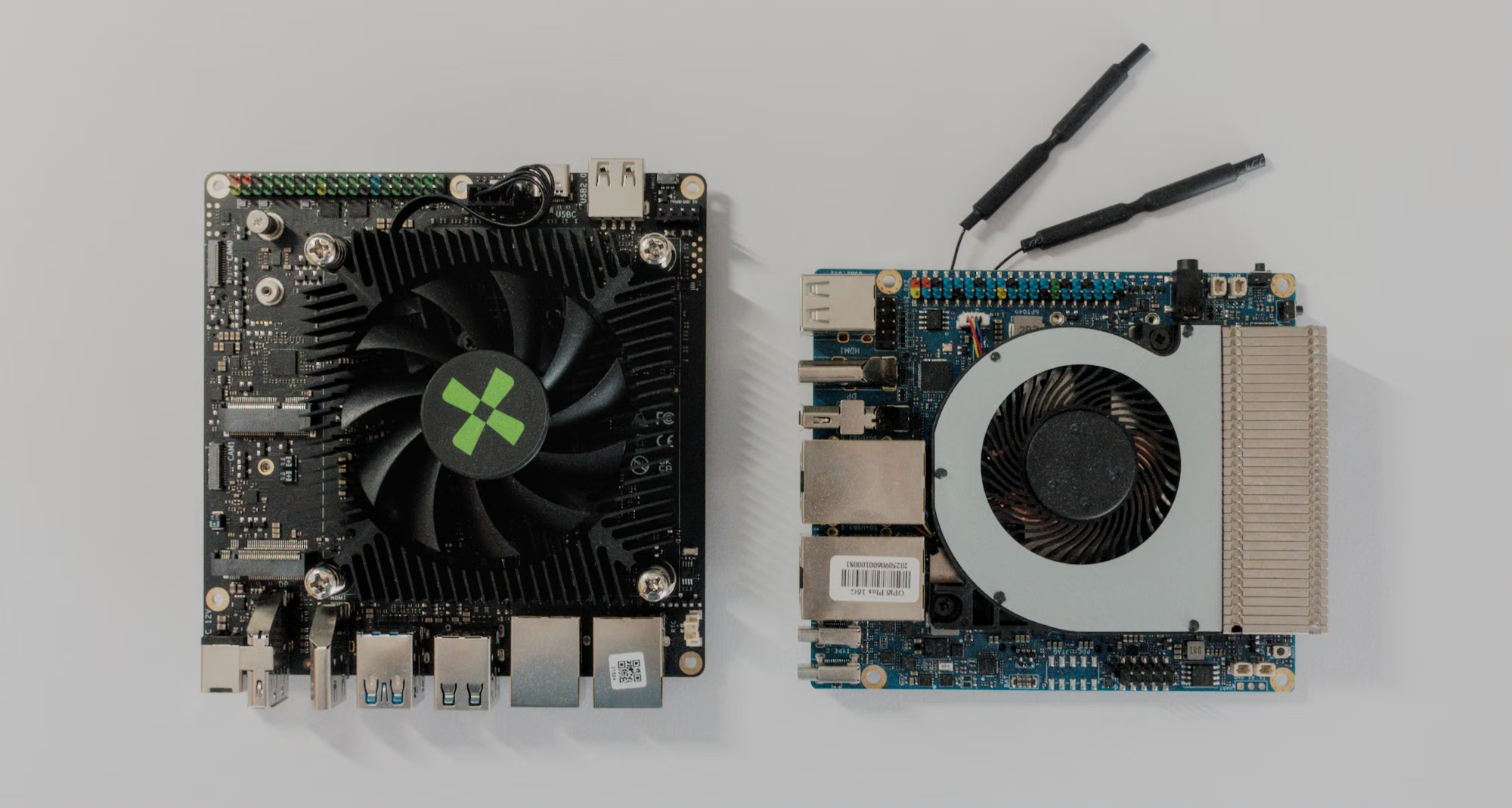
During operation, you can see the fan turning fairly often, but it makes no noise at all. Apart from brute forcing the board into a state of 100% CPU usage, it’s very hard to get the temperature to rise under normal usage conditions.
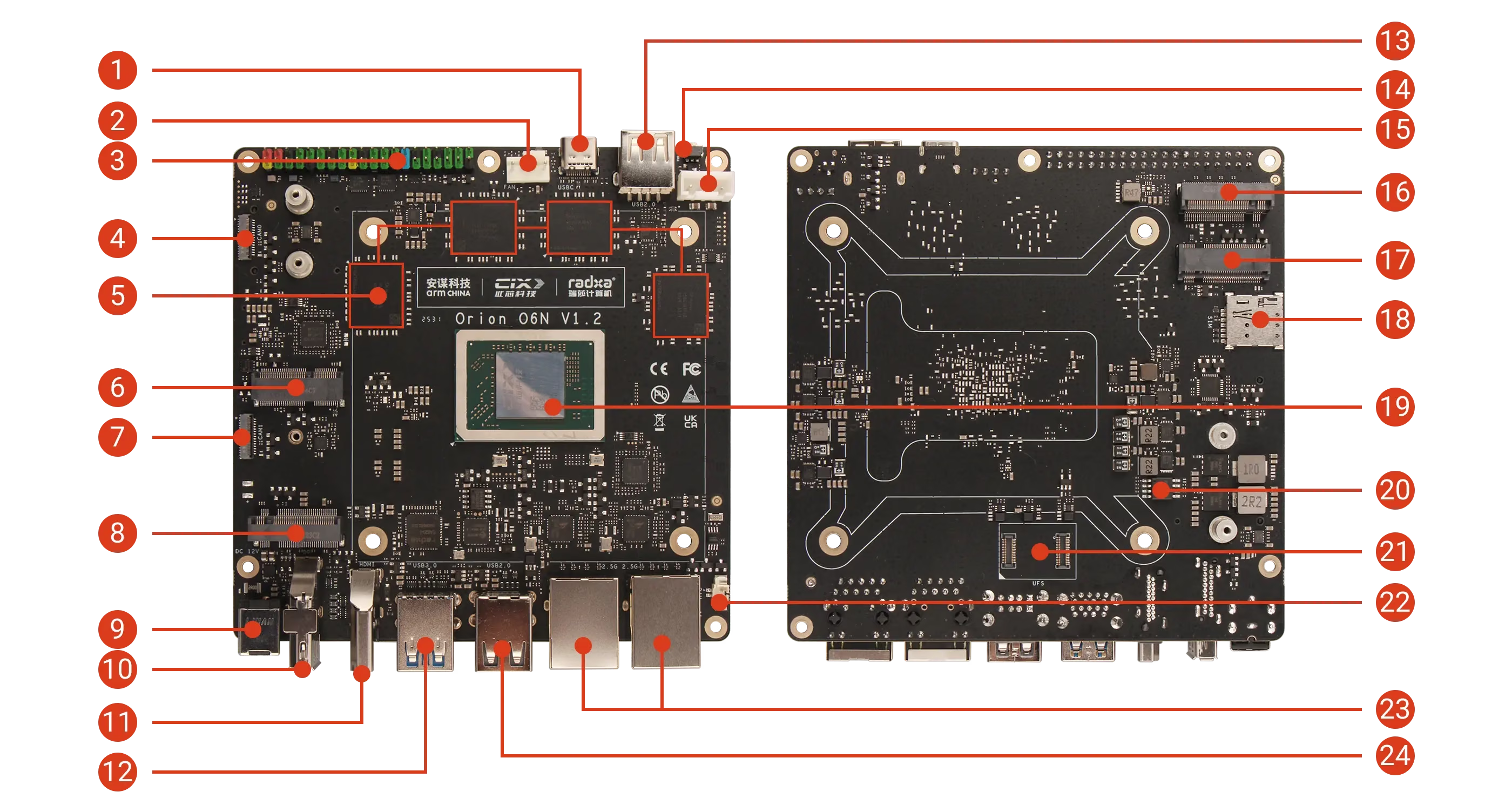
| No. | Description | No. | Description |
|---|---|---|---|
| 1 | USB Type-C Port (Supports DP Video Output) | 13 | USB 2.0 Type-A |
| 2 | 4-Pin Fan Header (PWM & Tachometer) | 14 | Power Button |
| 3 | 40-Pin GPIO Header | 15 | 5V / 12V Power Port |
| 4 | MIPI CSI Interface (4-lane) | 16 | M.2 M Key 2280 Slot |
| 5 | LPDDR5 | 17 | M.2 B Key 3042 Slot |
| 6 | M.2 E Key 2230 Slot | 18 | Nano SIM Card Slot |
| 7 | MIPI CSI Interface (4-lane) | 19 | CIX P1 SoC |
| 8 | M.2 M Key 2280 Slot | 20 | SPI Nor Flash (BIOS) |
| 9 | 12V DC Power Input (5525) | 21 | UFS Module Interface |
| 10 | Standard DP Port | 22 | RTC Battery Connector |
| 11 | Standard HDMI Port | 23 | 2x 2.5G Ethernet |
| 12 | 2x USB 3.0 Type-A | 24 | 2x USB 2.0 Type-A |
One important detail is that board does not come with a Wireless device. So you’ll need to get your own M2 wireless dongle to get Wifi and Bluetooth. A minor inconvenience, really, but if you are use to having OrangePi bundle all of this on the SBC, well this one gives you a little more work.
Software Support
Desktop Experience
Radxa OS (i.e. Debian 12 Bookworm)
In this Debian Bookworm build we get a desktop running the 6.6.89-3-sky1 kernel at the time of writing, and a user environment running on wayland. Debian Bookworm is almost prehistoric at this stage (first released in 2023) but should continue getting updates until 2028 so that gives you some runway. The biggest problem is that you are stuck by default with older packages in the repos. But just like for the OrangePi, there is often good ways to get new software these days:
- flatpak (as long as there are arm64 builds - thankfully they are getting more and more common these days)
- appimage (much rarer but you do find once in a while arm64 builds packaged as appimages)
- distrobox
Distrobox is my favorite in the lot, as it gives you direct access to a podman container that can contain a whole new distro image, accessible right from your terminal, almost transparently. Distrobox handles the connection to your desktop, to your audio and video drivers, to make it seamless to launch GUI applications from within that container and display them as if they were running on the Radxa OS.
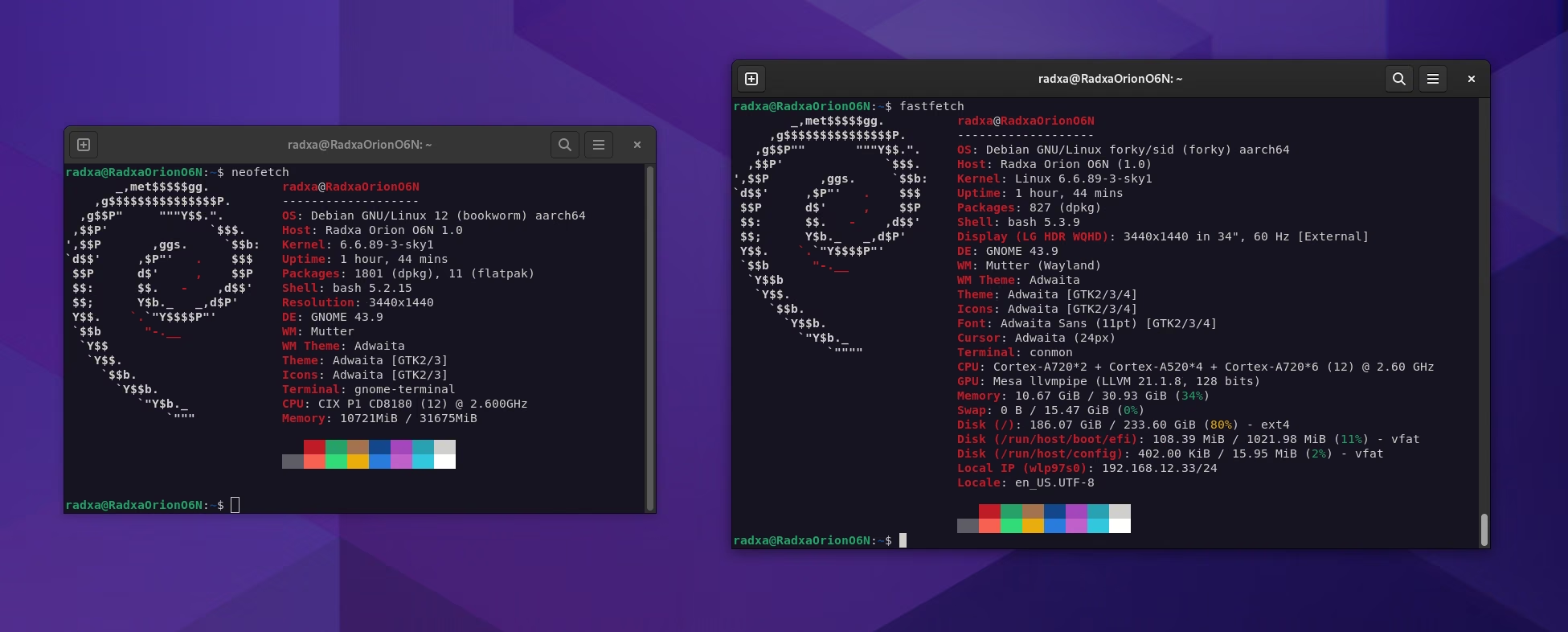
I have a debian latest running in distrobox, which makes it practical to install more recent piece of software now and then. You won’t get GPU acceleration through distrobox, but for many use-cases this is not necessary.
Wireless
The board comes without wireless connectivity (unlike the Orange Pi 6 Plus) so you need to grap a wireless M2 board yourself. These are fairly cheap these days. I selected one that is equipped with the RTL8814AU chip from Realtek. The drivers do not come in the kernel so you have to install them using a repo that you can find on github.
git clone https://github.com/lwfinger/rtw88.git
cd rtw88
sudo dkms add .
cat dkms.conf #to get the package number
sudo dkms build rtw88/0.6
sudo dkms install rtw88/0.6
sudo cp firmware/rtw8822b_fw.bin /lib/firmware/rt88/
sudo depmod -a
sudo modprobe rtw_8822be
It takes about five minutes, and now you have bluetooth and Wifi.
Power Draw
Since my usual device to measure this kind of things relies on a USB-C port, I am unable to get my own numbers. But Jeff Gerling did the work for the rest of us and provided these figures:
- Idle power draw (at wall): 14.2 W
- Maximum simulated power draw (stress-ng –matrix 0): 24.9 W
This seems very much similar to what we had observed for the Orange Pi 6 Plus as well. The 15W at idle is a shame, because this makes it relatively expensive to run 24/7 as a server, for example. Hopefully firmware upgrades down the road may help fix this fairly high idle power consumption.
Noise and Temperature
I have already mentioned it in passing at the beginning, but this board has excellent active cooling. Kudos to Radxa on their design and choice of components. No matter how hard I tried to push the board, the temperature remained consistently between 50 and 60 C under full load, even if this lasted for dozens of minutes. Not only was the temperature well controlled, but the fan was extremely quiet.
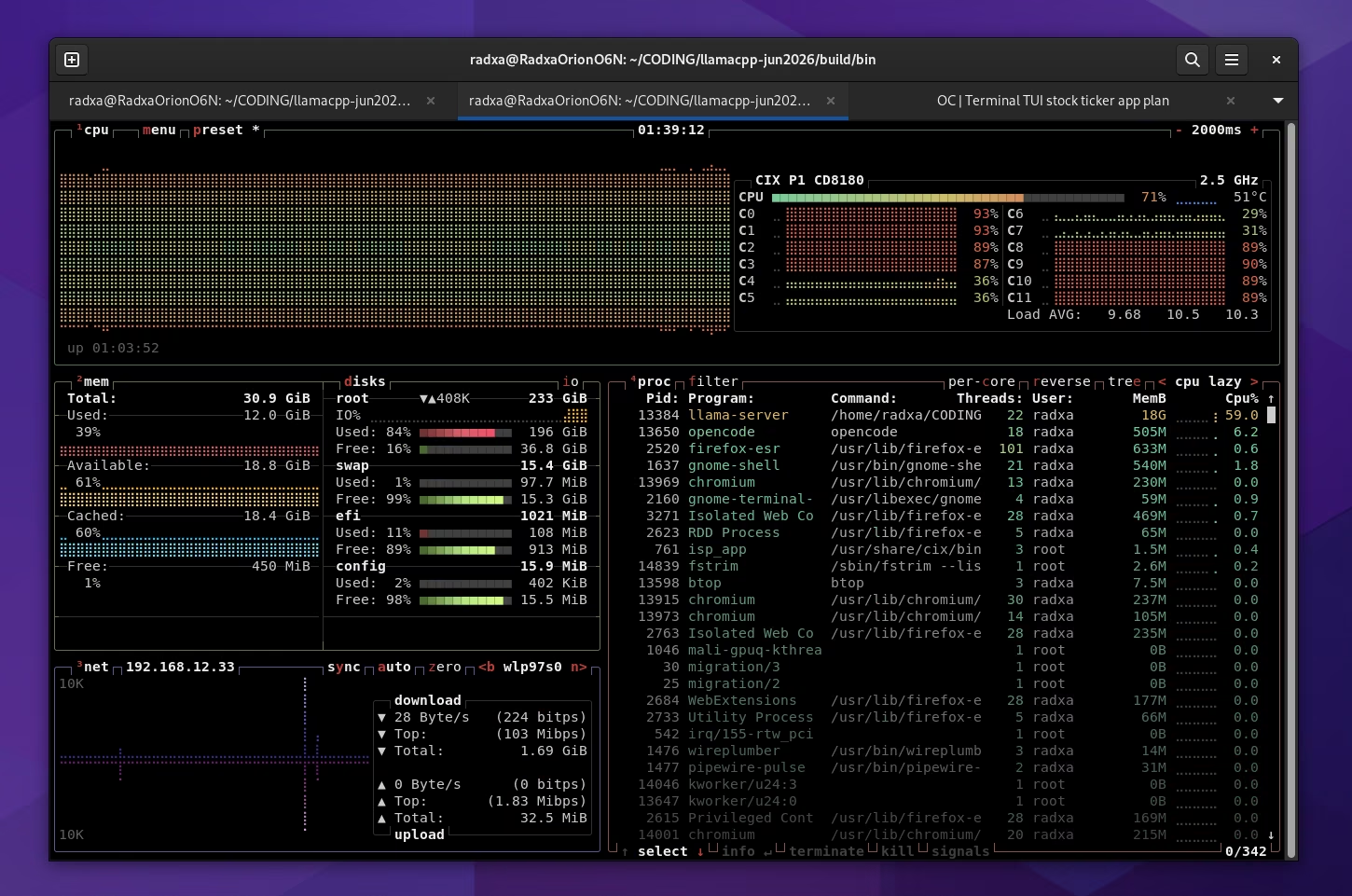
You can hear it spinning if you pay close attention, but it fades in the background sound of your room. Much better than the (smaller) fan used on the Orange Pi 6 Plus, which becomes noisier when the board is under pressure.
If you plan to use the Radxa Orion O6N as a server, this is perfect. It won’t bother anyone no matter where it’s sitting.
Benchmarks
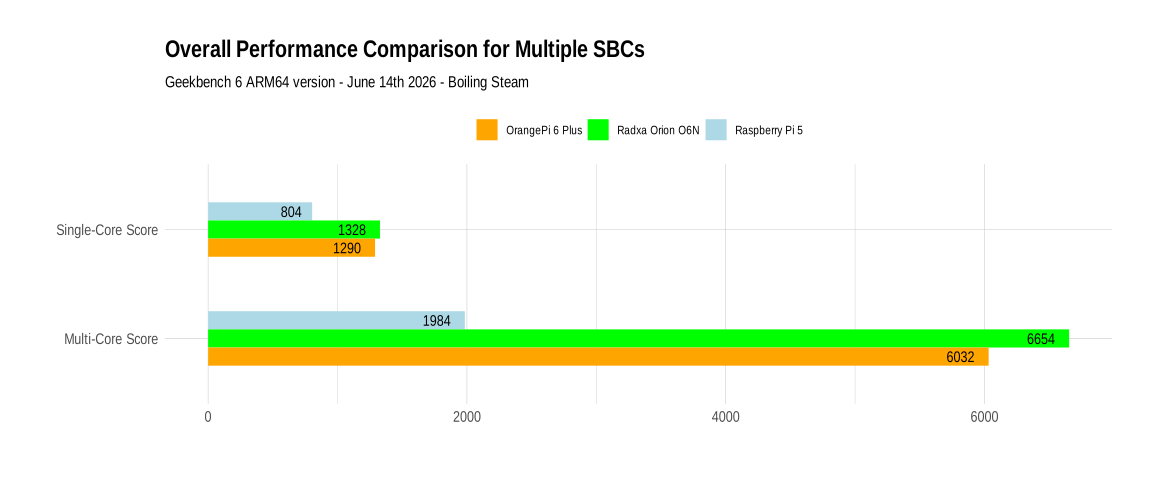
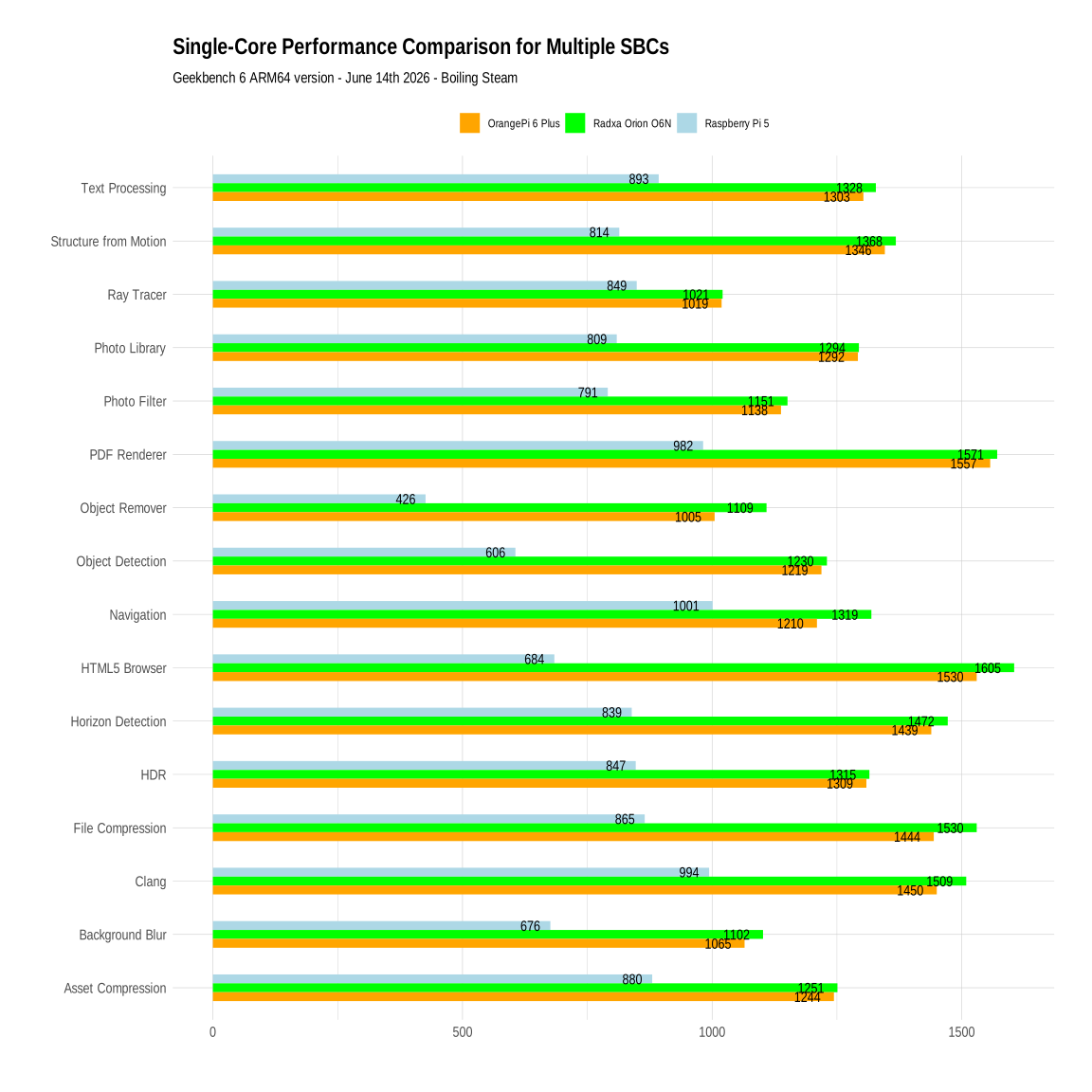
Here are our figures using Geekbench 6. The overall picture shows almost no difference between the Orange Pi 6 Plus and Radxa Orion O6N in single core tests, but in multi core scenarios for some reason the Radxa Orion O6N tracks ahead. In any case, we are leagues away from a weak Raspberry Pi 5, these boards are much closer to what you get on a desktop these days than on regular SBCs.
You can see the details below for the single core benchs…
And here are the multi-core benchs.
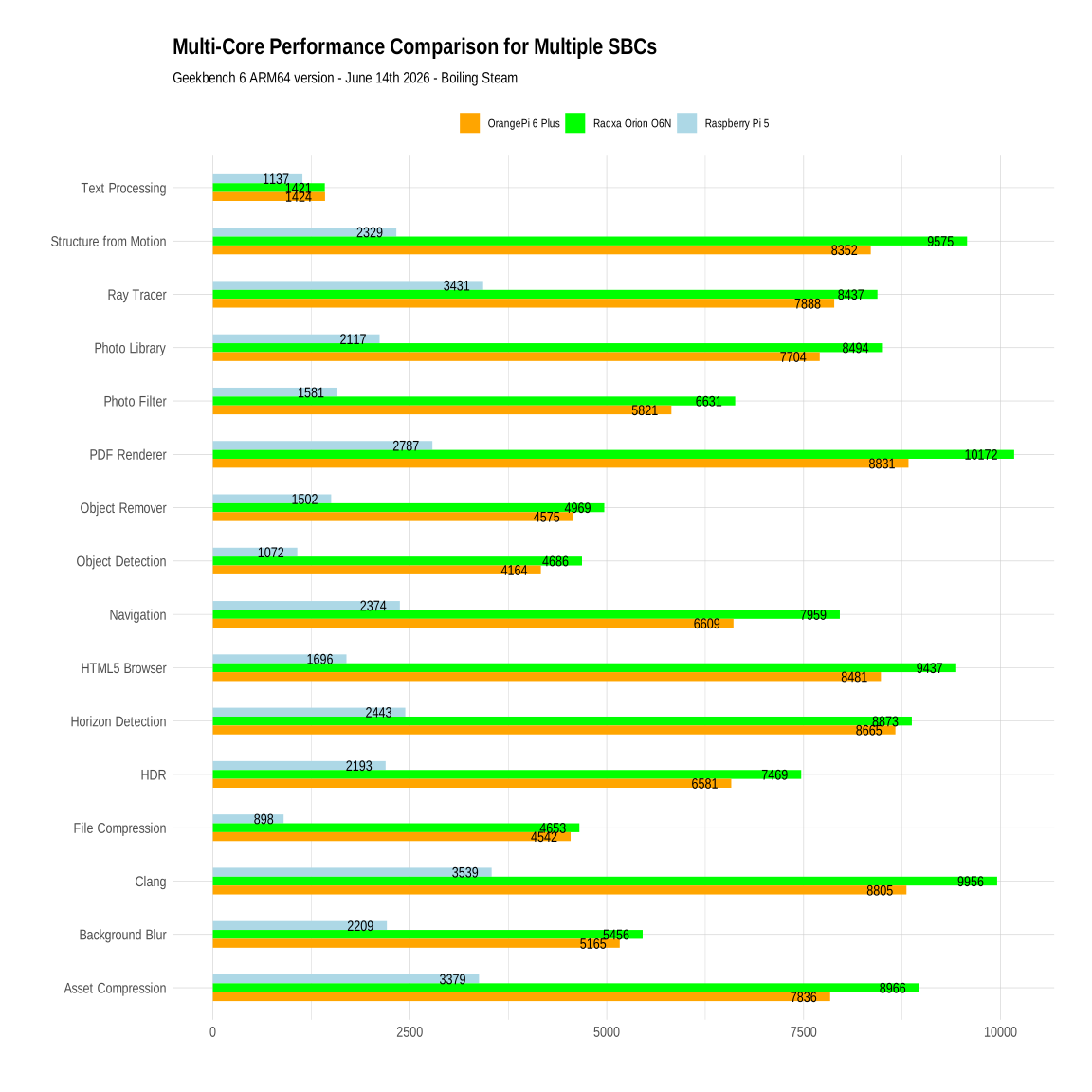
Very impressive numbers overall.
Gaming
Of course we could try running native stuff on this board and we would get excellent results, but where is the fun in that? Instead, just like what I did on the Orange Pi 6 Plus, I tried Box64 and Heroic Launcher and several games from the Epic Games Store. Before going there, I tried to install Steam again, but launching Steam resulted in a segfault just like on the Orange Pi 6 Plus.
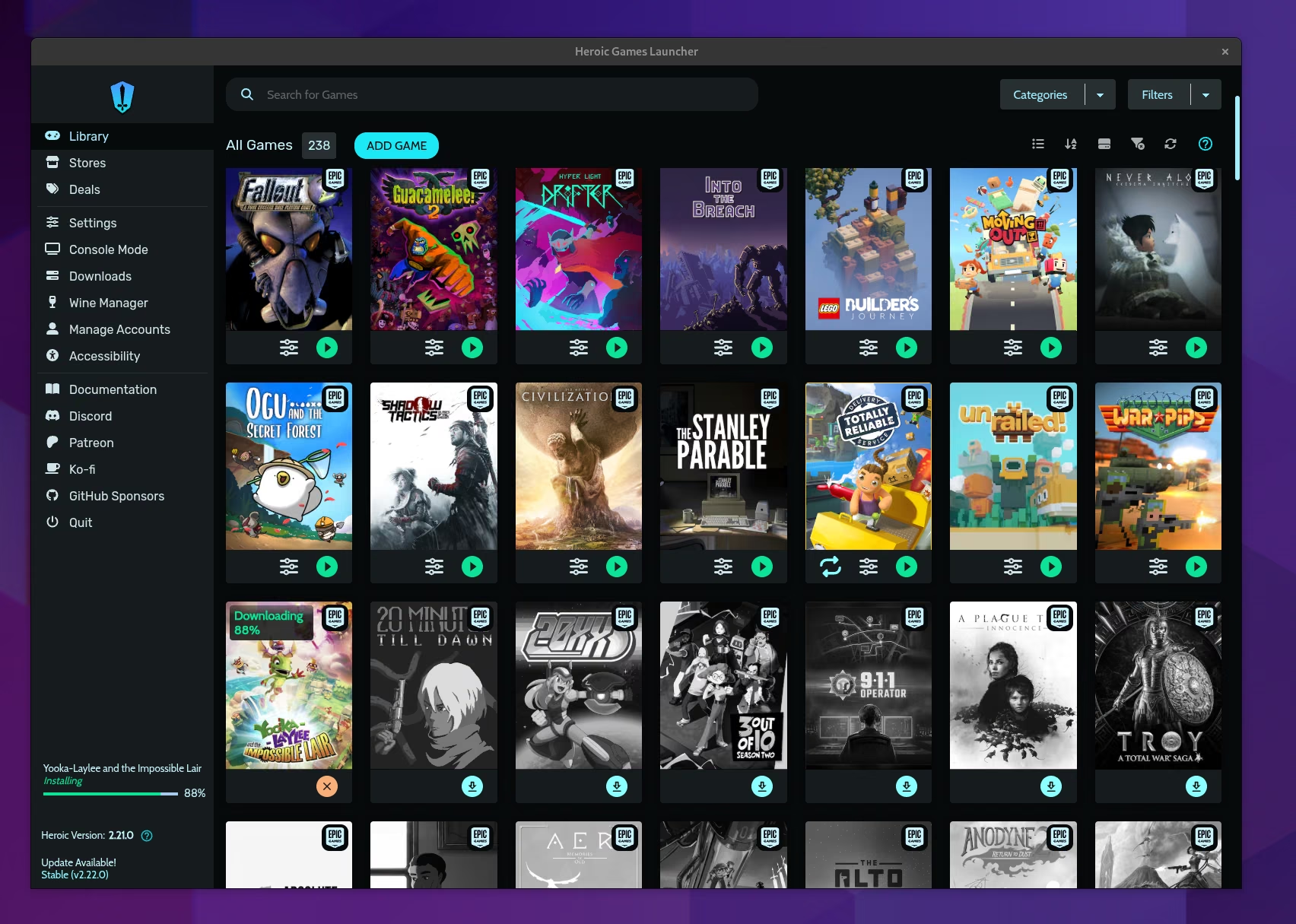
Heroic Launcher, with its special ARM64 Appimage available only on Github (once logged in), works nicely out of the box. Similarly to what we had seen on the Orange Pi 6 Plus, the compatibility results are somewhat random. Some games work. some games crash at start. Let me show you a few screenshots taken on the Radxa of the ones that did.
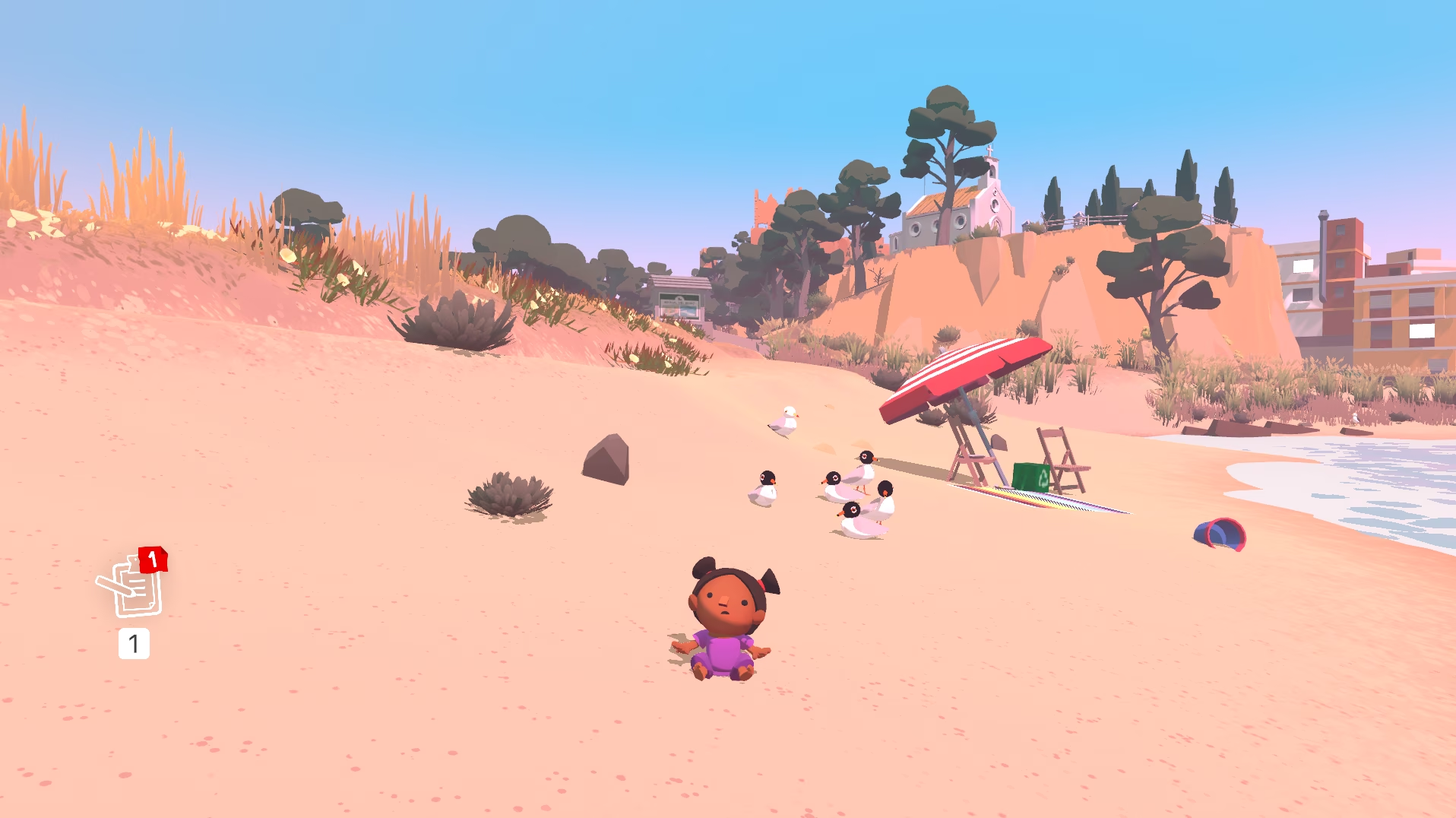
First, we have Alba, a 3D exploration game that runs well at Full HD once you decrease the details a little.
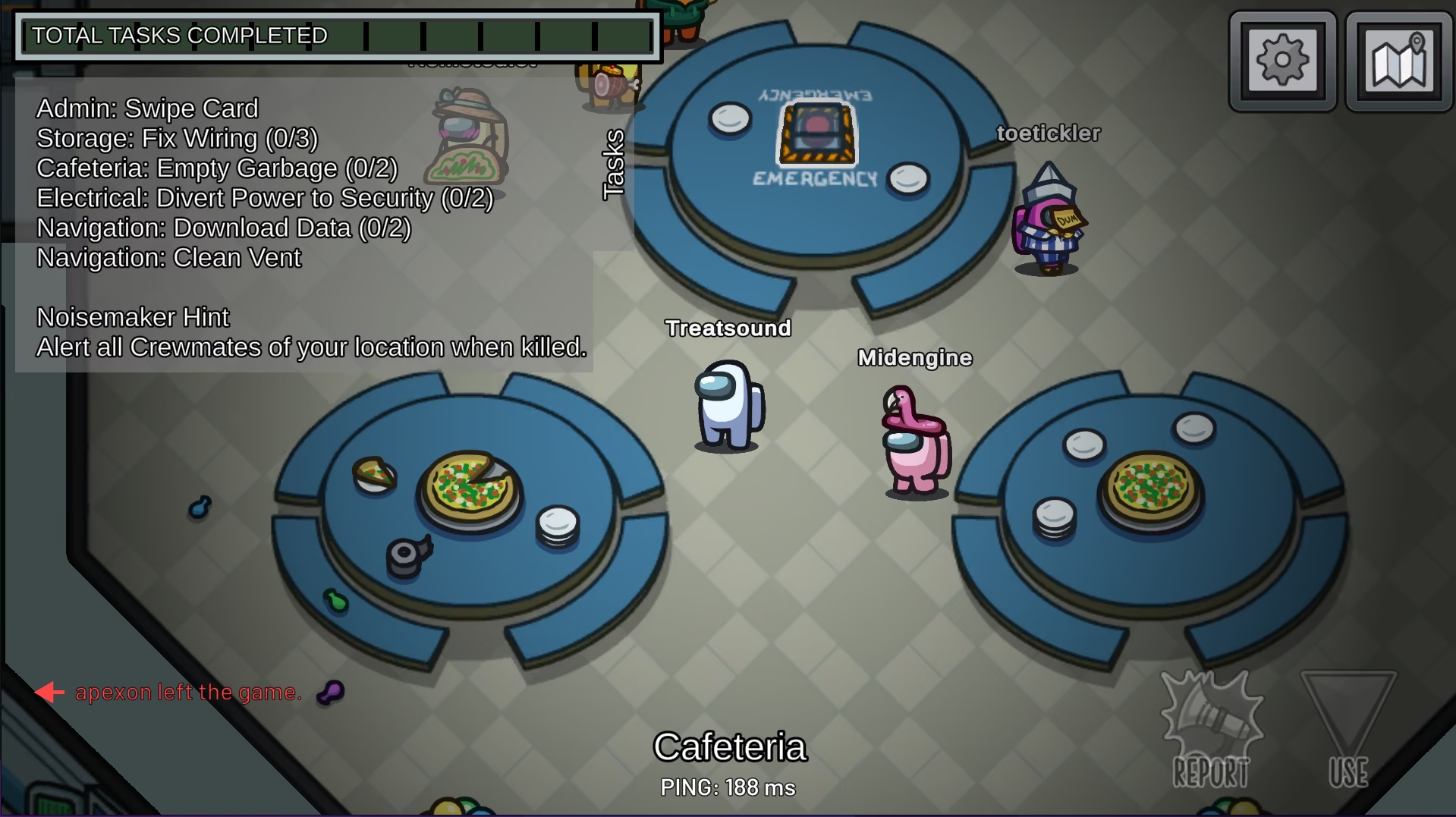
Among Us works out of the box, online, making it able to use the game in its full. Of course we get 60 FPS!
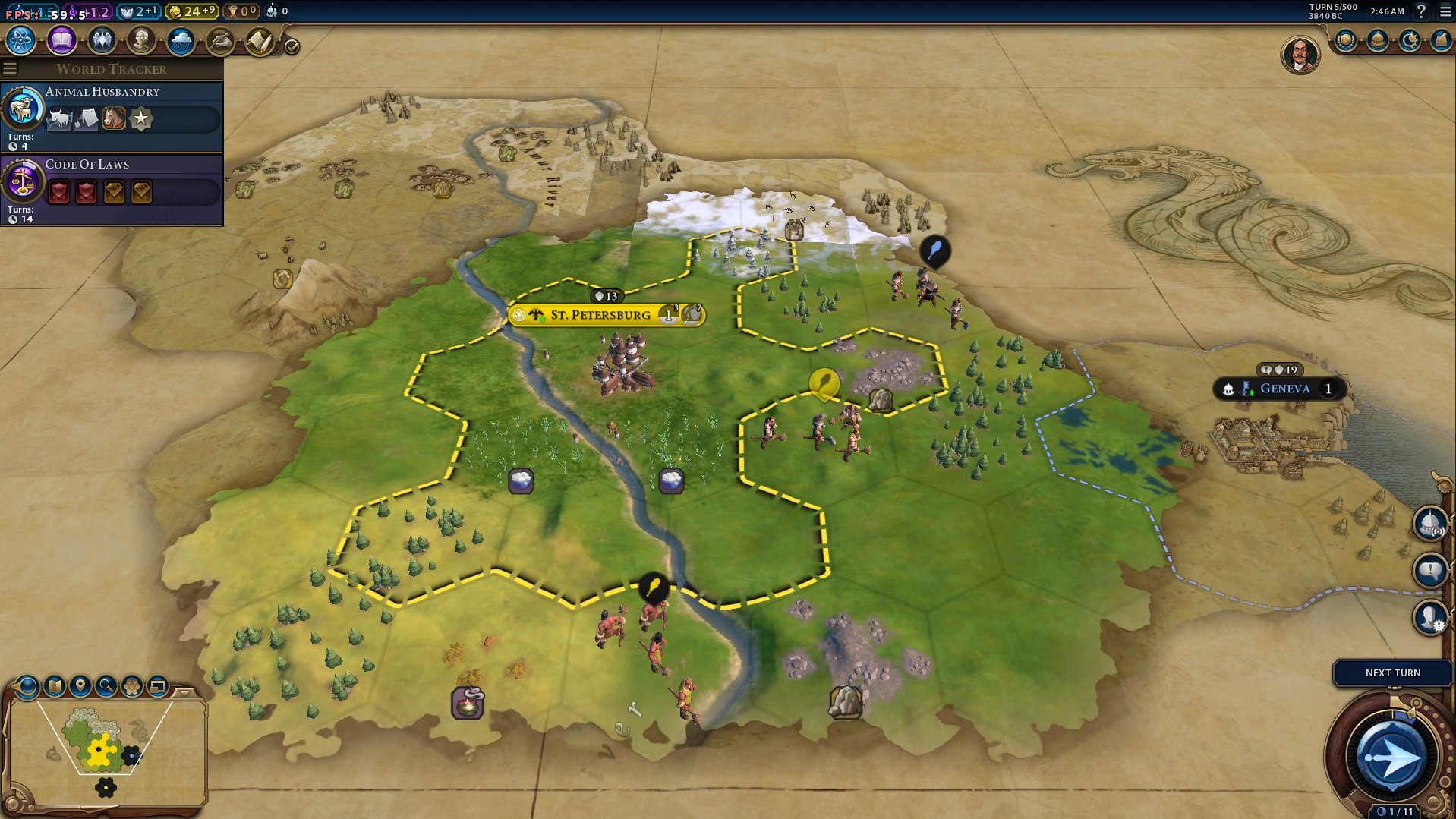
We also have Civilization VI! This massive game runs at low settings at 60 FPS in the early part of the game. Very impressive. This was already the case with the Orange Pi 6 Plus but it seems to run even better now.

In game we get 60 fps at low settings, and we probably have some margin to increase visual fidelity (we have vsync on).
If you like visual novels with a twist, Doki Doki Litterature Club works perfectly on the Radxa Orion O6N.

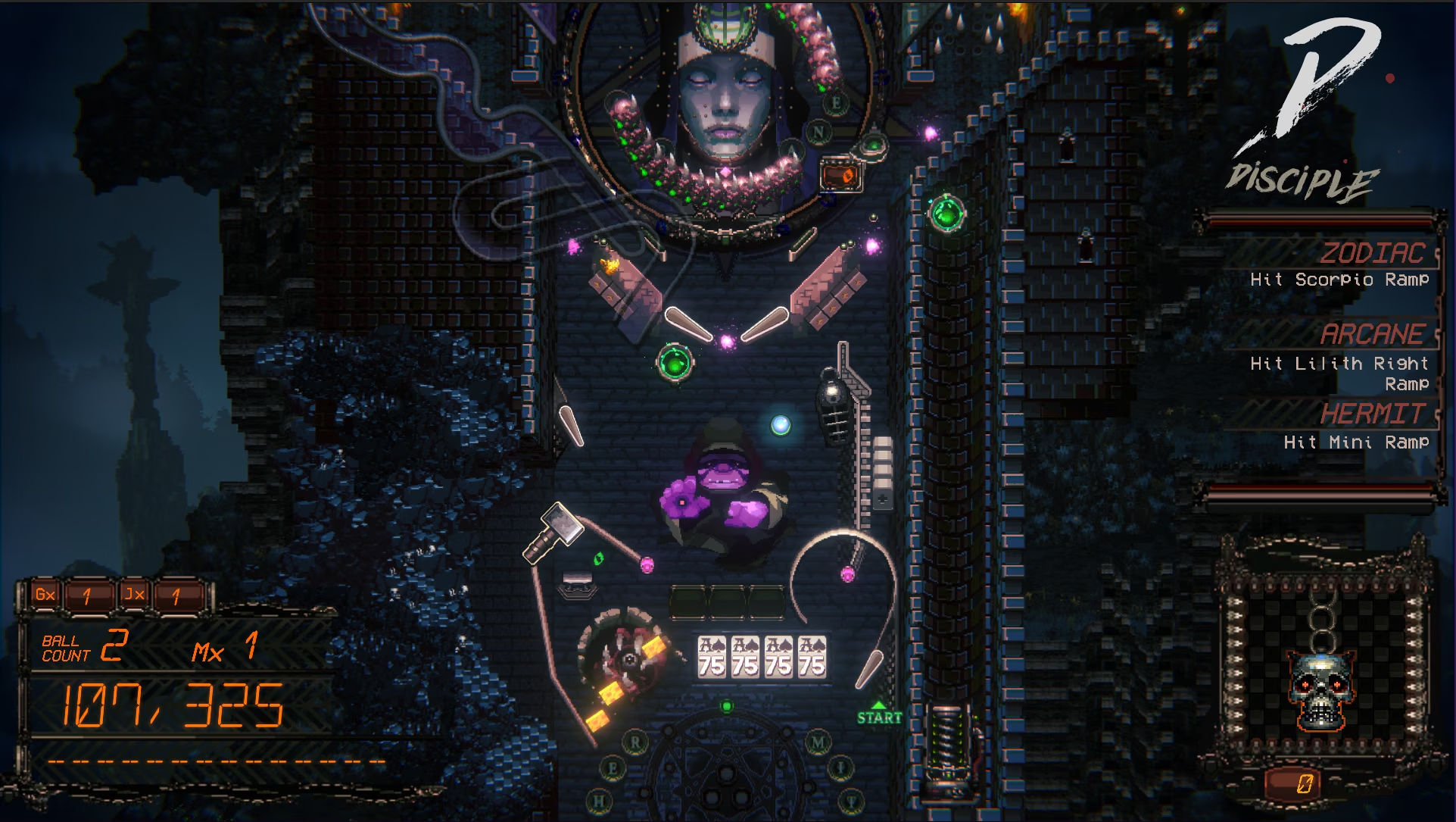
A game that I really like a lot, Demon’s Tilt, works super well on the Radxa Orion O6N. Constant 60 fps, great gameplay. A great pinball game.
I also tried Fall Guys, just in case, but no can do. Even with the optional installation of the anti-cheat system (EAC) from Epic, it still refuses to pass early checks in the game.

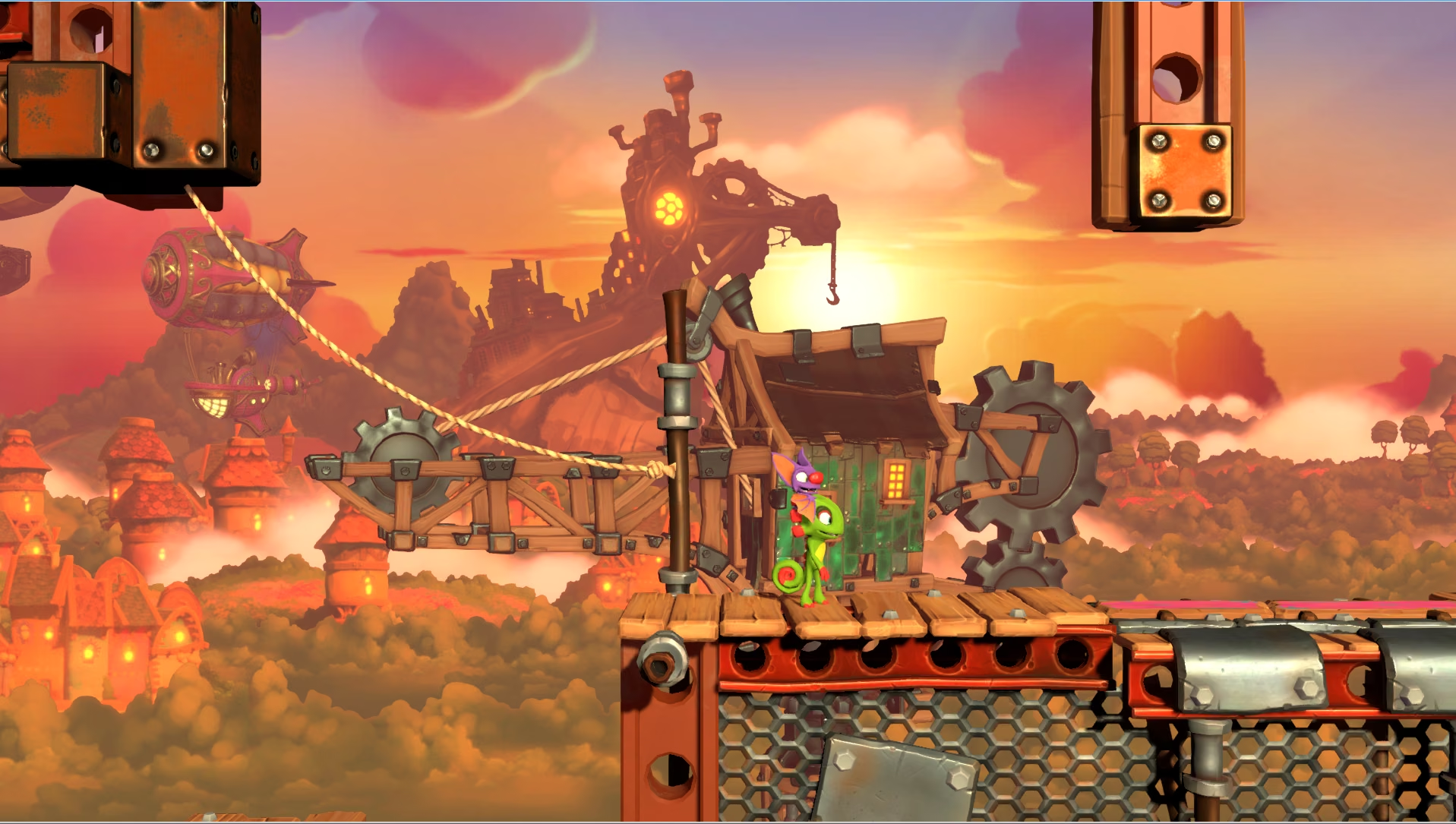
Yooka Laylee’s Impossible Lair works perfectly on this machine too - If you are unfamiliar with this one, this is a side-scrolling platformer (made in 3D) similar to the types of games you could find in the 90s on the Playstation 1.
So when games launch, typically they work very well on this kind of hardware. The success rate is however a little low, around 30~40%. I can attribute this to the driver issues - somehow the Vulkan driver seems to be still immature and lacking in features, causing crashes. It’s probably not the only reason, but the main one, according to what I could see in the logs.
Debian 13 Experimental
Now for something really interesting. You may be used to SBC makers not really doing much effort to support their hardware past a first distro version. For most vendors this is (unfortunately) a correct assumption. But Radxa seems to be better in that regard. Proof being that they are working on an experimental Debian 13 build, as highlighted by a specific page in their docs. I have not tested this version yet, but it looks like it should bring a 7.0 kernel to the board, together with more modern libraries and an open source driver for the CIX CPU. Now, how featureful the open source driver is, that remains to be seen, but we get this:
- linux-image-7.0.0-rc5-generic
- linux-headers-7.0.0-rc5-generic
- cix-npu-driver-dkms
- cix-vpu-driver-dkms
The NPU part is intriguing. This would mean that the NPU driver (30 TOPS) would be exposed with a Linux interface, potentially opening the door to use it in various applications (including LLM inference).
Based on third party reports, it looks like the open source driver is surprisingly robust at this stage:
- Display & Video Output: Working reliably at 4K@60Hz over DisplayPort and HDMI.
- Graphics Acceleration: functional using the open-source Panthor (kernel) and PanVK / Mesa (userspace) stack. It supports Vulkan 1.4 and OpenGL 4.6 out of the box. This should open the door to proper gaming-related applications. It also supports hardware video decoding! Note that the performance is supposed to be weaker than the proprietary driver.
- AI & NPU Compute: Working via open-source Vulkan compute.
- Audio: Onboard audio (HDA speakers, headphones, and HDMI audio output) is fully supported in the open-source stack.
The open source support almost brings a tear to my eye. For some boards, you need to wait for years before a (hacked-together) community build is available. Now, just a year or so after the release of this kind of SBCs, we are already granted access to experimental builds. If this becomes a trend for ARM64 boards in the future, their sales potential will be unleashed.
Running LLMs
Believe it or not, we have a lot of unified RAM on this kind of device, and that was one of the primary reasons why I was so interested to experiment with this kind of hardware. After all, can we run some kind of decent model on this?
And the answer is somewhat mixed.
The first very month when I got the board I was unable to compile llamacpp with vulkan support. I think the vulkan driver was somewhat still immature and cause some segfaults during compilation. But following some updates, I was suddenly able to compile Vulkan support, and lo and behold we had, on paper, an hardware accelerated board capable of running LLMs!
Playing around with the integrated chat server for llama.cpp was fun, and gave me great hope! After asking a simple question, the model had no trouble running token inference at about 8~9 tokens per second which is extremely decent. I was about to cry VICTORY! until I realized that my answers were getting slower and slower as the context grew.
And this brought me to the test that shattered my confidence. I gave a large block of text for the LLM to summarize. And the flaw became so apparent: the prompt processing speed on the Vulkan build is atrocious. We are talking about dozens of tokens per second. For comparison, my RTX3090 on my main PC routinely processes 900 tokens/s (on a model like Qwen3.6 27b which is even bigger) - a few dozens tokens per second is sluggish and makes it unattracive to do real-time chat or interaction.
Turns out the best solution is not to use Vulkan. You have to turn to using the CPU instead. And only some of the CPU cores, not all of them. Using all of them will make your inference slower, because of the Little-Big design. You want only your most powerful cores to run the inference. And you take a hit: instead of 9 tokens per second, you are typically between 6 and 7 only. But prompt processing is a little faster. It’s still super slow compared to any real GPU, but it’s less slow. Still too slow for long real time chat.
Here are some compilation instructions to get the best out of it. First you need to get KleidiAI which are a set of extensions to speed up inference on ARM64.
git clone https://github.com/ARM-software/kleidiai.git
cd KleidiAI
rm -rf build/

# Make sure we use Clang for the compilation
export CC=clang
export CXX=clang++

# Configure KleidiAI explicitly passing the target architecture flags
cmake -B build \
  -DCMAKE_BUILD_TYPE=Release \
  -DCMAKE_C_FLAGS="-march=armv9-a+sve+sve2+i8mm+dotprod" \
  -DCMAKE_CXX_FLAGS="-march=armv9-a+sve+sve2+i8mm+dotprod"

# Compile it
cmake --build build --config Release -j4
Then you should jump in your llama.cpp git cloned folder.
cd <directory where you cloned llamacpp>
rm -rf build/ #removing older builds if any

# since we used Clang for KleidiAI, let's make sure to keep using Clang here too:
export CC=clang
export CXX=clang++

# we compile llamacpp with KleidiAI now
cmake -B build \
-DGGML_NATIVE=OFF \
-DCMAKE_C_FLAGS="-march=armv9-a+sve+sve2+i8mm+dotprod" \
  -DCMAKE_CXX_FLAGS="-march=armv9-a+sve+sve2+i8mm+dotprod" \
  -DGGML_CPU_KLEIDIAI=ON \
  -DCMAKE_PREFIX_PATH="<path_to_kleidiAI_directory>/KleidiAI"

cmake --build build --config Release -j4
You will now end up with a fresh llama.cpp binary, once you go into the build/bin folder of llama.cpp. From there you can run the server, where it find models that I have downloaded, in my case in the ~/Downloads/models directory:
taskset -c 0,1,2,3,8,9,10,11 ./llama-server --models-dir ~/Downloads/models/ --ctx-size 50000 --cache-type-k q4_0 --cache-type-v q4_0 -fa on -t 8 -ub 64
You will see that there is a taskset instructions that serves a clear purpose: it only assigns the faster cores to work for LLM inference. If you don’t do that, your inference will be distributed across all cores, and the slower ones are going to bottleneck everything. This is a good demonstration of why it’s not always a good idea to use all cores available, especially on such asymetric systems.
What kind of performance do we get with llama.cpp benchmarks?
For a small model:
| model | size | params | backend | threads | n_ubatch | test | t/s |
|---|---|---|---|---|---|---|---|
| qwen3 1.7B Q4_K - Medium | 1.19 GiB | 2.03 B | CPU | 8 | 64 | pp512 | 90.65 ± 0.38 |
| qwen3 1.7B Q4_K - Medium | 1.19 GiB | 2.03 B | CPU | 8 | 64 | tg128 | 21.17 ± 0.15 |
For a much larger model:
| model | size | params | backend | threads | n_ubatch | test | t/s |
|---|---|---|---|---|---|---|---|
| qwen35moe 35B.A3B Q4_K - Medium | 16.10 GiB | 34.66 B | CPU | 8 | 64 | pp512 | 23.52 ± 0.54 |
| qwen35moe 35B.A3B Q4_K - Medium | 16.10 GiB | 34.66 B | CPU | 8 | 64 | tg128 | 7.16 ± 0.04 |
You can tweak the parameters to get a bit more speed. For example setting ub at 128 gives us:
| model | size | params | backend | threads | n_ubatch | test | t/s |
|---|---|---|---|---|---|---|---|
| qwen35moe 35B.A3B Q4_K - Medium | 16.10 GiB | 34.66 B | CPU | 8 | 128 | pp512 | 26.71 ± 0.03 |
| qwen35moe 35B.A3B Q4_K - Medium | 16.10 GiB | 34.66 B | CPU | 8 | 128 | tg128 | 7.34 ± 0.02 |
But going to 256 hardly makes much of a difference
| model | size | params | backend | threads | n_ubatch | test | t/s |
|---|---|---|---|---|---|---|---|
| qwen35moe 35B.A3B Q4_K - Medium | 16.10 GiB | 34.66 B | CPU | 8 | 256 | pp512 | 27.59 ± 0.06 |
| qwen35moe 35B.A3B Q4_K - Medium | 16.10 GiB | 34.66 B | CPU | 8 | 256 | tg128 | 7.44 ± 0.01 |
Inference is very decent. Getting 7.44 tokens/s on qwen35moe 35B.A3B Q4_K is very encouraging. And this is even before doing any work to get the recent MTP draft model working. With the draft model MTP function, we should be able to pass the 10 tokens/s. The main problem remains the prompt processing, stuck at a few dozens tokens/s. It would need to be 10 times faster at least to make real-time chat an option. So, by looking at these numbers, you may be thinking that there’s no point in using LLMs on this board?
But… there are still uses for it, actually.
This hardware (the Orion O6N with 32GB RAM) can actually run Qwen 3.6 35b-A3b (at least at Q4_K), which is a very good MOE type of model. Good enough to do some light coding. Using software like OpenCode (also called a harness), you can ask a LLM to work on a project and have it produce code from scratch to meet your stated objectives. And I tried two little projects with this board.
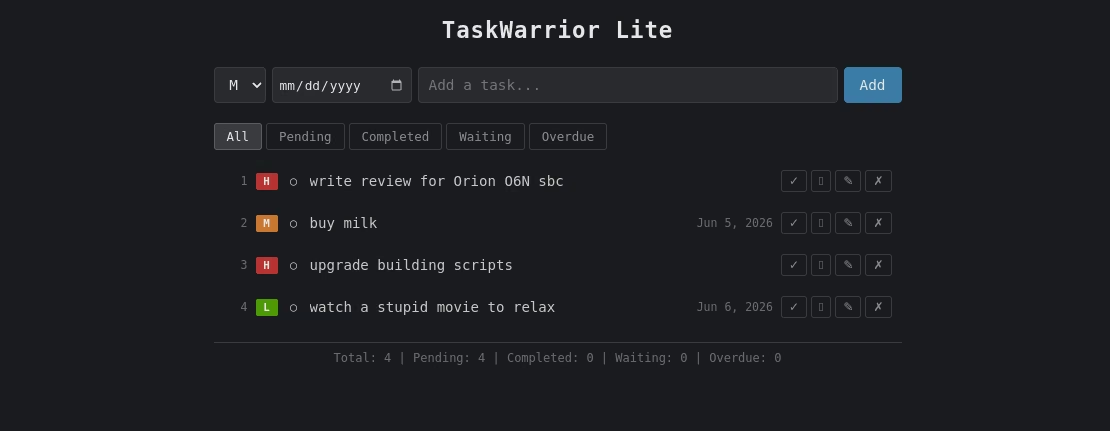
- Taskwarrior Lite: I asked the LLM to produce a webapp that would emulate some of the features of TaskWarrior and make it fairly bare-bones to-do app for the browser.
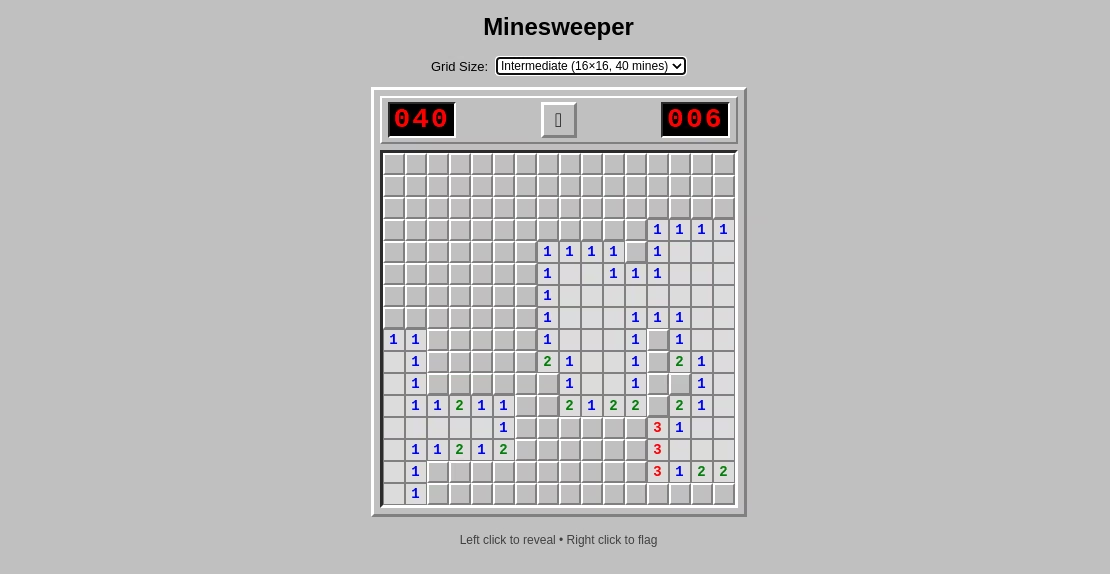
- Minesweeper a la Windows 95: fairly standard game, but I insisted that I wanted it to look like the version that was available on Windows 95 with the color scheme and the embossed look.
I’m not going to pretend it was done in 5 minutes. Actually, I did not even really measure how long it took. I think each of them took something like 30 mins to produce an output. The model aced Taskwarrior Lite ine one go and produced a small todo-app that worked flawlessly, even considering all the features that were included. Pretty cool.
Minesweeper required a bit more work. The app worked, but the numbers that were revealed when clicking around looking for mines were always the same - a bug somewhere in the code. With some clear feedback (once only) and some additional time given, Opencode paired with the LLM managed to fix the issue. And now we have a very nice, functional Minesweeper game with a retro look.
Of course, these are simple projects. Doing something that takes way more lines of codes is going to be challenging. With this board I could get something like 50 000 tokens of context, which is decent for typical chat-based interactions, but rather on the low side of things when it comes to coding agents. The harness works around this limitation by constantly compacting the context if it exceeds the maximum context available, but that slows things down and encurs the risk of introducing new problems.
The ultimate goal would be to make use of the NPU for inference. Not possible with Radxa OS right now, but I have hopes that the experimental Debian 13 image should change this conclusion.
Cost and Availability
At the time of writing, it was sold out, out of stock, even on Aliexpress. But after contacting Radxa again, they had let me know that new stocks were on their way, and lo and behold here they are:
- Arace has the 16GB board listed at 309 USD, and the 32GB board at 549 USD.
Right now the Orange Pi 6 Plus has still some units available here and there, and they sell for much higher prices. (like 366 USD for the 16Gb version and 730 USD on Amazon.com for the 32B version)
So the current pricing for the Radxa Orion O6N is very advantageous! At this pricing for the quantity of RAM you get, it’s very hard to find anything that sells at this kind of pricing for equivalent performance.
So it looks like that if you really want to get your hands on a SBC equipped with the CIX P1 SOC, the Radxa Orion O6N may be your first choice at the moment, as long as you aware of the few differences between the two boards. As a reminder, such differences could be summarized in this way:
| Feature | Orange Pi 6 Plus | Radxa Orion O6N |
|---|---|---|
| Size / Footprint | Smaller, more compact | More bulky, need a bit more space |
| Noise / Temperature | A little noisy when pushed | Excellent temperature control, almost silent |
| Power plug | USB-C | Barrel jack |
| Wireless | integrated on the board | Require additional chip on M2 port |
| Max RAM available | 16GB and 32GB available | 16GB and 32GB available, 64GB out of stock |
I expect to be back with a new article down the road when I get around to test the Debian Experimental image. This should prove interesting, for games and LLM applications.
Note: we were provided a review unit by Radxa for this hardware review.