Updated: |
For the last few months, I migrated a documentation site from Gatsby to Astro (Gatsby is dead). We looked at alternatives like Next.js, Remix, Astro, Docusaurus or no framework etc. We picked Astro in the end for it’s first-class Markdown support, server-first / zero JavaScript by default design, and active development.
In the end, I am happy we chose Astro. The migrated website is faster and we enjoyed using Astro’s full-stack features.
But Astro is built for our use case (content-driven websites). Here are few things that a React developer
(especially the ones worked in the single page application (SPA) era with create-react-app) may not be aware of…
- Astro != a React framework
- Oh, State Management
- Two Servers and Two Astro?
- Multi-Environment of Madness
- Closing Notes
Astro != a React framework
Astro is not a React framework. It is a full-stack JavaScript web framework. Some developers might’ve mistaken it as a “React framework” because the Astro homepage promotes React as one of it’s supported UI frameworks.
Zero Lock-in Astro supports every major UI framework. Bring your existing components and take advantage of Astro’s optimized client build performance. Integrate your favourite framework: React, Vue, Preact, Svelte, Solid
React is supported, but Astro introduced Astro Components (if you are writing React/Vue/Solid within Astro, these UI library components are called Island Components).
React vs Astro Components
Let’s look at the difference between React and Astro by building a simple LikeButton component.
This LikeButton component will fetch its initial like state from the server (true or false), and when the user
toggle the button, it will inform the server, receive response and update the UI accordingly.

Let’s say we already have this component from an existing React SPA codebase, like this:
export const LikeButton = () => {
const [liked, setLiked] = useState(null);
const [isLoading, setIsLoading] = useState(true);
// inital mount to fetch server state
useEffect(() => {
mockLikeAPI(liked)
.then(({ dbLiked }) => setLiked(dbLiked))
.finally(() => setIsLoading(false));
}, []);
async function onLikeClick() {
try {
const { dbLiked } = await mockLikeAPI(liked);
setLiked(dbLiked);
} finally {
setIsLoading(false);
}
}
if (isLoading) {
return <button disabled>loading...</button>;
}
return <button onClick={onLikeClick}>{liked ? 'Unlike 👎' : 'Like 👍'}</button>;
};
When we copy and paste this component to Astro, we use the client-only directive to skip the server-rendering and just
hydrate it on the client side (SPA style):
---
import { LikeButton } from '../components/LikeButton.tsx';
---
<LikeButton client-only="react" />
Now let’s say we want to re-write the same component as an Astro Component, it would be:
---
import { mockLikeAPI } from './mockLikeAPI';
const { dbLiked: initialLike } = await mockLikeAPI(null);
---
<button id="like-btn" data-liked="{initialLike.toString()}">{initialLike ? 'Unlike 👎' : 'Like 👍'}</button>
<script>
import { mockLikeAPI } from './mockLikeAPI';
const likeBtn = document.getElementById('like-btn');
let isLiked = likeBtn.dataset.liked === 'true';
likeBtn.addEventListener('click', async () => {
const { dbLiked } = await mockLikeAPI(isLiked);
// setting local state directly to a variable
isLiked = dbLiked;
likeBtn.textContent = dbLiked ? 'Unlike 👎' : 'Like 👍';
});
</script>
Keep in mind, this simple LikeButton example is only here for demostration purposes. But it highlights the key
differences between React and Astro components:
- There is no JSX in Astro component.
- There is no React APIs in Astro component.
- Astro renders on the server at build-time or on-demand, have server capabilities (e.g., access to database) before initial page load.
- React (without RSC) is a client UI library and have no server capabilities.
- Astro uses vanilla JavaScript and HTML/DOM APIs to add interactivity.
- React uses React-specific hooks and APIs like
useState,useEffect,useCallbacketc.
In a codebase consisting both the Astro Components (HTML with progressive enhancements) and the React Islands (individually hydrated React roots), we can:
-
Keep all things Astro (
Astro -> Astro -> Astro✅) -
Nest islands inside Astro (
Astro -> Island -> Island✅) -
But not mixing them (
Astro -> Island -> Astro -> Island❌)This is not possible because Astro follows server-first principle, once
Astro -> Islandhappened, the rendering context switched over to the client and it cannot be switched back to the server within the same request.
If you are a React SPA developer coming to Astro:
Consider whether the website will be mostly static or mostly dynamic?
If it is mostly static, you might be happy to see the bundle size get smaller, application loads faster, can use vanilla JavaScript packages, writing more HTML/DOM API standards and write less React.
If is is mostly dynamic, you might realise islands are not 100% React-compatiable (e.g.,
can’t share Context between islands), the codebase is
split between two file extensions (.astro or .tsx), the HTML/DOM APIs looks scary, and now daydreaming the promises
of “Isomorphic React”.
Oh, State Management
Remember back in year 2019, you have a SPA, and somehow you need to share states across the application like “auth status”, “search bar values”, “rich text editor”, or Google Calendar (where any interaction on a component can have effect and update components elsewhere on the page).
You could just put everything in a React/Redux store, and call it a day, right?
Wait, did you forget about:
- data normalization, immutable and functional updates, etc
- store, dispatch, action, creator, reducer, slice, selector, etc
- utils like Thunk, Saga, observable, reselect, logger, etc
Before you know it, you are complaining about the boilerplate and complexity that are unnecessary for small apps and overenginerred/overwhelming for big apps.
Fast forward to today, the community moved from SPA to MPA, the modern full-stack frameworks makes writing both server and client code easier, the client is split into islands or even different frameworks (micro-frontends).
What options do we have in terms of managing global states in Astro?
Lifting State Up and basic React hooks
If possible, the fundamental practice of “lifting state up” should still be considered first. React hooks like Context combined with the reducer pattern is good enough for many common cases.
Managing server-client states
Turns out, many CRUD or API-driven websites are facing server state management problems! They have issues effeciently
fetch server data and keep them in sync between components. In this case,
TanStack Query (former react-query) can cache/reuse the same network endpoints,
store data through named keys, and pass the data to components through hooks like useQuery and useMutation. Without
mixing your client UI states and server states altogether.
Here are few other libraries to TanStack Query that can also be your server states manager.
Managing client-client states
There will still be a time where managing client states where TanStack Query cannot help. For example, a client-only design tool like Figma would generate complex client states just from user edits and need to share that across multiple components.
TanStack Query can remain to manage server states, but we can use the help of the following client-state libraries too:
- Nano Stores. This is the library where Astro recommends to use when trying to share states between islands.
- Zustand is a popular client state management library alternative to Redux/Context, with many modern and powerful features such as “no context providers needed”, “use hooks”, “no unnecessary re-renders”, “use without React”, etc.
Micro State Management with React Hooks is a book written by Zustand maintainer Daishi Kato, give it a read if you want to dig deeper into the difference between states such as “local”, “global”, “component”, “module”, etc.
Storing states elsewhere
Besides within the React app, we can store states/data in other places too:
- URL. E.g., the “search bar query” can be updated in the URL and be reflected across the page.
- SessionStorage/LocalStorage. State are maintained even after page refreshes, but remember the
windowandlocalStorageobjects are not available during server-side rendering, therefore state must be initialised in the browser and there will be UI loading flickers. - Cookies. State in the cookies will be available during server-side rendering, but remember to limit the size and usage (as it will be sent across every page request). Boilerplate code will need to be written to ensure components are aware of the cookie values.
- Astro APIs. Astro offers many of its own server capabilities like Middleware, Actions, Sessions where you can mix and combine these features to share data between requests even for server-rendered pages.
 example of full-stack state/data management
If you are a React SPA developer coming to Astro:
States are just data. And we can manage data anywhere.
State management has never been an easy problem in the first place, no matter which technologies we are using.
We tried to manage it all in one single place (it didn’t work out), now we are managing them accordingly to its rightful environment, context, and use cases.
State management should be treated as architectural decisions rather than library/framework choices.
Two Servers and Two Astro?
If we use Astro with the Node.js adapter with
middleware mode, we get the ouput of the build in a dist folder and can pass the app as a middleware to another
Node.js http server like express:
import express from 'express';
import { handler as ssrHandler } from './dist/server/entry.mjs';
const app = express();
app.use('/', express.static('dist/client/'));
app.use(ssrHandler);
app.listen(8080);
So first we get a express server, with a SSR middleware. But within the SSR handler, we get another server context
with Astro-specific features like Middleware and
Actions.
Remember the code fence --- synax in the .astro files?
---
// Component Script (server context)
---
<!-- Component Template (client context: HTML and JS Expressions) -->
Adding everything altogether, we get two servers and two Astro exeuction contexts?
 welcome to full-stack “debugment”
If you are a React SPA developer coming to Astro:
This “multiple execution contexts” phenomenon is not specific to Astro.
Other full-stack frameworks like Next.js, SvelteKit, and Remix have similar patterns. React RSC introduced the
use client or use server directives to separate client/server
concerns.
Here are two examples where a clear and deep understanding of this layered architecture matters:
- We can create API endpoints in both the
expressserver and Astro app, so where should we put it? The Astro API endpoints might be prefered because they share the same execution context as the frontend components. - When logging telemetry data across the entire application for enabling comprehensive observability, we need to setup
different instances in different context. If the
expressserver caught a system error, it won’t necessarily be picked by the telemetry instance from the Astro execution context.
Multi Environment of Madness
When we examine the Astro server context in depth, we’ll see the Node.js server is the runtime (executed through the node ./dist/server/entry.mjs command), and the Astro server is actualy the build, executed through the astro build command:

And the astro build command is powered by Vite, the de facto build tool for the modern web (replacing the previously popular webpack).
In the simple terms, Vite acts as the middleman that make sure all the modern JavaScript code we write, with TypeScript or not, with various assets we want to bundle (images, css files, json files…), however we want to define the rules for dynamic imports, it will handle it and output code that can be consumed by the client (browser) or server (usually the node.js runtime).
Really, Vite is doing a lot of the heavy lifting here in the ever growing complexity of the JavaScript ecosystem.
But to manage all these different context (or let’s say different environment) effectively, Vite also introduced new syntax and APIs. One example that we can find in the Vite documentation is the difference between process.env.NODE_ENV and import.meta.env.MODE: https://vite.dev/guide/env-and-mode.html
Both variables can be used to determine the code execution environment, and set logic dynamically depending on the environment. But if the developer are not clear about the difference, they may be shocked about the following example:
| Command | NODE_ENV | Mode |
|---|---|---|
NODE_ENV=development astro build | "development" | "production" |
astro build --mode development | "production" | "development" |
NODE_ENV=development vite build --mode development | "development" | "development" |
astro build | "undefined" | "production" |
The fact Vite build our code for the nodejs environment is only the first part of the question, the second part of the question is “how many environments are there?”
From Vite 6 (released Dec 2024), the team released their plan for experimental Environmental API, and here’s the diagram on the https://vite.dev/guide/api-environment.html page listing several of the common environment a developer might encounter:
nodebrowserJSDOMfor testing- Cloudflare
workerdedge environment
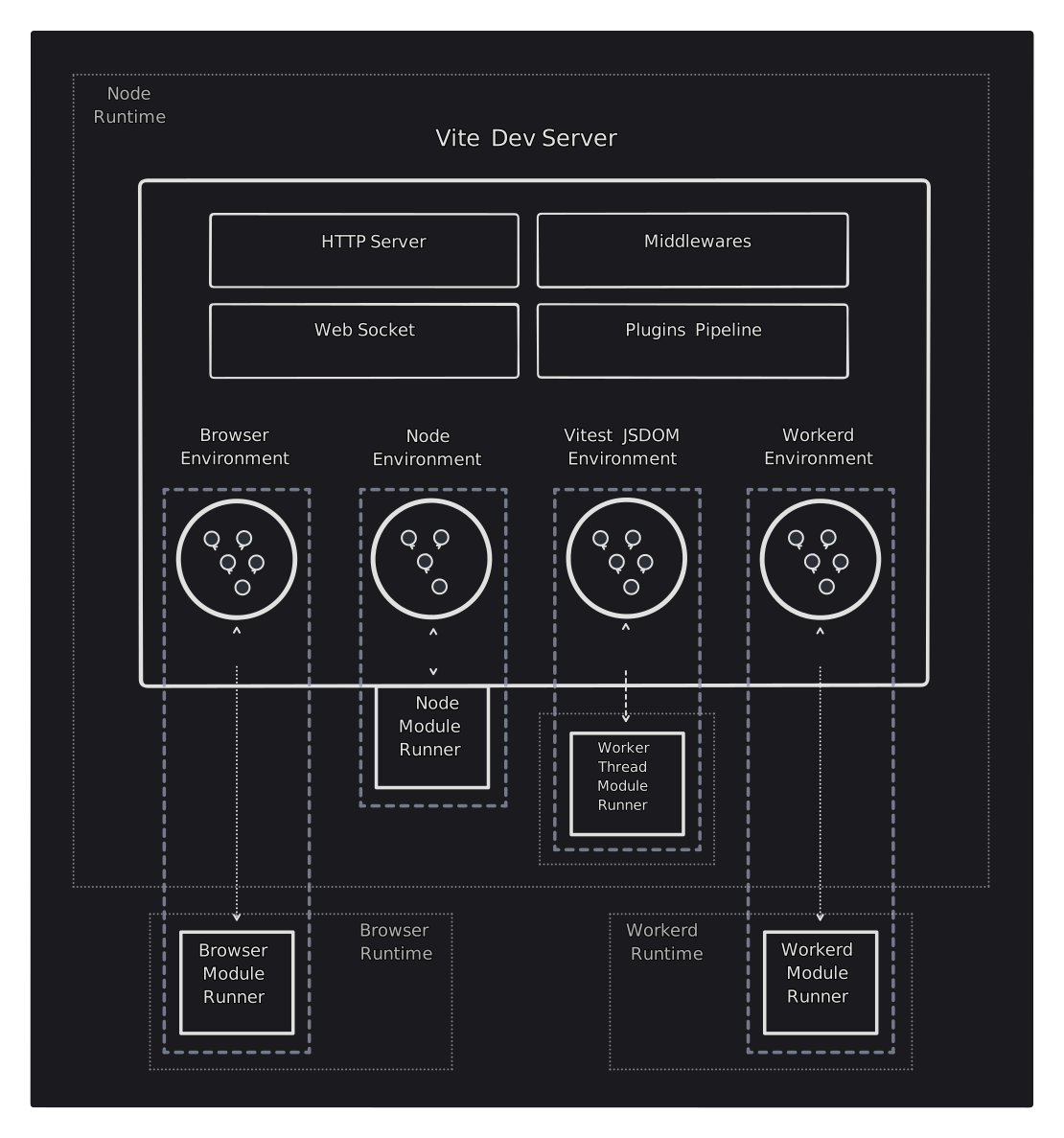
But the actual list of environments in the ecosystem is much bigger. Here are just the 17 that are named under the Runtime Keys proposal: https://runtime-keys.proposal.wintercg.org/
- Alibaba Cloud - edge-routine
- Arvancloud Edge Computing
- Azion - Edge Functions
- Cloudflare - workerd
- Deno Land - Deno
- Lagon - Lagon Runtime
- Meta - React Native
- Moddable - Moddable SDK
- Netlify - Edge Functions
- OpenJS Foundation - Electron
- OpenJS Foundation - Node.js
- Oven - Bun
- React - Server Components
- Vercel - Edge Light
- Fastly - JavaScript on Compute@Edge
- Kiesel
- Wasmer Edge
Remember, these are only runtimes. The previous JSDOM environment are not even counted in there because it is not a runtime.
And many of these environments are integrated, for example, we may have a Bun runtime + React server components + Vercel edge stack, and Vite have to consider all the environments to build and output the appropirate code.
Closing Notes
This blog started out explaining how the Astro Component is the new UI choice for frontend developers, but slowly as we dived deeper, the conversation moved gradually from the client to the server. And a typical frontend developer start to realising they may have to start thinking about problems in a full-stack scale, as many of the modern frameworks offer solutions from the server side.
What does this mean for our old school SPA React developer?
The first cross road they have to choose is “client vs server”:

One could argue that if the bundle size is not a problem, SPA may still be an attractive choice for developers who are familar with client-only React APIs and doesn’t want to be context-switching all the time.
Maybe that’s why, even after the archival of create-react-app in 2022, developers in 2025 are still creating SPA-like stack: https://github.com/stevedylandev/bhvr
If the developer wants to migrate to the full-stack/server side, the next cross road they’ll face is “React vs NoReact”:

Like in the database world, people defined the two broad categories as “SQL” vs “NoSQL”. Even though, in the “NoSQL” category, the databases can have little in common (e.g., document-based, graph-based, key-value based…). The only reasons they are grouped together is they are “No SQL”.
The same is happening in the web frameworks. In the “NoReact” category, the frameworks offers different functionality and are built-upon different languages, but they all share the “No React” functionality. (Astro being the exception for supporting React optionally, with caveats).
But most of the times, the questions when picking a web framework today remains:
Do you want to write more or less React?