TLDR: Built a real time leaderboard that allows users to stream updates using SSE (Server Sent events). Load tests (based on Go scripts) hit the limit of 28,232 concurrent connections on Linux (which is a very peculiar number). This post explains what was blocking this and the path to go beyond (and a framework to scale to potentially millions of connections).
Acknowledgements
I’d like to thank Tushar Tripathi for pointing me to resources explaining how others achieved similar results (on websockets). And to my friends, Ritu Raj and Chahat Sagar for listening to my ramblings on this topic for days on end.
System overview
The leaderboard service (a Go HTTP server) is being tested for the maximum number of connections it can sustain, specifically the SSE (Server Sent Events) endpoint exposed by it.
Each client connection is handled by a goroutine, and each goroutine receives updates through its own dedicated channel from a single broadcaster goroutine. The broadcaster continuously polls Redis for leaderboard updates and fans them out to all connected clients.
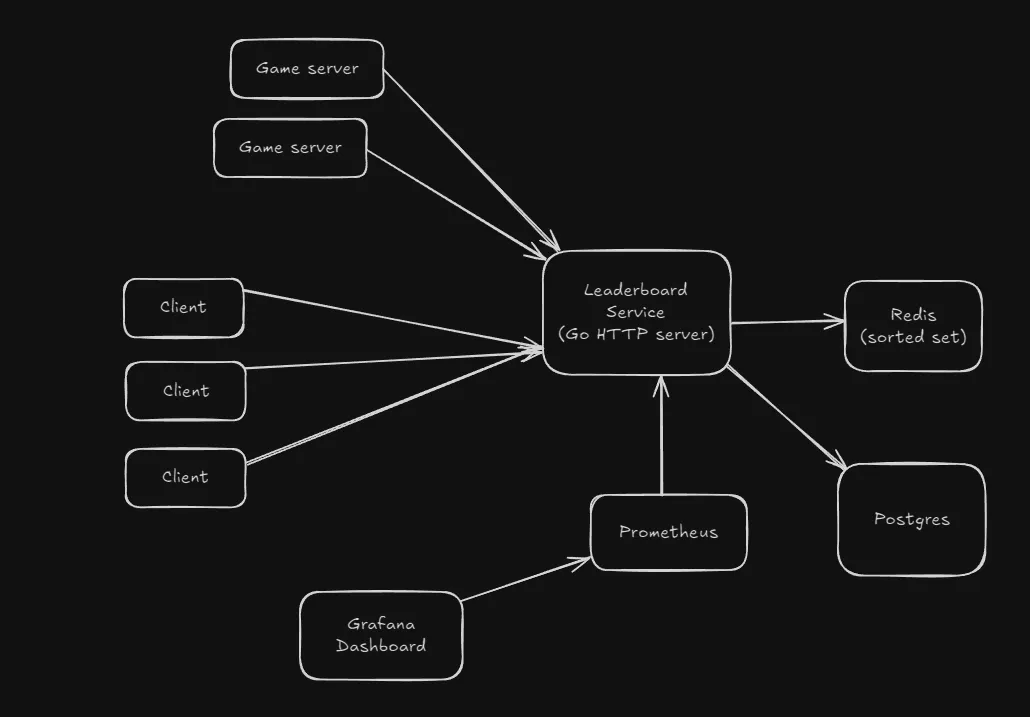
System overview
The SSE implementation I’m using here is stateless, as clients would not need to stream past events (in case they disconnected and rejoined), they only care about the latest state (historical data is accessed through another endpoint that connects to a Postgres database storing aggregated data).
Prometheus and Grafana are used for monitoring the setup, to observe in a visual way the various resource usages among other metrics.
The client is a script that opens up tens of thousands of SSE connections to the /stream-leaderboard endpoint. Initially it was being run on the native OS, without a container for the client.
All of the server components run via Docker compose. The client as well as the server are on the same laptop (but the server components are inside Docker containers, so that separates it from client).
This benchmark does not measure
- Game servers submitting results (a more realistic benchmark)
- Network spikes (I know from experience that this server is terrible at that)
The 28,232 connection limit
Initial testing was done through a Go script that opens up a bunch of persistent HTTP connections to the backend server, which was based off of the testing script used in this talk.
This got me to 15,400 concurrent connections on Windows, and 28,232 connections on Linux. All tests are done by setting up the server using docker compose and the script running natively.
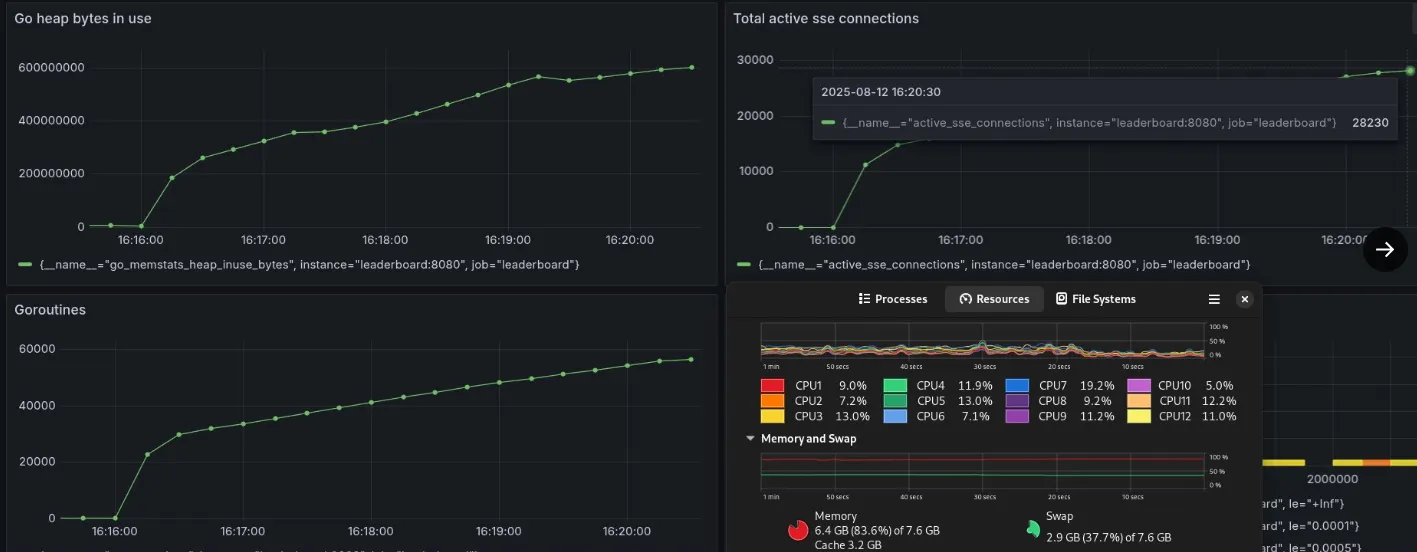
28k concurrent SSE connections reached
This number was peculiar, and I got curious as to why this was happening, as I believe that it should have scaled to hundreds of thousands of more connections, since there were no issues with memory, CPU or network resources.
Client script
package main

import (
	"flag"
	"fmt"
	"io"
	"log"
	"net/http"
	"os"
	"time"
)

var (
	ip          = flag.String("ip", "127.0.0.1", "Server IP")
	connections = flag.Int("conn", 10000, "Number of SSE connections")
)

func main() {
	flag.Usage = func() {
		io.WriteString(os.Stderr, `SSE client generator
Example usage: ./client -ip=127.0.0.1 -conn=10000
`)
		flag.PrintDefaults()
	}
	flag.Parse()

	url := fmt.Sprintf("http://%s:8080/stream-leaderboard", *ip)
	var conns []*http.Response

	for i := 0; i < *connections; i++ {
		resp, err := http.Get(url)
		if err != nil {
			log.Printf("conn %d failed: %v", i, err)
			break
		}
		defer resp.Body.Close()
		conns = append(conns, resp)
		log.Printf("Connection %d established", i)
	}

	// keep alive
	for {
		time.Sleep(30 * time.Second)
	}
}
The bottleneck
A quick google search showed me that the issue was ephemeral port exhaustion, which was something I encountered for the first time.
The core idea is - whenever a client tries to connect to a server, it needs the destination ip and port. The operating system then selects a source ip and port to form the 4 tuple required for establishing a connection.
A TCP connection is uniquely identified by a 4-tuple:
(src_ip, src_port, dst_ip, dst_port)
The source port is chosen from a range of available ports configured for outgoing connections, known as the ephemeral port range.
On Linux this can be viewed by this command:
sysctl net.ipv4.ip_local_port_range
Which on my machine, gives the output net.ipv4.ip_local_port_range = 32768 60999
This means that a client is assigned an outgoing port from 32768 to 60999, which is exactly 28232 ports (60999+1-32768=28232). Windows has a smaller port range - max out at 15k. This is a client side limit, not a bottleneck on my server.
However, this is not a hard limit.
Fixing ephemeral port exhaustion
Linux allows you to expand the usable range of ephemeral ports by modifying:
/proc/sys/net/ipv4/ip_local_port_range
And the sockets (and therefore source ports) can be reused between multiple connections under certain conditions, which this Cloudflare blog explores.
But I didn’t apply these changes on my machine, since I did not want to risk breaking something on the only machine that I have.
The TCP bottleneck
Even if the ephemeral port exhaustion is improved by using above techniques, there’s still further issues that will prevent it from scaling further than that.
The main issue here would be how a TCP socket works.
A socket connection is a 4 tuple consisting of 32 bit IP addresses for source and destination, and 16 bit port numbers. This makes the maximum number of outgoing ports from a single IP address to a fixed destination IP and port to be limited at 65,536 connections (2^16).
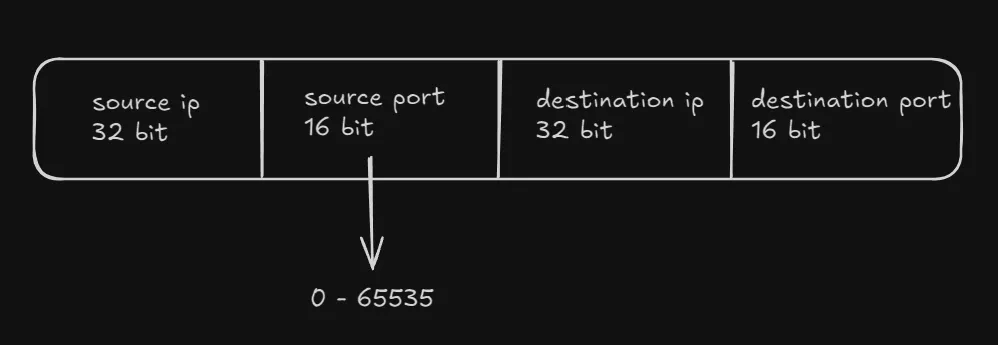
TCP socket 4 tuple
This was something I first read in this blog post which describes the scaling to 2 million websocket connections in a Elixir framework.
This part clicked instantly and I knew the solution to this problem would be having different IPs for the clients, which when added could exceed the number reachable by a single client.
Scaling clients
I first thought of creating clients on different machines and using that to test out this idea I had, but since I don’t have multiple devices I decided to find another solution.
So I dockerized the client script, made a bash script to create multiple client containers inside a specific Docker network (the one created for my server). Each client could be configured to create a specific number of connections.
This method led me to scale the setup to 150,000 concurrent SSE connections on a single laptop (8 GB RAM) running Fedora Linux.
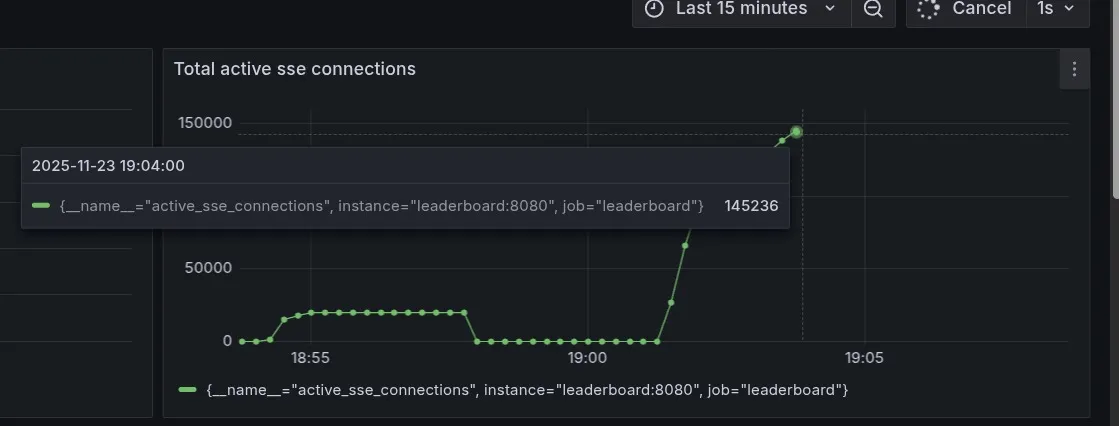
Reached 150k connections (almost)
Grafana crashes at this point.
Docker networking
Click to expand section
To exceeed the 65k connection limit when using a single source IP, I’m using Docker networking, which solves this problem in a creative way.
When a container connects to a Docker network, it is assigned an IP address (IPv4) by default, and it can communicate with other containers and the external services through the host as a gateway (based on type of network) without knowing if the device it is interacting with is a real machine or just another container on the same host.
Each container gets its own IP address, virtual network interface, and DNS discovery service. Containers will only see the IP addresses, the routing table and the gateways, and the network interface abstracts all the details.
The server compose setup already uses a user defined bridge network:
networks:
  internal:
This was done to fix issues with networking faced when connecting services to the server (Redis mostly).
Every container connecting to this leaderboard_internal network will be automatically assigned an IPv4 address. So something like this works:
docker run -d --name client1 --network=leaderboard_internal sseclient:0.2 -ip=leaderboard -conn=20000This container (client1) attaches to the network leaderboard_internal, the ip param fixes the server to connect to (ip address of leaderboard is used), the conn param defines the number of concurrent SSE connections the client container is required to maintain. sseclient is just the image name.
Creating multiple containers is easy this way, just change the name of the container. Since this is a repetitive task, I created a simple bash script to do it for me. To avoid the server crashing due to network spikes (which is a problem I haven’t solved yet), small delays are added.
#!/usr/bin/env bash

CLIENTS=5
CONNS_PER_CLIENT=20000

for i in $(seq 1 $CLIENTS); do
  docker run -d --name client$i --network=leaderboard_internal sseclient:0.2 -ip=leaderboard -conn=$CONNS_PER_CLIENT
  sleep 2
done
This is the way a system can escape the TCP ceiling, and go beyond 65k connections, simulating (potentially) millions of connections.
The bottleneck now becomes memory, something that can be solved through vertical scaling (more RAM), which is hard to do these days due to the soaring prices.
A workaround is horizontal scaling - using Wifi to connect multiple devices, each running multiple of these client containers, and since the containers do not know if they are connecting to external services or other containers, the process is largely the same. Minor config changes may be required for the IP address of the server, which is trivial.
What’s stopping me from going further
OOM at 150k.
Since this testing setup had both client and server containers on a single machine, making the client containers reside on different machine would greatly increase the number of connections that could be made.
Further easy gains could be got from replacing Redis with an in memory sorted set data structure, removing the Grafana container (which would lead to losing out a visual representation). Some more difficult to implement updates would be memory optimizations, profiling to see how goroutines could be optimized for this.
Note: The testing setup does not currently consider the other part of the system, the game servers submitting game results which are broadcasted to the clients, which would definitely increase CPU and network usage, and a bit of memory too.
References
- Phoenix framework - road to 2 million websocket connections
- Cloudflare - How to stop running out of ephemeral ports and start to love long-lived connections
- Docker networking overview
- Docker - Bridge network driver
- Port publishing
- SO_REUSEPORT
There’s a few experiments I’m looking forward to conducting with this system, primarily horizontal scaling (to 1M connections), replacing Redis with a native sorted set implementation, profiling, realistic benchmarking (with game servers submitting results), preventing crashes due to request spikes (an annoying issue that I have not figured out till date). Trying the ephemeral port expansion is also interesting, maybe some other time though.
If you’ve got any ideas, or interesting plans for this, reach out to me through email, twitter, or just submit an idea to the repo.