Highlights
- Shout-out to new contributor Lorenz A, who fixed almost 70 bugs over the past few weeks! Most of this work was modernizing some of our DevTools code to use ES6 classes (example)
- Split View has been enabled by default in Nightly! You can right click on a tab to add it to a split view, and from there select the other tab you’d like to view in the split. Or, multi-select 2 tabs with Ctrl/Cmd, and choose “Open in Split View” from the tab context menu
-
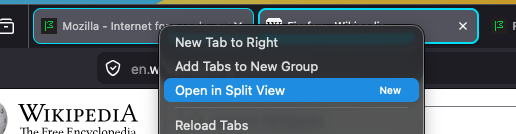
New!
-
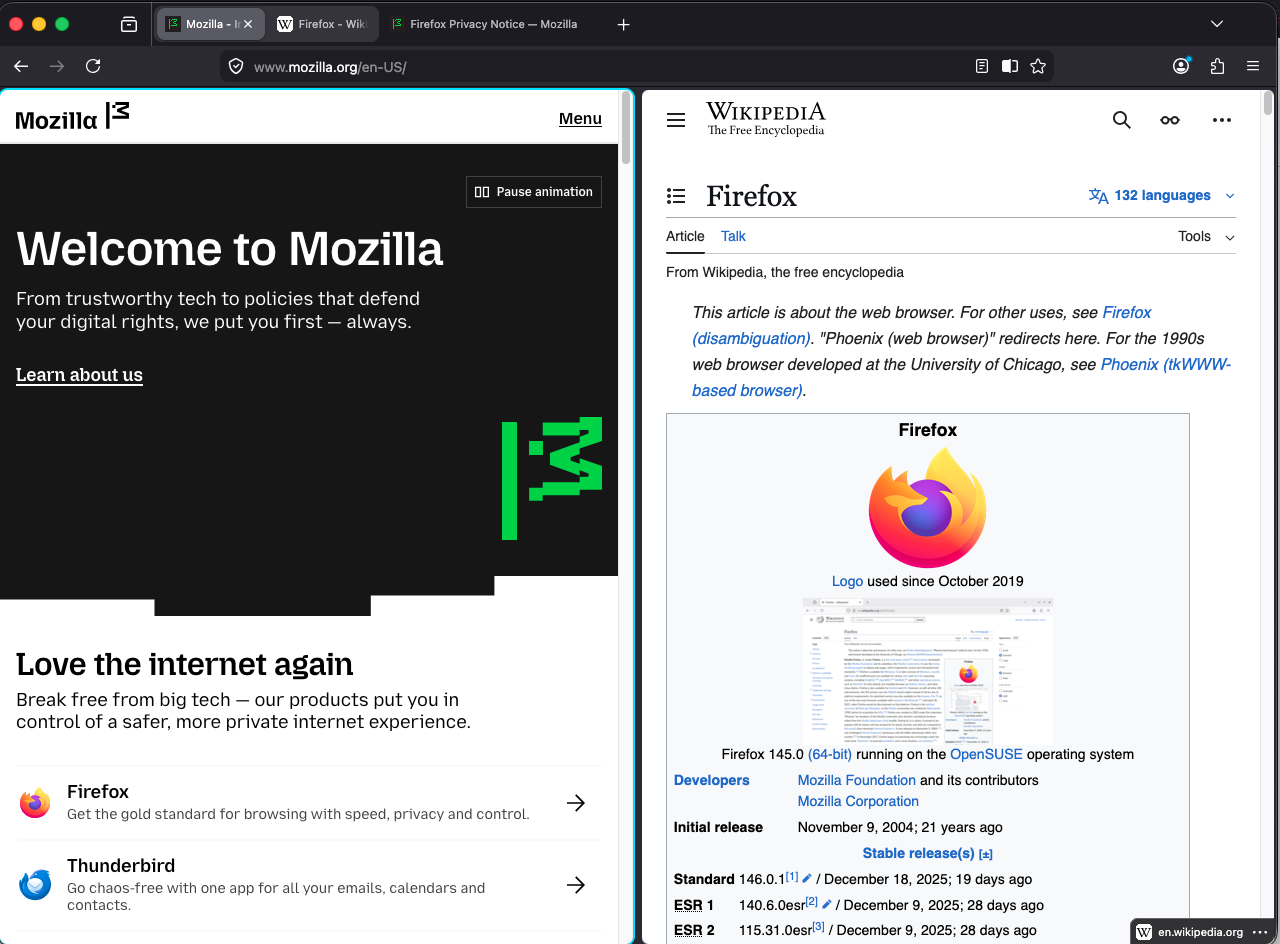
Sometimes, two are better than one.
- Let us know if you find any bugs!
-
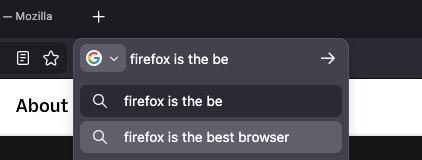
- The Search team has updated the separate search input in Nightly to use the same underlying mechanisms as the AwesomeBar
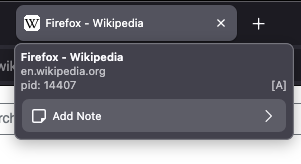
- Tab Notes have been enabled in Nightly! These are still a work in progress, but you can add and view notes by hovering them:
Friends of the Firefox team
Introductions/Shout-Outs
- Introducing Finn Terdal and Michael Hynson! Both started yesterday.
- Finn is working on UX Eng Productivity / Fundamentals bugs to get started, and then Settings Redesign
- Michael is working on the IP Protection project.
Resolved bugs (excluding employees)
Volunteers that fixed more than one bug
- Dominique
- John Bieling
- Lorenz A
- Yunju Lee
New contributors (🌟 = first patch)
- 🌟 Doğu Abaris
- 🌟 Lorenz A
- Matt Kwee
- Vignesh Sadankae
- 🌟 Sameem [:sameembaba]
- Yunju Lee
Project Updates
AI Window
- We added browser.aiwindow.enabled, and the ability to open a new AI Window (still extremely early days here)
- Chat requires being signed in to a Mozilla Account
- A new page extractor component is being built-out to help extract text from a page
- The updated settings to give users more control over the AI features they want (or don’t want) is being worked on here
WebDriver
- Sajid Anwar fixed an issue where browsingContext.navigate with wait=none could sometimes return a payload with an incorrect URL.
- Sameem added a helper to assert and transform browsing and user contexts in emulation commands which allowed us to significantly reduce the number of repetitions in these commands.
- Simon Farre implemented the Generate Test Report command in Marionette to support the Reporting API specification, enabling execution of the corresponding web-platform tests.
- Henrik Skupin has started implementing support for using WebDriver BiDi within chrome browsing contexts. As part of this work, the browsingContext.getTree command was extended to allow retrieval of browsing contexts for open ChromeWindows. These contexts can then be used with the script.evaluate and script.callFunction commands to execute scripts in the parent process. At this time, no other supported commands accept chrome browsing contexts.
- Henrik Skupin fixed an issue in Marionette where unique IDs from WebDriver BiDi’s clientWindow type were incorrectly used as window handles. These IDs are not compliant; window handles must instead correspond to the navigable handles of a tab’s top-level browsing contexts.
- Henrik Skupin improved the handling of newly opened browser windows in Marionette and WebDriver BiDi by waiting for the window to be fully initialized, specifically until the browser-delayed-startup-finished notification was received.
- Julian Descottes updated browsingContext.create to wait for the document to be visible when the background option is false.
Lint, Docs and Workflow
- ESLint rule jsdoc/check-tag-names has now been enabled everywhere. We allow a few extra tags over the plugin defined set:
- @backward-compat for marking code as being backwards compatible with a specific version, e.g. New Tab and devtools code use it.
- @rejects for indicating if an async (or promise returning) function may reject. This is not standard in JSDoc, and TypeScript doesn’t have an equivalent. Hence for now, this is an alternative way that we can use to at least document the expectations.
- Various tag names that are used for Lit types.
Information Management/Sidebar
- We have a new bugzilla component for Split View.
- We’re aiming to enable sidebar.revamp (the new sidebar launcher and treatments) by default in 148.
- Kelly Cochrane fixed an issue where moving the mouse to the other Split View pane after hovering a link would briefly display the prior link in the wrong pane’s status panel by scoping status-panel updates to the active subview and clearing hover state on pane switch to eliminate cross-pane flashes.
- View bugs in Bugzilla
New Tab Page
- Scott Downe stabilized row changes in frecency-sorted grids by recomputing layout and using stable keys, avoiding jumpy reordering and misplaced tiles when the row count changes.
- Reem Hamoui migrated ModalOverlay to the native dialog element with showModal, improving focus management, Escape to close, and screen reader semantics on about:newtab.
- Reem Hamoui stopped the New Tab customization panel from reopening after reload when launched from about:preferences#home by clearing the persisted open state.
- View bugs in Bugzilla
Profile Management
- Quick update this week – OS Integration intern Nishu is traveling a long road to add support for storing profiles in the secure MacOS App Group container (bug 1932976), over the break she fixed
Search and Navigation
- Moritz and Dao continue re-implementing the search bar using urlbar modules (2007126, 1989909, 2006855, 2006632, 2004788, 2002978, 2004321, 2002293, 2005772)
- Vignesh (open source contributor) removed the unused browser.urlbar.addons.minKeywordLength pref (2003197)
- Mak improved favicon clearing performance in SQLite, significantly reducing CPU usage. (2007091
- Moritz fixed browser.search.openintab opening in the current tab instead of a new tab (2007254
- Drew and Daisuke continue implementing online flight status suggestions (1994297)
- mconley removed legacy non-handoff content search UI code(1999334)
- Daisuke fixed multiple address bar bugs, including broken “switch to [tab group]” behaviour, persisted search terms, and a missing unified search button in private new tabs (2002936, 1968218, 1961568)
Storybook/Reusable Components/Acorn Design System
- Hanna Jones converted the Settings UI Account (FxA) section in about:preferences to config‑based prefs, enabling enterprise policy/rollout control of Account UI across desktop without changing default behavior for users.
- View bugs in Bugzilla
Tab Groups
- Jeremy Swinarton aligned the tab note editor to spec in Tab note content textarea spec, refining textarea sizing, focus/blur save behavior, and keyboard shortcuts for consistent editing and better a11y across platforms.
- Stephen Thompson added a one-click entry point in hover previews via Add note button to tab hover preview, surfacing Tab Notes in the preview tooltip (behind notes and hover-preview prefs) with full keyboard focusability and theme-aware iconography.
- Jeremy Swinarton fixed multi-select behavior in Selecting multiple tabs using Shift-Click and adding a note only adds note to the tab that was clicked despite multiple tabs being selected so note actions apply to all selected tabs via gBrowser.multiSelectedTabs.
- Stephen Thompson hooked History API updates in Update canonical URL for tab note on pushState to recompute the canonical URL on pushState/replaceState/popstate, preventing stale or misplaced notes during SPA navigations.
- View bugs in Bugzilla
UX Fundamentals
- Jack Brown aligned the NS_ERROR_NET_EMPTY_RESPONSE error page visuals with the Figma spec, improving readability and parity on about:neterror (desktop).
- Jack Brown enabled the security.certerrors.felt-privacy-v1 pref by default, rolling out the Felt Privacy v1 certerror UI to certificate errors on about:neterror with a pref-guarded default.
- View bugs in Bugzilla