
A Cross-Platform IDE for C and C++
CLion 2025.3 Is Here, and It’s Epic: Faster Language Engine, Unique Constexpr Debugger, DAP Support, and Much More
Read this post in other languages:
This is one of our largest updates ever, featuring advanced capabilities and refinements to deliver a smoother workflow.
CLion 2025.3 represents one of our most ambitious releases yet. Beyond the extensive feature additions and workflow improvements, this version marks a fundamental shift in how we approach C and C++ language support – prioritizing speed and precision at every level.
The key release updates are as follows:
- Faster performance with the CLion Nova language engine as the default.
- Deeper insight into compile-time evaluations with the unique Constexpr Debugger.
- Expanded debugger options with support for the Debug Adapter Protocol.
- New default look with the Islands theme.

You can download CLion 2025.3 from the link below, via the Toolbox App, as a snap package if you’re using Ubuntu, or via a patch update from version 2025.2.
Faster performance with the new language engine
You can now write code faster and work more efficiently thanks to our new C and C++ language engine, CLion Nova. With this engine, the IDE has become more performant, responsive, and accurate. CLion Nova now includes the most requested features, as well as exclusive capabilities. To ensure everyone benefits from it, we’ve now made CLion Nova the default language engine for all users.
What is CLion Nova?
CLion Nova is a C and C++ language engine based on the JetBrains proprietary engine, originally developed for ReSharper C++ and Rider. We adapted this internal engine specifically for CLion and first introduced it as “CLion Nova” in November 2023.
This new engine is an alternative to the legacy CLion Classic engine. CLion Classic has accumulated performance and reliability issues over time. CLion Nova was specifically designed to address these challenges, delivering enhanced responsiveness, accuracy, and overall efficiency.
Read this article to learn more about prehistory, goals, and advantages of CLion Nova over CLion Classic.
The following three subsections explain why CLion Nova is more performant and memory efficient than CLion Classic, demonstrate the unique features it offers over CLion Classic, and answer frequently asked questions about the migration to CLion Nova as the default engine.
Check out all the other updates and enhancements in the next section.
Performance and memory advantages
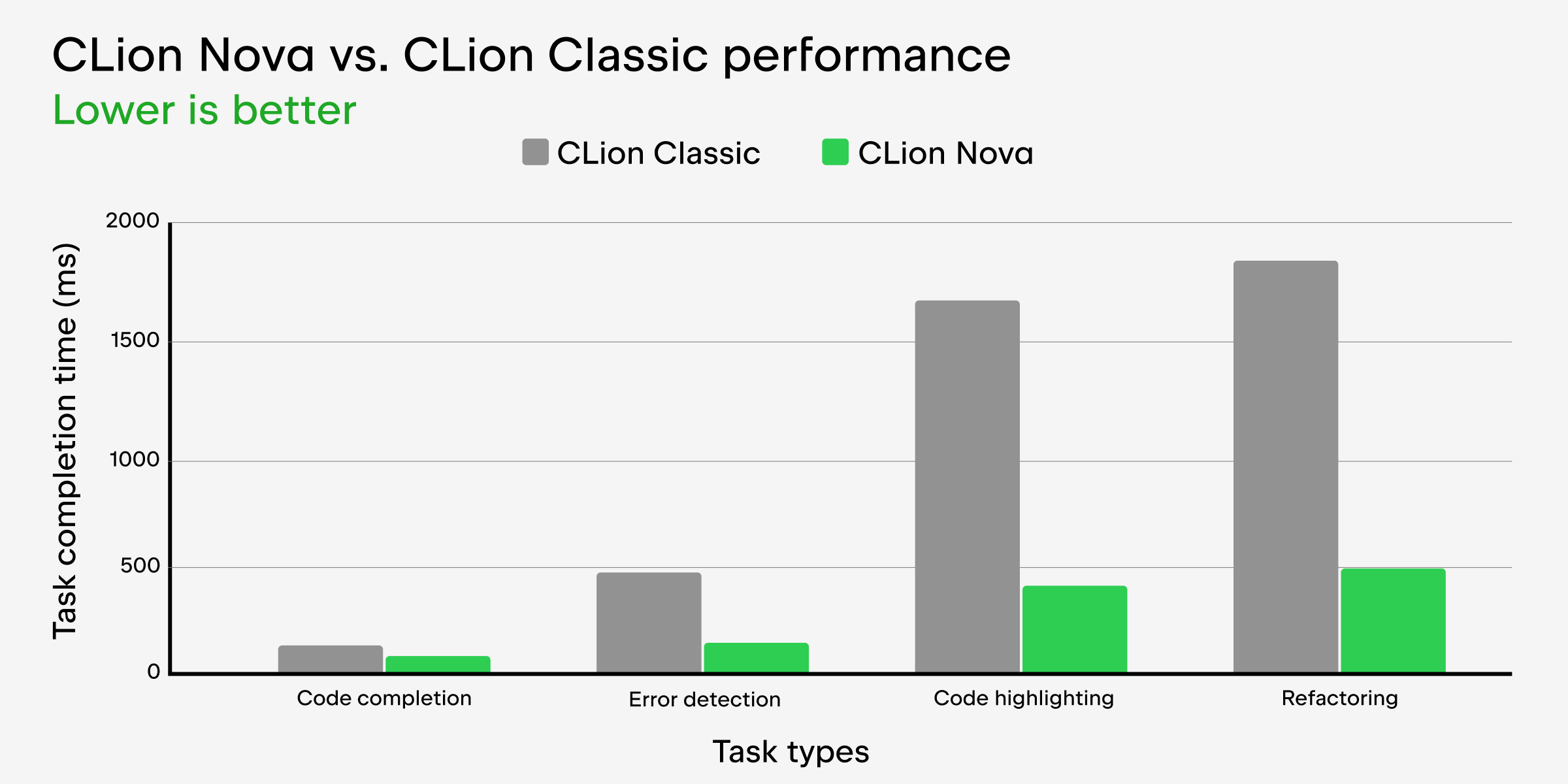
Here are some of the essential editor tasks and metrics in which CLion Nova’s performance surpasses that of CLion Classic:
- Up to 2 times faster code completion
- Up to 3 times faster error detection
- Up to 4 times faster code highlighting when opening a new file
- Up to 4 times faster refactoring
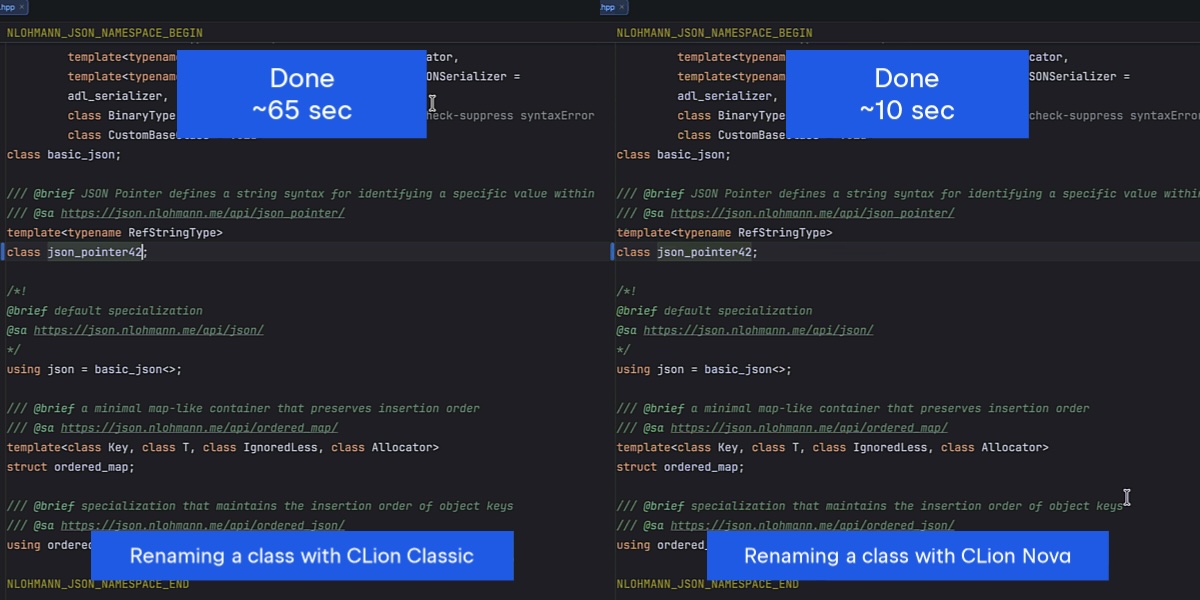
The video below compares the time taken to rename a class in CLion Classic and CLion Nova when working with large projects (over 100,000 lines of code). It demonstrates that the new engine can be more than six times faster.
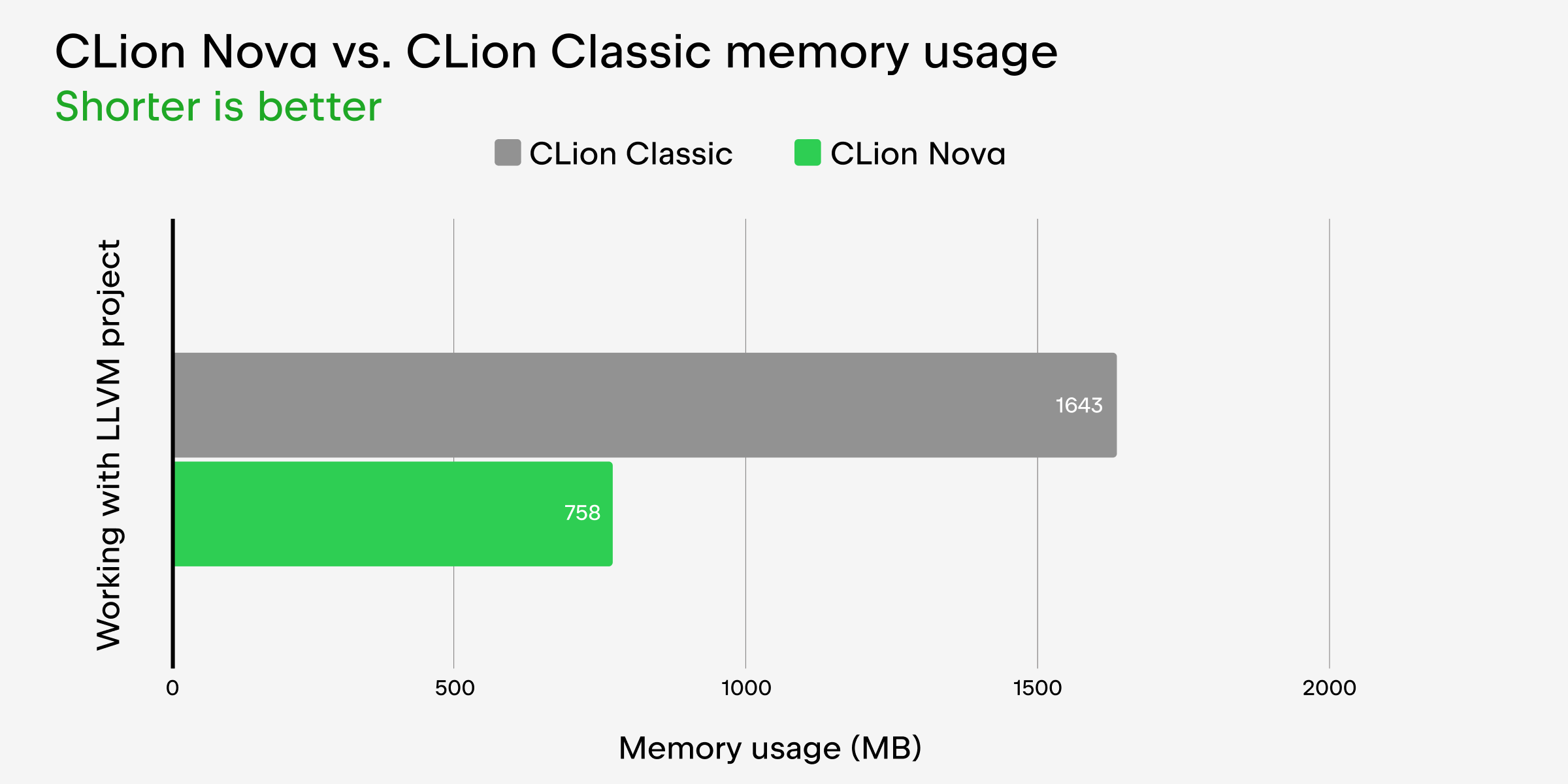
CLion Nova is also less memory-consuming when working on large projects, such as LLVM and Chromium. We did an internal test with LLVM and found that CLion Nova uses 24% less memory than CLion Classic. The reason for this is that, with the new engine, the Java virtual machine (JVM) doesn’t use up all the memory on its own but instead shares it with the .NET backend component. Symbols are stored separately, so the IDE’s UI freezes less.
CLion Nova’s unique features
The new engine now supports not only the most important features of CLion Classic but also a number of totally new ones unique to CLion Nova. Here are some examples of these:
- The Constexpr Debugger allows you to stay in the compiler’s world and see what really happens. You can step through the evaluation, inspect values, and confirm which if constexpr branch fired.
- The reworked code formatter offers a better user experience and provides a new option that allows you to use an EditorConfig file for your code style settings.
- Inlay hints in the editor show names for auto variables, function and lambda return types, structured bindings, and in-function calls. There are also hints for namespace names and preprocessor directives.
- Additional refactorings include introducing a new field, a namespace alias, and a
using enumdeclaration. - Cloud code completion, powered by JetBrains AI Assistant, can autocomplete single lines of code, code blocks, and entire functions in real time based on the project context.
- Full line code completion for C++ works locally and provides single-line suggestions based on the context of the current file.
- Junie, the AI coding agent by JetBrains, can perform complex tasks independently, such as testing code, fixing bugs, bootstrapping and prototyping, and searching inside projects. Even though you can run Junie with CLion Classic, it won’t work properly, and essential features won’t be available. To access all of Junie’s capabilities, you must use CLion Nova.
We also want to highlight two important points:
- We don’t plan to add support for these unique features in CLion Classic.
- We intentionally didn’t strive for complete feature parity or bug-for-bug behavior between CLion Nova and CLion Classic. However, we remain committed to processing feedback after the release and implementing the most popular feature requests that we overlooked.
FAQ about CLion Nova
Please refer to our FAQs below for more information on CLion Nova becoming the default language engine. If you don’t see an answer to your question there, email us at clion-support@jetbrains.com, and we’ll be happy to help.
We’re an enterprise customer. How will this affect us?
The transition shouldn’t affect you. However, if you have any concerns, please contact your CSE or account manager. If you’re not sure who you need to contact, please use our contact form for enterprise customers.
Will this affect pricing?
No, this won’t affect pricing. CLion Nova is simply a different language support engine within CLion, and your subscription plan is not impacted by your choice to use it or CLion Classic.
How to switch back to CLion Classic?
Please keep in mind that we’re no longer actively developing CLion Classic. To switch back to it, go to Settings | Advanced Settings | CLion, or you can find the switch under the Settings icon in the top right-hand corner of your IDE.
What is the future of CLion Classic?
We want to make CLion Classic a non-bundled plugin available for installation from JetBrains Marketplace. We’re tentatively planning to do this in one of the releases next year, but not sooner than six months from now.
I still want to stay with CLion Classic. What should I do?
If you still want to use CLion Classic, please let us know why. You can contact us via clion-support@jetbrains.com and share your reasons. We’ll try to find a solution for you.
Does CLion Nova upload my local code to the cloud for processing or analysis?
No, CLion Nova is no different from CLion Classic in this sense and doesn’t upload your local code or any data to the cloud. However, there are several cases when the IDE may upload your code to the cloud or collect data:
- Non-preinstalled AI features and agents: Your code may be sent to an LLM provider when using AI-powered features with a remote model or working with AI agents. Note that JetBrains AI Assistant, Junie, and Claude Agent are not bundled and enabled by default. To learn more about how JetBrains handles your code and data, read the JetBrains AI documentation and JetBrains Privacy Notice. Also, read the blog post about the upcoming changes to how JetBrains collects code-related data.
- The non-commercial license: CLion may collect anonymous telemetry and detailed code‑related data when you’re using the non-commercial license (learn more).
You can also view the specific types of data you share in Settings | Appearance & Behavior | System Settings | Data Sharing.
Do you plan to provide full support for Objective-C in CLion Nova?
Currently, we don’t plan to do so. If you’re working on a project that heavily relies on Objective-C code, we recommend using CLion Classic. However, if your project only partially includes Objective-C code, the basic Objective-C support that CLion Nova provides may suffice. Otherwise, please follow or upvote CPP-37281.
I’m a plugin developer. How will this change affect me?
If you have already developed a plugin for CLion Classic, you will need to adapt it for CLion Nova. Please email us at clion-support@jetbrains.com and provide a detailed explanation of your use case. We’ll try to help.
For existing and new plugins that don’t use the IDE language engine, nothing changes, and our instructions remain valid.
Constexpr Debugger: Insight into compile-time evaluations
The Constexpr Debugger is a one-of-a-kind tool that provides insights into compile-time evaluations, particularly for constexpr and consteval code – something that no other IDE currently offers.
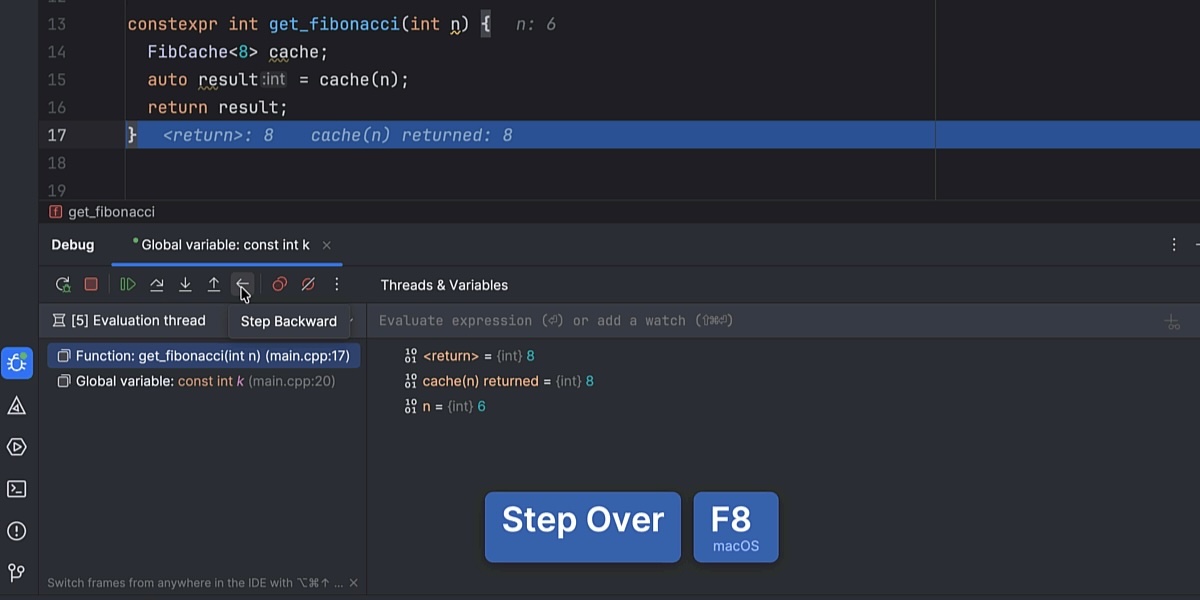
Enhancing the debugging experience for modern C++, it lets you step through evaluations, inspect values, and confirm which constexpr branch fired – revealing exactly how the compiler executes your code. The Constexpr Debugger helps you understand exactly what the compiler is doing and fix issues faster. To learn more about how to use this tool, read the documentation.
Expanded debugger support with DAP technology
CLion now supports the Debug Adapter Protocol (DAP), bringing the IDE closer to being debugger-agnostic. With DAP technology, CLion can communicate with a range of additional debuggers. Besides LLDB and GDB, you can now use third-party implementations that support this protocol.
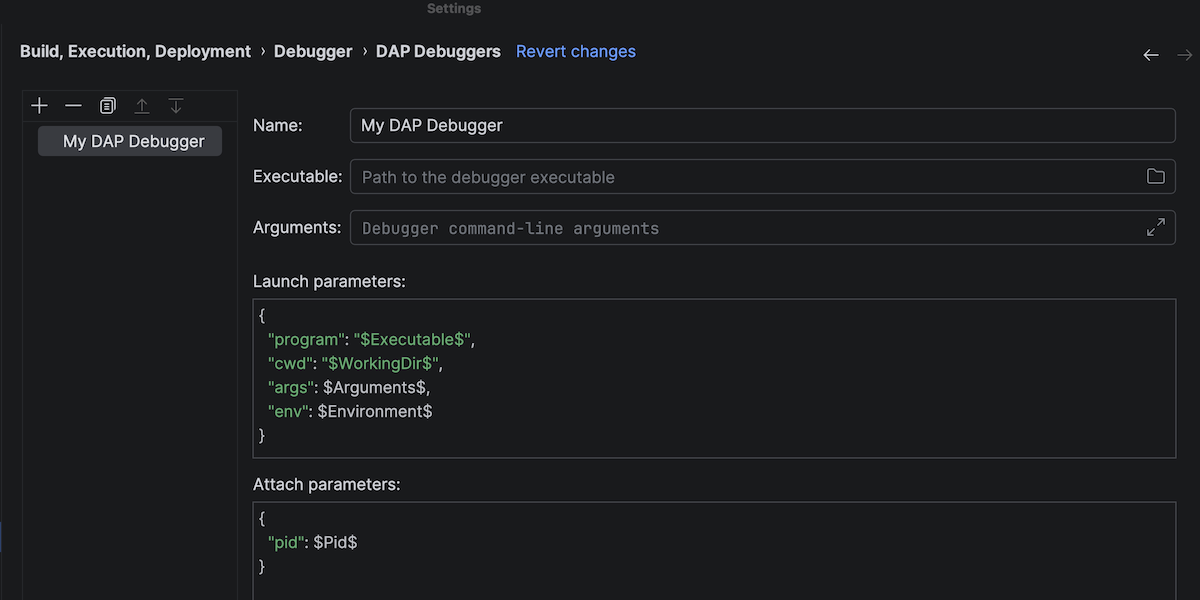
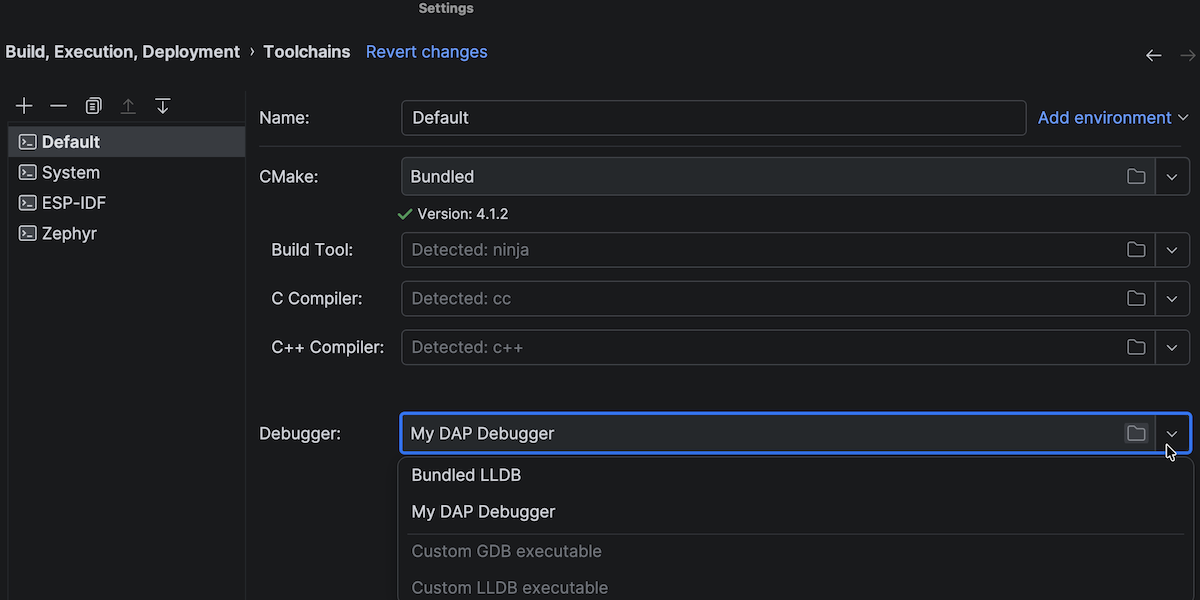
To learn more about how to configure a DAP debugger, read the documentation.
New default look: the Islands theme
The new Islands theme is designed to help you stay focused and code with ease. It features instantly recognizable tabs, enhanced in-editor contrast, distinct separation between work areas, and rounded corners.
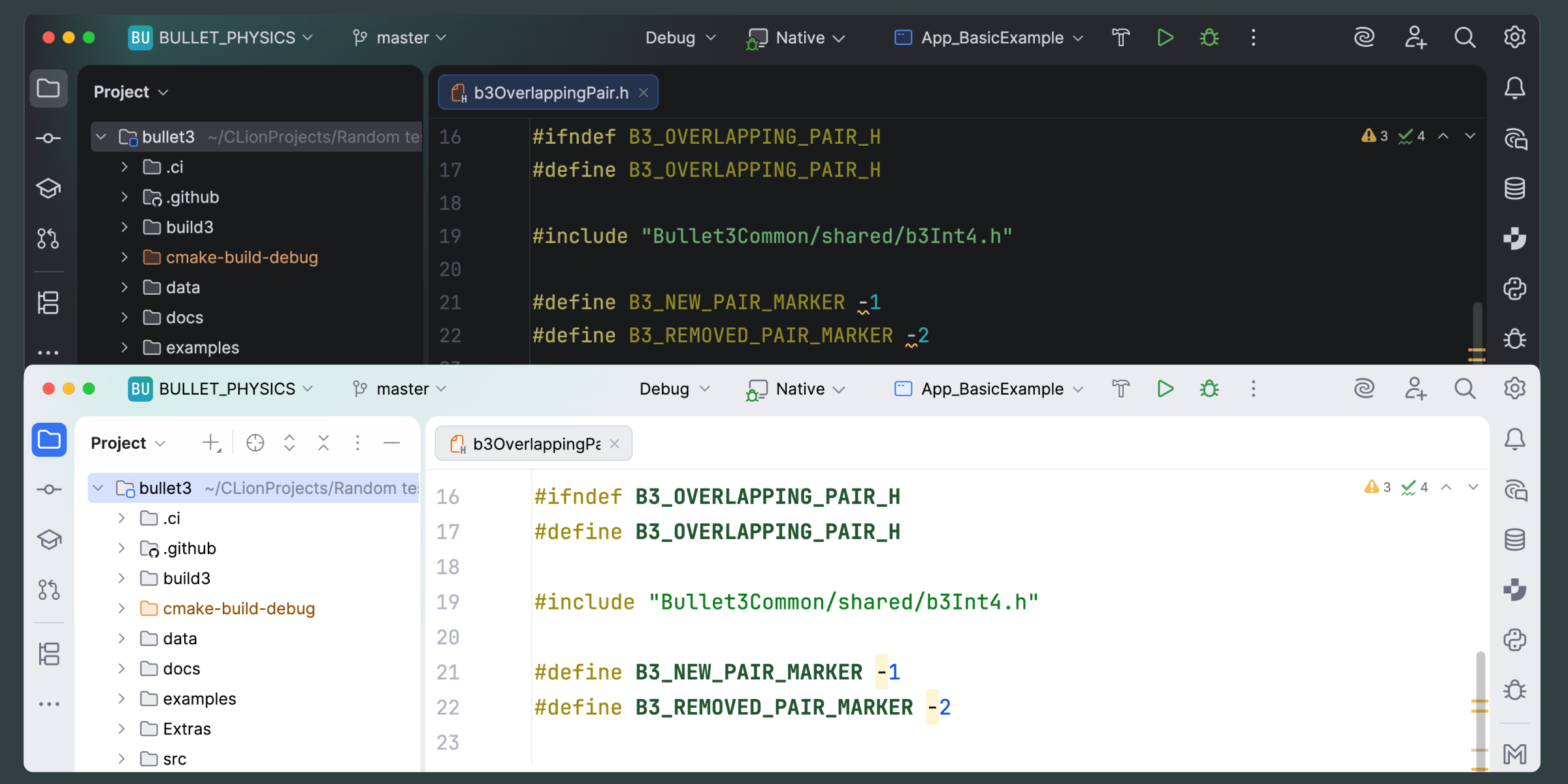
Now, this is the default look in CLion and other JetBrains IDEs. The update is purely visual, so all functionality remains unchanged. To learn more about the details behind this change, read the IntelliJ Platform blog post.
Embedded development
In this release, we’ve streamlined several embedded workflows and improved tool integrations. This will help you spend less time on configuration and more time on what matters – core development tasks.
Essential plugins bundled by default
We’ve improved the user experience for embedded system developers who work with the Serial Port Monitor, PlatformIO, and Rust plugins. These plugins are now integrated into the IDE, so you no longer need to install them manually.
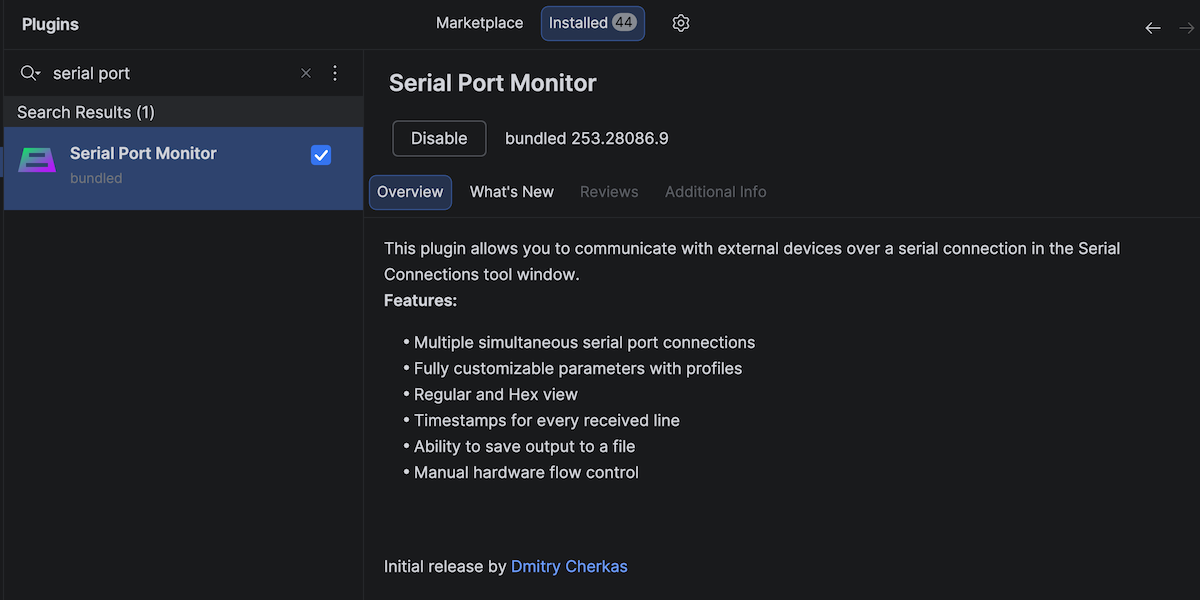
In addition to the integration, we’ve refined the UX and UI of these tools to make them easier and more convenient to use.
Enhanced STM32 and STM8 support
JetBrains has become an official ST Authorized Partner, making CLion the go-to JetBrains IDE for embedded development with STM32 and STM8 microcontrollers. This partnership reinforces our dedication to the embedded ecosystem and addresses the increasing demand for smarter, more connected devices.
In recent releases, we’ve been actively improving CLion’s STM32 integration to provide a robust and modern platform for modern embedded development.
Live watches: Usability improvements and new features
Live watches allow you to monitor global variables in real time without stopping the program’s execution. This is especially useful for developers who work with time-critical protocols or with physical processes that require uninterrupted operation.
This release includes some functional and usability improvements, such as the ability to view peripheral register values, export data in CSV format, and use autocompletion for variable names. These updates make live watches more versatile and comfortable to work with. You can learn more about the feature in the documentation.
Build tools and project formats
This release brings essential toolchain updates for Windows users and smoother integrations for West projects to keep your development environment current and reduce configuration overhead.
Support for the Visual Studio 2026 toolchain
CLion now supports the Visual Studio 2026 toolchain for Windows – giving you access to the new MSVC build tools v14.50, including v19.50 of the C++ compiler. This compiler version supports new language features in C++23, including auto(x) and auto{x} syntax, which allows you to copy an object and make it temporary (P0849R8). The compiler has also received several important bug fixes.
Improved nRF Connect SDK and West integration
We’ve streamlined the project configuration process for developers working with the nRF Connect SDK. Now, CLion accepts sysbuild as the default build configuration for these projects, allowing you to build, run, and debug them without needing to configure additional West settings.
Bundled CMake updated
CLion now bundles the latest stable version of CMake, v4.1.2. For more information about the improvements to CMake in this version, please refer to the vendor’s documentation.
C++ language updates
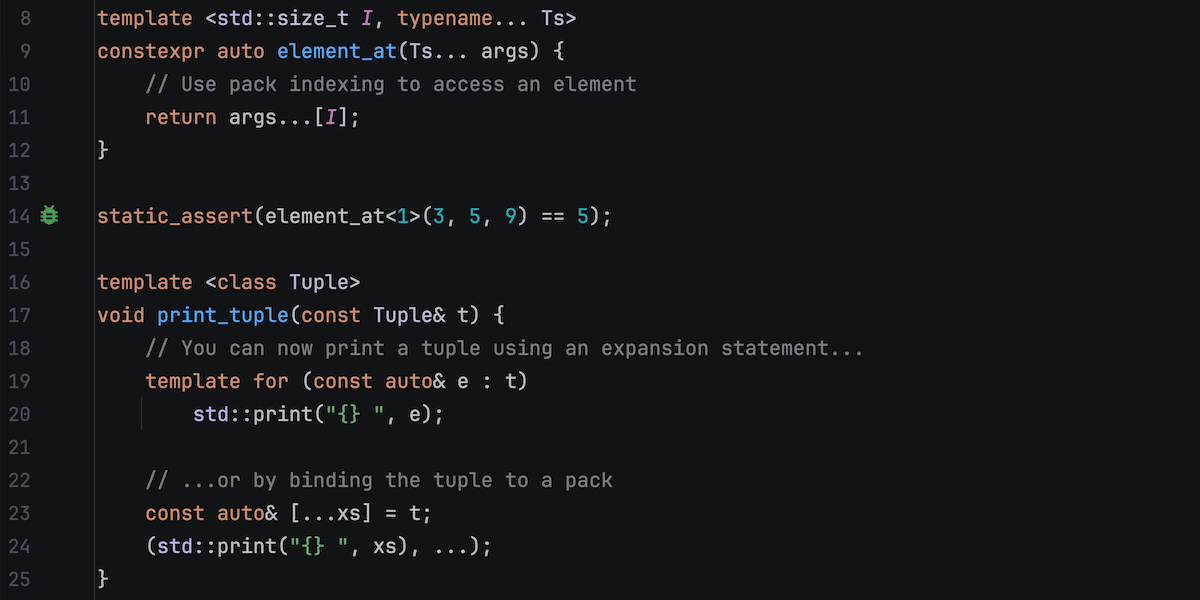
Modern C++ moves fast, and we’re committed to keeping you ahead of the curve. With the CLion Nova engine, you can now explore and adopt C++26 features like pack indexing, expansion statements, and contracts, plus get clearer diagnostics when constexpr evaluations fail.
C++26 features
With CLion Nova enabled, the IDE now supports the following major features from the latest language standard:
- Pack indexing: Access individual elements within a pack using the subscript operator.
- Expansion statements: You can now iterate over elements at compile time with the new
template forstatement. - Packs in structured bindings: Use a single pack in structured binding declarations to bind any number of elements.
- Concept and variable templates as template template parameters: Template template parameters can now match concepts and variable templates, not just class templates.
- Contracts: Use language-level syntax to express preconditions, postconditions, and other assertions.
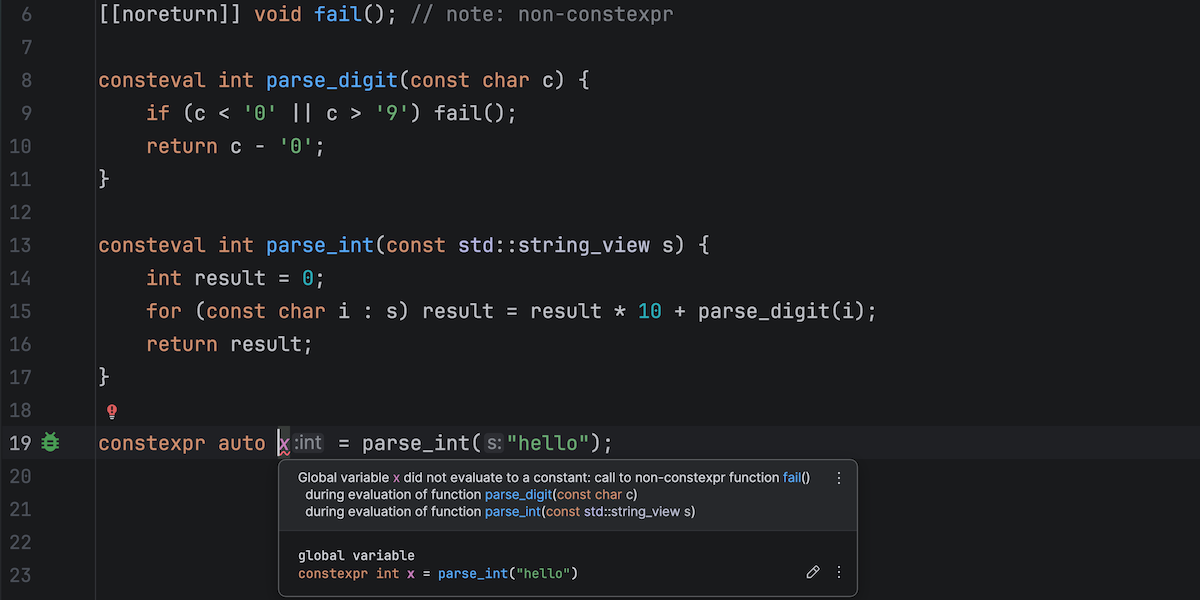
constexpr evaluation
CLion Nova now provides a new inspection that detects constexpr evaluation failures and presents a complete evaluation trace to help you identify and fix this problem more easily.
Updates to AI tools
AI assistance works best when it fits your workflow and budget. You can now choose the right AI agent for each task, connect your own API keys and models, and get full transparency into your usage and costs – all designed to give you flexible, predictable AI assistance on your terms. Additionally, CLion’s AI chat and Junie now provide the latest model from Google, Gemini 3 Pro.
Multiagent experience for more flexibility and better results
CLion now supports two AI coding agents: Junie and Claude Agent. This adds greater flexibility to the advanced AI coding assistance available in the IDE.
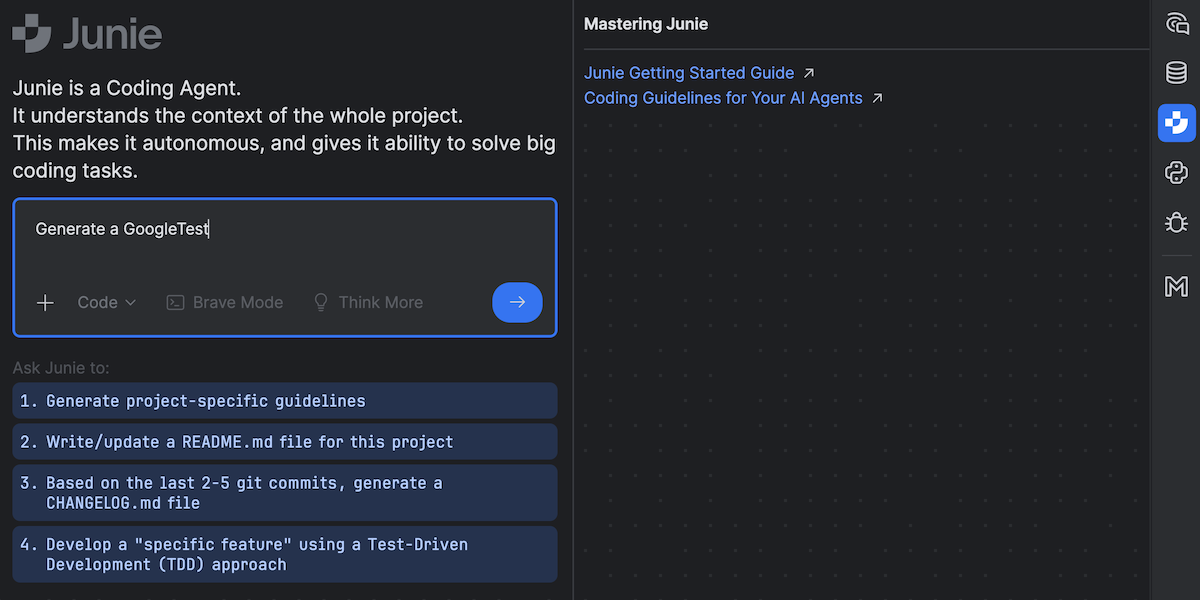
Junie can independently handle complex tasks, such as testing code, fixing bugs, bootstrapping and prototyping, searching inside projects, and many more. You can install Junie from the JetBrains AI widget, the in-IDE Marketplace tab, or by selecting the Install Plugin from Disk option. Learn more about Junie in the documentation.
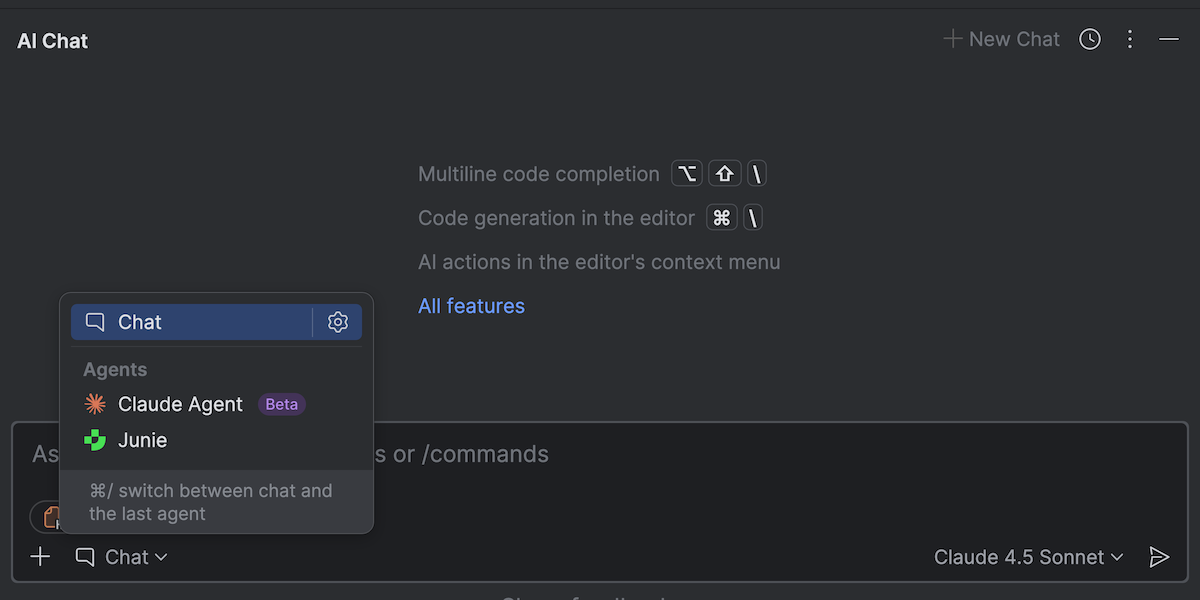
Claude Agent is a third-party agent seamlessly integrated into JetBrains IDEs via the AI chat. It can analyze your project, plan multi-step tasks, and execute them with IDE-level awareness. Learn more about Claude Agent in the blog post.
BYOK: More freedom and control
Updated: Starting with CLion 2025.3.1, BYOK is available in the AI chat.
An upcoming minor release of v2025.3 will include Bring Your Own Key (BYOK) support for JetBrains AI Assistant and Junie. BYOK lets you connect your personal OpenAI or Anthropic accounts directly to CLion and other JetBrains IDEs, so you can use these or any OpenAI API-compatible local model without relying on JetBrains-managed quotas.
This also gives you clear visibility into your usage and costs directly from your provider.
More transparency in AI quotas
The new AI quota model for JetBrains AI services simplifies AI subscriptions, making them easier to understand and manage. It also allows you to extend your usage beyond the included quota with transparent pricing in real currency. Learn more about the new model in the following blog posts:
Gemini 3 Pro for AI chat and Junie
Google’s latest AI model is now available in CLion, powering JetBrains’ AI chat and Junie coding agent. Gemini 3 Pro offers improved reasoning and instruction-following capabilities. It excels at understanding your codebase to match your coding style and handling complex multistep tasks, enabling you to transform an idea into polished, production-ready code with minimal manual intervention.
Code completion in the terminal
When working in the terminal, you no longer need to remember exact command names, Git branches, or file paths. The new completion feature suggests commands, option names, and path parameters, helping you stay productive and focused.
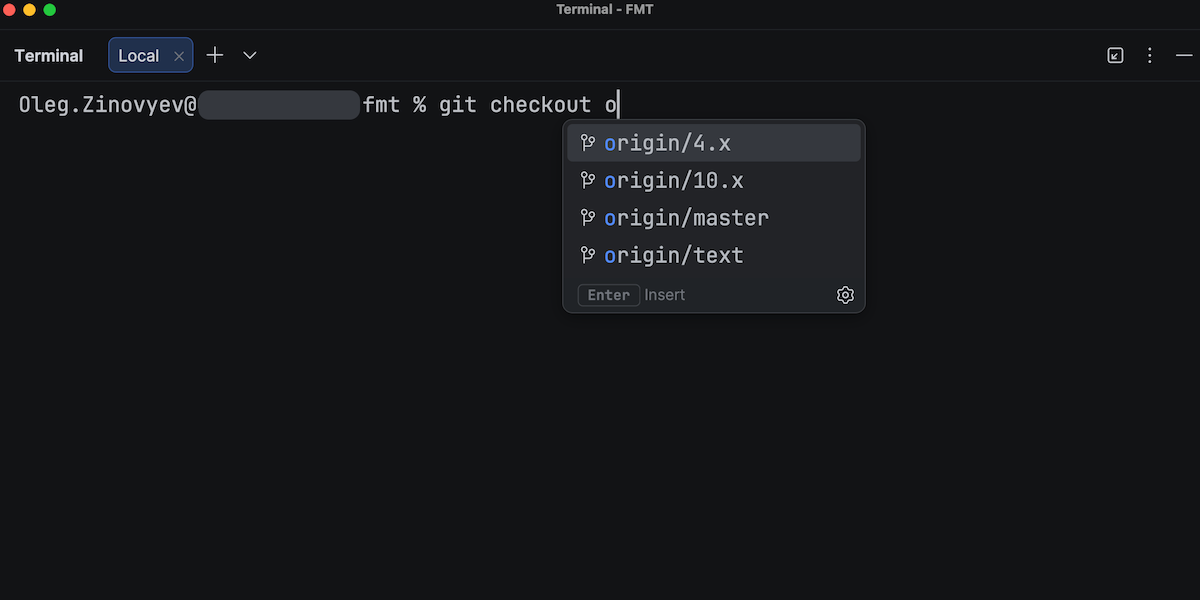
You can configure completion behavior in the terminal settings, choosing whether to always show suggestions or display them only for command parameters.
Try CLion and tell us what you think
We invite you to give CLion 2025.3 a try. If you have an active subscription, you can update it right away. New to CLion? Try the IDE for free if you plan to use it for non-commercial projects or for educational purposes. Otherwise, start a free 30-day trial to access all its features and improvements.
We value your feedback! If you have anything to share or if you run into any problems, please let us know in the comments below, on X, or via our issue tracker.
Subscribe to CLion Blog updates
Thanks, we've got you!