WebMCP is pretty powerful, as far as web technologies go. It enables a web page to register tools which can be called by whatever AI agents you decide on, which opens up a whole world of possibilities for web applications to do things like expose a cart or a search to an agent, let an agent fill in a form, complete a checkout, and more. The agent doesn't have to guess at what the page does any more. The page just tells it.
There are some things about WebMCP which make it a little painful right now though:
- Any agent that wants to use it has to be running inside the browser, which rules out pretty much every agent people actually use.
- It's behind a flag in Chrome, and it isn't implemented anywhere else yet.
- ChatGPT has no idea it exists.
So I had a thought: why not render a browser inside ChatGPT, and send the page's tools through the chat itself? That would mean:
- No server-side integration for the website
- A single place where the page's tools are defined (the page)
- Client-side only, in the user's own browser
- No support from OpenAI needed!
With all this in mind, I spent a few days hacking on something I've dubbed chatgpt-webmcp-bridge. It's very much a hack, but I feel it's an interesting one, so this post is about how it works. (The code is on GitHub if you'd rather just read that.)
Wait, what's WebMCP?
In a nutshell: WebMCP lets you build tools directly into your web page, which let AI agents interact with your site without scraping it or clicking around in it. There are a metric ton of uses for that. Nothing else comes close for this purpose; and as a result, I feel like it's going to be a big deal once it's actually usable.
There are a couple of ways to let an agent use your website today, and there are a huge number of perils and pitfalls around both of them:
- Agents that browse absolutely can't be trusted to click the right thing. They take a screenshot, or read the DOM, and guess which button does what. Doing that causes issues that are virtually impossible to track down, most of the time.
- MCP servers need you to stand up a seperate server somewhere on the internet. ChatGPT connects to it, logs in as the user, and calls your tools over HTTP. This works! But it's just yet another integration to build, and yet another server to keep running.
The principle behind WebMCP is as follows:
- You declare all of your tools in your web page, with
registerTool(): a name, a description, an input schema and a function. - Any agent running in the user's browser reads that list of tools.
- Any tool the agent calls runs right there in the user's tab, with the user's own session, and the user's own half-filled form right there in front of it.
With WebMCP, I can build a tool into my page and make it work with any agent, without once thinking about OAuth, API keys, or standing up a new backend.
Chrome has an early implementation of this behind a flag. So far so good!
What's stopping us from using it?
WebMCP lives in your browser tab, and ChatGPT lives on OpenAI's servers, and there is nothing connecting the two. There are three things we have to consider here:
- First, ChatGPT (at least today) can only talk to servers. We're going to have to go through a server here, since any plugin behind the scenes can typically only be an MCP server. That's easy enough: we can just stand up a tiny server that does almost nothing.
- Second, it's not enough just to have a server, since that will not help us call the page back in the user's browser. That would normally be tricky, but we're in luck! ChatGPT already lets a plugin render an iframe inside the chat, so we can just re-use that!
- Third, we don't want to create anything that can call arbitrary functions on arbitrary pages, especially pages we don't trust. We want to share tools only with pages that opted in, and no others.
What it looks like
Here's how it looks in practice, with a demo shop. I mention the plugin in a chat and ask it to open the browser:
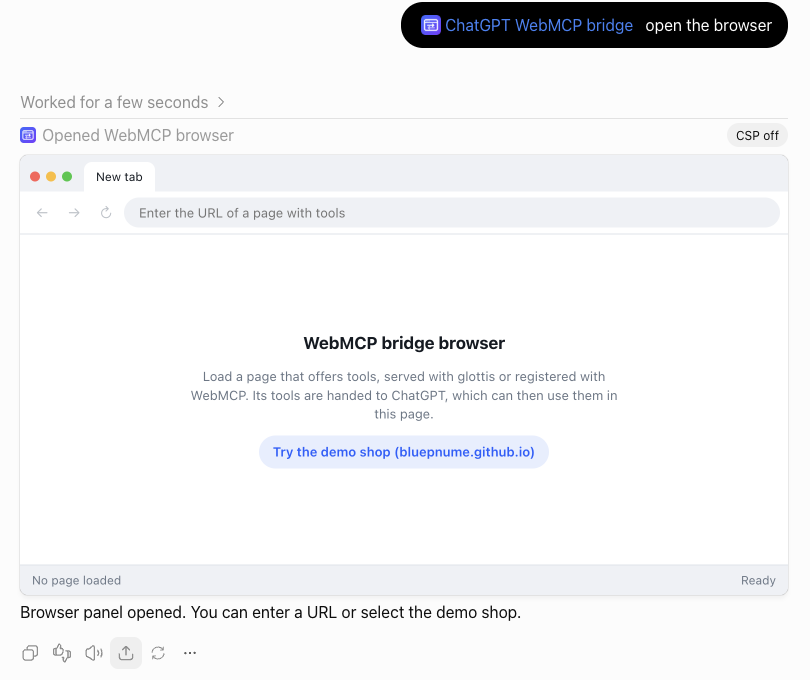
(A quick note on naming: from here on, the iframe ChatGPT renders in the chat is the plugin frame, and the iframe inside it that loads the actual website is the website frame.)
I click the button, and the shop loads. Notice that the shop asks me first. That prompt is rendered by the shop itself, not by ChatGPT:
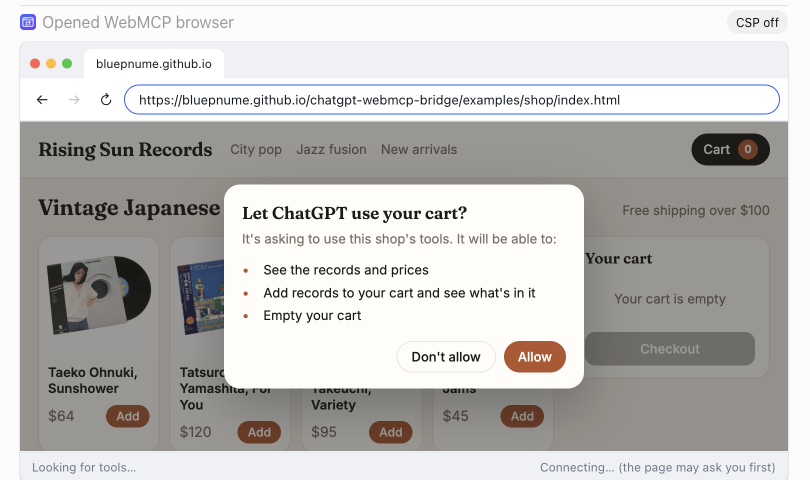
I click Allow. The status bar on the plugin frame lists the four tools the shop offers, and ChatGPT tells me what it is able to do here:
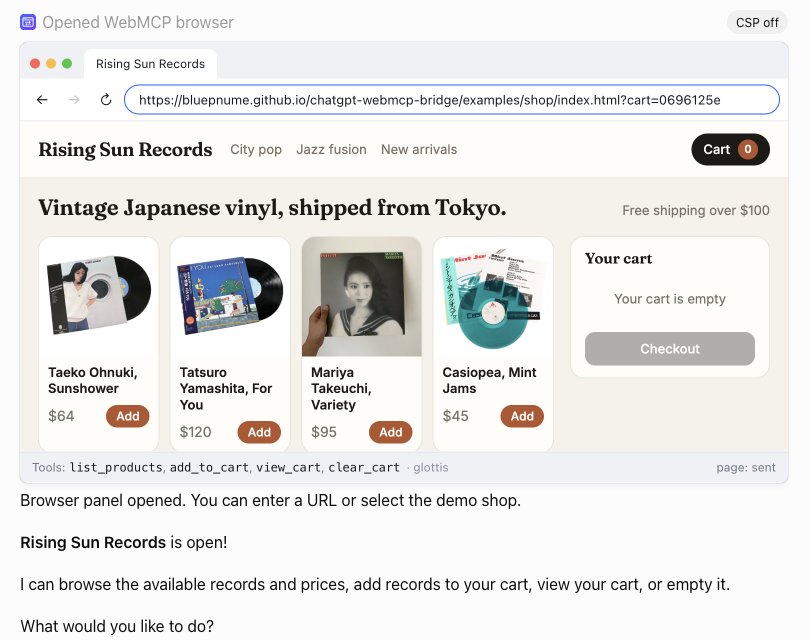
From there I can just ask for things:
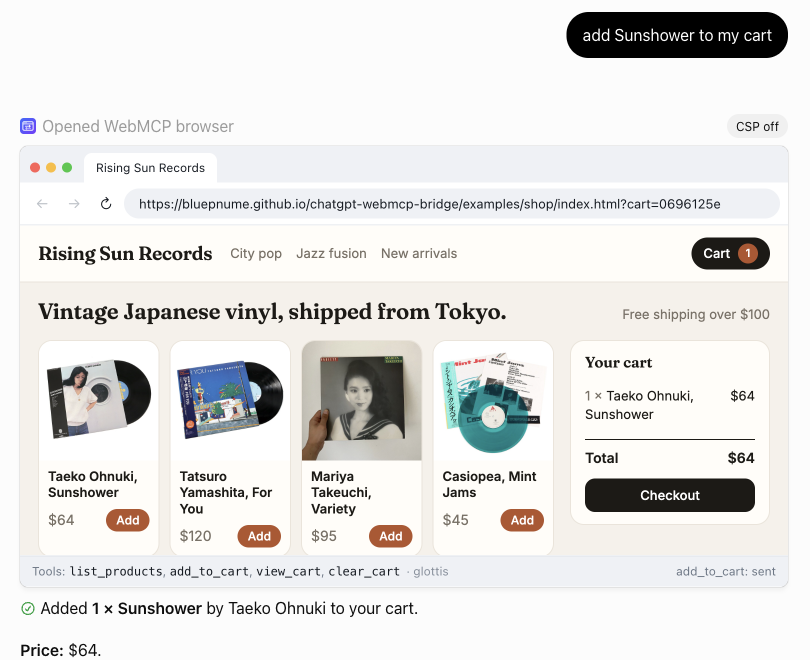
And the record really is in the cart!
The hack, step by step
Essentially we want to do something like this:
- Show a website inside ChatGPT
- Tell the model which tools that website has
- Let the model call one of them
- Get the result back to the model
Let's go through them one at a time.
Step 1: put a browser in the chat
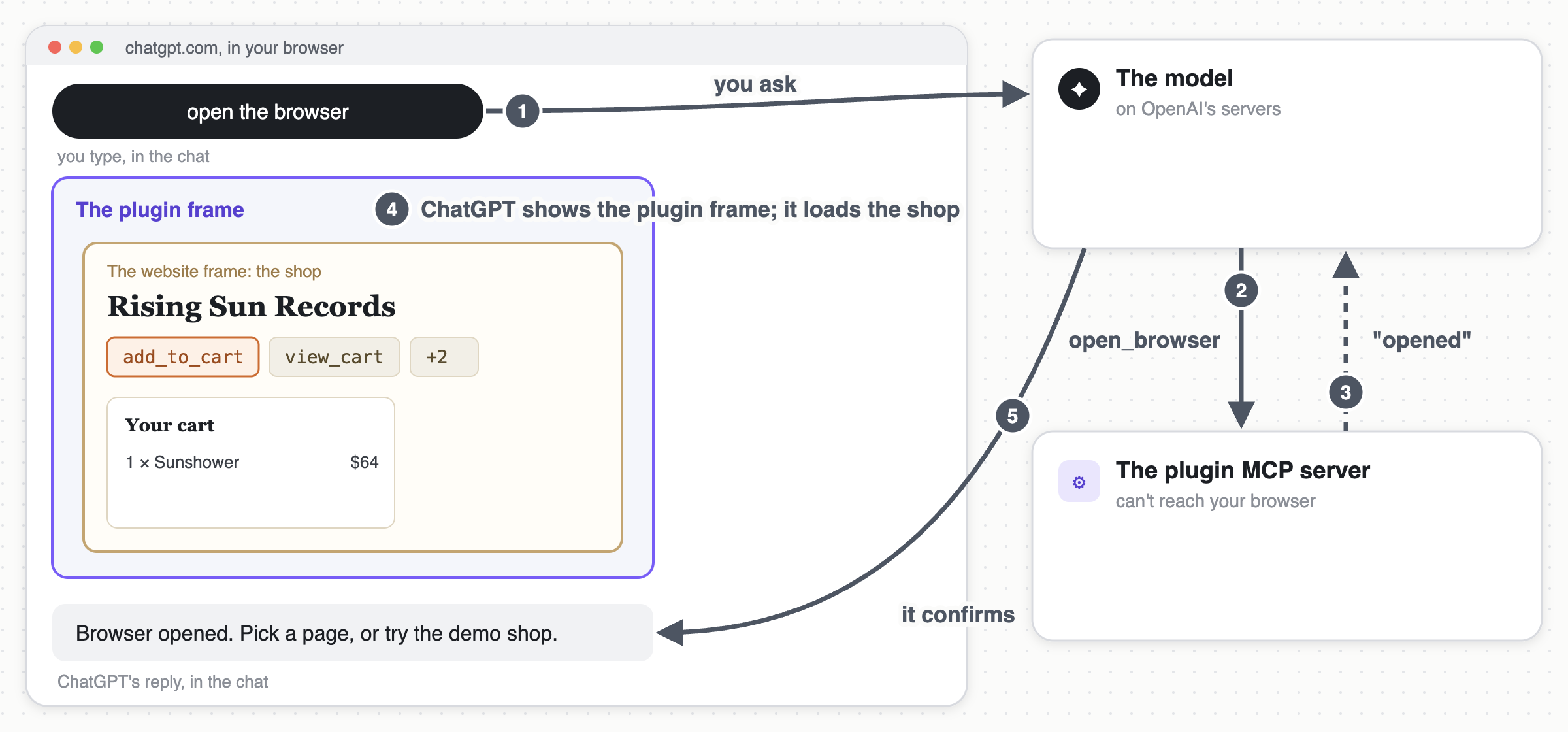
- The plugin MCP server exposes a single tool to ChatGPT called
open_browser. - When I ask for the browser, the model calls that tool, and the plugin MCP server responds saying the browser is opening. The plugin MCP server also serves up the HTML for the plugin frame, which ChatGPT fetches separately (and caches, aggressively, as I found out).
- ChatGPT renders the plugin frame in the chat. It has an address bar, back and forward buttons, a status bar, and the website frame.
- I pick a website (the demo shop, in this case), and it loads in the website frame just like any other page I might visit.
- The model confirms the browser is open, and that turn is done.
So far so good. But at this point the model still has absolutely no idea what the website can do.
Step 2: tell the model what the website can do
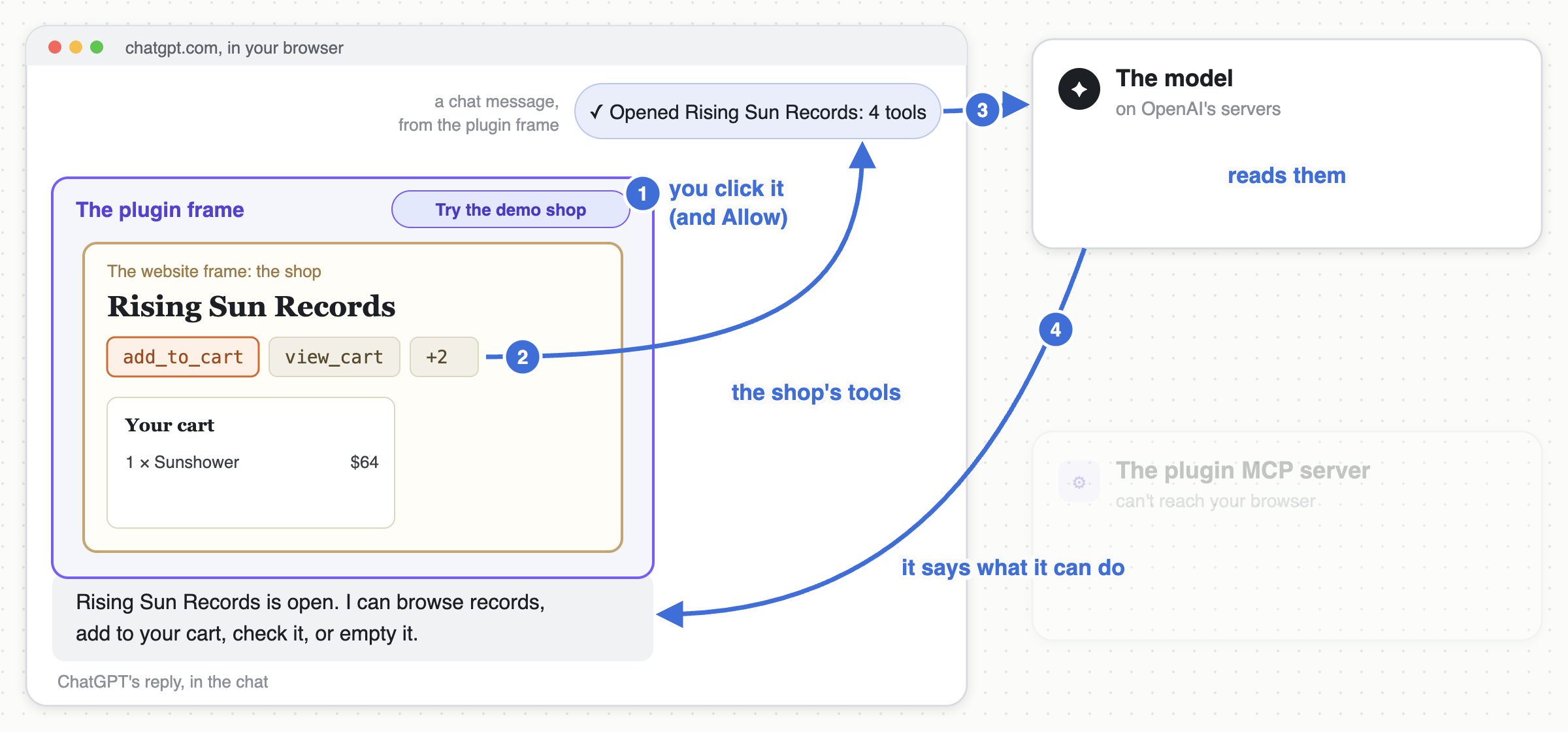
Of course, for this to work, we still need some way to get the website's tools in front of the model initially, to "bootstrap" the whole thing. That is, we need to actually pass the list of tools from the website to the model so they can be called in future. Normally a plugin's tools come from its MCP server. But the plugin MCP server never sees the website, so that's not going to work. The only other route into the conversation is a chat message:
- The plugin frame connects to the website frame and asks it for a list of its tools (more on how that works later).
- The plugin frame posts a chat message. For me it's a single line,
✓ Opened Rising Sun Records: 4 tools. For the model, the full list of tools is attached as JSON. - ChatGPT shows that message for a second, tucks it away, and then gives the model a new turn.
- Now the model has the tools in front of it, and it tells me, in plain english, what it can do on this website.
Notice that I never actually asked the model to list anything. The instructions attached to the plugin frame's message did that.
Step 3: call a tool the plugin MCP server has never heard of
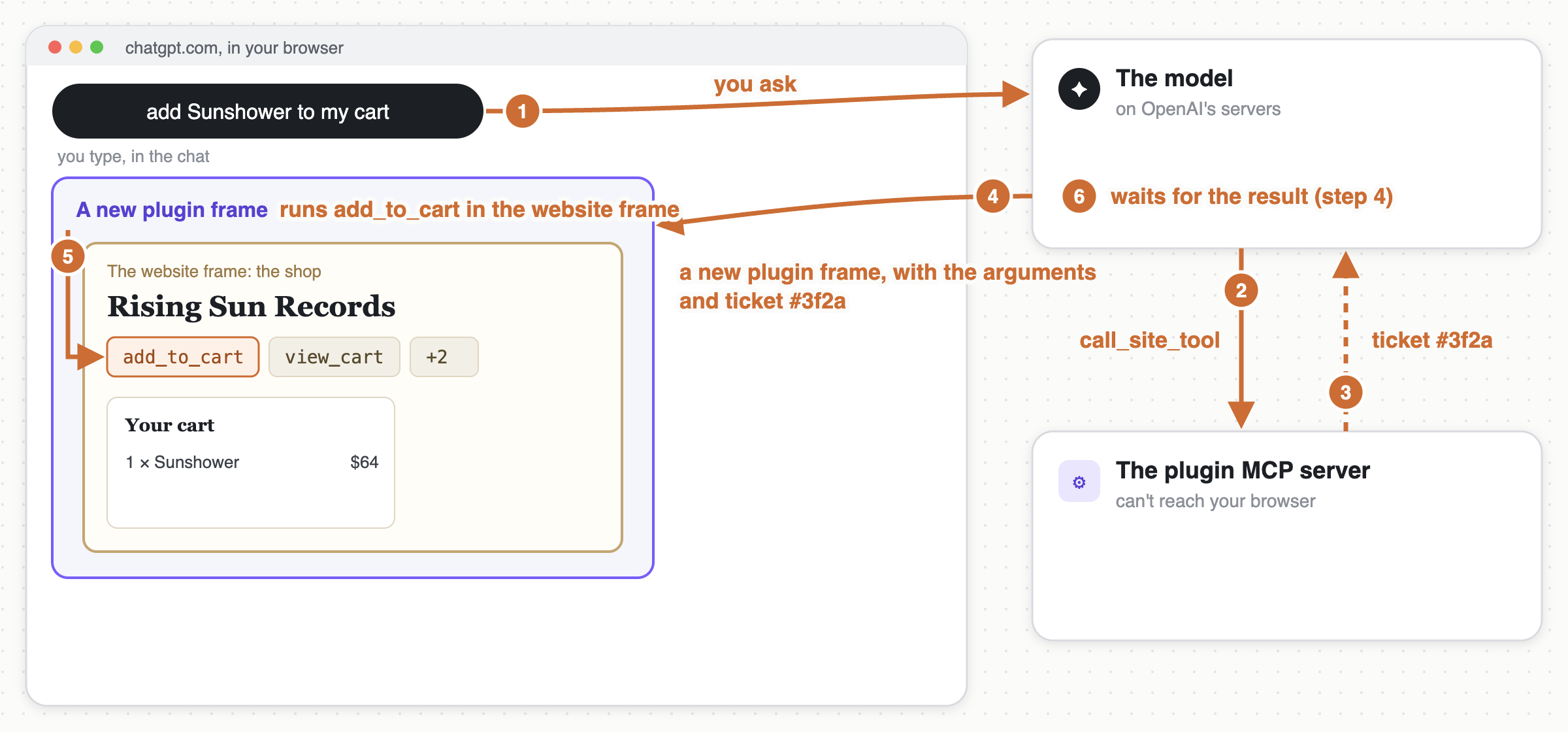
The plugin MCP server has a second tool, call_site_tool. Essentially, when I say "add Sunshower to my cart", we want to do something like this:
- The model calls the
call_site_tooltool and passes in arguments: the website, the name of the tool, and the arguments for the tool. (This is the one generic tool the plugin MCP server exposes for calling anything on any page.) - Calling that tool sends a message to the plugin MCP server. The plugin MCP server can't reach my browser, so all it does is generate a ticket number, and send that back to the model, along with an instruction to wait for the result.
- ChatGPT then renders a brand new plugin frame for the call. This frame includes the ticket number, and the arguments which should be passed into the tool.
- The new plugin frame loads the same shop in its website frame (the cart lives in the url, so it finds the same cart as before), looks up the website's tool based on the name, and deserializes the arguments.
- The plugin frame then calls the website's tool with those arguments, and that tool then returns a value. (The older plugin frame folds itself away at this point, so to the user it still looks like one browser.)
I would love to have some way to keep the same plugin frame around, and just send the new arguments down with a postMessage, so the website could keep its state. But right now a new plugin frame per call is what we get.
Yes, the plugin MCP server is really just a receptionist: it takes a message and points at the door. But it works! And the plugin MCP server never sees the website, or the tools, or the results.
Step 4: get the result back
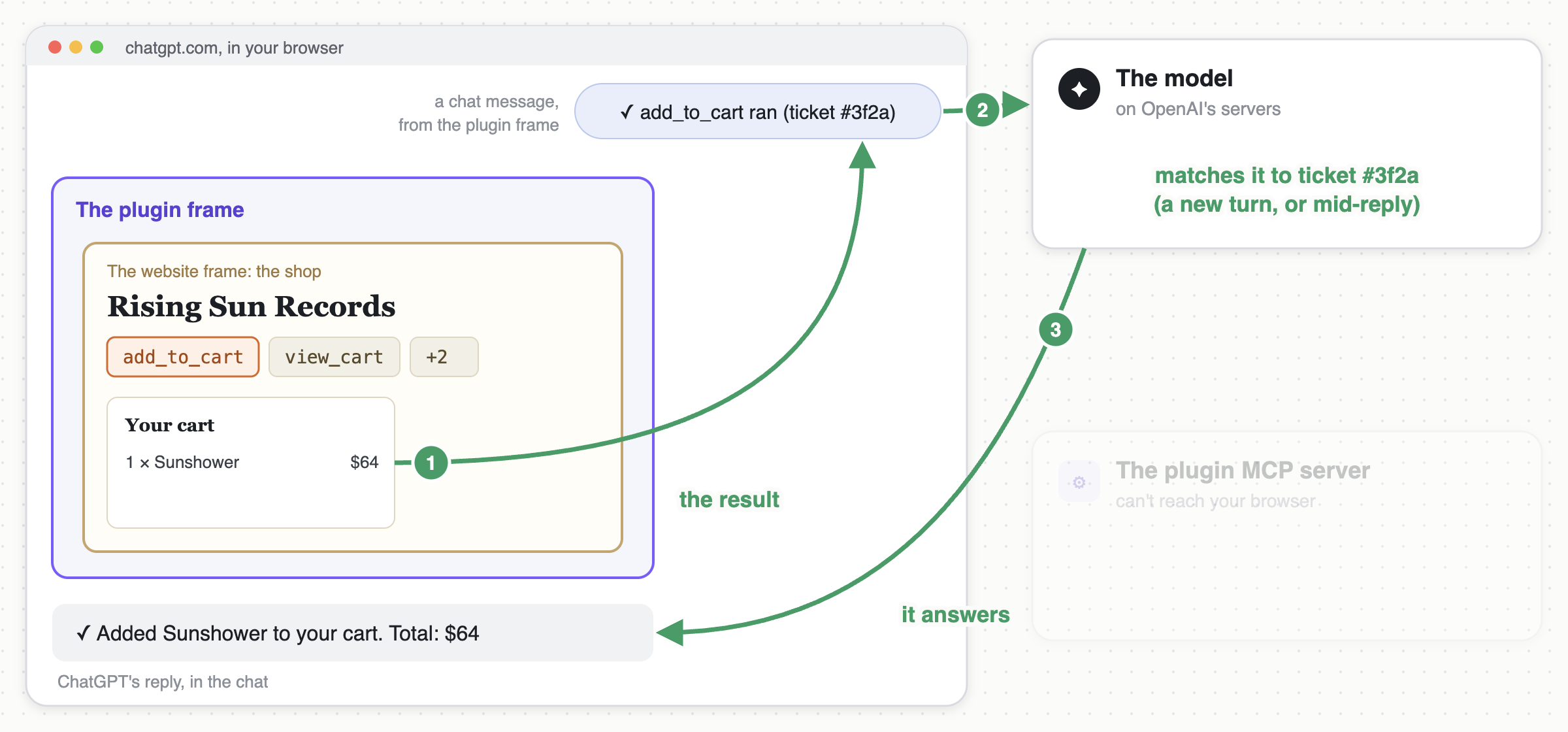
- That return value is serialized, and sent in a chat message back to the model:
✓ add_to_cart ran on Rising Sun Records. Result attached. The message includes the same ticket number, so the model can correlate the result with the original call. - This is the same trick as step 2. The difference is that this time, the model is usually still in the middle of writing its reply, and this is where things got kinda finicky.
- It's only possible to slip a message into the model's reply in the exact instant a turn is active. Do it a moment too late, and we've lost our chance: ChatGPT will reject the message with a red "Steering requires an active compatible turn" error, even though it was technically the result of the model's own call. And none of this is documented anywhere.
- So the plugin frame tries the active turn first, then a brand new turn, and if both say no, it waits a couple of seconds and tries both again.
- The model reads the result, and answers.
Once we've done all that, the rest is like magic! The model asks for a record, and a record appears in the cart, even though the model has no idea where the cart is or what ran to put it there.
One last bit of polish. Initially the model would narrate the wait: "I've sent the request to add Sunshower ($64) to your cart. Awaiting confirmation from the shop." Thats accurate, but it gets old really fast. Now it just stays quiet until the result arrives, so the entire reply is the one line in the screenshot above.
The whole picture
Here's everything at once: what runs where, and what flows between all the pieces.
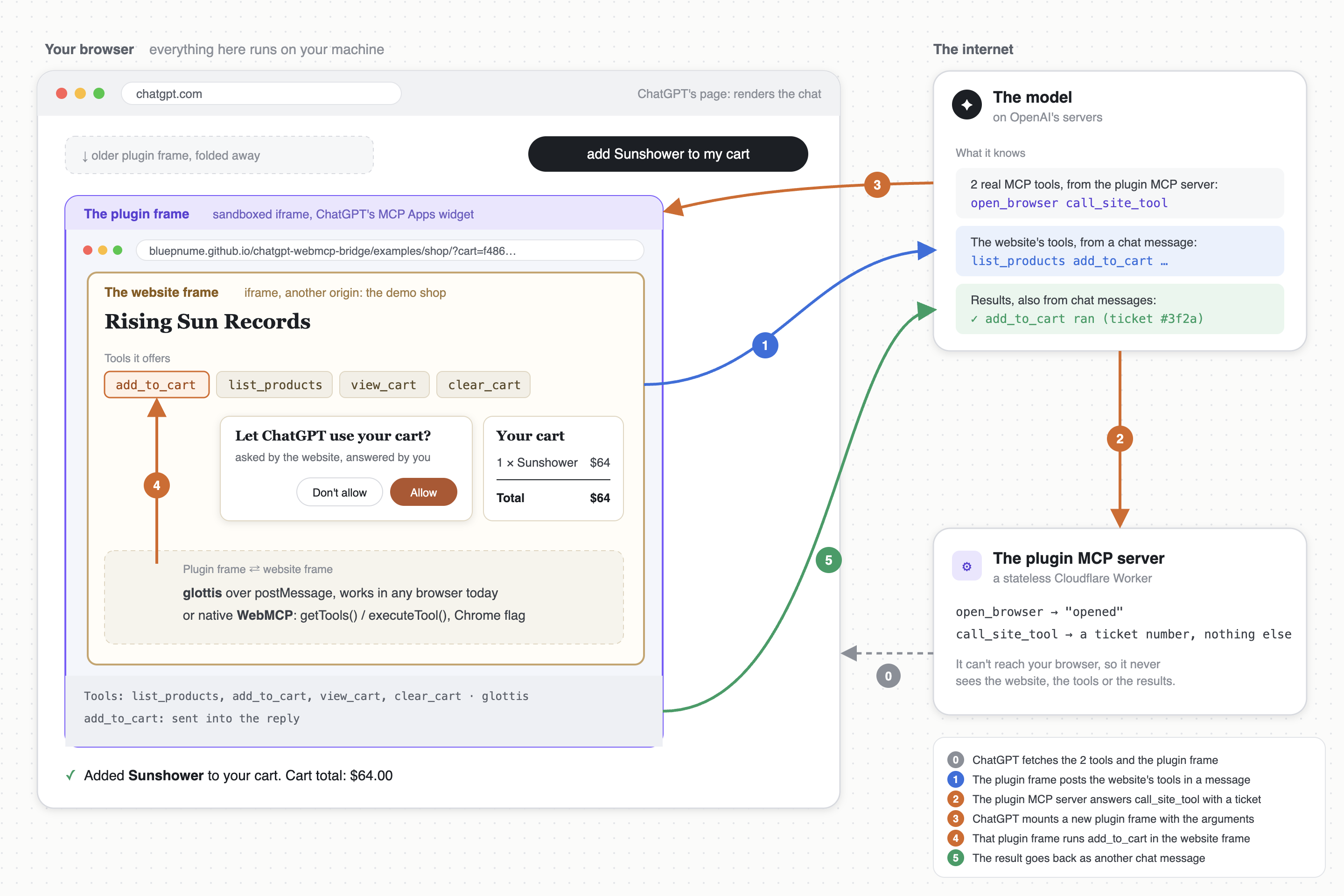
The main thing I want to point out is that everything real happens inside your browser. The only thing outside the browser that knows anything about the shop is the model itself, and it only knows what the website decided to tell it.
Why hacks like this work
Why does any of this work? Because a model embraces the idea that everything is just text. It takes the conversation as input, and it outputs the next bit of conversation.
Programs are good at handling calls and return values. Models are good at handling text. So naturally, a tool result is best suited to live directly in the conversation itself, rather than as a separate thing with different rules and different conventions. Regular conversation rules apply; if it's in the chat, the model can use it.
This plugin breaks three rules that a normal program could never break. The shop's tools are never declared up front. The return value doesn't come back from the call. And the "user" message with the result in it didn't come from the user. And the model doesn't care. Not even a little bit.
Of course, perhaps models shouldn't be this forgiving. I'll leave that to you to decide. I think it's worth it, for the hackability alone.
Talking to the website: glottis
I skipped over one thing in step 2, which is how the plugin frame actually gets the list of tools from the website in the first place.
The first real technical problem here is messaging between the plugin frame and the website frame. They're on different domains, so they can't touch each other's code. Think you can just pick up postMessage and start firing messages? Think again:
- There are no responses or callbacks, which makes requesting data from another window and getting something back really tricky.
- Error handling is virtually non-existent. So is determining whether the other window ever received your message.
- You can't send more interesting data types over the wire, like functions, promises, error objects, etc.
Native WebMCP would solve all of this, but it isn't turned on by default anywhere yet. So for now the website serves up its tools with glottis, which is a small library I wrote to make a page's functions callable from another window. The website wraps each function in tool() along with a zod schema. The plugin frame connects, and gets those functions back as regular async functions it can just call.
Notice that the website didn't need to manually create any kind of listener for the plugin frame, and the plugin frame didn't need to manually send a message to the website. It just called the add_to_cart function (which was transparently serialized and deserialized behind the scenes, with the zod schema turned into the JSON Schema the model sees, and every call validated against it) and glottis automatically did all of the required messaging for us!
There's a lot more to glottis than that. Read more here:
The shop asks first
If you're going to let a chatbot drive your shopping cart, it should probably ask you first. And in this case it's the website that does the asking, not ChatGPT, and not the plugin. glottis allows exports to be an async function, and it holds the connection open until that function returns:
serve({
  clients: {
    remoteWindow: { allowed: true, domain: '*' }
  },
  exports: async ({ client }) => {
    if (!await askTheUser(`Let ${ client.origin } use your cart?`)) {
      throw new Error('The user declined.');
    }
    return tools;
  }
});
The request to the user is rendered inside the website frame. So neither ChatGPT nor the plugin can click it; only I can. The demo shop remembers the answer per cart, so the plugin frames that come later on (remember, one per call) don't need to ask again.
A quick note on security. This article is mainly about the messaging trick itself; but security is also obviously crucial here. It's natural to worry about letting a model loose on a web page. But my view is this is actually a fairly safe way to do it, when implemented in the right way:
- When the website exports a tool, that tool can only be called by the exact window and domain that the website let in. All you need to ask is "Am I happy for this window and domain to call this tool in future?". If not: don't let it in.
- Exporting small self-contained tools can actually limit potential misuse, since it is easier to make tools as specific and tightly-scoped as you like. Only tools that the website exports explicitly become available to the model, and even then, none of the page or anything else is made available to the model. All the model can do is call the tool and pass arguments back to the website.
- And of course none of this is ever shared with the plugin MCP server. It never sees a website, a tool, or a result, so there's nothing on the server to leak.
The real thing, behind a flag
So what about actual, native WebMCP? The plugin supports that too. If you don't want to use glottis, you can register your website's tools with the browser's own registerTool(), and the plugin frame will find them with getTools() and run them with executeTool(). No connection needed. (glottis can also do that registration for you, with one extra line in serve().)
Native WebMCP goes some way to solving the messaging problem, but as of yet it's gated behind a browser permission called tools, which every frame between ChatGPT's page and the website frame needs, and which ChatGPT's frames don't have. Right now there's absolutely no way to get that permission granted from inside ChatGPT. So I hacked around it: the repo has a launcher that opens your own Chrome in a separate profile, with the flag turned on and every iframe granted the permission.
npx chatgpt-webmcp-bridge chrome
(if anyone at OpenAI is interested in some real world use-cases for granting that permission, please let me know, I have a bunch)
Where the seams show
Is it really that easy? Yes, and no. You can absolutely do everything I just demonstrated above. But as always, there are a few pesky nuances to consider:
- Results are chat messages; the model has to wait for a message it was told is coming, with no real guarantee it won't show up as a red "Steering requires an active compatible turn" error for a second first. It nearly always goes through. But not always.
- It's a new plugin frame per call, resulting in a pretty terrible experience for any page that keeps its state in memory. A shop that keeps its state in the url and in local storage is fine.
- Origins are limited; by default the plugin frame is constrained to the origins the plugin MCP server lists up front (they become its
frame-src), and ChatGPT will not accept wildcards. - Framing is limited; the website has to allow it, with no
X-Frame-Optionsheader and aframe-ancestorsthat allows ChatGPT's sandbox. - Generally speaking: it's developer mode only. OpenAI's app directory is not going to approve an app that frames arbitrary websites.
- Native WebMCP needs a flag and a launcher, at least until browsers actually ship WebMCP and ChatGPT grants the permission.
Right now the plugin does a pretty good job at ironing over the cracks, and solving any problem that it's possible to solve without OpenAI changing ChatGPT. For everything else, I really hope OpenAI start to treat WebMCP as more of a first-class citizen in ChatGPT, and help fix some of the above issues which are not hackable around right now. I really like the work that has been done on WebMCP so far. I just hope ChatGPT doesn't get left behind.
Try it
In ChatGPT (with developer mode on), you just add the server url as a custom MCP server, with no authentication:
https://webmcp.danielbrain.ai/chatgpt-webmcp-bridge/mcp
Then you can just mention the plugin in a chat with the usual @, ask it to open the browser, click Try the demo shop, click Allow, and ask it to add something to your cart.
If you want to point it at your own websites, you run your own copy of the server (one command on Cloudflare Workers, or the package's serve command behind a tunnel), and you specify a policy for which origins you want to allow. The code is all on GitHub, and on npm as chatgpt-webmcp-bridge.
chatgpt-webmcp-bridge doesn't yet have anything like 1:1 parity with what a real WebMCP integration in ChatGPT would look like (it's just the result of a few days of hacking, so far), but most of the fundamentals are there. Would love to know if it's useful for anyone else! Give it a whirl and let me know what you think.
-Daniel