Presented at ForwardJS Ottawa JavaScript/TypeScript/React developer meetup on July 26, 2026. Example To Do app code here
If you tried React Native in 2021 or earlier, you used the old Bridge architecture. If you tried it in 2024 or later, you used the New Architecture.
Many developers still judge React Native by the old Bridge architecture. The framework they remember is not the framework teams ship today.
What Is React Native?#
React Native is a framework for building native applications with React. It runs your React and TypeScript code in a JavaScript engine on the device, then renders real platform views. A <View> becomes a UIKit view on iOS or an Android view on Android, not an HTML <div> inside a WebView.
Your components, hooks, state management, and business logic stay in ordinary React. The rendering target changes from the browser to the operating system's UI toolkit.
Its design principle is "learn once, write anywhere." You share skills and a large part of the application core while each platform keeps its own interaction patterns, accessibility behavior, and visual conventions. When the product needs something specific, you can branch by platform or drop into Swift and Kotlin.
For a React and TypeScript team, React Native sits between two separate native codebases and a web wrapper: shared language, shared logic, largely shared UI, and native output.
Who Is Shipping on React Native?#
Many of the most popular mobile apps run on React Native.
- Amazon: Amazon Shopping, Kindle
- Meta: Facebook, Instagram
- Microsoft: Office, Outlook, Teams
- Shopify: Shop, Shopify Admin
- Coinbase, Discord, and WordPress
These teams choose React Native because it lets them share product code and React skills across iOS and Android while still shipping native interfaces.
The React Native People Remember#
Meta released React Native as open source in 2015. Its first architecture placed JavaScript and native code on opposite sides of an asynchronous Bridge.
JavaScript described work, serialized messages into bridge-friendly values, and queued them for native code. Native code deserialized those messages, did the work, and sent results back through the same process. The old NativeModules system also initialized modules eagerly, and the old renderer sent UI work across that same boundary.
That design let React Native ship, but it imposed three hard limits:
- Every crossing required serialization and queued messages.
- Layout and measurement could not call native code synchronously.
- The renderer could not support React's concurrent model.
Teams also dealt with fragile upgrades, inconsistent Android behavior, abandoned packages, and weak debugging tools. Expo helped with setup, but the old "eject" workflow forced teams to take ownership of generated iOS and Android projects as soon as they needed custom native code.
These issues drove a broader backlash that peaked in 2018, when Airbnb publicly announced that it was moving away from React Native. That post captured both the technical limits and the organizational cost of running native and React Native teams in parallel. Many developers compressed that detailed write-up into a simpler memory: "React Native failed."
The Long Transition to the New Architecture#
Meta started rewriting the old Bridge architecture in 2018 while production apps kept shipping.
It took several years to roll out, but by 2024 the New Architecture had fully taken over the platform.
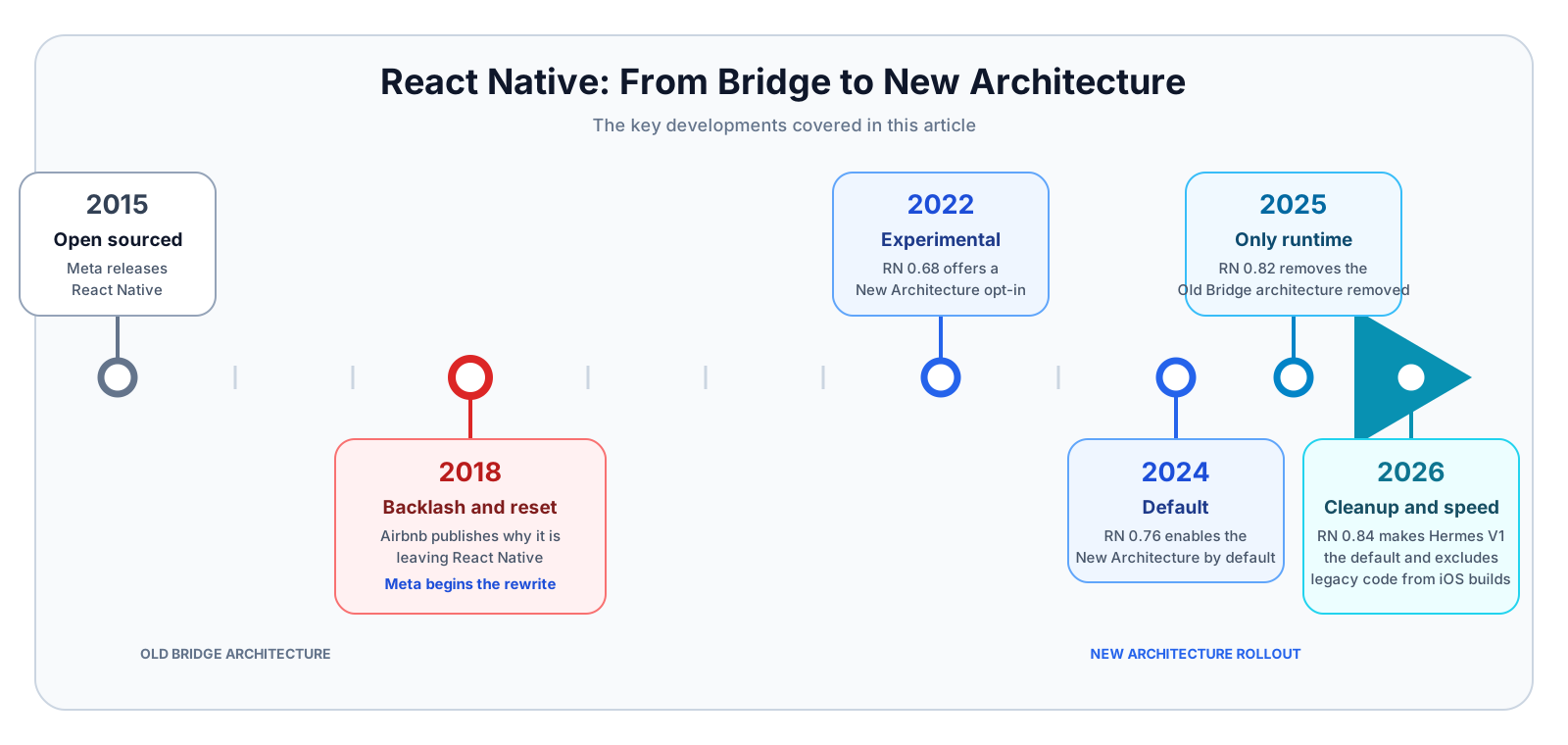
The transition took years because React Native had to keep working for real products through the rewrite. That constraint made the timeline long, but it also made the result more credible.
How a React Native App Works in 2026#
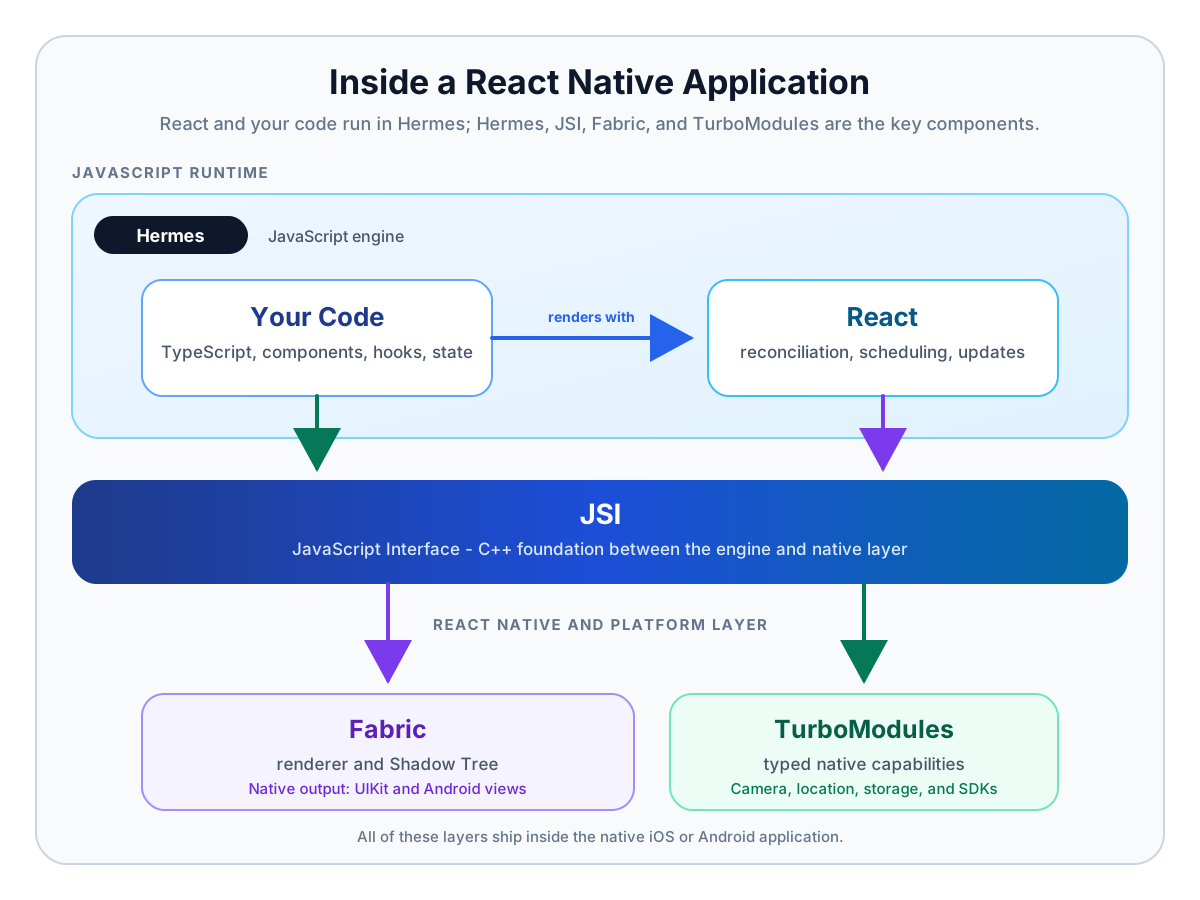
A modern application starts in a native iOS or Android shell. Metro bundles its TypeScript and JavaScript. Hermes, the default JavaScript engine, executes that bundle. React runs your components, hooks, and state updates.
Four key components define the New Architecture:
- Hermes: the JavaScript engine
- JSI: the foundation
- TurboModules: native capabilities
- Fabric: native UI
Hermes: the JavaScript engine#
Hermes is the JavaScript engine most React Native apps use in 2026.
It is a special-purpose engine built for React Native, not a wrapper around V8 or JavaScriptCore. The Hermes Compiler is a JavaScript AOT compiler, so you can compile during the build for production or at runtime during development. The Hermes VM then executes bytecode directly.
That setup improves cold-start performance and helps reduce memory use and app size.
In the old Bridge architecture, most apps used JavaScriptCore as the default engine. Hermes later became an option, but it was not the center of the runtime story the way it is now.
The practical gains are faster startup, lower memory use, and smaller app binaries than the common JavaScriptCore setup.
JSI: the foundation#
JSI is the C++ interface between the JavaScript engine and native code. JavaScript can hold references to native host objects and call host functions without sending every interaction through the old serialized message queue.
JSI supports synchronous or asynchronous calls, depending on the API. Slow file, network, and sensor work still needs asynchronous handling, but React Native no longer pays the Bridge tax for every cross-language call.
The practical improvements are simple: less copying, less queueing, and synchronous native calls when an API actually needs them.
TurboModules: native capabilities#
TurboModules expose native capabilities such as Bluetooth, cryptography, location, or a proprietary SDK.
A typed specification defines the contract, and code generation creates much of the glue between JavaScript and native code. React Native lazily initializes a TurboModule the first time the app accesses it instead of eagerly instantiating everything up front.
Most teams do not write many TurboModules themselves. They install modules from Expo or the broader React Native ecosystem, then write their own only when the ecosystem does not cover a required platform API or native SDK.
Fabric: native UI#
Fabric replaces the old renderer. It represents React's result in a C++ Shadow Tree, then commits changes to UIKit views on iOS or Android views on Android.
Fabric supports React concurrency, synchronous layout reads when the framework needs them, and rendering with multiple priorities. A high-priority update can interrupt lower-priority work such as startTransition(). Fabric also cuts down intermediate UI states, reduces serialization, and applies view flattening to nested components.
How the pieces cooperate#
Suppose a user presses a button that requests the current location:
- A native view reports the press to React.
- Hermes executes the JavaScript that calls a location module through JSI.
- Native code calls the platform location API.
- JavaScript updates React state with the result.
- Fabric commits the changed native views.
React owns state and composition. Fabric owns rendering. TurboModules expose platform APIs. Hermes runs the JavaScript that ties the flow together.
What Writing React Native Feels Like#
The biggest surprise for a web React developer is how familiar React Native feels once you stop expecting HTML.
const [shared, setShared] = useState(false);

async function shareLocation() {
  const { coords } = await Location.getCurrentPositionAsync();

  await api.shareLocation(coords);
  setShared(true);
}

return (
  <Pressable disabled={shared} onPress={shareLocation}>
    <Text>{shared ? 'Location Shared' : 'Share Location'}</Text>
  </Pressable>
);
This is still React:
- state
- event handlers
- async business logic
- conditional rendering
The differences come from the target platform:
- you use
PressableandText, not HTML expo-locationor another native module talks to the device- the button renders as native UI, not as a browser control
StyleSheet: How React Native Styles UI#
React Native styling stays close to CSS concepts, but it lives in JavaScript.
import { Pressable, StyleSheet, Text, View } from 'react-native';

export function ProfileCard() {
  return (
    <View style={styles.card}>
      <Text style={styles.title}>React Native in 2026</Text>
      <Text style={styles.subtitle}>ForwardJS</Text>

      <Pressable style={styles.button}>
        <Text style={styles.buttonText}>Open Session</Text>
      </Pressable>
    </View>
  );
}

const styles = StyleSheet.create({
  card: {
    padding: 16,
    borderRadius: 12,
    backgroundColor: '#ffffff',
    gap: 8,
  },
  title: {
    fontSize: 20,
    fontWeight: '600',
  },
  subtitle: {
    color: '#475569',
  },
  button: {
    marginTop: 8,
    paddingVertical: 12,
    borderRadius: 8,
    backgroundColor: '#2563eb',
  },
  buttonText: {
    color: '#ffffff',
    textAlign: 'center',
  },
});
The main patterns are straightforward:
- call
StyleSheet.create()to define named, reusable style objects - pass them to components with
style={styles.card}orstyle={styles.title} - use camelCase keys such as
backgroundColorandpaddingVertical - use numeric spacing and size values instead of CSS strings in most places
- compose styles with arrays such as
style={[styles.button, disabled && styles.disabled]}
The web differences are just as important:
- there is no CSS cascade or separate stylesheet file by default
- you style each React Native component directly
- React Native uses Flexbox for layout, but the styling surface is smaller than the browser's CSS surface
Common React Native UI Components#
If you build on the web, you can think of React Native as a different set of primitives with a familiar component model.
Common layout and display components:
ViewTextImage
Common interaction and input components:
PressableTextInputButtonSwitch
Common scrolling and collection components:
ScrollViewFlatListSectionListRefreshControl
Common presentation and feedback components:
ModalActivityIndicatorKeyboardAvoidingViewStatusBar
These are React Native components, not browser elements. Fabric renders their native host views, and libraries can provide custom native components when the built-in set is not enough.
What Can I Reuse?#
React and TypeScript skills transfer well.
You can reuse:
- components, props, hooks, state, and composition patterns
- API clients, schemas, stores, and business logic
- pure JavaScript libraries such as Zod,
date-fns, Day.js,lodash, and Immer - cross-platform libraries such as Axios, TanStack Query, Zustand, Redux Toolkit, React Hook Form, Apollo Client, and
i18next
You need to replace or adapt:
- HTML, the DOM, and the CSS cascade
- browser-only APIs
- Node APIs such as
fsand native.nodeaddons - web assumptions about focus, visibility, and network lifecycle
React Native provides fetch, WebSocket, URL, timers, and console, but it does not provide browser DOM APIs or Node's server runtime. Native libraries fill many of those gaps for files, secure storage, location, camera, notifications, and other device capabilities.
Before installing a package, check its React Native support and native dependencies. React Native Directory tracks support for the New Architecture, and npx expo-doctor catches many dependency and version problems.
Mobile Lifecycle Complications#
A mobile operating system can suspend or terminate your app without a final callback. That breaks a few assumptions that web developers make without thinking about them:
- Execution stops. Persist important state as it changes and use supported background-task APIs.
- Connections disappear. Reconnect WebSockets after resume or network changes.
- The world changes. Permissions, deep links, and notifications may look different when the process wakes.
Use AppState and mobile-aware focus and network hooks. Test lifecycle behavior on physical devices because iOS and Android enforce different limits.
iOS and Android get first-class support. Separate implementations also target Windows, macOS, web, Meta Quest, and other devices, but their library coverage and release alignment vary.
What Is Expo?#
Expo is a framework and toolchain built around React Native.
It gives you:
- a maintained SDK for common device capabilities through Expo modules
- project and native configuration
- local and cloud builds
- development tools and application updates
Expo coordinates the parts every mobile team would otherwise assemble itself. It does that without blocking native code or hiding the native projects forever. The React Native team recommends a framework such as Expo for new applications, and I think that is the right default in 2026.
Common Modules in the Expo SDK#
These are some of the Expo packages many teams reach for first when they need real device or platform integration:
Device and app capabilities:
expo-locationfor GPS and permission flowsexpo-notificationsfor push and local notificationsexpo-camerafor camera preview and captureexpo-image-pickerfor photos and videos from the library or cameraexpo-file-systemfor reading, writing, uploading, and caching filesexpo-contactsfor address book access
Storage, auth, and system integration:
expo-sqlitefor local relational storageexpo-secure-storefor tokens and secrets in platform secure storageexpo-auth-sessionfor OAuth and OpenID Connect sign-in flowsexpo-web-browserfor in-app browser flows such as authenticationexpo-devicefor hardware and device metadataexpo-constantsfor app config, runtime, and build metadata
Expo Configuration, Building, and Testing#
Older Expo projects had an "eject" step. Once you crossed it, you owned the generated native projects.
Modern Expo uses Prebuild and Continuous Native Generation instead.
Expo provides a simple and repeatable way to build React Native projects:
- App config such as
app.config.jsdescribes names, icons, permissions, platform settings, and plugin configuration. - Config plugins apply repeatable native changes for installed packages.
npx expo prebuildre-generates theiosandandroidprojects from that config and those plugins.- Expo also offers paid cloud services around Continuous Native Generation for CI and build workflows.
That workflow keeps your intent in version control instead of burying it in hand-edited native files.
With testing, a practical stack looks like this:
- For JavaScript and TypeScript components, Expo recommends tools such as Jest and React Native Testing Library.
- For the native app, use development builds on a simulator and cover end-to-end flows with Detox or Maestro.
You still open Xcode or Android Studio when you need native debugging. You just stop treating generated project files as the real source of truth.
Expo Makes Custom Native Code Easier#
Sometimes you still need native code, for example when you need an unsupported device capability, a proprietary SDK, a custom native view, or lower-level platform work.
React Native's TurboModule path focuses on lower-level C++, but that can be tedious for typical app work.
For most application-specific Swift and Kotlin code, I would reach for the Expo Modules API. It gives you a cleaner authoring model for many app-level integrations, while Expo handles native project setup with npx expo prebuild and provides the surrounding build tooling.
Expo Web and Expo Go#
Expo gives you two lightweight feedback loops that help at different stages.
Expo Web works well for browser-based UI iteration:
- fast browser loop for layout, navigation, forms, and shared React code
- useful for desktop demos and early UI iteration
- not reliable for native touch, safe areas, keyboards, gestures, or device APIs
Expo Go works well for simple checks on a physical device:
- fast device loop for simple experiments and quick demos
- useful when your app fits inside the bundled Expo Go runtime
- not reliable for custom native dependencies, exact SDK control, or production validation
For production work, use a development build plus simulator and physical-device testing.
Which Mobile Approach Should You Choose?#
I would choose React Native when all of these are true:
- you need both iOS and Android
- your team knows React and TypeScript
- you need native UI and device APIs
- sharing most product code and delivery work matters
I would choose fully native when the product depends on advanced platform-specific UI, an unsupported low-level SDK, or a team that already delivers efficiently in separate iOS and Android codebases.
I would choose a web wrapper such as Capacitor when you already have a web product and most screens are content and forms.
React Native can also own one bounded screen inside an existing native application. That brownfield approach gives a team a way to adopt React without rewriting the surrounding product, but it needs a clear contract for navigation, state, and lifecycle events between the native and JavaScript sides.
Get Started#
If React Native fits your product and team, start with npx create-expo-app@latest and a development build.
From there, I would keep the setup simple:
- Keep native configuration in app config and config plugins.
- Prefer maintained libraries, then check them with React Native Directory and Expo Doctor.
- Write an Expo Module in Swift or Kotlin when the ecosystem lacks a required platform API.
React Native still asks you to learn mobile lifecycle constraints and decide where platforms should differ. In return, it lets a React and TypeScript team ship native UI, share a large application core, and move faster across iOS and Android.