I recently released ShellTalk, an Apache 2.0 licensed CLI and library that converts natural language English text into the Bash commands.
shelltalk "find all images in this folder"
find . -type f \( \
  -name '*.jpg' -o \
  -name '*.jpeg' -o \
  -name '*.png' -o \
  -name '*.gif' -o \
  -name '*.webp' -o \
  -name '*.svg' \
\)
While building Junco, I discovered Hunch, an on-device CLI that uses Apple Intelligence and few-shot dynamic retrieval to convert text to bash. The concept was fascinating, and proved that even a small non-coding model like the 3B Apple Foundation Model (AFM), with guardrails, is capable of producing valid Bash scripts from natural language input.
Using the AFM is ideal because it’s incredibly optimized and comes pre-installed on many Macs with macOS 26 Tahoe. However, it’s not truly portable since it has a runtime dependency on a limited-availability small language model (SLM). Given that single-command bash is a pretty constrained space, I hypothesized that this might be possible without LLMs at all. My approach for ShellTalk was leveraging Semantic Template Matching (STM) to map intent → command.
Why no LLMs? #
On-device AI keeps getting better, cheaper, and more efficient, but it’s not a panacea. It’s still not easily accessible on many environments like embedded devices, older mobiles, or the web. Beyond LLMs, Natural Language Processing (NLP) has continued to advance with more efficient embedding models that come pre-packaged into many runtimes like Apple’s NLEmbedding introduced in macOS/ iOS 13.
Moreover, deterministic approaches are typically faster and easier to reproduce, resulting in shorter testing and iteration cycles. Given text-to-bash has relatively constrained inputs and outputs, I figured a tool like Claude Code could quickly prototype and iterate autonomously towards a working solution similar to Meta-Harness. Effectively, this technique builds a system that build systems.
How ShellTalk works #
ShellTalk has a sequential pipeline:
- Entity recognition - regular expressions (file paths, URLs), lexicon (installed commands), preposition framing (“in X” or “on Y”), and (optionally)
NLTaggeron macOS for parts of speech (POS) recognition - Category matching - Best Matching 25 (BM25) picks the most probable category (Git, ImageMagick, File I/O)
- Template match - Score candidates across 167+ templates using BM25, Term Frequency-Inverse Document Frequency (TF-IDF), and
NLEmbeddingcosine distance on macOS - Slot extraction - entity & regex slot-fill replaces placeholders with actual file names, extension suffixes, URLs, etc
- Path resolution - BSD vs GNU adapts commands and flags between macOS (BSD
coreutils) and Linux (GNU) - Validation - confirm command existence,
bash -nsyntax validation, and safety scoring
Testing ShellTalk #
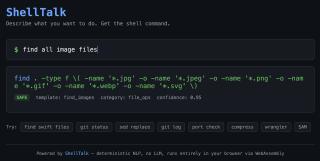
You can test ShellTalk yourself on GitHub Pages. This version compiles and optimizes the Swift library into WebAssembly (Wasm) using Binaryen. It works fully offline, although it lacks a few features including command healing–matching output to which commands and versions are installed on your device–and typo correction since NSSpellChecker is only available on macOS. Nonetheless, once the ~45 MB Wasm binary is loaded & cached, you should see near-instant results with safety and confidence scores.
ShellTalk is not perfect. Although it can detect and leverage installed commands, it works best on pre-trained commands bundled in the tool’s corpus. ShellTalk also struggles with ambiguous intent or complex pattern matching for file names, paths, and URLs. But it’s failure modes are deterministic, so they are easy to reproduce and debug. This gives ShellTalk the ability to be quickly and autonomously improved by AI agents.
Limitations #
One of the biggest limitations of ShellTalk is that it intentionally doesn’t synthesize pipelines from user input. The following inputs won’t work:
- list swift files, filter by mtime, then wc -l
- find all png images then convert jpeg and copy to ~/Downloads
ShellTalk maps one query to one template, so pipes are only used in a stable way for a single intent (counting matches or pbcopy clipboard sink). Generalizing multi-step decomposition would almost certainly require some kind of domain specific language (DSL) or an LLM planner which risks breaking the, “same query, same machine, same result,” contract.
What’s Next? #
ShellTalk is available for free on GitHub, including pre-built binaries for macOS (Universal), Linux (x86_64), and Wasm. The same techniques might work for AppleScript or PowerShell. ShellTalk might prove useful inside of another agentic harness, where it’s deterministic output could spare some tokens.