TL;DR You can build a personal task manager inside Claude using two pieces: a Claude Skill that adds tasks to your data source instantly, and a Claude Cowork Live Artifact that displays them as a Kanban board. This article gives you the exact prompts to build both — plus the map of every mistake I made so you don’t have to make them yourself.
The real problem — why existing tools fail at the moment tasks actually arrive
What went wrong — a week of errors, duplicates, timeouts, and pagination surprises
The system today — how two focused tools replaced one over-engineered skill
Why I chose Notion — the tradeoffs, the honest doubts, and what you might choose instead
A design philosophy — why simplicity is a deliberate decision, not a limitation
Part 1: Build your own task skill — a prompt that guides you from zero to a working skill, including creating your database if you don’t have one yet
Part 2: Build your own live Task Board — a prompt for a persistent Cowork artifact that loads and displays your tasks without involving Claude each time
An honest assessment — what works, what doesn’t, and where this is all heading
My partnership with Microsoft started with time management.
Not with SharePoint, not with infrastructure, not with enterprise deployments. With Outlook. With calendar invites and shared task lists, and the promise that if you used the right tools correctly, you would finally be in control of your day. That workshop — one of my first, sponsored by Microsoft when I arrived in Slovenia — felt like the beginning of something. And for a long time, it was.
But that was then. Today, “using Outlook for tasks” means navigating a fragmented experience across a web app, a desktop client, and a mobile app that each behaves differently. Connect your iPhone’s native mail client, and you get a fourth variation. It is too complicated for something that should be simple.
So for years, like many solopreneurs, I settled for good enough — a combination of apps, notes, and memory. Until I realized I already had the tool I needed open in front of me every day.
Tasks don’t arrive at convenient moments.
I’m driving, and an idea surfaces. I’m working in the orchard, and I remember something I need to follow up on. I’m in the middle of a conversation, and a task appears. In those moments, I need the path of least resistance.
Siri should be the answer. It isn’t, at least not reliably enough to trust.
But Claude is open in front of me for most of the working day. I use it constantly. So the question became obvious: why open another tool at all?
I thought the solution would take twenty minutes to build.
I was wrong.
The first part worked immediately: adding tasks. Tell Claude, the task appears in Notion. Fast, reliable, done. Claude even created the Notion DB, extracted the DB IDs, and all technical details needed to make the integration work.
The problem started when I wanted more, a skill that could also retrieve and display my tasks in Claude. A complete task manager inside Claude, one skill to rule everything.
Here is what I ran into:
Speed. Generating a simple HTML view of fewer than twenty tasks through a Claude skill took several minutes. Not seconds. Minutes. Unusable. Claude had to rebuild the HTML each time.
Pagination. The Notion API returns a maximum of 25 results per call. If you don’t handle this explicitly, you silently lose tasks. They don’t error — they disappear.
Duplicates. Running parallel calls to work around pagination introduced a new problem: the same task appearing twice, with slightly different ID formats. The skill had no way of knowing it was the same record.
Cowork Scheduled Tasks. I tried using Claude Cowork to run scheduled task refreshes. Timeouts. Excessive usage against my subscription. An 80% failure rate. That experiment ended quickly.
Type contamination. Notion search doesn’t return only tasks. It returns databases, schemas, views — everything. Without strict filtering, phantom entries inflate your task count and render as broken cards.
After more than a week of iteration, I had something that technically worked. But it was fragile, slow, and not something I could share with anyone in good conscience.
Then Anthropic released live artifacts — and the second half of the problem finally had a proper solution.
Two pieces. Clean separation of responsibility.
A skill for adding tasks. One job only: you mention a task, Claude adds it to your data source, and confirms in a single line. No retrieval, no display, no status management. The constraint that started as a defeat turned out to be the right design. Adding a task from Claude is genuinely faster than opening any other app.
A live artifact for viewing tasks. A persistent Task Board that lives in Claude Cowork, connects directly to Notion, and loads your tasks without asking Claude to reason through anything. Fast, reliable, and always there when you need it.
Neither piece tries to do the other’s job. That’s what makes it work.
I use Notion because I already have a subscription, and I wanted to test how capable the MCP integration really is. The answer: capable, with real limitations — which is exactly what this article documents.
What I like about Notion for this use case:
Views. Notion’s data visualization is genuinely good. Kanban, table, calendar — you can look at your tasks the way that makes sense to you.
Pages as records. Every task in a Notion database is also a page — it has an open space for writing. So if a task needs context (notes for a meeting, a checklist, a link), that space is already there. You don’t need extra fields.
Cloud access. I can interact with my tasks through Claude, but also directly through the Notion app on my phone or computer. The data lives in one place and is accessible everywhere.
What I keep questioning: would a local spreadsheet or even a Markdown file be faster and more reliable for Claude to read and write? I don’t have a definitive answer yet. A local database removes the MCP layer entirely, which would likely solve the speed and pagination problems. But you lose the cloud access and the native Notion views.
It is not a permanent decision. It is the best available option I found while working with the tools I already use.
Before you build anything, I want to share one decision:
Most task tools push you toward complexity, due dates, priority levels, assignees, tags, linked projects, progress percentages, and long descriptions. I understand why those features exist. But for the way tasks actually arrive in my life, that complexity creates more friction than it removes.
When I read “pick up the branches left in the orchard”, I know exactly what that means. I know what tools I need, how long it will take, and when it makes sense to do it. Writing all of that into fields adds work without adding clarity.
So my design rule is: the task name carries the meaning. Everything else is optional.
For the rare cases where a task genuinely needs more — I had one recently involving a meeting where I wanted to capture a few ideas and a checklist in advance — Notion’s page body is the right place for that. Open the record, write what you need. No extra fields, no system redesign.
If you end up using a different tool, look for something equivalent: a notes field, a description area, a rich text space attached to the record. One optional field for context is all you need. The task name should do the work.
Where to run this: Standard Claude chat is the default. However, if your chosen data source MCP, is only connected in Claude Cowork and not in regular chat, run it there instead. Check Settings → Integrations to see which MCPs are active in each environment.
Supported data sources (you’ll need the corresponding MCP connected in Claude):
Notion, Google Sheets, Airtable, Todoist, Trello, Linear, GitHub Issues. Do you know any others?
Before you start: Make sure the MCP for your chosen data source is connected and authorized. Without this, the skill won’t have access to your data — and Claude will build something that silently fails every time.
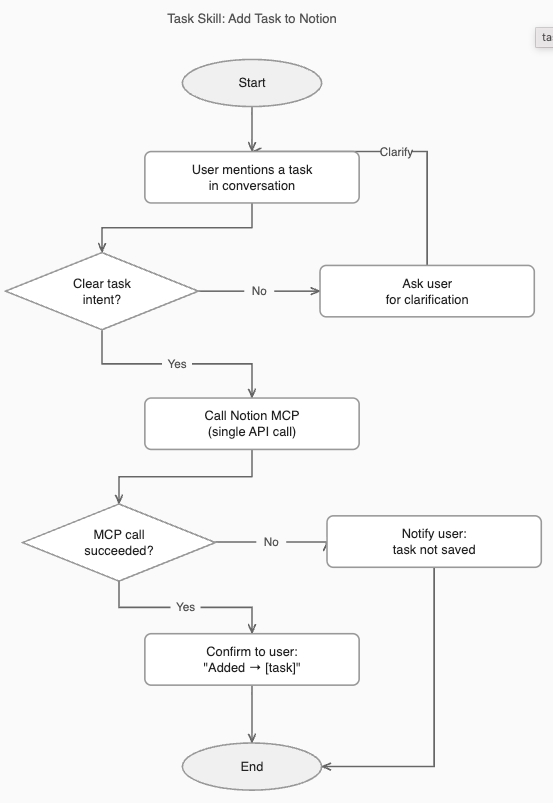
Prompt: Task Skill Builder
I want to build a Claude skill that lets me add tasks by just mentioning them in conversation — no switching apps, no extra steps.

Before writing anything, ask me these questions and wait for my answers:

1. Where do I want to store my tasks? Options include Notion, Google Sheets, Airtable, Todoist, Trello, Linear, GitHub Issues, or another tool. Tell me which MCPs are available in my current Claude setup and help me choose the best fit for my situation.
2. Do I already have a database or list set up for tasks in that tool, or do I need to create one? If I need to create one, show me exactly what you are about to create and wait for my approval before doing anything.
3. What fields should the task have? Keep it minimal: task name and status are required. Add an optional rich text or notes field for context when needed. Ask me if I want anything else, but push back gently if I start overcomplicating it.
4. What should the confirmation look like after a task is added?

Once I answer, follow these steps in order:

**Step 1 — Verify the connection.**
Make a test call to the MCP before writing anything. Confirm the data source is reachable and responding. If it fails, stop and tell me clearly — do not proceed to build a skill around a connection that doesn't work.

**Step 2 — Inspect the actual data structure.**
Make one real read call to the data source. Observe the actual field names, ID format, and how records are nested. Build everything around what you observe, not what you assume. Never guess field names. If you need to create the database first, do it now — and confirm the exact name and stable ID before continuing.

**Step 3 — Write the SKILL.md.**
The skill must:
- Trigger only on clear task intent — not every casual mention of something to do in conversation
- Capture tasks mentioned in conversation and add them to my data source in a single API call (never loop with multiple sequential calls, even for multiple tasks)
- Hardcode the exact database or list ID — do not rely on Claude finding it dynamically each time
- Confirm with one short line after adding (e.g. "Added → [task name]")
- Handle multiple tasks mentioned at once in a single call
- If the MCP call fails, tell me clearly — never silently confirm a task that was never saved
- Focus on one job only: adding tasks. No retrieval, no display, no status management.

**Step 4 — Test the skill.**
After writing the SKILL.md, add one real test task using the skill exactly as it will be used. Confirm the task appears in the data source. Show me the confirmation. Only then tell me the skill is ready.
How to save your skill: Once Claude produces the SKILL.md file, save it to your Claude skills folder at /mnt/skills/user/[skill-name]/SKILL.md. Claude will automatically detect and use it in future conversations based on the description at the top of the file. If you are new to Claude Skills, I wrote a full guide on how they work — and how to migrate from Custom GPTs — in a previous Automato article:

Where to run this: Claude Cowork only. Live artifacts are not available in the standard Claude chat interface.
This prompt builds a persistent Task Board — a sidebar panel that loads your tasks directly from your data source every time you open it. It handles pagination, deduplication, error states, and data integrity, so you don’t have to discover those problems the hard way.
Before you run this prompt:
Confirm your data source, MCP is connected and authorized in Cowork
Know approximately how many records your database has
Have the exact name of your MCP server as it appears in your Cowork connections
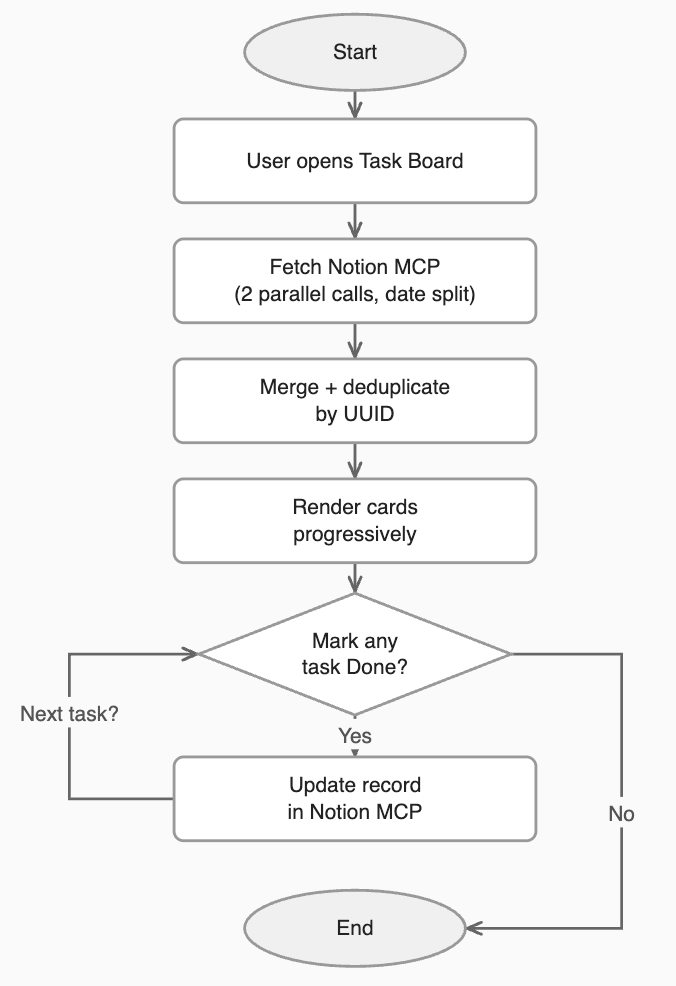
Prompt: Live Task Board
Check for placeholders in the prompt:
I want to build a Live Task Board as a Cowork Live Artifact — a persistent sidebar panel that loads my tasks directly from my data source every time I open it, without asking Claude each time.
My tasks are stored in [describe your source: e.g. "a Notion database called Task Manager" / "an Asana project" / "a CSV file in my outputs folder" / "a Trello board"].
Each task has at minimum: a name and a status (something like To Do / Done — tell me what yours is called).
Features I want:

Open tasks in one column, newest first
Tasks older than 7 days highlighted in a different color
A Done button on each card that updates the record in my data source
Completed tasks filtered to this month only, visible via a "Full panorama" toggle
A Reload button to refresh data without closing the panel


Before writing a single line of code, do two things:
1. Ask me these questions and wait for my answers:

What data source / MCP am I using, and what is its exact server name as it appears in my Cowork connections?
Is the MCP already connected and authorized in Cowork?
How many records does my database have approximately?
What are the exact status values in my data (e.g. "To Do" vs "Done")?
What should the Done button do — change the status field, archive the record, or delete it?
Are there any other fields I want to show on the cards (due date, tags, assignee)?

2. Once I answer, make one real test call to the MCP before building anything. Inspect the actual response — field names, data types, how IDs are formatted, how results are nested. Build the artifact's data layer around what you actually observe, not what you assume. Never guess field names.

Safeguards — data integrity (non-negotiable):

Pagination: Most MCPs cap results at 25 per call. Run two parallel search calls with a date split (e.g. recent 3 days vs. older) and merge the results. If the user has more than 50 records, increase the number of calls accordingly.
Deduplication: The same record can appear in both calls with different ID formats. Deduplicate using the record's stable UUID (r.id stripped of dashes), not the URL or title.
Type filtering: Search calls return more than just task records — databases, schemas, and views can appear in results. Filter strictly to type === "page" (or the MCP equivalent) so phantom entries don't inflate counts or render as cards.
Rate limiting / slow loading: Don't fire all fetch calls simultaneously. Use a concurrency pool capped at 6 parallel requests with auto-retry on timeout. Show a progress bar while loading.
Done button — writes to data source: The Done button must call the MCP to update the actual record, not just change the card's appearance. Optimistically update the UI immediately, but revert visually if the call fails.
Done button — sequential clicks: Use a Set to track which records are currently being updated so multiple Done buttons can be clicked back-to-back and each runs independently. Never use res.isError to detect failures — it produces false positives on sequential MCP calls in Cowork. Use try/catch only.
Separate read ID from write ID: Some MCPs use different identifiers for reading a record vs. updating it. Store both from the start — never reuse one for both operations.
Null-safe field access: Not every record will have every field populated. Always handle missing or null values gracefully — never let an undefined field crash the render.


Safeguards — UX resilience (non-negotiable):

Progressive loading: Render task names immediately from search results while individual status fetches are still in progress. Never wait for all fetches to complete before showing anything.
Error cards with retry: If a record fails to load its status, show it as an error card with a retry button. Never silently default it to any status — silent defaults corrupt task counts invisibly.
Top-level error handling: If the MCP cannot be reached at all, show a clear error banner with a Reload button. Never show a blank or broken UI without explanation.
No localStorage: Cowork Live Artifacts do not support browser storage. All state must be held in JavaScript variables in memory. Do not use localStorage or sessionStorage for any reason.


Safeguards — security (non-negotiable):

Escape all rendered content: Every piece of text coming from the data source — task names, tags, assignees, any field — must be HTML-escaped before being injected into the DOM. Never use innerHTML with raw external data. A task name containing <script> or an event attribute must render as plain text, not execute.
This system works. But I want to be clear: it is good enough, not perfect.
What I built is pushing against real limitations in how large language models interact with external databases today. A query to Notion through an MCP is not like a SQL query to a local database. It is slower, it has caps, and it requires more defensive engineering than it should for something this conceptually simple.
I can imagine a near future where this is seamless — where Claude reads from Notion as fast as Excel reads from a spreadsheet. We are not there yet. But we are close enough that the system works, and the prompts above will save you the week I spent finding the edges.
That is the actual value of this article. Not the solution — the map of the territory, including the parts that are still rough.
Take the prompts. Adapt them to your tools. And add tasks from wherever you are.
Let me know if you find improvements and features you added to your own Task Manager!
Love,
Jose from Automato