Or should I say: from KDE to Cosmic. #
I used to run Endeavouros with KDE as my daily driver on my work laptop. (In fact it's my only laptop, I haven't used my personnal desktop for years 😁) Everything worked pretty well, except for the occasional frustration with the lack of “smart” shortcuts to organize windows on the workspace.
I tried several tiling window managers like i3 and Hyprland, but it’s easy to get lost with all the shortcuts, and using the mouse becomes complicated. Customization is a long process, I don’t want to spend time on this.
Of course, I know these environments aren’t really designed for heavy mouse use.
A few weeks ago, while I was at a customer’s office, a disaster occurs : right after an upgrade, my OS refused to boot. More precisely, it was stuck at the end of the boot step and wouldn't start KDE or give me access to a TTY terminal ... 😤
An bug with Mesa library and some nvidia/intel graphic controler
It wasn’t the first time I’d had problems with Arch-based distributions. Few years ago I used to run Manjabrick and I had the same kind of issue Desktop environnement does not want to start after an upgrade.
Even with the nice and helpful community, I didn’t want to go through the painful manual process of downgrading a problematic package... especially than OS disk is encrypted. I’m lazy and don’t want spend time to troubleshot my own laptop.
MAKE YOUR BACKUP !! #
Of course I have it. Everything is backed up throug a S3 bucket with garage-s3 and I have my own Nextcloud instance that contains every importants files.
So, I grabbed a random ISO and did some test ... what to install now ?
- Knowing that all the Arch based distribution will be impacted by the same bug 🐛
- Well no thanks for Mint / Ubuntu I mean I will feel like be back 20 years agos
- NixOS I don’t have time to learn a new paradigme and it seems more server oriented than desktop.
- I do not like Gnome so much ...
- Didn’t retry FreeBSD ... Don’t know what will be the behavior with Slack/Gmeet/Microphone/Zoom/Camera/ScreenShare ...
Finally I’ve installed Pop!_OS #
Yes this is a Ubuntu based distribution
So back to good old stability ... and not up to date softwares repositories 😇
But with :
- A really up to date Kernel
6.12.10-76061203on 2025-06-06 - Some really cool feature that I’ve never say in any distribution at least on KDE world :
- You can directly through the menu upgrade your BIOS and Firmware devices with 1 clic 🤠
- You can choose what “hardware graphic acceleration” you what to use on 1 click (The Nvidia Chip or the Intel) of both of them in hybrid mode.

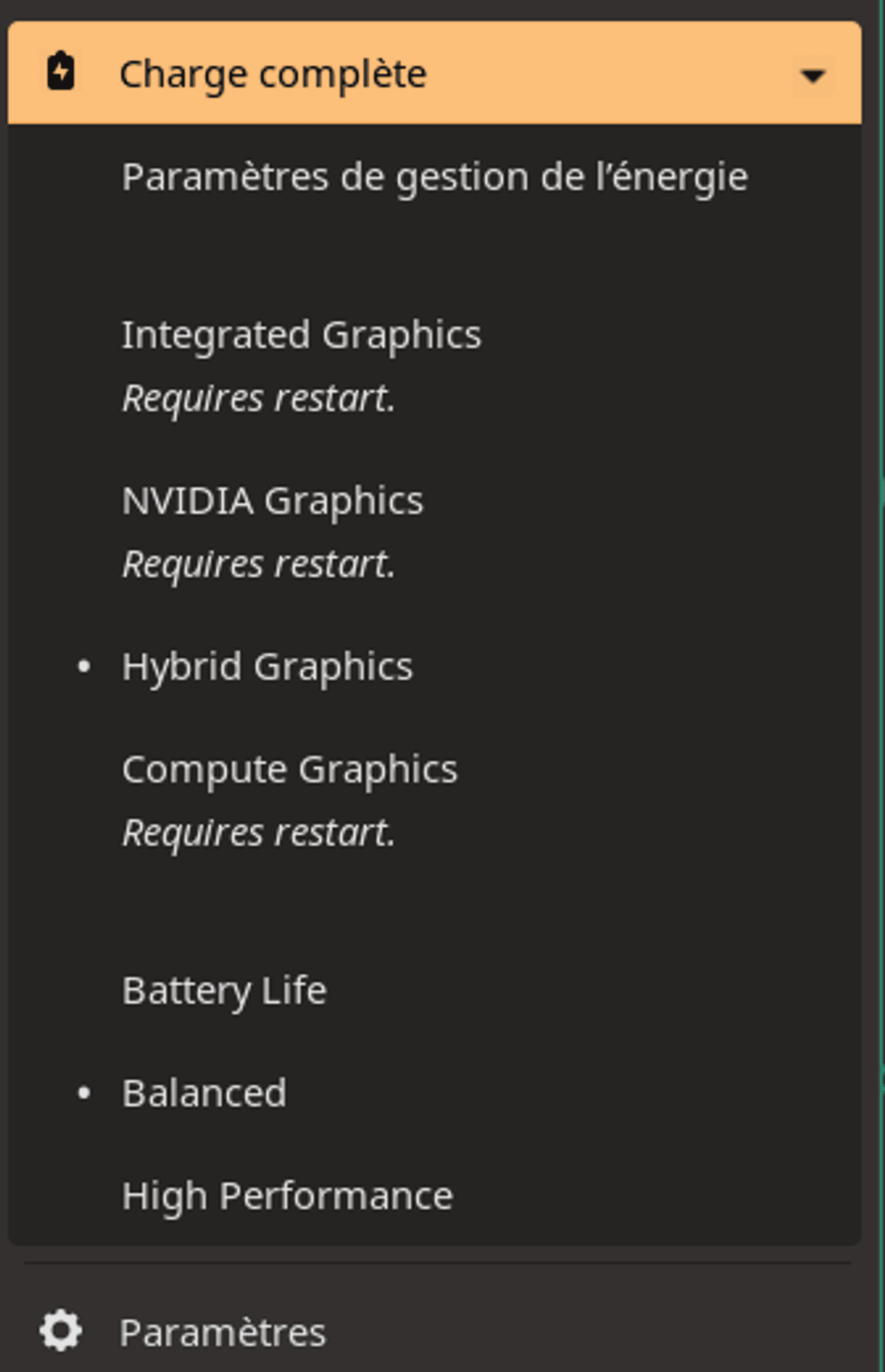
- You can also install the nvidia driver from the configuration menu.
- OS partition is encrypted by default.
- Install is super fast.
- Boot is also way more faster than Endeavoros
- Shutdown too : No more “Waiting for devices to be stopped ... during 60 seconds” and during this time you can’t close you laptop .. or it will stay running in you backpack :D
- When you stop the OS it will stopped for sur and quickly.
- Basically the whole distribution seems really nicelly packaged
- There is a kind of new “Systemd-boot” method that I’m not very familiar with but I looks modern and it works finaly (I don’t have concerns with systemd as long as I do not have to troubleshoot this on my laptop)
The whole distribution seems way more stable thant Endeavoros (Of course Ubuntu ...) dual screen is also nicely managed.
Ho my god, Cosmic ! Some fresh air in the WM world #
This is the cherry of the cake and I’m pretty sur this will be my future Windows manager until now.
This is a kind of Gnomish - Tilling manager but hybrid.
I mean at any moment you can get your mouse and use a standard “mode” when you feel lost with all the shortcuts.

Also the shortcuts are really really simple basically “SUPER” key (🪟) + a KEY. I also really appreciate the “View All” that opens a windows with all the shortcuts.
Currently this is still in “Alpha Release” Alpha 7 on 2025-06-05.
But after 3 weeks, not lag, not bug, no blackscreen. Just things needs to be a bit more optimized and some behavior fixed.
But what a real pleasure to use this Windows Manager.
Switching betwen Workspace is really easy. Navigate through the windows too. The tilling automanagement needs a bit of optimization but yet this is really effective.
I really feel much more efficient and organized with Cosmic than with KDE. It's much easier to navigate between workspaces and I can open a lot of windows without getting lost or needing to touch the mouse.
And if I accidentally make a bad combination of keys, no problem, I pick up the mouse and put everything back in the right place, which is impossible to do with HyprLand or I3 (at least without sending a key combination) to change one windows in floating mode. Or I can even disable Tilling mode altogether.
I also like the fact that you have finally very few things to customize.
I mean You don’t start with kind of “totally black and desolate environnement” when you have to spend 3 hours to “rice” to have something “ok”.
(Few) Things that I don’t like #
- Well this is still Ubuntu so “à Dieux” the huge list and up to date software from AUR repositories 😥
- The software manager : I hate this on the Linux World the “flatpack/Snap” repository that takes 1Gig of room for installing a 100MB software .. Everything should be installed through the packet manager
aptthat all. For rust software I install everything withcargoor I use AppImages.- Also it is super slow to load application needs to be reviewed on listing performance
- But I understand the goal, you have to provide an easy an friendly method to install up todate packets that are not in the official repository.
- Bye bye Kate 😥 the Gnome default TXTpad is minimal but does not replace Kate from KDE. For instance this is not possible to split the screen ...
- The File manager is also way less powerfull than Dolphin on KDE (But I will try to use yazi now)
- You can finally customize very few thing but I like it everything looks simple. This way I can focus on my goal
(customize my terminal)my work.
Good job System76 !