You can now run an almost frontier class model, locally, on your own hardware. I run one, and I can tell you: it is real, it is fast, and it changed how I work. And at the same time you can run a useful local model on a phone.
Those two facts together mean the interesting question is no longer “is local AI possible?” The interesting question is “what do I actually need?” That is what this is. It is the deep dive that goes with the video, The AI Home Lab, and it covers the whole map: the three parts of a home lab, the memory trilemma, where the limits really are, what you can run today, and the software layer that most beginners never see, which is where the actual difference shows up.
The shift to keep in mind while reading: the same hardware gets more capable over time, not less. The machine I bought months ago now runs better models, faster. My ASUS GX10, the DGX Spark equivalent, costs about $1,000 more today than when I bought it, and it does more than before. Your hardware is not getting old. The models that fit inside it are getting better.
An AI home lab is not a GPU. It is a system with exactly three parts, and if you understand all three and how they constrain each other, you will not waste money. If you only understand one or two, you will build something that frustrates you and sits in a drawer.
Hardware is the box. Memory and speed decide what the model can hold and how fast it can answer. Model is the brain, the weights, a probabilistic engine that works out of probabilistic networks. Bigger and newer usually means better, that is the trend, though it is not always the truth. Harness is the wrapper, the software around the model that lets it use tools, keep memory, follow instructions, and actually have a job description.
Most beginners focus only on the model. They download a model, open a chat window, and assume the quality of the conversation tells them what local AI can do. It does not. A model on its own can generate an answer. A harness can let that model read a file, call a transcription tool, search a codebase, run a command, check the result, send a message, remember a preference, and route a difficult task to another model.
The harness does not magically make the underlying model smarter. It changes the effective intelligence of the system by giving the model better context, reliable tools, defined procedures, and ways to verify its work. The model matters, but the system around the model determines whether it becomes useful.
The three parts stack in layers. The hardware at the bottom holds the model in memory and runs it. The model in the middle “thinks”. The harness on top is where the work happens: it feeds the model the right context, hands it tools, checks its output, and repeats until the job is done.
Each layer needs its own research and its own decision. A powerful model inside a weak harness is a smart person locked in a room with no doors. A great harness on a model your hardware cannot run fast is a brilliant employee who takes ten minutes to reply to every sentence. You are sizing all three at once.
Choosing which hardware to buy is connected to what kind of work you need to do. Different workloads need very different levels of intelligence, memory, speed, and reliability. Before you look at any machine, look at this table and be honest about which row is you.
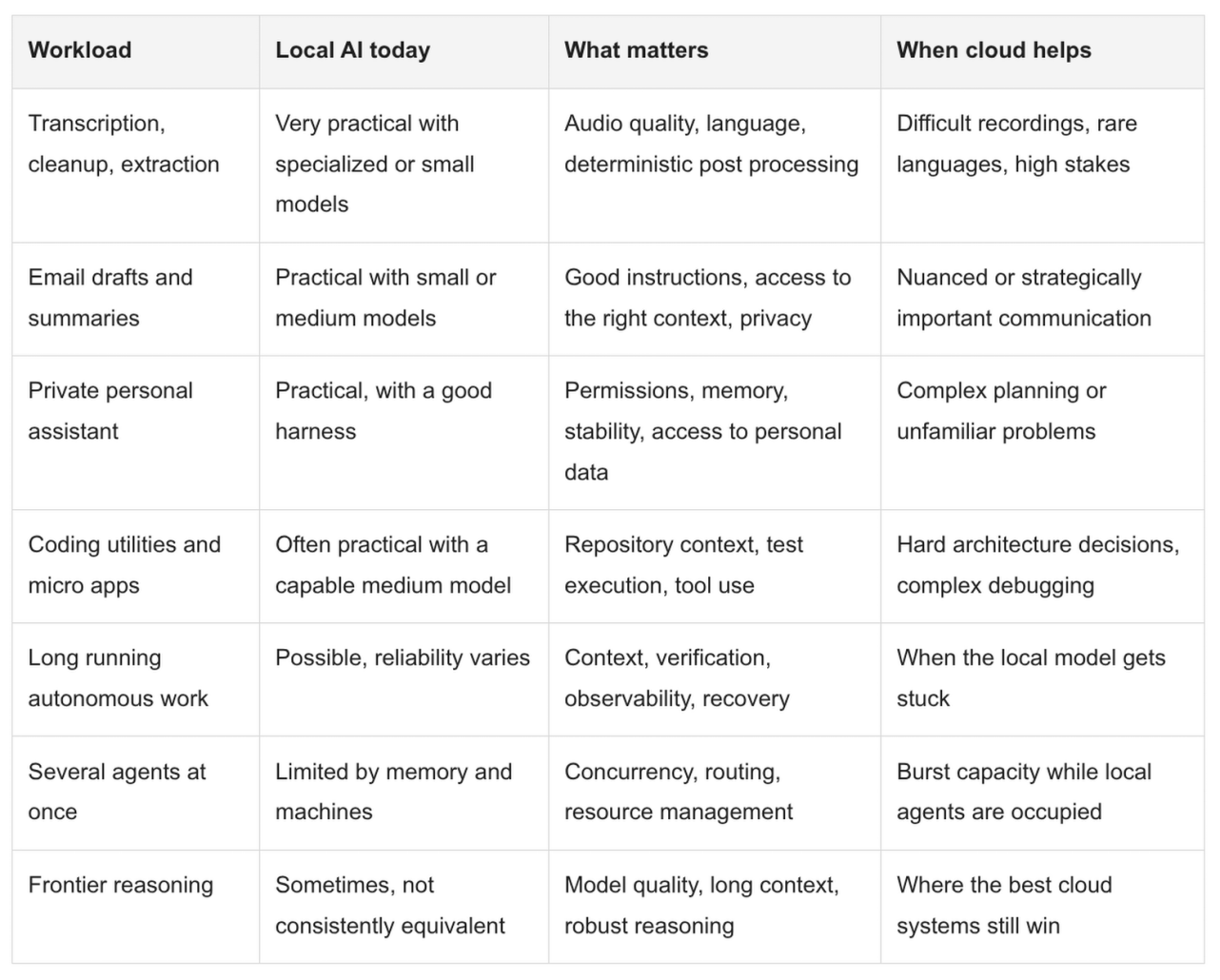
This is why “which GPU should I buy” has no universal answer. A person building a private transcription and email assistant does not need the same machine as someone running several coding agents in parallel.
Every AI home lab runs into the same constraint, and it determines every decision you make after it: the trilemma.
Memory has three properties:
Size, how much model and context fits; Speed, how fast tokens come out, which is how many words per second you can see; and Cost, what you pay.
You can pick two of the three. Not all three.
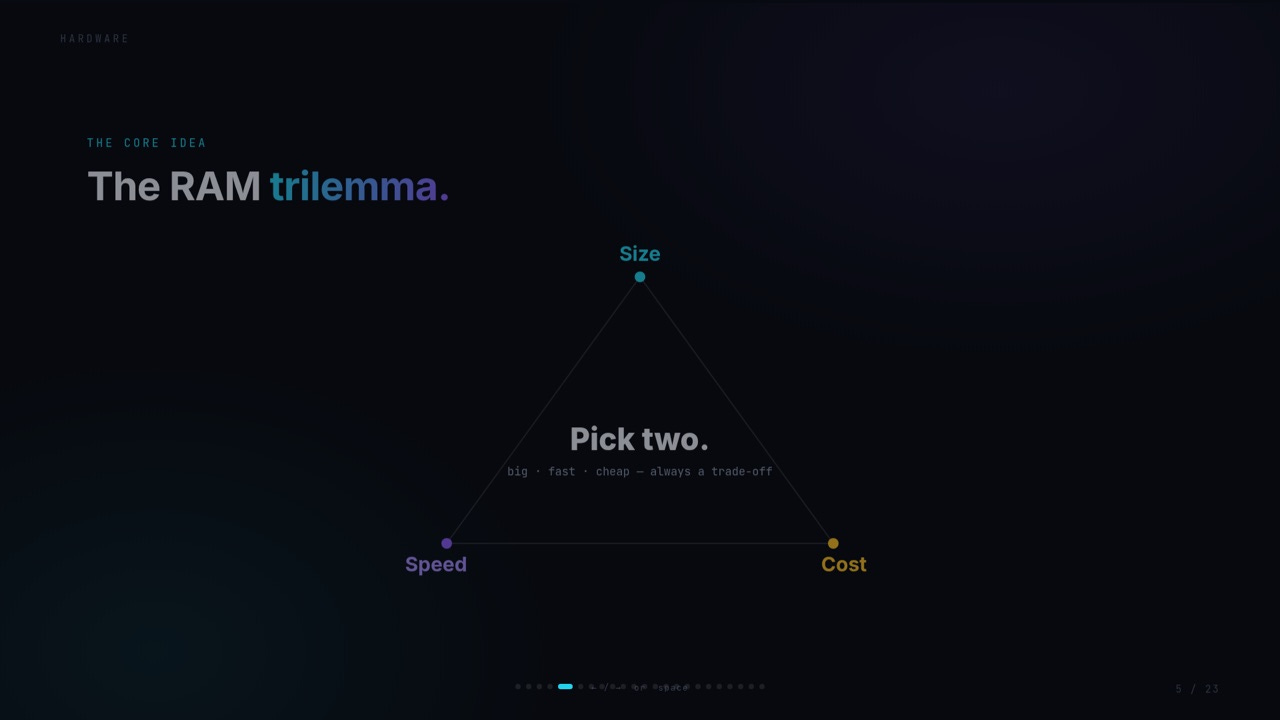
Bigger models handle much more complex scenarios. Faster memory means you stay productive instead of frustrated. There is a minimum speed below which a model stops being usable, and once you are above it, faster simply means you can do more in parallel. Faster and bigger, together, always costs more.
Two practical consequences. First, do not buy hardware from a “parameters fit into gigabytes” calculation. A model file fitting on paper does not guarantee that your desired context length, the runtime, and the tools will fit comfortably in practice. The weights are not the only thing consuming memory: the context window, the KV cache, the operating system, and everything else on the machine all need space too. Second, the trilemma resolves itself if you start from the right question: what is the biggest model I actually need to run, and what is the cheapest machine that holds it?
Here is the misunderstanding most beginners have. You can run a model inside ordinary system RAM, no GPU required. You can also run it so slowly that you quit. The rule is: for anything you want to work with daily, you are forced into fast memory.
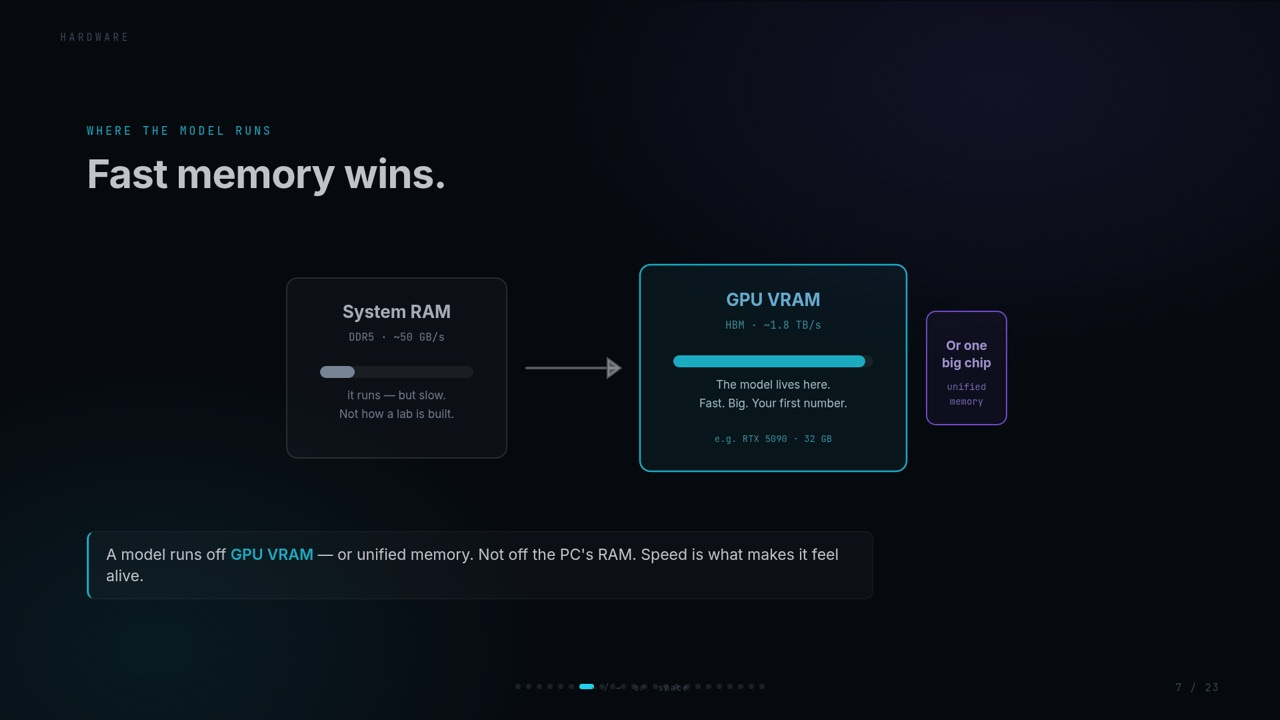
That is why GPUs, with their HBM, are the default answer: the RTX 5090 sits at about 1,792 GB/s, a completely different planet from the ~50 GB/s of DDR5 system RAM. But “GPU” is not the only shape. Unified memory systems, Apple Silicon, the RTX Spark and equivalents, share the system memory between CPU and GPU. You get a decent speed and a decent size in one machine, and that is a legitimate lab architecture, not a compromise.
Now the math that decides your real options. Take a 32 GB card, one RTX 5090, and the model I run, Qwen 3.8 27B at Q6 quantization. The weights are 25 GB. They load once, and every session shares them. What each session costs is only its context, the KV cache.
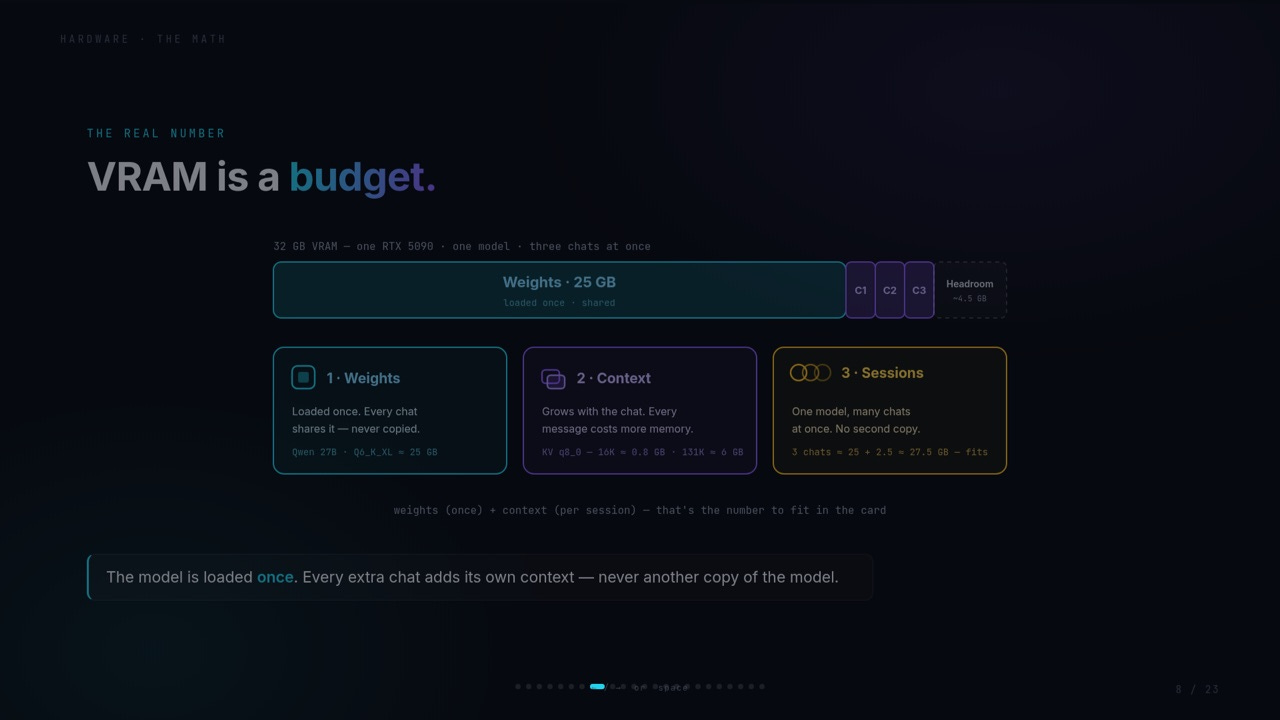
On paper that means one model, three chats at once, fits comfortably in 32 GB. And here is the part nobody tells you: this is exactly why multi session, multi agent work is possible on a single card at all. The model is not duplicated. Only the conversations are.
On paper, three chats. In reality, I make a choice, and the choice is the lesson.
The quantization of Qwen 3.8 27B (Q6) I am happy running, plus the maximum context window, fills the card. When I do that, I get one session, not three. No parallel agents. Full context for the one conversation I am in. That is a trade, and it is a real trade: on this hardware I can run this model at about 131,000 tokens of context out of the 264,000 it supports, and I can only run one instance of it.
Is 131K enough? For real work, yes. Is it the full context the model supports? No. That gap is the difference between “it runs” and “it runs the way the people who made it intended,” and it is the whole reason a 48 GB machine exists as a sweet spot (more on that below).
What can you do if you want more than one instance? Quantize harder. Q4 files are smaller, they leave room for more KV cache, you get your parallel agents back. But here is the honest part: while the model is nominally the same, you start to lose capability. It is not “less intelligent” in some clean linear way. It feels less capable. It answers more directly, reaches less far. Quantization is a dial between “it fits and it is fast” and “it thinks the way it is supposed to think,” and the position of that dial depends on the hardware you have.
The number to remember: on one 5090, Qwen 3.8 27B at Q6 runs at 100 to 110 tokens per second when the model is warm, 81 on a cold start. One word is roughly 2 to 3 tokens. That is what “local” feels like on serious hardware.
Every model has two dials that change what fits on your machine and how fast it runs. Beginners miss both because the dials are invisible: the file size is just a number in the URL.
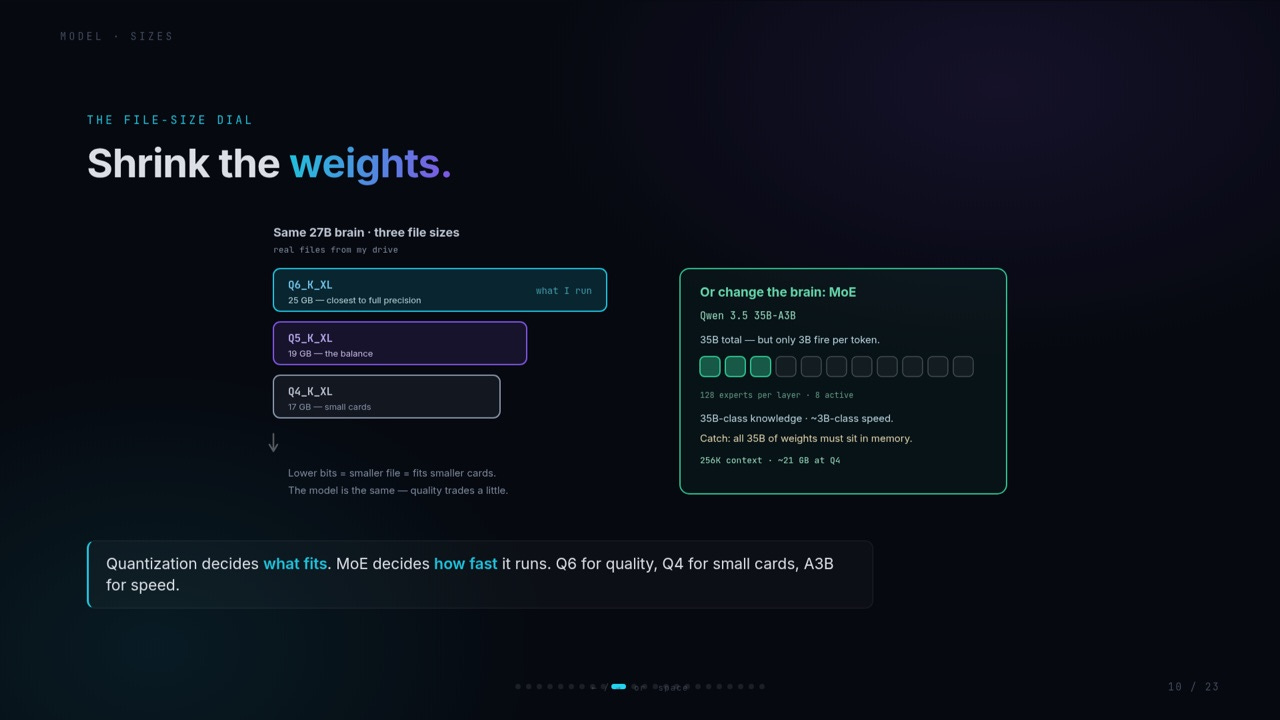
Dial one: quantization. The same 27B model exists as Q6_K_XL at 25 GB, closest to full precision, which is what I run. Q5_K_XL at 19 GB, the balance point. Q4_K_XL at 17 GB, for small cards. Lower bits means a smaller file, which fits smaller cards and leaves more room for context. The model is the same brain. Quality trades a little, and as we said above, it feels more than it should.
Dial two: architecture. Qwen 3.8 27B is a dense model. Every one of its 27 billion parameters is activated for every single token it generates. The alternative is Mixture of Experts, or MoE. Qwen 3.6 35B A3B is a MoE model with 35 billion total parameters, but only 3 billion fire per token. 128 experts per layer, 8 active. You get 35B class knowledge at roughly 3B class speed.
The catch with MoE: all 35B of the weights still have to sit in memory, even though only 3B do work per token. So a 35B MoE model at Q4 needs about 21 GB and can use 256K context. Quantization decides what fits. MoE decides how fast it runs. Q6 for quality, Q4 for small cards, A3B for speed. That is the whole sentence.
The third dial is not about the file at all. It is about how long the model thinks before it answers.
For some models you can turn thinking off entirely. The model answers word by word, direct, fast, weakest. Turn it on and the behavior changes: the model spends tokens in the background, analyzing the problem, finding a solution, then answers. You can set a budget for how long it thinks, and on Qwen 3.8 27B the levels go off, low, medium, and xhigh, which is the default I run it at.
The longer it thinks, the more complex the problems it can solve. The proof is in the numbers. Qwen 3.6 27B, the previous version, had thinking off and thinking on. Turning it on was a massive jump. Same model, same weights. The switch changed the class of work it could do. And Qwen 3.8 27B at xhigh, running on one 5090, reaches frontier class: in the same league as GPT 5.6 Luna at max effort, DeepSeek V4 Flash, and just behind GLM 5.2 at max.
The cost is real: longer thinking uses more tokens, takes more time, and eats more context. This is why “set it to max and forget it” it can be wrong. Reasoning effort is a per task decision, the same way you would choose between a sketch and a full drawing.
With the trilemma, the budget, and the two model dials in hand, here is the actual map of machines you could build on. Read it as archetypes, not a catalogue. Pick the shape that fits your work, then let the numbers argue from there.
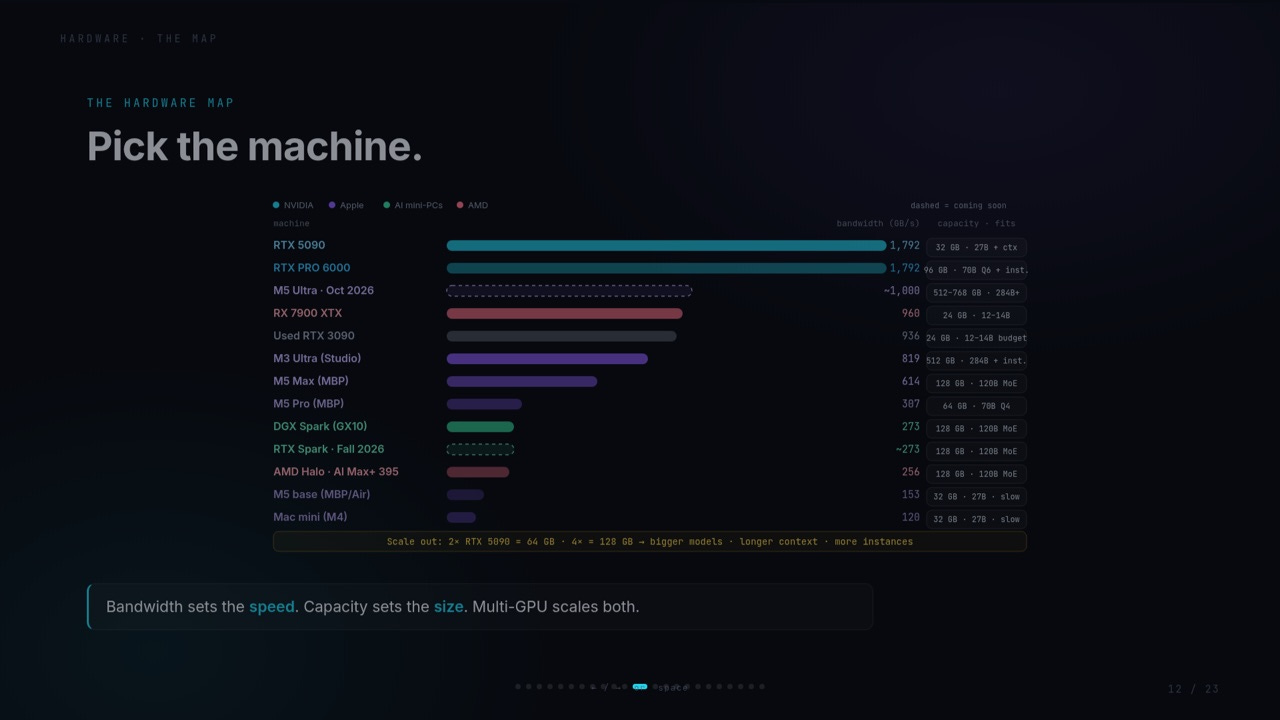
At the top, the discrete flagships: the Nvidia RTX 5090 at 32 GB and about 1,792 GB/s, and the RTX PRO 6000 at 96 GB, which is a different animal entirely, 96 GB of VRAM means full context windows and multiple instances of models that would not even load on a 5090. The PRO 6000 is also where the money gets absurd: it launched around $8,000 and is now closer to $16,000. For most people it is not in the argument.
In the middle, the unified memory machines that matter: the DGX Spark and its equivalents, at about 273 GB/s with 128 GB of memory. The RTX Spark, coming soon, should land a little faster, maybe 280 to 290, not enough to change the decision. AMD Halo class systems, the Ryzen AI Max 395, sit at similar bandwidth. These are the machines where “128 GB” stops being a server spec and becomes a desktop spec.
And the Apple line, which people misunderstand because the chip name, not the bandwidth, is what gets marketed. M5 base is 153 GB/s, that is low. M5 Pro is 307 GB/s, that is Spark class. M5 Max is about 614 GB/s, double. M3 Ultra is 819 GB/s. Even the Ultra runs at less than half the speed of a 5090. The M5 Ultra, expected soon, should land around 1,000 GB/s, a real jump, and it is where the 512 GB of unified memory makes the whole argument interesting again: you can run models that would need server class memory, on one quiet, efficient box.
What 48 GB buys you. For the best model I can run today, Qwen 3.8 27B, the comfortable amount of memory is 48 GB. That is the number that solves the 5090 problem: full context window, multiple instances, no trade. The most cost effective way to get there is not a 5090 and not a PRO 6000. It is two 24 GB cards, an AMD Radeon RX 7900 XTX card or the Nvidia RTX 3090, for less than one 5090 costs. Two of them gives you 48 GB, which is a really good spot. If you have business money and want maximum speed plus huge capacity, the PRO 6000 is the answer, and you can run several in a server. If you want speed, one 5090. If you want capacity and quiet, unified memory.
There is one spec the hardware map does not show, and it is the one that compounds forever, because a home lab runs 24/7. Electricity.
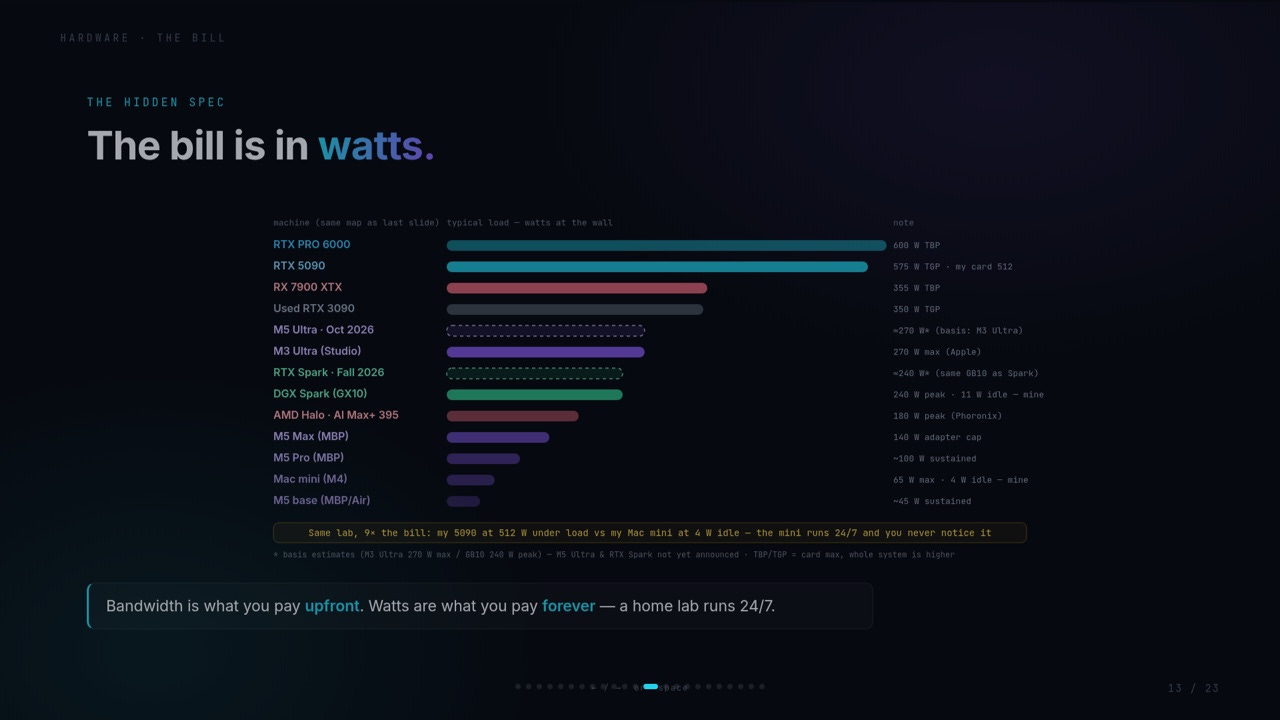
The gap is massive. A MacBook with an M5 uses around 45 watts at its ceiling. The RTX PRO 6000 uses 600w. The 5090 is 575w. The Mac mini idles at single digits, and the M3 and M5 machines, despite being slower, save you more than half of what you spend on those GPUs. There is a number worth keeping: tokens per watt. The NVIDIA cards are fast but inefficient. The Apple machines are slower but so efficient that intelligence per volt flips in their favor, and the DGX Spark and RTX Spark are expected around 240 watts, while the AMD Halo machine, even though it is a tiny bit slower than the Spark, is much more efficient at about 180w.
So when you compare machines, the bandwidth chart and the watts chart are the same chart seen from two ends. One tells you what you pay upfront. The other tells you what you pay for the rest of the machine’s life.
Now put a real model on each rung. This is the list I would hand someone on day one.
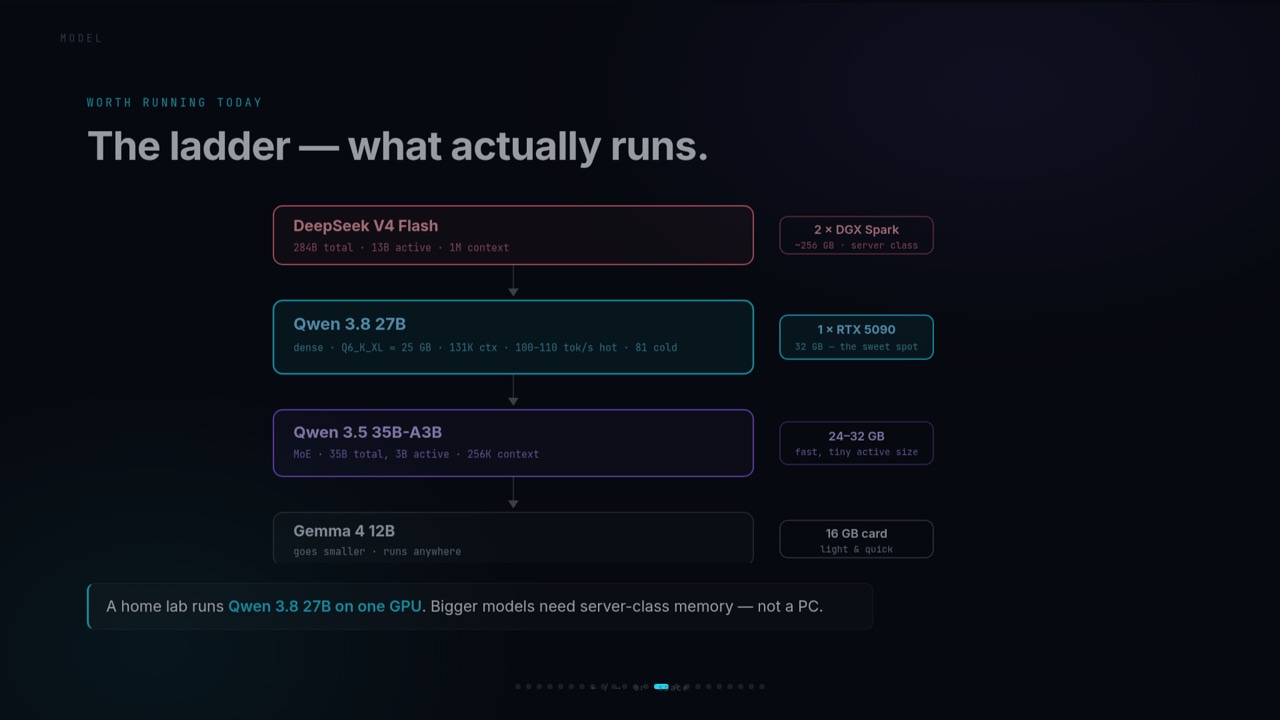
Gemma 4 12B at the bottom. It only needs 16 GB of RAM. It is small, capable, and honestly underappreciated: it runs anywhere and it is the right first model to learn on.
Qwen 3.5 35B A3B in the middle. The MoE model we just talked about. 35B total, 3B active, runs really well on 24 to 32 GB, the one I run on my GX10 at 50 to 70 tokens per second. Fast, because of the active size, and capable enough for serious daily work.
Qwen 3.8 27B is the model I run on my 5090, and for the moment it is the best model out there for a home lab. The amazing thing is that it is small enough to run on a lot of different hardware. As a minimum, look at 24 to 32 GB, and more RAM means bigger context and more instances. If a 3.8 version of the 35B MoE shows up soon, this ladder gets an even more interesting middle rung.
DeepSeek V4 Flash at the top. 284B total, 13B active, and a 1 million token context window. That is what the frontier models offer in the cloud, and most people never use it because it is really expensive to run 1M context on an API. Running it locally changes the math completely: a 1M context is genuinely useful when you want to analyze a massive codebase, give it all of it at once, and have the model work on it. But it needs server class memory, two DGX Sparks, around 256 GB. That is not a PC.
One honesty note on the top of the ladder: on paper DeepSeek V4 Flash and Qwen 3.8 27B can look like they have the same capability, and the benchmark numbers are close. In reality the models are never the same. They trade different strengths for different weaknesses. That trade is yours to make, against the problem you want to solve. That is not a bug. That is the whole point of having a lab instead of a subscription.
In the video I showed you the harness as a concept, because a full comparison would have broken the beginner flow. This section is the part you deferred. If you remember one thing from this article, make it this one: the harness is what turns a model into a worker, and it is the layer where your daily experience is actually decided.
First, the shift. If you use AI, you have been using chat: you ask, it answers, and it stops there. A harness takes the model past chat and into the agent territory: it plans, it uses tools, it remembers, and it does the job end to end. The gap in capability between “chat” and “agent” is huge, and it comes entirely from the harness, not from a bigger model.
Then the anatomy. Every serious harness is built from the same six parts:
Agent loop — the heartbeat. Think, act, observe, decide, repeat until the job is done. This is how a model works for hours instead of one exchange.
Tools — search, code execution, files, and anything it can connect to through MCP.
Memory — short term inside the task, long term across sessions, so your assistant actually knows you.
Planning — breaking a goal into steps before touching anything.
Context management — the prompt, the chat, and everything needed to reason, curated and sized to fit your model’s window.
Guardrails — permissions, safety, retries. “Do not delete the system files” is a guardrail, not a model feature.
Now the part you are actually here for. I use several of these, on the machines in this video, and I am going to be straight about what each one is, who it is for, and where it hurts. All five are free and open source. None of them requires a subscription to work, which is the baseline for me: a harness that pushes you to a token subscription is not a harness, it is a funnel.
Hermes is the one doing my daily work. It is a full personal orchestrator: it connects models (local and cloud), tools, memory, schedules, multiple machines, and the channels I actually live in, Telegram. It runs my micro apps, my transcription pipeline, my research workflows, and it routes work between my 5090, my GX10, and the cloud. It is the harness I use to record this video’s workflows, and it is the one that feels most like a “system” than a “tool.”
Where it shines: multi machine coordination, persistent memory that survives across weeks, scheduled and background work, and a skill system that lets the assistant get better at your specific workflows over time. Where it is heavy: it is a lot of surface area. If you want a minimal coding agent, Hermes is overkill. And like every harness, its quality of life depends on the model underneath it, which is the whole point of this article: the harness and the model are a pair.
OpenCode is the one you reach for when the work is a codebase. It runs in the terminal, reads your repository, edits files, runs commands, and has a useful split: a build agent with full file and shell access, and a plan agent that is read only, so you can reason through an approach before anything gets written. It is fully model agnostic. You can point it at cloud providers, or at local models served by Ollama or llama server, for fully air gapped coding. No account, no lock in, MIT licensed.
Where it shines: the plan/build split, file snapshots you can step back through, and the fact that it works the same against a local 27B and a frontier cloud model. The practical note: coding quality on local models depends heavily on which local model you point it at. The harness is not the ceiling, the model is.
OpenClaw is a different shape entirely. It is an open source personal assistant that runs on your own hardware and connects to the messaging apps you already use: WhatsApp, Telegram, Slack, Discord, Signal, iMessage. You do not open a new interface. You text it. It has persistent local memory, system access, and a big community of shared skills, and it can build new skills on the fly. OpenClaw was my main harness before I moved to Hermes.
Where it shines: the “assistant that is already in your pocket” experience. If your life happens in chat apps, OpenClaw is the shortest path to a private assistant that meets you there. Where it is heavy: it wants real system access to do real things, so the setup is the security conversation.
Pi is the philosophy in the list. It is a minimalist open source agent by Mario Zechner (the libGDX creator) with a deliberately tiny core: four tools, read, write, edit, bash, and a short system prompt. The whole argument for Pi is the opposite of a feature list: the agents that try to do everything end up as spaceships with 80 percent unused functionality, and the fix is a minimal core that you, or the agent itself, extend for your workflow. It ships as a set of packages, an AI layer that abstracts across providers, an agent core that is basically a while loop plus tool calling, and the coding agent on top. It is the right starting point if you want to build your own agent and understand every line of what it does.
Where it shines: total transparency, a tiny attack surface, and the SDK for building your own. Where it “costs” you: you build the rest. Pi is the engine, not the car.
This one is new (developer preview, August 2026) and it is the most radical architecture in the list. DeepSeek open sourced its agent harness under MIT, built on a plugin system called Cordis, and its design rule is that everything is a plugin: the model adapter, the tool registry, the session log, the memory, the sandbox, even the agent loop itself. There is no privileged core to patch. Extending the harness means mounting a plugin beside the others, and swapping the model means swapping one plugin while everything else stays put. Every run is traceable, which is the part I care about most.
Where it shines: the architecture. It is what “own your stack” means at the code level, and it pairs naturally with local models, including DeepSeek’s own. The honest caveat, and I said this in the video: it is amazing but it is early. Developer preview, small ecosystem, and you will hit rough edges. I am building on top of it and documenting what is missing, because I think this plugin shape is where the whole category is heading. For a first home lab, I would watch it rather than build on it, unless building the harness is the project.
The sovereignty note. I use these tools, and I like them. But I also dislike any direction that makes me feel like a guest inside my own assistant. If a harness that claims to be local first keeps pushing its preferred models, tokens, subscriptions, or defaults, it weakens the reason I built the home lab in the first place. The assistant should work for you. You should choose the model, the provider, the memory policy, the tools, and the routing. A sustainable business model is fine. A funnel is not.
This is why we our community we are building our own harness, ResonantOS.
Now the part that ties the whole lab together, because a home lab that runs 100 percent local is a different machine than the one I run.
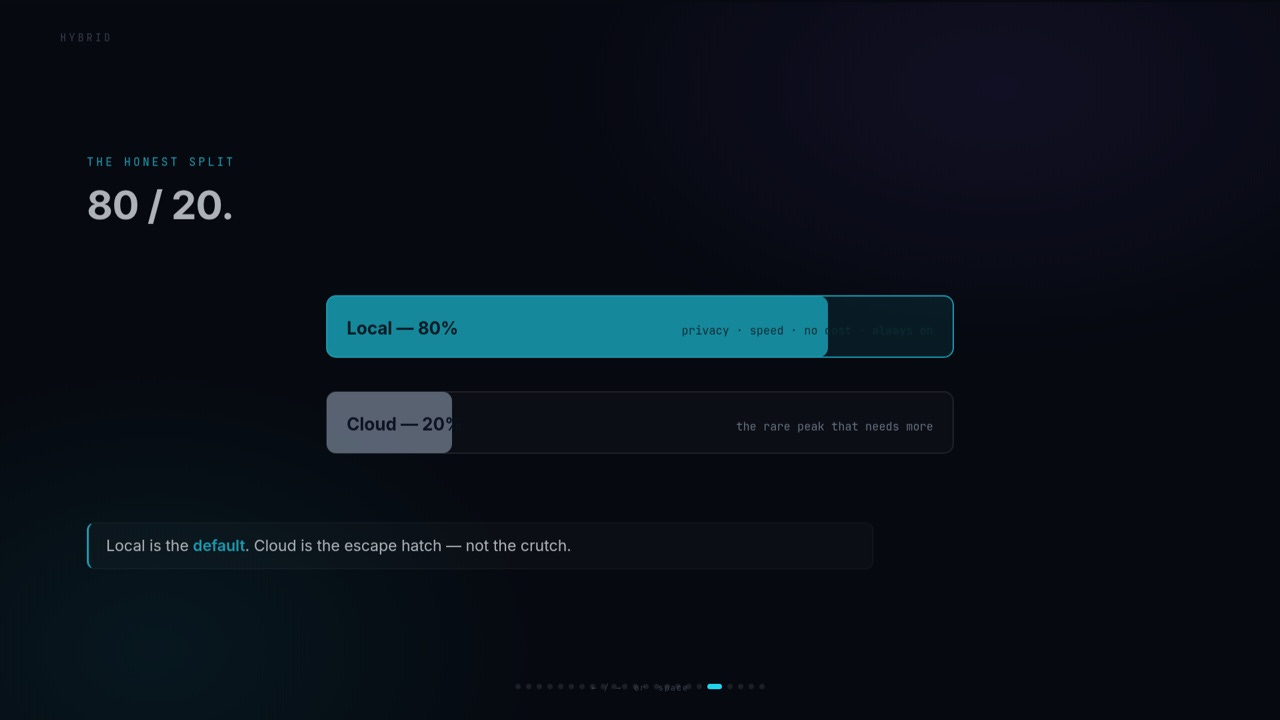
My split is 80 percent local, 20 percent cloud. And the reason that number exists, and why it is moving, is interesting. A few weeks ago, before Qwen 3.8 27B came out, my 20 percent cloud was there for capability: my local model was the 3.6 version, and for a slice of the work it was not capable enough, so the cloud covered the gap.
Now the 20 percent is there for a different reason: concurrency. When my local model is busy running, I do not queue, I escalate. A cloud instance handles the second task while the local one finishes the first. I have a few subscriptions I turn on and off, I am testing Kimi K3, GLM 5.3, and GPT 5.6, and I will keep testing. The reason the frontier still gets called: last week I needed it for a problem I could not fix, and even the frontier model did not fix it. That is the honest state of the art. When the best tool in the world fails, the answer is not “buy a better GPU,” the answer is a different approach.
What would take me to 100 percent local is not a better model. It is a second machine: another 5090 or another GX10, running DeepSeek V4 Flash with its 1M context on one box and Qwen 3.8 on the other. That is the concrete next purchase in this lab, and it exists because of the multi instance math from the VRAM budget section. Local is the default. Cloud is the escalation layer. That is not a compromise, it is the architecture.
The trend to bet on, the one this whole video is built around: the box you buy today runs bigger and better models for free, as the models shrink and improve. Concretely, four things are moving.
Memory systems keep expanding: unified memory machines and dedicated AI appliances push bigger models into compact boxes, while discrete GPUs keep winning on speed. Capacity and price remain the central constraint for discrete, bandwidth remains the central constraint for everything.
Models keep getting more capable at the same size. The 3.6 to 3.8 jump, and the reasoning effort dial, are the two examples: same hardware, new class of work. The computer you bought last year is more useful today than it was on the day you bought it.
Inference software keeps improving the kernels, the memory management, the speculative decoding, the context handling. Software maturity can change the real value of a GPU or a unified memory machine after launch. The bandwidth chart is a snapshot, not a law.
Harnesses may be the biggest one. The next important advance may not be a larger model. It may be a better control layer: transparent routing, persistent memory, explicit permissions, dependable recovery, multiple machines, and the ability to choose between local and cloud without rebuilding the workflow. That is the layer I am working in, and it is where the plugin architectures are heading.
The last section of the video pointed somewhere, so here is the written version. Having the hardware is nothing unless you apply it, and the way I have found people actually learn is by building a real thing with a real deadline.
Inside our community there is a 90 day challenge: you pick an idea, you build a team, and you work on a real venture for 90 days. Not a tutorial. A thing that ships. It is free to join, it is running now, and the mechanics are in the companion article on the Substack. If you want to learn local AI, the fastest route is not more videos. It is a project that will not let you get away with skipping the hard parts.
And the reason the community is structured the way it is: we are building the alternative. The one AI monoculture, a few corporations building AI to replace humans. The many, a lot of different ways of working, a lot of different intelligences, models that augment the person using them. That is what the lab is for, at the level above the hardware: to be one of the many. If you believe you are getting augmented by AI and you do not want to be replaced by it, that is the place to be building.
The whole loop, one more time: start from the work you want to do, use the trilemma to pick a machine, set honest expectations for the model, pick the harness that matches the shape of your work, run 80 percent local and escalate the 20, and build something real so the knowledge sticks.
The video, the slides, and the challenge are all linked below. And if you are going to build a home lab, bring your questions: the Discord is where the hardware experiments and the harness problems become shared knowledge, and the Substack is where the deep dives land.
Numbers in this article are from my own machines, measured where stated (the 5090 at 100 to 110 tok/s hot and 81 cold, the GX10 at 24 to 50 to 70 tok/s depending on model, power figures at the wall). Prices and hardware availability change fast, so verify the exact configuration before you buy, and test the exact model, quantization, and context you intend to run.
Transparency note: This article was written and reasoned by Manolo Remiddi. The Resonant Augmentor (AI) assisted with research, editing and clarity. The image was also AI-generated.