We're excited to announce Atlas v1.1.
This release delivers on a promise we made in v1.0: Database Security as Code is now available for Atlas Pro users.
We're also shipping declarative data management for lookup tables and seed data, expanding database coverage with Aurora DSQL, Azure Fabric, and CockroachDB Cloud, and further improving our drivers and Atlas Cloud.
Here is what you can find in this release:
- Database Security as Code - Manage roles, users, and permissions declaratively across various popular Atlas-supported databases.
- Declarative Data Management - Define lookup tables and seed data as code using various sync modes.
- Aurora DSQL Support - Manage schemas on AWS's new serverless distributed SQL database.
- Azure Fabric Support - Use Atlas to manage your Microsoft Azure Fabric databases.
- Spanner Enhancements - Added support for Spanner's PostgreSQL dialect and vector indexes.
- ClickHouse Improvements - Cluster mode and data retention on table recreation.
- CockroachDB Support - Full Atlas support for CockroachDB Cloud and self-hosted deployments.
- PostgreSQL Enhancements -
CASTdefinitions andreplica identitysupport. - Slack Integration - Connect to our native Slack app for real-time notifications.
- Schema Exporters - Declarative export for schema inspection, drift and diff reporting, and more.
- macOS + Linux
- Homebrew
- Docker
- Windows
- CI
- Manual Installation
To download and install the latest release of the Atlas CLI, simply run the following in your terminal:
curl -sSf https://atlasgo.sh | sh
Database Security as Code
Security best practices are clear: database users and those with specific roles should only have access to the resources and operations they need. Permissions should be regularly reviewed. Every access change should be audited. But in practice, most teams manage database permissions manually - if they manage them at all.
Atlas now lets you define database roles, users, and permissions as code - reviewed in PRs, deployed through CI/CD, tracked in git. The same workflows used by Atlas for schema management can now be applied to database roles, users, groups, and their access control.
To congiure your users, roles, permissions, etc., simply add them to your desired state file. Atlas then handles the translation and migrations to bring the database to that state.
Definitions can be written in SQL using ROLE, USER, GRANT, etc., or in Atlas HCL language:
schema.hcl
role "app_readonly" {
  comment = "Read-only access for application"
}

role "app_admin" {
  superuser   = false
  create_db   = false
  create_role = false
  login       = true
  member_of   = [role.app_readonly]
}

user "app_user" {
  password  = var.app_password
  member_of = [role.app_admin]
}

permission {
  for_each   = [table.users, table.orders, table.products]
  for        = each.value
  to         = role.app_readonly
  privileges = [SELECT]
}

permission {
  for        = schema.public
  to         = role.app_admin
  privileges = [ALL]
  grantable  = true
}
note
This feature is currently supported by the PostgreSQL, MySQL, MariaDB, SQL Server, ClickHouse, Spanner, and Databricks drivers. Each driver maps to its native permission model - Atlas handles the translation.
To enable support for security as code, add the following to your atlas.hcl:
atlas.hcl
env "prod" {
  schema {
    src = "file://schema.hcl"
    mode {
      roles       = true
      permissions = true
    }
  }
}
sensitive data handling
Sensitive data, such as passwords, is masked as <sensitive> in logs and inspection output.
Use Atlas data sources to read credentials from secret
managers at runtime and inject them using input variables,
so that passwords never touch your codebase.
Declarative Data Management
Managing lookup tables and seed data has always been an awkward task. You either seed them manually, write custom scripts, or treat them as "special" tables outside your migration workflow.
Now with Atlas, you can manage your data declaratively in both declarative and versioned workflows. Include the table rows you want in your desired state file and Atlas generates the migration plan to get there:
- HCL
- SQL
schema.pg.hcl
table "countries" {
  schema = schema.public
  column "id" {
    type = int
  }
  column "code" {
    type = varchar(2)
  }
  column "name" {
    type = varchar(100)
  }
  primary_key {
    columns = [column.id]
  }
}

data {
  table = table.countries
  rows = [
    { id = 1, code = "US", name = "United States" },
    { id = 2, code = "IL", name = "Israel" },
    { id = 3, code = "DE", name = "Germany" },
    { id = 4, code = "VN", name = "Vietnam" },
  ]
}
To get started, configure sync behavior in your environment:
atlas.hcl
env "prod" {
  ...
  data {
    mode     = UPSERT         // INSERT, UPSERT, or SYNC
    include  = ["countries"]  // e.g., "public.*"
  }
}
You control how Atlas handles data changes with three modes:
- INSERT - Add new rows only, never touch existing data
- UPSERT - Insert new rows, update existing ones by primary key
- SYNC - Full sync: insert, update, and delete to match desired state
With added data management support, you can now manage predefined data that is part of your application's expected state, such as feature flags or settings.
Aurora DSQL Support
Amazon Aurora DSQL is AWS's
new serverless distributed SQL database, and Atlas now supports managing these databases with the dsql:// scheme:
atlas.hcl
env "dsql" {
  url = "dsql://admin:${local.dsql_pass}@cluster.dsql.us-east-1.on.aws/?sslmode=require"
  dev = "docker://dsql/16"
}
Atlas handles DSQL's quirks automatically by:
- Generating
CREATE INDEX ASYNCinstead ofCREATE INDEX CONCURRENTLY - Adding
-- atlas:txmode nonesince DSQL doesn't support multi-statement DDL transactions - Skipping unsupported PG features, and more.
See the DSQL getting started guide for setup instructions.
ClickHouse Improvements
Cluster Mode
Atlas now natively supports ClickHouse clusters.
Add the ?mode=cluster query parameter to your connection URL, and Atlas automatically adds ON CLUSTER '{cluster}'
to all DDL statements. The revision table uses a replicated engine, keeping version tracking consistent across nodes.
Data Retention on Table Recreation
Changing ORDER BY or PARTITION BY in ClickHouse requires table recreation. Previously, this meant data loss, but Atlas now handles this
automatically by creating a temp table, copying data, and swapping so you can safely modify sort keys and partitioning without losing data.
Azure Fabric Support
Microsoft Fabric is Microsoft's unified analytics platform that combines data warehousing, data engineering, and BI. The Fabric Data Warehouse is built on SQL Server and uses T-SQL.
Atlas now supports Fabric Data Warehouse, bringing the same declarative workflow and CI/CD integration you use for other databases to Microsoft's modern analytics stack. Whether you're managing schemas across complex data pipelines or coordinating changes across multiple teams, Atlas keeps your Fabric databases in sync with your codebase.
Start managing your Fabric databases with Atlas by following our guide.
PostgreSQL Enhancements
CAST Support
PostgreSQL lets you define custom type casts - how to convert between types implicitly or explicitly. These typically go hand-in-hand with custom types, domains, or composite types.
Atlas now supports including cast definitions in your HCL schema file:
schema.hcl
cast {
  source = varchar
  target = composite.my_type
  with   = INOUT
}

cast {
  source = int4
  target = composite.my_type
  with   = function.int4_to_my_type
  as     = ASSIGNMENT
}
The with attribute specifies the conversion method (INOUT uses the types' I/O functions, or reference a custom function).
The as attribute controls when the cast applies: IMPLICIT (automatic), ASSIGNMENT (on assignment), or explicit only.
Replica Identity
For logical replication, a table must have a replica identity so the subscriber can identify which rows to update or delete. By default,
this is the primary key. If there is no primary key, you can use a unique index or set it to FULL (the entire row becomes the identity).
Without a valid replica identity, UPDATE and DELETE operations will fail.
Atlas now manages replica identity as part of your schema:
schema.hcl
table "users" {
  schema = schema.public
  // ...
  replica_identity = FULL
}

table "accounts" {
  schema = schema.public
  // ...
  index "idx_account_id" {
    unique  = true
    columns = [column.account_id]
  }
  replica_identity = index.idx_account_id  // Use this index instead of PK
}
Spanner Enhancements
PostgreSQL Dialect
Spanner's PostgreSQL dialect lets you use Spanner with the PostgreSQL ecosystem, granting access to ORMs like SQLAlchemy or GORM,
frameworks, and standard libpq drivers. You get Spanner's scalability without rewriting your data layer.
Atlas now supports Spanner's PostgreSQL dialect by auto-detecting the dialect from your target database and providing a PostgreSQL-based Spanner dev database via the Docker driver:
atlas.hcl
env "spanner" {
  url = "spanner://projects/my-project/instances/my-instance/databases/my-db"
  dev = "docker://spannerpg/latest"
}
Vector Indexes
Atlas also now supports Spanner's VECTOR index type for similarity search workloads:
schema.sp.hcl
table "Documents" {
  schema = schema.default
  column "DocId" {
    null = false
    type = INT64
  }
  column "Title" {
    null = true
    type = STRING(256)
  }
  column "Category" {
    null = true
    type = STRING(100)
  }
  column "DocEmbedding" {
    null = false
    type = sql("ARRAY<FLOAT32>(vector_length=>128)")
  }
  primary_key {
    columns = [column.DocId]
  }
  index "DocEmbeddingIdx" {
    columns       = [column.DocEmbedding]
    type          = VECTOR
    distance_type = COSINE
    tree_depth    = 2
    num_leaves    = 1000
    include       = [column.Title, column.Category]
  }
}
schema "default" {
}
CockroachDB Support
We're reviving CockroachDB support with a dedicated crdb:// driver. CockroachDB started as
PostgreSQL-compatible, but the differences have grown enough that it warrants its own implementation.
atlas.hcl
env "cockroach" {
  url = "crdb://user:pass@cluster.cockroachlabs.cloud:26257/defaultdb?sslmode=verify-full"
  dev = "docker://crdb/v25.1.1/dev"
}
Connect to CockroachDB Cloud with sslmode=verify-full, or run locally with sslmode=disable.
Both declarative and versioned workflows are supported.
Start managing your CockroachDB databases with Atlas by following our guide.
CockroachDB support is available only to Atlas Pro users. To use this feature, run:
Slack Integration
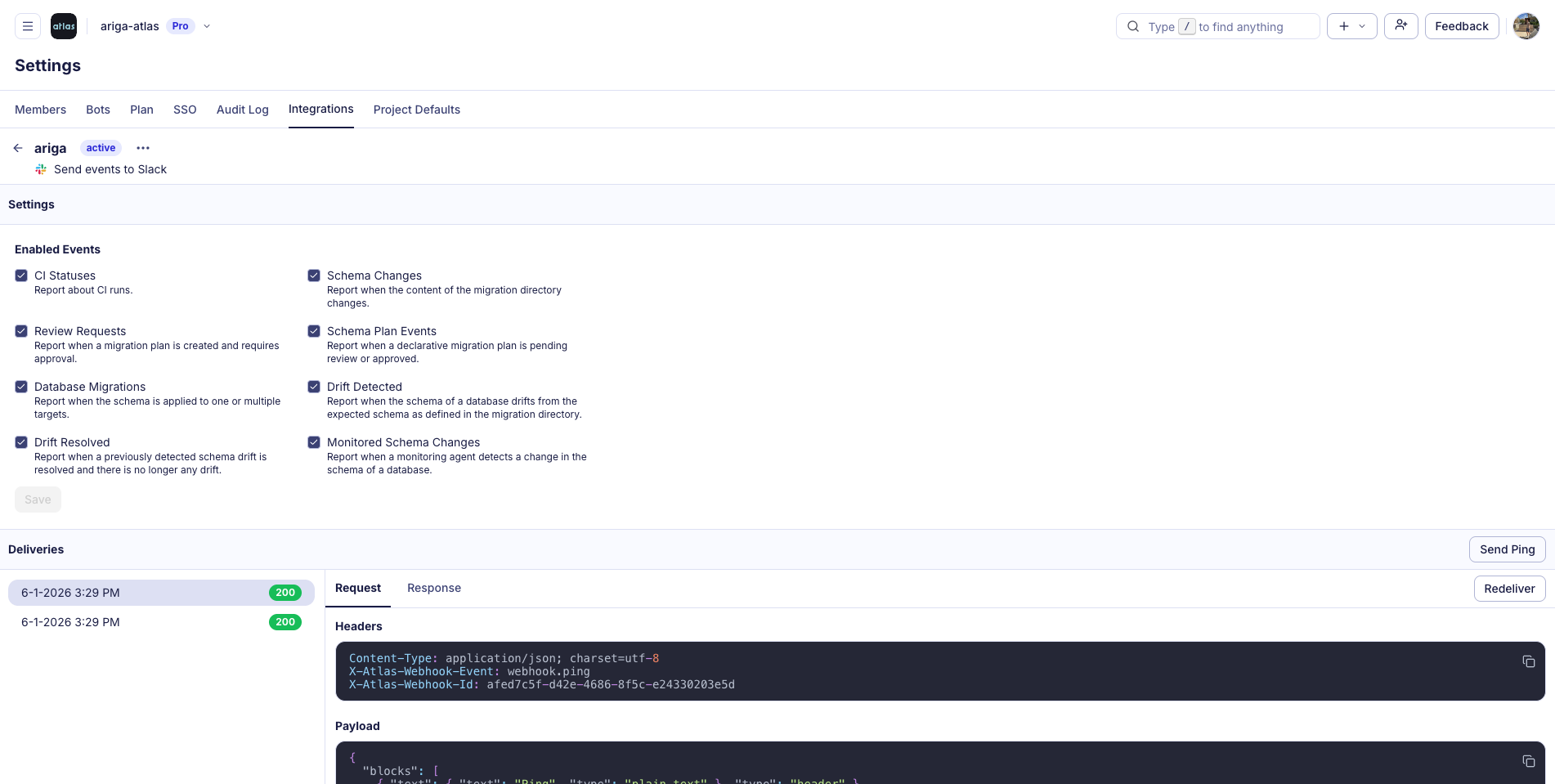
Atlas Cloud now has a native Slack app. Get notified when CI runs complete, migrations deploy, schema drift is detected, or reviews need attention. Configure per-project channels and filter which events you care about.
Set it up yourself in Settings > Integrations in Atlas Cloud to keep your team up-to-date and informed about your Atlas projects.
Schema Exporters
The new --export flag provides a declarative way to export schemas to files or external services
when running atlas schema inspect and atlas schema diff. This cleans up the command line and makes the export process simpler and
reproducible.
Start by adding your exporter configuration to your atlas.hcl file:
atlas.hcl
// Export as SQL files, one per object, preserving original names.
exporter "sql" "schema" {
  path     = "schema/sql"
  split_by = object
  naming   = same // lower (default), upper, title.
}

// Export schema as HCL files with custom extension.
exporter "hcl" "schema" {
  path     = "schema/hcl"
  split_by = object
  ext      = ".pg.hcl"
}

// Send schema using a webhook.
exporter "http" "webhook" {
  url           = "https://api.example.com/schemas"
  method        = "POST"
  body_template = "{{ sql . }}"
}

exporter "multi" "all" {
  exporters = [
    exporter.sql.schema,
    exporter.hcl.schema,
    exporter.http.webhook,
  ]
  on_error  = CONTINUE
}

env "prod" {
  url = getenv("DB_URL")
  export {
    schema {
      inspect = exporter.multi.all
    }
  }
}
Then, run:
atlas schema inspect --env prod --export
MySQL TLS Support
MySQL does not require TLS by default, but many production setups mandate encrypted connections. Atlas now supports TLS configuration in the connection string.
Use ?ssl-ca for custom CA certificates, or ?ssl-cert and ?ssl-key for client certificate authentication:
mysql://user:pass@host:3306/db?tls=true&ssl-ca=/path/to/ca.pem
See the MySQL URL docs for details.
What's Coming Next
This release showcases the momentum we've built leading up to and since our v1.0 release, and we're already looking ahead to what's next.
We're expanding roles, users, and database access-control to Redshift, Oracle, and Snowflake, and shipping column-level lineage for schema visualization in Atlas Cloud.
Beyond that, we're building out the full database security lifecycle:
- Discover - Already in Atlas Monitoring. Get notified when roles or permissions change. Detect and fix drift between declared and actual state.
- Assess - Analyzers that flag overly permissive roles and excessive privileges.
- Govern - Policy engine to enforce least-privilege by default. Block risky permission patterns before they reach production.
Wrapping Up
We hope you enjoy the new features and improvements. As always, we would love to hear your feedback and suggestions on our Discord server, and if you're interested in learning more about Atlas, schedule a demo.