ast-grep outlineis released in ast-grep 0.44.0 as an alpha preview, and feedback is welcome.
Code agents are getting better at editing projects, but they still spend a lot of time opening files just to learn what is inside. Before changing code, an agent often needs a quick map of a file's exports, imports, classes, structs, and methods. Reading the whole file works, but it is expensive in tokens and slow in large repositories.
ast-grep outline is a new command designed for that first pass.
sh
# Summarize one file before opening the full source.
ast-grep outline src/parser.ts
# List the exported surface of a directory.
ast-grep outline src
# Focus on one symbol and expand its local details.
ast-grep outline src/parser.ts --match Parser --view expanded
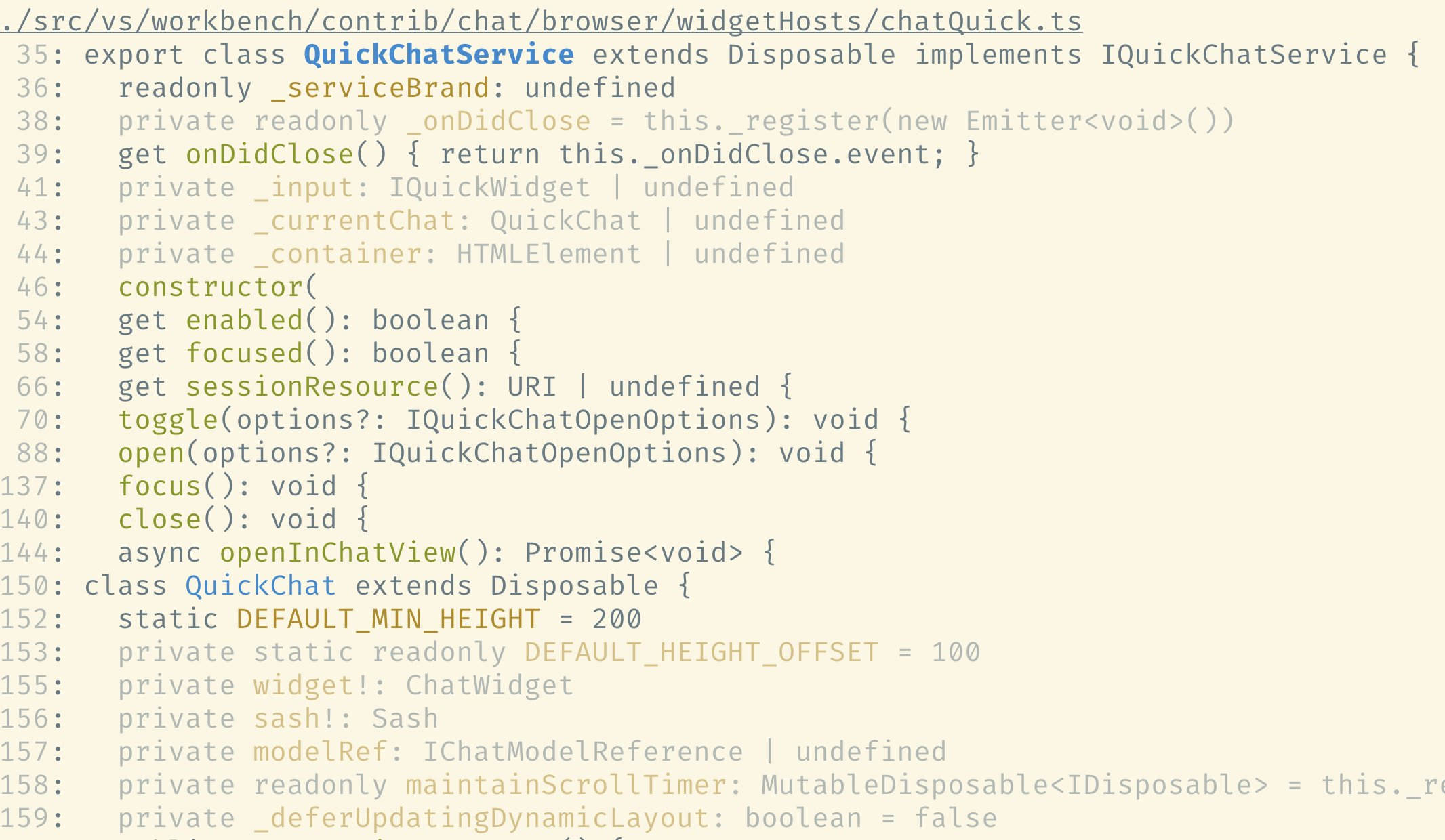
It parses source files with ast-grep rule and tree-sitter, then prints a compact table of contents: functions, classes, structs, imports, exports, direct members, and source ranges. It is not a language server or semantic graph, just a small structural primitive for deciding what to read next.
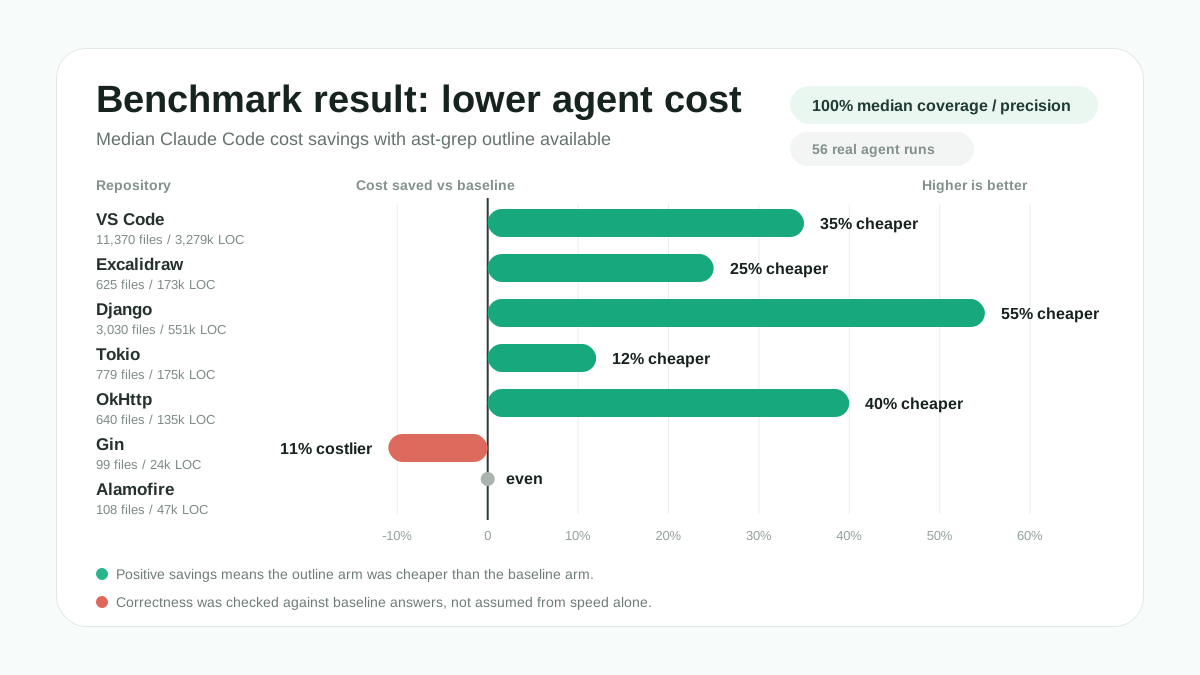
In the validated benchmark run, outline cut median Claude Code cost by 35% on VS Code, 55% on Django, and 40% on OkHttp while keeping median baseline coverage and precision at 100%. The detailed numbers and caveats are below, but the short version is simple: on larger repositories, a structural first pass can replace a lot of broad file reading.
Why Outline?
The most common code-navigation loop is not "answer every question about this repository." It is much smaller:
- Find the file that probably matters.
- Understand the file's shape.
- Open the smallest useful source range.
- Repeat with better context.
Traditional grep is excellent for step one. Read or an editor is necessary for step three. The missing piece is step two: a cheap summary of source structure after you have a candidate file or directory.
ast-grep outline fills that gap with two defaults tuned for navigation.
Inspect a file's local shape when you already have a likely source file before reading the implementation:
console
$ ast-grep outline src/parser.ts
src/parser.ts
12: export function parseRule(source: string)
40: export class Parser
    fields: source, diagnostics
    methods: parse, recover, finish
Inspect a folder's exported surface when you are scanning a subtree. Directory outlines default to exports:
console
$ ast-grep outline src
src/parser.ts
12: export function parseRule(source: string)
40: export class Parser
src/rule.ts
8: export interface Rule
21: export function validateRule(rule: Rule)
After the first outline, you can narrow the same structural view to dependencies, a single symbol, or matching imports without falling back to full-file reads.
console
# Check what one file depends on.
$ ast-grep outline src/parser.ts --items imports
src/parser.ts
3: import { Rule } from "./rule"
4: import { Scanner } from "./scanner"
console
# Expand a known top-level symbol without reading its full body.
$ ast-grep outline src/parser.ts --match Parser --type class --view expanded
src/parser.ts
40: export class Parser
42:   source: string
43:   diagnostics: Diagnostic[]
45:   parse(): Rule
58:   recover(error: ParseError): void
66:   finish(): ParseResult
console
# Find imports matching one dependency across a folder.
$ ast-grep outline src --items imports --match ast-grep-core --view signatures
src/parser.ts
6: import { parseAst } from "ast-grep-core"
src/checker.ts
11: import { Rule } from "ast-grep-core"
Machine-readable output is planned as part of the upcoming release work.
For coding agents, this makes outline a cheaper first read when the question is about shape rather than implementation. It gives precise file and range metadata, so an agent can move from a directory summary to a symbol and then to a small source slice. That is where the token savings come from.
Benchmark Result
In the validated benchmark run, outline kept median baseline coverage and precision at 100% across all seven repositories while usually reducing cost on larger repositories. Exact paired-run alignment still varied: VS Code matched exactly in 3/4 paired runs, and Excalidraw in 2/4. Those misses are shown in the folded table rather than hidden.
VS Code, Django, and OkHttp were the clearest wins, with median cost reduced by 35%, 55%, and 40%. Smaller repositories such as Gin and Alamofire were already cheap to explore with grep and direct reads, so outline sometimes added work instead of saving it.
The result is not "outline always reduces tool calls." It helps most when it replaces broad file reads with compact structure. Agents still need judgment about when a grep result is enough and when a structural summary will save the next few reads.
Benchmark setup and performance table
Setup
I tested outline with headless Claude Code on real architecture questions. Each scenario ran twice: once with normal Read, Grep, Glob, and shell search tools, and once with ast-grep outline available as an extra structural tool. The completed run used 56 real claude -p sessions: 7 repositories, 2 arms, 4 repeats, and claude-sonnet-4-6.
The correctness check was baseline-relative. The answer with outline had to cover the same mechanism claims found by the answer without outline, without adding unsupported extra claims. The Baseline alignment column reports median coverage, median precision, and exact paired-run alignment count.
A few details matter for reading the result:
- The benchmark used real repositories, not synthetic files: VS Code, Excalidraw, Django, Tokio, OkHttp, Gin, and Alamofire.
- The questions were architecture-level prompts, such as how Django builds and executes a
QuerySet, how Tokio schedules async tasks, and how OkHttp runs a request through its interceptor chain. - The runner isolated Claude Code from local customization: no MCP servers, no slash commands, no skills, and no plugins. The available tools were
Read,Grep,Glob, andBash; the only structural-tool difference wasast-grep outline. - The raw LLM traces were also inspected by the validator, which requires each
with-outlinerun to contain an actualast-grep outlinecall; the completed run passed that check. - Runs were paired by scenario and iteration, with balanced arm order so the outline arm was not always first or always second.
- Cost, token count, wall-clock time, and tool calls came from Claude Code's JSON event stream and were summarized by median across repeats.
Performance Comparison
| Codebase | Size | Baseline alignment | Cost | Tokens | Time | Tool calls |
|---|---|---|---|---|---|---|
| VS Code | 11,370 files / 3,279k LOC | 100% coverage, 100% precision (3/4) | 35% cheaper | 45% fewer | 12% faster | 11% fewer |
| Excalidraw | 625 files / 173k LOC | 100% coverage, 100% precision (2/4) | 25% cheaper | 26% fewer | 4% slower | 3% more |
| Django | 3,030 files / 551k LOC | 100% coverage, 100% precision (4/4) | 55% cheaper | 67% fewer | 33% faster | 29% fewer |
| Tokio | 779 files / 175k LOC | 100% coverage, 100% precision (4/4) | 12% cheaper | 38% more | 3% faster | 79% more |
| OkHttp | 640 files / 135k LOC | 100% coverage, 100% precision (4/4) | 40% cheaper | 40% fewer | 5% faster | 45% more |
| Gin | 99 files / 24k LOC | 100% coverage, 100% precision (4/4) | 11% costlier | 39% more | 13% slower | 93% more |
| Alamofire | 108 files / 47k LOC | 100% coverage, 100% precision (4/4) | even | 48% more | 26% slower | 94% more |
Benchmark Honesty
This benchmark tries to measure whether outline helps a real agent workflow, not whether a prompt can force a better-looking number. The prompt does not tell the agent to avoid normal tools. The with-outline arm can still use Read, Grep, Glob, and shell search. It also does not tell the agent to blindly trust ast-grep outline output; the agent still has to read concrete code for evidence when implementation details matter.
This matters because some impressive-looking tool benchmarks can be artificial. If a benchmark prompt tells the agent not to use other tools, or reports speed without checking the correctness of the final answer, the tool can look fast while the agent is simply giving incomplete or inaccurate answers. Fast wrong answers are not useful. The benchmark above reports cost, tokens, time, tool calls, and baseline-relative correctness together.
The benchmark harness and materials are available in the ast-grep outline benchmark repository.
That result explains the design choices below. outline is not magic. It is a fast structural tool that pays off when the repository is large enough for file shape to matter.
The Design: Parse Now, Stay Local
The design follows three constraints: parse current files on demand, stay local instead of pretending to know global semantics, and make extraction rules explicit.
The trade-off is intentional: less global knowledge, but faster, more deterministic, and concise enough to use before reading code.
No Index
outline parses the files you ask about in real time every time. That means there is no index to build, update, invalidate, or debug. This matters for agentic programming because agents often work in multiple git worktree checkouts at once. Indexed tools have to either share a cache across worktrees or build one codebase index per checkout. ast-grep outline does neither. Each worktree is just source text on disk, so parallel agent worktrees do not create parallel copies of the same codebase index. The command stays simple and is still fast on projects below roughly 10,000 files.
No Cross-File Analysis
There is no cross-file analysis and no type resolution. outline does not resolve imports, follow references, construct call graphs, infer receiver types, or guess that two symbols must be related because they share the same name. That keeps it fast, but more importantly it keeps the failure mode understandable. If outline misses something, it is usually because the extractor rule for that language does not cover that syntax yet. It should not invent relationships by heuristic name matching.
Different tool, different knowledge
Code navigation tools make different trade-offs between speed, scope, and semantic accuracy. outline sits between text search and global semantic tools: it stays local like grep, but it understands syntax structure.
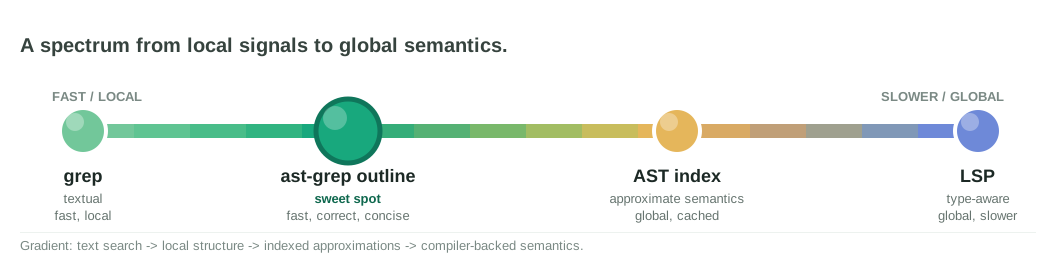
Legend: the spectrum moves from local textual signals to global semantic knowledge. ast-grep outline aims for the sweet spot: fast like local search, correct about syntax structure, and concise enough to guide the next read.
| Tool approach | Speed | Scope | Knowledge |
|---|---|---|---|
| grep-style search | Fast | Local | Textual knowledge. It knows the bytes and lines that match. |
| ast-grep outline | Fast | Local | Structure-aware knowledge. It knows declarations, imports, exports, members, and source ranges. |
| AST code indexing | Relatively fast | Global | Roughly accurate semantic knowledge. It can connect files and symbols, but approximate relationships can go wrong. |
| LSP | Slow | Global | Accurate semantic knowledge from the language toolchain, including type and reference resolution. |
This is why outline intentionally avoids acting like a language server. If the task needs exact type resolution, use an LSP or compiler-backed tool. If the task needs a quick structural map of the code in the current checkout, outline can answer without waiting for a global index or duplicating one per worktree.
Declarative Extraction
The command uses ast-grep's rule system to find outline entries. Built-in language support is a bundled rule catalog. Adding a new language should primarily mean adding rule definitions and tests, not hard-coded language branches in the CLI. Custom language extraction is not supported yet, but this rule-based design is intended to make it possible.
Conceptually, an extractor looks like this:
yaml
id: rust-struct
language: Rust
role: item
symbolType: struct
rule:
  pattern: $VIS struct $NAME { $$$BODY }
name: $NAME
isExported:
  has:
    regex: '^pub\b'
---
id: rust-field
language: Rust
role: member
parentRuleIds: [rust-struct]
symbolType: field
rule:
  pattern: $VIS $NAME: $TYPE
name: $NAME
isPublic:
  has:
    regex: '^pub\b'
The rule selects syntax. The metadata says whether the result is a top-level item or a member, what symbol type to display, how to derive the name, and how to mark import/export or public/private flags. Members attach by syntactic containment, not by guessing from names or types.
This is the same philosophy as ast-grep itself: use the AST for precision, keep the model explicit, and make extension data-driven.
What Outline Returns
An outline entry is a local structural fact:
- a name, such as
ParserorparseRule; - a symbol type, such as
class,function,struct, orfield; - a source range;
- a first-line signature;
- the underlying AST kind;
- optional flags for imports, exports, and public members.
Top-level entries are called items. Direct children are called members. A class can have method members, a Rust impl can have function members, and an enum can have variant members. Flat source stays flat: Go receiver methods and Rust impl blocks remain top-level entries because that is how the source is organized.
This source-like output is intentional. outline does not normalize extends, implements, traits, protocols, or receiver types into a cross language relationship graph. If that information is visible in the signature, the signature preserves it. If you need a deeper semantic question, use normal search, ast-grep rules, or a language-specific tool after the outline points you to the right code.
Extending Outline
Because extraction is rule-based, outline can grow one language at a time. Built-in rules can start with top-level declarations, then add imports, exports, members, and language refinements. A partial rule catalog is still useful as long as it is honest about what it extracts.
Custom language extraction is not supported in the current implementation yet. The intended direction is to let projects provide outline extractors using the same rule shape. A future extractor definition could look like this:
yaml
id: mylang-function
language: mylang
role: item
symbolType: function
rule:
  pattern: def $NAME($$$ARGS) $$$BODY
name: $NAME
signature: def $NAME($$$ARGS)
The exact CLI surface for custom extractor loading is still future work, so I am not documenting flags for it yet.
This keeps the CLI small while letting the ecosystem improve coverage. The hard part should be writing the right syntax rule, not rebuilding an outline engine.
Before the Upcoming Release
The outline model is in place, but a few pieces still need to land before the release is ready:
- JSON interface: stable machine-readable output so agents, editors, and scripts can consume outline entries without parsing text.
- More built-in rules and improvements: broader bundled rule coverage, better import/export/member extraction, and fixes for language-specific syntax gaps found in real repositories.
- Custom languages and custom rules: project-provided extractor definitions for languages or syntax that are not covered by the built-in catalog yet.
The last item is especially important for the long-term design. Adding support for a new language should mostly mean loading rule definitions and tests, not adding hard-coded branches to the CLI. That custom extraction path is not supported in the current implementation yet.
ast-grep outline is intentionally not a replacement for ast-grep run, ast-grep scan, an IDE, or a language server. It does not rewrite code. It does not lint. It does not answer "where is this symbol referenced?" or "which implementation will runtime dispatch call?" Those questions require different machinery.
What it does is much smaller and, I hope, more composable: parse the current worktree, extract the local structure, and show just enough information to guide the next read.
That narrowness is the feature. No index, no semantic guesswork, no hidden heuristics. Just AST-backed structure, declarative rules, and fast feedback.
Try it first on a large file, changed files, or a directory where an agent would normally start reading too broadly. If outline misses syntax in a supported language, that is exactly the kind of deterministic rule-catalog gap we can fix. Please report a small example in the ast-grep issue tracker.
Happy grepping outlining!