Welcome to Aspire 13.2! Whether you’re a long-time Aspire user or just getting started, we’re excited for you to try what’s new. If you have questions, feedback, or run into issues, come say hi on Discord or open an issue on GitHub.
Aspire 13.2 brings significant improvements with enhanced CLI capabilities, dashboard improvements, new AI agent integrations, and better multi-language support. This release focuses on making local development more streamlined for both developers and coding agents while maintaining the robust cloud-native foundation that Aspire is known for. 13.2 also includes significant infrastructure improvements to make it easy for the Aspire team to ship more frequent stable releases. A huge thank you to all the community contributors who helped make this release happen — your issues, PRs, and feedback drive Aspire forward.
🆙 Upgrade to Aspire 13.2
For general purpose upgrade guidance, see Upgrade Aspire.
The easiest way to upgrade to Aspire 13.2 is using the aspire update command:
-
Update the Aspire CLI:
-
Update your Aspire apphost using the
aspire updatecommand:
Or install the CLI from scratch:
curl -sSL https://aspire.dev/install.sh | bash
You can also manually update your apphost to reference Aspire version 13.2.0:
#:package Aspire.AppHost.Sdk@13.2.0
If you’re using a C# apphost, you can then upgrade both your hosting and client integrations via NuGet.
If you’re using a TypeScript apphost, run aspire restore after upgrading so the integration SDKs are regenerated.
🛠️ CLI enhancements
Aspire 13.2 introduces a wave of new CLI commands that dramatically expand what you can do from the terminal. The CLI now exposes all of the data that was previously trapped inside the dashboard and apphost, making it accessible from scripts, editors, and automation workflows.
Language-specific templates and multi-language setup
Section titled “Language-specific templates and multi-language setup”
Aspire 13.2 makes the aspire new (creates a full starter template) and aspire init (creates only an apphost) experiences much more language-aware. The CLI now has options to scaffold language-specific full stack starter apps for C#, TypeScript, Python, and both C# and TypesScript apphosts. Use aspire new to create a new project from a template, or aspire init to add Aspire to an existing project.
The new aspire restore command complements this workflow. For C# apphosts it restores the integration NuGet packages, and for TypeScript apphosts it regenerates the integration SDK code and required artifacts. This automatically happens on aspire run, but is also now exposed manually.
# Create a new starter with the interactive template picker
aspire new
# Or, create a new blank apphost in an existing codebase
aspire init
# Restores integration packages and starts the apphost
aspire run
# Manually restore integrations
aspire restore
Detached mode and process management
One of the most requested features lands in 13.2: detached mode for running Aspirified apps. You can now run your apphost in the background, freeing up your terminal for other tasks.
# Run in detached mode
aspire run --detach
# Shorthand command for run --detach
aspire start
# List all running apphosts
aspire ps
# Stop a running apphost in the background
aspire stop
The aspire ps command displays all currently running Aspire apphosts, making it easy to manage multiple projects simultaneously. When combined with aspire stop, you have full control over your application lifecycle directly from the command line.
The new aspire start shortcut makes background apphost startup easier to remember, and aspire stop can stop a selected apphost or all running apphosts. In JSON mode, aspire ps can include resources, which makes it a solid building block for automation and editor integrations.
aspire start --apphost .\MyApp.AppHost\MyApp.AppHost.csproj
aspire ps --resources --format json
aspire stop --all
Resource commands were also reorganized into the aspire resource <resource> <command> form. Built-in commands such as start, stop, and restart now line up more naturally with what the dashboard exposes, and project resources can expose richer commands such as rebuild.
aspire resource api restart
aspire resource api rebuild
Isolated mode for parallel development
The new --isolated flag runs an apphost with randomized ports and isolated user secrets, preventing port conflicts and configuration collisions:
aspire run --isolated
aspire start --isolated
This is especially useful for agentic workflows, git worktrees, and integration tests where multiple instances of the same apphost need to run side by side.
Resource monitoring with aspire describe
The new aspire describe command gives you and your coding agents CLI access to the same detailed resource information you get in the Aspire dashboard. You can inspect resource state, configuration, environment variables, health status, and more—all from the terminal.
# Show all resources in a running apphost
aspire describe
# Continuously stream resource state changes
aspire describe --follow
Environment diagnostics with aspire doctor
The new aspire doctor command provides comprehensive diagnostics of your development environment:
This command checks:
- HTTPS development certificate status (including detection of multiple certificates)
- Container runtime (Docker/Podman) availability and version
- Container tunnel requirements for Docker Engine
- .NET SDK installation and version
- WSL2 environment configuration
- Agent configuration status (detecting deprecated settings)
Not all checks appear in every run. Some checks, such as WSL2 configuration and agent configuration status, are conditional and only appear when the relevant environment or issues are detected.
The output provides actionable recommendations when issues are detected, making it easier to troubleshoot configuration problems.
Enhanced aspire add with fuzzy search
Finding the right integration package is now easier with fuzzy search in the aspire add command. Simply start typing and the CLI will suggest matching packages, reducing the friction of discovering and adding new integrations to your project. This release also improves friendly-name generation and better respects NuGet central package management for C# apps.
New CLI commands for certificates, exports, secrets, and resource lifecycles
Section titled “New CLI commands for certificates, exports, secrets, and resource lifecycles”
Aspire 13.2 significantly expands the day-to-day CLI surface area with several new commands.
Certificate and parameter/secret management get first-class commands:
aspire certs clean
aspire certs trust
aspire secret set ApiKey super-secret-value
aspire secret list --format json
aspire certs helps you clean stale developer certificates and trust the current certificate, while aspire secret gives apphost user secrets their own dedicated CLI workflow for setting, reading, listing, locating, and deleting secret values. These are the same secret values that back AddParameter(..., secret: true) calls in the app model—aspire secret set writes to the user-secrets store so you no longer need have the .NET CLI installed to manage them via dotnet user-secrets.
Two new operational commands round out the experience:
aspire wait api --status healthy --timeout 120
aspire export --output .\artifacts\aspire-export.zip
Use aspire wait to block automation until a resource becomes healthy, up, or down, and use aspire export to capture telemetry and resource data from a running apphost into a zip file. You can also scope export to a single resource with aspire export <resource>.
Agent integration (aspire agent)
The aspire mcp command has been renamed to aspire agent to better reflect its purpose of managing AI agent integrations. It’s also been updated to add Aspire specific SKILL.md files into your repo. The new command structure includes:
# Initialize agent environment configuration including MCP and skills
aspire agent init
# Manually start the MCP (Model Context Protocol) server - only
aspire agent mcp
This enables AI agents to interact with your Aspire applications through a standardized protocol, opening up new possibilities for AI-assisted development workflows.
Documentation commands from the CLI (aspire docs)
Section titled “Documentation commands from the CLI (aspire docs)”
The new aspire docs command brings the official aspire.dev documentation directly into your terminal. Built on the same MCP (Model Context Protocol) documentation tools that power the Aspire agent integration, these commands let you browse, search, and read documentation without leaving your development workflow.
# List all available documentation pages
aspire docs list
# Search for specific topics
aspire docs search "redis"
# Read a full documentation page by its slug
aspire docs get redis-integration
# Read a specific section of a page
aspire docs get redis-integration --section "Add Redis resource"
Each command supports --format Json for machine-readable output, making them useful for scripting and automation. The aspire docs search command also accepts a --limit option to control the number of results returned.
Improved configuration management
The aspire config command has been enhanced with better organization:
# List all configuration with organized sections and colors
aspire config list
# List all available feature flags
aspire config list --all
# Get a specific setting
aspire config get <key>
# Set a configuration value
aspire config set <key> <value>
Configuration is now clearly separated into local and global settings, with feature flags displayed in an organized manner.
Aspire now also prefers a single aspire.config.json file that combines apphost location, language metadata, Aspire SDK version, channel selection, feature flags, launch profiles, and package pins:
{
"appHost": {
"path": "apphost.ts",
"language": "typescript/nodejs"
},
"sdk": {
"version": "13.2.0"
},
"channel": "stable",
"profiles": {
"default": {
"applicationUrl": "https://localhost:17000;http://localhost:15000"
}
}
}
This unified format replaces the older split across .aspire/settings.json and apphost.run.json and makes TypeScript apphosts much easier to move, inspect, and automate.
Auto migration from legacy configuration files
Section titled “Auto migration from legacy configuration files”
If you have an existing project that uses .aspire/settings.json or apphost.run.json, the CLI handles migration automatically. The first time you run any aspire command (such as aspire run) against an existing project, the CLI merges your legacy .aspire/settings.json and apphost.run.json into a new aspire.config.json at the project root. Paths are automatically re-based—for example, an appHostPath that was relative to the .aspire/ directory is adjusted to be relative to the project root. The legacy files are preserved during migration so you can continue using older CLI versions side by side if needed.
Global settings (globalsettings.json in your user-level Aspire directory) are also copied to the new aspire.config.json format in the same location. No manual steps are required—just update the CLI and run your project as usual.
CLI option standardization
Several CLI options were standardized for consistency with common CLI conventions:
-vfor--version: The-vflag is now a short alias for--version, following standard CLI conventions.--formatdescriptions: The--formatoption description is now standardized to “Output format (Table or Json).” across all commands that support it.--log-level/-l: Commands that support log-level filtering now use--log-level/-lconsistently.
Other CLI improvements
There are plenty of smaller but meaningful CLI improvements in 13.2:
aspire runnow supports--no-buildfor cases where you know the apphost artifacts are already up to date.--format jsonalways sends JSON output to stdout, while status messages are sent to stderr. This ensures human-readable output is kept separate from structured JSON output, allowing scripts and editors that consume JSON to receive well-formed content.- Tables, status indicators, help organization, logging, and error messages were refined across interactive and non-interactive scenarios.
- The unified self-extracting Aspire CLI bundle continues to improve multi-language experiences, especially when .NET isn’t already installed globally.
- Status messages that start with an emoji are consistently aligned. This is harder than you might think! If you see messy CLI output, please let us know.
🧩 VS Code extension
The Aspire VS Code extension received its biggest update yet in 13.2, with over 20 PRs shipping new features that make VS Code a first-class Aspire development environment alongside Visual Studio.
Aspire Activity Bar panel
A dedicated Aspire panel in the Activity Bar gives you a live tree view of running apphosts and their resources. The panel uses aspire describe --follow to stream real-time resource state updates for the workspace apphost — no polling, no latency. A workspace/global toggle lets you switch between viewing just the current workspace’s apphost or all running apphosts on your machine.
Resources in the tree show health-aware icons (green for healthy, red for errors, amber for degraded, spinner for starting), rich markdown tooltips with type, state, and clickable endpoint URLs, and right-click context menus for common operations like viewing logs, stopping, or restarting resources.
CodeLens and gutter decorations
When an Aspire apphost is running, the extension now shows inline CodeLens above each resource definition in your C# or TypeScript apphost file:
- Live resource state (Running, Starting, Stopped, Error) with health status
- Action buttons: Start, Stop, Restart, View Logs
- Custom resource commands from the runtime
Colored gutter decorations appear alongside resource definitions — green for running, blue for starting, red for errors, gray for stopped — giving you an at-a-glance view of your entire app’s health right in the editor. Both features are backed by language-aware parsers that understand DistributedApplication.CreateBuilder in C# and createBuilder() in TypeScript.
Getting Started walkthrough
A new Getting Started walkthrough guides new users through installing the CLI, creating a project, running their app, exploring the dashboard, and next steps — all from within VS Code. The walkthrough includes clickable terminal links to install the Aspire CLI directly from the editor.
Debugging improvements
- Azure Functions debugging — Azure Functions projects referenced from an apphost can now be debugged directly.
- TypeScript apphost debugging — TS apphosts now participate in debugging more naturally, with better tool detection, build/launch coordination, and support for browser debugging scenarios.
publish,deploy, anddoflows can now be debugged directly from the extension.- Apphost exit messages now appear in the debug console for easier troubleshooting.
aspire.config.json and MCP support
The extension now reads aspire.config.json for apphost discovery instead of relying solely on .csproj file detection, making TypeScript apphosts work seamlessly. It can also auto-register the Aspire MCP server for AI agent workflows. The CLI is automatically detected at default install paths even when it’s not on PATH.
Additional improvements
- A new
enableAspireDashboardAutoLaunchsetting lets you disable automatic dashboard launch on run. - File pickers replace raw string prompts in more places.
- Right-click context menus on resource endpoint URLs.
- Falls back to
code-insiderswhencodeis not found.
🌐 TypeScript AppHost support (preview)
One of the most anticipated features in Aspire 13.2 is support for writing your apphost in TypeScript. The TypeScript AppHost is currently in preview.
Writing an apphost in TypeScript
TypeScript apphosts use the same app model as C#—resources, references, integrations—expressed in idiomatic TypeScript via createBuilder():
import { createBuilder } from './.modules/aspire.js';
const builder = await createBuilder();
const cache = await builder.addRedis("cache");
const api = await builder.addProject("api", "../api")
.withReference(cache)
.waitFor(cache);
await builder.build().run();
Under the hood, this runs as a guest process alongside Aspire’s .NET orchestration host, communicating via JSON-RPC over local transport. Your TypeScript defines the resource graph; the host handles orchestration, health checks, and the dashboard.
When you run aspire add, the CLI inspects the integration’s .NET assembly and generates a TypeScript SDK into .modules/. Running aspire restore regenerates these SDKs—useful after upgrading or switching branches (this also runs automatically on aspire run).
In 13.2, the code generator gained AspireList support for richer collection handling and now covers Go, Java, and Rust test targets alongside TypeScript.
Debugging, tooling, and templates
TypeScript apphosts now have first-class support in the VS Code extension—CodeLens, gutter decorations, and debugging all work with createBuilder() calls. The aspire.config.json format means TypeScript apphosts are discovered automatically without needing a .csproj. Templates were also refreshed with updated dependencies and better starter defaults.
📊 Dashboard improvements
Data export and import
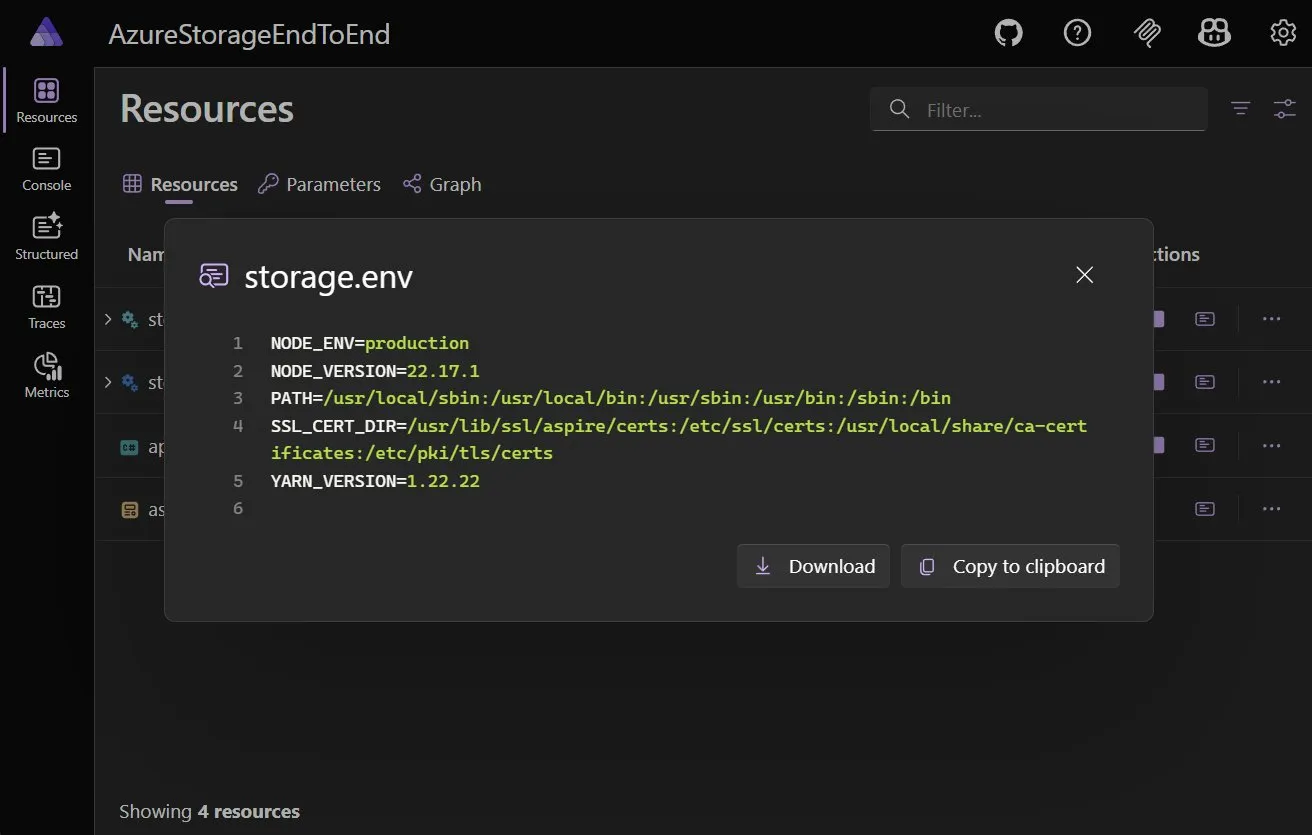
Aspire 13.2 adds comprehensive data export and import capabilities to the dashboard. You can bulk-manage telemetry through a centralized dialog, export individual resources and telemetry as JSON, and export environment variables as .env files.
Manage logs and telemetry dialog
The new Manage logs and telemetry dialog (accessible via Settings → Manage) is a one-stop shop for exporting, importing, and removing data from the dashboard. Select resources and telemetry types, then export, remove, or import as needed.
Data is exported as JSON in a zip file. Share it with AI, teammates, or import it back into the dashboard later.
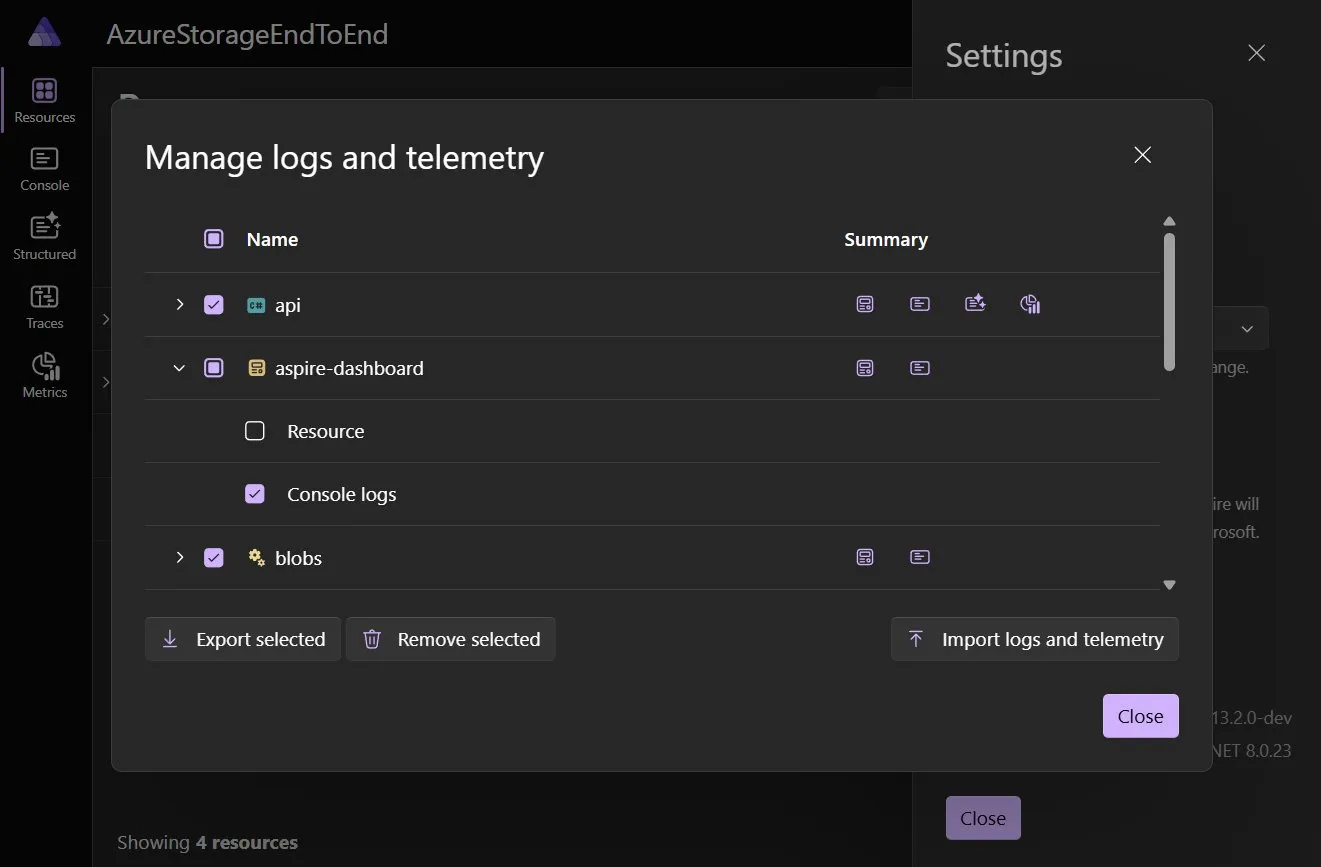
The dashboard can also import telemetry bundles captured with aspire export, making it easy to attach diagnostics to bug reports, preserve a point-in-time view of a session, or share a failing scenario with a teammate.
Export JSON for resources and telemetry
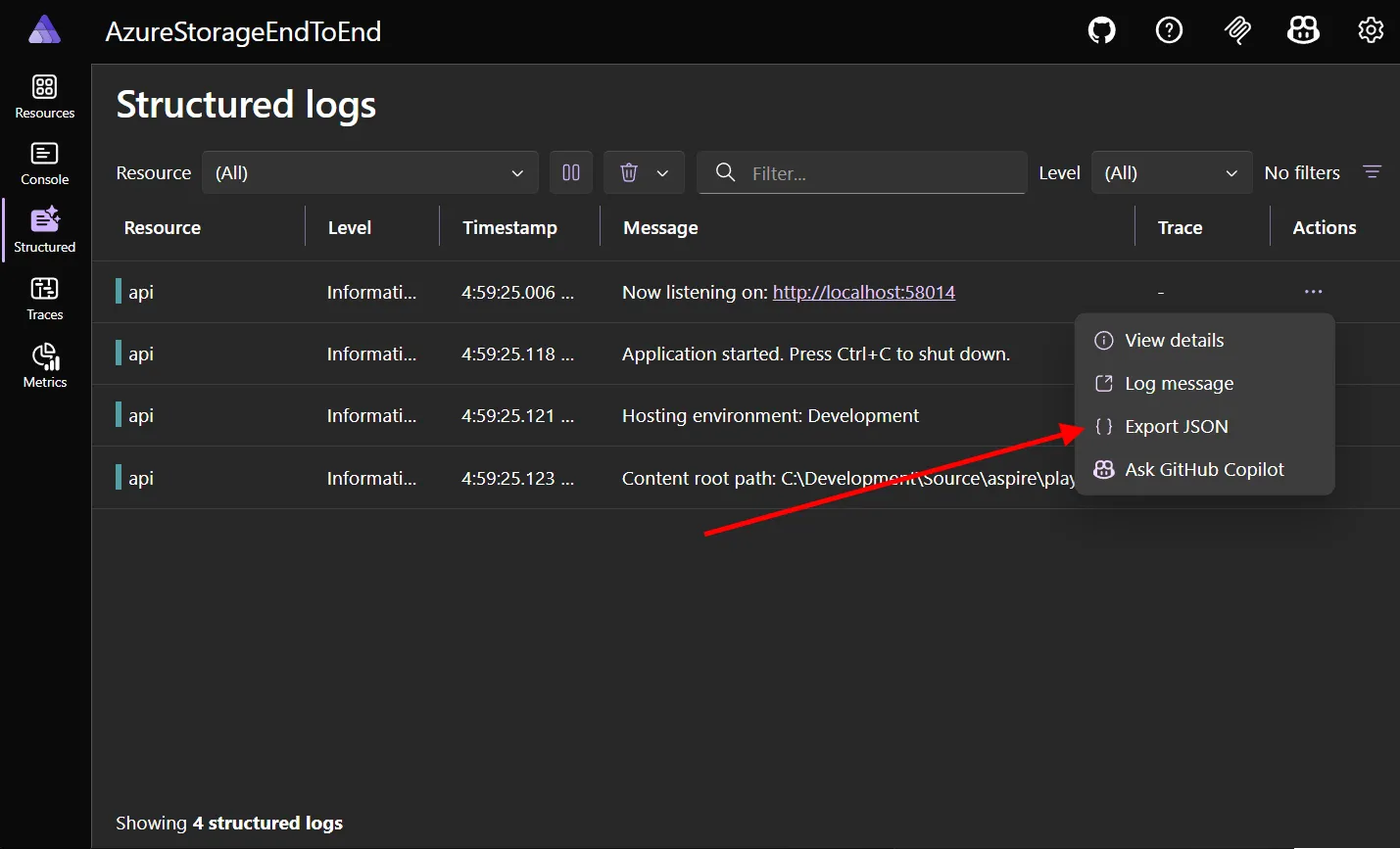
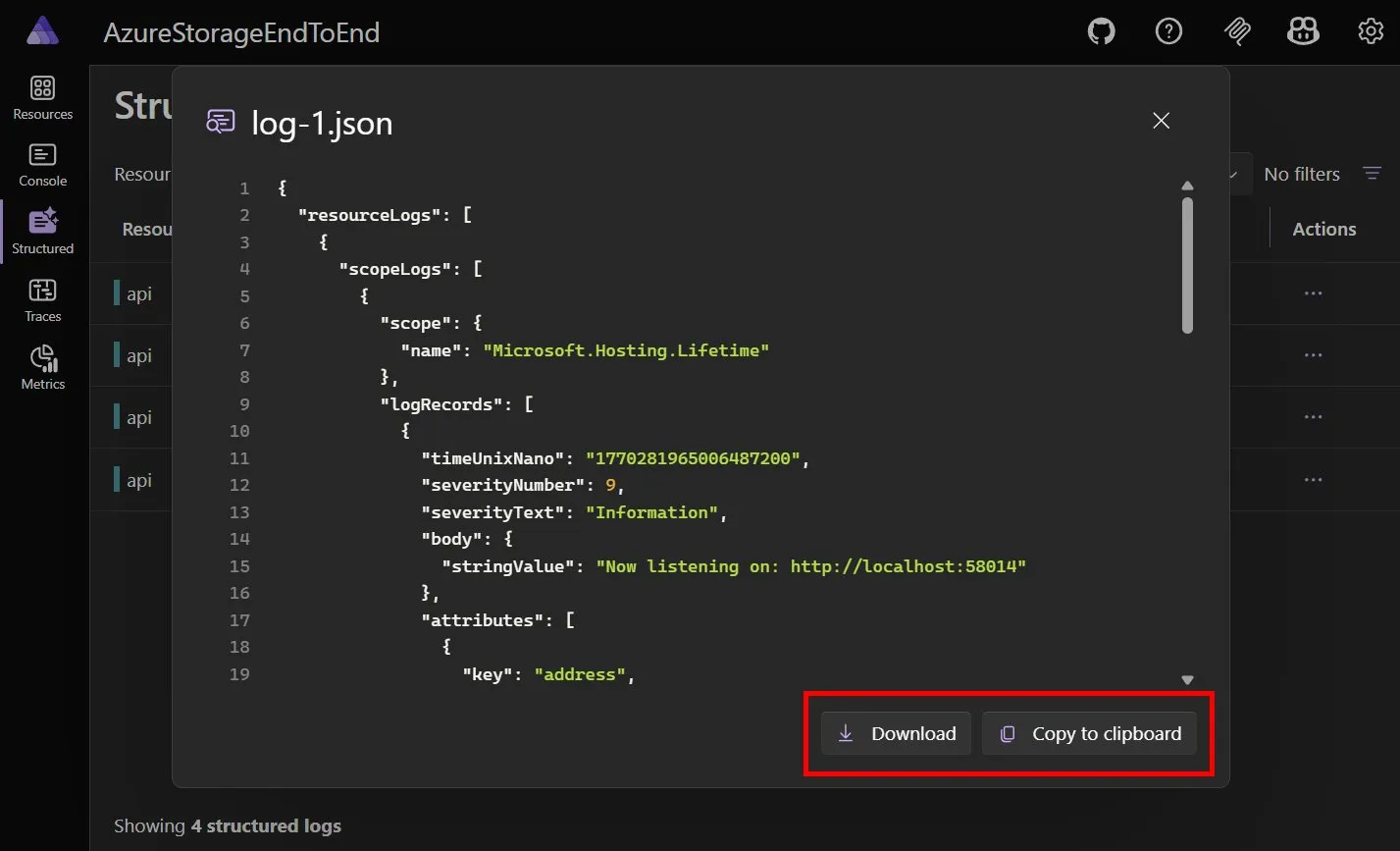
Export data for specific resources and telemetry directly from the dashboard. Select Export JSON in context menus to get the data — copy it to your clipboard or download it to your machine.
Export environment variables as .env files
Export a resource’s environment variables directly to a .env file format from the resource details view.
Telemetry HTTP API
The dashboard now exposes an HTTP API for querying telemetry data programmatically. These APIs power the aspire agent mcp and aspire otel Aspire CLI commands.
The API is served under /api/telemetry and returns data in OTLP JSON format. Available endpoints:
GET /api/telemetry/resources— List resources that have telemetry dataGET /api/telemetry/spans— Query spans with optional filtersGET /api/telemetry/logs— Query logs with optional filtersGET /api/telemetry/traces— List traces with optional filtersGET /api/telemetry/traces/{traceId}— Get all spans for a specific trace
The spans and logs endpoints also support real-time streaming via ?follow=true, which returns NDJSON (newline-delimited JSON) as new telemetry arrives. Multiple resource names can be specified by repeating the resource query parameter (e.g. ?resource=api&resource=worker).
When running with an Aspire apphost, the telemetry API is enabled automatically. For standalone dashboard deployments, set the DASHBOARD__API__ENABLED environment variable to true and configure authentication with DASHBOARD__API__AUTHMODE (ApiKey or Unsecured) and DASHBOARD__API__PRIMARYAPIKEY.
Set parameters from the dashboard
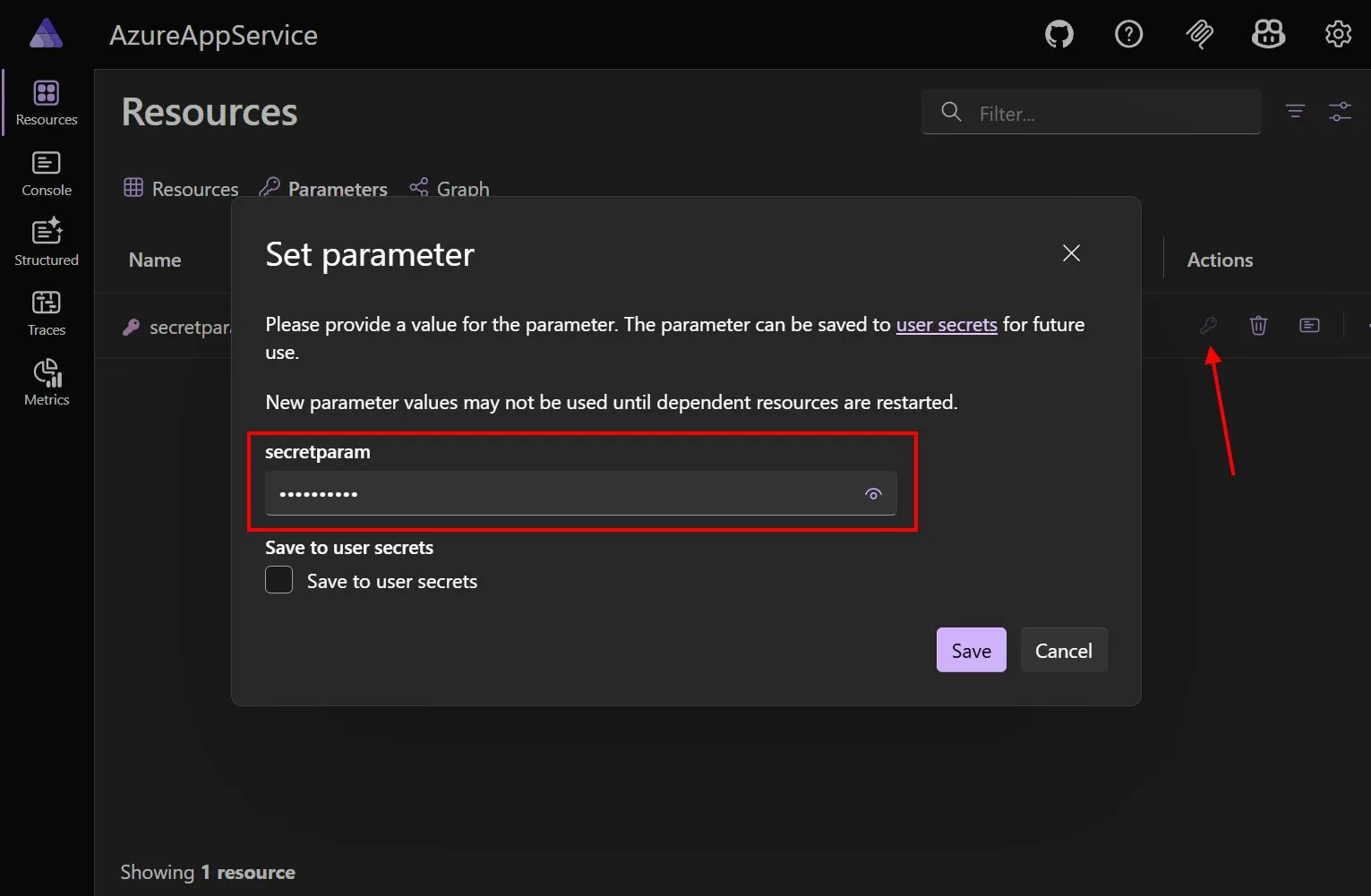
You can now set resource parameters directly in the dashboard. Click the key action on a parameter and enter a new value. To remember it next time, optionally save the value to your user secrets.
GenAI visualizer improvements
The GenAI visualizer keeps getting sharper. In 13.2 it handles more schema shapes, tolerates truncated payloads more gracefully, properly displays non-ASCII text, and makes tool inspection easier by letting you jump directly from a tool call to the corresponding tool definition.
Resource graph improvements
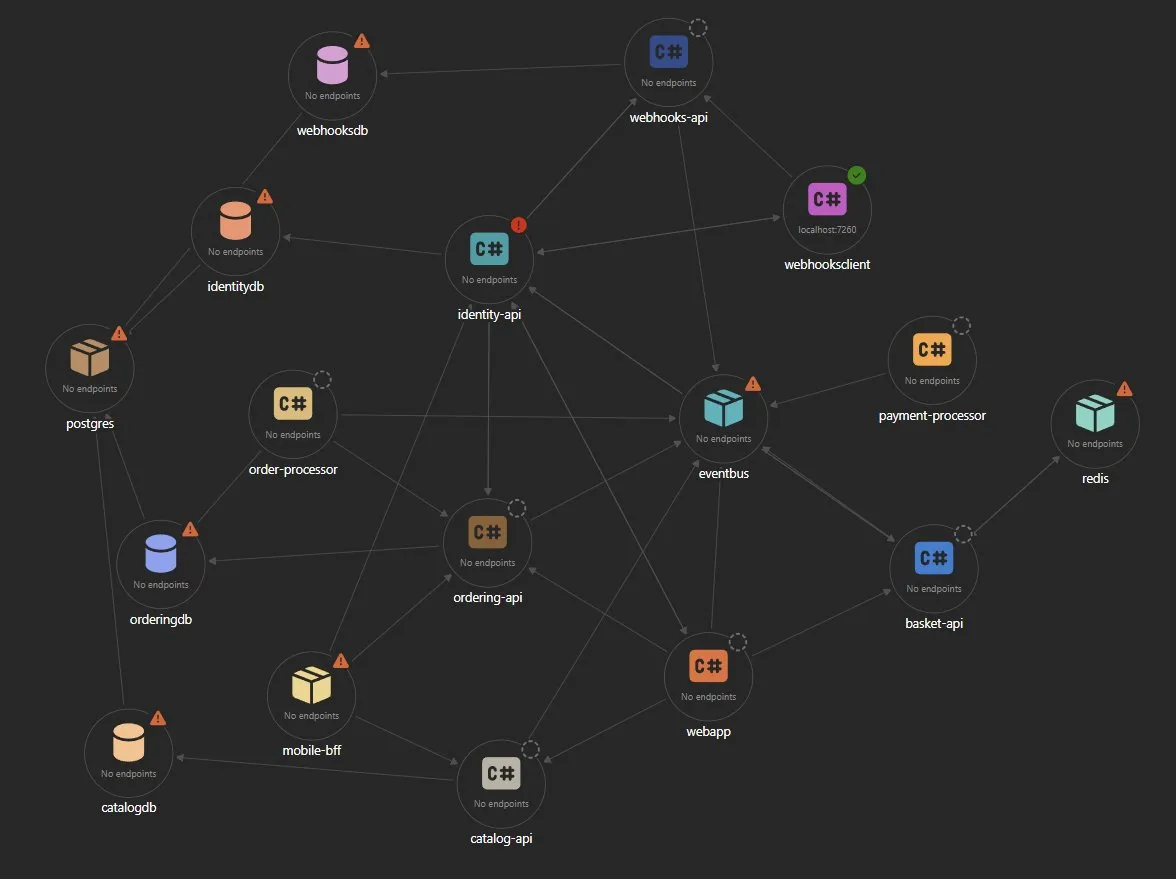
The resource graph layout has been significantly improved with adaptive force-directed positioning. Resources with many connections now have more space around them, making complex graphs feel less cluttered.
After:
Dashboard UX refinements
Additional dashboard refinements in 13.2:
- Persistent collapsed/expanded state of resources
- A 12-hour or 24-hour time format setting.
- Consistent resource colors across the dashboard and CLI.
- Better JSON viewers for traces, spans, logs, and resources.
- Improved handling for large gRPC payloads.
- More stable graph layout and filtering behavior.
- Base path configuration for reverse proxy scenarios.
- Aggregate replica states—parent resources now show combined state from their replicas.
- More polished dialogs, menus, copy flows, and resource details views.
🧩 App model and resource improvements
MCP endpoints from the app model
Aspire 13.2 adds WithMcpServer, which lets you declare in the app model that a resource hosts a Model Context Protocol (MCP) server. Aspire tooling can then discover and proxy that endpoint directly.
var builder = DistributedApplication.CreateBuilder(args);
var api = builder.AddProject<Projects.MyApi>("api")
.WithMcpServer("/mcp");
builder.Build().Run();
Project rebuilds and smarter change detection
Section titled “Project rebuilds and smarter change detection”
.NET Project resources now support a rebuild command in addition to the usual lifecycle commands. This gives you a clean way to apply source changes to a single project resource without tearing down the whole apphost session.
aspire resource api rebuild
Under the hood, Aspire coordinates stop, build, and restart through a hidden rebuilder resource and improved change detection, so the experience is much closer to “rebuild just this one thing” instead of “restart everything and hope.”
OTLP endpoint as a first-class resource
The OpenTelemetry Protocol (OTLP) endpoint is now modeled as a first-class resource in the application model, making it visible in the dashboard and configurable through standard resource APIs.
Better secret and certificate handling
Container build secrets got a clearer API in 13.2. WithBuildSecret replaces the old WithSecretBuildArg name and makes secure Docker or Podman build secret flows more readable.
var builder = DistributedApplication.CreateBuilder(args);
var accessToken = builder.AddParameter("accessToken", secret: true);
builder.AddContainer("worker", "contoso/worker")
.WithDockerfile("../worker")
.WithBuildSecret("ACCESS_TOKEN", accessToken);
Certificate trust handling also became more flexible. You can now create custom certificate bundles during run mode, which helps with scenarios like Java trust stores or custom bundle formats that don’t map cleanly to the default certificate layout.
builder.AddContainer("my-java-app", "my-image:latest")
.WithCertificateTrustConfiguration(ctx =>
{
ctx.EnvironmentVariables["JAVAX_NET_SSL_TRUSTSTORE"] =
ctx.CreateCustomBundle((certs, ct) =>
{
var pkcs12Builder = new Pkcs12Builder();
var safeContents = new Pkcs12SafeContents();
foreach (var cert in certs)
{
safeContents.AddCertificate(cert);
}
pkcs12Builder.AddSafeContentsUnencrypted(safeContents);
pkcs12Builder.SealWithMac(
string.Empty, HashAlgorithmName.SHA256, 2048);
return Task.FromResult(pkcs12Builder.Encode());
});
return Task.CompletedTask;
});
ReferenceExpression now exposes GetValueAsync() and supports conditional mode in multi-language code generation, which makes advanced hosting extensions easier to build without relying on synchronous value access patterns.
Enhanced debugging experience
Several types now include DebuggerDisplayAttribute for better debugging:
DistributedApplication- Resource types
EndpointReferenceExpressionReferenceExpressionPipelineStep
This makes it easier to inspect your Aspire application state during debugging sessions.
Resource event improvements
- Added
Loggerproperty toIDistributedApplicationResourceEventfor better logging context - Improved
ResourceNotificationService.WaitForexception messages with more detailed information BeforeResourceStartedEventnow only fires when actually starting a resource (breaking change)
Docker and container enhancements
- ‘Never’ Pull Policy: Exposed image pull policy option for scenarios requiring local images
- PullPolicy for Docker Compose: Added
PullPolicyproperty to Docker Compose Service class .npmrcin Docker builds: JavaScript Dockerfiles now copy.npmrcbefore running install, so private registry authentication works correctly in container builds- PostgreSQL v18+ Compatibility: Fixed data volume path for PostgreSQL version 18 and later
Build improvements
- Build error when
GenerateAssemblyInfois disabled in apphost projects - Trailing commas now allowed in
launchSettings.json - JSON comments and trailing commas parsed without errors
Contextual endpoint resolution
Aspire 13.2 introduces enhanced contextual endpoint resolution APIs that allow you to resolve endpoints from the perspective of specific resources or networks. This enables you to get the correct URL for a resource depending on where you’re accessing it from, whether it’s from a container, a host service, or a specific network.
The same resource can have different URLs depending on the context:
- From localhost:
http://localhost:1234 - From a container on the host Docker network:
http://host.docker.internal:1234 - From a container on the Aspire container network:
http://resource.dev.internal:4567
Resolve from a specific resource (Caller)
You can resolve an endpoint URL from the perspective of a specific calling resource using the Caller property on ValueProviderContext:
var builder = DistributedApplication.CreateBuilder(args);
var redis = builder.AddRedis("cache");
var containerApp = builder.AddContainer("worker", "myimage");
// Get the endpoint reference
var endpoint = redis.GetEndpoint("tcp");
// Resolve the URL from the container's perspective
var url = await endpoint.GetValueAsync(new ValueProviderContext {
Caller = containerApp.Resource,
});
// The URL will be appropriate for container-to-container communication
// e.g., "redis:6379" or "cache:6379"
This is particularly useful when you need to pass connection information between resources that may be running in different contexts (containers vs. host processes).
Resolve from a specific network
You can also resolve an endpoint URL from the perspective of a specific network using the Network property on ValueProviderContext:
var builder = DistributedApplication.CreateBuilder(args);
var redis = builder.AddRedis("cache");
// Get the endpoint reference
var endpoint = redis.GetEndpoint("tcp");
// Resolve the URL for the default Aspire container network
var url = await endpoint.GetValueAsync(new ValueProviderContext {
Network = KnownNetworkIdentifiers.DefaultAspireContainerNetwork
});
// The URL will be appropriate for the container network
// e.g., "cache:6379" using the resource name as the hostname
The KnownNetworkIdentifiers class provides predefined network identifiers:
LocalhostNetwork: Resolves to localhost-based URLsDefaultAspireContainerNetwork: Resolves to container network URLs using resource namesPublicInternet: Resolves to externally accessible URLs
📦 Integrations updates
Docker Compose publishing
The Docker Compose publishing integration has moved from prerelease to a stable release in Aspire 13.2. When you add a Docker Compose environment to your app model, Aspire generates a docker-compose.yaml from your resources at publish time, making it easy to deploy your Aspire application to any environment that supports Docker Compose.
var builder = DistributedApplication.CreateBuilder(args);
builder.AddDockerComposeEnvironment("compose");
builder.Build().Run();
Aspire generates a complete docker-compose.yaml from the resources in your app model, including networking, volumes, and environment variables.
Microsoft Foundry and hosted agents
Aspire 13.2 replaces the earlier Azure AI Foundry-focused hosting surface with a broader Microsoft Foundry integration. The hosting package is now Aspire.Hosting.Foundry, replacing Aspire.Hosting.Azure.AIFoundry.
You can now add Foundry accounts, create Foundry Projects, attach model deployments with the generated FoundryModel catalog, and publish hosted agents from the regular Aspire app model:
var builder = DistributedApplication.CreateBuilder(args);
var foundry = builder.AddFoundry("foundry");
var project = foundry.AddProject("agents");
var chat = project.AddModelDeployment("chat", FoundryModel.OpenAI.Gpt5Mini);
builder.AddPythonApp("agent", "..\\agent", "main:app")
.WithReference(project)
.WithReference(chat)
.PublishAsHostedAgent(project);
builder.Build().Run();
New APIs in this area include AddProject, AddModelDeployment, WithAppInsights, WithKeyVault, WithContainerRegistry, PublishAsHostedAgent, and AddAndPublishPromptAgent. RunAsFoundryLocal is still available for local model development, but Foundry Projects aren’t supported when the parent resource is configured as Foundry Local.
Azure Virtual Network and private endpoint support
Section titled “Azure Virtual Network and private endpoint support”
When deploying to Azure, securing network access to your resources is critical. The new Aspire.Hosting.Azure.Network integration lets you lock down your Azure resources by defining virtual networks, subnets, NAT gateways, network security groups (NSGs), and private endpoints directly in your apphost—ensuring your cloud infrastructure is secure by default.
var vnet = builder.AddAzureVirtualNetwork("vnet");
// Add a subnet with NSG rules
var subnet = vnet.AddSubnet("web", "10.0.1.0/24")
.AllowInbound(
port: "443",
from: AzureServiceTags.AzureLoadBalancer,
protocol: SecurityRuleProtocol.Tcp)
.DenyInbound(from: AzureServiceTags.Internet);
// Add a NAT gateway for deterministic outbound IPs
var natGateway = builder.AddNatGateway("nat");
subnet.WithNatGateway(natGateway);
// Add private endpoints for secure connectivity
var peSubnet = vnet.AddSubnet("private-endpoints", "10.0.2.0/27");
var storage = builder.AddAzureStorage("storage");
peSubnet.AddPrivateEndpoint(storage.AddBlobs("blobs"));
Key capabilities include:
- Virtual networks and subnets: Create networks with
AddAzureVirtualNetworkand add subnets withAddSubnet. - NAT gateways: Provide deterministic outbound public IP addresses with
AddNatGatewayandWithNatGateway. - Network security groups: Control traffic flow using shorthand methods (
AllowInbound,DenyInbound,AllowOutbound,DenyOutbound) or explicitAddNetworkSecurityGroupwithWithSecurityRulefor full control. - Private endpoints: Securely connect to Azure services over private networks with
AddPrivateEndpoint, which automatically creates private DNS zones, virtual network links, and disables public access on the target resource.
Azure AI and embedding support
The Azure AI Inference component now supports embeddings in addition to chat completions. You can register an EmbeddingsClient and then layer an IEmbeddingGenerator<string, Embedding<float>> on top of it:
var builder = WebApplication.CreateBuilder(args);
builder.AddAzureEmbeddingsClient("embeddings")
.AddEmbeddingGenerator();
var app = builder.Build();
app.MapGet("/embed", async (
IEmbeddingGenerator<string, Embedding<float>> generator) =>
{
var embedding = await generator.GenerateEmbeddingAsync("Hello, world!");
return embedding.Vector.ToArray();
});
Azure App Service enhancements
- Deployment slot support with new extension methods
- Sticky slot app settings fixes
- Configuration naming improvements
SearchIndexerClientadded as an extension method for Azure Search
Azure Container Registry
The Azure Container Registry integration now supports scheduled image cleanup with the new WithPurgeTask method. This provisions an ACR purge task that automatically removes old or unused container images on a cron schedule:
var acr = builder.AddAzureContainerRegistry("my-acr")
.WithPurgeTask("0 1 * * *", ago: TimeSpan.FromDays(7), keep: 5);
Additionally, the new GetAzureContainerRegistry method makes it easy to access the registry from a compute environment for further configuration.
Azure Data Lake Storage integration
Aspire 13.2 adds both hosting and client-side support for Azure Data Lake Storage. This closes an important gap for teams using hierarchical namespace storage and gives Data Lake users the usual Aspire integration benefits: DI registration, retries, health checks, logging, and telemetry.
var builder = DistributedApplication.CreateBuilder(args);
var api = builder.AddProject<Projects.Api>("api");
var storage = builder.AddAzureStorage("storage");
var dataLake = storage.AddDataLake("data-lake");
var fileSystem = storage.AddDataLakeFileSystem("data-lake-file-system");
api.WithReference(dataLake)
.WaitFor(dataLake)
.WithReference(fileSystem)
.WaitFor(fileSystem);
builder.AddAzureDataLakeServiceClient("data-lake");
builder.AddAzureDataLakeFileSystemClient("data-lake-file-system");
Database integrations
- MongoDB: Connection string options now correctly prepend forward slash
- MongoDB Entity Framework Core: New client integration
Aspire.MongoDB.EntityFrameworkCore - Oracle EF Core: Multi-targeting support added
- SQL Server: New
Aspire.Hosting.SqlServerexports
The new MongoDB EF Core provider makes it easier to use EF Core with MongoDB while keeping the normal Aspire enrichment experience:
builder.AddMongoDbContext<MyDbContext>("mongodb", databaseName: "appdb");
If you register the DbContext yourself, you can still opt into Aspire instrumentation and health features with EnrichMongoDbContext<TContext>().
JavaScript hosting with Bun
JavaScript resources can now opt into Bun as their package manager with WithBun(). Aspire configures the right package-manager annotations, install behavior, and container build image defaults for Bun-backed applications. This release also fixes reliability issues when using Yarn with AddViteApp via WithYarn().
var builder = DistributedApplication.CreateBuilder(args);
builder.AddViteApp("frontend", "./frontend")
.WithBun()
.WithDockerfileBaseImage(buildImage: "oven/bun:latest");
builder.Build().Run();
- Azure ServiceBus emulator updated to 2.0.0
- Azure App Configuration emulator updated to 1.0.2
- CosmosDB preview emulator readiness check added
- Azure Managed Redis now uses
rediss://as the default scheme - Multiple Azurite storage accounts now supported with
RunAsEmulator
- Microsoft Foundry models automatically updated
- GitHub models updated
- AI model code generation now converts markdown to C# XML docs
🚀 Deployment and publishing
Kubernetes improvements
- YAML publishing fixes for Kubernetes deployments
- Better handling of resources with
ExcludeFromManifest
- Container Registry exposed from compute environments
- Improved handling of environment normalization in Azure App Service
- Better error messages for deployment failures
- Better waiting for Azure role assignments and private endpoints during provisioning
- Markdown support in publish and deploy pipeline summaries
- Azure portal links in pipeline summaries for the resource group
- Better multi-language export coverage for Azure integrations such as Cosmos DB and AppContainers
Pipeline enhancements
- Pipeline summary info displayed after successful completion
- Environment name validation in deployment state manager
- Deployment directory permissions restricted to current user
This release includes numerous bug fixes across all areas:
- Fixed DCP path creation for AppHostServer
- Fixed dashboard URL port logging for randomized ports
- Fixed Windows startup error with AUX reserved device name
- Fixed race condition in RabbitMQEventSourceListener
- Fixed certificate serial number generation
- Fixed resource logger service disposal and memory leaks
- Fixed various GenAI tool definition parsing issues
- Improved search highlight contrast in CLI interactive prompts
- Fixed tooltip for view options button in resource details panel
⚠️ Breaking changes
Service discovery environment variable naming
Section titled “Service discovery environment variable naming”
Service discovery environment variables now use the endpoint scheme instead of the endpoint name:
// services__myservice__myendpoint__0 = https://localhost:5001
// services__myservice__https__0 = https://localhost:5001
This improves consistency when endpoints share the same scheme. If you have code or configuration that depends on specific endpoint name patterns in service discovery environment variables, update it to use scheme-based patterns instead.
Consolidated configuration files
Aspire now prefers aspire.config.json over the older split configuration model.
New scaffolds and updated tooling write unified configuration there, and launch profiles that used to live in apphost.run.json are merged into the same file. Legacy files are still read during migration, but if you have custom automation that edits .aspire/settings.json or apphost.run.json directly, plan to move that logic to aspire.config.json.
Resource command rename
Built-in resource commands now use the shorter names start, stop, and restart.
If you scripted command names directly, migrate away from resource-start, resource-stop, and resource-restart:
aspire resource api start
aspire resource api stop
aspire resource api restart
Dashboard telemetry API now opt-in
The standalone dashboard now defaults its HTTP API to off.
If you host the dashboard directly and rely on the API, enable it explicitly by setting ASPIRE_DASHBOARD_API_ENABLED=true or by supplying equivalent configuration:
{
"Dashboard": {
"Api": {
"Enabled": true
}
}
}
BeforeResourceStartedEvent behavior
The BeforeResourceStartedEvent now only fires when actually starting a resource, not on every state change. Update your event handlers if they rely on the previous behavior.
Connection property suffix
A connection property suffix has been added which may require updates to code that accesses connection properties directly.
AIFoundry to Foundry transition
Aspire.Hosting.Azure.AIFoundry was replaced by the broader Aspire.Hosting.Foundry surface.
When upgrading, make both of these changes:
- Replace the
Aspire.Hosting.Azure.AIFoundrypackage reference withAspire.Hosting.Foundry. - Migrate from
AddAzureAIFoundry()toAddFoundry(), then add deployments explicitly withAddDeployment()orAddModelDeployment().
<ItemGroup>
<PackageReference Include="Aspire.Hosting.Foundry" Version="13.2.0" />
</ItemGroup>
// Before
var ai = builder.AddAzureAIFoundry("ai");
// After
var foundry = builder.AddFoundry("ai");
var project = foundry.AddProject("agents");
var chat = project.AddModelDeployment("chat", FoundryModel.OpenAI.Gpt5Mini);
This aligns the hosting API with the current Foundry branding and unlocks the new project, deployment, and hosted-agent capabilities added in new Microsoft Foundry releases.
WithSecretBuildArg renamed to WithBuildSecret
Section titled “WithSecretBuildArg renamed to WithBuildSecret”
The container build secret API was renamed for clarity:
// Before
builder.AddContainer("worker", "contoso/worker")
.WithDockerfile("../worker")
.WithSecretBuildArg("ACCESS_TOKEN", accessToken);
// After
builder.AddContainer("worker", "contoso/worker")
.WithDockerfile("../worker")
.WithBuildSecret("ACCESS_TOKEN", accessToken);
If you only used the old name through shared helpers or extension methods, this is usually a straightforward rename.
IAzureContainerRegistry obsolete
The IAzureContainerRegistry interface has been marked as obsolete. Use the new ContainerRegistry property on compute environments instead.
Default Azure credential behavior in client integrations
Section titled “Default Azure credential behavior in client integrations”
Aspire Azure client integrations no longer use the parameterless DefaultAzureCredential constructor. This is a breaking change for anyone depending on credentials other than ManagedIdentityCredential working in an Azure service. For more information on the new behavior, see Default Azure credential.
Follow the directions in Upgrade to Aspire 13.2 to move forward and start using the new CLI, TypeScript apphost, dashboard, hosting, and integration capabilities in this release.
For a complete list of issues addressed in this release, see the Aspire 13.2 milestone on GitHub. As always, we want to share a huge thank you to all our community contributors who filed issues, submitted pull requests, and helped shape this release — Aspire is better because of you.