Giving a coding agent read-only access to Slack and Kubernetes lets it investigate bugs, but it doesn’t stop the agent from copying what it reads into a web request or a public commit.
Our Slack bot needs that access to do useful work. So alongside the disposable dev environments and automated PR reviews, we’ve had to build controls over where the data can go. In this article I’ll follow one real bug going through the setup, from a 🦀 in Slack to a merged PR.
If you’re mainly here for the security details, skip to “The uncomfortable part.”
The case study
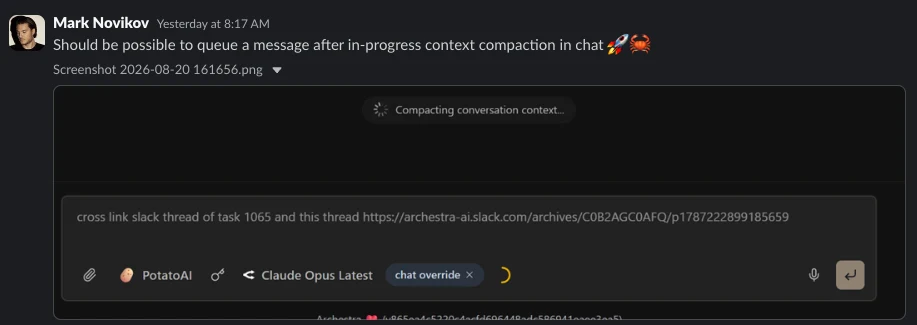
Our engineer Mark caught a minor bug in our chat UI: once context compaction starts, you can’t type another message until the session finishes. Pretty annoying when you’re multitasking.
Usually, this means a ticket, a context switch, and lost momentum. Or the bug joins sixty other inmates in the backlog while everyone agrees it should be fixed.
We now fix such bugs by dropping a 🦀 emoji in our Slack.
Mark wanted the composer to keep accepting and queuing messages during compaction. He posted a short request with a screenshot:
About three minutes later, the bot replies with access details. Here is one of those messages:
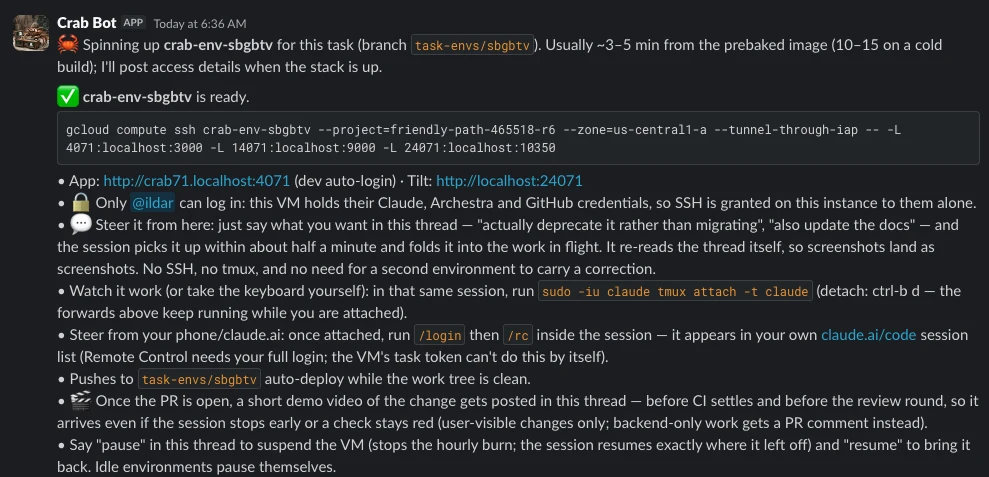
What happened in those three minutes was that a controller running in our cluster picked up the request from the Crab Bot and provisioned a virtual machine in GCP.
The virtual machine comes pre-configured with:
- The archestra-ai/archestra repo checked-out
- A local Kubernetes cluster
- Tilt (to run the full Archestra development stack)
- An installed headless Chromium
- OpenAPPA (we’ll get to this in “The Uncomfortable Part”)
- nitpicker
Finally, it starts a Claude Code session pointing Claude to start by reading the Slack thread to gather context on the task, all this with no human supervision.
Here’s how the VM login screen looks like if you SSH in:
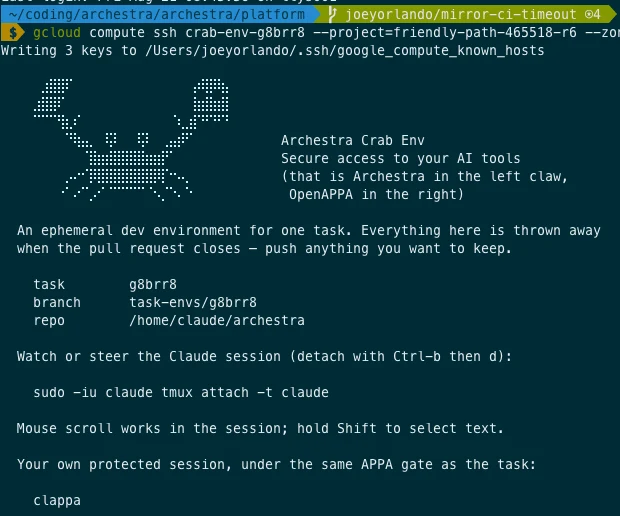
The main character of course is the crab holding Archestra in one claw and OpenAPPA in the other. There’s a reason for this, and we’ll talk about it later, but now, to the positives worth noting.
You can keep talking to the agent
The agent polls its own Slack thread. This allows you to add any message straight to the running session, and it will be folded into the work on the go. A follow-up thought, which used to be time-consuming, now costs one message in the thread you are already reading.
There’s also a small detail I like here. The session doesn’t receive your message as text. It first gets a pointer to the Slack thread and then reads the thread itself. This is especially important because many of our bug reports are screenshots. So instead of relying on someone else’s description, the agent opens the original thread and inspects the actual image before starting work. This is a perfect way to exclude the human factor.
The agent reviews its own work first
Once the PR is open, the session runs nitpicker, a tool built by our colleague Arseny. The tool reviews the diff with several models at once, merges their verdicts, and posts one comment on the PR.
The session then treats that comment as review feedback on its own work. It fixes valid issues and explains why it leaves the rest unchanged.
This way the first human to open the PR sees the work that has already survived a critical pass, with all disagreements written down.
And now to the part I enjoyed the most.
The session records its own demo
When the change can be presented, the session makes a screen recording of a freshly built feature and posts it back into the Slack thread. For this, we use shot-scraper video, a Playwright-powered tool Simon Willison released in June. The integration is about as complicated as the description: pass it a config, get a video back. Simon, if you’re reading this: thank you for saving us from building a smaller, worse version ourselves.
The result
Here is the end of Mark's bug. On the left is the demo of the fix: the agent opens our chat app, sends a message, waits for "Compacting conversation context…" to appear, then types a follow-up into the composer—exactly the thing that was impossible that morning! On the right is the Slack thread where Mark requested it, with the video embedded, Mark replying "Ship it", then "Promote", and the bot replying with a link to the public PR. Job done.
Watch the agent-recorded feature demo
To underline once again: no one either set up an environment or pulled a branch. The only human actions in the whole loop were:
- Describing the bug
- Watching the video
- Typing in "Ship it"
- Reviewing the PR
The uncomfortable part
Now that a lot of attention has been paid to handling minor bugs, let’s scale things up a bit.
Some of our tasks are not “fix this button”. They're “our internal staging deployment is slow, go figure out why.”
An agent cannot answer that just by reading a diff. It needs to look at the running system (pods, restarts, OOM kills, container logs, resource limits). It might need call recordings, product analytics, or the Slack thread where three people have already diagnosed half of it.
We gave these sessions read access to exactly that:
- The Claude session is registered with an MCP gateway.
- It runs in our own Archestra deployment.
- It can read our staging Kubernetes cluster, our Slack, call recordings, and product analytics.
Each of those tools is read-only by construction, and each one runs with the credentials of the person who asked for the environment, so a session can’t go beyond the access level of its requester.
Let’s look once again at what we've built:
- An agent with read access to internal data (customer names, tenant data, cluster internals, screenshots of production).
- The same agent with a network connection and web tools.
- The same agent pushing code to GitHub, which is public for our platform repo.
That's the very lethal trifecta that we wired up on purpose, on a machine with nobody watching it. If a session ever decides to put a requester’s name in a commit message, there is no human in the loop to catch it.
You can include a rule in the prompt to block this behavior, which we do: there's a whole confidentiality section instructing an agent to describe its work in neutral technical terms and never name a customer. But prompt instructions are as reliable as the model's mood—not something you can call “direct control”.
There’s a post I wrote about why models are structurally vulnerable to this, and another about what happens when you give an agent too much access and hope for the best. Which brings us to Simon Willison again, who wrote earlier this year that he is on the record predicting "a challenger disaster for coding agents security" in 2026, based on how vulnerable coding agents are to precisely this kind of attack.
OpenAPPA tracks what the agent reads and checks where it can send data.
What we put in front of it
OpenAPPA is a local policy engine. It tracks the restrictions on data the agent has read and checks each tool call before it runs. In our setup, the rules are:
- A session starts unrestricted.
- Reading from an internal tool marks the session as internal.
- Once marked internal, the session can’t publish to public destinations without an authorized review—for example, by copying internal logs and configuration into a public GitHub issue.
Here’s what that means for our bug reports:
After reading an internal Slack thread, the agent can’t simply post what it learned to a public GitHub issue. OpenAPPA blocks the tool call before it runs.
The agent needs the original thread and screenshots to understand the bug. Giving it that access shouldn’t also give it permission to publish the internal information it finds there.
OpenAPPA covers both MCP tools and CLI tools. For example, we added a script that checks which cluster a kubectl command reads from. If it’s a non-local cluster, the output is marked internal. The script also marks reads from cloud APIs as internal, while leaving ordinary local development alone.
If an agent disguises a command in a way the script doesn’t recognize, we also use OpenAPPA’s built-in LLM classifier as a second line of defense. It assesses calls we haven’t manually annotated and helps identify commands that read internal data, so the same restrictions can apply.
OpenAPPA is MIT-licensed and currently in preview; the paper is up and the policy reference is public, but it’s still an RFC rather than a finished product. We’re using it on our own bug-fixing sessions to see how these policies hold up when agents need internal data to do useful work.
We'd rather show up in the evidence for the optimistic case than end up in the headlines with a major incident. Simon, if you ever want to try to break it, please do. It may be exactly the stress test this thing needs.
The verdict
Things it’s good at: small, well-described, self-contained fixes.
Things it’s not so good at: anything that requires taste, architecture, or an argument. We don’t let it independently work on hard problems, as those require us to be ‘in the loop’. Its PRs open on a private mirror first and get published to the public repo only when a human says "Promote".
The tool hasn't made us faster at hard work, but it has reduced the cost of a small bug fix to the cost of a bug report, and as it turns out, an enormous amount of bugs are much more affordable and easier to fix than we’ve got used to thinking.
Drop a crab in the thread. Go back to what’s important.