Notes without app switching
Capture notes, tasks, links, and snippets from the edge of your screen without leaving the app you're in.
One-time purchase per major version · No subscription
SideNotes requires macOS 13+ · SideNotes Mobile is sold separately. Learn more
iCloud Synchronization
Keep your notes in sync across your devices with iCloud. Note: SideNotes and SideNotes Mobile (iPhone and iPad) are sold separately.

Make it look your way
SideNotes looks great out of the box. Choose a built-in theme or easily create your own.

Made for safety
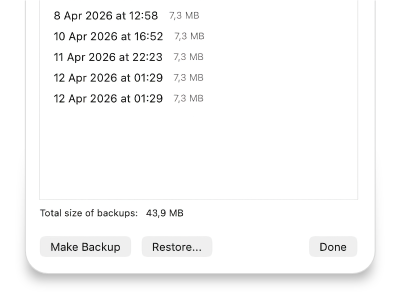
Your notes matter. Alongside iCloud sync, SideNotes includes automatic backups for extra safety.
Integrate it

SideNotes offers many ways to integrate it with your workflow: Apple Shortcuts, AppleScript API, and URL-based API. Some apps are already integrated: Alfred, Hookmark, PopClip, Dropzone, and Raycast. See more here.
New
Markdown. Now Invisible!
You can format your notes using Markdown. And yet, you don't need to see its markup.

What's New in SideNotes 1.6
Pin Notes & Folders
Keep your most important notes and folders at the top of the list. Perfect for quick access to frequently used content.

Quick Formatting Toolbar
Select text and format it instantly.

Fold Notes
Collapse long notes to save screen space. Expand them only when you need to see the full content. Clean and organized.

There’s much more
SideNotes looks small, but it’s surprisingly powerful.

Quick Access — Anywhere You Need
SideNotes is displayed on top of other apps. No matter if you work in full screen mode, regular windows, or in Stage Manager. SideNotes is always on top. You can quickly show or hide it with a keyboard shortcut, by clicking the Open Bar, or by simply moving your mouse cursor to the screen edge (Hot Side mode).

Folders, Colors, Reordering
To keep everything clean, SideNotes offers you folders. You can quickly move your notes to other folders with the Command-Shift-M shortcut. And colors. It's easier to distinguish your notes with colors. And if you don't like full-background colors, you can choose to display a little bar on the left.

Images, File Shortcuts, Tasks
No place for a just-taken screenshot? Put it into SideNotes. Need access to some important file? SideNotes will make a shortcut for it. You can also enter colors in #rrggbb mode. Perfect for developers and designers. And most importantly: tasks.
Plenty of Features
Lots of settings, automatic backups and iCloud synchronization. We truly love making this app, so this is not the end. Stay in touch!
Images
Searching
Automatic Backups
Pinning Notes & Folders
Folding Notes
Quick Formatting Toolbar
Images
Searching
Automatic Backups
Pinning Notes & Folders
Folding Notes
Quick Formatting Toolbar
Quick Formatting Toolbar
Folding Notes
Pinning Notes & Folders
Automatic Backups
Searching
Images
Quick Formatting Toolbar
Folding Notes
Pinning Notes & Folders
Automatic Backups
Searching
Images
View All Features

SideNotes Mobile for iPhone and iPad
Put your notes in your pocket. Write down your fleeting thoughts when they come. Access them later on your computer.

What People Are Saying?
SideNotes is used by thousands of people every day. We've received hundreds of emails where SideNotes users tell how useful the app is. The app has great reviews on App Store®. Here are some reviews from our users:
Sidenotes has honestly been a game changer for me as a student. Whenever I’m studying or attending a lecture, I can hover or click and instantly jot down anything important, no friction, no switching apps, no distractions.
I use it to store important concepts during study sessions, deadlines, and exam reminders, and the best part is that it’s always right there when I need it. The creation of different folders is also a great addition, since I can easily group important notes into different subjects or sections. It feels like having a mini whiteboard on the side of my screen. Simple, fast, and useful. I couldn't recommend it more highly if you're a student trying to stay organized without clutter
This is my new favorite way to quickly write down my daily tasks as they come to mind. Also, I haven’t seen a quicker way to grab notes or text from another place like SideNotes, and believe me, it is quicker than anything else - like an inbox for the thoughts.
I love that I always have my notes accessible and in front of me no matter what I'm doing, always, while at the same time they never take up any extra space on my screen or clutter things up. (...) Check out the video
Frequently Asked Questions
-
One-time payment or subscription?
One‐time payment. Free updates within the current major version. Future major upgrades are paid separately.
-
Does one-time payment apply to SideNotes 1.x only?
Yes, a one-time payment covers SideNotes 1.x, including all minor (1.x) updates. SideNotes 2 will be a paid upgrade, with a discount for existing users, and free for users who purchased SideNotes within the last 6 months.
-
Minimum system requirements?
macOS 13 or newer
SideNotes Mobile requires iOS / iPadOS 17 or newer. -
What about SideNotes Mobile?
Yes — SideNotes Mobile is available for iPhone and iPad. Learn more here
-
Is SideNotes safe to use?
Yes. SideNotes is private by design. We do not collect, use, store, or have access to any of your notes or personal data recorded in the app. Your notes are stored locally on your device and, if you enable iCloud sync, in your private iCloud account managed by Apple. We cannot view, read, or analyze your content.
You can read our full Privacy Policy here: Privacy Policy.
-
Do you collect personal data or usage analytics?
No. SideNotes itself does not collect personal data, usage statistics, analytics, or telemetry. We do not track how you use the app and we do not store any information about your activity.
If you use SideNotes via Setapp, your use of the Setapp platform is subject to Setapp’s own Privacy Policy, which may describe data collection or analytics performed by Setapp independently of us. If you purchase via Paddle, Paddle.com processes the order and shares the information necessary to fulfill your purchase with us.
Full details are available in the Privacy Policy.
-
Does SideNotes support Apple Silicon?
Yes, it supports Apple Silicon as well as Intel.
-
Do you offer student discount?
Sure! It's available through this website.
-
My trial expired. Can I get longer trial?
Sure. Please contact us and we'll give you access to a longer trial.
-
Does SideNotes support iCloud synchronization?
Yes!
-
Does SideNotes support light and dark mode?
Out of the box. It's up to your system preferences.