For many years I have been tracking my runs using iPhones and since the end of 2018 an Apple Watch 4, using Nike’s running app. I had issues with tracking and syncing, and did not like that the Nike app does not let you download your running data (solved it with this). After a few years I decided to start using Apple’s workout app. It lets you export your data (Health app, export all data) and there is no need to upload to a cloud. Syncing is seamless. I created a few scripts that parse the data, create graphs with speed, altitude, heart rate and an annotated map. It also allows me to automatically calculate stint times.
I run a few times a week and almost always the same route. Total distance of that route is about 9.7km. First and last kilometer is through busy areas of the city, but there are no tall buildings. For the rest trees and water.
Nike usually logged between 9.6 and 9.8 kilometers, but sometimes had weird swings. When I started using Apple’s workout app with watchOS 7, results were similar.
Almost always the first 50 to 150 meters had some tracking issues, but most of the time everything worked ok, with some weird measurements now and then.
Since watchOS 8 I have had a lot of issues with tracking my runs. I have logged 135 runs with watchOS 8 and 9 (only a few on 9, since the release), 128 of those the same route.
Three of those runs had completely messed up measurements. Two times no GPS file and tracking at all, one time a sudden jump or teleport of a few kilometers on the map and entirely wrong speed, direction and distance measurements after the jump.

The biggest issue since watchOS 8 however is that runs most of the time start in what I call erratic mode. Erratic mode influences distance, speed and altitude.
Measured distance is between 4% and 10% too low, usually around 7%. At 15 km/h (or 4:00 minute/kilometer) 7% translates into a recorded pace that is 18 seconds slower per kilometer. The measurement error is one-sided, always less kilometers, never more
Speed measurements are wildly inaccurate jumping up and down from 4 to 30 km/h, while running about 15 km/h
Altitude measurements are a lot smoother and less precise, this is not a problem but noticeable
If the watch works correctly, there is a GPS data point exactly every second. In erratic mode this is less than one per second (but not much less, fluctuates a lot, but around 50 per minute)
After about a kilometer I have to cross a busy street, I need to pause there regularly. Pausing always fixes erratic mode. I had to pause after a kilometer 67 out of 128 times on the route. If I don’t pause, erratic mode will usually stop at some random moment.
Below is a collection of speed plots of all runs on the same route on watchOS 8 and 9, where I didn’t pause after the first kilometer.

In about 80% of the cases runs start in erratic mode, and erratic mode lasts about 18 minutes on average but varies a lot.

Measured distance jumps often because of erratic mode. For me an average pace of 3:52 is great, while 4:12 is very bad. Measurement errors increase my pace up to 27 seconds per kilometer. The impact of erratic mode on my measured average pace is a lot more than the impact of my actual pace difference between runs.
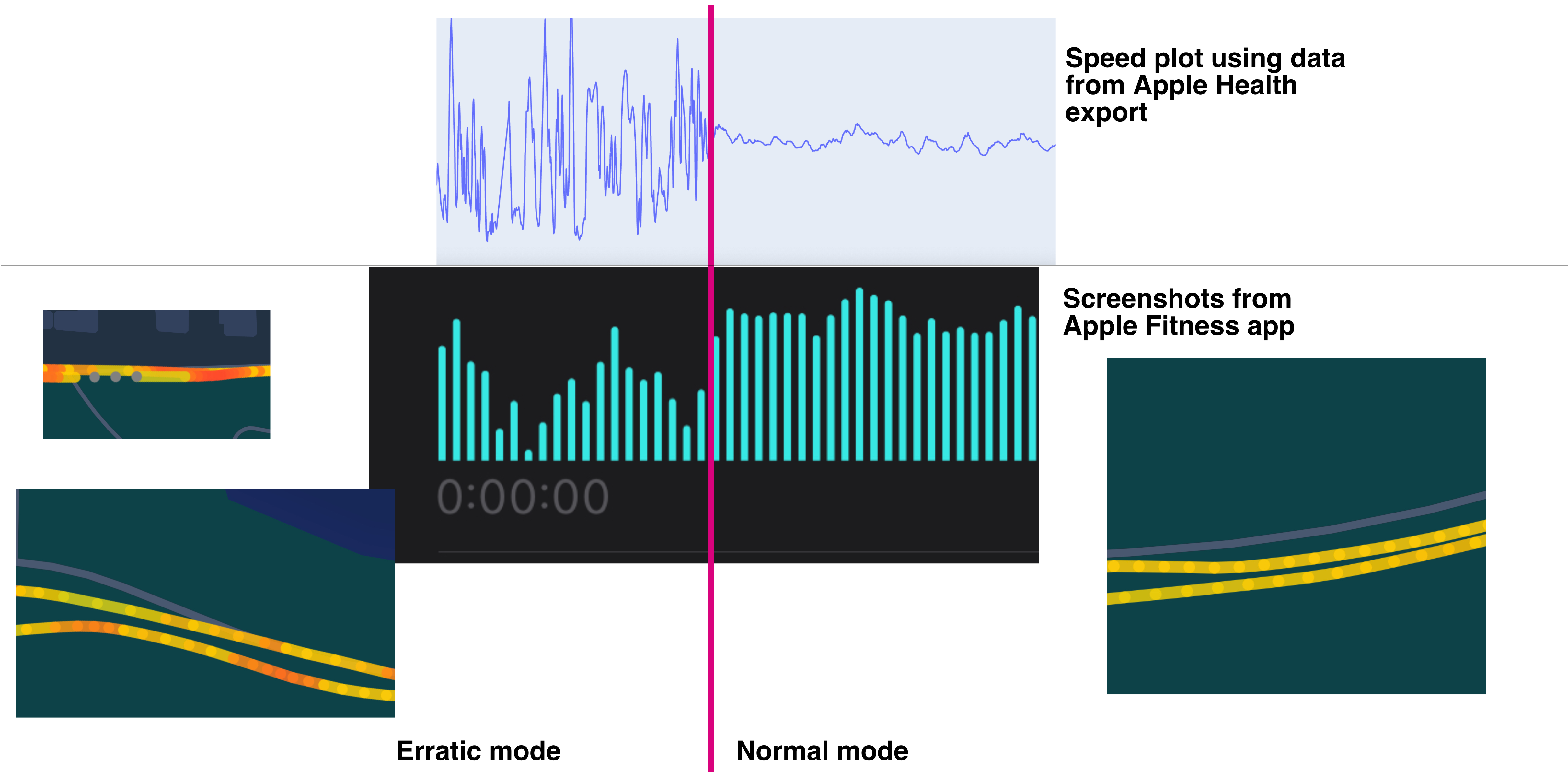
Apple’s fitness app shows a graph of speed since watchOS 9, you can see the impact of erratic mode in the graph above.
The plotted map shows some gaps during erratic mode, and the incoherent speed measurements are also visible, lot’s of little red bits. Kilometer splits, average pace and distance are also wrong. Basically everything is wrong except for total running time.
The watch announces kilometer split times every kilometer. The first kilometer split is always wrong, but after it becomes trickier. If I have to pause, I can rely on the info after. But if I don’t, I have to guess if a split is entirely or partly in erratic mode an if I have to subtract 20 or less seconds from a split time. The watch also shows current pace, which is way off in erratic mode.
The large jumps in measurement error between runs make the results too inconsistent. Erratic mode (and the switch between erratic and normal mode) during runs makes the watch useless for keeping a good pace. Speed, distance, average pace, pace splits, pace plots are all wrong.
Apple calculates a lot of stats, like VO2 max and calories, but they are probably also impacted by this. The only reliable measurement is time. The auto-pause feature during runs works really well.
For me the data is useful because I almost always run the exact same route, and parse the runs myself with a fixed distance. I am also aware of the flaws in measurements. But if I didn't know, the stats of the watch would do more harm than good for me. I would have a very hard time correlating factors (like how I feel during and after a run, weather, effort, etc…) with running performance.
Disabling wifi on the Apple Watch, Bluetooth on iPhone and combinations of those, to disconnect the watch from iPhone before starting the run
Restart or reset before run
Waiting 30 seconds after opening the workout app before running
Multiple reinstalls and fresh installs, is always a hassle because getting music on the watch never works well (see one of the many issues)
I haven’t installed any apps on the watch.
After multiple runs with erratic mode, I decided to contact Apple. In multiple calls they asked me to:
Check all settings and permissions
Upload screenshots of runs with issues
Run diagnosis software on the watch
Wipe my iPhone
Install a profile on the watch to keep track of all logs and shared those with Apple
When support finally contacted an engineer, they told me the errors were within their accepted margins. It would have been much better if they had told me that in the first call.
I hoped that watchOS 9 would resolve the issue, but it hasn’t. The XML health export file is broken since the update. I now need to run a script to fix it before I can parse my data.
The watch works great as a stopwatch and mp3 player
The watch is bad at measuring runs
Inconsistent during runs
Inconsistent between runs
Measurement errors are one-sided, always less distance
Most of the stats and graphs in Apple’s health and fitness app are wrong
Apple’s support process is not very good
Apple engineers accepted margins of error for health and fitness data are very wide
Because the watch performed better on earlier versions of watchOS, and even my iPhone 4S was better at tracking, I think the issue is software. The measurement errors are so bad, that they overshadow performance differences between runs, and during runs. At the same time Apple keeps adding more and more incorrect stats and graphs, building on top of a shaky foundation. The kilometer splits measured in seconds imply more accuracy than is delivered.
Running with only a watch and wireless earbuds still feels kind of magical, especially if tracking does work. I very much appreciate that I don’t need to upload my running data to some cloud and can parse everything myself. Hopefully Apple will fix all these issues.