A thermal pad modification can boost sustained clock speeds in the MacBook Neo under heavy loads, but it's not something that most people should attempt.
Every modern processor slows down when heat builds up, so better cooling can extend higher clock speeds. A post on the r/MacbookNeo subreddit says the MacBook Neo's A18 Pro chip previously dropped to about 2.3 GHz under load but held around 3.3 GHz after the change.
Two stacked thermal pads are positioned between the processor's heat spreader and the bottom case. During testing, the user reported about 5.2 watts of CPU power.
Thermal pads like the 1 mm Arctic TP-3 silicone pad are inexpensive and widely used for electronics cooling.
Accessing the processor area requires removing the MacBook Neo's bottom case. The cover is secured with several screws, and the system-on-a-chip sits near the center of the logic board beneath a heat spreader.
Reaching that area is relatively straightforward compared with many Apple laptops, but it still requires opening the computer. A thermal pad can be placed on top of that area so it presses against the aluminum bottom case when the laptop is reassembled.
The pads transfer heat from the processor into the aluminum shell instead of letting it accumulate around the chip. Better heat transfer allows the processor to maintain higher speeds before thermal throttling begins.
The Reddit mod uses the MacBook's aluminum case as a heatsink
In an experiment, a user placed two 1 mm thermal pads above the processor area so they pressed against the aluminum bottom case. Heat from the chip can then pass through the pads and spread across the metal underside of the laptop.
The modification turns the entire chassis into part of the cooling system. The results showed the processor could maintain higher speeds for longer periods before slowing down.
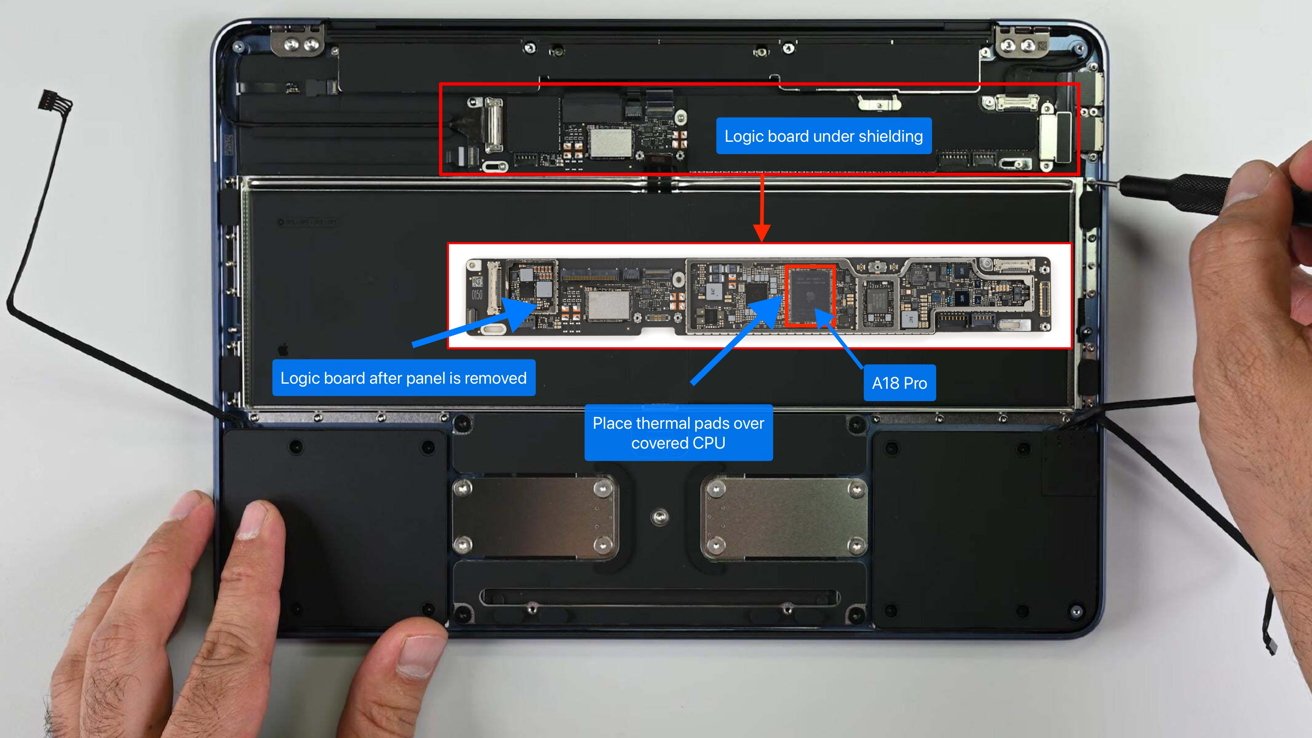
Once the MacBook Neo bottom panel is removed, you'll have to remove another panel to access the logic board. Image credit: iFixit
Accessing the processor area requires removing the MacBook Neo's bottom case. The cover is secured with several screws, and the system-on-a-chip sits near the center of the logic board beneath a heat spreader.
After removing the MacBook Neo's bottom cover, the logic board sits beneath a long shield along the top edge of the laptop. The processor is located under that shield.
The thermal pads are placed on top of the processor area so they press against the aluminum bottom case when the laptop is reassembled.
When your laptop's sensors detect that the temperature is nearing the safe limit, it slows down by reducing the clock speed and voltage. It's called thermal throttling and it helps prevent overheating.
The modification can increase case temperatures and may affect warranty coverage. Shifting heat to the chassis makes the laptop's bottom noticeably warmer during heavy use.
Thermal throttling is normal behavior for modern chips
If the MacBook Neo ever needs warranty service, users need to remove the thermal pads first and restore the system to its original configuration. Apple can deny warranty repairs if damage is determined to be caused by unauthorized modifications.
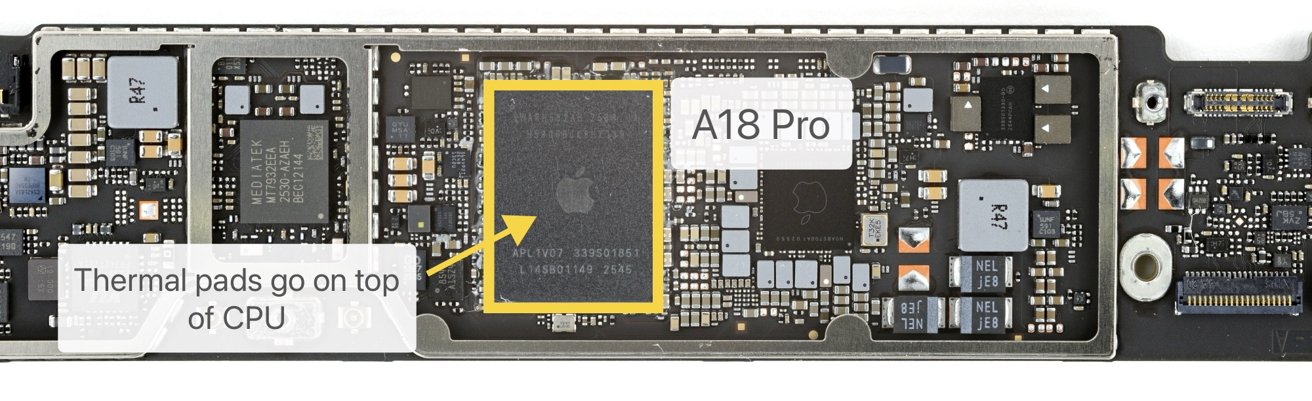
Logic board for the MacBook Neo. This is what you see once the panel over the logic board is removed. Image credit: iFixit
Thermal throttling isn't exclusive to Apple. As we've said before, every modern processor in computing devices, from smartphones to desktop GPUs, incorporates something to reduce the chip's speed when temperatures rise.
Modern CPUs typically experience short "boost" periods at higher clock speeds before settling into lower sustained speeds once heat accumulates. The cooling capacity determines the duration of these higher speeds.
Fanless laptops, like Apple's MacBook Air with Apple Silicon, can get pretty hot because they only use passive cooling. The MacBook Neo is similarly cooled, while the MacBook Pro line uses a fan attached to the heatsink.
Passive cooling systems have lower thermal capacity because they rely on conduction and natural airflow to dissipate heat. Fan-based systems actively push heat away from the processor, allowing sustained performance under heavy workloads.
The thermal pad mod has circulated for years
Enthusiasts have modified thermal pads on Intel MacBooks and Apple Silicon models in the past. In 2022, adding thermal pads to the M2 MacBook Air improved sustained benchmark scores by aiding heat dissipation.
Geekbench benchmarks are mostly not affected by thermal conditions, unless run repeatedly, keeping the machine hot. However, the Cinebench benchmark is a longer run, and does a pretty good job of assessing thermal slowdowns.
In 2022, a thermal pad-modified MacBook Air scored about 930 points higher in Cinebench than the stock version. That worked out to roughly an 8%-10% improvement in sustained performance.
Thermal pads that connect the processor to the bottom case move heat directly into the chassis
Community discussions across Reddit and forums report similar sustained performance improvements.
Why Apple takes a more conservative thermal approach
Thermal pads that connect the processor to the bottom case move heat directly into the chassis rather than through the laptop's internal cooling structure. The aluminum shell becomes hotter during heavy workloads, which can make the laptop uncomfortable to hold or use on a lap.
Some discussions note that thermal pad modifications can create hot spots on the case surface during extended tasks.
Consumer electronics must meet regulatory limits for exposed surface temperatures. Devices with metal enclosures generally can't exceed certain temperature thresholds without risking burns or failing certification requirements.
Apple's thermal design keeps more heat inside the system so the exterior stays comfortable to touch.
The company's design for the fanless MacBook Air models focuses on silent operation, thinness, and keeping surface temperatures safe. Other models, like the MacBook Pro, have active cooling systems with fans to handle higher performance during long workloads.
Better cooling allows processors to maintain higher speeds for longer periods. In the case of this modification, the extra heat ends up in the MacBook's aluminum chassis.