100% on-device · no upload
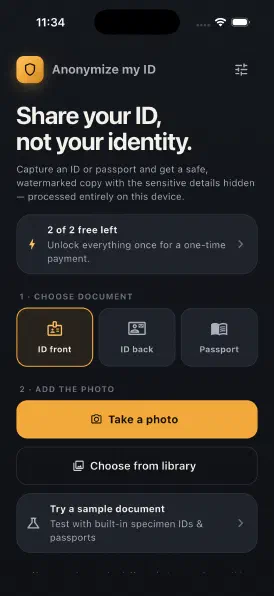
Photograph an ID card or passport and get a safe, watermarked, redacted copy — processed entirely on your phone. For the hosts, landlords, buyers and clients who ask for one.
No accountnothing to sign up for
No uploadyour photo never leaves the phone
IDs & passportsSpanish & English-speaking countries
One-time ≈ €4no subscription, ever
Three taps to a safe copy
1
Snap or pick
Photograph your ID or passport, or choose an existing photo. Everything happens offline.
2
Hide what matters
Drag the boxes over the sensitive fields. Free hides everything; Pro lets you choose blur, pixelate, partial or colour.
3
Share safely
Export a watermarked copy and send it anywhere — your real details stay private.
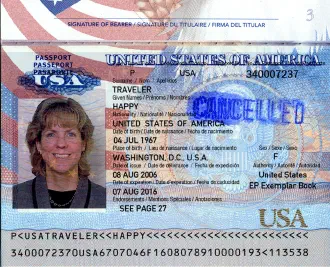
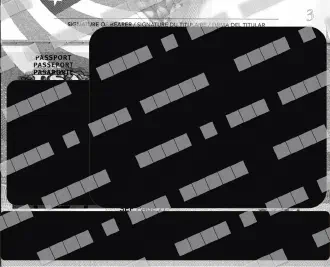
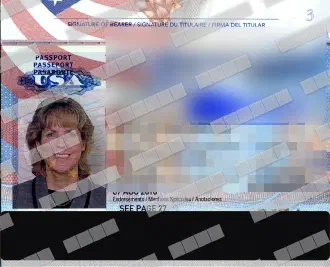
Built for privacy, made to travel
100% offline
All processing runs on-device with Apple/Google's image engine. Nothing is uploaded.
Nothing stored
No account, and the app never keeps a copy of your original photo.
IDs & passports
Front and back ID cards plus passport data pages, with sensible field presets.
Hide every field
Move, resize, add or delete redaction boxes to cover exactly what you want.
Blur · pixelate · bars
Pick how each field is hidden — a clean solid bar, a blur, or a pixelate.
Partial redaction
Reveal just the last digits of a number while hiding the rest.
B&W or colour
Keep the classic black-and-white photocopy look, or stay in colour.
Tamper-evident watermark
Tile a custom watermark across the whole image so copies can't be reused.
Simple pricing
Try it free. Unlock everything once — no subscription.
Free
€0
To get a feel for it
- 2 anonymizations per install
- Every sensitive field hidden
- Black & white + watermark
- ID cards & passports
- 100% offline
Best value
Pro
≈ €4 once
one-time · yours for life
Approx. — excludes VAT, varies by region
- Unlimited anonymizations
- Choose exactly what to hide
- Blur, pixelate or solid bars
- Partial redaction (show last digits)
- Keep it in colour
- Custom watermark text & opacity
Your identity never leaves your phone
There is no server, no account and no analytics on your documents. The original photo is processed locally and is never stored or sent anywhere. Read the privacy policy →
Questions
Is my document uploaded anywhere?
No. Everything is processed on your device. The app has no server and never sends or stores your photo.
What does the free version include?
2 anonymizations per install. Each one hides every sensitive field, renders in black & white and adds a watermark.
What do I get with Pro?
A one-time ≈ €4 unlock (Approx. — excludes VAT, varies by region) — yours for life, no subscription — for unlimited anonymizations and full control: choose what to hide, blur/pixelate/solid bars, partial redaction, colour, and a custom watermark.
Which documents are supported?
ID cards front and back — such as the Spanish DNI or NIE — and passport data pages, with field presets tuned for Spanish- and English-speaking countries.
Is it safe to share an anonymized copy?
The app helps you hide the sensitive fields and adds a tamper-evident watermark, so a shared copy can't be reused to impersonate you. You stay in control of exactly what's covered before you share.
Will a redacted copy be accepted everywhere?
No, and it is worth knowing where. A handful of checks are legally required to capture the complete document — a bank's anti-money-laundering verification, guest registration at a hotel in much of Europe, a statutory right-to-work check — and a redacted copy fails those. Everywhere else, which is most of what you will be asked, a redacted copy is exactly right. See when redacting your ID won't work.
Can I send a copy of my ID or passport by email or WhatsApp?
Only if you redact it first. Once the sensitive fields are hidden and the copy is watermarked, an intercepted or forwarded image can't be used to open accounts or forge documents. Anonymize my ID prepares that safe copy in a few taps.
Which phones does it run on?
iPhone and iPad on iOS 13 or later from the App Store, and Android phones on Google Play. It works fully offline on both.
Is it GDPR-friendly?
Yes. Because your document is processed 100% on-device with no account and no upload, it never becomes data that we — or anyone else — could store, leak or be compelled to hand over.
Guides
Plain-English advice on sharing your passport or ID without giving your identity away.