Read at your own pace. Code execution, quizzes, progress tracking, and the AI tutor are available in the interactive view with JavaScript enabled.
Introduction
A queue is a collection of items whereby its operations work in a FIFO - First In First Out manner. The two primary operations associated with them are enqueue and dequeue.
**Lesson Objectives**: At the end of this lesson, you will be able to: 1. Know what the *queue* data structure is and appreciate it's real-world use cases. 2. Learn how queues work and their operations. 3. Know and implement queues with two different approaches.
I'm sure all of us have been in queues before-- perhaps at billing counters, shopping centers, or cafes. The first person in the line is usually serviced first, then the second, third, and so forth.
We have this concept in computer science as well. Take the example of a printer. Suppose we have a shared printer, and several jobs are to be printed at once. The printer maintains a printing "queue" internally, and prints the jobs in sequence based on which came first.

Another instance where queues are extensively used is in the operating system of our machines. An OS maintains several queues such as a job queue, a ready queue, and a device queue for each of the processes. If you're interested, refer to this link to know more about them.
I hope we've got a solid high-level understanding about what queues are. Let's go ahead and understand how they work!
0How Do Queues Work?
How do queues work?
Consider a pipe, perhaps a metal one in your bathroom or elsewhere in the house. Naturally, it has two open ends. Imagine that we have some elements in the pipe, and we're trying to get them out. There will be one end through which we have inserted the elements, and there's another end from which we're getting them out. As seen in the figure below, this is precisely how the queue data structure is shaped.

Unlike the stack data structure that we primarily think of with one "open end", the queue has two open ends: the front and rear. They have different purposes-- with the rear being the point of insertion and the front being that of removal. However, internally, the front and rear are treated as pointers. We'll learn more about them in the subsequent sections programmatically.
Note that the element that got inside first is the initial one to be serviced, and removed from the queue. Hence the name: First In First Out (FIFO).
0Question 1
By which principle do queues work for enqueuing or dequeuing an element?
Queue Operations And Implementation Of Queues Using Python
Queue operations and Implementation of queues
Similar to how a stack has push and pop operations, a queue also has two pairwise operations:
- Enqueue: To add elements
- Dequeue: To remove elements.
Let's move on and cover each.
Click here to check out our lesson on the stack data structure!
0Enqueue
1. Enqueue
The enqueue operation, as said earlier, adds elements to your queue from the rear end. Initially, when the queue is empty, both our front (sometimes called head) and rear (sometimes called tail) pointers are NULL.
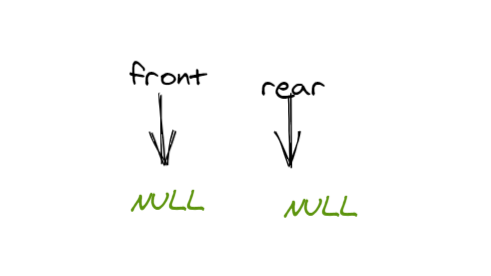
Now, let's add an element-- say, 'a' to the queue. Both our front and rear now point to 'a'.

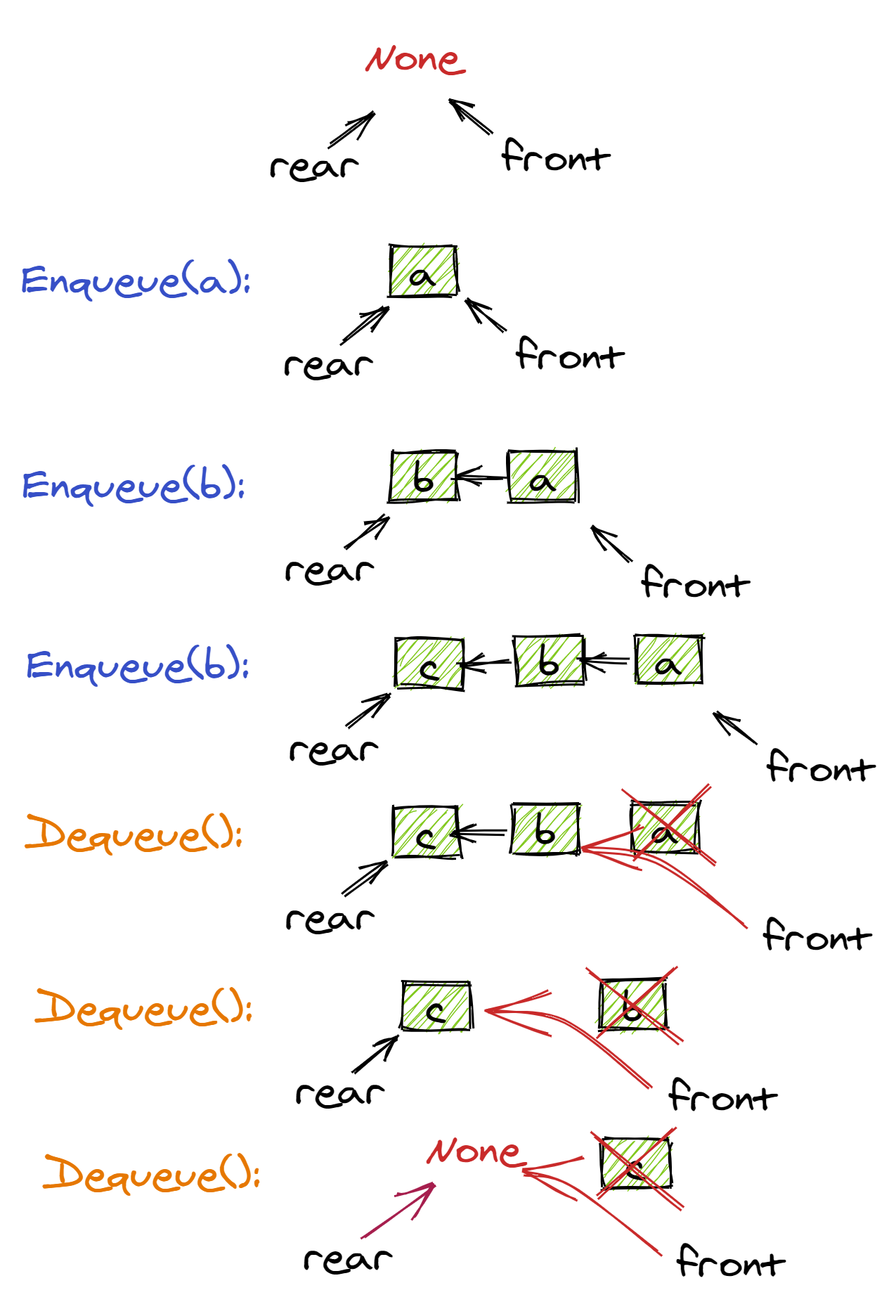
Let's add another element to our queue-- 'b'. Now, our front pointer remains the same, whereas the rear pointer points to 'b'. We'll add another item 'c' and you'll see that that element is also added at the rear end. Note that, a must somehow point to be internally, and b must point to c.

0Dequeue
2. Dequeue
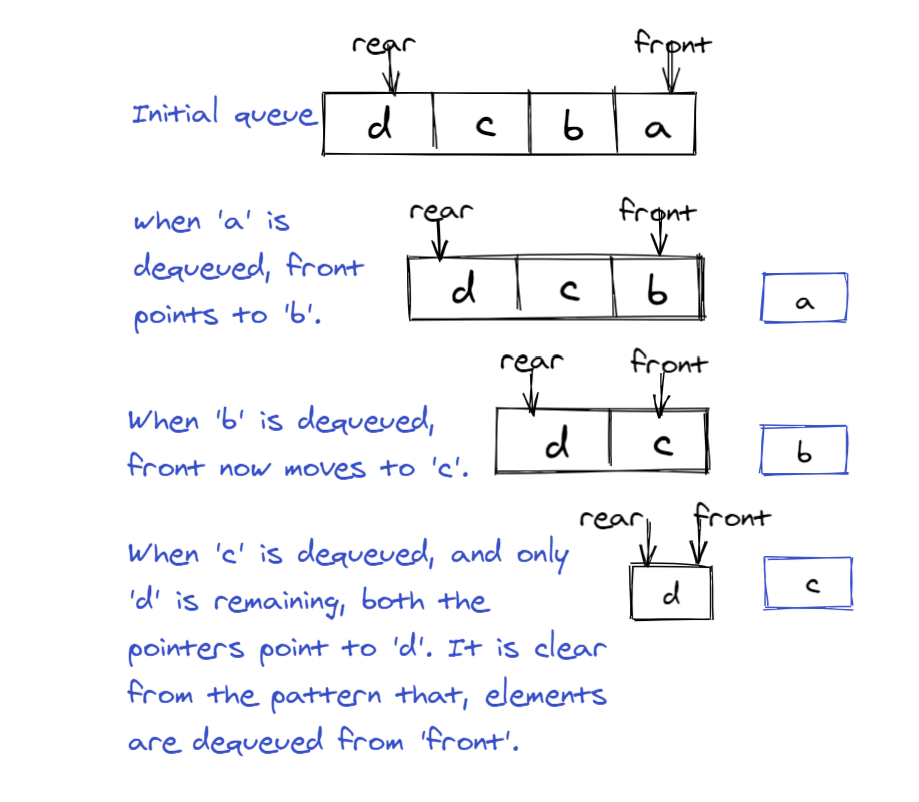
To dequeue means to remove or delete elements from the queue. This happens from the front end of the queue. A particular element is removed from a queue after it is done being processed or serviced. We cannot dequeue an empty queue, and we require at least one element to be present in the queue when we want to dequeue. The following figure explains the dequeuing of our previous queue.
0Question 2
When dequeuing an element, the front pointer points at the last element added to the queue.
Implementation Using Code
Implementation
Let's use python for our implementation. In python, queues can be implemented using three different modules from the python library.
- list (using a
listorarrayis generalizable to most languages) - collections.deque (language-specific)
- queue.Queue (language-specific)
Using the list class can be a costly affair since it involves shifting of elements for every addition or deletion. This requires O(n) time. But, with the round-robin technique, even with lists, we can achieve the time complexity of O(1). We have shown the implementation below.
Instead, we can also use the 'deque' class, which is a shorthand for 'Double-ended queue' and requires O(1) time, which is much more efficient.
0Question 3
Using list to implement a queue in any programming language, has the complexity of:
Using a List
So first-- we can quickly implement a queue using a list or array in most languages! This is intuitive given that they're both linear data structures, and we just need to enforce some constraints on data flow:
- To
enqueuean item in the queue, we can use the list functionappend. - To
dequeuean item from the queue, we can use the list functionpop(0). - If we want the "top-most" (or last element to be processed) item in the queue, we can get the last index of the list using the
[-1]index operator.
This is by far the easiest approach, but not necessarily the most performant.
# Initialize a queue list
queue = []

# Add elements
queue.append(1)
queue.append(2)
queue.append(3)

print("Initial queue state:")
print(queue)

# Removing elements from the queue
print("Elements dequeued from queue")
print(queue.pop(0))
print(queue.pop(0))
print(queue.pop(0))

print("Queue after removing elements")
print(queue)
// Initialize a queue list
queue = [];

// Add elements
queue.push(1);
queue.push(2);
queue.push(3);

console.log("Initial queue state:");
console.log(queue);

// Removing elements from the queue
console.log("Elements dequeued from queue");
console.log(queue.pop());
console.log(queue.pop());
console.log(queue.pop());

console.log("Queue after removing elements");
console.log(queue);
List<int> queue = new List<int>();
queue.Add(1);
queue.Add(2);
queue.Add(3);

Console.WriteLine("Initial queue state: ");
queue.ForEach(i => Console.WriteLine(i));

Console.WriteLine("Elements dequeued from queue");
Console.WriteLine(queue[0]);
queue.RemoveAt(0);
Console.WriteLine(queue[0]);
queue.RemoveAt(0);
Console.WriteLine(queue[0]);
queue.RemoveAt(0);

Console.WriteLine("Queue after removing elements");
queue.ForEach(i => Console.WriteLine(i));
List<Integer> queue = new ArrayList<Integer>();
queue.add(1);
queue.add(2);
queue.add(3);

System.out.println("Initial queue state: ");
System.out.println(queue);

System.out.println("Elements dequeued from queue");
System.out.println(queue.remove(0));
System.out.println(queue.remove(0));
System.out.println(queue.remove(0));


System.out.println("Queue after removing elements");
System.out.println(queue);
package main

import "fmt"

func main() {
    // Initialize a queue slice
    queue := []int{}

    // Add elements
    queue = append(queue, 1)
    queue = append(queue, 2)
    queue = append(queue, 3)

    fmt.Println("Initial queue state:")
    fmt.Println(queue)

    // Removing elements from the queue
    fmt.Println("Elements dequeued from queue")
    for i := 0; i < 3; i++ {
        fmt.Println(queue[0])
        queue = queue[1:]
    }

    fmt.Println("Queue after removing elements")
    fmt.Println(queue)
}
#include <iostream>
#include <queue>

int main() {
    // Initialize a queue
    std::queue<int> queue;

    // Add elements
    queue.push(1);
    queue.push(2);
    queue.push(3);

    std::cout << "Initial queue state:\n";
    std::queue<int> tempQueue = queue;
    while (!tempQueue.empty()) {
        std::cout << tempQueue.front() << ' ';
        tempQueue.pop();
    }
    std::cout << '\n';

    // Removing elements from the queue
    std::cout << "Elements dequeued from queue\n";
    for (int i = 0; i < 3; i++) {
        std::cout << queue.front() << '\n';
        queue.pop();
    }

    std::cout << "Queue after removing elements\n";
    // The queue is now empty, so there's nothing to print
}
Note that in C++, I used the standard queue container, which doesn't allow for direct access to its elements. The initial printout of the queue state is achieved by copying the queue to a temporary one and iterating through it. In the Go version, I used slices, which provide direct access to the underlying array, making it easier to print the entire queue.
To make this more efficient with lists, we can create a fixed-sized list and use it with two pointers and modular operations. It will yield a queue with O(1) access and deletion time.
SIZE = 10
queue = [-1 for _ in range(SIZE)] # A queue with 10 capacity

front_pointer = -1
rear_pointer = -1

def enqueue(data):
    # Check if queue is empty
    if front_pointer == -1 and rear_pointer == -1:
        front_pointer = 0
        rear_pointer = 0
        queue[front_pointer] = data
        return

    # Check if overflow
    if (rear_pointer + 1) % SIZE == front_pointer:
        print("Queue overflow")
        return

    # Enqueue
    rear_pointer = (rear_pointer + 1) % SIZE
    queue[rear_pointer] = data

def dequeue(data):
    # Check if underflow
    if front_pointer == -1 and rear_pointer == -1:
        print("Queue underflow")
        return

    # Check if queue becomes empty
    if rear_pointer == front_pointer:
        rear_pointer = -1
        front_pointer = -1
        return

    # Dequeue
    data = queue[front_pointer]
    front_pointer = (front_pointer + 1) % SIZE
    return data

def is_empty():
    return front_pointer == -1

def is_full():
    return front_pointer != -1 and front_pointer == rear_pointer
function Queue() {
  this.items = [];
}

Queue.prototype.enqueue = function (val) {
  this.items.push(val);
};

Queue.prototype.dequeue = function () {
  return this.items.shift();
};

// Check if the queue is empty
Queue.prototype.isEmpty = function () {
  return this.items.length == 0;
};

// Get the element at the front of the queue
Queue.prototype.peek = function () {
  return !this.isEmpty() ? this.items[0] : undefined;
};

Queue.prototype.length = function () {
  return this.items.length;
};

let q = new Queue();
console.log(q);
private static List<int> queue = new List<int>(10); // A List with size 10

public static void Enqueue(int value)
{
    queue.Add(value);
}

public static void Dequeue()
{
    queue.RemoveAt(0);
}

public static bool IsEmpty()
{
    return queue.Count == 0;
}

public static int Peek()
{
    return queue[0];
}

public static int Length()
{
    return queue.Count;
}

public static bool IsFull()
{
    return queue.Count == 10;
}
private static List<Integer> queue = new ArrayList<Integer>(10); // A List with size 10

public static void Enqueue(int value) {
    queue.add(value);
}

public static void Dequeue() {
    queue.remove(0);
}

public static Boolean IsEmpty() {
    return queue.size() == 0;
}

public static int Peek() {
    return queue.get(0);
}

public static int Length() {
    return queue.size();
}

public static Boolean IsFull() {
    return queue.size() == 10;
}
package main

import "fmt"

var queue []int

func Enqueue(value int) {
    queue = append(queue, value)
}

func Dequeue() {
    queue = queue[1:]
}

func IsEmpty() bool {
    return len(queue) == 0
}

func Peek() int {
    return queue[0]
}

func Length() int {
    return len(queue)
}

func IsFull() bool {
    return len(queue) == 10
}

func main() {
    // Example usage
    Enqueue(5)
    fmt.Println(Peek()) // Output: 5
}
#include <iostream>
#include <vector>

class Queue {
private:
    std::vector<int> queue;
    const int maxSize = 10;

public:
    void Enqueue(int value) {
        if (queue.size() < maxSize) {
            queue.push_back(value);
        }
    }

    void Dequeue() {
        if (!queue.empty()) {
            queue.erase(queue.begin());
        }
    }

    bool IsEmpty() {
        return queue.empty();
    }

    int Peek() {
        return queue.front();
    }

    int Length() {
        return queue.size();
    }

    bool IsFull() {
        return queue.size() == maxSize;
    }
};

int main() {
    // Example usage
    Queue queue;
    queue.Enqueue(5);
    std::cout << queue.Peek() << std::endl; // Output: 5
}
Linked List Implementation Using Code
Linked List Implementation
There is another way to implement a queue. This is very similar to the Linked List implementation of stacks we used in a previous lesson.
```py
class Node:
    def __init__(self, data, next=None):
        self.data = data
        self.next = next

class Queue:
    def __init__(self):
        self.front = None
        self.rear = None

    def enqueue(self, data):
        # Check if queue is empty
        if self.front is None:
            self.front = self.rear = Node(data)
            return

        self.rear.next = Node(data)
        self.rear = self.rear.next

    def dequeue(self):
        # Check if queue is empty
        if self.front is None:
            print("Queue underflow!")
            return

        data = self.front.data
        self.front = self.front.next
        return data

    def is_empty(self):
        return self.front is None


q = Queue()

print("Enqueuing: ", 1, 2, 3, 4, 5)
q.enqueue(1)
q.enqueue(2)
q.enqueue(3)
q.enqueue(4)
q.enqueue(5)

print("Dequeueing")
print(q.dequeue())
print(q.dequeue())
print(q.dequeue())
print(q.dequeue())
print(q.dequeue())

```
```csharp
using System;
public class Node
{
    public int Data;
    public Node Next;

    public Node(int key)
    {
        Data = key;
        Next = null;
    }
}

public class Queue
{
    public Node front;
    public Node rear;

    public Queue()
    {
        front = null;
        rear = null;
    }

    public void Enqueue(int key)
    {
        Node node = new Node(key);

        // If the queue is empty, then new node is front and rear
        if (rear == null)
        {
            front = node;
            rear = node;
            return;
        }

        // Add the new node at the end of queue and change rear
        rear.Next = node;
        rear = node;
    }

    public void Dequeue()
    {
        // If queue is empty, do nothing.
        if (front == null)
            return;

        // Store previous front and move front one node ahead
        front = front.Next;

        // If front becomes NULL, then change rear also as NULL
        if (front == null)
            rear = null;
    }
}

public class Test
{
    public static void Main(String[] args)
    {
        Queue queue = new Queue();

        Console.WriteLine("Enqueuing 1,2,3,4,5");
        queue.Enqueue(1);
        queue.Enqueue(2);
        queue.Enqueue(3);
        queue.Enqueue(4);
        queue.Enqueue(5);

        Console.WriteLine("Dequeuing all nodes");
        queue.Dequeue();
        queue.Dequeue();
        queue.Dequeue();
        queue.Dequeue();
        queue.Dequeue();
    }
}
```
```java
public class Main {

    public static void main(String[] args) {
        Queue queue = new Queue();

        System.out.println("Enqueuing 1,2,3,4,5");
        queue.Enqueue(1);
        queue.Enqueue(2);
        queue.Enqueue(3);
        queue.Enqueue(4);
        queue.Enqueue(5);

        System.out.println("Dequeuing all nodes");
        queue.Dequeue();
        queue.Dequeue();
        queue.Dequeue();
        queue.Dequeue();
        queue.Dequeue();
    }
}

class Node {

    public int Data;
    public Node Next;

    public Node(int key) {
        Data = key;
        Next = null;
    }
}

class Queue {

    public Node front;
    public Node rear;

    public Queue() {
        front = null;
        rear = null;
    }

    public void Enqueue(int key) {
        Node node = new Node(key);

        // If the queue is empty, then new node is front and rear
        if (rear == null) {
            front = node;
            rear = node;
            return;
        }

        // Add the new node at the end of queue and change rear
        rear.Next = node;
        rear = node;
    }

    public void Dequeue() {
        // If queue is empty, do nothing.
        if (front == null) {
            return;
        }

        // Store previous front and move front one node ahead
        front = front.Next;

        // If front becomes NULL, then change rear also as NULL
        if (front == null) {
            rear = null;
        }
    }
}
```
```go
package main

import "fmt"

type Node struct {
	Data int
	Next *Node
}

type Queue struct {
	front *Node
	rear  *Node
}

func (q *Queue) Enqueue(key int) {
	node := &Node{Data: key}

	if q.rear == nil {
		q.front = node
		q.rear = node
		return
	}

	q.rear.Next = node
	q.rear = node
}

func (q *Queue) Dequeue() {
	if q.front == nil {
		return
	}

	q.front = q.front.Next

	if q.front == nil {
		q.rear = nil
	}
}

func main() {
	queue := &Queue{}

	fmt.Println("Enqueuing 1,2,3,4,5")
	queue.Enqueue(1)
	queue.Enqueue(2)
	queue.Enqueue(3)
	queue.Enqueue(4)
	queue.Enqueue(5)

	fmt.Println("Dequeuing all nodes")
	queue.Dequeue()
	queue.Dequeue()
	queue.Dequeue()
	queue.Dequeue()
	queue.Dequeue()
}
```
```cpp
#include <iostream>

class Node {
public:
    int Data;
    Node* Next;

    Node(int key) : Data(key), Next(nullptr) {}
};

class Queue {
public:
    Node* front;
    Node* rear;

    Queue() : front(nullptr), rear(nullptr) {}

    void Enqueue(int key) {
        Node* node = new Node(key);

        if (rear == nullptr) {
            front = node;
            rear = node;
            return;
        }

        rear->Next = node;
        rear = node;
    }

    void Dequeue() {
        if (front == nullptr) {
            return;
        }

        Node* temp = front;
        front = front->Next;

        if (front == nullptr) {
            rear = nullptr;
        }

        delete temp;
    }
};

int main() {
    Queue queue;

    std::cout << "Enqueuing 1,2,3,4,5\n";
    queue.Enqueue(1);
    queue.Enqueue(2);
    queue.Enqueue(3);
    queue.Enqueue(4);
    queue.Enqueue(5);

    std::cout << "Dequeuing all nodes\n";
    queue.Dequeue();
    queue.Dequeue();
    queue.Dequeue();
    queue.Dequeue();
    queue.Dequeue();
}
```
```js
class Node {
    constructor(key) {
        this.Data = key;
        this.Next = null;
    }
}

class Queue {
    constructor() {
        this.front = null;
        this.rear = null;
    }

    Enqueue(key) {
        let node = new Node(key);

        if (this.rear === null) {
            this.front = node;
            this.rear = node;
            return;
        }

        this.rear.Next = node;
        this.rear = node;
    }

    Dequeue() {
        if (this.front === null) {
            return;
        }

        let temp = this.front;
        this.front = this.front.Next;

        if (this.front === null) {
            this.rear = null;
        }
    }
}

let queue = new Queue();

console.log("Enqueuing 1,2,3,4,5");
queue.Enqueue(1);
queue.Enqueue(2);
queue.Enqueue(3);
queue.Enqueue(4);
queue.Enqueue(5);

console.log("Dequeuing all nodes");
queue.Dequeue();
queue.Dequeue();
queue.Dequeue();
queue.Dequeue();
queue.Dequeue();
```
The Queue Class
Implementation of queue using queue class
Another way of using queues in python is via the queue class available in Queue module. It has numerous functions and is widely used along with threads for multi-threading operations. It further has FIFO, LIFO, and priority types of queues. However, we'll implement a simple queue using the queue class of the python library.
The queue class is imported from the Queue module. The queue is initialized using the Queue() constructor. Note that it accepts a maxsize() argument, specifying an upper boundary of queue size to throttle memory usage.
We use the put() function to add elements to the queue, and the get() function to remove elements from the queue. Since we have a maxsize check here, we have two other functions to check empty and full conditions. The function empty() returns a boolean true if the queue is empty and false if otherwise. Likewise, the full() function returns a boolean true if the queue is full and false if otherwise.
Here, we added elements to the queue and checked for the full condition using q.full(). Since the maxsize is four and we added four elements, the boolean is set to true.
Later, we removed three elements, leaving one element in the queue. Hence the q.empty() function returned boolean false.
You can find more functions on deque collections here.
```py
# Python program to demonstrate the implementation of a queue using the queue module

from queue import Queue

# Initializing a queue with maxsize 4
q = Queue(maxsize = 4)

# Add/enqueue elements to queue
q.put('a')
q.put('b')
q.put('c')
q.put('d')

# Return Boolean for Full Queue
print("\nFull: ", q.full())

# Remove/dequeue elements from queue
print("\nElements dequeued from the queue")
print(q.get())
print(q.get())
print(q.get())

# Return Boolean for Empty Queue
print("\nEmpty: ", q.empty())
print("\nQueue size:", q.qsize()) #prints size of the queue
```
```csharp
using System;
using System.Collections.Generic;

public class Program
{

    static void Main(string[] args)
    {
        //Initialize a queue with max size 4 and of type char
        Queue<char> queue = new Queue<char>(4);

        //Enqueue items
        queue.Enqueue('a');
        queue.Enqueue('b');
        queue.Enqueue('c');
        queue.Enqueue('d');

        // Get the first item from the queue
        Console.WriteLine("First item in queue " + queue.Peek());

        // Get the size of the queue
        Console.WriteLine("Number of items in queue " + queue.Count);

        // Dequeue the first item from the queue
        Console.WriteLine("Dequeue first item " + queue.Dequeue());

        Console.WriteLine("Queue now looks like this: ");
        foreach(char c in queue){
            Console.WriteLine(c);
        }

        //Clear all the items from the queue
        queue.Clear();

        Console.WriteLine("Queue now looks like this ");
        foreach(char c in queue){
            Console.WriteLine(c);
        }
    }
}
```
```java
import java.util.LinkedList;
import java.util.Queue;

public class Main {
    public static void main(String[] args) {
    //Initialize a queue with max size 4 and of type char
        Queue<Character> queue = new LinkedList<>();

        //Enqueue items
        queue.add('a');
        queue.add('b');
        queue.add('c');
        queue.add('d');

        // Get the first item from the queue
        System.out.println("First item in queue " + queue.peek());

        // Get the size of the queue
        System.out.println("Number of items in queue " + queue.size());

        // Dequeue the first item from the queue
        System.out.println("Dequeue first item " + queue.remove());

        System.out.println("Queue now looks like this: ");
        System.out.println(queue);

        //Clear all the items from the queue
        queue.clear();

        System.out.println("Queue now looks like this ");
        System.out.println(queue);
    }
}
```
```go
// Go program to demonstrate the implementation of a queue using channels

package main

import (
	"fmt"
)

func main() {
	// Initializing a channel as a queue with max size 4
	q := make(chan string, 4)

	// Enqueue elements to queue
	q <- "a"
	q <- "b"
	q <- "c"
	q <- "d"

	// Check if the queue is full
	fmt.Println("\nFull:", len(q) == cap(q))

	// Dequeue elements from queue
	fmt.Println("\nElements dequeued from the queue")
	fmt.Println(<-q)
	fmt.Println(<-q)
	fmt.Println(<-q)

	// Check if the queue is empty
	fmt.Println("\nEmpty:", len(q) == 0)

	// Print the size of the queue
	fmt.Println("\nQueue size:", len(q))
}
```
```javascript
// JavaScript program to demonstrate the implementation of a queue using an array

let q = [];

// Initializing a queue with maxsize 4
let maxSize = 4;

// Enqueue elements to queue
q.push('a');
q.push('b');
q.push('c');
q.push('d');

// Return Boolean for Full Queue
console.log("\nFull:", q.length === maxSize);

// Dequeue elements from queue
console.log("\nElements dequeued from the queue");
console.log(q.shift());
console.log(q.shift());
console.log(q.shift());

// Return Boolean for Empty Queue
console.log("\nEmpty:", q.length === 0);

// Print the size of the queue
console.log("\nQueue size:", q.length);
```
Initializing A Deque With Deque() Constructor
Implementation of queue using deque class
Let's go ahead and utilize a queue along with its operations in python language using the deque class!
The deque class is imported from the collections module. We use append() function to add elements to the queue and popleft() function to remove elements from the queue.
We can see that after enqueuing, our initial queue looks like this:
Initial queue:
deque(['a', 'b', 'c', 'd'])
And after dequeuing, our final queue looks something like this:
Final queue
deque(['d'])
You can find more functions on deque collections here.
```python
# Python program to demonstrate queue implementation using collections.dequeue
from collections import deque

# Initializing a deque with deque() constructor
q = deque()

# Adding/Enqueueing elements to a queue
q.append('a')
q.append('b')
q.append('c')
q.append('d')

print("Initial queue:")
print(q)

# Removing/Dequeuing elements from a queue
print("\nElements dequeued from the queue:")
print(q.popleft())
print(q.popleft())
print(q.popleft())

print("\nFinal queue")
print(q)
```
```java
// Java program to demonstrate queue implementation using ArrayDeque
import java.util.ArrayDeque;

public class Main {
    public static void main(String[] args) {
        ArrayDeque<String> q = new ArrayDeque<>();

        // Adding/Enqueueing elements to a queue
        q.add("a");
        q.add("b");
        q.add("c");
        q.add("d");

        System.out.println("Initial queue:");
        System.out.println(q);

        // Removing/Dequeuing elements from a queue
        System.out.println("\nElements dequeued from the queue:");
        System.out.println(q.poll());
        System.out.println(q.poll());
        System.out.println(q.poll());

        System.out.println("\nFinal queue");
        System.out.println(q);
    }
}
```
```javascript
// JavaScript program to demonstrate queue implementation using Array

let q = [];

// Adding/Enqueueing elements to a queue
q.push('a');
q.push('b');
q.push('c');
q.push('d');

console.log("Initial queue:");
console.log(q);

// Removing/Dequeuing elements from a queue
console.log("\nElements dequeued from the queue:");
console.log(q.shift());
console.log(q.shift());
console.log(q.shift());

console.log("\nFinal queue");
console.log(q);
```
```cpp
// C++ program to demonstrate queue implementation using STL
#include <iostream>
#include <queue>

int main() {
    std::queue<char> q;

    // Adding/Enqueueing elements to a queue
    q.push('a');
    q.push('b');
    q.push('c');
    q.push('d');

    std::cout << "Initial queue:\n";
    // Displaying initial queue
    std::queue<char> qCopy = q;
    while (!qCopy.empty()) {
        std::cout << qCopy.front() << ' ';
        qCopy.pop();
    }

    // Removing/Dequeuing elements from a queue
    std::cout << "\n\nElements dequeued from the queue:\n";
    std::cout << q.front(); q.pop();
    std::cout << '\n' << q.front(); q.pop();
    std::cout << '\n' << q.front(); q.pop();

    std::cout << "\n\nFinal queue\n";
    // Displaying final queue
    while (!q.empty()) {
        std::cout << q.front() << ' ';
        q.pop();
    }
}
```
```csharp
// C# program to demonstrate queue implementation using Queue
using System;
using System.Collections.Generic;

class Program {
    static void Main(string[] args) {
        Queue<string> q = new Queue<string>();

        // Adding/Enqueueing elements to a queue
        q.Enqueue("a");
        q.Enqueue("b");
        q.Enqueue("c");
        q.Enqueue("d");

        Console.WriteLine("Initial queue:");
        foreach (string item in q) {
            Console.Write(item + " ");
        }

        // Removing/Dequeuing elements from a queue
        Console.WriteLine("\n\nElements dequeued from the queue:");
        Console.WriteLine(q.Dequeue());
        Console.WriteLine(q.Dequeue());
        Console.WriteLine(q.Dequeue());

        Console.WriteLine("\nFinal queue");
        foreach (string item in q) {
            Console.Write(item + " ");
        }
    }
}
```
```go
// Go program to demonstrate queue implementation using slices

package main

import "fmt"

func main() {
	q := []string{}

	// Adding/Enqueueing elements to a queue
	q = append(q, "a")
	q = append(q, "b")
	q = append(q, "c")
	q = append(q, "d")

	fmt.Println("Initial queue:")
	fmt.Println(q)

	// Removing/Dequeuing elements from a queue
	fmt.Println("\nElements dequeued from the queue:")
	fmt.Println(q[0])
	q = q[1:]
	fmt.Println(q[0])
	q = q[1:]
	fmt.Println(q[0])
	q = q[1:]

	fmt.Println("\nFinal queue")
	fmt.Println(q)
}
```
Question 4
Which function can we use to remove elements from a deque in Python?
Conclusion
Conclusion
In this article, we began right from the basics of queues then learned the queue operations later scaled to two different approaches in implementing queues using python. We saw how the FIFO approach works in queues and how using collections is effective in terms of time complexity. I recommend you to go through the resources linked in-line with the article for further reading on queues.
One Pager Cheat Sheet
One Pager Cheat Sheet
- A queue is a collection of items whereby its operations are arranged in a
FIFO(First In First Out) format and involve two main operations:enqueueanddequeue. - The queue is a data structure with two open ends, the rear for adding elements and the front for removing them, which follows the
First In First Out (FIFO)principle. - Queues work on the First In First Out (FIFO) principle of
enqueuinganddequeuingelements. - A Queue has two main operations - Enqueue to add elements and Dequeue to remove elements.
- The
enqueueoperation adds elements to the rear end of thequeue, and updates thefrontandrearpointer accordingly. - To
dequeuean element from a queue, it is removed from the front end, if it is present, and at least one element must be in the queue for it to be possible. - Dequeuing an element from the queue does not affect the
frontpointer, which remains the same, pointing at the first element added, while therearpointer increases with new elements. - We can implement queues using a
list,collections.deque, orqueue.Queueinpython, with thelistinvolving costlyO(n)time complexity but with the use of the round-robin technique also requiringO(1)time, or usingcollections.dequeorqueue.QueuerequiringO(1)time complexity. - The complexity of implementing a queue with a
listclass in any programming language is O(n) due to the time needed to shift all items on each addition or deletion. - We can quickly
enqueueanddequeueitems in a queue using most languages by either using alistorarray, or with more efficient time complexity by implementing a fixed-sized list with two pointers. - The
Linked Listimplementation ofQueuesis similar to the Linked List implementation ofStackswe used previously. - The python library provides the
queueclass from theQueuemodule to enable users to implement simple queues and check for the empty and full conditions using theempty()andfull()functions respectively. - We can implement a
queueusing thedequeclass from the collections module toappend()andpopleft()elements from the queue. - The
dequeclass from thecollectionsmodule can be used topopleft()the first element and reduce the size of the queue in Python. - The FIFO approach and using
collectionsare effective approaches forimplementing queuesin python.