alex-free.github.io
PS1 DemoSwap Patcher: The Ultimate Swap Trick & Swap Trick Enhancer
PS1 DemoSwap Patcher can apply 2 different patches to PSX game disc images, with the end goal to properly boot unlicensed discs on PS1 consoles using only CD-Rs and real PSX game discs!
The DemoSwap Patch can be used on all PSX consoles. It enables a new ‘DemoSwap’ Trick method that is compatible with every PS1 console. It involves removing a moving disc (at 1x speed) only once and then swapping when the motor is stopped. The goal of the DemoSwap Trick is to provide a temporary method to install/access something like the Tonyhax International, MCTool, or Unirom. Although it is not meant to be anything more then a temporary solution/entry point, the DemoSwap Trick still enables all the same improvements and enhancements found by TOCPerfect patching a CD image.
The TOCPerfect Patch can be used on the SCPH-1000, early SCPH-3000, early SCPH-1001, and early SCPH-1002 consoles which have the CD Player Swap Trick. The TOCPerfect Patch enhances booting a CD-R with the CD Player Swap Trick found in early-manufactured PS1 consoles. The CD Player Swap Trick is the only swap trick which involves swapping while the CD drive motor is off/stopped. There is no hot-swapping while the CD/motor is spinning. In combination with a TOCPerfect Patched CD-R, the CD Player Swap Trick is arguably the best method to boot CD-R backups for the PS1 consoles that support it.
Requirements
DemoSwap Patch
- Any PSX console.
- Something to block the lid sensor.
- An authentic supported PS1 game demos disc.
- A CD burner to rip your real supported PS1 game demo disc into an image that PS1 DemoSwap Patcher can patch.
- A high quality blank CD-R and CD-R burner to burn your patched PS1 demos disc image.
TOCPerfect Patch
- An early manufactured PSX console exploitable via the CD Player Swap Trick. Any SCPH-1000 will work. Early SCPH-3000, SCPH-1001, and SCPH-1002 consoles also work.
- Something to block the lid sensor.
- At least one authentic PS1 game disc that works with your console (NTSC-J PS1 black disc for a Japanese console, NTSC-U PS1 black disc for a USA console, PAL PS1 black disc for a European console).
- A high quality blank CD-R and CD-R burner to burn your patched PS1 game disc image.
Usage
DemoSwap Patch
- DemoSwap Patch
- DemoSwap Patching Instructions
- Booting DemoSwap Patched CD-Rs With The DemoSwap Trick
- Adding Support For More Demo Discs
TOCPerfect Patch
- TOCPerfect Patch
- CD Player Swap Trick
- TOCPerfect Instructions
- TOCPerfect Patching EDC protected PSX Games
- TOCPerfect Enhancements
- Mid-Game Hot-Swap Trick
Links
- PS1 DemoSwap Patcher Homepage
- Tonyhax International Loader
- PSXDEV (TOCPerfect) Thread
- PSXDEV (MCTOOL) Thread
- PSX-Place Thread
- GBATemp Thread
Downloads
Version 1.0.9 (7/25/2023)
- Windows x86
- Linux x86 For modern 32-bit Linux distros (static build).
- Linux x86_64 For modern 64-bit Linux distros (static build).
Changes:
- TOCPerfect patching now moves license data to sector 15 instead of sector 12 after rewriting sector 4 (the original license data sector) to enable support for TOCPerfect patching EDC Protected PSX games. Please see the new TOCPerfect Patching EDC protected PSX Games section for full info.
Usage
Blocking The Lid Sensor
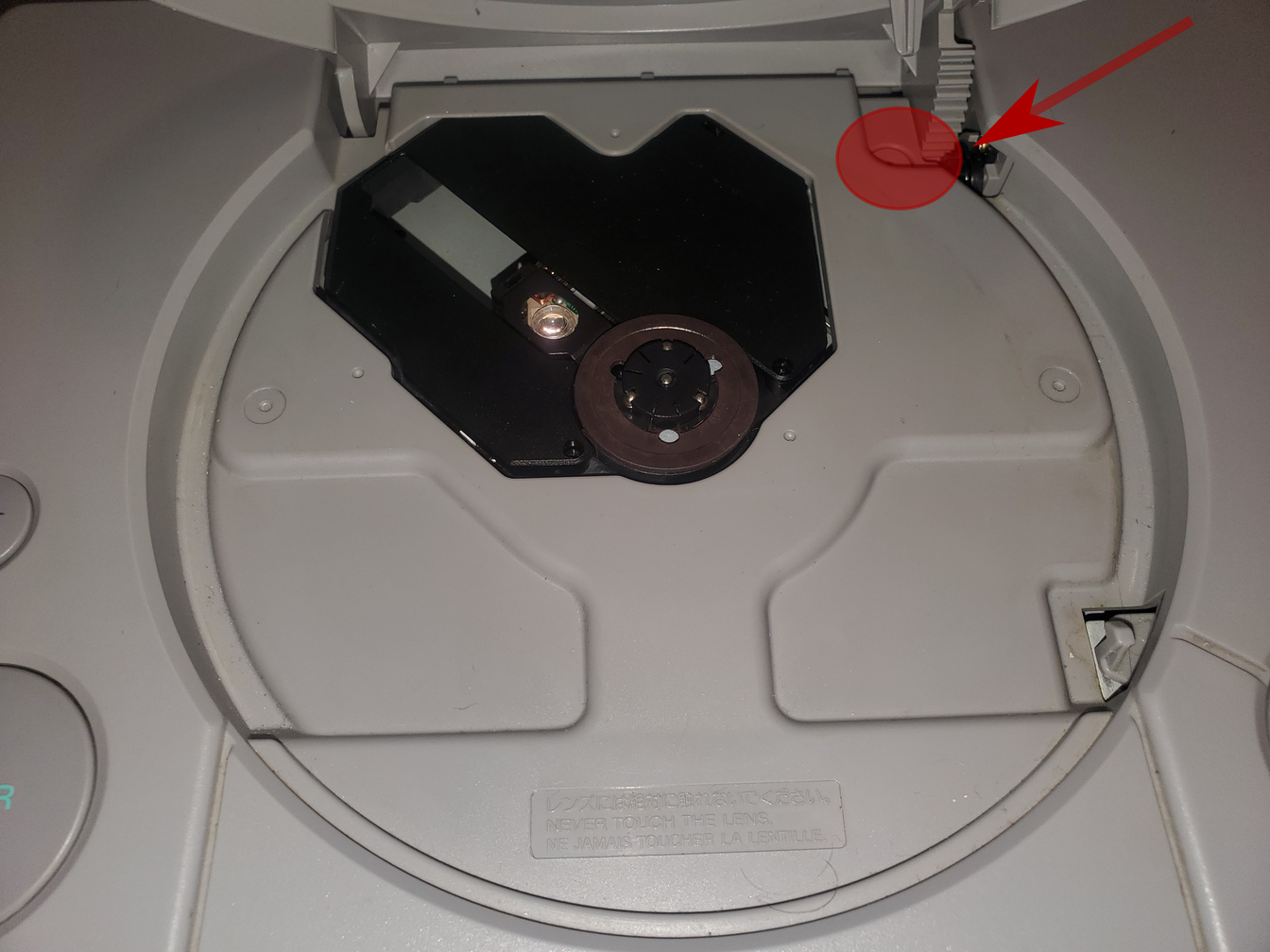
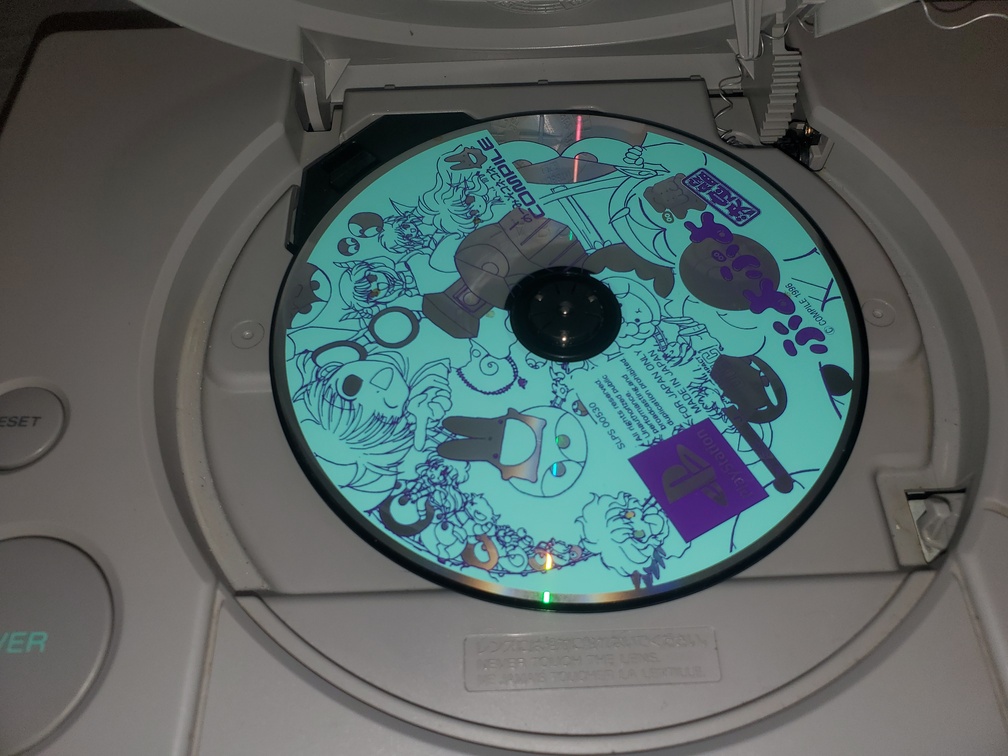
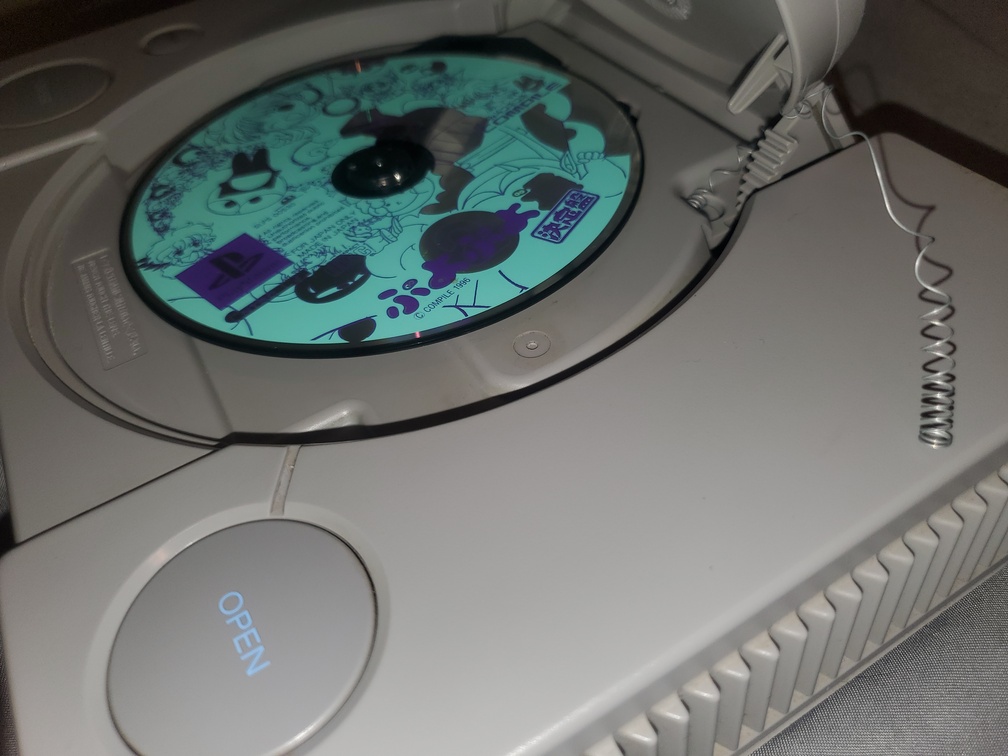
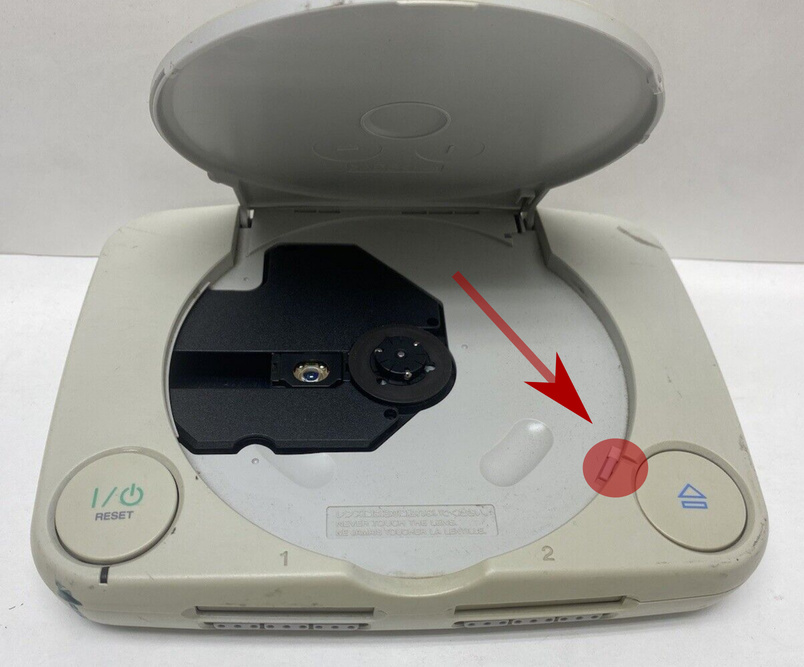
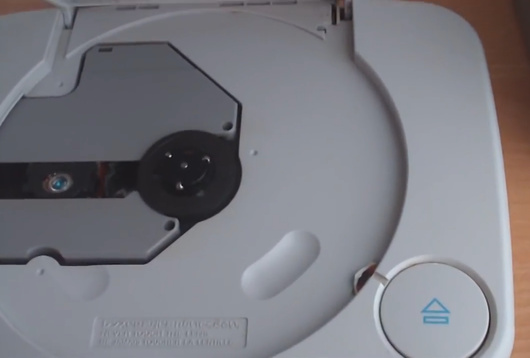
Both TOCPerfect and DemoSwap methods require you to block the lid sensor of the PS1 console to trick it into thinking that the CD Drive lid is closed at some point in the process of using these patches. The lid sensor is highlighted by the red circle and arrow in the images below. On the original grey fat PS1 consoles (SCPH-1000 to SCPH-900X) the lid sensor is located in the top right corner, it is is shaped like a circle. Ideally you press it down with a bent pen spring as shown. You can also use a bent QTIP, scrap of paper, aluminum foil, or even tape cut to size. On the slim PSone consoles (SCPH-100 to SCPH-102) it is in the lower right corner to the side of the edge of the CD drive. For these consoles it is best to use a piece of tape or paper to slide in and press it down as shown.
TOCPerfect Patch
The idea of the TOCPerfect patch is this:
- You rip your real PS1 black game disc (can be any region, Japan, USA, PAL, does not matter) that you want to play a backup CD-R of on your SCPH-1000, early SCPH-3000, early SCPH-1001, or early SCPH-1002 console.
- You download the latest version of PS1 DemoSwap Patcher, and use it to patch (change) your PS1 game rip.
- You burn the TOCPerfect patched game rip to a high quality CD-R.
- You do the CD Player Swap Trick on your SCPH-1000, early SCPH-3000, early SCPH-1001, or early SCPH-1002 console to boot your TOCPerfect patched game CD-R.
- Your console will boot the CD-R, run Tonyhax International automatically, and boot the game with no user input required seamlessly in a few seconds.
- Your console is now playing a CD-R backup with correct TOC data. If you have an early SCPH-1001/early SCPH-1002 consoles you also gain the ability to seamlessly swap discs in games that span multiple discs. The ultimate use of the original CD Player Swap Trick!
CD Player Swap Trick
This is an exploit only available on early (very old, among the first manufactured) PlayStation consoles, it is the only swap trick that does not involve swapping a moving disc making it the best swap trick ever available. It was first described in the original Swap Trick Guide from 1996, and in short this is how to use it on compatible PlayStation consoles:
- Turn on the PlayStation with no game in it.
- Start the CD player.
- Open the PlayStation’s lid, and put in a real legit PlayStation game.
- Find something to block the lid sensor. The legit PlayStation game will start spinning and then stop spinning.
- Once the legit PlayStation game stops spinning, put in your backup game or home brew.
- Exit the CD Player menu, and wait for your backup game or home brew to spin up and load.
Supported Consoles:
-
All SCPH-1000 consoles (the original Japanese console model) are compatible. These consoles are either System BIOS v1.0J and CDROM Controller VC0A (example serial number
A5532655) or System BIOS v1.0J and CDROM Controller VC0B (example serial numberA6145548). Note that no date of manufacture is available on Japanese consoles. -
Early SCPH-3000 consoles (the second Japanese console model) are compatible. Compatible consoles have System BIOS v1.1J and CDROM Controller VC0B (example serial number:
A6956171. Incompatible consoles have System BIOS v2.1J and CDROM Controller VC1B (example serial number:A7543968). -
Early SCPH-1001 consoles (the original American console model) are compatible. These consoles have a serial number lower then
U592XXXX(where X can be any number) according to the original Swap Trick Guide from 1996. These consoles are either System BIOS v2.0A and CDROM Controller VC1A (example serial number:U5361469, July 1995 manufacture date) or System BIOS v2.1A and CDROM Controller VC1A (example serial number:U5860989, October 1995 manufacture date). -
Early SCPH-1002 consoles (the original European console model) are compatible. No serial number based info is available for this console model at this time. There also appears to be no date of manufacture available (like Japanese consoles), so it is truly a roll of the dice if a specific SCPH-1002 console has the CD Player Swap Trick or not.
TOCPerfect Instructions
You want to TOCPerfect patch the first data track of the game rip you want to use. The first data track will be named something like “track 01.bin” in your game rip directory.
On Windows a basic GUI is supported. You can use the CLI on Windows as well, but the GUI may be easier for many users.
Windows GUI:
- You can drag and drop the “track 01.bin” file of the game you want to TOCPerfect patch into the “PS1 DemoSwap Patcher.exe” executable file. If you do not do this, you will be prompted to select the ‘track 01.bin’ file in a file picker.
- Select “NO” in the message box to select the TOCPerfect patch mode.
- Select “YES” for Stealth mode if you do not want anything to display before booting the game. Select “NO” if you want to see debug output before the game boots.
- Wait for PS1 DemoSwap Patcher to complete.
Windows CLI:
- Start cmd.exe.
-
Select the TOCPerfect Patch by using the first argument as
-t:"PS1 DemoSwap Patcher.exe" -t "track 01.bin" - Wait for PS1 DemoSwap Patcher to complete.
Linux CLI:
- Start Terminal.
-
Select the TOCPerfect Patch by using the first argument as
-t:./ps1demoswap -t "track 01.bin" - Wait for PS1 DemoSwap Patcher to complete.
TOCPerfect Patching EDC Protected PSX Games
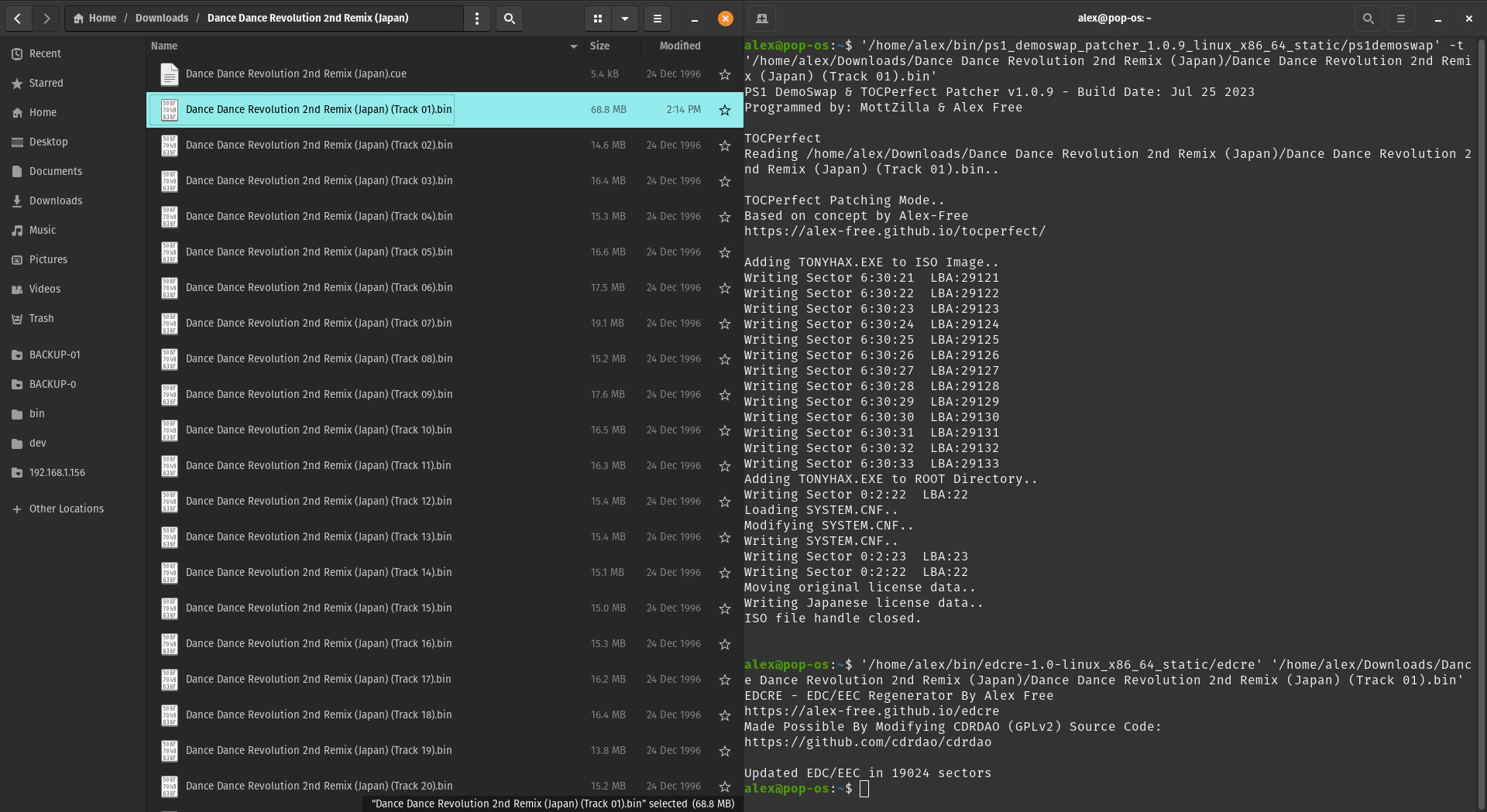
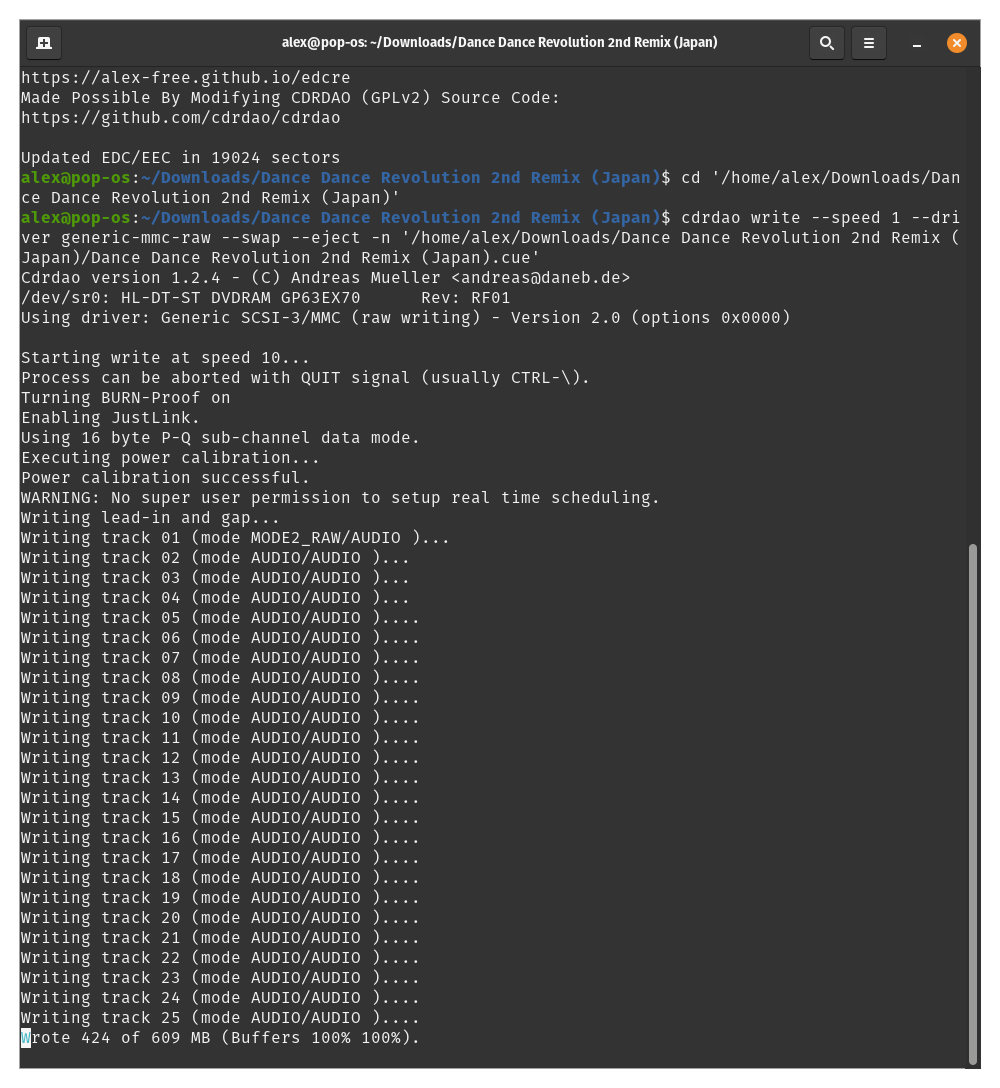
Almost all of the Dance Dance Revolution games contain an additional EDC-based anti-piracy protection measure. For these games, You must run edcre on the TOCPerfect patched data track bin file (the first or only track in the CD image) after TOCPerfect patching. Then you must burn the disc image RAW. A new enough CDRDAO can do this.
NOTE: The Japan version of the first Dance Dance Revolution game is not yet able to be TOCPerfect patched successfully. This is some kind of issue with PS1 DemoSwap Patcher and not due to EDC protection. The USA version of the first Dance Dance Revolution game and all other EDC protected games do not have such an issue.
TOCPerfect Enhancements
The SCPH-3000 has a region lock so even with the CD Player Swap Trick it refuses to boot any discs without the Japanese license data. The SCPH-1000, SCPH-1001, and SCPH-1002 do not have any region locks and do not have this problem.
The TOC is not updated from the original PSX disc used in the CD Player Swap Trick. This causes CD audio to not play at all in some games, or even causes crashes. TOCPerfect updates the TOC before booting the game to fix this.
Most anti-piracy detention (such as in Dino Crisis) is partly checking for Swap Tricks by comparing the TOC of the current CD with the one expected to be read from a real Dino Crisis disc during proper booting. This can cause the anti-piracy check to trigger and prevent playing the CD-R with the CD Player Swap Trick on even the SCPH-1000/SCPH-3000 consoles. Again, TOCPerfect fixes this.
On stock SCPH-1000 and SCPH-3000 consoles anti-piracy detection is completely bypassed when using a TOCPerfect Patched CD-R. SCPH-1001 / SCPH-1002 consoles are using the Tonyhax International APv2 Bypass System to achieve the same results automatically.
DemoSwap Patch
Enables you to patch a rip of one of the commonly found psx game demo discs supported by PS1 DemoSwap Patcher that you own an authentic copy of to boot a special Tonyhax when doing a simple disc swap from the original authentic PSX game demo disc to the patched backup CD-R of the same PSX game demo disc. This special simple disc swap trick does not require any tricky timing, and best of all works on all PSX consoles.
If you have a USA/PAL console, you can then use MottZilla’s MCTOOL to install TonyHax onto a memory card using the FreePSXBoot exploit for future convience.
DemoSwap Patching Instructions
Check the DiscLib.txt for the title of the demo disc you have or will obtain. As of this writing all Interactive CD Sampler Volumes 1 through 11 are supported. More demos can be added, details below.
Create a raw ISO image of your demo disc using a tool like ISOBuster.
On Windows a basic GUI is supported. You can use the CLI on Windows as well, but the GUI may be easier for many users.
Windows GUI:
- You can drag and drop the “track 01.bin” file of the demo disc rip you want to DemoSwap patch into the “PS1 DemoSwap Patcher.exe” executable file. If you do not do this, you will be prompted to select the ‘track 01.bin’ file in a file picker.
- Select “Yes” in the message box to select the DemoSwap patch mode.
- Wait for PS1 DemoSwap Patcher to complete.
Windows CLI:
- Start cmd.exe.
-
Execute “PS1 DemoSwap Patcher.exe” with the
-dargument. Example:"PS1 DemoSwap Patcher.exe" -d "track 01.bin" - Wait for PS1 DemoSwap Patcher to complete.
Linux CLI:
- Start Terminal.
-
Execute “PS1 DemoSwap Patcher.exe” with the
-dargument. Example:./ps1demoswap -d "track 01.bin" - Wait for PS1 DemoSwap Patcher to complete.
- Burn the “.cue” file in your PSX game demo disc rip directory to a blank CD-R after applying the DemoSwap patch.
- Put the original demo disc in your PS1. Using your method of choice you must hold down the lid switch so the console will read discs with the lid open. A wooden toothpick, a stretched out pen spring, and molded aluminum foil are a few things that can work.
- Power on your PSX console and consult the “Per Disc Instructions” section immediately below.
DemoSwap Trick
When you remove the original PS1 demo disc you do not need to rush to replace it with the DemoSwap Patched CD-R. When removing the disc the motor and laser will try to read the disc you have removed for a few seconds before giving up. After that you can easily place the CD-R into the console. When you take your next action the CD-R should begin spinning and reading. However if you removed the disc at a time when data was being read the system may lock up. Read the notes below to know when you should be removing the original disc and swapping in the CD-R.
DemoDemo PlayStation Vol. 22
Versions Supported: Japan
Instructions: Select “Mighty Hits” demo. While on the screen with Start and controls, swap discs. Then start the demo.
Namco Museum Vol. 1
Versions Supported: USA (Rev 0, Rev 1).
Instructions: In the menu press start and go to the games section. Swap discs on the games menu. Select “PACMAN” and start the game.
Namco Museum Vol. 2
Versions Supported: USA.
Instructions: In the menu press start and go to the games section. Swap discs on the games menu. Select “XEVIOUS” and start the game.
Namco Museum Vol. 3
Versions Supported: USA.
Instructions: In the menu press start and go to the games section. Swap discs on the games menu. Select “DIGDUG” and start the game.
Namco Museum Vol. 4
Versions Supported: USA.
Instructions: In the menu press start and go to the games section. Swap discs on the games menu. Select “ASSAULT” and start the game.
Interactive CD Sampler Volume One
Versions Supported: USA.
Instructions: Select “Loaded” demo. While on the screen with Start and Help, swap discs, then start the demo.
Interactive CD Sampler Volume 2
Versions Supported: USA.
Instructions: Load Demo “Need For Speed”. On “game mode” menu swap discs. Press Select to exit to main menu.
Interactive CD Sampler Volume Three
Versions Supported: USA.
Instructions: Load Crash Bandicoot demo. When you control Crash, swap discs. Then Press Select to return to main menu. Load 2Xtreme demo.
Interactive CD Sampler Volume Three (Version 3.5)
Versions Supported: USA (Disc Ver 0, Disc Ver 1, Rev 1, Rev 2, Rev 3).
Instructions: Load Crash Bandicoot demo. When you control Crash, swap discs. Then Press Select to return to main menu. Load 2Xtreme demo.
Interactive CD Sampler Volume 4
Versions Supported: USA.
Instructions: Start Croc demo. Once controlling Croc swap discs. Press Select to exit. Start Parappa demo.
Interactive CD Sampler Volume 5
Versions Supported: USA (Disc Ver 0, Disc Ver 1, Rev 1).
Start Crash 2 demo. Once you control Crash, swap discs. Press select to return to menu. Start Parappa demo.
Interactive CD Sampler Disc 6
Versions tested: USA (Rev 0, Rev 1).
Instructions: Start Crash 2 demo. Once you control Crash, swap discs. Press select to return to menu. Start Bloody Roar.
Interactive CD Sampler Volume 7
Versions Supported: USA (Rev 0, Rev 1).
Select Blasto demo. On instruction screen swap discs, then start demo.
Interactive CD Sampler Volume 8
Versions Supported: USA.
Instructions: Select Spyro demo. On instruction screen swap discs, then start demo.
Interactive CD Sampler Vol. 9
Versions Supported: USA (Disc Ver 0, Disc Ver 1).
Instructions: Select Crash 3 demo. On instruction screen swap discs, then start demo.
Interactive CD Sampler Vol. 10
Versions Supported: USA.
Instructions: Select Contender demo. On instruction screen swap discs, then start demo.
Interactive CD Sampler Vol. 11
Versions Supported: USA.
Instructions: Select Ape Escape demo. On instruction screen swap discs, then start demo.
PSOne Wherever, Whenever, Forever
Versions Supported: USA Disc Ver 0.
Instructions: Select Atlantis demo. On instruction screen swap discs, then start demo.
Once the Tonyhax International loader is booted via the DemoSwap method, the patched PS1 game demo disc backup CD-R will stop the motor of the PS1 CD drive. If you see the text Put in a backup/import disc, then press X remove the patched PS1 game demo disc backup CD-R from your PS1 console’s CD drive. Put in the backup CD-R or import PSX game disc you want to play without unblocking the lid sensor. Once you press X, the console will run some commands automatically, followed by the game booting with perfect CD audio playback. Note that you can not unblock the lid sensor while playing the game on Japanese consoles, if you do so the game will stop working.
Adding Support For More Demo Discs
You can add support for an unsupported PS1 demos disc by editing the DiscLib.txt file (found in the same directory as the PS1 DemoSwap Patcher executable) to include information on how to patch the CD image of the (currently) unsupported PS1 demos disc. Follow the steps below to add manual support for your PS1 demos disc:
- Insert the PS1 demos disc into a CD drive connected to your computer.
- Create a CD image of your PS1 demos disc.
- Use a program such as CDmage to open the first track of the CD image you just created of your PS1 demos disc. Using such a program will allow you to browse through the files in the CD image.
- Make sure there are at least 2 executables (.EXE files) in the CD image. This is the only requirement for the PS1 demos disc to work with PS1 DemoSwap Patcher. As long as a PS1 demos disc contains more then 1 game demo on it, this should be a given.
- Extract and or view the contents of the
SYSTEM.CNFfile in the CD image. Find the main executable of the PS1 demos disc on theBOOT=cdrom:\line, i.e the line inSYSTEM.CNFcould beBOOT=cdrom:\main.exe;1which would mean the main executable of the PS1 demos disc would bemain.exein this case. - Next find the target demo executable of the PS1 demos disc in the CD image. This could be any other
.EXEfile that you find in the CD image. Through trial and error or clues in the.EXEfilename you can figure out what game demo correlates to what executable file. - Now that you have both the main executable and target demo executable for your unsupported PS1 demos disc, decide on a name for PS1 DemoSwap Patcher to identify your PS1 demos disc as. It is recommended that you use the name in the Redump set so others can specifically identify the PS1 demos disc that support has been added for.
- Now with all information gathered, edit the
DiscLib.txtfile with a text editor of your choice. The format is simple, each individual PS1 demo disc takes up 3 lines in the file. The first line is the name of the PS1 demo disc. The second line is the main executable, and the third line is the target demo executable. You should prepend this information to the beginning of the file. The import thing to keep DiscLib.TXT readable by PS1 DemoSwap Patcher is to not remove the last 3 lines of the file containing 3 dots (...). - Finally, figure out when to swap in your PS1 demos disc. When to swap the discs from the real PS1 demos disc to the DemoSwap Patched backup CD-R of the PS1 demos disc depends on the menu system of the PS1 demos disc. Some PS1 demos discs have menu systems that stream data off the disc for full motion video previews, if this is the case for your unsupported demo disc be aware that swapping the discs at this point could result in a freeze or crash if you don’t swap fast enough. As an example for such alternative swap points in such a case, look at the instructions above for the 11 volumes of Interactive CD Sampler PS1 demo discs which avoids these issues. The swap methods given for these currently supported discs allow for relaxed timing. Using Vol 5 as an example, while the Crash demo is running and you can control the character you should be able to carefully grab the disc by the edge and center stopping it. Remove it quickly so that you don’t hurt the motor. After you remove it you should be able to wait for the motor to stop trying to spin and then disc swap to your DemoSwap Patched backup CD-R of the PS1 demos disc. You may be able to then press Select to exit the current demo game in play, which will cause the CD to spin up again and load the main menu. Now at the main menu (running off of your DemoSwap Patched backup CD-R of the PS1 demos disc) you can start the demo that was replaced with the TonyHax International executable by the DemoSwap Patch.
Credits
PS1 DemoSwap Patcher
- The TOCPerfect concept was first released as TOCPerfect v1.0 by Alex Free.
- MottZilla is the original sole creator of PS1 DemoSwap Patcher v1.0. MottZilla reimplemented the TOCPerfect concept into a much superior method, and included his implementation alongside of his DemoSwap idea in PS1 DemoSwap Patcher.
- Alex Free ported PS1 DemoSwap Patcher to Mac OS X and Linux.
- Alex Free discovered that SetSession is bugged on the VC0 and VC1(a) CDROM BIOS firmwares, and came up with a bypass idea by mashing SetSession in frustration on MottZilla’s PSX CDROM Debugger program that was created to debug the SetSession command on a early SCPH-1001 and SCPH-1000 with BIOS v1.0.
- Martin Korth confirmed that SetSession is bugged on VC0 and VC1(a) CDROM BIOS firmware. He also wrote the amazing No cash PSX Specs Alex Free and MottZilla used to find out about various commands needed to make a loader.
- MottZilla wrote controller input support for TonyHAX and all the functions that add support for Japanese VC0/VC1(a) consoles with the bugged SetSession to Alex Free’s requests.
- MottZilla came up with reset+unlock without opening/closing the lid method for TOCPerfect booting on USA/PAL consoles.
- MottZilla came up with the CDROM BIOS Firmware detection and VC3 console laser recalibration to fix disc reading after using SetSession to get the TOC data on VC3 consoles.
- Alex Free put everything together and tested the modifed Tonyhax loader that targets DemoSwap, TOCPerfect, and FreePSXBoot booting methods for all retail consoles.
TonyHAX Acknowledgements
Socram8888 is the original developer of the Tonyhax loader, which is the base that the heavily modifed special Tonyhax loader now known as Tonyhax International used by PS1 DemoSwap Patcher. The original Tonyhax loader credits are below, in alphabetical order:
- Alex Free for adding the boot CD image.
- ChampionLeake for documenting the Brunswick exploits at PlayStation dev wiki.
- Gerardo Rodriguez for suggesting Cool Boarders 4 on a YouTube comment.
- @FMecha for suggesting Castrol Honda VTR on Twitter.
- John Wilbert Villamor (aka Lameguy64) for creating mkpsxiso.
- Jose Silva for adding support for Sports Superbike II and XS Moto.
- Martin Korth for his super awesome technical documentation page that was vital for the development of this project, as well as for developing the no$psx emulator that was also essential for debugging.
- Patrick Vogt for testing on multiple development PS1 consoles.
- Everyone that’s reported the issues on GitHub and helped Socram8888 make it better.