
Signum Framework is an Open Source (MIT) framework for writing applications using a modular design, and taking advantage of the latest technologies from Microsoft (.Net Core, C#, LINQ, SQL Server, ASP.Net Core and TypeScript) and other popular web frameworks (React, Bootstrap and D3.js), to provide a complete solution for Line-of-Business application.
Compile time checking
We believe that statically-typed languages like C# and Typescript, and the tools they make possible (i.e., compile-time errors, refactoring, auto-completion...) are necessary for maintain big applications built by many developers.
Functional programming
Functional programming is influencing languages by their ability to compose complex solutions in terms of simpler ones and control side effects. Lambdas, expression trees and LINQ have changed how we write C# code.
Own your code
Code generation is a two edge sword: as fast as it generates a solution, it generates a big maintainability problem. Whenever possible, we prefer hand made code and runtime intelligence, using code generation as the last resort to remove the last bits of redundancy.
Good citizen
We try as much as possible to use standard technologies, familiar patterns and write idiomatic code. Specifically, we use React and Typescript to let developers have full control over the user interface, and C# and LINQ for the back end.
Features
Modeling
Entities
Operations
Mixins & Symbols
- Entities are the basic building blocks of any Signum Framework application. They represent the shape of the data in the database and, most of the time, also influence the way the user interface looks.
- Operations are the most convenient way to let end-users create and manipulate entities.
- Mixins and Symbols allow shared-code to be more flexible, pushing code-reuse to the limits.
Designing entities
The entities are classes written by hand in C#, using a set of base classes, attributes and collection that serve us as standard building blocks.
Entity: Base class to create new entity typesEmbeddedEntity: Base class to create small entities that will be stored in-line in the parent entity. Similar to database value-types.Lite<T>: It is a type-safe identity card for an entity. Stores theIdandToStringand it is the only mechanism for lazy-loading. Allows inheritance using covariance. Massively usefull (Combobox items, Autocomplete, Search control, many APIs,...).MList<T>: Alternative to List<T> for entity properties. Keeps track of changes and optionally preserves ordering in the database.Tcan be any type (e.g., entities, embedded entities, Lite<T>, or values).- Values: Any simple data type that can be part of an entity property (e.g., strings, numbers, nullable values, enums, date, times and any UDT like geographic data).
This standards simplify your code dramatically, providing good default behaviors in the user interface, allowing generic programming in the business logic, and ensuring easy integration and good performance at the database schema.
Additionally, the entities type and properties are localizable. This way the consistency in the user interface is guaranteed and there are less messages to translate, sharing a common language with non-English speaking users.
Entities change
Entities play a central role in any application built with Signum Framework: database schema, business logic, queries, windows and web user interfaces, tests and even documentation depend on the way the entities have been designed.
Unfortunately... the entities are the ones that suffer more changes. When a new property is created, removed or renamed, it will affect all the dependent layers and there’s no dependency injection mechanism that can protect you from that.
By using statically typed code, and schema and documentation synchronization, we can absorb this impacts and let the entities change if necessary, keeping the artificial mismatch between what the users sees and how the information is structured to a minimum.
Powerful Validation
One of the main responsibilities of the entities is defining their validation rules. This rules will be checked before saving the entity, and the same rules will also be shown in the windows or web user interface, removing redundancy.
Signum Framework provides a wide range of options available to define this rules:
- Simple rules using attributes over the properties.
- More complicated rules using imperative C# code (with or without database access).
- Tables to define mandatory properties depending on the entity state.
- ...or even inject contextual validation rules to child entities.
All this rules can be overridden if the module is not written by you, and there’s support to disable any rule on entities loaded from legacy applications.
Embedded Change Tracking
Additionally, all the entities have a built-in change tracking system to commit only the necessary changes when the entity is saved in the database.
This mechanism lies in the entity itself, not in an external context. That means the entities can be safely serialized and sent to remote client applications, and still have change tracking and concurrency control working when they turn back.
Exposing the data
In today application is common that the database schema, the way the information is structured, is hidden for the end-user behind complicated naming conventions, table and column with out-dated names or not used anymore, or user interfaces that, trying to simplify some user case, complicate the overall picture.
While some of this decisions could be justified in some particular cases, in is necessary for power users to understand the data, so they can explore the information, design reports and, ultimately, share a common languages with the developers.
Signum Framework removes the technical impediments that keep the data hidden to the world, but gives you the security mechanisms to protect this data when necessary.
Types of Operations
Operations are actions to create and manipulate entities, and are available in the user interface. There are five types of operations:
Construct: Create a new entity with no additional context (e.g., Create new Invoice)ConstructFrom: Create a new entity from another one (e.g., Create Invoice from Customer)ConstructFromMany: Create a new entity from many others (e.g., Create Invoice selecting Products)Execute: Modify an entity (e.g., Authorize Invoice, Cancel Invoice)Delete: Delete an entity from the database (e.g., Delete Order)

Most operations contain, not only the code that will run when executed, but also code to check the operation pre-conditions (CanExecute), returning an error message if not.
Additionally, operations can be embedded in a state machine, where each operation represents a transition between the states of the entity.
Advantages
While operations could be manually implemented using manual UI buttons/commands and business logic, they have important advantages that make them a more convenient way to creating and manipulate entities:
- Operations are defined in the Server, but create automatic buttons in the entity UI (or context menu on the search dialog) for Windows and Web applications.
- When the pre-condition is not satisfied by the entity, the button (or context menu) is disabled, and a useful tooltip with the message is shown to the end-user.
- Operation store a log every time they are executed, with the start and end dates, user, related entity, and maybe an exception.
- They can be overridden if special behavior is necessary in complex class hierarchies.
- Their implementation can also be replaced, making each operation an extensibility point.
- They all can share a common set of Web Service Operations (Windows) or Controller Actions (Web) saving you code.
- They are automatically transactional.
- When using Authorization module, they can easily be allowed / disallowed for certain roles.
- When using Processes module, they can easily be executed for multiple entities at once, using a context menu in the search dialog.
Once you start including in your database entities designed in third-party modules new challenges appear. We have created some new patterns to solve this challenges.
Mixins and Symbols let us push code-reuse to the limits, without scarifying a static-typed programming experience.
Mixins
In statically-typed languages like C# is not possible to add extra members to type without inheriting from it (creating a new, different type). Extensions method can add new functions, but adding new fields/properties (and database columns) requires changes in the memory layout of the entity, and there is no standard alternative to do it.
Using MixinEntity we have an standart mechanism to add new fields, properties or methods to any entity. Mixins are just like a EmbeddedEntity attached to the end of an entity.
When an entity is created, all the registered mixins for this entity type are attached to the end of it, and there is no way to remove them. Mixins are like limpets, so you can trust that your entity will have the new properties defined in the mixin.
Attached mixins have no name, and are accessible by type. Entities can have many mixins, but not two mixin of the same type.
Mixins are fully supported at all levels of the framework (e.g., ORM, LINQ, Window/Web user interface, Dynamic queries, Authorization ...) and their properties are indistinguishable from normal properties for the end-user.
There are extension points to modify third-party operations and (windows and web) user interfaces to make use of the new fields provided by the mixin.
Symbols
Enums are a common data-type to define a fixed amount of different values. Under the cover they are just numbers, but with a special superpower: Calling ToString on an enum value returns the name of the field where is was declared, not the underlying int. Enum values always remember their type and the field where they were declared.
Unfortunately, enums are not very flexible : There’s no way to add new values to an enum already declared in a third-party library. When this is necessary, the typical solution is to use magic strings instead of enums. But strings are not strongly typed: no auto-completion, no rename, no compile-time errors…
Symbols solve this problems. You can declare a new symbol type just by inheriting from Symbol, but you can declare new symbol fields/instances in any static class. Moreover, they inherit their name and type from the field where they were declared, just like enums.
Also, symbols are entities, so can be reference by other entities easily and with referential integrity. Moreover, the schema synchronizer understand and synchronizes the used symbols.
This features make symbols a replacement for magic strings that are as easy to use as enums and can be referenced in the database. They are simple read-only entities that are usually related to a piece of code in a dictionary, creating a strongly-typed bridge between code and data. (e.g.,Operations, Permissions, Process algorithms, etc... are all symbols) .
Database
ORM
Schema Sync
Avoid inline SQL queries without compromises:
- Signum Framework has a performant fluent ORM to store in-memory entities. Cycles? no problem.
- LINQ to Signum will brow your mind: Correlated sub-queries, extension methods, batch deletes/updates/inserts and much more....
- The Schema Synchronizer can adapt the database schema to your application, understanding renames, and with no additional meta-data. Trouble-free database evolution with multiple branches.
Avoid inline SQL
While SQL is the gold standard in database manipulation, it has some important flaws that make using it, especially from general purpose programing languages like C#, inconvenient.
Writing inline INSERT/UPDATE/DELETE in SQL is error-prone due to the lack of auto completion, and once the query is made, it will easily get out-dated when some field or table is renamed, creating bugs that won’t be catch at compile time. SQL Injection is also a source of security problems.
Database class
The most classical part of the ORM in Sigum Framework is represented by the Save extension method in Database static class. Still, under its simplistic appearance, it contains some interesting features:
- It allows saving arbitrary object graphs with cycles, polymorphic references and collections.
- Because entities and
MList<T>have embedded change tracking, only the changes are commited. - Before saving, it analyzes the object graph to validate that all the entities satisfy the validation rules.
- Under the covers, it uses run-time code generation/compilation to create fast INSERT/UPDATES calls to ADO.Net (just as the ones you could written).
- It has a built-in mechanism to avoid concurrency problems when two users changes the same entity at the same time.
- In order to improve performance when saving collection of entities, it generates bulk insert and update statements, but it does so generating stable statements that can be cached by the database query planner .
- Because there is no
Contextclass, Save can be an extension method on a static class, becoming a nice fluent API.
LINQ to Signum
Traditionally, an ORM is a library that let you manipulate database rows as if they were objects. While this is a convenient strategy for individual rows, it can cause performance problems when many rows are required, like complex queries and bulk inserts/updates/deletes.
LINQ (Language INtegrated Queries) is a technology invented by Microsoft to write queries in C# to in-memory object (like many other functional languages) and also to the database, requiring a library to translates a C# query to SQL (LINQ Provider).
LINQ queries are really powerful, letting you express complex operations (e.g., Joins, groupings, aggregates, correlated sub-queries, etc… ). Because of this, translating a LINQ query to SQL is a challenge comparable to write SQL compiler.
In Signum Framework we’re proud to have developed one of the most powerful LINQ Providers available.
Module-friendly Syntax
One difference between LINQ to Signum and other LINQ providers is that, instead of a property for each table, a generic method is used to access the tables.
This is important because this way your query is not tied to a particular Context / Database Schema, just some tables being there. This allows vertical modules to work in any other application.
Typical features
Here is a small resume of the typical features of a LINQ Providers that LINQ to Signum also support:
- Supports all the standard query operators (
Select,Where,SelectMany,OrderBy,ThenBy,GroupBy,Join,Distinct,Skip,Take, etc...), aggregates (Count,Sum,Min,MaxandAverage) and collection-to-instance operators (Single,SingleOrDefault,First,FirstOrDefault, etc...). - Support for the common .Net methods for string manipulation, math operations, date-time, etc…
- Automatic
LEFT OUTER JOINnavigating object relationship through properties, simplifying all the joins through Foreign Keys (95%). - Allow mixing in-memory objects and SQL statements seamlessly by automatically creating parameterized queries (avoiding SQL injection) and complex object graph materialization.
- Full support for enums.
Powerfull features
And here are some nice features that you couldn’t in other LINQ Providers:
- Bulk
DELETE/UPDATE/INSERTdirectly with LINQ syntax, without materializing the entities. Of course, validation does not work in this case: - Correlated sub-queries to retrieve hierarchical data, avoiding the N + 1 problem.
- Create expression properties/method that will be expanded on the query, letting you factor-out code for in-memory and in-database scenarios.
- Full support for inheritance/interface implementation using casting, polymorphic references (implemented with
CASEorUNIONstatements), orGetType()method. - Support for simple in-database property navigation using
InDBextension method. - Simpler syntax for writing
LEFT/RIGHT/FULL OUTER JOINS. - Extension points to allow filtering the visible rows transparently, to enforce security restrictions (used by Authorization, Disconnected and Isolation module).
- Extension point to allow automatic query simplification for cached master data (used by Cache module).
Schema Generation
Signum Framework is able to generate the full database schema for the set of registered modules in the application, including:
- Tables: For any entity,
MList<T>property, orenumreferenced by entties. - Columns: Determining
SqlDbType, nullability, size and precission (and default constraints for sync) - Indexes: Simple and multi-column unique indexes, and recommended non-unique indexes on foreign keys.
- Foreign keys: For any simple or polymorphic entity relationship.
- Rows: for some special tables
- Enums
- Symbols
- Types
- Queries
- ...
Schema Synchronization
One of the most popular features of Signum Framework is the ability to, not only generate the schema for the the application, but also synchronize the schema to the one required by the application as it evolves.
The strategy is quite simple: A console application compares the current application with the current schema and asks the user for potential renames. At the end, it generates a SQL Script with the necessary changes, and the end user can review it, execute it, or store it for using it in the next deployment to production.

Since the synchronization mechanism doesn’t require any metadata information (like Migrations do) it’s much easier to collaborate with developers working in other branches.
It’s also easier to ensure that, when deploying to production, the database schema match perfectly with the application: Just sync one more time and check that no script is generated.
The Schema Generation/Synchronization infrastructure is expansible, letting modules do custom logic if necessary (e.g., UserQueries, UserCharts, EmailTemplates, ...)
User Interface
Windows & Web
Entity controls
Search control
- Signum Framework has been designed to provide first class support for Windows and Web user interfaces using the latest technologies on each field.
- Signum.Windows and Signum.Web provide a set of base Entity controls that, taking advantage of the rich entities, provide good default behaviors that make writing user interfaces a breeze.
- Both also provide a powerful Search control that lets end-user take advantage of a big subset of the LINQ provider in a user-friendly interface.
Both Signum.Windows and Signum.Web have been designed to create a standardized user interface for administrating entities with the focus put on being productive. This design, however, is completely customizable and flexible enough to satisfy all the user interface requirements in back-office scenarios.
In both cases, we use the latest technologies that we can expect a developer to know, so they can take advantage of their previous knowledge and not sacrifice their creativity.
Signum Windows
Signum.Windows takes advantage of WPF and XAML to build native windows experiences. It makes use of typical WPF concepts like Bindings, Templates and Styles.
Since the entities already implement INotifyPropertyChange, there is no need to create a ViewModel and by using Operations there’s no need to create WPF Commands, radically simplifying the necessary amount of code.
Typically, a WPF UserControl is associated with each entity type, contains one line of XAML for each entity property, and no code behind.

Signum Web
Signum.Web, on the other side, takes advantage of ASP.Net MVC 4.0 and Razor to create views in HTML5 for each entity. Using HtmlHelpers, a similar experience is provided in web, typically requiring one line of C# for each entity property.
The user interface is based on the popular Bootstrap 3.0 framework and can be customized with any of the available Bootstrap themes, or using CSS 3.0. Charting and Profiler modules in Signum Extensions also make use of D3.js.
In order to modify the client-side behavior of the application, Typescript and Require.js are used, ensuring best scripting experience and future maintainability.
The web user interface is designed to allows creating complex Line of Business forms, embedding sub-entities in the same page or opening pop-ups to view the details. Mappings allow fine grained control materializing a complex graph of entities from a HTTP POST FORM .
For front-office scenarios, typically web sites exposed to company customers, entity or search controls can still be used or in the worst case, where a more radical design is appropriate, you’ll still be able to develop this interface in the same application and using the same technologies. This is a big advantage over integrating with closed packages.

Entity Controls are controls specifically designed for manipulating entity properties. Taking advantage of the rich meta-data available in the entities they get good default behavior.
Most of the times, only one line of code per property is necessary to write a Windows and Web user interface for an entity, but there are extension points to add special behavior or, since they are just controls inside a XAML/HTML file, they can be easily replaced or combined with other custom controls.
Value Controls
For example, simple controls to manipulate value properties are auto-configured using ValueLine control:
- The right control is choose depending the property type:
TextBox,NumericTextBox,ComboBox,Date/TimePicker,ColorPicker, etc... - Entity controls take their labels from the localized name of the entity property.
ValueLinetakes format and unit from the property attributesFormatAttributeandUnitAttribute.- Controls take advantage of the entity validation mechanism to inform the user the exact place where there’s an invalid input.
- The controls automatically became read-only for read-only properties.
- Additionally, there are extension points to make the controls invisible or read-only depending specific rules (used by Authorization and Disconnected module).
Entity Refereces and Collections
There are also Entity controls specifically designed to manipulate entity references, each optimized for a special user cases:
EntityCombo: Select and entity from a small list of possible ones.EntityLine: Select an entity from the database using auto-complete.EntityLineDetail: Select or create an entity and show its content embedded in the parent window.
This entitiy controls also have some standard buttons for common actions:
- Create a new entity in a popup or embedded control.
- Find an existing entity using a Search control popup.
- View the current entity in a popup (if not embedded).
- Remove the current entity.
There are also Entity controls designed to manipulate list of entities, using similar buttons and, optionally, allowing re-ordering the entities with the Move button:
EntityList: Find or create entities and show them in a list.EntityStrip: Find entities using auto-complete and show them in tag-like list.EntityRepeter: Create entities and show them in-line.EntityTabRepeater: Crete entities and show them in different tabs.
On this controls, designed to manipulate entity references or collections, even more default behavior can be inherited from the entity properties:
- Create/View buttons are automatically hidden depending the type of the property and its role in the application (
EntityKind). Even for polymorphic properties that could reference entities of different types. - Find button is automatically hidden depending if the type (or types) of the property have a query defined.
EntityLineandEntityStripautocomplete is automatically setup to look for entities of matching types and, when Authorization module is enabled, filtering out the entities not visible by the user.EntityLineDetail,EntityRepeaterorEntityTabRepeatercan look for the associated control of the current entity automatically, even for polymorphic properties.- All the controls for manipulating collections can show Move button depending if
PreserveOrderAttributeis set in theMList<T>property.
All this sensible default behavior, inherited from the entities, can be overridden if necessary but most of the times works out the box. The end result is a dramatically increase in developer productivity and a flexible and consistent user interface.
Example Windows Control

Example Web Control
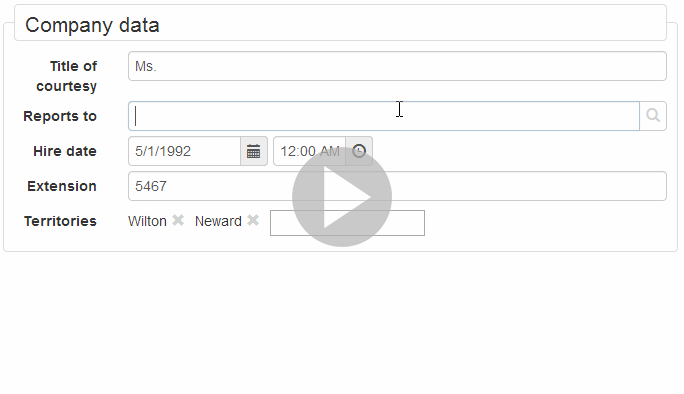
Video: Search Control in Signum Framework
Description
LINQ (or SQL) is powerful languages. With them, developers express complex queries to fill tables, draw charts and create reports.
Unfortunately, most of the applications trim down all this expressivity power to end-users. At most, they give them few options:
- Filter by a small set of previously-defined fields
- Order columns
- Control pagination
Search control
Our SearchControl build on top of the DynamicQueryManager, can do some useful new tricks:
- Navigate to related entities, the columns of the search control can not be basic types (e.g., numbers, strings, dates,...) but references to entities (
Lite<T>), allowing navigation and filters with auto-complete. - Remove any column, simplifying the underlying query.
- Add any arbitrary column that is accessible from the current query, creating the necessary join as the user navigates through properties.
- Filter by any arbitrary column, using in each case the right set of comparison operations depending of the type of the selected column.
- Navigate through collections for adding filters (Any, All, None, AnyNot) or multiply the results (Element).
Dynamic Query Manager
The DynamicQueryManager is cool technology that, using a simple sequence of combo boxes, lets the end-user express easily complex queries.
Since it’s just a sequence of combo boxes, and the names of the properties are localized, this query language is simple enough for any power user to understand.
The DynamicQueryManager is build on top of LINQ to Signum and, while not as expressive as SQL or LINQ, it reduces the gap considerably, giving user much more power and freedom without complicating the simple use cases.
Of course, this freedom can be reduced depending on the user role, or augmented registering LINQ expression method or properties in the DynamicQueryManager.
To use the Search Control, just register a query in the DynamicQueryManager , this will be the base query for the user to modify:
Demo of Web Search Control
This small demo show how the Web SearchContol manage:
- Ordering and Multiple Ordering
- Pagination
- Quick filters
- Remove columns
- Add new columns (even photos!)

Demo of Windows Search Control
Here we use the Windows SearchContol to manage collections:
- Add the Count column
- Add columns inside the Elements of the collection, multiplying results.
- Filtering using Any operator, without multiplying results.

Principles
Modular design
The main point of Signum Framework is to be a foundation for an ecosystem of reusable modules. Is an alternative to Entity Framework designed from the ground up to create SAP-like modules on the Microsoft stack.
Modularity matters
There are plenty of libraries out there to help you with technical problems (e.g., ORMs, dependency injection, templating, DOM manipulation, etc…) and you can also purchase nice looking controls for your user interface. Still, building a big application from the ground up is too expensive, even if 60% of your application is quite standard.
Good look trying to find higher-level module that you can easily integrate in your .Net application (e.g., Authorization, Accounting, Stock management, Human resources, etc…). Those modules only exist on expensive packages for big companies using old technologies that you don’t want to learn.
The ideal scenario is to rely on a technology where an ecosystem of high-level modules exist but at the same time is open, affordable, and based in the latest technologies, so it’s easy to find developers that want to extend your application to your custom needs. This is what Signum Framework is all about.
The fundamental problem is the assumption that, in any .Net or Java application, when it comes to the database every application is an island.
In order to plug-and-play business and technical modules you have to provide a standard mechanism that lets modules integrate at the database, business logic and user interface levels.

Vertical modules
A vertical module, in Signum Framework terms, is a logical package containing:
- A set of entities representing the data model and written by hand in C#. They also contain the validation rules.
- A set of database tables, automatically generated from the entities using an standard convention.
- A set of operations that define which actions can be done with every entity, as well as any other business logic that the module could require.
- A set of base queries that will be exposed to the end user to let them find the entities in the database. Still, the end user will be able to modify this base query to fit their needs.
- A set of user interface controls , windows, pages, styles, scripts, images or icons that are necessary to manage this entities in a Windows or Web user interface.
Every piece of code written on top of Signum Framework belongs to a module and uses the same standard mechanisms, APIs, and extension points. Including all the modules in Signum Extensions, Signum Business, or your application itself.
What makes Signum Framework modular?
There are many technical decision that make Signum Framework ideal for writing and integrating independent vertical modules. Some of them:
- In our LINQ provider, there’s no class that represents your database with a property for each table, as in Entity Framework, but a generic method that returns the table. This way all your business logic is not dependent on the whole database schema, just on some tables being there, and you can move the code to another application.
- Most ORMs make symmetrical properties for any foreign key in the database. Since most of the tables are related, the whole schema becomes an indissoluble block of dependencies. e.g., An Order has a Customer property, and a Customer has an Orders property
In Signum Framework the relationship between the entities create a directed graph of dependencies with no cycles, similar to the dependencies of the modules, and expressions are provided to navigate the relationships backwards using queries. e.g., An Order has a Customer property, and defines an expression on Customer to navigate to their Orders
This way we remove cylic dependencies between the entities.

Other characteristics that facilitate modularity are:
- All the entities have some standart fields (like
IdandToString). This homogeneity gives the possibility to write generic code and use inheritance and interface implementation to connect modules at the database level, as well as good default behaviors in the user interface. - Operations, Views, Process as well many other resources, are stored in public dictionaries and can be easily replaced by custom implementations, giving Signum Framework a built-in fine-grained dependency injection mechanism.
- By using Mixins and attribute overrides, new fields and validations can be added, removed or modified to entities in third party modules. This way you can customize modules that are not under your control without suffering complex merges when a new version is released.
- Transaction, as well as first level cache, are transparently compostable by default. e.g., The business logic for purchasing and order will embed in their transaction the business logic of dependent modules, like accounting and stock management.
- We have a built-in system for storing web assets, like Views, Controllers, CSS and JavaScript files in of .Net Assemblies to distribute modules.
There are many other technical decisions in Signum Framework to solve developer or end-user needs, but the ability to create and integrate vertical modules written in .Net seamlessly is the defining factor and reason of the existence of Signum Framework.
Complete solution
Signum Framework already has solution for the challenges that a Line of Business applications could face using Signum Extensions (technical modules) and Signum Business (business modules).
We have designed the framework considering (or just solving) all the the common problems that an data-centric application could face:
Windows & Web
The framework is designed to allow building Windows and Web applications using a similar technology, allowing hybrid applications.
For example, because the entities implement INotifyPropertyChanged, they can be used as WPF ViewModels for many screens.
Also, since the entities have change tracking embedded, the can be serialized to a Windows client without attaching/detaching from any context
Explore data
The design removes all the technical obstacles for power users to understand data.
For example, it encourages to create simple UI just binding entity properties to controls, and facilitate navigation between related entities.
Even more, the Search Control facilitates this navigation using Lite<T> columns, and letting the end user remove columns or add new ones.
This feature is taken even further by Signum Extensions, letting power users create Chats, Excel Reports or Email Templates.
Data integrity
By defining validations in one place (the entities), and enforcing the rules during business logic just before saving, we're sure the the database contains valid data.
Additionally, by writing the entities by hand, with validation and meta-data, the user interface can take advantage of it and show the errors in a human-friendly way. This is more challenging if the entities are auto-generated from database tables.
On the other side, the synchronizer makes it easy to keep a high quality database schema, updating the indexes, foreign keys and column data-types as the application evolves. Without this technology databases tend to degrade as time goes.
Authorization and Isolation
Signum Framework provides extension points to connect authorization-like systems.
For example, Authorization module (in Signum Extensions) can audit all the database operations asserting for granted permissions. Even further, it can automatically filter the data, so one department can no see, or modify, other department data.
Similar extension points exist in the Windows or Web user interface: to remove query columns, UI fields, or just make them read-only.
Isolation module using the same extension point and adding a new column to the necessary tables (Mixins) is able to split the data in different isolated subsets, typically different companies working in a SAAS application.
Business changes
Using dependency injection frameworks, many applications try to prepare themselves for technological changes that never occur, distracting from the common ones: Business changes.
Using a combination of strongly-typed languages, succinct functional code, and a malleable database-schema (thanks to synchronization), Signum Framework is prepared to assume big changes in the business that could affect any part of the application.
We are used to, on a daily basis, add/remove/rename any database column, table, operation, process, scheduled task, etc... to adapt the application to the business requirements.
Fast Prototypes
Signum Framework is optimized for high-maintainability software solutions, but is also a really productive framework.
Just don't pay attention to validation, write empty operations and keep the default behavior in the user interface and you could have a working LOB application in about the same time you do some Photoshop screen designs.
If the project is accepted, you're already half of the way! Implement the operations and validations and polish the user and don't worry if you have to re-design your entities. The synchronizer makes your database really malleable.
Homogeneous technology
Having an homogeneous way of developing any data-centric application has one important benefit: Moving from one project to another is much simpler.
Signum Framework is not ambiguous about it, its an opinionated framework, with clear technological choices, and an standardized architecture.
By using the same structure, technologies and conventions, and having documentation publicly available, the amount of things a developer has to learn to start working in a different team is much smaller, as well as the things that have to be documented for each application.
Working Disconnected
Disconnected module, in Signum Extensions, let Windows users work disconnected and upload their changes by transferring database backups.
The key to make working disconnected simple is to avoid merges, setting a disconnected strategy for any entity.
Once off-line, the Disconnected module is able to reduce the functionality depending on this strategies, using the same extension points that Authorization module uses.
Additionally, in order to prepare a new database before the user disconnects, we use of the ability of Signum Framework to generate a Database Schema that matches the application.
Testing
Using functional programming and strongly-typed languages is a good starting point to reduce the number of bugs. Still, writing unit and integration tests is the only way to be confident after making changes in a big application.
Signum Framework facilitates writing business logic test using Transaction.Test, a special kind of transaction that will avoid committing to the database (even for independent transactions).
Additionally, thanks to the homogeneity in the user interface, its possible to create higher-level frameworks for writing user-interface tests. Using Signum.Selenium for Web testing, and Signum.UIAutomation for Windows (both modules in Signum.Extensions), the developer can write strongly-typed test in C# to test the user interface.
Localization
Localizing a Signum Framework application is easier because more strings can be generated from the entities names and properties. Signum Framework already has a build-in mechanism to re-use translated strings that only very in gender or number.
The Translation module, in Signum.Extensions, facilitates the work of a translator using Bing (or Google) Translate. And to keep the translations updated using a synchronizer.
Once again, thanks to the homogeneity in the way the entities are stored in the database (specifically being able to refer to any entity with an ImplementedByAll and refer to database column with a PropertyRoute), its possible to translate, not only code, but any string field in the database.
The Translation module also gives you this possibility to, for example, create a custom multi-language catalog product for your customers directly in your application.
Multi-Database
If necessary, Signum Framework let's you control the table and schema names of your database. But most of the time the default is just ok.
More interesting is being able to move some tables to other databases in the same or a connected server. This improves scalability and performance.
You can, for example, split departments in different databases, or put all the log tables (e.g., Exceptions, Emails, Operation logs...) in a different database to reduce backup time and size.
After setting a table in another database, all your code, LINQ queries and reports will continue working unaffected, and the synchronizer will generate the script to move the data.
Multi-server & Caching
Adding more servers to improve performance is easy, but really soon the database becomes the bottleneck.
The best way to scale a system based on a RDBMS is using cache system, but cache invalidation is hard.
Signum Framework has extension points to connect a Cache module (like the one provided in extensions) to simplify queries.
This module, based on SqlDependency, guarantees that the cache is going to get invalidated when the underlying data changes, so we can create transparent caches that don't affect the way you write code, just make it faster!
While not all applications will face all this challenges, and our aim is to pay for the added complexity only when they occur, it’s a relief to build and application on top of a technology that has been designed, and already has elegant answers, to all this challenges.
Evolution or Revolution
Changing the database schema with Signum Framework is really easy. You want a fresh start? Or start from your legacy database and make changes one by one?. Now we support both!.
Revolution: Traditionally Signum Framework has favored a fresh start design, this has allowed us to see software development of business applications from a different perspective, promoting code reuse and generic programming. The downside is that you have to create the application from scratch and potentially also an application that loads the legacy data. This is still the recommended approach for Greenfield projects, or projects with an heavily flawed database design. Checkout Southwind tutorials.
Evolution: Recently we have make the framework more flexible in their database schema requirements, and with a little bit of code generation and small changes in the schema we are able to create full Signum Framework applications on top of legacy databases. This is the recommended approach to start using Signum Framework if you already have a reasonably well designed database. Once in Signum Framework, improving the design will be easier. Checkout Adventure Works tutorials.
Video Tutorials

Legacy Videos

Philosopy

0 Basics

1 Entities

2 Logic

3 Windows
This videos were made in 2009 and are now a little bit outdate.
Still, they are the most entertaining way to know the philosophy and learn the basics of the Signum Framework, but keep in mind Patch Notes!.
Enjoy them!
Description
Cartoon animation explaining the philosophy behind Signum Framework:
- The historical context: ORMs and Linq
- What Signum Framework offers to the development of data-centric applications.
- Finally, a very concrete example shows how Signum Framework simplifies the development and maintenance of an hypothetical application.
Description
This is the Getting Started Tutorial to get used with the ORM doing simple things in a Console Application.
We will learn to:
- Model a simple entity class
- Create the database
- Create an entity object using object initializers
- Save the entity
- Retrieve the entity in many different ways (Retrieve, Query or through Lite)
Description
This is the first of three tutorials that will show you how to build an application for a shop.
In this tutorial we explain:
- The typical architecture of a client-server system
- How to create all the projects using the Signum Framework Client - Server Template Project
- How to model the entities, the first and more important step when building an application using Signum Framework
Description
This is the second of three tutorials that will show you how to build an application for a shop.
In this tutorial we explain how to:
- Create the database
- Load legacy data
- Write the business logic
- Set-up the web server that will be used by the client applications
Description
This is the third and last tutorial that will show you how to build an application for a shop.
In this tutorial we explain:
- Create UserControls for our entities using the Signum Entity Control Item Template.
- Associate controls to entities in the navigator.
- Write Linq queries in the server that will be used by the search windows.
- Customize an UserControls for an entity.
- End of course surprise :)
Due to it’s lean and mean character and leading edge technology Signum Framework is fun to work with and helps me keep up with the latest technologies. Signum aids us in delivering stable products while remaining flexible for changing clients needs.

The synchronizer is really smart, we can update the database easily. The generated script is perfect with the massive changes that we do in Unono.net. Doing that by hand would be a full-time job!
 Nuria Pérez Web developer at Unono Net 3.0