January 13, 2021 | Dukus | 31 Comments
Does anyone want to know how save games work in video games? Yeah! of course you do! I've spent the last two weeks working on it. In a simulation game you can't get very far testing things without being able to save. I suppose you can, but you'd spend a lot of time recreating the conditions you need to test a new feature or fix a bug.
The basics of saving are pretty easy. You write out all of an objects properties. What model and materials is the object using? Does it have collision and pathing information? Does it store inventory? What animation is playing? What plan has the AI made? When you read it back in, you just take that data, and setup the object again based on what was stored.
Then it gets harder. Let's say there are several hundred objects. And some of them reference each other. An character might have a target that it is following. When the game is running, this is easy - that character stores the physical (well, technically virtual) address in memory of the item it needs to reference. But when the game goes to write that out, I can't write the physical address. It's meaningless. Because the object is probably going to be in a different place in memory when it's recreated on load.
So I have a system where each object is assigned an identifier. It's just a unique number. The first time an object is written out to a save game, the full object is written, and then its identifier. After that, if the object is referenced again, just the identifier is written. When the save is restored, the object is read in, and while the object gets a new unique identifier, the previous identifier is stored in a dictionary with the objects new address. If references are encountered, the identifier can be looked up and exchanged for the new memory address of the object.
Alright, so now save game works! Well, that was it for my last game. But this one is slightly more complicated, and consists of the bulk of my recent work.
Since the game is going to be open world-ish, saving is harder. The first thing to consider is that when the player is far away from some regions, they don't need to be simulated. So when they go out of range, they get removed. But whatever the player has done in the area needs to be saved. So the same save process happens, but just for that area.
A bit of care needs to be taken here, because to save a group of items together, they can reference each other, but they can't reference things outside the area. So the region is disconnected from the rest of the world. I have some safety code that ensures the disconnection - if something goes to write to the save that isn't in the region, that's a fatal error and needs to be fixed before I can proceed.
The game also can't pause to do these types of saves. So after being disconnected, the save process happens in a background thread. This save data is just kept in memory, rather than being written to disc.
The loading process for this is similar. A background process loads the needed resources, all objects and references are restored, and then the region is connected to the rest of the world and the player can then interact with it. This happens hopefully before the player gets near the area so the world appears continuous. There's some safety code there as well - if the player somehow gets too close to the area before the load and restore is complete, a message appears that loading is occurring and the player has to wait.
So when a normal save comes along, all active game play regions undergo the same process as above, anything remaining goes through the normal save process, and all the chunks of memory that were saved for each region are written to disc.
This whole process took a while to get right, and to get all the bugs worked out. One single piece of information not saved, and really strange things happen when a save game loads. For example, I had a bug where a save game would load and all characters would face east and quickly turn to the direction they were supposed to be facing. I had just failed to save out the current direction they were facing. Another example - I was dealing with objects being duplicated, since multiple areas were referencing the same object. That was before I added the safety checks for objects not being written if they were in different areas.
Dealing with references was tricky too. Since objects depend on each other, loading has to be done in three passes. The first pass restores values for each object. That's generally easy. However, there are internal dependencies in an object. Graphics are totally separate from animation which is separate from audio, but a logic controller might reference all three. Since the graphics component might not be loaded before the controller, anything to configure that uses those dependencies has to be delayed. That's what the second pass is for. Finally a third pass is made once all objects are setup so that external references can be dealt with. Like making sure that an animation of a bow pointing at a specific target can be setup to point that way and the initial animation is in the right pose.
Once save game was working properly, I then wanted to deal with space requirements. The image below has 9363 objects placed on it. You can't see all of them, since small ones disappear when they are far away, but they are there.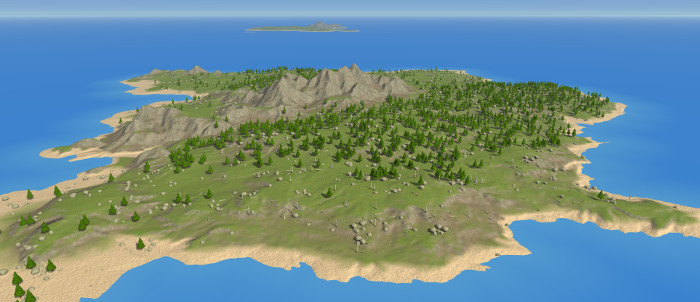
Saving all of them requires 3.7 megabytes! That's around 400 bytes per object! yikes! It seems like a lot, but each object is storing a lot of gameplay data you don't visually see.
Each object has some overhead making them future proof. Each section of an object, (graphics, audio, collision, animation, ai, etc) has a header and footer, version number, and size. This allows me to make sure when the data is read back in everything is read correctly. It allows me to make additions in future versions, read the old data, and setup any new data. It allows me to skip over any sections that aren't needed anymore. It gives me safety when I change code and forget to update the save function - i'll get a fatal error that the code doesn't match the data written to disc.
This large size doesn't seem a huge deal, until I consider that a player might visit 100 such places. I dont want saves to be 370 megabytes. A player might not go that many places or the save might not total that large, but I need to deal with worst case.
My first fix was to apply a quick LZ compression. Since the trees and rocks save data are self similar, there's a lot of data repetition, so that takes it down to 731 kilobytes. That's 5 times smaller, but still not great, and real game data will have much more variety. I've got some Huffman/Arithmatic encoding I can do as well that brings it down another 50% or so, but I had a better idea.
Items placed on the map are known ahead of time. Even if they are procedural, they can be computed. But a player can interact with every one of them, removing them or changing them, requiring them to be saved. So what if instead, I track if a player has modified one of them. Say cut down one tree. Then I can just procedurally generate all but one of them, skippng over the one that was modified. I can store a single bit per object, which tells if the object is placed as it was on map creation, or it's been modified or removed.
If the tree is in the middle of being cut down it's saved as a full object. If it's gone it costs nothing but 1 bit. If it's there it costs 1 bit. All the sudden 3.7 megabytes becomes just over 1 kilobyte, plus a little for any object that is being interacted with.
As development continues I plan on extending this system a little further. I can precompute objects that aren't there initially. For example if you can plant a forest of trees on a plain, I can have the positions precomputed, but the objects not added. When a tree is planted later, it uses one of the available positions. For a while, the tree grows and is stored as a full object. And when it's reached full growth, the bit is changed to have the tree be there on load, and it costs nearly nothing in save space.
This way the majority of the simple objects in an area cost nothing to save. The save game size will be determined as just what the player builds and by the characters that are walking around. Certainly if a player builds 1000 buildings save games will be bigger, but it's unlikely they will do so across many different places.
Saving is one of those things that's so important, and no one ever notices if it's working like its supposed to. So now saving is out of the way, except for nice menus and interface. Hopefully next time I'll be talking about the beginnings of my new AI simulation.