Semantic 2.4 brings a new components for handling content loading ui placeholder, as well as a new type of segment used to reserve space for content: ui placeholder segment.
Additionally several important component updates are included in this release.
Modals have been re-architected to use hybrid flex support, falling back to JS positioning for more complex use-cases (or older browsers).
Dropdowns now include a clearable setting for letting users reset dropdowns to its empty state.
If you are upgrading from a previous SUI version, be sure to add @placeholder to your theme.config to include the placeholder component in your code.
Placeholders can be used to reduce the jarringness, and perceived load time when loading new content
Simulate Loading

Placeholder segments allow you to reserve space in your design for where content is intended to appear. This is useful when a page should prompt a user about its intended functionality, even when no content is present.
Now dropdowns can specify that their content can be cleared with clearable: true.
Show me
classes currently available.
Although flex-box were introduced in 2.3.0 there were limitations which may have prevented some advanced use-cases. For example, flexbox modals did not support modals that used detachable: false and werent directly inside dimmer flex containers. Also some flex browsers (IE11) do not support absolutely positioned elements inside flex containers, so multiple overlapping modals could not be used in those cases.
2.4.0 solves this by introducing a hybrid flex system, that will fall back to javascript positioning for browsers or layouts that aren't compatible with flex.
After an extended period of patches, Semantic UI 2.3 marks the return to significant feature changes for the project.
In upcoming Semantic releases we will be releasing more frequently, but with smaller changesets, to make it easier for users to upgrade and adjust to global changes.
In 2.3 icons now include a full port of Font Awesome 5.0.6, including 929 icons.
Icon categories now match icon categories in Font Awesome's documentation, making it easier to find icons between docs.
Smile
Smile Outline
Hand Rock
Hand Paper
Hand Scissors
Semantic UI icon docs now includes a global icon search with easy copy and paste access to html
Semantic UI 2.3 includes a rewrite of modal to include non-js flexbox positioning for vertical centering. No longer will you have to call $('.ui.modal').modal('refresh') if content height changes to recenter.
In addition there's a new setting centered: false which makes it easier to do top aligned modals when the internal may be dynamic and you dont want content to shift vertically.
$('.ui.special.modal') .modal({ centered: false }) .modal('attach events', '.modal.example .button') ;
Transition now includes zoom and glow. Glow is useful for highlighting elements on page,
$('.autumn.leaf') .transition('zoom') ;
$('.autumn.leaf') .transition('glow') ;

Theming now uses two no global variables @bold and @normal making it easier to modify font weights in a more complex font stack
/* Use some custom font weights */ @bold: 600; @normal: 400;
You can now use category search with the source option without having to add API callbacks
var categoryContent = [ { category: 'South America', title: 'Brazil' }, { category: 'South America', title: 'Peru' }, { category: 'North America', title: 'Canada' }, { category: 'Asia', title: 'South Korea' }, { category: 'Asia', title: 'Japan' }, { category: 'Asia', title: 'China' }, { category: 'Europe', title: 'Denmark' }, { category: 'Europe', title: 'England' }, { category: 'Europe', title: 'France' }, { category: 'Europe', title: 'Germany' }, { category: 'Africa', title: 'Ethiopia' }, { category: 'Africa', title: 'Nigeria' }, { category: 'Africa', title: 'Zimbabwe' }, ]; $('.local-category.example .ui.search') .search({ type: 'category', source: categoryContent, searchFields: [ 'title', 'category' ] }) ;
Semantic popups now detects when horizontally aligning the popup on it's arrow is more reasonable than matching edges with a popup.
To use this feature be sure to specify movePopup: false in your settings


$('.centering.example .avatar.image').popup();
In addition, search now includes three tiers of matched results, similar to the options available in dropdown. Fuzzy results now are turned off by the new default fullTextSearch: 'exact'
Query matches the start of field exactly
Query matches any part of field
New
Query "fuzzy" matches field
$('.ui.search') .search({ fullTextSearch: 'exact' // only matches exact matches (no fuzzy matching) }) ;
2.2 represents nearly a half year of updates, many new features, and bug patches.
40 new features
70 bug fixes
For the complete list of bugs, their accompanying issue threads and the fixes please consult the release notes
2.2 brings many new bug fixes. For a complete list please check out our release notes. Here is a highlight of some critical bugs
View Critical Bug List
All UI - Using component('setting, {}) to add multiple settings as an object literal, for example error: {}, will now deep extend the existing object instead of replacing it.
API - beforeSend would not correctly cancel request when return false; is used in callback.
API - cache: 'local' would not return the localstorage cached results in some cases
Divider - Descenders like "g" are cut off in horizontal divider
Dropdown - forceSelection will now automatically select values with multi dropdowns. When using userAdditions setting it will now automatically tokenize the current entered value
Dropdown - search selection would not let you move back in an entered search string with left arrow
Dropdown - Fixed issue where value set using javascript DOM metadata would be cleared when a message or user addition triggered refresh
Form Validation / Dropdown - Using "enter" key in a search dropdown could cause a form to be submitted
Form Validation - Fix issue with some foreign email addresses with extended charsets causing email validation to fail
Form Validation - Revalidating a field on: blur could cause fields not yet interacted with to be validated
Form - Fixed issue with (x) fields and equal width fields where middle rows would be slightly smaller because they include both left and right padding in % width. (Edges only have one side padding). Field groups now use negative margins instead.
Popup - Fixed issue where clicking element inside popup removed from DOM (like clicking a multi select label) would cause popup to close
Rail - Fixed incorrect width for close rail and very close rail caused by variable addition with mixed units px + em
Search - Fixed bug where a previously XHR query could cause the next one to fail depending on the latency of the request.
Search - Fixed an issue where onResult returning false would not prevent the search menu from hiding. Clicking on an empty results message will also no longer close the search results.
Sticky/Visibility - Added mutation observer to teardown element with destroy if removed from DOM context, fixing a possible memory leak
Video - Fixed issue with .video('change') behavior not properly changing video.
2.2 includes CSS only popups that work without JS initialization using the data-tooltip property on any element. CSS tooltips even support inversion and specified positioning.
Top Left
Top Center
Top Right
Bottom Left
Bottom Center
Bottom Right
Right Center
Left Center
Top Left
Top Center
Top Right
Bottom Left
Bottom Center
Bottom Right
Right Center
Left Center
2.2 of Semantic UI includes the latest version of Font Awesome with 50+ new icons. For a complete breakdown of new icons please check Font Awesome's list.
Wheelchair
American Sign Language (ASL) Interpreting
Assistive Listening Systems
Audio Description
Blind
Braille
Deafness
Low Vision
Sign Language
Universal Access
Volume Control Phone
Progress bars in 2.2 have been recoded to handle rapid update events.
Now developers can trigger updates at fast intervals without causing animations to stutter, or easing tweens to occur unnaturally.
Waiting for you to press button
$('.rapid.example .ui.button') .on('click', function() { var $progress = $('.rapid.example .ui.progress'), $button = $(this), updateEvent ; clearInterval(window.fakeProgress) $progress.progress('reset'); // updates every 10ms until complete window.fakeProgress = setInterval(function() { $progress.progress('increment'); $button.text( $progress.progress('get value') ); // stop incrementing when complete if($progress.progress('is complete')) { clearInterval(window.fakeProgress) } }, 10); }) ; $('.rapid.example .ui.progress') .progress({ duration : 200, total : 200, text : { active: '{value} of {total} done' } }) ;
Sticky, visibility, popup, and dropdown, modules that can attach events on initialization to window and body, for example to detect changes in window scroll, will now use additional mutation observers to determine if they are removed from the DOM and automatically fire their destroy behaviors.
This can prevent memory leaks when the parent element of a component is removed without the element is propertly teared down by calling its destroy behavior.
Simulate Memory Leak
Not Active
This segment has visibility events attached to modify the button above to say "active" when it is on screen
$('.memory.example .demo.segment') .visibility({ onOnScreen: function() { // this will no longer fire even though element was removed indirectly $('.memory.example .display.segment').html('This is active'); } }) ; // button will remove parent of visibility element and callback will stop firing automatically $('.memory.example .ui.button') .on('click', function() { $('.memory.example .display.segment').html('De-activated'); $('.memory.example .wrapper') .remove() ; }) ;
Form field validation can now specify a depends property which will only cause validation to occur only when another field, like a checkbox or input, is selected.
$('.depends.example .ui.form') .form({ onSuccess: function() { alert('No form problems'); return false; }, fields: { yearsPracticed: { identifier : 'yearsPracticed', depends : 'isDoctor', rules : [ { type : 'empty', prompt : 'Please enter the number of years you have been a doctor' } ] } } }) ;
We've updated dropdowns to make it simpler to breeze through forms with dropdowns, and provide more intuitive selection controls
Multiple select dropdowns use a new algorithm for line breaks based on actual rendered pixels and not estimated length based on glyph width calculations, meaning more choices can squeeze on a line than before.
Dropdowns now change selections on keyboards without hitting "enter", this lets users quickly navigate between dropdown elements in a form without having to hit "enter" before "tab" after each field entry, saving an additional keystroke.
All dropdown menus now support letter keyboard shortcuts. Hitting "C" for instance will let you jump to "California" in a dropdown list, then hitting it again "Colorado", even without using a search selection dropdown.
We've added primary, secondary, positive and negative basic buttons
Popups now include a new setting boundary that let you specify that a popup should not escape the boundary of another section. This can be useful in complex paned layouts
Additionally popups can now specify a scroll context, to allow for scroll containers other than window to cause a clicked popup to hide on scroll.
$('.boundary.example .button') .popup({ boundary: '.boundary.example .segment' }) ;
Hover Me
Normally this popup would open in the default position top center but because this would escape the boundaries of the segment it will search other available positions until it can find one to place the popup while staying inside the segment
We've added many new settings to components to help provide more granular control for some use-cases.
| selectOnKeydown | Whether dropdown should change active selection on keyboard shortcuts, preventing the requirement of hitting enter to confirm selection before the user tabs out of the field. (This will save one extra keystroke)
|
| allowReselection | Setting to true will allow onChange to be triggered even when reselecting the same option |
| fullTextSearch | Setting to true will allow search across any part of string, setting to exact will disable fuzzy matching for dropdowns. |
| hideAdditions | Setting to true will allow custom user additions without triggering a special dropdown message for "Add custom choice". This is now enabled by default |
| minCharacters | Minimum characters required to begin showing filtered results |
| boundary | A selector, or DOM element that the popup should never escape when positioning itself |
| scrollContext | A selector or DOM element which should be used for determining if user has scrolled. |
| observeChanges | Whether popup should automatically watch for its own removal from page to avoid memory leaks. |
| selectFirstResult | Whether the first search result element should be selected after results appear. |
| showNoResults | Whether a message should appear when no search results are returned |
| fireOnInit | Whether the rating component should fire callbacks on initialization. |
| zIndex | Allows you to specify the z-index used with type: 'fixed'
|
| onFixed | A callback used with type: 'fixed' to occur when content is fixed to the page.
|
| onUnfixed | A callback used with type: 'fixed' to occur when content is fixed to the page.
|
| onLoaded | A callback used with type: 'image' to occur when content is loaded.
|
| onAllLoaded | A callback used with type: 'image' to occur when all images initialized together are loaded.
|
| cacheType | When set to html will cache the tabs html after load, reloading with the exact same html. Setting to response will cache the serve response, allowing for load events to fire with same contents.
|
| deactivate | When set to siblings deactivates only DOM elements that are siblings of the selected tab activator. all will deactivate all other elements initialized at the same time.
|
| width | When set to next will use the size of the next side during the shape's animation. When set to initial it will use the size of the shape at initialization. When set to a specifix pixel width, will force the size to that width.
|
| height | When set to next will use the size of the next side during the shape's animation. When set to initial it will use the size of the shape at initialization. When set to a specifix pixel height, will force the size to that height.
|
2.1 sums up around two months of work, including many new features, and updates to help bulletproof existing UI.
70 bug fixes
23 new UI updates
14 feature enhancements
To see the complete list of updates review our release notes
Labeled buttons are a useful design pattern for displaying a tally alongside a button.
Labeled buttons are compatible with any label type, but looks great alongside a basic label.
Labeled input now supports labels on both sides of content at the same time.
Tabular menus now support right and bottom positioning.
This is an stretched grid column. This segment will always match the tab height
This is an stretched grid column. This segment will always match the tab height
Grids now support using multiple vertical dividers per column, in any specified arrangement.
Grids now support reversing their column flow per-device. This can be useful when a column should appear on the opposite side of the screen on smaller screens.
Reversing grids are also designed to be compatible with column-order specific variations like divided or celled
Computer First
Tablet Fourth
Computer Second
Tablet Third
Computer Third
Tablet Second
Computer Fourth
Tablet First
Cards have a stackable variation so that they appear full width on mobile.
14h
 Elliot
17 likes 3 comments
14h
Elliot
17 likes 3 comments
14h
Elliot
17 likes 3 comments
14h
Elliot
17 likes 3 comments
Tables now include a variation for using table-layout: fixed, which does not adjust column widths based on size.
This can help present data more cleanly with content that is uniformly formatted.
Fixed tables also support content collapsing using text-overflow: ellipsis when used with single line.
| Name | Status | Gender |
|---|---|---|
| John | Approved | Male |
| Jamie | Approved | Male |
| Jill | Denied | Female |
| Name | Status | Description |
|---|---|---|
| John | Approved | This is much too long to fit I'm sorry about that |
| Jamie | Approved | Shorter description |
| Jill | Denied | Shorter description |
In 2.1 all component that uses remote data will let you specify a fields array to modify expected JSON property names, saving you the trouble of specifying an onResponse callback to modify the data structure.
$('.ui.search') .search({ apiSettings: { url: '//api.github.com/search/repositories?q={query}' }, fields: { results : 'items', title : 'name', url : 'html_url' } }) ;
Fields can also be used with local search to simplify working with unusual search sources.
$('.ui.search') .search({ searchFields: ['pickle'], fields: { title : 'mustard' }, source: [ { mustard: 'Title #1', pickle: 'thing' }, { mustard: 'Title #2', pickle: 'another thing' }, { mustard: 'Title #3', pickle: 'thing 100' } ] }) ;
We've added new validation rules for payment. These work with luhn and non-luhn card numbers. If you only accept a certain set of credit cards you can specify that too.
Try 4565340519181845 a test visa card number
$('.payment.example form') .form({ on: 'blur', inline: true, fields: { card: { identifier : 'card', rules: [ { type : 'creditCard', prompt : 'Please enter a valid credit card' } ] }, exactCard: { identifier : 'exact-card', rules: [ { type : 'creditCard[visa,amex]', prompt : 'Please enter a visa or amex card' } ] } } }) ;
Checkboxes now include four new callbacks beforeChecked, beforeUnchecked, beforeDeterminate, and beforeIndeterminate, returning false from these callbacks will cancel the action from occuring.
$('.cancel.example .ui.checkbox') .checkbox({ beforeChecked: function() { var luckyPerson = (Math.random() < 0.5) ; return luckyPerson; } }) ;
Global variables have been added to modify form focus color across all components. The default theme now uses a light blue to signal selection.
Basic colored buttons now are colored without hover, making the style more similar to common usage on most sites.
Horizontal labeled icon menu now use stacked icons to appear more in-tune with common icon menu usage.
2.0 brings a whopping set of changes to the project:
129 enhancements
118 bug fixes
3 new components
There's just too much to cover in one page, but we've tried our best to give you examples of some of the new features available in 2.0
To see the full list of what's changed check out the project's release notes.
Flexbox allows for elements to intuitively resize to fill available space, making many complex layouts much simpler.
13 components: Form, Grid, Menu, Message, Button, Segment, Step, Dropdown, Modal, Feed, Statistic, Card, Item now use flex for positioning.
All components have received a face-lift for 2.0. Styles give slightly more negative space and a few idiosyncratic design touches have been removed.
EM sizing has been improved in 2.0, with all values rounding to exact pixel values. This helps common relative sizing pitfalls like rounding errors in vertical alignment.
Em variables now use new globally calculated em ratios, like @relative4px, to express pixel values in terms of root em size. This makes sure components don't include confusing decimal or fractional values when dealing with sizing.
Grids in 2.0 now use flexbox so columns are always equal height across rows.
The new equal width variation adjusts column widths automatically splitting available width between columns.
If a column has a specified width, other columns will adapt to take available space around it.
Containers have been added as a simple way to limit content width.
The new stretched variation makes vertically aligning layouts much simpler. Columns will not only match heights, but stretch their contents to match heights.

Multiple select dropdowns are now available, and can generate automatically from standard HTML selects.
Dropdowns now all support advanced keyboard shortcuts like pagedown, delete, shift+left ctrl+click, and selection using first letter of item.
Additionally dropdowns will now automatically open upward if there is not enough space available in the viewport below a dropdown.
All dropdowns, single and multiple now support user tagging. Values can be automatically separated by a delimiter and placed in a hidden input, or extend an existing select element.
$('.ui.dropdown') .dropdown({ allowAdditions: true }) ;
All dropdowns now support loading remote data. Selected name value pairs retrieved remotely are stored in sessionStorage so that selected values are repopulated correctly even after a page refresh.
// somewhere in app $.api.settings.api = { queryTags: '//api.semantic-ui.com/tags/{query}' }; $('.ui.dropdown') .dropdown({ apiSettings: { action: 'queryTags' } }) ;
Scrolling menu and nested menus are now supported.
Listing choices in a nested menu will still give all the same keyboard shortcuts and filtering as regular menus.
Dropdowns now support advanced shortcuts like page down and page up, scrolling to selection on first letter press, i.e. "N" for New York, shift+left/right for group selection, and ctrl+click for modifying groups.
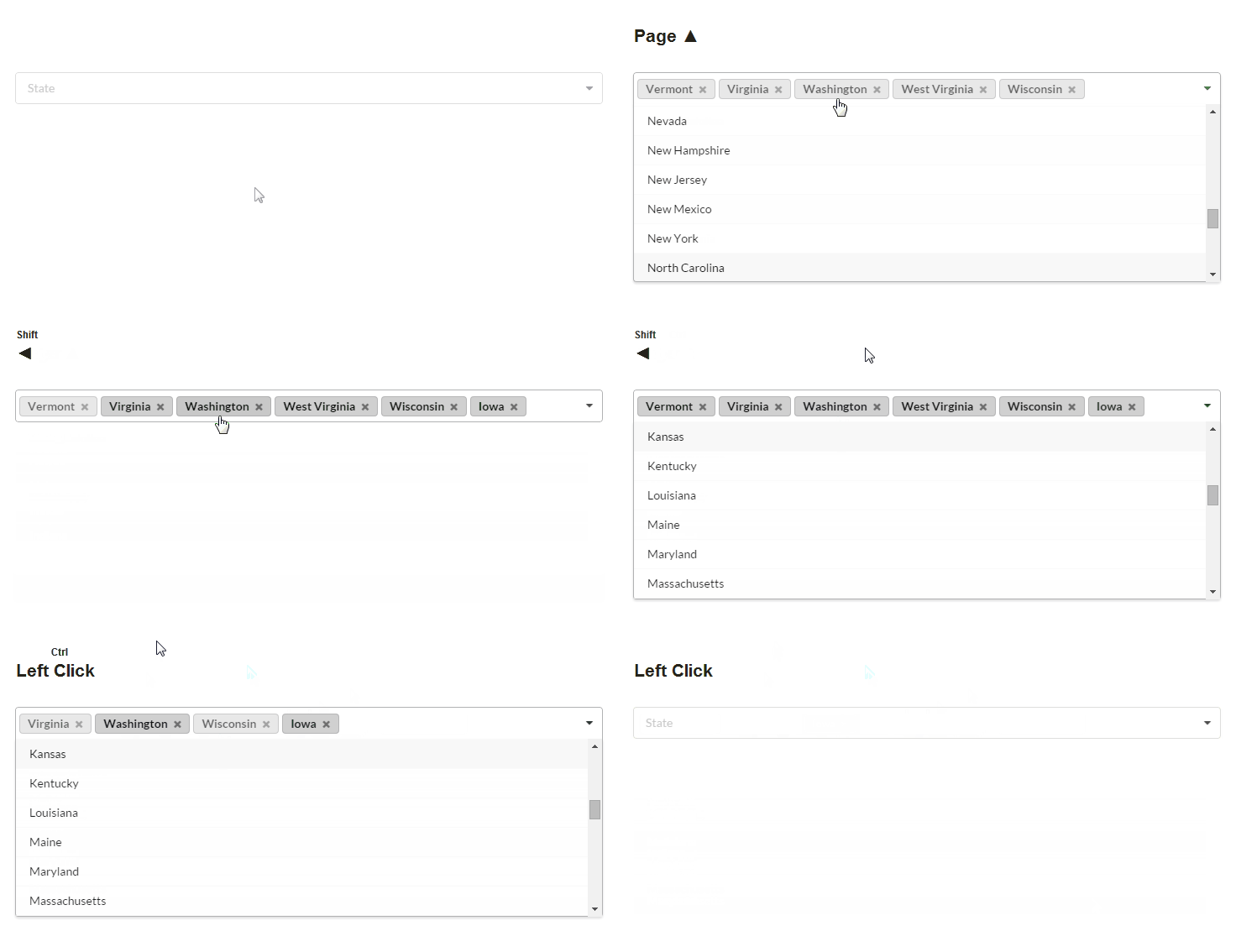
Dropdowns support many, many new features, including:
- Maximum selection count is supported for multiple selects
- Mutation observers will now watch for changes in menus or the elements they are generated from and will update choices automatically
- Custom templated error messages are now supported with dropdowns
API now supports sessionStorage caching. This setting makes repeated requests to a URL return results instantly across a user's session, drastically improving performance for components like search.
Try refreshing the page and searching the same letter, results will appear instantly without a server roundtrip.
$('.ui.dropdown') .dropdown({ apiSettings: { cache : 'local', url: '//api.semantic-ui.com/tags/{query}' } }) ;
API now lets you adjust a server's JSON response using a new callback, onResponse. This can let you restructure third party APIs to match your local data requirements.
$('.ui.search') .search({ type : 'category', minCharacters : 3, apiSettings : { onResponse: function(githubResponse) { var response = { results : {} } ; // translate GitHub API response to work with search $.each(githubResponse.items, function(index, item) { var language = item.language || 'Unknown', maxResults = 8 ; if(index >= maxResults) { return false; } // create new language category if(response.results[language] === undefined) { response.results[language] = { name : language, results : [] }; } // add result to category response.results[language].results.push({ title : item.name, description : item.description, url : item.html_url }); }); return response; }, url: '//api.github.com/search/repositories?q={query}' } })
API now supports mocked responses, letting you specify how responses are returned in advance.
$('.toggle.button') .api({ // lets pretend this took a while loadingDuration: 500, // lets treat this button as requesting this JSON mockResponse: { success: true } }) // successful responses will trigger a text state change .state({ text: { inactive : 'Off', active : 'On' } }) ;
Off
API can now use custom asynchronous callbacks for resolving API requests, this can let you use other custom XHR backends, or local data to resolve requests.
$('.toggle.button') .api({ // lets wait a half second then try your luck mockResponseAsync: function(settings, callback) { var luckyPerson = (Math.random() < 0.5), response = (luckyPerson) ? { success: true } : { success: false, message: 'You are not lucky' } ; // simulate this is an async task setTimeout(function() { callback(response); }, 500); }, successTest: function(response) { return response && response.success; }, onFailure: function (response) { alert(response.message); } }) .state({ text: { inactive : 'Off', active : 'On' } }) ;
Off
Form now include custom styling for browser autocompleted form fields. Autocompleted fields can also specify focused autocomplete, and errored autocomplete styles.
Dimmers now include blurring dimmer variations.
Other component can use blurring dimmers to add overlay content, modal also includes a blurring setting that affects its generated dimmer.


Checkboxes now support an indeterminate state. This is useful when a collection of checkboxes may be partially selected.
Horizontal groups are now available for segment.
Groups now use flexbox and fully support nesting.
Top
Nested Top
Nested Middle
Nested Bottom
Middle
Bottom
Menus have been completely rewritten to use flexbox. Items inside a menu will automatically adjust to align with other menu items regardless of size.
Menus now include a new vertical tabular menu type.
This is an stretched grid column. This segment will always match the tab height
Menus now have better coupling with other components like dropdown, search, button, and input.
$('.ui.menu .browse.item') .popup({ popup : '.classes.popup', hoverable : true, position : 'bottom left', delay : { show: 300, hide: 800 } }) ;
$('.ui.search') .search({ type: 'category', apiSettings: { action: 'categorySearch' } }) ;
Visibility APIs now include useful shortcuts for sticky content. A placeholder will automatically be added when an element is passed making sure other content does not shift position.
Additionally visibility and sticky have been rewritten to use a pub/sub pattern which is much more performant than 1.0
$('.overlay') .visibility({ type : 'fixed', offset : 15 // give some space from top of screen }) ;
.overlay { background-color: #FFFFFF; padding: 0.5em; box-shadow: 0px 0px 0px rgba(0, 0, 0, 0); transition: all 0.5s ease; background: transparent; } /* change style */ .fixed.overlay { position: fixed; padding: 1em; box-shadow: 0px 0px 6px rgba(0, 0, 0, 0.2); }