Free VPN for mobile and computer
A free, no-log browser VPN is built into the Opera browser for mobile and computer. No add-ons. Browse with enhanced online privacy using Opera. See more
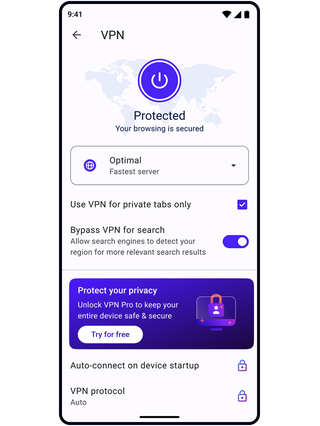
Free VPN Benefits
Opera’s no-log virtual private network protects your browser privacy on mobile and desktop. Best of all - it’s free.
Integrated in Opera
Protection
Opera Browser only Entire device (up to 6)
No-log service
Mobile & desktop
Locations
3 general locations 48 unique locations
Number of servers
100+ high-speed servers 3,000+ high-speed servers
No data cap
Unlimited bandwidth
Data encryption
DNS leak protection
Two-factor authentication
Live chat support
30-day money-back guarantee

Opera AI
Chat and create for free with built-in Opera AI.
Ad Blocker
Browse with less distractions and load websites faster.
Music Player
A world of music and podcasts at your fingertips.
Browser AI
Expand your capabilities with built-in Opera AI, ChatGPT, and Gemini.
Snapshot
Easily capture, edit and share your snapshots from webpages.
Tab Islands
Save space, keep organized, and switch contexts easily with Tab Islands.
Tab Emojis
Personalize your tabs and express yourself with Tab Emojis.
Workspaces
Organize tab groups in separate customizable workspaces.
VPN Pro
Browse privately anywhere with VPN Pro.
Slack in Opera
Stay focused and organized with Slack in Opera’s sidebar.
Discord in Opera
Stay connected with your Discord communities in Opera’s sidebar.
Chat in WhatsApp on desktop in your Opera browser.
Use Instagram in Opera’s sidebar while you browse.
X
Explore and tweet conveniently with a better view on desktop.
YouTube
Your favorite videos, alongside your browsing.
Opera Sync
Synchronize the Opera browsers on any of your devices.
Opera Bookmarks
Easily manage, customize and keep your favorite places online.
Video Popout
Pop out online videos so they float on top of webpages as you browse.
Lucid Mode
Enhance online videos and images in one click.
Unit Converter
Automatically convert time-zones, currencies and units of measurement.
Personal News
A customizable and convenient newsfeed on your start page.
Battery Saver
An easy way to noticeably extend your laptop’s battery life.
Flow
Instantly send files, links and notes between your devices.
Pinboards
Save and collect web content easily, share it visually.
Opera Cashback
Automatically get money back when shopping in Opera Browser.
Opera Themes
Completely transform the look, sound and feel of your browser.
Deezer
Play your favorite music in Opera’s sidebar.
How a virtual private network protects you
When you connect to a website without a VPN service, the website can see your IP address. However, when using a VPN connection, internet traffic and private data is encrypted and routed through a remote VPN server so the website sees the address of the server, rather than yours. This is especially useful when you get internet access through public Wi-Fi or have an internet connection that is accessed by other devices.
Opera's Free VPN gives you unlimited access to our fast and free VPN servers, with a strict no-logging policy, and free access to multiple VPN server locations, so you can choose a location that is optimal for you and your internet service provider.
Protect your privacy with Opera's Free VPN service
The best things in life are free, and your online privacy and security should be no exception. Virtual Private Networks protect your privacy and online activity from third parties with an encrypted connection for your internet traffic.
While free VPN providers may be hard to come by, the Opera browser proves that it is still possible to have a reliable VPN service for both mobile and desktop without having to pay and without browser extensions. This free feature is built into the Opera browser across all of your devices, giving you enhanced privacy online wherever you are.
Get the Opera browser Free VPN now
Because Opera's browser VPN software is built right into the browser itself, you’re able to start using Free VPN immediately and don't need to download a VPN extension. Get Opera's Free VPN at no charge when you download the Opera browser for any of your devices.
When you enable VPN in your Opera desktop browser, you'll see a VPN badge to the left of your address and search bar. Click on the badge and you will be shown an on/off switch, information about the amount of data transferred, your virtual location, and your virtual IP address. There, you can also switch Free VPN server locations to switch virtual IP addresses. Enjoy additional online privacy with the best free VPN built into the Opera browser.
Opera’s free VPN works within the browser
Because Opera’s Free VPN service is built into the browser, it keeps your activity within the Opera browser private, but does not apply to your internet use outside of Opera.
Now secure your entire device with VPN Pro
For complete, device-wide VPN protection, subscribe to Opera VPN Pro. No matter which application you use, your internet traffic stays safer behind a wall of next-generation VPN encryption. Plus, you can secure up to 6 devices with one premium VPN Pro subscription.
You deserve a better browser
Opera's free VPN, Ad Blocker, and Flow file sharing. Just a few of the must-have features built into Opera for faster, smoother and distraction-free browsing designed to improve your online experience.