Home | 2022-09-07 | © James Hudson

Who is this for?
Developers who are sad that Heroku no longer offers free tiers, and/or service owners who wince at their monthly bills.
This is a review of the process of migrating Heroku-hosted services onto other "Platform as a Service" (PaaS) providers, and my initial experience with that process.
Django is my preferred platform for most web projects, so that is the specific platform I will discuss.
This article goes into some technical details for developers who are considering migrating an existing Django app from Heroku to another platform.
Why am I moving off Heroku?
Recently, Heroku, the original "Platform as a Service" company, made an announcement that it was ending its free tier of web service hosting. This killed off my main reason for staying with Heroku, and it seems I am not alone. There has been a flood of blog posts in my search results, such as: "Getting off Heroku", "Heroku alternatives", and "Migrating from Heroku to ...".
Heroku has been a fantastic tool for my freelance business over the last decade, but this was before the Docker revolution. The platform has not really innovated during that time, considering all the deployment options we now have. Heroku's choice to remove their free tier was a deal-breaker.
I am a happily-paying Heroku customer, and I have customers whom I have convinced to use Heroku, but it will no longer be my go-to choice for new projects. Heroku is relatively expensive, and I don’t want to pay for every single instance of staging servers, experimental projects, small apps, or non-profit services that I might end up doing in the future.
Reasons to stay on Heroku
Heroku has been around for ages. There is loads of documentation on every possible configuration. They seem to have included every obscure library you would ever need in their Buildpacks.
There is a huge list of third-party plugins for Heroku. One alternative which I tried did not even have cron, but required a janky extra VM instance which called a cron library.
The alternatives I tried were still under development, with plenty of rough edges and missing functionality which stopped them from being a seamless replacement for Heroku.
If you are a small team mostly developing Minimal Viable Products, or trying out small projects or experiments, then server maintenance does not add value to your business. Learning the ins and outs of AWS and container management is a job in itself, and can have hidden cost traps. I have found it liberating to outsource the platform work, so I only think about infrastructure at the abstraction level of git and above.
The contenders
I decided to put some small, unimportant services on each platform as a test. This is my experience of doing the minimal setup possible to migrate these couple of services from Heroku. I did not dig deeply into any of the PaaSs, so please don’t consider this an in-depth review.
On Railway.app I installed a service that includes PDF export (using the Weasyprint library) and additional binary library packages. This makes it more complicated to deploy than the average Django CRUD/CMS.
On Fly.io I installed a simple REST API and CMS for an app.
I have not had enough time to see how they perform over time with these real services, or what the long-term costs would look like.
My very non-scientific ratings
- Ease of setup - how easy was it to migrate a Django app from Heroku.
- Value - what you get for nothing, and how much sense their pricing scheme makes
- UI - how nice does the dashboard look
- Cleanliness - how it left my codebase. Did I need any weird config files, or need to hack anything to get it to work on the new platform?
- CLI - how easy is it to use a Command Line Interface to manage the service
- Database migration - how easy is it to pull the old data across from Heroku.
Railway.app
https://railway.app- Ease of setup: (4/5) the new Nixpacks system would not work for me, but the legacy Buildpacks option worked flawlessly "out of the box". I give this 5/5 with the power of hindsight: if I'd gone straight to Buildpacks and ignored Nixpacks. Nixpacks looks promising, but the base Docker image seemed to be lacking a lot of basic libraries, and I don't have time right now to learn the intricacies of a new packaging tech.
- Value: (5/5) "free"* for small instances. Very attractive "postpaid" payment option, plus $5 credit per month for free. Buy more credits as you exceed that $5 limit; or if you trust that you will not have a DoS attack, there is also an automatic payment potion. * Note that if you don't put in your credit card details, you will only have a very limited 500 excution hours per month, which effectively means that your services will be down part of the time. But you can buy a one-time $5 credit to remove this limit.
- UI (5/5) dashboard with beautiful overview of your infrastructure
- Cleanliness: (5/5) lots of instrumentation, and easy to follow what is going on: better than it was on Heroku. Didn’t add any extra weird config files to my git repo.
- CLI: (4/5) easy to do everything on the CLI, but the dashboard is so slick you will not mind doing things in either. Automatic deploy from GitHub means you get CI without any action.
- Database migration: (5/5) Just worked exactly like my old Heroku instance, after a few lines of shell script.
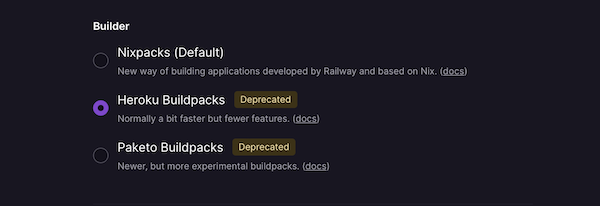
Tick this, and save yourself a world of dependency hell.
Also note:
- No cron job - you need to make a new small instance and run code there. This is straightforward to setup, and it arguably makes a lot of sense to have everything work with the same "git + deployed instance" philosophy.
- It is still under very active development. On the positive side, they have excellent community support, with regular updates and feature additions, and opportunity to give feedback. On the other hand, I don't feel quite ready to trust existing commercial projects to such a new compan just yet; trust is earned in drops, but lost in buckets.
Fly.io
https://fly.io- Ease of setup: (2/5) 2 hours of messing with database connections, manually copy/pasting SQL commands into a terminal
- Value: (5/5) 3 very small VMs of 256MB to configure how you want. These need to include database space.
- UI: (3/5) dashboard does the job, but is nothing special
- Cleanliness: (2/5) the database migration was not 100% perfect, and some data was lost. My Fly.io deployment and setup feels jankier than Railway. I am sunsetting this service, and so will probably not want to touch it again or poke around inside Fly.io, as long as it is still running. +1 point for generating a normal, clean Dockerfile as part of the build process.
- CLI: (5/5) easy to do everything you need on the CLI, so you don’t even need to touch the bare-bones dashboard.
- Database migration: (1/5) I barely managed it; it took a lot of hackery and ssh/command line black magic.
Also note:
- Really nice command line quiz to set up databases, instances etc. Just asks you questions.
- Secrets are really secret - bonus points for security.
Nope: the alternatives that didn't make the cut
OpenShift
I did try openshift years ago, but they made their lowest tier more expensive than Heroku.Heroku
No free tier as of November 2022.Render
Free tier database wipes every 3 months, making it unusable for any real project.Code snippets
These might help you with your own migration:
Export old database from Heroku
Run this code from your local machine to export your old Heroku database
	heroku login

	heroku run 'pg_dump $DATABASE_URL' > backup.sql --app <your app name>
Note that $DATABASE_URL will be filled by the Heroku environment, so type it as is here.
railway.app
Import database dump into railway.app:
(Copy/paste the from Railway’s PostgreSQL/Connect dashboard and add the -f backup.sql at end)
PGPASSWORD=
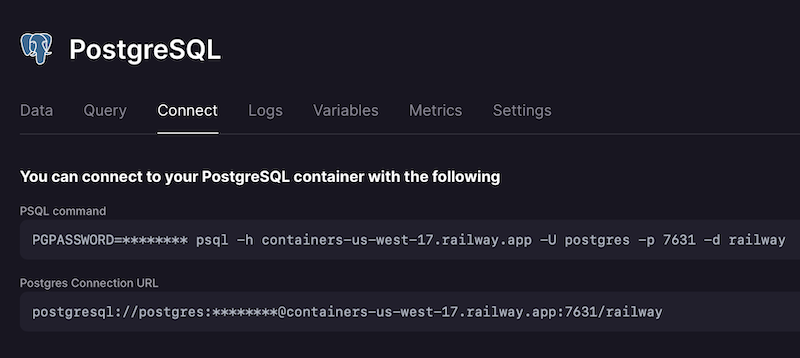
This might be a bit of an unneccesary security hole, but it sure is convenient.
Fly.io
Deploy
Had some issues deploying - needed to use this line for deploy to use my local Docker daemon:
flyctl deploy --verbose --local-only
Import database
I needed to open a local proxy to the database:
flyctl proxy 5400:5432 -a name—of-app-db
And then do my migration manually by
flyctl ssh console -a <app name>
python manage.py migrate
Then manually copy/pasting the important data from the SQL dump into a Postgres shell.
flyctl postgres connect -a < app name >-db
Then something like:
postgres=# COPY < table > (id, schoolid, classtypeid) FROM stdin;
Enter data to be copied followed by a newline.
End with a backslash and a period on a line by itself, or an EOF signal.
  24   24  5
  29   63  5
  32   30  5
    35   72  5
  36   61  5
37 77 5
Overall winner`: Railway.app
https://railway.appThe effortless setup, true "free" tier, attractive pricing, good support, and beautiful dashboard, make this a clear winner for my small projects. However, it's still a new service, so I'll see how it runs for a while on my small projects before I host any commercial projects there.
Summary
Both Railway and Fly gave me a few genuine moments of thinking: "wow, that is really cool", as I was setting them up. Perhaps they still have some rough edges, but I'm excited by their potential. Railway feels closer to the ideal of "just show it some code, and the service is running".
Perhaps Render is still worth it despite the lack of a proper free tier. But I'm not paying for my staging servers, experiments, or apps with miniscule user bases, when there are excellent free options out there.
I'll continue paying Heroku for my existing commercial services, but it will no longer be my go-to PaaS for new projects. As my Heroku projects scale, I'll migrate them too, for the added features and lower costs elsewhere.
In closing, I would say that us small developers are spoiled for choice; we just have so many interesting options.
James Hudson
If you have any thoughts on this, please email me. Or at least "like" or "share" this post if you think others would appreciate it.
OTHER POSTS:







Disclaimer
Needless to say, this blog isn't financial or legal advice, an excuse for getting fired, or promising that any of these ideas will work for you. The companies or people I mention may not agree with my opinions here. Don't do anything reckless, damaging or hurtful to anyone! In the future you might need your bridges unburnt. Images used under fair use, and are copyright their respective owners. © 2014-2022 James Hudson