Sensationalist title aside, this article will present our measurements of our app Colors! across 10 devices: Nintendo 3DS, PlayStation Vita, Microsoft Surface Pro, Apple iPhone, Samsung Galaxy Note, Samsung Galaxy Note 2, Samsung Galaxy S3, Google Nexus 10, and with special appearance by Nintendo DS and the Nintendo Wii U.
As I’ve posted before, Latency in video-games (and apps) is something I feel strongly about. While the benefit of low latency is easy to understand for video-games where the action is intense, it’s equally true for a painting apps like Colors!. Just try write to write your name on your average note-taking app, and you will see how high latency makes this so much harder than it should be. This video from Microsoft Labs shows that in an excellent way.
Before I continue, I must point out that this is a long and technical article, and if you are looking for info on the Colors! 3D update, you should probably stop reading. Come back in a day or so and I think I should have some good news on that one as well.
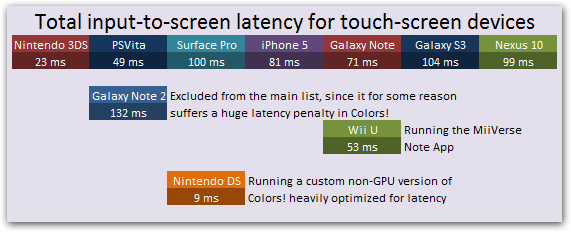
With Colors!, we are in a pretty unique position where we have our app up and running on pretty much every major touch-screen device out there. And since I haven’t really seen any comparisons of latency across all the handheld hardware out there before, so I thought I present my findings here. A huge disclaimer though: THIS IS HOW COLORS! PERFORMS ACROSS DEVICES – WHICH MIGHT NOT BE HOW OTHER GAMES/APPS BEHAVE ON THOSE SAME DEVICES. Each device has their own way of doing input and rendering, and we have done more work on latency on some devices than on others. This means that these numbers should be taken with a grain of salt, and I’ll go into details about that later. But first, check out the results:
So let’s kick off and talk what I’m measuring here. By capturing video of Colors! running in 240fps using a GoPro Hero (awesome toy by the way!), I measured how long it takes from when I touch something on the screen, to when something is displayed on the screen based on those screen-coordinates. I do this by counting the number of 240fps frames it takes for the brush-stroke to catch up with the actual stylus (or finger in some cases). For example, if it takes 7 frames (in 240Hz) for the brush-stroke to catch up with the stylus, then that means that the input-to-screen latency is 1000*(7-0.5)/240=27.1ms. In other words, it would take 27.1ms from you touching the screen at a specific point for the device to display something based on that information. (the -0.5 is to account for that the pixels could have been updated anytime between frame 6 and frame 7 in the video-capture, but I’m not sure how sound that math is). Here is an example video of this:
I did such measurements for 10 devices, and multiple times on a couple of devices where I had more than one testing scenario. You can find the full result spread-sheet here.
Results
So what does this data tell us? Well, for one thing we can see that the gaming-devices consistently outperformed the smart-phones. I can only guess why, but it is possible that the Nintendo 3DS and the PSVita can have lower latency since they will never have to render anything on top of your game like a phone sometimes do. Also, the input handlers are usually very effective on game-devices, allowing you to read the latest available input rather than have to wait for it to be sent to you through an event-handler like you have to on iOS and Android.
On the Android side, it is very interesting to see that the various devices perform quite differently, even though they are running the same version of the Colors!. Also that the most popular Android device out there, the Galaxy S3, had the highest latency (except the Galaxy Note 2, but I think there is some bug with that since I could get lower latency with the built-in note app).
Finally, I think it’s nice to see that the handheld gaming devices perform better than a general Console/TV setup. From other articles I’ve read, the lowest latency you can hope for in a game highly optimized for latency like Guitar Hero and Call of Duty, you can at best hope for around 60ms of latency with a good TV.
Platform specific info
Nintendo 3DS – 23 ms
The Nintendo 3DS performs amazingly here, beating all other GPU based platforms. This is especially nice because it’s by a huge margin the most popular platform for Colors!. The reason it’s beating the PSVita by that much is that on the 3DS I spent some time implementing a single-buffer rendering mode. This is normally not viable for games since it causes tearing, but for drawing strokes this is not noticeable and saves one 60Hz frame of latency.
PlayStation Vita – 49 ms
The PSVita is also performing very well. The rendering of the PSVita is built for multi-threading, which made it harder for me to trick my way to lower latency, but with some additional work, it should be possible accomplish the same single-buffering techniques I use on the 3DS which should get it very close to the Nintendo 3DS.
Surface Pro – 100 ms
I wasn’t really expecting the Surface Pro to perform well, since the version of Colors! running on is still in alpha stage. However, we’re using the basic template DirectX implementation used in the samples, so it’s still a little bit surprising that it is not performing better since it’s built around DirectX which was developed with games in mind. Perhaps I’m processing the input incorrectly or something, or maybe the Metro UI adds some latency to it somehow.
iPhone 5 – 81 ms
On the iPhone, I’ve spent a fair amount of time trying to reduce latency. However, most of that time was spent in earlier iterations of iOS, so it is possible that there are better ways of doing thing now. Colors! is set up with the renderer running on a separate thread using DisplayLink, which I think is still the recommended way of doing things.
Galaxy Note – 71 ms
Galaxy Note is the device that has received most attention by Ben, our Android programmer. When using the SPen, MotionEvents are delivered at about 120Hz compared to the 60Hz for finger input. This means that Android is likely to deliver two MotionEvents per screen refresh (60Hz refresh rate). As an experiment Ben created a simple app that moves an OpenGL ES cross in response to input with the MotionEvents used to set the cross’s position. It used a custom version of GLSurfaceView which records the time at which the last elgSwapBuffers returned. The render mode is set to “when dirty”. MotionEvents are continuously processed with requestRender() only being called if at least 12 milliseconds have past since the last elgSwapBuffers returned. When using the SPen this achieved a touch latency of respectable 45 ms. While this suggests that there are improvements to make in Colors!, this sort of latency may not be achievable in since the rendering there is more complex than a simple cross. Ben also had this to say about Android rendering in general.
Galaxy S3 – 104 ms & Nexus 10 – 99 ms
These devices was measured using finger, which makes it harder to accurately measure the number of frames, and also seem to add some latency – probably because there is more processing involved for the OS to process finger input.
Galaxy Note 2 – 132 ms
The Galaxy Note 2 is the reason I started doing these measurements in the first place. We don’t have a Galaxy Note 2 device at the office, but we had gotten reports that latency was bad in Colors! on this device. So I dropped by a T-Mobile store to do make these measurements and luckily, they didn’t mind. Thanks T-Mobile! :) In addition to measuring Colors! I also measured the latency in the built-in S Pen Notes app, which is developed by Samsung specifically for this device and its stylus, which should hopefully be a good reference on how low we should be able to get the latency. Actually, on the original Galaxy Note, we already beat the S Pen Notes App with a small margin, but on the Galaxy Note 2 there is a huge amount of latency (132 ms in Colors! vs 78 ms in the S Pen App) which we are not sure where it’s coming from. Maybe someone reading this article can help us figure that out.
Wii U GamePad – 53 ms
The Wii U GamePad was the one I was most curious to test out the latency on. I know this has been a big point of concern since what is displayed on the GamePad is a video-stream sent over Wi-Fi from the stationary console. We are still in the process of figuring out if we can/should do a Wii U version of Colors! or not, so our test here was performed on the MiiVerse Notes drawing app. To our surprise it performed as well as for the PS Vita, which makes it a very attractive platform for us to bring Colors! to. It’s really impressive work by Nintendo to pull off such a low latency.
Nintendo DS – 9 ms
Talking about Nintendo DS version is this context feels a little bit like cheating. The Nintendo DS version is the earliest version of Colors! and was a public prototype, that was never available in an official way. However, I spent a ton of time testing various latency strategies on that one. The big difference is that this platform has no GPU, so all processing is done on the CPU which allowed me to do things that would not be possible on a GPU based platform. Along with that, I dedicated the whole sub-processor to read out and process input from the hardware at maximum speed (between 500 and 1500 Hz sampling, if I remember correctly). This resulted in less than a 60Hz frame of latency, which surprises a lot of people who say that shouldn’t be possible. However, since I had direct access to VRAM, I could draw directly to the front-buffer which get between 0 – 16.7ms of latency depending on where the LCD refresh scan-line is at the time when I drew a pixel. That ideal result of this would be an average of (0+16.7)/2=8.3 ms of latency, so now that I finally managed to measure this accurately, seeing that I reached 9 ms feels pretty great.
Conclusion
Comparing the dedicated game-devices and the smart-phones it is pretty obvious which one is going to have a better gaming-experience. I also don’t think there is any real reason why the smart-phones should be able to have as good latency as modern handheld gaming consoles. Maybe by highlighting this issue, the hardware and software manufactures for these devices can take another look at what they are doing that is causing this and improve the situation for us all.
I’m personally excited to continue working on this on my end, now that I can easily and accurately measure the latency in Colors!. There is more that I can do to reduce latency, and there are some excellent articles that go into depth about this. This very recent one by Carmack is especially interesting: http://www.altdevblogaday.com/2013/02/22/latency-mitigation-strategies/.
Here are a few more that my friends shared with me while I was writing this article:
http://realtimecollisiondetection.net/blog/?p=30
http://www.gamasutra.com/view/feature/132122/measuring_responsiveness_in_video_.php
http://www.cs.unc.edu/~olano/papers/latency/
http://www.eurogamer.net/articles/digitalfoundry-lag-factor-article
Jens