I love AngularJS. You know I love AngularJS. I write poems about AngularJS. But, at InVision App, some of the engineers have started using ReactJS; so, it's time that I start digging into ReactJS a bit such that I can remain relevant on the team and be able to jump in and fix bugs. Since I didn't know thing-one about ReactJS, I took some time over the weekend to go through React's "Getting Started" tutorial. And, after I was done with it, I thought it would be interesting to recreate the tutorial in AngularJS.
View this demo code in my JavaScript Demos project on GitHub.
Fundamentally, ReactJS and AngularJS are doing the same thing. Well, at least the relevant parts; React is a view-rendering framework whereas Angular is more of a JavaScript application platform. But, when you consider the parts of AngularJS that deal with the view-model and with the rendering of the DOM (Document Object Model), both React and Angular are solving the same problem. And, more or less, they're doing it in the same way.
The underlying mechanisms of each library are different. And, some philosophies are more thoroughly codified in the respective frameworks. But, when it comes down to it, each library is translating application state into a physical DOM tree that the browser renders.
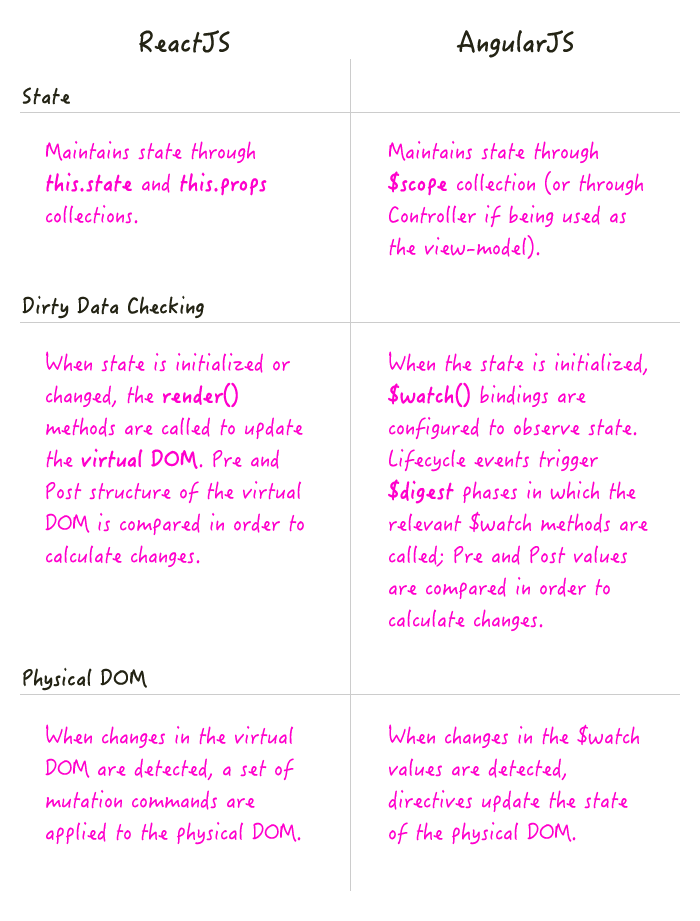
NOTE: From what I have read, one of the benefits of dealing with a virtual DOM, as you do with ReactJS, is that you can render your views on the Server as well as on the Client. This is one of the main aspects of what people are calling "Isomorphic JavaScript."
On the ReactJS site, the getting started tutorial walks you through creating a Comment Box component. The following code is, more or less, the outcome of that tutorial, plus my personal coding style and general joie de vivre.
<!doctype html>
<html>
<head>
	<meta charset="utf-8" />

	<title>Hello React</title>

	<script src="/vendor/reactjs/react-0.13.3.js"></script>
	<script src="/vendor/reactjs/JSXTransformer-0.13.3.js"></script>
	<script src="/vendor/jquery/jquery-2.1.0.min.js"></script>
	<script src="/vendor/marked/marked-0.3.2.min.js"></script>
</head>
<body>

	<h1>
		Hello World: Comparing ReactJS to AngularJS
	</h1>

	<div id="content"></div>

	<script type="text/jsx">

		// I manage the comment box.
		var CommentBox = React.createClass({

			// I provide the initial view-model, before the component is mounted.
			getInitialState: function() {

				return({
					data: []
				});

			},


			// ---
			// PUBLIC METHODS.
			// ---


			// I get called once after the component has initially been rendered. At
			// this point, there is a physical DOM, including the window object, that
			// can be consumed.
			// --
			// NOTE: The reason we are using this method to start polling for data is
			// that we only want to poll on the client. Theoretically, we could be
			// rendering this on the server through so-called "isomorphic JavaScript"
			// where it wouldn't make any sense to poll for updates. This method
			// indicates that we're actually working with a DOM (Document object model).
			componentDidMount: function() {

				// Load the initial data payload.
				this.loadCommentsFromServer();

				// Start polling the remote URL for new content.
				setInterval( this.loadCommentsFromServer.bind( this ), this.props.pollInterval );

			},


			// I add a new comment to the collection.
			handleCommentSubmit: function( comment ) {

				var self = this;

				// Optimistically add the new comment to the collection before
				// we even hear back from the server.
				// --
				// NOTE: We are overwriting the data key of the current state, but
				// leaving any other state keys in tact.
				this.setState({
					data: this.state.data.concat( comment )
				});

				$.ajax({
					url: this.props.url,
					dataType: "json",
					type: "POST",
					data: comment,
					success: function handleSuccess( data ) {

						// Store the new comments collection, overwriting the
						// existing reference.
						// --
						// NOTE: We are overwriting the data key of the current state,
						// but leaving any other state keys in tact.
						self.setState({
							data: data
						});

					},
					error: function handleError( xhr, status, error ) {

						console.error( "error", error );

					}
				});

			},


			// I render the view using the current state and properties collection.
			render: function() {

				return(
					<div className="commentBox">

						<h1>
							Comments
						</h1>

						<CommentList comments={ this.state.data } />
						<CommentForm onCommentSubmit={ this.handleCommentSubmit } />

					</div>
				);

			},


			// ---
			// PRIVATE METHODS.
			// ---


			// I load the remote data from the server.
			loadCommentsFromServer: function() {

				var self = this;

				$.ajax({
					url: this.props.url,
					dataType: "json",
					cache: false,
					success: function handleSuccess( data ) {

						self.setState({
							data: data
						});

					},
					error: function handleError( xhr, status, error ) {

						console.error( "Error", error );

					}
				});

			}

		});


		// I manage the list of comments.
		var CommentList = React.createClass({

			// I render the view using the current state and properties collection.
			render: function() {

				// Translate each comment item into a comment component.
				var commentNodes = this.props.comments.map(
					function operator( comment, i, comments ) {

						return(
							<Comment author={ comment.author }>
								{ comment.text }
							</Comment>
						);

					}
				);

				return(
					<div className="commentList">
						{ commentNodes }
					</div>
				);

			}

		});


		// I manage the individual comment.
		var Comment = React.createClass({

			// I render the view using the current state and properties collection.
			render: function() {

				// NOTE: Since processing markdown is an "expensive" action, I want to
				// get a sense of how often this will run.
				console.log( "Running marked on comment." );

				var rawMarkup = marked(
					this.props.children.toString(),
					{
						sanitize: true
					}
				);

				return(
					<div className="comment">

						<h2 className="commentAuthor">
							{ this.props.author }
						</h2>

						<span dangerouslySetInnerHTML={{ __html: rawMarkup }} />

					</div>
				);

			}

		});


		// I manage the comment form.
		var CommentForm = React.createClass({

			// I validate the form data (lightly) and then submit the comment for
			// processing.
			handleSubmit: function( event ) {

				event.preventDefault();

				var author = React.findDOMNode( this.refs.author ).value.trim();
				var text = React.findDOMNode( this.refs.text ).value.trim();

				if ( ! author || ! text ) {

					return;

				}

				// Pass the comment back up to the parent using the passed-in submission
				// handler.
				this.props.onCommentSubmit({
					author: author,
					text: text
				});

				React.findDOMNode( this.refs.author ).value = "";
				React.findDOMNode( this.refs.text ).value = "";

			},


			// I render the view using the current state and properties collection.
			render: function() {

				return(
					<form className="commentForm" onSubmit={ this.handleSubmit }>

						<input type="text" placeholder="Your name" ref="author" />
						<input type="text" placeholder="Say something..." ref="text" />
						<input type="submit" value="Post" />

					</form>
				);

			}

		});


		// Render the root CommentBox and mount it inside the given element.
		React.render(
			<CommentBox url="/comments.json" pollInterval={ 2000 } />,
			document.getElementById( "content" )
		);

	</script>

</body>
</html>
Coming from an AngularJS background, I have to admit it was bit jarring to see all of these Global objects, just handing out there for the world to see. I don't know if that is how ReactJS works? Or, if this is done just to keep the tutorial simple? From what I have seen at work, it looks like ReactJS might lean on the CommonJS module pattern in order to manage the global scope.
Using inline HTML (through the JSX traspiling) is a very interesting approach. On the one hand, it seems like it would get unwieldy; but, on the other hand, maybe that's the point. By including your HTML in your JavaScript, you are, for sure, more likely to keep your views very small which will force you to favor component composition.
Ok, now that we see the ReactJS tutorial, here is my attempt to recreate the same thing in AngularJS. Since Angular doesn't [easily] allow for inline HTML (like JSX does), I've at least tried to group the Controllers and "text/ng-template" Views together. This way, you can see the Controller and then, below it, you can see the View for which it is managing state.
<!doctype html>
<html ng-app="Tutorial">
<head>
	<meta charset="utf-8" />

	<title>Hello AngularJS</title>

	<script src="/vendor/angularjs/angular-1.3.16.min.js"></script>
	<script src="/vendor/marked/marked-0.3.2.min.js"></script>
	<script type="text/javascript">

		angular.module( "Tutorial", [] );

	</script>
</head>
<body>

	<h1>
		Hello World: Comparing ReactJS to AngularJS
	</h1>

	<div
		bn:comment-box
		url="/comments.json"
		poll-interval="2000">
	</div>


	<script type="text/javascript">

		// I manage the Comment Box.
		angular.module( "Tutorial" ).directive(
			"bnCommentBox",
			function() {

				// Return the directive configuration object.
				return({
					controller: Controller,
					scope: {
						url: "@",
						pollInterval: "@"
					},
					templateUrl: "comment-box.htm"
				});


				// I manage the Comment Box view-model.
				function Controller( $scope, $http ) {

					// I am the collection of comments to render.
					$scope.comments = [];

					// Start polling the remote URL for new content.
					setInterval( loadRemoteData, $scope.pollInterval );

					// Load the initial data payload.
					loadRemoteData();


					// ---
					// PUBLIC METHODS.
					// ---


					// I add a new comment to the collection.
					$scope.submitComment = function( comment ) {

						// Optimistically add the new comment to the collection before
						// we even hear back from the server.
						$scope.comments = $scope.comments.concat( comment );

						var promise = $http({
							method: "POST",
							url: $scope.url,
							data: comment
						})
						.then(
							function handleResolve( response ) {

								// Store the new comments collection, overwriting the
								// existing reference.
								$scope.comments = response.data;

							},
							function handleReject( response ) {

								console.error( "Error", response );

							}
						);

					};


					// ---
					// PRIVATE METHODS.
					// ---


					// I load the remote data from the server.
					function loadRemoteData() {

						var promise = $http({
							method: "GET",
							url: $scope.url,
							cache: false
						})
						.then(
							function handleResolve( response ) {

								$scope.comments = response.data;

							},
							function handleReject( response ) {

								console.error( "Error", response );

							}
						);

					}

				}

			}
		);

	</script>
	<script type="text/ng-template" id="comment-box.htm">

		<div class="commentBox">

			<h1>
				Comments
			</h1>

			<div
				bn:comment-list
				comments="comments">
			</div>

			<div
				bn:comment-form
				on-submit="submitComment( comment )">
			</div>

		</div>

	</script>


	<script type="text/javascript">

		// I manage the list of comments.
		angular.module( "Tutorial" ).directive(
			"bnCommentList",
			function() {

				// Return the directive configuration object.
				return({
					scope: {
						comments: "="
					},
					templateUrl: "comment-list.htm"
				});

			}
		);

	</script>
	<script type="text/ng-template" id="comment-list.htm">

		<div class="commentList">

			<div
				ng-repeat="comment in comments track by $index"
				bn:comment
				author="comment.author"
				text="comment.text">
			</div>

		</div>

	</script>


	<script type="text/javascript">

		// I manage the individual comment.
		angular.module( "Tutorial" ).directive(
			"bnComment",
			function( $sce ) {

				// Return the directive configuration object.
				return({
					controller: Controller,
					scope: {
						author: "=",
						text: "="
					},
					templateUrl: "comment.htm"
				});


				// I control the comment view-model.
				function Controller( $scope ) {

					$scope.markdown = "";

					// Since the HTML is based on the content of the comment text, we
					// need to watch the text for changes so that we can recompile the
					// markdown when needed.
					$scope.$watch(
						"text",
						function handleTextChange( newValue ) {

							// NOTE: Since processing markdown is an "expensive" action,
							// I want to get a sense of how often this will run.
							console.log( "Running marked on comment." );

							$scope.markdown = marked(
								$scope.text,
								{
									sanitize: true
								}
							);

							$scope.markdown = $sce.trustAsHtml( $scope.markdown );

						}
					);

				}

			}
		);

	</script>
	<script type="text/ng-template" id="comment.htm">

		<div class="comment">

			<h2 class="commentAuthor">
				{{ author }}
			</h2>

			<div ng-bind-html="markdown"></div>

		</div>

	</script>


	<script type="text/javascript">

		// I manage the comment form.
		angular.module( "Tutorial" ).directive(
			"bnCommentForm",
			function() {

				// Return the directive configuration object.
				return({
					controller: Controller,
					scope: {
						addComment: "&onSubmit"
					},
					templateUrl: "comment-form.htm"
				});


				// I manage the comment form view-model.
				function Controller( $scope ) {

					// Set up the form input value defaults.
					$scope.form = {
						author: "",
						text: ""
					};


					// ---
					// PUBLIC METHODS.
					// ---


					// I validate the form data (lightly) and then submit the comment
					// for processing.
					$scope.handleSubmit = function() {

						var author = $scope.form.author.trim();
						var text = $scope.form.text.trim();

						if ( ! author || ! text ) {

							return;

						}

						// Pass the comment back up to the parent using the passed-in
						// submission handler.
						$scope.addComment({
							comment: {
								author: author,
								text: text
							}
						});

						$scope.form.author = "";
						$scope.form.text = "";

					};

				}

			}
		);

	</script>
	<script type="text/ng-template" id="comment-form.htm">

		<form class="commentForm" ng-submit="handleSubmit()">

			<input ng-model="form.author" type="text" placeholder="Your name" />
			<input ng-model="form.text" type="text" placeholder="Say something..." />
			<input type="submit" value="Post" />

		</form>

	</script>

</body>
</html>
The AngularJS version is a bit longer, mostly due to the directive definition objects which tell AngularJS how to translate the HTML attributes into state. But, overall, the code is basically the same.
One thing that is nice about the ReactJS version is that the rendered HTML more closely resembles the view you "intended" to build. In the AngularJS version, directive templates don't replace the element that references the directive; instead, the template content is appended to the root element. This isn't a problem, per say, it just makes the DOM a little bit heavier. That said, I think the benefit of the AngularJS approach is that it makes things like transition-animations a bit easier to reason about. It also means that you can easily add both structural and behavior directives to the same element through directive composition.
Since this getting started tutorial uses Marked, and parsing markdown is a relatively expensive process, I put in some logging to see how often it gets run. In the AngularJS version, it gets run once per comment when the comment is first encountered. In the ReactJS version, it gets run once per comment whenever the state is changed. This is because React's general philosophy is "always be rendering." That said, it looks like ReactJS has ways to mitigate expensive rendering operations through the shouldComponentUpdate() component lifecycle method.
At first glance, from a "getting started" perspective, I don't see much difference between the two frameworks (from a view-rendering standpoint). ReactJS uses the virtual DOM, AngularJS uses $watch() bindings; but, basically, they're doing the same thing. The biggest difference, to me, seems to be in how opinionated the frameworks are. ReactJS clearly favors immutable state. But, there's nothing that prevents you from using the same approach in AngularJS; it's just that AngularJS let's you go your own way if you want to. That said, I think this is also one of the biggest criticisms of AngularJS - that it doesn't "lead" the developer enough.
This just scratches the surface, so I can't really make any substantive comparison between the two frameworks. I know when you bring in things like Flux and server-side rendering, the differences may become more pronounced. More to come.
Want to use code from this post? Check out the license.