This article was originally posted during the first week of 43 Folders' existence, and, pound for pound, it remains one of the most popular page on the site. Please be sure to also visit related pages, browse our Hipster PDA topic area, plus, of course you can search on the Hipster PDA across our family of sites.
Recently, I got sick of lugging my Palm V around, so I developed a vastly superior, greatly simplified device for capturing and sharing information. I call it “The Hipster PDA.”
Beauty & Simplicity
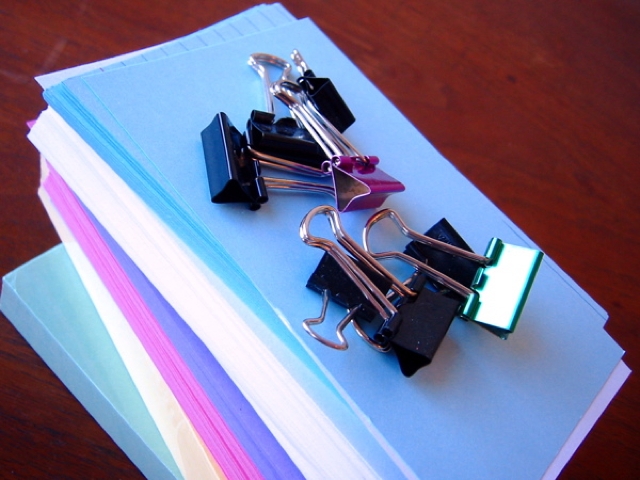
The Hipster PDA (Parietal Disgorgement Aid) is a fully extensible system for coordinating incoming and outgoing data for any aspect of your life and work. It scales brilliantly, degrades gracefully, supports optional categories and “beaming,” and is configurable to an unlimited number of options. Best of all, the Hipster PDA fits into your hip pocket and costs practically nothing to purchase and maintain. Let’s make one together.
Building your first Hipster PDA
- get a bunch of 3"x5" file cards (here’s 500 for around 3 bucks)
- clip them together with a binder clip
- there is no step 3
Settings & Preferences
For you hotrods who like to tweak your equipment, I’ll note a few mods you might make to the basic configuration.
- Consider picking up some different kinds of cards—different colors, lined and unlined.
- Personally, I like the really small binder clips and a stack of 12 or fewer cards; experiment for the combination that suits you
- Try using a single different-colored card as a visual separator between used and fresh cards in your stack (helps you from accidentally giving someone an old, written-on note)
- Buy yourself a Fisher Space Pen. I’ll post more on this later (since I’m a bit obsessed with them), but The Fisher Bullet model is tiny, sturdy, and surprisingly comfortable to use. And, thanks to its famous nitrogen-forced ink well technology, the Space Pen writes upside down, underwater, and—yes I’ve tested it— through a pat of rich, creamery butter. It’s the perfect stylus for your new Hipster PDA.
“Getting Things Done” with your Hipster PDA
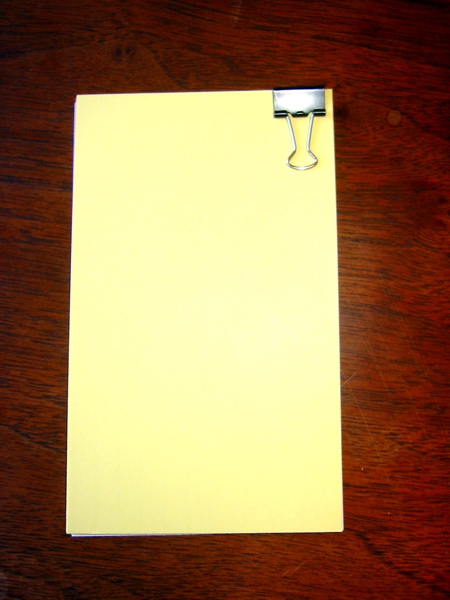 Fellow fans of Getting Things Done will instantly see the application here. Try using a separate index card for each potential inbox item you want to track. This requires carrying a few more spare cards around, but it helps ensure you “close the loop” as soon as the throught occurs to you.
When you get back to the office or home (wherever your physical inbox resides), you can toss all your new notes into the pile and process them like you would any other incoming items. Alternatively, you can base a whole GTD system around index cards, sorting them into piles for “Next Actions,” “Waiting,” “Sometime,” and so on. Whatever works for you.
Hipster PDA: Related 43F Links
- 43 Folders: Organizing Your Hipster PDA
- 43 Folders: The Globe and Mail on the Hipster PDA
- 43 Folders: Index Cards - All 43F posts pertaining to index cards.
- Hipster PDA - 43FoldersWiki - The ever-expanding main entry on the 43F wiki. More links available there.
- 43 Folders: Index Card Printer Review: Canon Pixma iP3000 - Our review of the Canon printer we purchased primarily for printing to index cards. Based partly on suggestions from readers on this 43 Folders post as well as this Google Group post, this review features short capsules of other recommendations from readers as well.
The Hipster PDA elsewhere
- a million monkeys typing » D*I*Y Planner Hipster PDA Edition - Thirty-four index card templates based on Douglas’ popular paper planner
- John Norris - John's made some very creative index card templates--including a sundial!
- Just A Guy - Adam Gurno » Tricking out the Hipster - Printing your own custom index cards
- GTDTiddlyWiki - all your tasks are belong to you - Wiki-based GTD system prints directly to index cards
- Getting Things Done … for teachers: Ductster PDA - Sturdy case for your Hipster PDA
- Hipster PDA links, via del.icio.us
- Hipster PDA photos on Flickr
Hipster PDA Supplies
- Index cards
- Index cards, plain, white (500) - Good bargain at around $3
- Index cards, grid, white (100) - Light blue grid/graph paper on one side, plain white on the other (although lines are faintly visible)
- Index cards, ruled, white (100) - The Classic
- Index cards, plain, white (100)
- Binder clips
- Binder clips, small (12) - I prefer these smaller ones, personally
- Binder clips, medium (12)
- Silver binder clips, assorted sizes (30)
- Space pens
- Bullet Space Pen, Chrome, with clip - This is the one I've owned for almost six years
- Bullet Space Pen, Matte Black, with clip
- Bullet Space Pen, Orange Moon Dust
- Explorer Space Pen
- Many more models »