Why you should trust us

Arriana Vasquez is a writer covering work-from-home equipment. In addition to this guide, she has written about home-office and hobby gear, including webcams, vlogging gear, and ring lights.
Kaitlyn Wells is a writer covering the intersection of home office, productivity, and technology. She’s been working from home in some capacity for over a decade and understands the value of a great home-office setup.
For this guide:
- Since 2013, we’ve reviewed and tested more than 40 standing desks, employing the help of many testing panels.
- Writer Melanie Pinola wrote previous versions of this guide. Some of her reporting and writing is still present in this version.
- We interviewed April Chambers, associate professor in the Department of Health and Human Development and Bioengineering at the University of Pittsburgh.
- We consulted ergonomic research papers and recommendations from sources such as the Cornell University Ergonomics website.
- We met with various standing desk manufacturers at a national trade show.
- Like all Wirecutter journalists, we review and test products with complete editorial independence. We are never made aware of any business implications of our editorial recommendations. Read more about our editorial standards.
Who this is for
Many people spend a majority of the workday sitting at a desk, either at home or in an office. They also sit while driving or taking public transportation, on the couch while watching TV, and at meals.
All that sitting could be dangerous to your health: Research has associated prolonged sitting (aka “Sitting Disease”) with a higher risk of a host of problems, including heart disease and diabetes, certain cancers, and premature death.
But the flip side is also true. Standing for too long can lead to degenerative joint damage, muscle injury, and circulatory diseases, such as venous disorders, increased stroke risk, and carotid atherosclerosis. So fixed-height standing-desk setups — including many DIY versions — aren’t ideal either if you’re spending long hours working at them.
That’s where a height-adjustable standing desk (also known as a sit-stand desk) comes in. You can quickly raise or lower your desk to alternate between sitting and standing throughout the workday.
In addition to letting you switch between sitting and standing (with the health benefits that potentially brings), a great standing desk is simply the most customizable and ergonomically friendly kind you can buy.
If you find the standard desk height of 29 to 30 inches to be too high or too low, you can raise or lower the desk so you’re able to sit more ergonomically. You can program different heights for different tasks, or even for whether or not you’re wearing shoes. And as your energy and focus wax and wane throughout the day, you can choose to sit or stand, depending on whatever makes you feel more productive.
If you don’t want to replace your existing desk with a sit-stand, or your work space is too small to accommodate one, you may benefit from a standing desk converter.
How we picked and tested
After years of using and testing standing desks, as well as getting feedback from readers, we’ve focused our criteria on the following features:
- Electronic control: The most convenient and reliable standing desks are those with electronic motors, which raise and lower desks with the touch of a button. We generally don’t recommend manually adjustable, hand-crank-style standing desks because our testing has shown they can suffer from load-balancing issues. They also made us less likely to switch positions, which, you know, is the whole point.
- Wide height range: Standing desks usually come with two frame height options, to accommodate the varying heights of people. We selected desks to test and recommend based on the two main frame types: those that best fit people under 5-foot-4, which is the average height of women, according to survey data, and those that best fit people who are over 5-foot-4. Some desk makers charge more for legs that extend a desk’s height range, and we noted such surcharges in our comparisons.
- Long-term reliability: Most fully adjustable and height-programmable desks cost at least $600. At that price, they should be stable and functional for a decade or more. For peace of mind, manufacturers should offer speedy, reliable support and a long warranty (five or more years).
- Customization: The best standing desks allow you to choose how your desktop looks and how big it is. Some companies sell frames separately from desktops, so customers can buy the frame and then bolt on a desktop of their own choosing.
- Smooth purchase experience and assembly: For buyers in the continental US, a new desk should ship for free and be delivered within a week. We favored companies with lengthy refund periods and free return shipping. Even though you have to assemble a desk only once, it should be simple to put together — at least no more difficult than assembling IKEA furniture. It’s a plus when manufacturers offer in-home assembly services for an added fee (if you don’t want to or can’t assemble the desk yourself).
Other considerations that are nice extras (but not absolute must-haves) include:
- Accessories and add-ons: Some manufacturers offer accessories for their desks, such as grommet cable guides (some with integrated power plugs), privacy screens, or PC holders. We looked at what the desk makers offered, and we considered whether these accessories were useful and affordable.
- High weight capacity: Some desks can lift upwards of 350 pounds, which is a sign of strength. But unless you have especially heavy equipment to raise and lower, this doesn’t really matter. Even a setup with multiple monitors, a tower PC, large speakers, and typical computer accessories would add up to only about 100 pounds. However, the weight of the desktop itself needs to be factored in, as well.
For testing, each desk is outfitted with our picks for a laptop stand, Bluetooth keyboard, wireless mouse, standing desk mat, and office chair.
Over a month, nearly three-dozen people (measuring from 4-foot-10 to 6-foot-9) explored, worked from, and played at each desk. They used each desk in both sitting and standing positions, and they noted in feedback surveys the overall quality, stability, adjustability, and noise level of the contenders.
How our picks compare
Below we list how our picks’ features compare. Because these desks are highly configurable, we’ve included the lowest starting price for each, the price as tested with a 48-inch laminate top, and the price for a desk with a 60-inch bamboo desktop. Prices are rounded and are current as of January 2026; they do not include any discounts or sale prices.
| Price, lowest (laminate with basic keypad) | Price, 48-inch (laminate with memory keypad)1 | Price, 60-inch (bamboo with memory keypad) | Height range with 1-inch desktop | Desktop options | |
| Uplift V3 Standing Desk | $600 (42 by 30 inches) | $690 | $890 | 22.6 to 48.2 inches | over 30, including bamboo, hardwood, and laminates, plus curved-edge variations of some of those |
| Branch Duo Standing Desk | $550 (36 by 24 inches) | $650 (with standard control paddle) | $750 (58-inch) | 28 to 48 inches (All Duo models are 1-inch thick) | laminate woodgrain, walnut, white, charcoal, black oak, maple, and sage green |
The 48-inch Branch Duo measures 24 inches deep, and the Uplift V3 measures 30 inches deep.
Top pick: Uplift V3 Standing Desk

Top pick
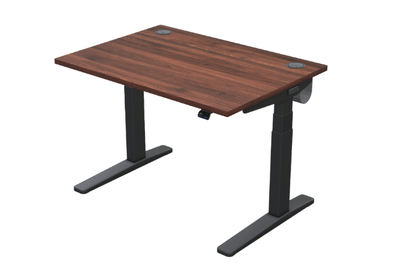
The Uplift V3 Standing Desk offers the best combination of features and build quality for the price, accommodates a wide range of heights, and it has far more customization options than any competitor. And this desk is more than stable enough for everyday use.
It’s not the most stable desk we’ve tested, but it’s close. For normal work purposes, the Uplift V3 is stable at all heights — unless you tend to pound heavily on your keyboard, or your walls tend to shake due to passing trains.
In testing the Uplift V3 against other desks in the Wirecutter office, we found the V3 to be slightly more wobbly from front to back than our other picks, especially set at heights of 40 inches and above. But this difference is quite small, perhaps noticeable only when you’re a tech journalist assigned to shake desks side by side.
It’s a smooth operator. The Uplift V3 adjusts its height smoothly and quietly, albeit with a whistling sound that’s more high-pitched than the other desks’ lower, more bass-y rumbles.
When we raised this desk from its lowest height to its highest, it was a second or two faster than the other models. In real-world use, though, what mattered most to our testers was that the V3 seemed easier to reliably raise and lower to a precise height than competing desks, which often overshot the mark.
We love its control pad. The Uplift V3’s standard keypad (which goes up and down only and doesn’t store favorite heights) is the best we’ve used, but we recommend everyone upgrade to the advanced “comfort” keypad, which adds four memory positions and a velvety touch to the keys for an extra $30 at this writing.
The Uplift V3’s many desktop finishes look great — even the laminates. Panelists preferred Uplift’s inch-thick bamboo desktop over other desks’ similar tops, particularly when it was configured with a curved front (for an additional $120 to $130). The walnut laminate, meanwhile, was fairly resistant to unsightly smudging, and looked great.
You can customize it to suit your space and tastes. Besides the vast array of desktop options — 30 at this writing, including stunning and expensive solid wood — the V3 desk has many frame and accessory options, so you can customize your desk when you order.
We’re talking multiple frame colors, grommet colors, keypad colors, types of casters, and various keyboard trays. Desks come with a cable-management tray and your choice of five free accessories, such as a motion standing desk mat, under-desk hooks, and desk organizer kits.
You can even have a desktop made to order for your size specifications, and you can buy a matching side table (currently starting at $450). No other standing desk we looked at offered this level of customization.
Uplift offers some weird and wonderful add-ons. If you order a desk that’s 72 inches or wider, you can even choose a hammock as one of your six included free add-ons.
Yes, a hammock. It attaches with carabiners to the frame of the desk, so you can lie or sit (cross-legged) underneath your desk while it’s raised. The hammock held one 200-pound tester, for as long as he could stand the self-conscious weirdness of it all. Other testers found the hammock surprisingly comfortable.
You can also get extras such as a rocking board (for more-active standing), a standing desk mat, a desk organizer set, a USB hub, or a “foot hammock” (among others).
Flaws but not dealbreakers
It’s not the most stable desk on the market. At its highest settings, the Uplift V3 isn’t quite as stable as the Vari Electric Standing Desk — the most stable standing desk we’ve tested. But it is more than stable enough for most people.
The desktop could crack, but if it does, Uplift will replace it. In early 2022, a few readers told us about their bamboo desktops cracking. We checked with Uplift to see what customers encountering this issue can do. A representative confirmed that any desktop cracks, including hairline cracks, are covered by the 15-year warranty. Though we haven’t heard any complaints recently, we advise using coasters or a desk pad with any wooden desktop to keep moisture and heat from causing damage.
Best for tall-ish folks and small spaces: Branch Duo Standing Desk

Best for...
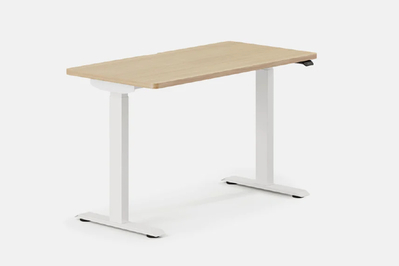
The Branch Duo Standing Desk is a good option if you have limited space or are over 5-foot-8. But it doesn’t offer nearly as many customizable features as the Uplift, and there’s no option to upgrade to an advanced keypad.
This standing desk is well made. Many testers liked the overall look and feel of the wood grain laminate desktop. They also said the two-tier lifting column was stable, and they noted that it ran smoothly during height adjustments. The Duo’s 10-year warranty and 275-pound lift capacity offer added peace of mind regarding its long-term durability.
It works in smaller spaces. This is the smallest standing desk we recommend. It comes in a 36-by-24-inch model that works well for small spaces, like a home office or studio apartment. (There’s also a larger, 48-by-24 inch model.) The smallest Uplift model we recommend is sold in a 42-by-30 inch desktop.

This desk (probably) works best for taller people. The Branch Duo’s desktop height can be adjusted from 28 to 47.5 inches, and it is ideal for people who are between 5-foot-8 and 6-foot-5. Still, a wide range of panelists — from 5 feet tall to 6-foot-9 — were able to find comfortable sit-stand settings. This reminded us once again that an ideal ergonomic setup can vary widely based on your leg and torso lengths.
Similarly, a tester who uses an electric wheelchair felt they could adjust the desk to heights that worked both for their taller electric wheelchair and the shorter manual wheelchair they have at home.

The programmable keypad isn’t as intuitive as that of our top pick. Our panelists had mixed reactions to the control paddle; it requires users to lift or press down to adjust the height, rather than pressing an arrow, like on a traditional control keypad. While some enjoyed the simplicity of “lifting” the paddle to lift the desk, most didn’t like using its menu screen and found it frustrating to use.
The paddle’s side profile buttons cycle through presets and reminders, but there’s no way to go back if you accidentally make the wrong selection. Rather, you have to cycle through the entire menu again.
It’s unlikely you’ll share this desk with a partner or roommate. The Branch Duo can be programmed with only two height settings, while the Uplift desk with its optional programmable keypad can store four different heights. We prefer four height settings so that two people can have personalized sitting and standing presets.
Flaws but not dealbreakers
The anti-collision feature works — but there’s an obvious flaw. Many desks we’ve tested have subpar anti-collision technology and faulty sensors, so we were pleased when this feature actually worked on the Branch Duo. But since this standing desk can go down to only 28 inches, the sensors won’t engage for children, pets, and objects sitting lower than that. The desk also descended another ¼ to ⅕ inch past our bodies while we were seated, applying an uncomfortable amount of pressure on our thighs. We fear that a kid who quickly dives under the moving standing desk could get their fingers pinched in the lifting column or get a bump on the head.
How tall should your standing desk be?
To figure out how tall a desk should be when you’re sitting, furniture retailer Wayfair recommends dividing your height in inches by 2.5.
We found that this guideline is fairly accurate, within a half-inch to an inch. The Uplift V3, for example, can accommodate those who are 4-foot-9 and above. Of course, people have different torso and leg lengths, so your experience may vary.
For standing height, you can multiply your height in inches by 0.6 to get a close approximation of how high you’d need a standing desk to go. The desks we recommend in this guide should accommodate people who are over 6 feet tall (and as tall as 7 feet for the Uplift V3 and the Vari).
Why don’t we have a budget standing-desk pick?
We’ve researched more than a dozen inexpensive standing desks, and we found that their seemingly reasonable price tags of $200 to $600 were invariably accompanied by major flaws. Namely, budget-priced standing desks are made with lower-quality materials and are harder to assemble than the slightly pricier models we recommend. They also offer low weight limits, narrow height ranges, and short warranties.
Of the desks we found under $600, several lacked predrilled holes to ensure accurate assembly and long-term stability. Additionally, most desks in this price range have tabletops made of split particle board, rather than having a solid bamboo, laminate, or wood desktop piece, like our picks have. That’s because it’s easier for manufacturers to ship the entire desk in a single box this way.
On average, these budget desks can hold only up to 150 pounds (sometimes including the tabletop’s weight), compared with the 300-pound-average weight limits of our picks.
Combined, the split tops and low weight limits make budget standing desks less stable than our picks, when loaded with heavy computer gear.
Budget standing desks often have narrower adjustable height ranges than our picks. They aren’t built for people who are, on average, under 5-foot-7 or over 6-foot-4.
These budget desks also offer subpar warranties ranging from one to three years. So they’re a bigger risk for the buyer, and they’re more expensive on a year-by-year basis compared with our picks that have 10- to 15-year warranties.
Lastly, many of the cheapest standing desks aren’t motorized. They need someone to manually adjust the desk’s height with a hand crank, making them inaccessible to people with mobility issues or limb differences.
If you’re on a budget and aren’t ready to commit to one of our picks, you’re better off opting for a standing desk converter. These tabletop desks offer more stability and a better height-adjustment range than any budget standing desk we found.
All that being said, if you absolutely, positively must have a standing desk, and you’re on a strict budget, the FlexiSpot EN1 is the best ultra-cheap option we’ve tested. Just be aware that you’d give up the higher-quality materials and stability at standing height that you’d get from our picks.
Other standing desks worth considering
If you need the most stable standing desk possible, and you don’t mind less customization: The Vari Electric Standing Desk is the sturdiest we’ve tested.
Even at its tallest height, 50.5 inches, it barely budged when forcefully shoved in all directions. Vari’s desks come with thicker desktops than our picks offer (1.25 inches, versus the Uplift V3’s typical 1-inch thicknesses), and the crossbar running across the bottom of the frame is pre-mounted. A thicker desktop leads to a sturdier desk. And a pre-mounted crossbar reduces the number of steps it takes to assemble the desk; it also eliminates any potential user-assembly errors that could cause wobbling.
But despite its stability, the Vari desk has fewer customization options than the Uplift, and while the memory pad worked smoothly, the desk was a second or two slower to respond than our picks. Also, Vari discontinued its smallest sizes of this model (48 by 30 and 60 by 24), so your only options in this lineup are 60 by 30 or 72 by 30.
Vari does offer a newer ComfortEdge desk that starts as small as 48 by 30, but it costs significantly more than our picks. Still, the lifetime warranty and stability might be worth the expense for some people.
If you need the least expensive desk possible: The FlexiSpot EN1 starts at just $199 (at the time of writing) but is frequently on sale for much less. It has a one-piece desktop in various sizes, and the included controller offers programmable heights. The desktop and legs looked as good as those of the Branch Duo, and programming the heights was simple and easy in our tests.
The EN1’s motor is loud, though, and much slower than those of our picks—it took a full 30 seconds to go from its lowest to its tallest height, compared with 14 seconds for our top pick. Its height range (28.1 to 45.7 inches) is also narrower than that of our picks, so it's not ideal for people who are shorter or taller than average.
If you want the desk with the best cable management: Check out the Secretlab Magnus Pro. The wires and the cable-management tray are built into the desk, so there's zero chance of a spaghetti mess. The desk doesn’t go as low as our top pick (the Uplift V3 goes 3 inches lower), but it’s suitable for a wider range of people than most competing desks. It's sturdier at its tallest height than our top pick, as well.
The desktop is made of metal and is magnetic, which was a turn off for some of our testers, and it comes in only two (large) sizes: The Pro is 60 by 30 inches, while the XL is 70 by 31 inches. There are no wood finishes for this desk so you’re out of luck if you're seeking something natural-looking.
The Magnus also costs about $100 more than our top pick (for a similar-size desktop) at this writing. And its warranty — two years for the electronic control panel and electrical control box, five years for everything else — isn’t as extensive as that of our picks.
During testing, the first desk we received had faulty anti-collision detection and didn’t respond to obstructions at the default settings. When we reached out to the company about the issue, representatives responded quickly and immediately shipped a replacement, which behaved as expected.
The competition
This is not a comprehensive list of all the standing desks we’ve tested. We have removed models that are discontinued or no longer meet our criteria.
The Secretlab Magnus Evo has a lot of the same things we liked about the Magnus Pro, like a whisper-silent operation and exceptional cable management. Unlike the Pro, which has a fully magnetic surface, the Evo has a powder-soft metal finish, which we found scratched easily. For example, despite taking every precaution during assembly — like placing the surface on padded foam to attach the legs — it still somehow got scratched, and during the natural course of testing noticed additional hairline scratches appear. Additionally, we encountered several issues with raising and lowering the desk in which the desk would stop at a certain height and display an error code. We also noticed subtle stuttering as the desk was lowering.
The Spout by Herman Miller is the company’s first sit-stand desk with more than two legs. The four-leg Spout has a clean, modern design with a weight capacity of 350 pounds (just 5 pounds shy of our top pick’s capacity) and the laminate desktop looks just as nice as the Uplift. The Spout comes with an ample 12-year warranty.
While it was more stable at its top height than most of the other desks we tested, the desk paused then shuddered slightly every time we adjusted the desk down — in comparison, our top pick is one of the smoothest we’ve tested, with almost no pausing between height adjustments. It also has a limited height range of 27 to 46 inches, which means it won’t work for people under 5-foot-4. The Spout starts at $2,500 — nearly four times the price of our top pick — and while it raises and lowers faster than any other desk we tested, the motor is louder, and it doesn’t include a programmable switch pad; Herman Miller charges an extra $100 for that.
The Branch Four Leg Standing Desk is a beautiful four-legged desk, but its height range was the smallest of all the desks we tested in 2025. It has touch-sensitive buttons built into its top surface, which were mostly responsive but occasionally needed a second or third touch to activate. Some testers worried about activating them with their arms while they worked. The motor was loud when moving, the desk was wobbly when set to the tallest setting, and it costs several hundred dollars more than our top pick at this writing.
The FlexiSpot E7 was very wobbly at its top height despite having some of the heaviest legs of all the desks we tested in 2025. The illustrated instructions didn’t exactly match the parts in the box, so we had to make some educated guesses during the building process. And one of the two leg motors swiveled in place whenever the desk was in motion.
The Jarvis Bamboo Standing Desk and the Laminate Standing Desk (both sold by Herman Miller) were previous picks due to their lower cost for a low-range frame that fits people under 5-foot-4.
Recently, however, the price of the desk has risen so that it’s no longer competitive with the V3-Commercial. Herman Miller has also shortened the warranty on the desks from 15 years to 7 years, the low-range frame is no longer available on the laminate desk model, and a couple of standard desk sizes are no longer offered for the bamboo desk.
That said, if you can find a Jarvis desk on sale and are okay with the shorter warranty, it may be worth buying, since many Wirecutter staffers own Jarvis desks and are happy with them.
The Union & Scale 55-inch Standing Desk with Micro Movements offers a novel feature that automatically raises and lowers the desk in a tenth of an inch increments. This is meant to encourage more movement at your desk, but we found it to be counterproductive: When the desk was set at our desired height, it lowered by a little over two inches, which caused us to slouch rather than fix our posture. The desk also did not raise or lower smoothly, and it comes in only one size and in white laminate.
Starting at under $450 (with the bamboo top), the FlexiSpot E5 (formerly EC4) was a potential budget standing-desk pick. It comes in a plethora of laminate desktop options and in several sizes. But we found it to be one of the least stable desks we’ve tested, both from front to back and side to side. Because of the E5’s wobbling, we think you’re better off investing in a pricier Uplift V3 or even paying more for the Vari desk’s superior stability.
Juniper Think desks also start at attractive prices, but we dismissed them from testing because of their limited height range (26.5 inches to 45.5 inches) in comparison with that of our picks. Juniper’s desks also have fewer memory presets than the other desks, and they’re only available in four laminate desktop finishes.
We decided to skip testing the Autonomous SmartDesk Core because it lacks anti-collision, offers limited customization, and has a poor warranty.
The IKEA Bekant is a seemingly promising, fairly inexpensive, height-adjustable standing desk, but two Wirecutter readers have mentioned returning theirs due to stability problems. And we’ve come across more problems and negative customer reviews for this model than for any other standing desk. It has the fewest desktop-customization options of the desks we researched. And unlike the major standing-desk manufacturers, IKEA charges high delivery fees if you can’t pick it up in-store.
The IKEA Idåsen is priced similarly to the Uplift V3, and if you have an IKEA nearby, it’s easy to try out the desk for yourself. Although you can remotely control the height of the Idåsen with your phone, the desk’s keypad lacks the customizable height-preset buttons found on our picks. It also comes in only four laminate desktop options.
The VertDesk v3, sold by BTOD.com (Beyond the Office Door), is one of the most stable two-leg standing desks we’ve ever tested, similar to the Vari. In previous tests, panelists voted its desktop the best of the laminate options, thanks to its lightly textured feel and realistic wood look. We didn’t pick the VertDesk v3 for most people because its assembly process is more involved than that of most desks we tested. And it has a more-limited height range, from 27 inches to 47.5 inches.
The Xdesk Terra 2s and Terra are beautiful desks that are unusually easy to assemble. They come partially assembled, sparing you a good 20 minutes of work compared with assembly time for most desks. However, they are far more expensive than our picks, louder than any of them, and significantly less stable.
The EvoDesk came with predrilled holes that were alternately tight or loose, so assembly was a pain, and ultimately the desk didn’t feel properly seated on the frame. It wobbled more than the Uplift. And considering that it costs more than our picks when similarly configured, we recommend passing.
The FEZIBO Electric Standing Desk has an appealing price tag, but we didn’t test it because of its two-year limited warranty on electronic components and motor and its paltry weight limit of 155 to 175 pounds.
Several readers have asked us about the ApexDesk Elite Series Standing Desk, but we skipped testing because it has only a two-year warranty — a no-go for such a pricey desk.
We considered testing the Vari Essential Electric Standing Desk as a possible new budget pick for this guide. But it fell short of our criteria due to its short, three-year warranty and 150-pound weight limit.
The SHW Memory Preset Electric Height Adjustable Standing Desk features an unsatisfactory one-year limited warranty, and it has a weight limit of 110 pounds, inclusive of the desktop.
The FAMISKY Dual Motors Standing Desk and the MONOMI Electric Height Adjustable Standing Desk offer inconsistencies in their product descriptions, feature narrow height adjustments that are ideal only for people averaging 6 feet tall, and have poor warranties.
The FlexiSpot E7 Pro Plus Standing Desk didn’t impress our testers. Most thought the desktop and keypad looked cheaper than those of the other models we tested. Panelists also noted that its motor was marginally louder compared with motors on other models, including the FlexiSpot Comhar Pro.
Our panelists had divided opinions about the FlexiSpot Comhar Pro Standing Desk Q8. They universally liked its built-in wireless charging station and slim drawer. However, many disliked the non-customizable bamboo top because it was rough and had sharper edges than those of other models we tested. It also wasn’t as stable as our picks.
The Ergonofis Sway Desk is one of the most expensive standing desks we’ve tested. Our panelists loved its materials but said the recessed keypad wasn’t intuitive to use, and many gave up trying to adjust it to their preferred heights. This desk was also harder to assemble than half of the models we tested. Overall, we found its assembly method — which uses snap clamps, rather than screws — to be less secure than that of our picks. Lastly, the Sway’s 10-year warranty is shorter than the Uplift V3’s 15-year warranty, even though the Sway typically costs about twice as much.
The Autonomous SmartDesk Connect doesn’t work until it’s been paired with the company’s app, which offers minimal functionality. Our panelists thought it was overkill to be able to adjust the desk’s height from across the room. Multiple testers also called this desk “cheap” and “wobbly.” Plus, the anti-collision feature didn’t work during our tests, and the white desktop smudged easily.
We skipped testing the Autonomous SmartDesk 2 because it lacks an anti-collision feature, which is an important safety consideration for anyone using a standing desk.
The anti-collision feature on the Branch Standing Desk didn’t consistently work during our tests. While the sensors identified obstructions at the front of the desk, they failed to sense objects and even our panelists’ legs at the back of the desk. Additionally, our testers found the motor to be too loud, and they thought the desk edges were too sharp to rest against while typing at a computer.
The Charcoal Desk is well reviewed by other publications, but our experience with it was subpar. The desk requires an app to unlock all of its features, but again our panelists found those extra features useless. Charcoal promises to “supercharge” your day by reminding you to take breaks via app notifications, plus a glowing dot on the desktop’s surface. After creating a profile with our age, gender, and sleep habits, we anticipated a personalized experience. But the app only offered generic, unrealistic break tasks, including taking a 9-minute nap. It never personalized suggestions, and the desk didn’t intuit breaks, sitting, or standing time based on our desk usage.
Additionally, the keypad wasn’t responsive, the desk motor was loud, the white acrylic desktop smudged easily, and its edges were too sharp to lean against while working. Lastly, the anti-collision feature only worked at the front of the desk. The free cable tray blocks sensors at the back, and it fell off whenever it hit an object during our tests. Bottom line: None of our testers thought the Charcoal Desk was worth $1,200 to $1,500. “If it costs $550, that is too much,” said one panelist.
The ErgoAV ErgoFx Sit Stand Desk is one of the most expensive models we’ve tested. Our panelists loved the tech-forward features, including a lighted drawer, USB ports, and a wireless charging base that automatically spins and tilts toward you when used. But this desk fell short of blowing us away because its capacity limit is 176.5 pounds, while our Uplift pick can carry loads twice as heavy. Plus, its adjustable height range can only be preset for above 35.5 inches and below 35.5 inches. This means people who share a desk can’t create multiple presets, and neither can people who use two wheelchairs at home (such as a manual and electric wheelchair of different heights). There’s an optional app that offers more preset options, but it didn’t work during testing.
At the time we tested this desk, the manufacturer’s website indicated it offered a one-year warranty. But a company spokesperson later relayed that this information was incorrect. Now, the website reflects a two-year warranty for the charging components and a five-year warranty for the frame and motor — all of which applies regardless of the purchase date.
This article was edited by Ben Keough and Erica Ogg.
An earlier version of this article was written by Melanie Pinola, a Wirecutter senior staff writer who died in October 2024.
Sources
April Chambers, assistant professor in the Department of Health and Physical Activity at the University of Pittsburgh, email interview, February 5, 2020