(Update - March 2020 I finally created a npm package angular-typesafe-reactive-forms-helper)
Problem
Working with more complex Reactive Forms, it was challenging to remember how the form was bound to my FormGroup object.
I wanted intellisense to help me.
This is because the FormGroup class has a ‘value’ property which returns ‘any’, the cause of my frustrations.
Good luck renaming property names!
1 |
|
Another frustration I faced was referring to the form properties names as ‘string’ values. It quickly got out of hand when I renamed property names.
1 |
|
Angular team is considering implementing Typesafe Reactive Forms
Here are the issues worth tracking:
* Proposal - ReactiveForms: add AbstractControl.getChild<T> method
* Reactive forms are not strongly typed
Can’t wait for that to be fully implemented…until then, I’ll hack my way to typesafety :)
Solution
Quick Demo
The Interface used for all the code samples
1 | interface IHeroFormModel { |
Intellisense on FormGroupTypeSafe<T>.value:
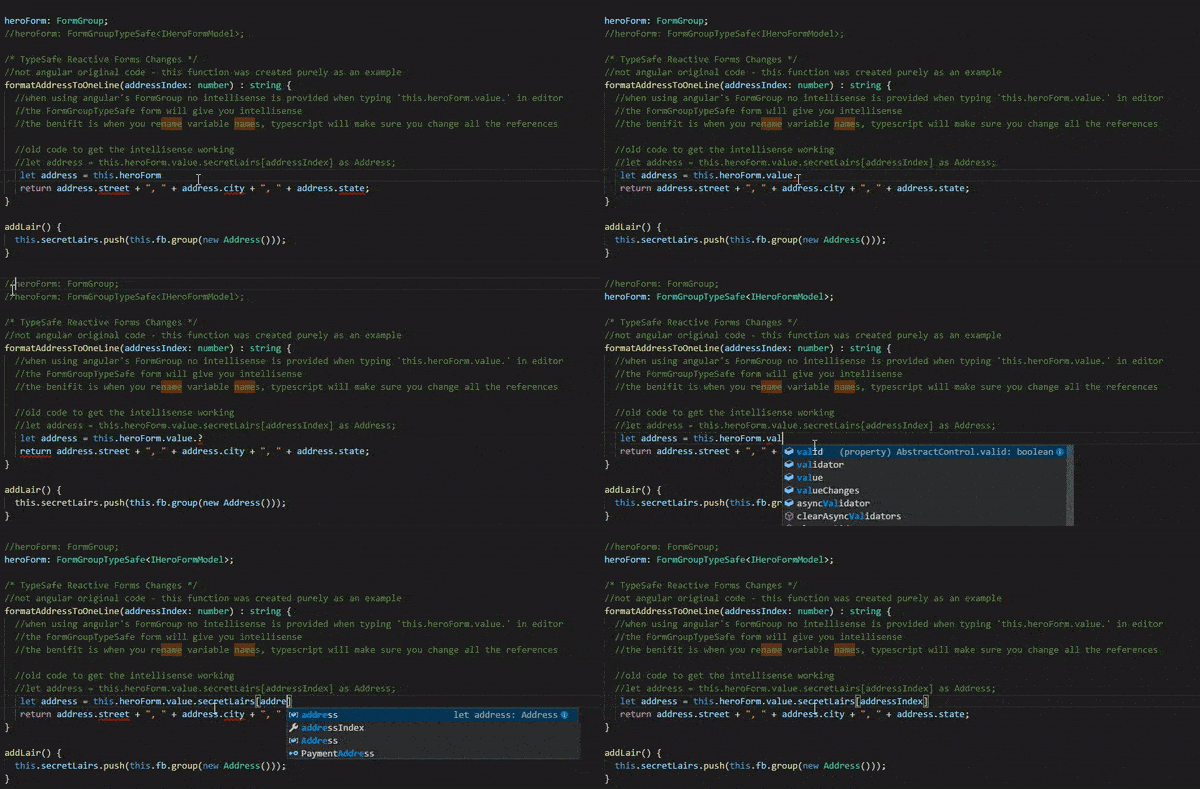
Intellisense on FormGroupTypeSafe<T>.getSafe and then patching the value:
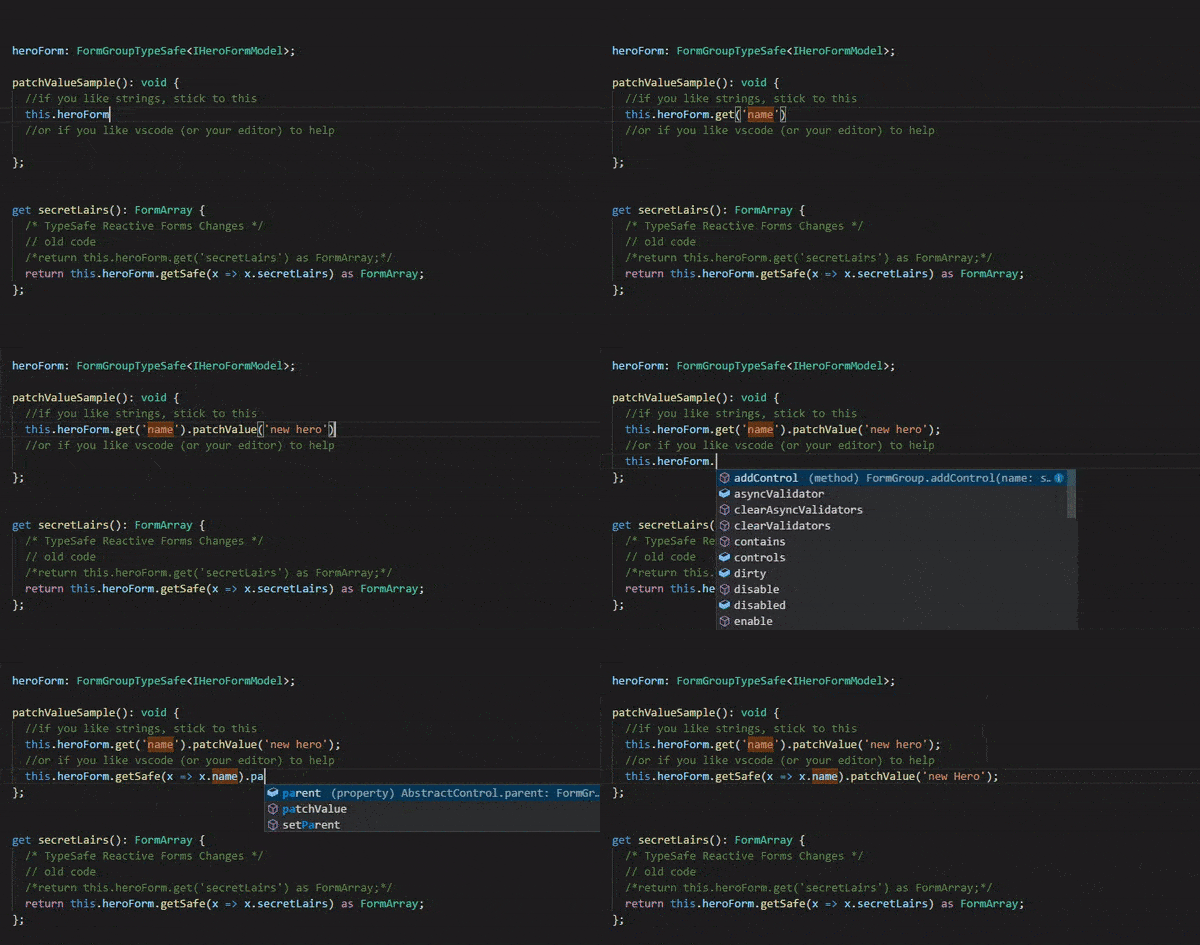
By having a lambda like expression instead of a ‘string’ property name, makes refactoring so much easier.
Typesafe Angular Reactive Forms Sample
I modified the Angular Reactive Forms Sample with my Typesafe Angular Reactive Forms Sample.
Search for TypeSafe Reactive Forms Changes to find all the changes. I commented out the original angular code and replaced it with the Typesafe way as a quick reference.
Files to focus on:
- app/app.modules.ts
- app/hero-detial.component.ts
- app/angular-reactive-forms-helper.ts
*** app/app.modules.ts ***
Two things of importance here:
- import the FormBuilderTypeSafe class
- add to provider list for the Dependency Injection
See Typesafe Angular Reactive Forms Sample for details.
*** app/hero-detial.component.ts ***
- Define an interface of your form model.
1 |
|
- Declare your new FormGroupTypeSafe form with the help of TypeScript’s generics.
1 |
|
- Inject FormBuilderTypeSafe.
1 | constructor( |
- Create your form group with Interfaces (contracts).
1 |
|
Benefits TypeScript provide:
Detecting errors (contract mismatch): Let’s say we change the ‘name’ property, ‘name’ => ‘nameNew’, but the IHeroFormModel.name did not change, TypeScript will raise the alarm.
Renaming properties: Super easy, I’m using VSCode and it’s as easy as F2, rename the property, enter…and TypeScript will do the rest. No more search and replace.
No more misspelled properties: Intellisense ensures you get the correct property name everytime. With string property names a mistake can easily creep in.
Guidance on how to create the form group: Code sample below will have TypeScript raise the alarm when attempting to set ‘name’ to ‘’, FormGroupControlsOf<T> returns FormControl | FormGroup.
message: ‘Argument of type ‘{ name: string; secretLairs: FormControl; power: FormControl; sidekick: FormControl; }’ is not assignable to parameter of type ‘FormGroupControlsOf
‘.
Types of property ‘name’ are incompatible.
Type ‘string’ is not assignable to type ‘FormControl | FormGroup’.’
at: ‘1, 49’
source: ‘ts’
1 | this.heroForm = this.fb.group<IHeroFormModel>({ |
5. Use the typesafe form.
1 |
|
*** app/angular-reactive-forms-helper.ts ***
In order to make this work as closely as possible to the angular way I created an abstract class FormGroupTypeSafe<T> which derives from angular’s FormGroup.
It also ensures that exisitng code will not break.
I also created two functions: getSafe, setControlSafe.
Those were the only functions I needed for the Typesafe Angular Reactive Forms Sample.
If you need more, add them :)
You can find the implementation of angular-reactive-forms-helper.ts on my Github account or have a look at the Plunker example: Typesafe Angular Reactive Forms Sample.
Conclusion
I don’t misspell property names anymore and refactoring Reactive Forms is back to being a trivial task.
I think the extra bit of ceremony is absolutely worth it.
Use it…don’t use it :)