Controls | Level select | Raspberry Pi | Feedback
Instructions
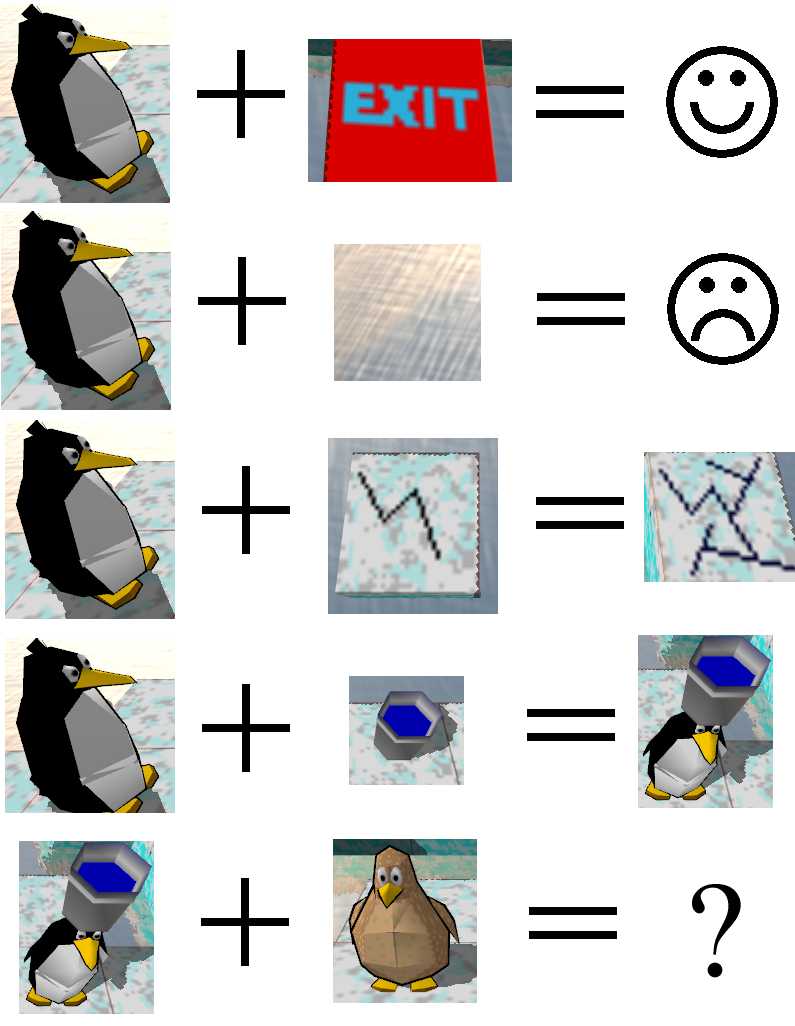
Guide the penguin to the exit without falling in the water.
Controls
- Arrow keys to move.
- Spacebar to switch penguins. (Only possible if you have fed the baby penguins with a fish.)
- U to undo a move.
- R to reset the level.
- Q to switch to low quality graphics.
- Z to zoom out for a wider angle view.
- Escape to choose a different level.
Unsolved levels
Choose one of the levels below to start playing.
We have tried to order them according to difficulty but you are welcome to play any level you like.
Loading...
Solved levels
Loading...
Troubleshooting
If no links to levels appear above, you might have Javascript disabled.
If you get a message "Your browser does not support WebGL" then you will have to upgrade your browser to play.
WebGL is not supported by Internet Explorer, but it should be supported by
- Mozilla Firefox since version 4.0
- Google Chrome since version 9
- Safari since version 5.1 (Only supported on Macs, and you need to turn it on by hand.)
If the game is running too slowly you can increase the framerate by:
- pressing Q to switch to simpler graphics
- making the window smaller
Raspberry Pi
You can also play this game on a Raspberry Pi running the Raspian "wheezy" operating system.
Installation
Launch a terminal and type
- sudo apt-get update
- sudo apt-get install penguinspuzzle
This requires the Raspberry Pi to be connected to the internet.
The C source code and game assets are available on the Penguins Puzzle github page.
Play
Launch a terminal and type penguinspuzzle to start the game.
- Arrow keys to move.
- Spacebar to switch penguins. (Only possible if you have fed the baby penguins with a fish.)
- U to undo a move.
- R to reset the level.
- Z to zoom out for a wider angle view.
- N to skip to the next level.
- P to change to the previous level.
- Escape to quit.
Raspberry Pi Troubleshooting
Make sure that you have a good power supply attached to the Raspberry Pi (and not too much overclocking) or you may find that the Pi crashes as soon as the game starts. For example, when I use a mobile phone charger to power my Pi I find my network and USB devices go down meaning that I am unable to move the penguin even though the 3d graphics are still working.
If you get the error messages:
- penguinspuzzle: penguinspuzzle.c:210: init_ogl: Assertion `state->surface != ((EGL_Surface)0)' failed.
- penguinspuzzle: audio.c:120: audioplay_create: Assertion `st->audio_render != ((void *)0)' failed.
it probably means you are using the wrong memory split. This game needs at least 64MB of GPU memory so will only work with memory split 128/128 or 192/64. You can change the memory split from a terminal by typing:
- cd /boot
- sudo cp arm192_start.elf start.elf
- sudo reboot
If you get the error message:
- error while loading shared libraries: libGLESv2.so: cannot open shared object file
It may mean that your libraries are not up to date. You may be able to fix this from a terminal by typing:
- sudo apt-get update
Charityware
Penguins Puzzle is charityware.
Please consider donating to a charity that will make the world a better place for all creatures (humans included).
One option is our JustGiving Penguins Puzzle page to raise money for the World Wildlife Fund.
 Credits
Level design and testing by David and Anna.
Programming by Peter.
Sound effects by Jenny.
Feedback
Tell us what you think on our Facebook page or by clicking the widgets below.
If there is enough interest, we'll upload some more levels...
Levels last updated September 2012.
Links
If you have enjoyed this, you may like to see what my brothers have created:
- A 3d space colonisation game called Light of Altair.
- An easy and fast 3d sculpting program called Curvy 3D.