In this post I describe how I made the Dunkin' Donuts website do my bidding.
Love
I am moving to Chicago and I want to make sure that there is a Dunkin' Donuts near where I live (if you've ever had their hash browns or hot chocolate you will understand). The problem is that we aren't settled on which area of north Chicago we are going to end up getting an apartment, and the Dunkin' Donuts site will only show 20 stores max. The problem is compounded by the fact that there are so many locations in Chicago.

Thus my quest...
This is too easy...
I started off by doing what everyone looking to shake things up does and viewed the source of the page. To my surprise I found the following function:
| /** | |
| * Function to perform search on Hotel Addresses from the origin location | |
| * | |
| * @param searchLat - contains latitude value | |
| * @param searchLng - contains longitude value | |
| * @param searchRadius - contains radius value | |
| * @param searchUnit - contains unit of measure - miles or minutes | |
| * @return resultsArry - array containing a record set of search results | |
| **/ | |
| function search(searchLat, searchLng, searchRadius, searchUnit){ | |
| //Build Radius Search Criteria | |
| var criteria = new MQRadiusSearchCriteria(); | |
| //Set Origin | |
| criteria.setCenter(new MQLatLng(searchLat, searchLng)); | |
| //Set Radius | |
| criteria.setRadius(searchRadius); | |
| //Set Maximum number of Matches | |
| criteria.setMaxMatches(MAX_MATCHES); | |
| //criteria.setMaxMatches(searchMaxMatches); | |
| //Build Database Query Object | |
| var dbLayerQuery = new MQDBLayerQuery(); | |
| //Define Data Table | |
| dbLayerQuery.setDBLayerName(Table); | |
| //Create Database Query Collection and Add Database Query to Collection | |
| var dbLayerQueryCollection = new MQDBLayerQueryCollection(); | |
| dbLayerQueryCollection.add(dbLayerQuery); | |
| var searchFeatures = new MQFeatureCollection(); | |
| var dtCollection = new MQDTCollection(); | |
| var results = new MQFeatureCollection(); | |
| //alert(searchRadius + "," + MAX_MATCHES ); | |
| //Build Spatial Search Object | |
| var spatialExec = new MQExec(spatialServer, serverPath, serverPort, proxyServer, proxyPath, proxyPort); | |
| //Perform Search | |
| spatialExec.search(criteria, results, "", dbLayerQueryCollection, searchFeatures, dtCollection); | |
| return results; | |
| } |
Notice that there is a parameter MAX_MATCHES being set in the Javascript... Searching through the rest of the page scripts confirmed that this was being set to 20. Ok, so how do I get the page to use a larger value? I could have used a Greasemonkey-type plugin to customize this script and ensure the page ran my version, but I was interested in a quicker solution.
An ode to client-side code

What I did was open Chrome's Javascript console and set MAX_MATCHES = 500. Then I called the onPageLoad() function to make the page refresh using my new value... lo and behold it worked! After changing the url parameter txtMatchesperPage to 500 to match I had the entire list of locations I could possibly need. As a bonus, the map dutifully displays all listed locations.
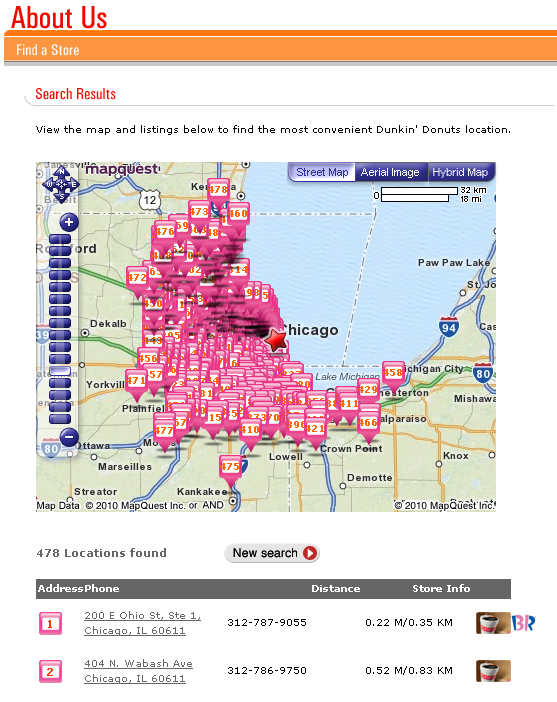
Ahh the things we do for love...